Recruitment Software for Small Business: A Practical Hiring Guide
If you're running a small business, you know the feeling. Your hiring process is a chaotic mix of spreadsheets, a flooded inbox, and sticky notes. It's a common story, but this manual approach isn't just messy—it's actively costing you top talent and holding back your growth.
Investing in recruitment software for small business isn't a "big company" luxury anymore. It's a strategic necessity that lets you punch above your weight and, most importantly, frees up your time.
Moving Beyond Spreadsheets in Small Business Hiring
Let’s be honest: if your recruiting "system" is a color-coded spreadsheet and candidates are getting lost in endless email threads, you're not alone. This is how many small businesses start out. But the hidden costs add up fast. Every hour you spend manually tracking applicants or scheduling interviews is an hour you’re not spending on actually growing the business.
This chaos doesn't just hurt you; it creates a frustrating experience for candidates. When great applicants fall through the cracks because of slow communication, it damages your reputation. For a small business, a clunky hiring process can be a real turn-off.
The Shift to Smarter Hiring
The good news is that powerful hiring tools are now well within reach. Small and medium-sized businesses are catching on and adopting these platforms at a rapid pace. A few years ago, you'd see about 70% of large companies using an applicant tracking system, while only 20% of small businesses did. That gap is closing quickly.
Why the change? Affordable, cloud-based software means you no longer need a huge IT budget to hire like the pros. At the heart of it all is the Applicant Tracking System (ATS), which serves as a central hub for everything hiring-related. Understanding what an applicant tracking system is and how it works is the first real step toward leaving the spreadsheets behind.
To see just how much of a difference this makes, here's a quick look at how dedicated software solves the most common frustrations of manual recruitment.
Manual Hiring Headaches vs Automated Solutions
| Hiring Task | The Manual Process Struggle | The Automated Software Advantage |
|---|---|---|
| Managing Applications | Juggling resumes from email, job boards, and referrals. It's a mess. | A single, searchable database for all candidates, no matter where they applied from. |
| Scheduling Interviews | Endless back-and-forth emails trying to find a time that works for everyone. | Automated scheduling links that let candidates pick a time based on your availability. |
| Candidate Communication | Forgetting to follow up or sending the wrong update. Ghosting happens by accident. | Automated emails for acknowledgments, updates, and rejections ensure a professional experience. |
| Team Collaboration | Forwarding emails and trying to gather feedback in a shared document. Notes get lost. | Centralized candidate profiles with notes and ratings, so everyone on the team is on the same page. |
The right tool provides a clear, centralized view of your entire pipeline, replacing guesswork and administrative headaches with an efficient workflow.

Ultimately, you get a system that gives you a clear picture of every candidate's status at a glance.
The goal is to transform hiring from a disorganized time-sink into a streamlined, professional operation. Automating the repetitive stuff frees you to focus on what really matters: finding and connecting with the right people to help your business thrive.
Identifying Your True Hiring Needs and Key Features
Before you get dazzled by software demos and their endless feature lists, the most critical first step is to look inward. Buying recruitment software for a small business isn’t about getting the trendiest tool; it's about solving your specific hiring headaches.
The best way to start is by grabbing your team and mapping out exactly how you hire right now. I mean every single step—from the moment you realize you need a new person to their first day on the job.
Get brutally honest. Where do good candidates seem to fall through the cracks? How many hours are burned on administrative quicksand, like manually emailing applicants or playing calendar Tetris to schedule interviews? Pinpointing these bottlenecks is the secret to building a feature wishlist that actually makes a difference.

This simple exercise helps you set real, measurable goals. Instead of a vague goal like "hire faster," you can aim for something concrete, like "cut our time-to-hire from 45 days to 25 days" or "slash administrative hiring tasks by 10 hours a week."
Distinguishing Must-Haves from Nice-to-Haves
Once you have a clear picture of your pain points, you can start sorting features into two buckets. This simple act keeps you from overpaying for bells and whistles you’ll rarely touch. Think of it as making a grocery list before you walk into the supermarket—it prevents impulse buys.
For most small businesses, the "must-haves" are the foundational tools that solve the biggest problems of a manual, spreadsheet-and-email-driven process.
Your Non-Negotiable "Must-Have" Features:
- Centralized Candidate Database: A single, searchable home for every application. No more digging through a dozen inboxes and folders.
- One-Click Job Posting: The power to push your job opening to multiple boards (think LinkedIn, Indeed, etc.) all at once, from one place.
- Customizable Hiring Pipeline: A visual, drag-and-drop way to see exactly where every candidate is in your process, from "Applied" to "Hired."
- Email Templates and Automation: Tools to send automatic confirmations, rejections, and updates. This ensures no candidate feels like they've been ghosted.
- Team Collaboration Tools: The ability for everyone on the hiring team to leave private notes, ratings, and feedback right on a candidate's profile.
These core functions deliver the biggest bang for your buck, right away. And the data backs this up: 86% of recruiters agree that an ATS cuts down their overall time-to-hire, and 79% say the quality of their new hires has improved. For a small team, the right system can shrink hiring cycles by as much as 60%—that’s time you can pour back into growing the business.
Exploring the "Nice-to-Have" Upgrades
Next up are the "nice-to-haves." These aren't critical for day one, but they can be incredibly valuable as your company scales and your hiring becomes more complex. They’re all about taking your efficiency to the next level.
A common mistake is paying for sophisticated AI screening tools when your biggest problem is just keeping track of five applicants. Solve your most pressing problems first, then find a platform that can grow with you.
Potential "Nice-to-Have" Features:
- AI-Powered Resume Screening: Lets the software do the first pass, automatically reviewing resumes and bubbling up the most qualified people based on your criteria.
- Automated Interview Scheduling: A tool that syncs with your team's calendars and lets candidates book their own interview slots, killing the back-and-forth emails.
- Advanced Reporting and Analytics: Dashboards that give you a clear view of key metrics like time-to-fill, cost-per-hire, and which job boards are actually delivering your best candidates.
- Candidate Relationship Management (CRM): Features for building and nurturing a talent pool of past applicants you can tap for future roles.
- Text Message Communication: The option to send quick updates and interview reminders to candidates via SMS.
By clearly defining these two lists, you build a powerful framework for your search. You can confidently evaluate recruitment software for small business options, focusing on platforms that solve today's problems while giving you room to grow tomorrow. You'll walk into every demo knowing exactly what to look for and which questions matter most.
If you want to dig deeper into what modern systems are capable of, our guide on essential applicant tracking system features is a great next step. Arming yourself with this knowledge ensures you'll choose a solution that becomes a true asset, not just another monthly subscription.
Choosing the Right Software and Understanding Pricing
Alright, you've got your feature wishlist. Now comes the fun part: heading into the market to find your perfect match. It's easy to get overwhelmed by the sheer number of options out there, but trust me, finding the right tool for your small business is completely doable when you know where to look and what to ask.
A quick Google search for "recruitment software for small business" will spit out a list of vendors who have mastered SEO. That doesn't mean they're the best fit for you. To get the real story on how a tool actually performs, you need to go where your peers are sharing their honest, unfiltered feedback.
Finding Trustworthy Software Options
Instead of just clicking on the top ads, you'll want to dig a bit deeper. Your goal is to get a clear, unbiased picture of a tool's real-world strengths and weaknesses, not just the marketing fluff.
Here’s where I always start:
- Peer Review Sites: Websites like G2, Capterra, and TrustRadius are absolute gold mines. They offer detailed reviews from verified users, and you can usually filter by company size. This lets you see exactly what other small business owners are saying.
- Industry Forums and Communities: Jump into HR or small business owner groups on LinkedIn or other forums. This is where you can ask direct, pointed questions. Something like, "Has anyone here used [Software X] to hire developers? What was your experience?" will get you much more candid answers than a sales page.
- Software Comparison Resources: A good comparison guide can save you a ton of time. While our own guide on recruitment software comparison is a solid place to start, checking out a few different resources helps you spot trends and narrow down the top contenders in your budget.
By gathering intel from these different sources, you can build a solid shortlist of 3 to 5 platforms that actually seem to align with what you need. This sets you up perfectly for the next step: figuring out how you’ll pay for it.
Demystifying Common Pricing Models
Recruitment software pricing is all over the map. Vendors slice and dice their costs in different ways, and picking the wrong model can mean you're either overpaying for things you don't use or hitting a surprise paywall right when hiring ramps up.
The trick is to match the pricing model to your hiring patterns and team size. For a small business, predictability is your best friend.
Let's break down the most common pricing structures you're going to run into.
Decoding Recruitment Software Pricing for Small Businesses
This table should give you a clear idea of how to choose the most cost-effective pricing structure for your specific hiring needs.
| Pricing Model | Who It Is Best For | Key Advantages | Potential Downsides |
|---|---|---|---|
| Pay-Per-User | Businesses where multiple people (like HR and hiring managers) need regular system access. | Simple and predictable. Your costs scale directly with the size of your hiring team. | Can get pricey if you have a lot of occasional users who just log in to leave brief feedback. |
| Pay-Per-Active-Job | Companies with inconsistent or seasonal hiring. You might hire three people one quarter and none the next. | Super cost-effective during slow hiring periods. You only pay for what you actively use. | Costs can spike without warning if you need to open several roles at once. Less predictable for budgeting. |
| Flat-Rate Subscription | Small businesses that hire consistently throughout the year and crave predictable monthly or annual costs. | Budget-friendly and straightforward. You get a set package of features for a fixed price. No surprises. | You might pay for unused capacity during slower months. Tiers can sometimes bundle features you don't need. |
| Free or "Freemium" | Startups or very small businesses with extremely low hiring needs (think 1-2 hires a year). | No upfront cost, which is great for testing the waters and getting familiar with an ATS. | Usually comes with major limits on features, users, or the number of candidates you can manage. |
Choosing the right model really boils down to your hiring rhythm. Don't let a sales rep push you into a structure that doesn't feel right for how you operate.
The best pricing model for a small business is one that offers flexibility without punishing you for growth. My advice? Avoid long-term contracts until you've thoroughly tested a platform. Most providers offer monthly plans or free trials, which are perfect for making sure it’s the right fit.
Acing the Software Demo
Once your list is narrowed down and you have a handle on pricing, it's demo time. A demo isn't just a sales pitch; it's your chance to put the software through its paces. Don't just sit back and watch a canned presentation.
You need to come prepared with questions that get to the heart of the problems you identified in the beginning. This is your opportunity to see if the tool actually solves them.
Key Questions to Ask During a Demo:
- Usability: "Can you show me the exact workflow my hiring manager would follow to review 5 new applicants and leave feedback? I want to see every click."
- Implementation: "What's the real setup process for a company our size? How long does it honestly take to get fully up and running?"
- Support: "Let's say we have a technical glitch during a critical hiring push. What does your support process look like? Are we talking to a bot or a person, and what are the typical response times?"
- Hidden Costs: "Talk to me about the other fees. Is there a charge for implementation, for migrating our data from spreadsheets, or for getting premium customer support?"
- Scalability: "If our hiring needs double next year, what does that practically mean for our plan and our bill? Show me how the platform handles that kind of growth."
When you ask specific, scenario-based questions, you force the salesperson off-script. They have to show you how the software solves your problems, not just rattle off a list of features. This practical approach is the best way to ensure you pick a tool that works for your team in the real world, not just in a slick presentation.
Connecting Your Tools for Hiring Automation
A standalone recruitment tool is a huge leap forward from tracking candidates in spreadsheets, but for a small team, an integrated system is a genuine superpower. The real magic kicks in when your new software "talks" to the other tools you already use every day—think Google Calendar, Outlook, Slack, or Microsoft Teams. This connectivity is what turns a simple database into a powerful hiring machine.
The goal here is to build a seamless bridge between your recruitment software for small business and the rest of your tech stack. Doing this eliminates those soul-crushing manual tasks, like copying and pasting candidate info from your ATS to an email, then from that email into a calendar invite. Every connection you set up removes a point of friction and a chance for human error.

And don't worry, this doesn't require a dedicated IT department. Most modern platforms are built with easy integrations in mind. They often have one-click connections to popular apps or use third-party tools like Zapier to link everything together.
Building Your Automated Hiring Workflow
The best way to start is to pinpoint the most repetitive, time-sucking tasks in your current hiring process. Where are the bottlenecks? What manual steps slow you down and create a clunky experience for your applicants? These are your prime candidates for automation.
Here are a few high-impact automation "recipes" you can set up to deliver a polished, professional experience without lifting a finger for each step.
Simple Automation Recipes for Small Teams:
- Self-Serve Interview Scheduling: Connect your ATS to your Google or Outlook Calendar. The moment you move a candidate to the "Phone Screen" stage, the system can automatically send them a scheduling link. They pick a time that works for them based on your team's real-time availability, and poof—the event is on everyone's calendar. No more endless email tag.
- Personalized Follow-Up Drips: Create email templates for key stages in your pipeline. For instance, you can set up a rule so that when a candidate is moved from "Interview" to "Reference Check," they instantly receive a personalized email letting them know what to expect next. This simple touch keeps great candidates engaged and feeling valued.
- Instant Internal Nudges: Link your software to Slack or Microsoft Teams. When a promising new candidate applies for a critical role, an automatic notification can pop up in the hiring manager's channel, prompting a faster review. This helps keep the momentum going internally so you don't lose top talent to a faster competitor.
These small automations really add up, saving you hours each week while ensuring every single candidate gets a consistent, top-notch experience. Staying current on what's possible is also key; understanding the latest in HR System Integration Trends for 2025 can help you plan for even more effective hiring automation down the road.
The Power of a Unified System
Connecting your tools does more than just save you time—it creates a single source of truth for all your hiring activities. When your systems are integrated, you get a complete, 360-degree view of your hiring process without having to piece together information from five different places.
Think about the classic combo: an Applicant Tracking System (ATS) and a Candidate Relationship Management (CRM) tool. While they have different jobs, integrating them is incredibly powerful. Your ATS manages the active workflow for open roles, while the CRM helps you nurture relationships with past applicants and passive talent for the future.
When these systems talk, you can effortlessly move a "silver medalist" candidate from a closed job in your ATS into a talent pool in your CRM. This way, you're building a pipeline for your next opening without starting from scratch. You can dig deeper into how this works by reading about what CRM integration is and how it supports a long-term talent strategy.
An integrated system means that every piece of candidate data—from their initial application to interview feedback and follow-up communications—lives in one central, accessible place. This unified view is what allows for smarter, data-driven hiring decisions.
For example, by connecting your software with your career site analytics, you can finally see which job boards are actually sending you the most qualified applicants. That insight alone can help you allocate your budget far more effectively. The connections you build are what transform your recruitment software from a simple organizational tool into a strategic asset that fuels your company's growth.
A Smooth Rollout for Your New Hiring Software
You’ve done the legwork. You’ve sat through the demos, compared the features, and finally picked the right recruitment software for your small business. But signing the contract is just the beginning.
The real win comes from getting your team to actually use the new system. A clumsy rollout leads to frustration and a tool that gathers digital dust, but a well-managed one can genuinely transform how you hire. The difference is all in the execution.
Think of it as two parallel projects: the technical setup and the people part. You need a solid plan for both to move from a signed deal to a fully adopted tool that makes everyone’s life easier.
Preparing for a Seamless Data Migration
First things first, you need to get your existing candidate data into the new system. For most small businesses, this means pulling information out of a tangled web of spreadsheets, email chains, and random folders. This is your chance for a fresh start.
Before you even think about importing, do some spring cleaning on your current records.
- Archive old or irrelevant candidate files. Is that resume from a role you filled three years ago still relevant? Probably not.
- Standardize your data. Make sure names, phone numbers, and job titles all follow the same format. This simple step prevents a world of headaches with duplicate or messy profiles later on.
- Tag your "silver medalists." You know those great candidates who were a close second? Tag them now so you can easily find them for future openings.
Most software vendors will give you a hand with migration, whether it's a simple CSV template or a more involved service. Don't hesitate to ask them for their best practices. Getting this right from the start gives your team a clean, valuable, and searchable database from day one.
Driving Adoption Through Effective Team Training
A new tool is useless if no one knows—or wants—to use it. Just sending out a mass email with login details and a link to a help center is a surefire way to see your investment flop.
Real adoption comes from training that answers the most important question for every team member: "What's in it for me?"
Don't run a one-size-fits-all session. Your hiring managers don't care about setting up complex integrations, but they absolutely care about how to review a candidate and leave feedback in less than five minutes.
Your goal in training is to show people exactly how this new software makes their job easier than the old way. Focus on the quick wins, like demonstrating how they can collaborate on feedback without ever having to draft another email.
The best way to make it stick? Use a live example. Walk everyone through the entire hiring process for a real job you're trying to fill. A hands-on walkthrough beats a theoretical tour of features every single time.
Configuring Your First Hiring Workflow
Okay, your data is in and your team is trained. Now it's time to actually build out your first process in the software. This is where you translate your hiring strategy into a functional, repeatable workflow.
Here’s a practical checklist to get you started:
- Customize Your Pipeline Stages: Ditch the generic defaults like "Applied" and "Interviewing." Create stages that reflect how you actually hire—think "Phone Screen," "Technical Assessment," "Team Interview," and "Reference Check." A visual pipeline that mirrors reality is one of the biggest perks of a real ATS.
- Build a Job Posting Template: Draft a posting for a current or upcoming role. This is your chance to add your company branding and really nail down the job description. Then, use the built-in tools to push it out to your favorite job boards.
- Set Up a Simple Application Form: Keep it short and sweet. All you really need to start is a name, contact info, and a resume. Maybe add one or two critical screening questions. Long, complicated forms are a massive deterrent for great candidates.
- Create Your Core Email Templates: At a minimum, set up an automated "Thanks for applying!" confirmation and a polite rejection template. This ensures no candidate is left in the dark, which is huge for protecting your employer brand.
By methodically working through these initial steps, you’re not just setting up software; you’re building the foundation for a better hiring process. This ensures your new recruitment software for small business starts adding real value from the moment you go live.
Tracking Success and Optimizing Your Hiring Process
Getting your new recruitment software for small business up and running is a huge milestone. But the real win? That comes when you use the data it generates to make genuinely smarter hiring decisions. So, how do you actually prove this investment was worth it? It all comes down to tracking the numbers that directly impact your bottom line and your team's efficiency.
The days of guesswork are over. Your software’s reporting dashboard is now your command center for figuring out what’s working and, just as importantly, what’s not. It's easy to get lost in a sea of metrics, so my advice is to focus on a handful that truly matter for a growing business.
Defining Your Core Hiring KPIs
To get started, let’s nail down three essential Key Performance Indicators (KPIs). Think of these as the vital signs of your hiring health—they give you a clear, high-level picture and create a baseline you can measure against down the road.
Time-to-Fill: This is the big one. It’s the total number of days from posting a job opening to a candidate signing on the dotted line. A long time-to-fill can point to bottlenecks in your process, like slow interview scheduling or a vague job description. For small businesses, a tight hiring cycle is critical for snapping up great people before the competition does.
Cost-per-Hire: This is as simple as it sounds. Just add up all your direct recruiting costs (job board fees, advertising, etc.) and divide that total by the number of people you hired in that period. This KPI tells you exactly where your money is going and gives you the hard data you need to justify your hiring budget.
Source of Hire: Your software should make it incredibly easy to see which channels are bringing you the best candidates. Are they coming from LinkedIn, a niche job board, or your own employee referral program? Tracking this stops you from throwing money at sources that simply don't deliver.
The goal here isn't just to collect numbers—it's to use them to tell a story about your hiring process. For example, if you see a sky-high Cost-per-Hire from one particular job board, that's a crystal-clear signal to reallocate that budget somewhere more effective.
Before you can even start tracking these metrics, you have to get the system live. This simple visualization breaks down the core rollout steps.
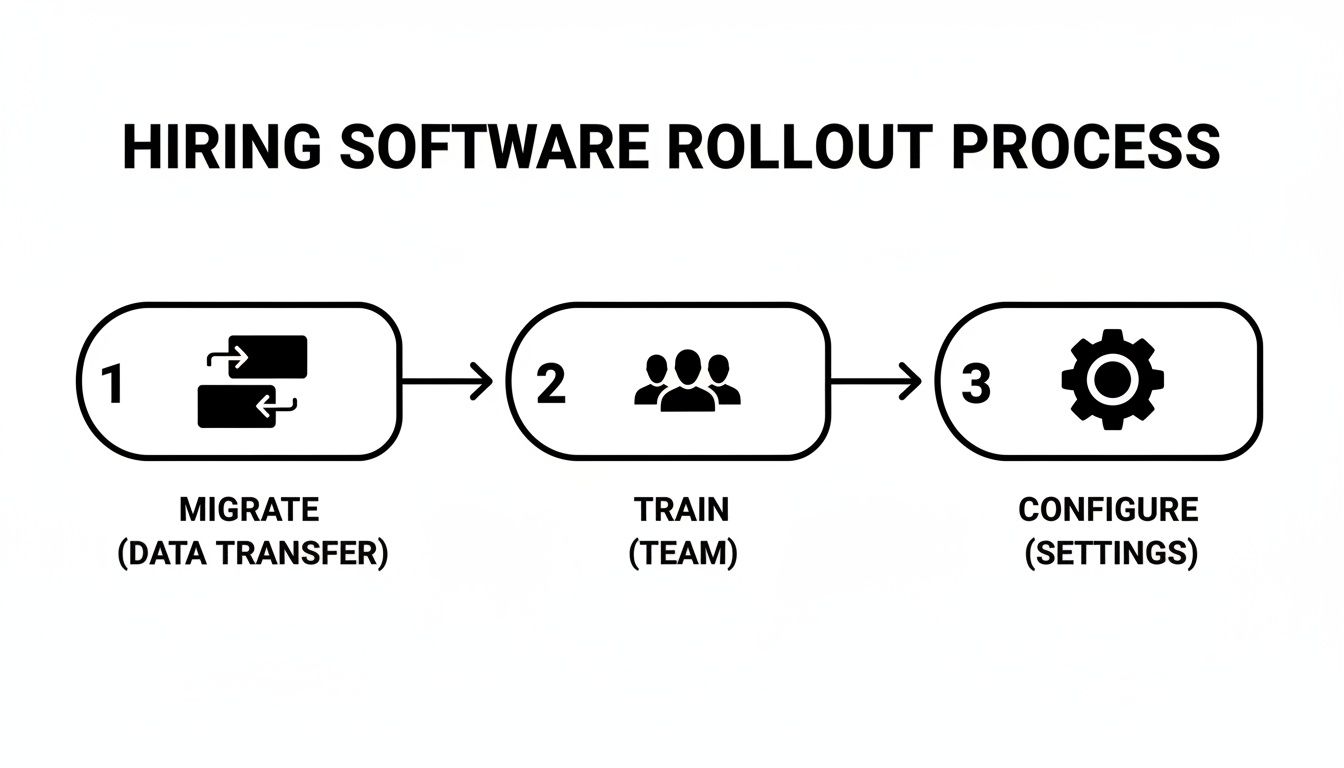
As you can see, a successful launch really comes down to three pillars: getting your data migrated cleanly, training your team properly, and configuring your workflows to match how you actually hire.
Turning Insights Into Action
Once you have this data, you can start making real improvements. If your Time-to-Fill for a specific role is dragging on, dig into that pipeline. Are candidates getting stuck at the initial application review? Maybe your job description isn’t pulling in the right people in the first place.
And on the flip side, if you find your best hires consistently come from employee referrals, that’s a loud-and-clear sign to invest more in your referral program. By checking in on these KPIs regularly, you can constantly tweak and refine your strategy, making sure your new software isn't just a tool, but a true engine for your company's growth.
Got Questions? We've Got Answers
Picking new software always brings up a few questions. Let's tackle some of the most common ones I hear from small business owners when they're looking at recruitment tools.
What's a Realistic Budget for This?
You'll see a lot of variation, but a solid, entry-level plan for a small business typically falls somewhere between $50 and $250 per month. Most platforms base their pricing on how many users you have or the number of jobs you're actively hiring for.
My biggest piece of advice here is to look for transparent pricing. You want to know exactly what you're getting. I'd also be wary of getting locked into a long-term contract right away. Give yourself the flexibility to make sure the software is truly a good fit before committing.
Should We Just Start with a Free ATS?
A free Applicant Tracking System (ATS) can be a decent entry point, especially if you only hire for one or two roles a year. It's certainly better than nothing.
But it's important to know what you're getting into. Free versions almost always have tight limits on features, the number of candidates you can manage, and how much support you get. As soon as your hiring picks up, you'll feel those limitations and need to upgrade to get the real time-savers like automation and insightful reports.
How Painful Is the Setup?
This isn't as bad as you might think! For most modern, cloud-based platforms built with small businesses in mind, you can get the basics up and running in less than a day.
Getting everything fully implemented—which means moving your old candidate data from spreadsheets and getting your team comfortable with the new system—usually takes about a week or two. The secret is to choose a tool that’s known for being user-friendly and has a great customer support team to back you up.
Ready to turn your hiring process from a chaotic time-sink into a smooth-running growth engine? MakeAutomation specializes in implementing automated recruitment systems that give you back your time. Learn how we can help you hire smarter, not harder, at https://makeautomation.co.