customer relationship management explained: A simple guide
So, what is customer relationship management, really?
Let's break it down. Imagine trying to keep track of every customer conversation, every deal in the pipeline, and every support request using a tangled mess of spreadsheets, sticky notes, and your own memory. It’s chaotic. Details get lost, follow-ups are missed, and opportunities slip through the cracks. It’s simply not a scalable way to run a business.
This is exactly the problem that customer relationship management—or CRM—solves.
Think of a CRM as the single source of truth for your entire business. It's the central hub where every single customer interaction lives, from the very first time they visit your website to the support ticket they filed last week. It’s not just a digital address book; it’s a living, breathing history of your relationship with each customer. This shared history gets everyone—sales, marketing, and customer service—on the same page.
More Than Just a Glorified Contact List
It's easy to mistake a CRM for just a fancy place to store names and emails. While contact management is part of the package, a real CRM platform goes so much deeper. It captures the context around every interaction, turning scattered data points into a clear picture of the person on the other end.
A simple contact list tells you a customer's name. A CRM knows their entire story:
- Interaction History: Every email they've opened, every call they've had with your sales team, every meeting they've attended.
- Purchase Behavior: What they’ve bought in the past, how frequently they buy, and their lifetime value to your company.
- Service Needs: A complete record of their support tickets and how your team resolved their issues.
- Engagement Level: How they’re interacting with your marketing campaigns, website content, and social media.
This level of insight is a game-changer. It allows your teams to deliver a connected and personalized experience at every turn. When a sales rep can see that a prospect has already downloaded three of your ebooks on a specific topic, they can skip the basic intro and have a much more meaningful conversation.
A CRM system helps businesses build a relationship with their customers that, in turn, creates loyalty and customer retention. Since customer loyalty and revenue are both qualities that affect a company's revenue, CRM is a management strategy that results in increased profits for a business.
Ultimately, CRM is a business strategy first and a technology second. It’s a commitment to understanding your customers on a deeper level. By taking all that messy, disconnected data and organizing it into one accessible system, you lay the groundwork for smarter decisions, stronger relationships, and sustainable growth. This is how you turn random interactions into predictable revenue.
What’s Really Inside a Modern CRM System?
A modern CRM isn’t just one piece of software. It’s actually a powerful combination of different components working together seamlessly. To really get what a CRM does, you have to look at its three core pillars. Each one has a specific job, but they all combine to create a complete system for managing every single customer interaction.
Think of it like building a high-performance car. You need an engine to actually move, a navigation system to point you in the right direction, and a communication system to keep the driver and crew in sync. A CRM is built on a very similar idea.
Operational CRM: The Engine of Your Business
First up, you have the Operational CRM. This is the action-oriented part of the system—the engine that keeps your day-to-day business running. It automates and cleans up the customer-facing processes in your sales, marketing, and service departments. Its main job is to make all those routine tasks faster, more consistent, and way less prone to human error.
This is the part of the CRM your team will live in every day. It handles the "doing."
- Sales Automation: A sales rep uses this to manage their pipeline, watch leads move from "new" to "closed," and set up automatic follow-up emails. It’s the safety net that ensures no opportunity ever gets dropped.
- Marketing Automation: The marketing team uses it to send out targeted email campaigns, schedule social media updates, and build out lead nurturing flows that gently guide prospects toward a purchase.
- Service Automation: Customer support agents rely on it to manage helpdesk tickets, track how long it takes to solve problems, and instantly pull up a customer’s full history for faster, smarter support.
Analytical CRM: Your Strategic Navigator
If operational CRM is the engine, then Analytical CRM is the super-smart navigation system. Its purpose isn’t to do the tasks, but to make sense of all the customer data the operational side is collecting. It helps you understand the "why" behind what your customers are doing, spot important patterns, and make strategic decisions based on hard data, not just gut feelings.
This component turns messy, raw data into clear, strategic insights. It lets you step back from the daily grind to see the bigger picture.
Analytical CRM is what helps a business stop guessing and start strategizing. By digging into customer data, you can pinpoint your most profitable segments, get a real sense of future sales trends, and finally measure the true ROI of your marketing spend.
For instance, a marketing manager could use it to group customers based on their purchase history. They might spot a segment of high-value customers who haven't bought anything in six months and create a targeted re-engagement campaign just for them. Likewise, sales leaders use it for sales forecasting to predict future revenue with much greater accuracy.
Collaborative CRM: The Communication Network
Finally, Collaborative CRM acts as the central communication network. It connects every department and makes sure information flows freely between them. Its core function is to tear down those frustrating internal silos so that everybody—sales, marketing, support—is looking at the same up-to-date customer information. This creates a true, 360-degree view of every single customer.
Without this piece, your sales team might have no idea that a prospect just filed a support ticket. Or your marketing team might send a promo offer to a customer who’s already frustrated with a service issue. Collaborative CRM stops these disjointed, awkward customer experiences from ever happening.
It makes sure that whenever a customer interacts with your company, it feels like they’re talking to one cohesive team, not a bunch of disconnected departments. This unified approach is the secret to delivering a consistently great customer experience.
When all these parts work together, they do far more than they could alone. To get a better sense of how all these systems can be connected, check out our guide on what CRM integration is and how it can tie all of your business tools together.
Why a CRM Is Your Engine for Business Growth
Let's get past the technical jargon and talk about why businesses actually use this stuff. A Customer Relationship Management system isn't just a digital address book; it’s the strategic engine that drives your company forward. It takes all that messy, scattered customer data and turns it into fuel for better decisions, stronger relationships, and, ultimately, more revenue.
Think about a business running without a CRM. Customer info is all over the place—spreadsheets, random email threads, maybe even sticky notes on a monitor. Sales reps forget who they need to call back, marketing sends out generic email blasts to everyone, and the support team is flying blind with no idea about a customer's history. It's a recipe for chaos and a terrible customer experience.
Now, imagine that same business with a CRM in place. Suddenly, every single team member has a full 360-degree view of every customer. A salesperson sees that a prospect just downloaded a whitepaper and opened three marketing emails. That’s a green light for a perfectly timed, relevant follow-up call. This is the core shift: moving from guesswork to informed action.
Driving Productivity and Smarter Decisions
One of the first things you'll notice is a huge jump in sales productivity. A CRM automates the grunt work—data entry, follow-up reminders, and pulling reports. This frees up your sales team to do what they're paid to do: sell. They can spend their time building relationships, not updating spreadsheets.
And it’s not just about speed; it's about being smarter. Marketing teams can slice and dice their audience lists with incredible precision, creating campaigns that actually hit the mark because they’re based on real customer behavior, not just a hunch.
The image below breaks down the three pillars that work together to make this happen.
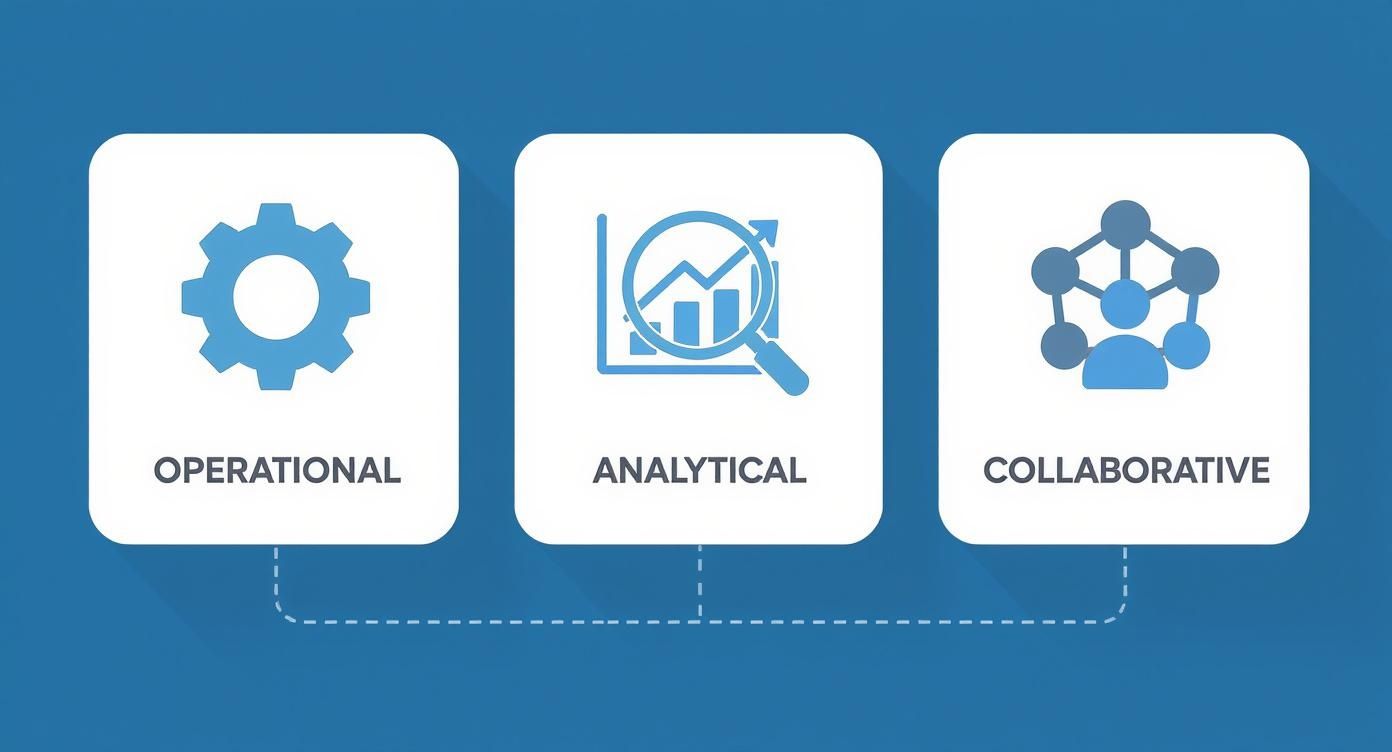
You can see how the operational, analytical, and collaborative parts of a CRM are all connected, turning everyday tasks into powerful business intelligence.
Building Loyalty and Boosting Your Bottom Line
With a CRM, exceptional customer service stops being a goal and starts being the standard. When a support agent can pull up a customer's entire history in seconds—every purchase, every past conversation—they can deliver quick, personal solutions that build real trust.
A CRM system turns customer service from a reactive cost center into a proactive loyalty-building machine. It empowers your team to anticipate needs and solve problems before they escalate.
This all-in-one approach has a serious payoff. Research shows the average return on investment for a CRM is a staggering $8.71 for every dollar spent. That's not just a small improvement; it's a game-changer that makes CRM technology one of the smartest investments a business can make.
At the end of the day, a well-run CRM is a powerful tool to help you increase customer satisfaction and build the kind of long-term loyalty that fuels sustainable growth.
Core CRM Features and How to Use Them
To really get what a CRM can do for a business, you have to look under the hood. It’s not just one single piece of software; it’s more like a suite of powerful tools all working together to organize, automate, and make sense of every single customer touchpoint. Think of it less like an app and more like a highly skilled crew, where each member has a specific, vital role to play.
Let's unpack the essential features that form the backbone of nearly every modern CRM system. Getting a handle on these functions is the first real step toward turning your customer data from a messy spreadsheet into a powerful strategic advantage. Each one solves a very specific problem, from bringing in new leads to keeping your existing customers happy.
Contact and Lead Management
At its very core, a CRM is your central command center for every contact. But this goes way beyond a simple digital address book. A good CRM builds a rich, detailed profile for every single person who interacts with your company, capturing their entire history—not just their name and email.
This unified view is a total game-changer. Imagine a sales rep being able to see every past purchase, support ticket, and marketing email a contact has ever received. They can walk into a conversation with complete context, tailoring their approach for maximum impact. That's the real foundation of a personalized customer experience.
- Lead Management in Action: A B2B SaaS company runs a webinar and captures leads through its registration form. The CRM instantly creates a new record for each person, automatically assigns them to the right sales rep based on territory, and then starts tracking how they engage with follow-up emails.
Sales Pipeline and Deal Tracking
This is where your sales team will fall in love with the CRM. A sales pipeline gives you a crystal-clear, visual map of your entire sales process. It shows you exactly where every single deal is at any given moment, broken down into logical stages like “Qualification,” “Proposal Sent,” and “Negotiation.”
That visual clarity is huge for forecasting and management. A sales manager can spot bottlenecks in seconds, see which reps are crushing it, and predict future revenue with far more confidence. For the reps themselves, it’s a personal roadmap to hitting their quota.
Marketing and Service Automation
Most modern CRMs come packed with automation tools built to take the grunt work off your marketing and customer service teams' plates. This frees up your people to focus on creative, strategic work instead of getting bogged down in repetitive, manual tasks.
By automating routine interactions like welcome emails and support ticket assignments, a CRM ensures nothing falls through the cracks. It delivers consistency and speed, allowing your team to scale their efforts without the customer experience taking a hit.
For instance, marketing automation can drip-feed a series of helpful emails to a new lead, warming them up until they’re ready for a sales call. On the service side, an incoming support ticket can be instantly routed to the agent with the right expertise, slashing resolution times. To really nail this, it helps to understand what CRM automation is and how it can connect your business workflows.
Reporting and Analytics
Your CRM is an absolute goldmine of data, but data is pretty useless if you can’t make sense of it. This is where reporting and analytics come in. These features turn all those raw numbers into insights you can actually use to make better decisions. You can build custom dashboards to track your most important Key Performance Indicators (KPIs) across the entire business.
With these tools, you can finally get straight answers to critical questions:
- Which marketing campaign brought in our best customers?
- What’s our team's average deal size this quarter compared to last?
- How quickly is our support team actually solving problems?
This data-first approach pulls your organization out of the guesswork and grounds your strategy in what's actually happening on the front lines.
Comparing Different CRM Types
It's important to know that not all CRMs are built the same. They're often designed with a specific focus, though many of today's platforms are hybrids that blend features from different categories. Getting to know these core types will help you zero in on the system that truly fits your business.
To help you distinguish between them, here’s a quick breakdown of the main categories.
Comparison of CRM Types by Core Functionality
| CRM Type | Primary Focus | Key Features | Ideal For |
|---|---|---|---|
| Operational | Process Automation | Sales pipelines, contact management, marketing automation, service ticketing. | Businesses looking to streamline day-to-day, customer-facing tasks and improve efficiency. |
| Analytical | Data Analysis | Advanced reporting, sales forecasting, customer segmentation, trend analysis. | Companies wanting to uncover deep insights from their customer data to inform strategy. |
| Collaborative | Information Sharing | Shared customer profiles, cross-departmental communication tools, unified data access. | Organizations with multiple teams (sales, marketing, support) that need to work together seamlessly. |
Choosing the right type—or a platform that combines the elements you need most—is a critical first step. An operational CRM might be the perfect fit for a growing business trying to get its sales process organized, while a larger enterprise might need an analytical CRM to make sense of its massive datasets.
How to Choose the Right CRM for Your Business
Picking a Customer Relationship Management system can feel overwhelming, but a clear plan makes it manageable. So many businesses make the same mistake: they jump right into software demos. The real secret to making a great choice starts with looking inward, long before you ever talk to a salesperson.
It all begins with a deep dive into your own operations. First, you need to map out your current sales, marketing, and customer service workflows. Where are the biggest bottlenecks? What causes communication to break down? Answering these questions gives you a "problem blueprint"—a clear picture of what any new CRM absolutely must solve.
Define Your Core Evaluation Criteria
Once you know exactly what you need to fix, you can set up a clear list of criteria for any system you look at. This simple step prevents you from getting distracted by flashy features you'll never actually use. Instead, you can focus on the fundamentals that will make a real difference to your team's daily work and your company's ability to grow.
Your evaluation checklist should include:
- Ease of Use: If the platform isn’t intuitive, your team simply won't use it. A clunky, complicated CRM ends up creating more problems than it solves, leading to low adoption rates and a wasted investment.
- Integration Capabilities: Your CRM needs to play nice with the tools you already depend on. Think about your email marketing platform, accounting software, and project management tools—it has to connect to them seamlessly.
- Scalability: The right CRM should be able to grow with you. Can it handle more users, more customer data, and more complex processes as your business expands? It needs to.
- Cost-Effectiveness: Look past the sticker price. You need to understand the total cost of ownership, which includes implementation fees, training, and ongoing support.
As you evaluate different platforms, it’s smart to see if one of the many free CRM solutions could work, especially if you're just starting out. For founders on a tight budget, our guide on the best free CRM for small business offers some great starting points.
Cloud vs On-Premise Systems
One of the biggest decisions you'll face is whether to go with a cloud-based or an on-premise CRM. An on-premise system is hosted on your own servers. This gives you total control, but it also demands a huge upfront investment in hardware and the IT staff to maintain it all.
In contrast, a cloud-based CRM is hosted by the vendor and you access it over the internet. This model has become the industry standard, and for good reason. Cloud systems already make up about 68.7% of the market's revenue. With clear advantages in flexibility, cost, and access to new features, that share is expected to hit 85.6% by 2035.
Choosing a cloud-based CRM means less time worrying about server updates and more time focusing on your customers. It offers the flexibility to scale up or down as needed, making it the practical choice for most modern businesses.
Ultimately, picking a CRM is less about buying software and more about finding a partner for your business's growth. By defining your needs first, sticking to your evaluation criteria, and understanding the deployment options, you can cut through the marketing noise and choose a platform that truly empowers your team to build stronger, more profitable customer relationships.
Getting Your New CRM Up and Running
https://www.youtube.com/embed/F9p0eEpruec
Picking the right customer relationship management platform is a huge step, but the real work starts after you’ve signed on the dotted line. Getting a CRM implemented successfully isn’t about just flipping a switch. It’s a thoughtful process that’s as much about your people and your processes as it is about the technology itself.
Without a solid plan, even the most powerful software can turn into a glorified, expensive address book that nobody on your team actually uses.
The journey begins with a clean data migration. This is your chance to scrub and organize all that customer info you have scattered across spreadsheets, old systems, and email inboxes. If you just dump messy data into a new CRM, you're starting off on the wrong foot, and your team will lose faith in the tool before they've even given it a fair shot.
Laying the Groundwork for Team Buy-In
Getting your team to actually use the new system is, without a doubt, the most important part of this whole endeavor. People naturally resist change, so you have to roll it out by clearly answering everyone’s biggest question: “What’s in it for me?”
That message needs to be specific to their role.
- For your sales reps: This isn't more admin work. It's a tool that kills tedious data entry and gives them a lead’s entire history in one click, helping them close deals faster.
- For your marketers: Show them how it unlocks the data they need for surgical-level segmentation, which means smarter campaigns and way better results.
- For your support agents: This is how they get a complete customer picture. It helps them solve problems on the first contact, which means happier customers and less stress for them.
A great move is to appoint a CRM champion. Find someone on the team who is genuinely excited about the new system and empower them to be the go-to person. They become the internal advocate, answering questions and showing their peers how the CRM makes their day-to-day work easier.
The success of a CRM is never about its feature list. It's measured by how many people actually use it. If your team doesn't embrace it, the investment is a wash.
Making It Yours: Customization and Training
No CRM is a perfect fit right out of the box. You have to take the time to mold it to your specific business workflows. This could be as simple as adding custom fields for data unique to your industry or as complex as building out automated sequences that mimic your sales process. The goal is to make the CRM feel like a natural part of how your team already operates.
And you absolutely cannot skimp on training. Forget the one-and-done, four-hour marathon session. Training should be ongoing, practical, and tailored to different roles. Show them, don't just tell them. This builds confidence from day one. This is particularly crucial for larger, enterprise-sized companies, which are currently leading the charge in CRM adoption from retail to finance, as highlighted in this customer relationship management market report.
Finally, figure out what success looks like before you even start. Track key metrics like how often people are logging in, how many new contacts are being added, and how accurate the sales pipeline data is. These numbers will be your guide, telling you what's working and where your team might need a little more support.
Your Top CRM Questions, Answered
As you start digging into the world of customer relationship management, you'll find a few questions pop up again and again. Getting straight answers is the key to figuring out if a CRM is right for your business and what you can realistically expect from it. Let's clear up some of the most common ones.
This isn't just about textbook definitions. It’s about understanding how this tool actually works in the real world, whether you're a one-person shop or a global team.
Is CRM Software Just for Big Companies?
This is probably the biggest misconception out there. The truth is, modern CRMs are built for everyone—from solo founders to massive enterprises. The days of needing a huge budget and an IT department to run a clunky, complicated system are long gone.
Today, you can find incredibly affordable and flexible CRMs that grow with you. In fact, for a startup or small business, getting a CRM in place early is a massive advantage. You're building a solid, organized foundation from day one, instead of trying to untangle a mess of spreadsheets and lost notes down the road.
What's the Difference Between CRM and Marketing Automation?
It's easy to get these two mixed up because they're often used together, but they play very different roles.
Here’s a simple way to think about it: your CRM is the central command center for all customer information. It’s the single source of truth that holds every interaction, purchase, and conversation your business has ever had with a customer, touching sales, service, and marketing.
Marketing automation, on the other hand, is a specialist tool that plugs into that command center. It uses the data from the CRM to run specific marketing plays, like sending a personalized email sequence to new leads or scoring prospects based on their activity.
In short, the CRM manages the entire relationship, while marketing automation executes the marketing-specific tasks.
How Long Does It Take to Implement a CRM?
This is a classic "it depends" answer, but for good reason. A CRM implementation can take anywhere from a few days to several months, and it all comes down to the complexity of your business and how much data you're bringing over.
- For a small business with straightforward needs, you could be up and running on a modern cloud-based CRM in a week or less.
- For a larger organization with custom workflows, multiple integrations, and years of data to migrate, the process will naturally take more time.
A smart approach is a phased rollout. Start with just the sales team, for example. Get them comfortable and iron out any issues before you bring the system to the rest of the company.
Can a CRM Actually Improve Customer Retention?
Absolutely—and this is one of its superpowers. A CRM gives your entire team a single, unified view of every customer's history. So, when a customer calls for support, your agent doesn't have to guess. They can immediately see past purchases, previous support tickets, and even what marketing emails they've recently opened.
This context is a game-changer. It leads to faster resolutions and more personal, effective conversations. You move from simply reacting to problems to proactively building stronger relationships, which is the cornerstone of genuine customer loyalty and a major boost to your retention numbers.
Ready to stop juggling spreadsheets and start building a powerful, centralized system for your customer relationships? MakeAutomation specializes in implementing and optimizing CRM systems that eliminate manual work and accelerate your growth. Learn how we can build an automated workflow for your business.