A Practical Guide to DevOps and Continuous Delivery
DevOps and continuous delivery are more than just industry jargon; they represent a massive shift in how we build and ship software today. At its core, this approach is a blend of cultural mindset, daily practices, and smart tooling that gives a company the power to roll out applications and services with incredible speed. It's about evolving your products faster than you ever could with traditional methods.
From Silos to Synergy: The Power of DevOps
Think of a world-class pit crew during a car race. The driver, the mechanics, and the engineers aren't working in separate vacuums. They’re in constant communication, using live data, and all driving toward one single goal: win the race. This is the spirit of DevOps and continuous delivery.
For a long time, software development felt more like a clunky relay race. Developers would code a feature and then just "throw it over the wall" to the operations team, who were left to figure out how to get it running. This created a ton of friction, endless delays, and far too many late-night fire drills. The teams had completely different incentives, which often led to a culture of finger-pointing when things inevitably broke.
The Collaborative Shift
DevOps smashes those walls. It merges development (Dev) and operations (Ops) into one unified, collaborative team. This isn’t just about forcing people into more meetings; it's a deep cultural change rooted in shared responsibility and mutual respect. Everyone—from the person writing the code to the person managing the servers—is on the hook for the product's success from beginning to end.
This shift creates a much more agile and responsive environment. When teams truly work together, they can:
- Communicate better: Everyone is in the loop, which cuts down on misunderstandings and costly mistakes.
- Align their goals: Instead of pulling in different directions, the entire team is laser-focused on delivering real value to the customer.
- Increase ownership: Developers start thinking about the production environment, and the operations team gets a much better grasp of the application's architecture.
To see how this works in practice, you can learn more about what is cross-functional collaboration.
The central idea is both simple and incredibly powerful: when you automate and integrate the entire process from code commit to customer release, you can build, test, and launch software faster and with far more reliability.
To better understand this evolution, let’s compare the old way with the new.
Comparing Traditional Development vs DevOps and CD
This table breaks down the fundamental differences between the siloed, traditional software development lifecycle and the integrated, modern approach.
| Core Principle | Traditional Approach (Siloed) | Modern Approach (DevOps & CD) |
|---|---|---|
| Team Structure | Separate, siloed teams (Dev, QA, Ops) with distinct goals. | Integrated, cross-functional teams with a single, shared goal. |
| Handoffs | Manual and infrequent "throw it over the wall" handoffs. | Automated, continuous handoffs between stages. |
| Release Cycle | Long, infrequent releases (months or years). | Short, frequent releases (days, hours, or even minutes). |
| Risk | High-risk, "big bang" deployments. | Low-risk, incremental changes. |
| Feedback Loop | Slow and delayed; feedback arrives late in the process. | Fast and immediate; feedback is gathered at every stage. |
| Accountability | Blame-oriented; "It's not my department's fault." | Shared ownership; "We build it, we run it." |
The contrast is clear. The modern approach isn't just an iteration; it's a complete reimagining of how to deliver value efficiently and safely.
The Engine of Modern Business
Adopting this model is far more than a technical choice—it's a critical business strategy. The ability to release high-quality software at a moment's notice allows companies to pivot with market trends, experiment with new ideas, and gather customer feedback almost instantly. This rapid adoption is fueling incredible market growth; the global DevOps market was valued at around $10.4 billion in 2023 and is on track to hit $25.5 billion by 2028.
This guide will show you exactly how to build that high-performance engine for your own organization.
Building Your Automated Assembly Line: The CI/CD Pipeline
If DevOps is the philosophy, then the CI/CD pipeline is the engine that brings it to life. Think of it as a modern, high-speed assembly line for your software. Raw code goes in one end, passes through a series of automated quality checks, and comes out the other side as a finished product, ready for your customers.
This “assembly line” is what we call the Continuous Integration/Continuous Delivery (CI/CD) pipeline. It’s the practical, hands-on application of the DevOps mindset, designed from the ground up to help you ship smaller updates more frequently and with far greater reliability. Each step is an automated checkpoint, giving your team instant feedback and making sure only solid, high-quality code makes it down the line.
The diagram below shows the dramatic shift from the old, siloed way of working to the integrated, looping flow of DevOps.
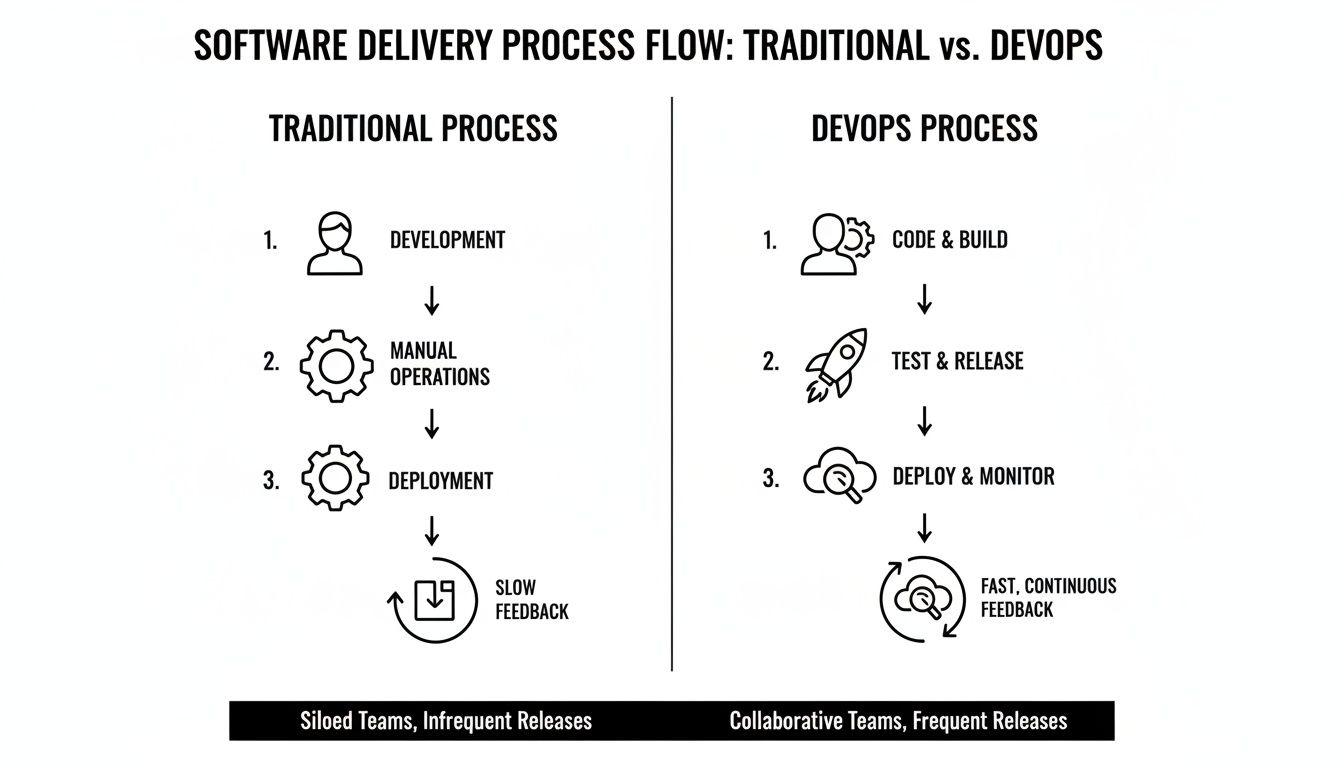
You can see how DevOps breaks down the walls between developers and operations, replacing those slow, error-prone handoffs with a single, efficient workflow.
The Four Core Stages of the Pipeline
Every CI/CD pipeline, no matter the specific tools, is built around four fundamental stages. These are the non-negotiable steps in any effective devops and continuous delivery setup.
-
Commit (The Trigger): It all starts here. A developer pushes a code change to a shared repository like Git. This single action is the starting gun that kicks off the entire automated pipeline. No exceptions.
-
Build (The Assembly): The pipeline automatically grabs the new code and compiles it into an executable file—the "build." If something is wrong, like a syntax error, the build fails. The pipeline stops dead in its tracks and immediately notifies the developer. Feedback that once took days now takes minutes.
-
Test (The Quality Control): This is where you bake quality into your process. The build is put through a whole suite of automated tests. We’re talking unit tests to check small pieces of code, integration tests to see how they work together, and more. A single failed test stops the entire process, preventing a bad update from ever seeing the light of day.
-
Deploy (The Release): If the build passes every single test, it’s officially a "release candidate." This final stage is all about getting it into the hands of users by deploying it to your environments. How you automate this last step is what separates Continuous Delivery from Continuous Deployment.
Understanding CI vs. CD vs. CD
People often throw these terms around interchangeably, but they represent very different levels of automation. Getting them straight is crucial for building a strategy that actually works for your team.
A well-structured pipeline is your organization's greatest defense against human error. It enforces consistency and quality control on every single change, creating a system that is both fast and trustworthy.
Continuous Integration (CI)
This is the starting point. CI focuses on the first two stages: developers frequently merge their code changes into a central repository, which automatically triggers a build and a round of testing. The whole point is to catch integration bugs early and often, before they become massive headaches.
Continuous Delivery (CD)
This is the next logical step. Continuous Delivery takes everything from CI and adds another layer of automation: after passing all tests, the release is automatically prepared and pushed to a staging-like environment. The code is always in a deployable state. However, the final push to production still requires a human to press the button, giving you final say over when the release happens.
Continuous Deployment (also CD)
This is the holy grail of pipeline automation. It takes Continuous Delivery one step further by automatically deploying every single change that passes the tests directly to production. There are no manual gates. This is a powerful approach, but it requires incredible confidence in your automated testing to pull off successfully.
By understanding these distinctions, your team can pick the right level of automation for your current needs and maturity, building a more reliable and efficient software assembly line one step at a time.
Mastering Your DevOps Toolchain
A solid DevOps and continuous delivery strategy relies on the right tools, but let's be honest—the market is flooded with options. It's easy to get overwhelmed. The secret isn't finding one magic tool, but building a connected system where each part has a specific job. Think of it like assembling a pit crew for a race car; you need a specialist for the tires, another for the engine, and another for fuel.
This integrated set of tools is what we call a DevOps toolchain. It’s the engine that automates your entire software delivery process. Instead of just listing tools, let’s look at the core problems they solve.
To make sense of it all, here’s a quick breakdown of the essential tool categories that form the backbone of a modern DevOps pipeline.
Key DevOps Tool Categories and Examples
| Tool Category | Purpose in the Pipeline | Popular Tools |
|---|---|---|
| Version Control | Manages code history and collaboration, acting as the single source of truth. | Git, GitHub, GitLab, Bitbucket |
| CI Server | Automates the build, test, and package stages of the pipeline. | Jenkins, CircleCI, Travis CI, GitLab CI |
| Configuration Management | Defines and enforces the state of infrastructure as code (IaC). | Ansible, Puppet, Chef, Terraform |
| Containerization | Packages applications and dependencies into isolated, portable units. | Docker, Podman |
| Container Orchestration | Manages and scales containerized applications across clusters. | Kubernetes, Docker Swarm, Amazon ECS |
Each of these categories addresses a critical step, and understanding their individual roles is key to building a workflow that truly delivers. Let’s dig a little deeper into a few of the most important ones.
Version Control: The Single Source of Truth
Everything in DevOps starts with a version control system (VCS). This is the definitive library for all your code, scripts, and infrastructure configurations.
It solves the age-old problem of chaos. A VCS creates a complete, transparent history of every change, answering who changed what, when, and why. The undisputed standard here is Git. It allows developers to work on features in isolated "branches" before merging their work back into the main codebase in a controlled, trackable way.
Without a solid VCS, collaboration breaks down into a mess of conflicting file versions and lost work, making any kind of automation impossible.
CI Servers: The Pipeline's Conductor
Once your code is checked into Git, a Continuous Integration (CI) server takes over. Think of it as the conductor of your automation orchestra; it listens for new code and kicks off the entire pipeline.
A CI server is the central hub of your automation strategy. It connects your tools, runs your scripts, and provides the critical feedback loop that developers need to move quickly and safely.
The main problem it solves is automating the repetitive, error-prone tasks of building, testing, and packaging software. A classic example is Jenkins, a highly flexible, open-source automation server. You can configure it to run practically any step you can imagine, from simple unit tests to complex, multi-stage deployments. By automating these steps, a CI server ensures every change is consistently verified, catching bugs within minutes of being introduced.
Configuration Management: The Environment Architect
Your app doesn't just run in a void. It needs servers, databases, and networks configured in a very specific way. Configuration management tools automate the setup and maintenance of this infrastructure.
This directly prevents "configuration drift"—that frustrating situation where servers that are supposed to be identical slowly become different over time, leading to bugs that are impossible to reproduce. A great tool for this is Ansible, which uses simple, human-readable YAML files to define the desired state of your systems. It guarantees that every server, from a developer's laptop to the production environment, is configured identically.
These tools are the foundation of Infrastructure as Code (IaC), a practice where you manage your infrastructure with the same rigor as your application code. To learn more, check out our guide on what is cloud automation.
Containerization: The Universal Shipping Container
Finally, let's talk about one of the oldest problems in software: the dreaded "but it works on my machine!" phrase. Containerization solves this by bundling an application with all of its dependencies—libraries, system tools, code—into a single, portable unit.
It guarantees that your software will run the exact same way, no matter where you deploy it. Docker is the platform that popularized this approach, making it easy to build and run containers. Kubernetes takes it a step further, acting as an orchestrator to manage, scale, and automate the deployment of containers across entire fleets of servers.
When used together, these tools create a predictable, scalable, and efficient foundation for your DevOps workflows, giving your team the confidence to build and release software faster than ever.
Embedding Security and Quality into Your Pipeline
In the old way of building software, security and quality checks were usually the last thing to happen before a release. Think of it like a final, stressful inspection right before the grand opening—a process that often brought everything to a screeching halt. A modern DevOps and continuous delivery model completely flips that script by weaving these checks directly into the automated pipeline from the very beginning.
This integrated approach has a name: DevSecOps. It’s not about tacking on another team or buying more software; it’s a cultural change where security and quality become everyone's job. The central idea is to "Shift Left," which simply means moving these critical checks as early as possible in the development process.

Instead of a frantic, last-minute scramble to fix a major vulnerability hours before launch, developers find and fix it minutes after writing the code. This isn’t just good practice anymore; it's essential for staying competitive and secure. The market reflects this shift, with the DevSecOps market valued at $3.73 billion in 2021 and projected to hit a staggering $41.66 billion by 2030. You can find more compelling data in these DevOps statistics to know.
Automating Security Checks in Your Pipeline
Baking security into your CI/CD pipeline doesn't have to be a massive undertaking. By automating a few key security scans, you give developers immediate, helpful feedback without slowing them down.
Here are three must-have types of automated security testing:
- Static Application Security Testing (SAST): This is like a spell-checker for security flaws in your code. SAST tools scan your source code for known vulnerability patterns, such as SQL injection risks, before the application is even built.
- Dynamic Application Security Testing (DAST): If SAST is the insider's view, DAST is the outsider's. It tests the running application, actively probing it for weaknesses just like a real-world attacker would, uncovering issues that only appear at runtime.
- Dependency Scanning: Let's face it, modern applications are built on the shoulders of open-source libraries. These tools automatically check all those third-party packages for known vulnerabilities, so you don’t accidentally import someone else's security problems.
By automating these security gates, you transform security from a manual, reactive process into a consistent, proactive habit. It becomes just another part of the development workflow.
Building Quality in with Automated Testing
Just like security, quality assurance also needs to "shift left." The aim is to catch bugs and unexpected side effects right away, not weeks down the line when a manual QA team finally gets to it. This is where automated testing frameworks really shine.
Every time a developer pushes a change, the CI pipeline should automatically kick off a series of tests to confirm the code is solid. This immediate feedback loop is crucial for keeping development moving quickly and with confidence. For a deeper dive, check out our guide on quality assurance best practices.
This automated safety net is typically built on three layers of testing:
- Unit Tests: These are the bedrock. They’re fast, focused tests that check tiny, individual pieces of code—like a single function—to make sure they do what they’re supposed to do.
- Integration Tests: Once you know the individual pieces work, integration tests check if they play nicely together. Do the login module and the user database communicate correctly? This is where you find out.
- End-to-End (E2E) Tests: These tests are the final dress rehearsal. They simulate a real user's journey through your application from start to finish, ensuring entire workflows—like signing up, adding an item to a cart, and checking out—work perfectly.
When you combine automated security and quality checks, you build a pipeline that doesn't just ship software faster—it ships better, more secure software right from the first commit.
Measuring What Matters with DevOps Metrics
How do you actually know if your investment in DevOps and continuous delivery is working? Without the right data, you’re flying blind. To really see the impact of your efforts, you have to look past vanity metrics like "lines of code written" and focus on what truly separates high-performing teams from the rest.
This is exactly why the DORA (DevOps Research and Assessment) metrics were created. These four key performance indicators (KPIs) give you a standardized, proven way to measure your software delivery performance. They connect the technical work your teams are doing directly to real business value, making them the gold standard for tracking both agility and reliability.
The Four Essential DORA Metrics
Think of these metrics less as numbers on a dashboard and more as vital signs for your engineering organization. They tell a story about your team's health, speed, and stability. Let's break them down.
-
Deployment Frequency: Simply put, how often do you successfully ship code to production? This is a direct measure of your team's throughput and ability to deliver value. Elite performers deploy on-demand, often multiple times a day.
-
Lead Time for Changes: This tracks the total time from a developer committing a piece of code to that code running in production. It’s a powerful lens into the efficiency of your entire pipeline, from the first keystroke to the final delivery.
-
Mean Time to Restore (MTTR): When a production incident or a bug hits your users, how long does it take you to fix it? MTTR is all about your ability to bounce back from failure, shining a light on the resilience of your systems and your team's problem-solving skills.
-
Change Failure Rate: What percentage of your deployments cause a problem that requires a fix (like a rollback or an urgent hotfix)? This is a crucial indicator of the quality and stability baked into your release process.
These four metrics create a balanced view, preventing you from chasing speed at the cost of stability, or vice versa. They work in harmony to give you the full picture.
Why DORA Metrics Drive Business Value
Tracking these KPIs isn't just an academic exercise for engineers; it’s about making smarter business decisions. A high deployment frequency means you can react to market feedback or outmaneuver competitors by shipping features faster.
A short lead time shows your development process is lean and efficient, with no time wasted in long-winded handoffs or bottlenecks. That translates directly into a faster time-to-market for new products and ideas.
DORA metrics provide the objective evidence needed to justify investments, guide process improvements, and demonstrate the tangible impact of DevOps on the bottom line. They turn abstract concepts like "agility" into measurable results.
Likewise, a low MTTR builds incredible customer trust. It shows that even when things go wrong, you can recover quickly and minimize disruption. And finally, a low change failure rate lowers the risk and cost of every single release, empowering your team to innovate with confidence instead of fear.
Getting Started with Measurement
The good news is you don't need a suite of expensive, complicated tools to start. Most of the raw data you need is already sitting in your version control system (like Git) and your CI/CD server (like Jenkins).
- Deployment Frequency: Just count the number of successful deployments to your main branch over a set period.
- Lead Time for Changes: Calculate the average time between a code commit and its corresponding deployment to production.
- Mean Time to Restore (MTTR): Pull data from your incident management system. Track the time from when an issue is first reported to when the fix is live.
- Change Failure Rate: Divide the number of deployments that required a hotfix or rollback by the total number of deployments in the same period.
By consistently measuring these four areas, you establish a powerful feedback loop. It will guide your DevOps and continuous delivery journey, making sure every improvement helps you build a faster, more stable, and more valuable product.
Getting the DevOps Culture and Best Practices Right
Setting up a slick CI/CD pipeline and mastering the toolchain is a huge win, but that’s only half the battle. The real magic of DevOps and continuous delivery happens when you nail the cultural shift. Without the right mindset, even the most advanced tools will just gather dust and fail to deliver on their promise.
This is all about breaking down old walls. You have to move away from siloed teams and the blame game, and start building a culture of collaboration and shared ownership. It takes a conscious effort to form new habits and get everyone pulling in the same direction. While that might sound intimidating, a few core practices can make the journey a lot smoother. Many organizations even bring in specialized DevOps consultants to help guide them through these crucial cultural and technical changes.
By focusing on these foundational principles, you'll create an environment where your automated workflows don't just work—they truly excel.
Automate Everything. No, Really—Everything.
The golden rule of any solid DevOps practice is simple: if a task is repetitive and manual, automate it. Human error is one of the biggest culprits behind unstable software delivery. Automation gives you consistency, repeatability, and speed, freeing up your team from mind-numbing work so they can focus on what they do best: solving real business problems.
This isn't just about code builds and tests, either. It’s about your entire infrastructure.
Infrastructure as Code (IaC): Think of this as managing your servers, networks, and databases using code and configuration files instead of clicking around in a UI. Tools like Ansible or Terraform let you define your whole environment in scripts that you can version control, making it a breeze to replicate, tweak, and restore.
You should treat your infrastructure with the same level of care as your application code. Every change gets versioned, reviewed, and applied automatically. This kills "configuration drift" and guarantees that every environment, from a developer's laptop to production, is a perfect match.
Make Version Control Your Single Source of Truth
In a DevOps world, your version control system (like Git) becomes the definitive record for your entire system. This goes way beyond just the application source code. It should also include:
- Test Scripts: All automated tests—unit, integration, and end-to-end—live right alongside the code they're supposed to validate.
- Configuration Files: Every app setting, environment variable, and feature flag needs to be tracked.
- Pipeline Definitions: The very script that defines your CI/CD pipeline (think a
Jenkinsfileor a GitHub Actions workflow file) belongs in version control. - Infrastructure Code: Your IaC scripts are a critical part of your system's DNA, so they absolutely belong in your repository.
Doing this creates one single, auditable "source of truth." Anyone on the team can trace the history of a change, understand the why behind a decision, and safely roll back if something unexpected happens.
Build a Blameless Culture
When something breaks in production, the knee-jerk reaction is often, "Who did this?" That instinct creates a culture of fear, where people are more likely to hide mistakes than learn from them. A true DevOps culture flips the script by asking a much more powerful question: "Why did the system let this happen?"
This simple change is the heart of a blameless post-mortem culture.
- Focus on the Process, Not the Person: The goal is to uncover the systemic weakness—maybe a missing test, a confusing deployment step, or a gap in monitoring—that allowed the error to slip through.
- Encourage Honesty: When people know they won’t be punished for making a mistake, they’re far more likely to raise a flag early and contribute to finding a real solution.
- Create Actionable Takeaways: Every post-mortem should end with a clear list of improvements. These are concrete changes to the system or process that will prevent that entire class of failure from ever happening again.
This approach turns failures from stressful crises into priceless learning opportunities that make your entire system stronger. More importantly, it builds the trust and psychological safety that high-performing teams need to thrive.
Got Questions About DevOps and Continuous Delivery?
As teams start to explore DevOps and continuous delivery, a few common questions always seem to pop up. Let's clear the air and tackle some of the most frequent misconceptions so you can start your journey with confidence.
Continuous Delivery vs. Continuous Deployment
One of the first things that trips people up is the difference between Continuous Delivery and its sibling, Continuous Deployment. They sound almost identical, but the distinction is crucial and comes down to one final step: the release to production.
-
Continuous Delivery is all about getting your code to a point where it's always ready to be released. Every change that passes your automated tests is automatically pushed to a staging-like environment. The key here is that the final push to live production requires manual approval—someone has to click the button. This gives you total control over when something goes live, which is perfect for coordinating with marketing campaigns or managing feature flags.
-
Continuous Deployment takes that final step and automates it. If a change passes all the tests, it’s automatically deployed to production right away, without anyone needing to intervene.
Think of it this way: Continuous Delivery puts the release candidate on the launchpad, ready to go. Continuous Deployment pushes the launch button for you.
Is DevOps Just About Tools and Automation?
This is probably the biggest myth out there. While tools and automation are a huge part of making DevOps work, they aren't the main point. At its core, DevOps is a cultural philosophy. It’s about tearing down the walls between development, operations, and other teams to create shared responsibility for a product.
The tools are there to support the culture, not create it. You can have the fanciest toolchain on the planet, but if your teams aren't talking or working toward the same goals, you're not doing DevOps.
A true DevOps culture is built on things like open communication, learning from failures without blame, and getting feedback as fast as humanly possible. The tools just help make all of that happen faster and more reliably.
How Can a Small Business Get Started with DevOps?
You don't need a huge team or a massive budget to start seeing the benefits of DevOps. For small businesses, the trick is to start small and focus on the fundamentals.
First, get all of your code and configurations into a version control system like Git. This creates a single source of truth. From there, set up a basic CI server to automate your builds and run a few simple tests. This alone can save a ton of time.
Most importantly, though, work on building a culture of collaboration. Start by automating one or two manual tasks that everyone hates doing. Once you show the value there, you'll build the momentum you need to expand your DevOps and continuous delivery practices over time.
Ready to eliminate manual workflows and accelerate your growth? MakeAutomation provides the AI and automation frameworks B2B and SaaS businesses need to scale efficiently. Our end-to-end support helps you optimize processes, reclaim valuable time, and boost your ROI. Learn how we can help you implement AI-powered automation today.