
How to Implement CRM System for Predictable B2B Growth
A successful CRM implementation starts with a strategic blueprint, not a software purchase. I’ve seen it time and again: companies get dazzled by features and jump the gun, only to end up with a system that doesn't fit their needs.
The real work happens upfront. It involves defining clear, measurable goals, mapping out your current customer-facing processes, and getting the right people from sales, marketing, and operations in the room to guide the project. This foundational planning is what ensures your new system actually drives growth instead of just gathering digital dust.
Your CRM Implementation Blueprint
Jumping straight into vendor demos without a clear plan is one of the biggest mistakes you can make. In my experience, a successful CRM implementation is 90% strategy and 10% technology. Before you even start thinking about features or pricing, you need to build this solid foundation. This discovery phase is non-negotiable and sets the stage for everything that follows.
Think of it like drawing up the architectural plans for a house before you pour the concrete. You wouldn't start building without knowing how many rooms you need or where the plumbing will go, right? The same logic applies here—you shouldn't implement a CRM without knowing exactly what you need it to accomplish.
Defining Your "Why" with Specific Goals
Generic goals like "improve sales" are useless. They're just wishes. To make this project work, you need specific, measurable objectives that tie directly into your company’s bigger picture. Vague targets will always lead to vague results.
Instead, get granular with quantifiable outcomes. Here are a few real-world examples:
- Reduce lead response time from an average of 24 hours down to under 1 hour.
- Increase the sales pipeline conversion rate by 15% within the next six months.
- Boost customer retention by 10% year-over-year by tracking support interactions more effectively.
- Automate 50% of manual data entry for the sales team, freeing them up to actually sell.
This level of clarity turns the project from a simple software installation into a genuine strategic initiative. Properly setting the stage means understanding the full scope of benefits, like those found when unlocking growth with a franchise CRM system.
Mapping Current Processes and Identifying Stakeholders
Next up, you have to get your hands dirty and document every single step in your current customer journey. How does a lead get from a marketing form to a sales call? What happens after a deal is closed and handed off to the success team?
Mapping these workflows is an eye-opening exercise. It always reveals the hidden bottlenecks and frustrating inefficiencies that a good CRM can fix. It’s a core concept to grasp when you're trying to understand what a customer relationship management system is.
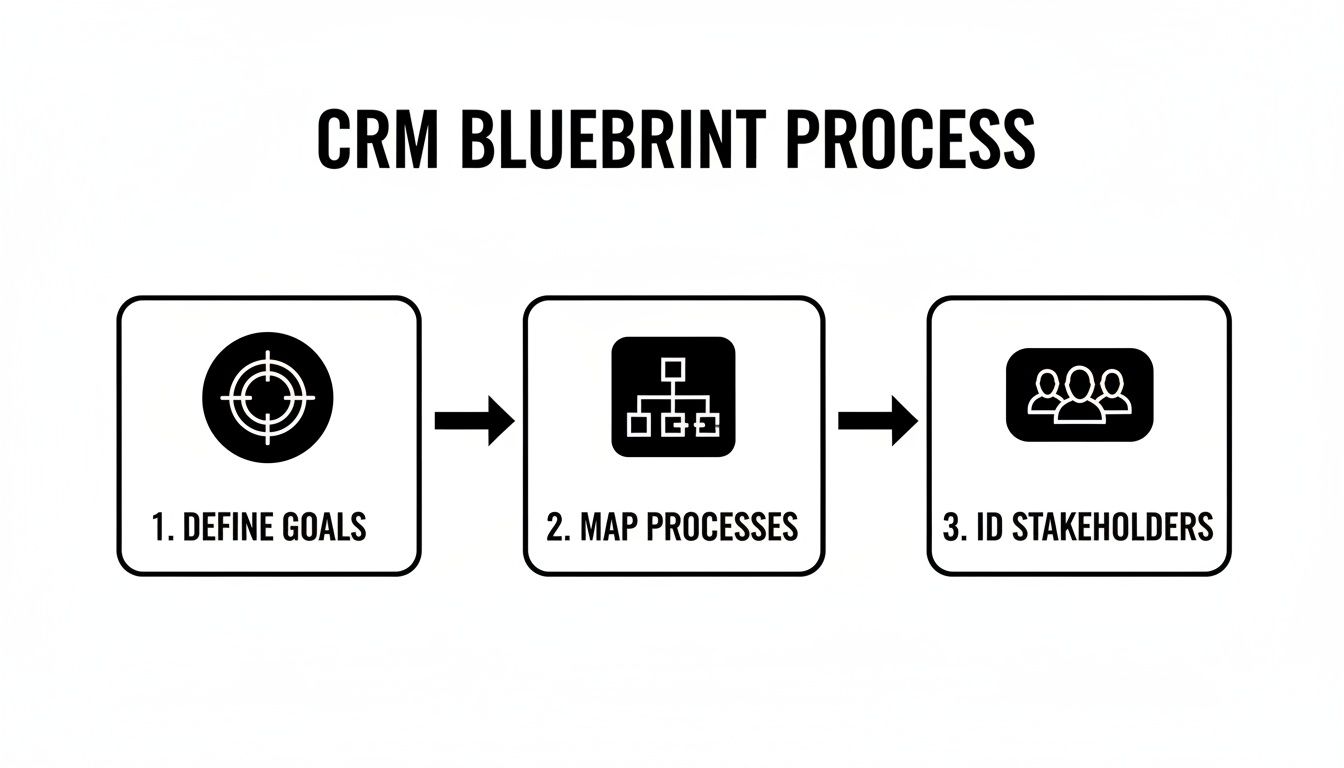
This process isn't just a box-checking exercise; each step builds on the last, creating a cohesive strategy.
Finally, you need to identify your key stakeholders. These are the department heads and, more importantly, the end-users from sales, marketing, and customer service who will live in this system every day. Their input isn't just nice to have—it's absolutely critical for getting buy-in and making sure the CRM meets their real-world needs.
2. Choosing the Right CRM Vendor: It’s a Partnership, Not a Purchase
With your goals and roadmap in hand, it’s time to wade into the crowded CRM market. Let's be honest, it can be a little overwhelming. The market hit a staggering $92.3 billion in 2023, which means you have hundreds of options, all claiming to be the perfect fit.
The key is to reframe your thinking: you're not just buying software. You're choosing a long-term partner who will be central to your growth. For B2B companies, this is critical—a full 64% report their CRM has a major impact on their success. But that success story only happens when the system is a good match and people actually use it. And since 87% of businesses are already in the cloud, we can assume a cloud-based CRM is your starting point.

Go Beyond the Feature Checklist
It’s tempting to create a giant spreadsheet comparing every feature from every vendor. Don't fall into that trap. You’ll get lost in the weeds.
Instead, I always advise clients to anchor their evaluation on three core pillars: scalability, usability, and integration. These are the things that separate a digital filing cabinet from a true growth engine.
Is It Built for Your Future? (Scalability)
The CRM you choose today has to work for the company you plan to be in three or five years. Migrating CRMs is a painful, expensive process you want to avoid at all costs.
Think about what growth actually looks like for your business and ask vendors the tough questions:
- Pricing Tiers: How does their pricing change as you add more users or contacts? You don't want a model that penalizes you for succeeding.
- API Limits: This is a sneaky one. As you automate more, your API calls will skyrocket. A low limit can bring your workflows to a screeching halt.
- Data Storage: Will you have enough room for years of customer history, emails, and attachments? Make sure there's a clear, affordable path to expand storage.
Will Your Team Actually Use It? (Usability)
I’ve seen incredibly powerful CRMs turn into expensive dust collectors because they were just too complicated. If your team finds the system clunky or confusing, they’ll retreat to their old spreadsheets in a heartbeat. The user interface (UI) and overall experience (UX) are non-negotiable.
A system that requires a Ph.D. to navigate will never become a daily habit for your sales team. The goal is to find a platform that feels intuitive from day one, reducing the friction between your team and the data they need to do their jobs effectively.
This is especially true if your team isn't packed with tech wizards. A clean, logical design empowers people to find what they need without a 100-page manual. It makes the CRM feel like a helpful assistant, not a chore. If you're looking for examples, reviewing a list of the best CRM for service-based businesses can give you a good sense of how different platforms are rated for usability.
How Well Does It Play with Others? (Integrations)
No CRM is an island. Its real value is unlocked when it connects seamlessly with the other tools you rely on every day—your marketing automation platform, accounting software, project management boards, you name it.
Before you even start demos, map out your current tech stack. Then, during the evaluation, check for robust, well-documented native integrations. Native connections are almost always more stable and easier to manage than relying on third-party connectors for your most critical tools.
Finally, think about tomorrow. Ask potential vendors about their AI roadmap. How are they planning to use artificial intelligence to help with practical tasks like lead scoring, sales forecasting, or automating follow-ups? A forward-thinking partner will ensure your CRM remains a competitive advantage, not a legacy system, for years to come.
To help structure your evaluation, use a checklist like the one below. It forces you to compare each platform systematically based on what truly matters for your business.
Key CRM Vendor Evaluation Criteria
| Evaluation Criteria | What to Look For | Importance (High/Medium/Low) |
|---|---|---|
| Core Functionality | Does it meet the must-have features identified in your planning phase (e.g., contact management, pipeline tracking)? | High |
| Usability & UX | Is the interface intuitive? Can a new user navigate it with minimal training? Conduct a live demo with a few team members. | High |
| Scalability | Review pricing tiers, API limits, and data storage options. Does it support your 3-year growth plan affordably? | High |
| Integration Ecosystem | Does it have native integrations with your essential tools (email, marketing, finance)? Is the API well-documented? | High |
| Customization | Can you easily add custom fields, objects, and workflows to match your unique business processes? | Medium |
| Reporting & Analytics | Are dashboards easy to build? Can you get the specific metrics you need to track your KPIs? | High |
| Mobile Access | How functional is the mobile app? Can your team work effectively from the field? | Medium |
| Vendor Support & Training | What level of customer support is included? Are there comprehensive training resources (webinars, knowledge base)? | Medium |
| Security & Compliance | Does the vendor meet industry-standard security certifications (e.g., SOC 2, GDPR)? | High |
| AI & Automation Roadmap | What are their plans for incorporating AI? How robust are the current workflow automation capabilities? | Medium |
| Total Cost of Ownership | Consider implementation fees, training costs, and potential add-on modules beyond the base subscription price. | High |
Using a structured table like this ensures no critical aspect is overlooked and helps you make a data-driven decision, not one based solely on a slick sales demo.
Preparing and Migrating Your Customer Data
Think of your brand-new CRM as a high-performance engine. It's powerful, full of potential, but completely useless without the right fuel. In this case, that fuel is your customer data. This is where so many CRM projects go off the rails—people underestimate the sheer effort involved in data migration and end up pouring dirty fuel into their shiny new engine.
What you get is a system that sputters from day one, filled with junk data that makes reporting a nightmare and kills user trust. To avoid this, you have to treat data preparation not as a technical chore, but as a strategic priority. It's about auditing, cleaning, and organizing your most valuable business asset.
Launch a Thorough Data Audit
Before you can move a single contact, you need to know exactly where all your data is hiding. And trust me, it’s scattered in more places than you think. This isn't just about exporting from your old CRM; it's a full-on scavenger hunt.
Your audit needs to map out every single source, including the forgotten ones:
- Legacy Systems: The old CRM is the obvious one, but don't forget about accounting software or ancient proprietary databases.
- Spreadsheet Graveyards: Think of all the sales pipeline trackers, marketing lead lists, and customer service logs living on people's local drives.
- Email Inboxes: So much critical contact info and deal history is buried in your team's Outlook or Gmail accounts.
- Marketing Tools: Data from your email platform, lead capture forms, and webinar software all needs to be accounted for.
This process gives you a complete map of your data landscape. Once you see it all in one place, you can start the real work of consolidating and cleaning. It’s the first, most critical step to improve data quality and set your new CRM up for success.
The Critical Cleansing and Standardization Process
Let me be blunt: migrating messy data is a recipe for failure. It guarantees frustrated users, worthless reports, and zero confidence in the system you just spent a fortune on. The old saying garbage in, garbage out has never been more true.
Data cleansing isn't optional. Here’s what to focus on:
-
De-duplication: You need to find and merge all the duplicate records. It's a classic problem: one salesperson enters "John Smith," another enters "J. Smith," and marketing has "Johnathan Smith" from a webinar. These all need to become one clean, unified contact.
-
Standardization: This is all about enforcing consistency. Are all phone numbers in the same format? Are states standardized to two-letter codes ("CA" instead of "Calif." or "California")? Are job titles consistent ("VP of Sales" vs. "Sales Vice President")? This stuff matters immensely for filtering and reporting.
-
Completion: Now, fill in the blanks. Identify records with missing email addresses, company names, or lead sources. This is your last, best chance to enrich your data before it enters the new system.
A clean dataset is the bedrock of a successful CRM. Time spent here is an investment that pays dividends through higher user adoption, trustworthy analytics, and effective automation down the line. Don't rush this step.
Structuring Your Data for Migration
Okay, your data is clean and consolidated. The final prep step is to get it ready for its new home. This means mapping the fields from all your old sources to the correct fields in the new CRM.
For instance, you'll need to make sure the "Lead Source" column from a spreadsheet correctly maps to the "Lead Source" dropdown menu in the new system. This is also the perfect time to start segmenting your data for future use. You can tag contacts with their lifecycle stage (Lead, Opportunity, Customer) or by buyer persona. Doing this now means your sales and marketing teams can hit the ground running with targeted campaigns the moment you go live.
This methodical approach to data prep isn't the most glamorous part of the project, but it’s what separates a failed implementation from one that truly transforms your business.
Getting Your CRM Configured for How You Actually Work
Think of a brand-new CRM as an empty workshop. It has all the potential in the world, but it’s just a blank slate. To make it useful, you have to set up your tools and arrange the space to fit your specific projects. This configuration phase is where you turn that generic software into a high-performance engine built for your team's exact workflows.
This isn’t about just adding features for the sake of it. It’s about strategically shaping the CRM to remove friction from your team's day. Every unnecessary click, every missing piece of information—these are the little annoyances that kill user adoption. A smart setup makes the CRM the easiest place for your team to get their work done, not an extra chore on their to-do list.
Making the CRM Speak Your Language with Custom Fields
Your business runs on data that a standard CRM has never heard of. Maybe you need to track a "Project Go-Live Date," a "Technical Fit Score," or a B2B contact's "Decision-Making Authority Level." These are the details that matter, and they need a proper home inside your CRM.
That's where custom fields and properties come in. They let you capture and organize the unique information your teams depend on every single day.
- For your sales team: You could create a custom field for "Competitor Mentioned" to see who you're up against in key deals.
- For marketing: A field like "Content Engagement Score" can help you segment leads and tailor your nurturing campaigns.
- For customer success: A "Health Score" property could be a lifesaver, proactively flagging at-risk accounts before they churn.
When you create these custom data points, you're teaching the CRM to speak your company's language. This makes your reports infinitely more valuable and gives your team the context they need without digging through messy, unstructured notes.
Building Sales Pipelines That Mirror Reality
Nothing will make a sales team abandon a CRM faster than a pipeline that doesn't match how they actually sell. A generic "Lead > Contacted > Qualified > Closed" pipeline is rarely enough. The real sales process is full of nuance, and your CRM needs to reflect that if you want it to be a tool for managing and forecasting.
Grab your sales leaders and map out every single stage of your sales cycle. Be brutally honest. What are the clear entry and exit criteria for each stage? What has to happen for a deal to move forward?
A well-defined pipeline is so much more than a list of stages. It's a visual map of your revenue strategy. It shows you where deals are getting stuck, helps you understand your sales velocity, and makes your forecasting much more accurate.
For a B2B SaaS company, a realistic pipeline might look something like this:
- New Inquiry: A fresh lead comes in.
- Discovery Call Booked: The initial meeting is on the calendar.
- Qualified Opportunity: You've confirmed they have the budget, authority, and need.
- Demo Completed: They've seen the product in action.
- Proposal Sent: A formal offer is in their hands.
- Negotiation: You're hammering out the final terms.
- Closed Won / Closed Lost: The deal is done, one way or another.
This level of detail transforms the pipeline from a simple database into an active, strategic tool.
Putting Your CRM to Work with Automation
Configuration isn't just about where data lives; it's about making the system work for you. This is where the magic happens. Workflow automation is hands-down the most powerful way to boost your team's efficiency and make sure critical processes are followed every single time.
The numbers don't lie. The average ROI from a CRM implementation is a staggering 8.71x, a figure that gets a huge boost from smart automation. Given that 70% of salespeople say their CRM is "very important" to closing deals, making it easier to use through automation is a no-brainer. And with 87% of businesses now using cloud-based CRMs, the opportunities to connect and automate across your entire tech stack have never been greater. You can find more CRM trends and ROI data on appsruntheworld.com.
Start by hunting down the repetitive, manual tasks that eat up your team's day. A few high-impact automations can make a world of difference:
- Smarter Lead Assignment: Automatically route new leads to the right person based on territory, industry, or even company size. No more manual triage.
- Automated Follow-ups: When a deal moves to the "Proposal Sent" stage, have the system automatically create a task for the sales rep to follow up in three days. Nothing falls through the cracks.
- Seamless Handoffs: The moment a deal is marked "Closed Won," trigger an automation that creates a new project in Asana and a new customer record in QuickBooks.
These automations do more than just save time. They reduce human error, enforce your best practices, and free up your team to focus on what they do best: building relationships and generating revenue.
Driving Adoption Through Effective Training
Let's be honest. You can build the most powerful, perfectly configured CRM on the planet, but it’s completely useless if your team won’t touch it. This is the human side of a CRM rollout, and frankly, it's the hurdle where most projects stumble. The challenge isn't the technology; it’s about guiding people through change and getting them to let go of their old habits.
Success here isn't about flipping a switch. It’s about turning your software investment into a daily tool that your team genuinely relies on to get things done.
You can't just book a one-hour demo and call it a day. Real training is so much more than a feature tour. It’s about showing each person, in their specific role, how this new system makes their job easier, faster, and more effective. If they can’t see the personal benefit, the CRM will always feel like just another task a manager is forcing on them.

Design Role-Specific Training Programs
A "one-size-fits-all" training session is a guaranteed way to see eyes glaze over. Your sales reps have completely different priorities than your marketing team or customer success managers. To get genuine buy-in, you have to build training modules that speak directly to their daily workflows.
Ditch the generic "how to create a contact" demos and focus on real-world scenarios.
- For Sales Reps: Show them how to manage their pipeline, log calls with a single click, and automate follow-ups so they never miss an opportunity. Frame it around how the CRM will help them hit their quota.
- For Marketers: Train them on segmenting leads for targeted campaigns, tracking attribution, and building dashboards that prove marketing's contribution to the bottom line.
- For Customer Success: Focus on tracking client health scores, managing support tickets efficiently, and spotting upsell opportunities hiding in your existing customer base.
This targeted approach instantly answers that all-important question every employee has: "What's in it for me?"
To keep this organized, a simple training plan can work wonders. Tailoring the content to each team ensures everyone leaves the session knowing exactly how the CRM applies to their day-to-day work.
CRM Implementation Training Plan
| Team/Role | Key Training Modules | Success Metric |
|---|---|---|
| Sales Reps | Pipeline Management, Activity Logging, Automated Sequences | 100% of active deals updated in the CRM weekly |
| Marketing Team | Lead Segmentation, Campaign ROI Tracking, Reporting Dashboards | All new campaigns are tracked and reported on within the CRM |
| Customer Success | Ticket Management, Client Health Scoring, Upsell Identification | 95% of all client interactions logged in the CRM |
| Leadership/Mgmt | Dashboard Creation, Team Performance Reports, Forecasting | Weekly review of CRM-generated performance reports |
By defining what success looks like for each group, you give them a clear target to aim for and make adoption measurable.
Empower Users with Clear Documentation
Even the most engaging training session will fade from memory. That's where clear, accessible documentation comes in—it’s your secret weapon for long-term success. The goal is to make people feel self-sufficient, not like they have to ping you for every minor question.
Great documentation is a core part of managing this change. If you need a starting point, there's some excellent guidance on how to create training manuals that people will actually open.
Focus on creating quick-reference guides and simple Standard Operating Procedures (SOPs). Nobody wants to read a 50-page manual. Think one-page PDFs, short screen-recording videos, or even a shared folder of GIFs that show exactly where to click for common tasks.
The numbers don't lie: implementing a CRM can boost sales by up to 29%, but getting people to use it is the biggest roadblock. An eye-opening 83% of executives say they struggle with staff reluctance to adopt new tools, and 40% of employees will slip back to using old spreadsheets without proper guidance.
Cultivate Internal CRM Champions
You can't drive this initiative alone. In every department, there are always a few people who are more tech-savvy and enthusiastic about new tools. Find them and turn them into your "CRM Champions."
These are your on-the-ground advocates. They can provide peer-to-peer support, answer quick questions in the team channel, and offer practical tips during meetings. By giving them a little extra training and a sense of ownership, you build a support network that fuels adoption from the bottom up—which is always more powerful than a mandate from the top down.
Measuring Success and Optimizing Post-Launch
Getting your CRM live is a huge milestone, but it's not the finish line. Honestly, it’s just the beginning. This is where the real work of turning a new piece of software into a genuine business engine starts—an engine that should pay for itself over and over again.
The weeks and months after launch are all about one thing: continuous improvement. Without a solid plan to measure what's working and listen to your team, even a perfectly configured system can become irrelevant. You need to keep your CRM in lockstep with your business as it grows and changes.
Defining Your Key Performance Indicators
You can't manage what you don't measure. To understand if the CRM is actually making a difference, you have to look at the numbers. Those goals you defined way back in the planning stage? It's time to turn them into your Key Performance Indicators (KPIs). These are the hard metrics that prove the system is delivering real value.
Don't keep these numbers hidden away. Build a dashboard that tracks your KPIs in real-time and make sure everyone on the team can see it. When people see how their work impacts the bottom line, it builds a powerful sense of ownership and accountability.
Here are a few essential KPIs that most businesses should be tracking:
- Sales Cycle Length: Are you closing deals faster? A shorter cycle, from the first contact to a signed contract, is a clear sign that your process is getting more efficient.
- Lead-to-Opportunity Conversion Rate: Of all the qualified leads that come in, what percentage actually become legitimate sales opportunities? This number tells you a lot about lead quality and the effectiveness of your hand-off process.
- Customer Lifetime Value (CLV): This is a big one. Are your customers staying with you longer and spending more over time? An increasing CLV is a fantastic indicator that you're improving customer satisfaction and loyalty.
- User Adoption Rate: You have to track this. What percentage of your team is logging in and actively using the CRM every single day? If this number is low, it’s the canary in the coal mine—an early warning that something needs to be fixed.
Building a Continuous Feedback Loop
Your dashboards tell you what is happening, but your team can tell you why. Setting up a formal way to collect their feedback is absolutely critical for the long-term health of your CRM. This isn't just about creating a suggestion box; it's about actively seeking out insights to make the system better.
Your team on the front lines will always be the best source of ideas for improvement. They are the ones who will spot the workflow bottlenecks, the repetitive tasks ripe for automation, and the confusing processes that need to be simplified.
Schedule regular check-ins—maybe once a quarter—to specifically ask for their thoughts. You could also send out quick, targeted surveys to find specific friction points. The goal is to uncover patterns and prioritize the changes that will make the biggest difference. This ongoing cycle of feedback and refinement is the secret to building a CRM that truly supports your business for years to come.
CRM Implementation FAQs
Let's be honest, any big software project comes with a lot of questions. Getting clear on the timeline, potential costs, and what can go wrong before you start is the best way to keep things on track. Here are a few of the most common questions that come up when we talk about implementing a new CRM.
How Long Does a CRM Implementation Take?
This is the classic "it depends" question, but I can give you some real-world benchmarks. The timeline really hinges on your company's size and how complex your needs are.
For a small business with relatively clean data and a pretty standard sales process, you could be live in as little as 4 to 8 weeks. But for a larger organization with messy data, custom integrations, and multiple teams to onboard, you're realistically looking at a 6 to 12-month project.
Here’s a rough breakdown of how that time is spent:
- Planning & Goal Setting: 1–4 weeks
- Vendor Selection: 2–6 weeks
- Configuration & Data Migration: 4–12 weeks
- Training & Rollout: 2–4 weeks
A smart way to tackle this is with a phased rollout. Get the core features up and running quickly so your team sees value right away, then layer in the more advanced customizations over time.
What Are the Most Common Implementation Mistakes to Avoid?
I’ve seen a lot of CRM projects go sideways, and it's almost always for the same few reasons. The number one mistake? Rushing into the tech without a solid strategy. If you don't know exactly what problems you're trying to solve, you'll end up with a powerful tool that nobody uses because it doesn't actually help them.
Another massive pitfall is what I call "garbage in, garbage out." Migrating messy, duplicated, or outdated data into your shiny new CRM is like putting a dirty engine in a new car. It poisons the well from day one, erodes user trust, and makes your reporting completely useless.
Finally, don't skimp on training and change management. Assuming your team will just figure it out is a recipe for disaster. If they don't understand how to use the system or why it benefits them, adoption will crater, and your investment will be wasted.
How Do You Calculate the ROI of a CRM?
Figuring out the return on investment isn't just for the finance team; it’s how you prove the project was worth it and measure its ongoing success. At its core, you're just comparing what you gained to what you spent.
The formula is simple: (Gain from Investment – Cost of Investment) / Cost of Investment.
So, if you brought in an extra $100,000 in revenue and productivity gains from a CRM that cost you $15,000 all-in, your ROI would be a whopping 567%.
The key is to be realistic about both sides of that equation. Gains aren't just about more sales; they also include better customer retention and time saved through automation. And the total cost has to account for more than just the software subscription—think implementation fees, data cleanup services, and the time your team spends in training. Looking at the complete picture is the only way to understand the real financial impact of your CRM.
Ready to implement a CRM that actually works for your business? MakeAutomation specializes in designing and configuring automated CRM systems that eliminate manual work and drive predictable growth. Learn how we can build your perfect CRM framework today.