
The Ultimate Guide to AI Form Filler Automation
Think of an AI form filler as a smart assistant that doesn't just store your information but actually understands how to use it. It’s intelligent software designed to automatically and accurately populate web forms, completely cutting out the tedious manual work.
Escaping the Data Entry Dilemma
Let's get real. Your sales team is probably drowning in low-value tasks. Every new lead from a webinar, every contact form submission, every event sign-up—it all has to be manually copied and pasted into your CRM. This isn't just boring; it's a massive drag on your entire growth engine.
Every minute someone spends on this kind of data entry is a minute they aren't spending on what they were hired to do: sell, build relationships, and close deals.
The problem runs deeper than just wasted time. Manual entry is a breeding ground for hidden costs. A single typo can make a lead unreachable. Inaccurate data throws off your marketing analytics. And let's be honest, the soul-crushing monotony of it all is a killer for employee morale. You have talented, expensive professionals stuck doing robotic work that a machine could handle better and faster. For any company trying to scale, this is simply unsustainable.
The challenge isn't just about saving time. It's about reallocating your team's most valuable resource—their focus—from mind-numbing admin work to high-impact, strategic activities.
The Rise of Intelligent Automation
This is where AI form fillers completely change the game. They serve as an intelligent bridge between messy, unstructured information and your clean, organized systems.
Imagine a sales rep trying to decipher a jumbled email signature to pull out a name, phone number, and job title. An AI does it in the blink of an eye. It has the contextual awareness to know "New York, NY" belongs in the city and state fields, and that "$250k" is likely a revenue or budget figure.
This is a big deal. The market for generative AI is absolutely exploding, projected to grow at a compound annual rate of 46.47% and hit an incredible $356.10 billion by 2030. You can learn more about the rapid growth of generative AI statistics and what it means for your business.
This trend sends a clear signal: companies that automate these kinds of repetitive tasks will run circles around those who don't. By adopting tools to automate data entry, you're not just improving efficiency—you're freeing your team to focus on what actually grows the business.
How AI Form Fillers Actually Work
So, what's really going on under the hood of an AI form filler? It's not magic, but it’s a pretty clever combination of two core technologies that work together: Machine Learning (ML) and Natural Language Processing (NLP).
Think of it this way: NLP gives the tool the ability to read and understand a form, while ML gives it the experience to know what to do with it.
The Power of Language Understanding
Natural Language Processing is what lets the AI understand the meaning behind the words on a form. It's the difference between seeing a box labeled "Full Name" and knowing it needs both a first and last name.
NLP acts like a universal translator for data. Whether a field asks for "Your Name," "Full Name," or just "Name," the AI gets that they all require the same information.
It can also get much more sophisticated. If you hand it a block of text, like an email signature, NLP can parse it—pulling out the job title, company, and phone number, even if they aren't labeled. This is the heart of what's known as intelligent document processing, which is all about turning messy, unstructured data into something organized and useful. You can learn more about this process here: https://makeautomation.co/what-is-intelligent-document-processing/
In short, NLP gives the form filler the ability to read and understand a document just like a person would, but at a speed no human could ever match.
This level of comprehension is a huge reason why AI adoption has exploded. One study showed 88% of organizations are using AI in some capacity. The top drivers? Gaining efficiency (41%) and cutting costs (20%).
Learning From Experience With ML
This is where the "smarts" come from. Machine Learning is essentially the training process. The AI models are shown millions of different forms, from simple website contact fields to sprawling, multi-page government documents.
By analyzing this massive dataset, the model learns to recognize critical patterns:
- Layout Recognition: It learns where to expect common fields, like "First Name" before "Last Name."
- Field Type Identification: It can tell the difference between a simple text box, a dropdown menu, a date selector, or a checkbox.
- Data Validation: The model learns basic rules, like a "Phone Number" field should contain digits, not letters.
This flowchart shows exactly the kinds of business headaches that AI form fillers are designed to fix—all of which stem from the slow, error-prone process of manual data entry.
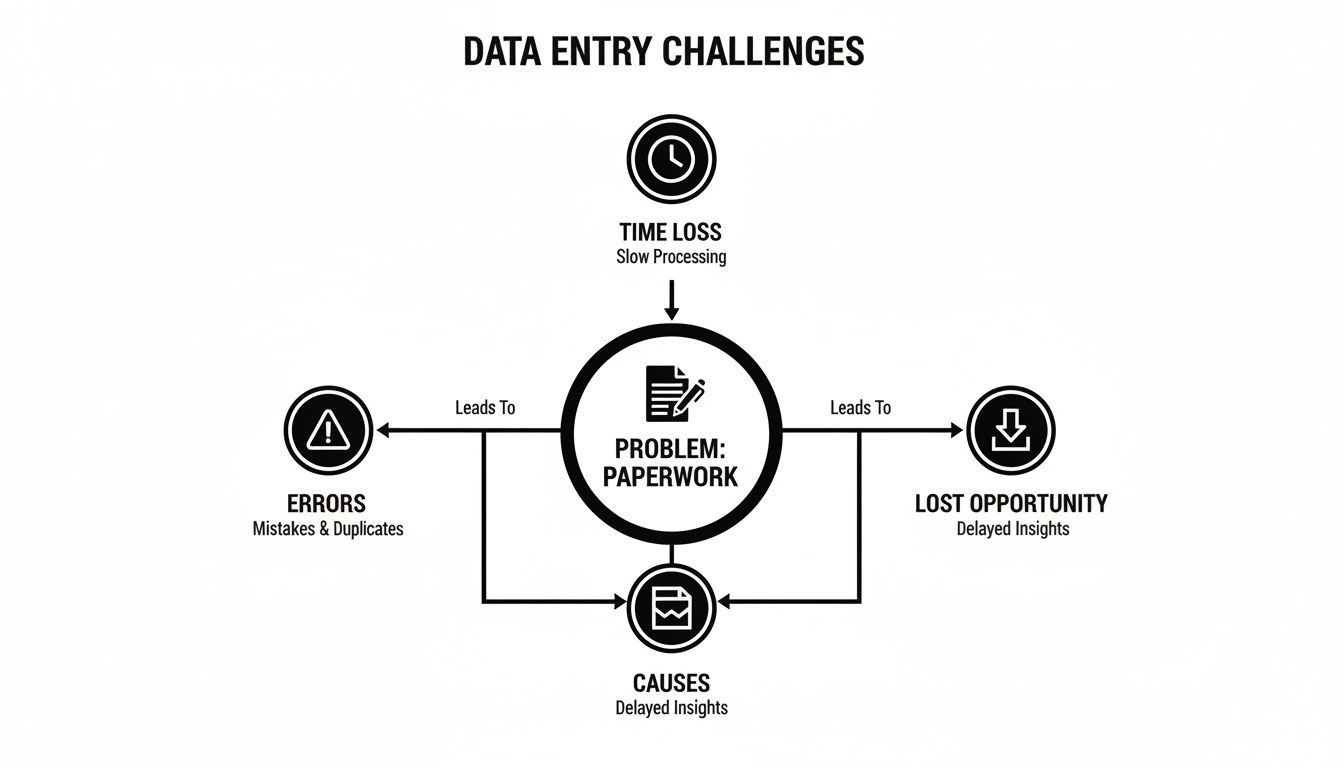
As you can see, the paperwork itself is the root cause of lost time, costly mistakes, and missed opportunities.
Through all this "training," an AI form filler gets incredibly good at adapting. It can tackle new and unfamiliar form layouts with remarkable accuracy because it’s not just following rigid rules; it's applying learned experience. If you're curious about other tools that work on similar principles, check out this list of proven B2B marketing AI tools.
Calculating the ROI of Form Automation
Alright, so we know how AI form fillers work. But let’s get to the real bottom line for any business: what’s the actual financial return? The great news is that the return on investment (ROI) from automating data entry isn't just some abstract concept—it's direct, you can measure it, and it's often a game-changer for B2B and SaaS companies.
The biggest win is reclaiming your team's most precious resource: their time. We all know manual data entry is a productivity black hole. In fact, studies show that AI assistance can speed up form completion by as much as 29%. When you spread that efficiency boost across an entire team, the gains really start to stack up.

A Practical ROI Scenario
Let's walk through a real-world example. Picture a sales team with five reps. Each one spends just three hours a week manually copying lead info from web forms, emails, and LinkedIn profiles into your CRM.
- Time Spent: 5 reps x 3 hours/week = 15 hours per week
- Monthly Time: 15 hours/week x 4 weeks = 60 hours per month
That’s 60 hours every month your skilled sales team is stuck doing admin work instead of what they do best—prospecting, calling leads, and closing deals. An AI form filler can wipe out nearly all of that wasted time.
Now for the money part. Let's say a sales rep’s time, fully loaded, is worth about $50 an hour. That means you’re spending $3,000 per month ($50 x 60 hours) on manual data entry. If an automation tool costs you $300 a month, your net savings come out to $2,700 monthly. That's a mind-blowing 900% ROI from time savings alone. If you want to get really granular with this, check out our complete guide on how to calculate return on investment for any business project.
The true value isn't just in the cost savings. It’s in what your team can achieve with those reclaimed 60 hours—more leads nurtured, more deals closed, and a faster sales cycle.
The Powerful Secondary Benefits
While the direct financial return is easy to see, the ripple effects of using an AI form filler are just as important. These "softer" benefits might be harder to put a number on, but they are absolutely critical for long-term growth.
First up is data quality. Let's be honest, manual entry is a recipe for human error. Typos, swapped numbers, and messy formatting can make your lead data completely unreliable. Automation gets that information into your systems with near-perfect accuracy, which means cleaner CRM data, more effective marketing campaigns, and analytics you can actually trust.
Beyond that, taking these mind-numbing tasks off your team’s plate does wonders for morale and burnout. When you free up skilled people from repetitive work, they become more engaged, more motivated, and more focused on the strategic stuff. This leads directly to higher job satisfaction and lower employee turnover—a huge, if indirect, cost saving for any company.
Weaving AI Form Fillers Into Your Current Setup
It’s one thing to see the power of an AI form filler, but it’s another thing entirely to get it working inside your day-to-day operations. The trick is picking an integration path that fits your team's tech skills, how fast you need to move, and where you want to be in a year. You've really got three main routes to consider, each with its own pros and cons.
Think of it like adding a new room to your house. You could hire an architect for a custom-built, seamless addition (that's your API). You could use a high-quality prefabricated kit for a fast, solid result (Browser Automation). Or, you could rig up a bunch of specialized tools for a really unique, tricky job (RPA).
Direct Connection With API Integration
The most solid, scalable way to plug an AI form filler into your business is with an Application Programming Interface (API). This creates a direct, server-to-server connection between the AI and your core software—your CRM, ERP, or marketing platform. It’s the digital equivalent of a dedicated pipeline.
This is the go-to approach for high-volume, mission-critical tasks. You could, for instance, set up a flow where every new website lead gets instantly analyzed by the AI, which then creates a new contact in Salesforce and kicks off a follow-up email sequence. No human hands required.
The catch? API integration isn't a simple plug-and-play. It takes development resources to build and maintain. It's the best long-term play for companies that have in-house engineers or are ready to invest in a deeply embedded solution. If you need expert help to get it done right, bringing in a specialized AI automation agency can be a smart move.
Quick Wins With Browser Automation
If you need a fix now and don't want to write a single line of code, browser automation is your best friend. These tools usually come as browser extensions or simple desktop apps that sit on top of the web pages you already use.
They work by watching you do something once—like copy-pasting a prospect’s details from LinkedIn into a web form—and then they just mimic your clicks and keystrokes perfectly every time after that.
This method is an absolute game-changer for sales and marketing teams. It lets non-technical folks automate their own tedious work, like prospecting or lead enrichment, and they feel the productivity boost almost immediately.
The only real downside is that these automations can be a bit fragile. If a website changes its layout, your bot might get confused and you'll have to "re-teach" it the steps. But for speed and empowering your team, they're hard to beat.
Handling Complexity With RPA
For the really messy, multi-system workflows, Robotic Process Automation (RPA) is your heavy-duty option. Think of RPA bots as software "robots" that can use any application on a computer, web or desktop, just like a person would.
Picture a process where you have to pull data from a PDF invoice, punch it into a clunky old desktop accounting program, and then log into a web portal to update a status. An RPA bot can juggle all of that without breaking a sweat.
- Best For: Complicated, enterprise-level processes that touch multiple legacy systems.
- Requires: Specialized RPA software and a bit more initial setup and configuration.
- Benefit: Lets you automate workflows that are simply out of reach for APIs or simpler tools.
So, which path is right for you? It all comes down to the problem you're trying to solve. Pinpoint the most frustrating, repetitive form-filling task in your business and choose the integration method that gets you to the finish line the fastest.
Automating Your First Process: A Simple Playbook
Theory is great, but seeing results is what really matters. This playbook is a straightforward, step-by-step guide to get your first AI form filler project off the ground. We’re going to focus on a quick win—something with high impact and low effort—to show immediate value and get everyone excited for more.

Let's dive in and find the perfect place to start.
Step 1: Find the Real Bottleneck
Before you even think about software, you need to find the pain. Look for the most repetitive, mind-numbing data entry task your team absolutely dreads. A classic example? Manually copying lead information from a website contact form, a webinar list, or even a LinkedIn message into your CRM.
Your ideal starting point is a process that is:
- High-Volume: It’s something your team does over and over, every single day.
- Low-Complexity: The data fields are consistent and don't require much interpretation. Think names, emails, and company names.
- High-Impact: Getting this off someone's plate will free up a noticeable amount of time for your sales or marketing team.
Once you have your target, document the current process. Time how long it takes to do it manually and note any common mistakes. This isn't just busywork—this data is your benchmark for proving success later on.
Step 2: Run a Small, Focused Pilot
Now, it’s time to test the waters. Resist the urge to automate everything at once. Pick one or two team members and a single tool to start with. Often, a simple browser automation extension is the quickest way to get going.
Your pilot program should be simple:
- Set Up the Tool: Install your chosen AI form filler and get it talking to your data source (like your website's lead form) and the destination (your CRM).
- Map the Fields: This is where you teach the AI. You'll need to map the source fields ("Your Name") to the corresponding destination fields ("Contact Name") in the CRM. The good news is you usually only have to do this once.
- Do a Test Run: Grab a small batch of 10-20 real leads and run them through the new automated workflow.
- Measure and Compare: Check the time it took and the accuracy against the manual baseline you recorded earlier. You should see a pretty dramatic improvement right away.
Starting with a focused pilot takes the risk out of the project and gives you a tangible success story. It turns the idea of an "AI form filler" from an abstract concept into a proven, time-saving tool for your team.
This is where having the right expertise really pays off. The demand for AI talent is exploding, with job postings for advanced AI roles jumping an incredible 986% between 2023 and 2024. This skills gap shows just how valuable it is to work with people who know how to make these projects succeed. You can discover more insights about AI trends for 2026 and beyond to see where things are headed.
Once your pilot is a clear success, document the new workflow in a simple Standard Operating Procedure (SOP). Now you’re ready to roll it out to the rest of the team.
Got Questions About AI Form Fillers? We’ve Got Answers.
Adopting any new tech, even one with obvious upsides, always comes with a few "what ifs" and "how does its." When I talk to business leaders about using an AI form filler, the same handful of questions pop up. Let's tackle them head-on so you can see the full picture.
"Our Forms are a Nightmare. Can AI Really Handle Them?"
This is probably the number one concern I hear. Can AI actually manage a sprawling, multi-page application or a document with a dozen conditional sections? The short answer is yes, absolutely. Today’s AI form fillers were built for exactly this kind of mess.
They don't just "read" the form; they use advanced layout analysis to map out its entire structure. Think of it like a GPS for your documents. It understands where sections begin and end, how fields relate to each other, and even how to navigate forms that stretch across several pages. This is how they can reliably fill out everything from complex client onboarding packets to lengthy compliance reports.
"Okay, But How Accurate Is It, Really?"
Accuracy is non-negotiable, and rightly so. The best AI form fillers on the market consistently hit accuracy rates well over 98% for most standard documents. But what happens in that tricky 2% margin where the AI might get confused?
This is where the "human-in-the-loop" design comes in, and it's a game-changer.
Instead of just guessing, the system flags any field it has low confidence in and queues it up for a quick human check. You get the speed of automation for the 98% of work that's easy, combined with the assurance of human oversight for the critical bits that need it. It’s the best of both worlds.
"How Long is This Going to Take to Set Up?"
Getting started is almost always faster than people expect. The timeline really just depends on how deep you want to go. For instance, setting up a simple browser automation tool for your sales team to auto-fill lead forms can be done in under an hour. You'll see the payoff almost immediately.
If you're looking for a more robust connection, like an API integration that feeds data directly from your CRM, you might be looking at a few days to a week of work. The beauty is you don't have to boil the ocean. You can start with a small, high-impact project, prove the value, and then build from there.
Ready to stop the soul-crushing data entry and give your team their time back? MakeAutomation specializes in implementing smart AI solutions that unlock serious growth. Book a consultation with us today and let's figure out the right automation strategy for your business.