
Navigating The Maze Of CRM Implementation Challenges
So you've decided to invest in a CRM. That's a huge step, but getting the software is the easy part. The real work—and where most projects go sideways—is in the implementation. A successful rollout can be the engine for your business growth, but a failed one feels like you just bought the world's most expensive and complicated spreadsheet.
The truth is, CRM projects don't fail because the technology is bad. They fail because of very human reasons: messy data, teams that won't use the new system, and a fuzzy idea of what "success" even looks like. Getting it right means treating this as a full-blown business transformation, not just an IT task.
Why Most CRM Projects Underperform
Think of your new CRM as a high-performance engine. You can have the most powerful engine in the world, but it's useless if you put dirty fuel in it, don't teach anyone how to drive it, and have no destination in mind. This is exactly what happens with CRM rollouts. Businesses get caught up in the potential of the software but stumble on the fundamentals.
It's a surprisingly common story. In fact, studies show that around 55% of CRM projects don't hit their original targets. This isn't just bad luck; it’s a pattern of predictable and avoidable mistakes. The "dirty fuel" is bad data. The "untrained driver" is poor user adoption. And the "no destination" problem is a lack of a clear strategy. When you neglect these areas, your powerful new engine just sputters and stalls.
Top CRM Implementation Hurdles At A Glance
Before we break down each of these challenges, let's get a bird's-eye view. You'll notice these problems are often tangled together. For instance, if you don't learn how to improve data quality before you start, your team will immediately lose trust in the system, and user adoption will plummet.
A CRM is a mirror that reflects your company's processes. If your processes are chaotic, your CRM will be chaotic. The software only amplifies what is already there.
The table below gives a quick snapshot of the most common hurdles that can derail a CRM project. Getting familiar with these core problems and their consequences is the first step to building a plan that actually works.
| Challenge Area | Core Problem | Immediate Impact |
|---|---|---|
| User Adoption | Teams resist change or find the system too complex, reverting to old methods. | Inaccurate data, low ROI, and frustrated sales and marketing teams. |
| Data Migration | Migrating incomplete, outdated, or duplicate data into the new system. | Erodes user trust, leads to flawed reporting, and wastes time on cleanup. |
| Strategic Vision | Lacking clear, measurable goals for what the CRM should accomplish. | The project lacks direction, leading to scope creep and misaligned features. |
| Integrations | The CRM fails to connect seamlessly with other essential business tools. | Creates data silos, requires manual data entry, and reduces overall efficiency. |
Recognizing these potential roadblocks early on allows you to proactively build a strategy that addresses them head-on, rather than trying to fix them after the damage is done.
Decoding The Eight Most Common CRM Failure Points
Successfully rolling out a new CRM is less about the technology and more about navigating a minefield of business challenges. I've seen it time and again: a powerful, expensive tool ends up gathering digital dust, becoming a source of frustration rather than a driver of growth.
Understanding where things typically go wrong is the first step to getting it right. It helps you build a resilient implementation plan that actually delivers.
Think of it like this: your CRM's success rests on three interconnected pillars—Strategy, Adoption, and Data. If one wobbles, the whole thing comes crashing down.
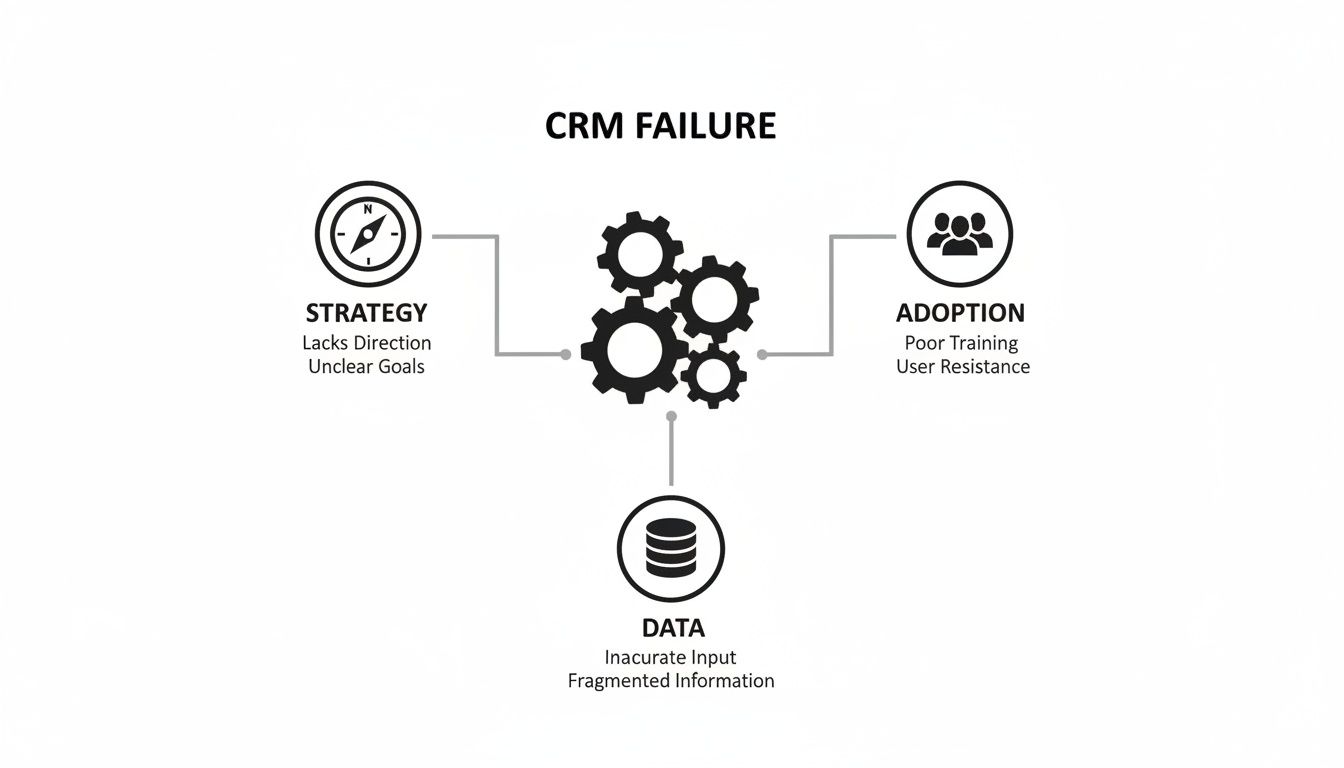
As the diagram shows, these aren't separate issues; they're gears in a machine. A weakness in one area grinds the entire system to a halt. Let's break down the eight most critical challenges that stem from these core pillars.
1. The Silent Killer: Poor User Adoption
You can buy the most sophisticated CRM on the market, but if your team doesn't use it, it's just an expensive paperweight. This is, without a doubt, the number one reason CRM projects fail.
It happens when teams see the new system as just another administrative task—a burden rather than a tool to make their lives easier. Before you know it, they’re back to their old spreadsheets and notebooks.
This isn't just about being stubborn. Resistance often comes from a system that feels clunky, doesn't actually fit their day-to-day work, or was simply dropped on them without any input. When the very people who need to be in the CRM all day don't see the point, the data becomes worthless, reports are a joke, and the entire investment goes down the drain.
The numbers don't lie. A staggering 47% of failed implementations are tied directly to poor user adoption. It's the biggest hurdle, with 25% of businesses saying training and getting people on board were their primary obstacles.
2. The Nightmare of Chaotic Data Migration
Imagine moving into a beautiful new house. But instead of labeling your boxes, you just throw everything in randomly. Unpacking is a nightmare. You can't find the coffee maker, your new living room is a mess, and the whole experience is stressful.
That’s exactly what a chaotic data migration does to your new CRM.
The classic mistake is shoveling "dirty" data—incomplete, outdated, and duplicate records—from old systems into your shiny new platform. This is the ultimate "garbage in, garbage out" scenario. The moment a sales rep looks up a major client and finds three different profiles with conflicting phone numbers, you've lost their trust in the system for good.
Clean data is the foundation of a successful CRM. Migrating messy data is like building a skyscraper on a foundation of sand; it’s destined to collapse.
A proper data migration is a meticulous process, not a copy-paste job. It demands a clear plan:
- Audit: Figure out what data you actually have and what's worth keeping.
- Cleanse: Fix typos, fill in the blanks, and get rid of junk entries.
- De-duplicate: Merge multiple records for the same person or company into one clean profile.
- Standardize: Make sure phone numbers, addresses, and names all follow a consistent format.
Skipping this will cripple your CRM's potential right out of the gate.
3. The Drift of a Missing Strategic Vision
Kicking off a CRM implementation without a clear strategy is like setting sail without a map or a destination. You’ll just drift, burn through resources, and end up nowhere near where you wanted to be.
Without clear, measurable goals, how can you possibly know if you've succeeded? What are you actually trying to achieve here?
- Do you want to increase customer retention by 15%?
- Are you trying to shorten the average sales cycle by 10 days?
- Is the goal to boost lead conversion rates by 20%?
These are real goals. They should guide every single decision you make, from which features you need to how you set up your workflows. Without this strategic anchor, the project just becomes a vague mission to "improve customer relationships," which is impossible to measure and results in a system that doesn't really help anyone.
4. The Bottleneck of Integration Silos
Your CRM isn't an island. It has to connect and share information with all the other tools your business relies on—your email marketing platform, your accounting software, your support desk. When these systems don't talk to each other, you create digital silos.
These silos are a productivity killer. They force your team into mind-numbing manual work, like copying and pasting customer info from one screen to another. This is not only a huge waste of time that could be spent selling or helping customers, but it's also a recipe for human error.
To get the most out of your CRM, you need a complete, 360-degree view of your customer. That's only possible when your systems are connected, which is why it's so important to understand what CRM integration is and why it matters to your bottom line.
5. The Danger of Uncontrolled Scope Creep
Scope creep is that slow, quiet killer of projects. It starts with small, innocent-sounding requests. "Can we just add one more custom field?" or "Could we build a quick report for this one thing?"
While you need to be flexible, letting these requests pile up without a process is a surefire way to derail your implementation. Every little change adds time, complexity, and cost. Soon enough, your project is bogged down in endless tweaks, the launch date keeps getting pushed back, and you've blown your budget.
The solution is to have a clearly documented project scope from the very beginning and a formal process for vetting any changes against your original strategic goals.
6. The Pitfall of Insufficient Training
Handing your team a powerful CRM without showing them how to use it is like giving someone the keys to a Formula 1 car without a single driving lesson. It’s not just going to be ineffective; it's going to end in a crash.
Insufficient training is one of the most direct causes of low user adoption.
And I don't mean a single, one-hour webinar for the whole company. Real, effective training needs to be:
- Role-Specific: Salespeople, marketers, and support agents all use the CRM for different reasons. Their training should reflect their specific, daily workflows.
- Hands-On: People learn by doing. Let them practice in a safe test environment, not with live customer data.
- Ongoing: Learning doesn't stop after launch day. Provide continuous support with help guides, short video tutorials, and regular Q&A sessions.
Treating training as an afterthought is a guarantee that your team will get frustrated and give up on the system.
7. The Void of Weak Project Leadership
Every successful CRM implementation needs a captain steering the ship. When you have weak or absent project leadership, you get a vacuum. Decisions don't get made, deadlines get missed, and no one is held accountable.
This isn't just a technical role. A strong project leader—a "CRM champion"—is the person who:
- Gets buy-in from the executive team.
- Keeps everyone focused on the strategic goals.
- Manages expectations and communicates progress across all departments.
- Isn't afraid to say "no" to prevent scope creep.
- Acts as the voice of the end-users to make sure the system actually works for them.
Without someone in this role driving the project forward, it’s bound to stall out.
8. The Mistake of Selecting The Wrong Platform
Finally, one of the most basic but common failures is simply picking the wrong tool for the job. Not all CRMs are the same. Some are built for massive enterprises with incredibly complex processes, while others are designed for small, nimble teams.
Choosing a platform that’s way too complicated for your needs will lead to wasted money and frustrated users. On the flip side, picking a basic system you'll outgrow in a year means you'll just have to go through another painful migration process down the road.
The key is to do your homework before you even start looking at vendors. Map out your business processes, define your must-have features, and think about where your company will be in three to five years. This will help you find a CRM that’s a true long-term partner for your growth.
Your CRM Implementation Success Checklist

Knowing what can go wrong with a CRM implementation is one thing. Actually avoiding those pitfalls requires a solid game plan. This checklist is designed to be just that—a clear, actionable roadmap that breaks the entire project into manageable phases, guiding you from the drawing board to a successful launch and beyond.
Think of this less as a simple to-do list and more as a strategic blueprint. Each step is designed to proactively tackle a potential failure point before it can derail your project. Following this phased approach helps you keep momentum, make sure everyone is on the same page, and build a CRM that genuinely helps your business grow.
Phase 1: Pre-Launch Foundation
This is where the magic really happens. The decisions you make now will set the tone for the entire project. I've seen too many teams rush this stage, only to face budget overruns, scope creep, and a system that nobody ends up using.
Define and Document Your Goals: Don't settle for vague objectives like "improve sales." Get specific. For instance, aim to "Reduce the average sales cycle from 45 to 35 days within six months" or "Increase customer retention by 15% in the next fiscal year." Hard numbers give you a clear target.
Assemble Your Project Team: You need a dedicated project manager or a "CRM Champion"—someone with the authority to make key decisions. Be sure to include representatives from every department that will touch the CRM—sales, marketing, customer service—to ensure their voices are heard and needs are met.
Map Your Current Processes: You can't improve what you don't understand. Take the time to document exactly how your teams currently handle leads, track deals, and manage customer inquiries. This map will be your guide for configuration.
Execute a Full Data Audit and Cleansing: This is absolutely non-negotiable. Before you even think about moving data, you have to audit your existing sources. Hunt down and eliminate duplicate, outdated, and incomplete records. A clean start is critical for building user trust from day one.
Phase 2: Go-Live Execution
With a solid foundation in place, it's time to roll out the system. The key here is a controlled, methodical launch. You want to minimize disruption and build positive momentum with some early wins. A "big bang" launch where everyone gets access at once often leads to chaos; a phased approach is almost always the smarter move.
A CRM launch isn't a finish line; it's the starting line for a new way of working. The goal of the go-live phase is to ensure everyone is confident and equipped to run the race.
Here are the key actions for a smooth transition:
- Configure and Customize the Platform: Start setting up the CRM to mirror the workflows you mapped out earlier. This means creating custom fields, defining your sales pipeline stages, and building out initial dashboards. Keep it simple at first—you can always add more complex features later.
- Run a Pilot Program: Handpick a small, tech-savvy group of users to test-drive the system. This pilot program is incredibly valuable for catching bugs, getting real-world feedback on your setup, and creating internal champions before the full rollout.
- Validate All Data Migration: Once you've moved your clean data into the new CRM, you need to verify it. Have your pilot group spot-check key accounts and contacts to confirm everything transferred over accurately.
- Conduct Role-Specific Training: Generic, one-size-fits-all training just doesn't work. Train your sales team on their specific sales workflows, and coach your support team on their ticketing and case management processes. Make it relevant to their daily jobs.
A critical part of a successful CRM is ensuring it supports a modern customer experience. This means understanding and building out your Omnichannel Customer Service capabilities, which creates a seamless journey for customers across all your touchpoints.
Phase 3: Post-Launch Optimization
Your CRM is live, but the job isn't done. This final phase is all about continuous improvement. The goal is to evolve your CRM from a static database into a dynamic engine for growth by listening to your team and making adjustments based on real-world use.
- Establish User Feedback Channels: Give users a simple way to report issues, ask questions, and suggest improvements. This could be a dedicated Slack channel, a simple form, or regular check-ins.
- Monitor Performance Dashboards: Keep a close eye on the metrics you defined back in phase one. Are you on track to hit your goals? Use the data to spot bottlenecks in your process and identify opportunities for improvement.
- Provide Ongoing Training and Support: Host regular Q&A sessions or create a library of quick video tutorials that address common questions. Reinforcing best practices is the key to making sure the new habits stick.
CRM Implementation Phase Checklist
To bring it all together, here's a simplified checklist that outlines the key tasks and success metrics for each phase of your implementation. Use this to keep your team aligned and focused on what matters most at each stage.
| Phase | Key Task | Success Metric |
|---|---|---|
| Pre-Launch Foundation | Define specific, measurable goals (e.g., increase lead conversion by 10%). | Goals are documented, signed off by stakeholders, and tied to business KPIs. |
| Pre-Launch Foundation | Audit and cleanse all existing customer data. | Data is de-duplicated, standardized, and >95% complete before migration. |
| Pre-Launch Foundation | Map out all current sales, marketing, and service processes. | Visual workflow diagrams are created and approved by department heads. |
| Go-Live Execution | Configure CRM to match defined processes and run a pilot test. | Pilot users successfully complete 100% of core tasks without major issues. |
| Go-Live Execution | Conduct role-specific training for all user groups. | At least 90% of users complete training and pass a basic competency quiz. |
| Go-Live Execution | Migrate and validate all customer data. | <1% error rate in post-migration data spot-checks. |
| Post-Launch Optimization | Establish a formal user feedback loop. | Feedback channel is active with consistent user engagement and suggestions. |
| Post-Launch Optimization | Monitor user adoption and key performance dashboards weekly. | User login rates exceed 85% weekly; project goals are on track. |
| Post-Launch Optimization | Provide ongoing training resources (e.g., video library, office hours). | Support ticket volume for "how-to" questions decreases by 50% in 3 months. |
This table serves as a high-level guide. Remember to tailor the specifics to your organization's unique needs and goals for the best results.
For a more detailed breakdown of the entire process, check out our complete guide on how to implement a CRM system from start to finish.
Using AI And Automation To Overcome CRM Hurdles

Let's be honest, many of the most stubborn crm implementation challenges aren't just about process—they’re about people and resources. Tedious data cleansing, endless administrative tasks, and inconsistent follow-ups eat away at your team's time and patience. Before you know it, the CRM starts feeling more like a burden than a benefit. This is exactly where AI and automation can completely change the dynamic.
Instead of just gritting your teeth and pushing through implementation roadblocks, you can use intelligent systems to dismantle them. Technology is the key to turning your CRM from a static database that demands constant attention into a proactive, invaluable partner for your entire team.
Automating Data Integrity And Cleanup
One of the first and most impactful areas for automation is data migration and maintaining quality over time. A messy data migration can sabotage a CRM right from the start. But with AI-driven tools, what was once a manual nightmare can become a smooth, automated workflow.
Think of it like having an intelligent assistant that combs through your old databases before you even start the migration. It can automatically:
- Find and merge duplicate contacts, looking beyond just a matching email to compare phone numbers, company names, and other data points.
- Standardize formatting across thousands of records, so addresses, job titles, and phone numbers are all consistent.
- Fill in the gaps on incomplete profiles by automatically pulling in public data like LinkedIn profiles or company details.
This isn’t just a one-and-done solution, either. After you go live, these automations can keep working in the background. They act as a gatekeeper, ensuring any new data coming into the CRM meets your quality standards, keeping your system clean and reliable for the long haul.
Proactive automation builds a resilient CRM ecosystem. It’s not about just fixing problems as they arise; it's about creating a system where common failures are prevented from taking root in the first place.
This approach ensures your data is an asset you can count on, not a liability that gets worse over time.
Driving User Adoption Through Intelligent Workflows
Low user adoption almost always comes down to one thing: friction. If using the CRM is more difficult than ignoring it, your team will find a way to work around it. Intelligent automation flips this on its head by weaving the CRM into your team's daily rhythm, making it the easiest path forward.
Put yourself in a sales rep's shoes. Automation can take over the tedious tasks they hate, freeing them up to do what they do best—sell. For instance, using a platform like MakeAutomation, you can build workflows that:
- Automatically log calls and emails to the right contact record, killing manual data entry.
- Use AI to transcribe call notes, summarize the key takeaways and action items, and attach them directly to the deal.
- Update deal stages automatically based on real-world triggers, like when a prospect signs a contract through a platform like DocuSign.
When the CRM starts doing the heavy lifting for your team, it transforms from an administrative chore into an indispensable tool. That shift in perception is everything when it comes to overcoming resistance and getting the full, consistent adoption you need to see a real return on your investment.
Real-World Tales Of CRM Failure And Triumph
Theory is one thing, but the real learning happens in the trenches. To see how these common CRM implementation challenges actually unfold, let's walk through two stories from the front lines. These scenarios really highlight what happens when things go wrong—and more importantly, how a smart recovery plan can save the day.
One company’s expensive new tool became a ghost town because nobody used it. Another nearly torpedoed its client relationships with a botched data migration. Both stories are a masterclass in how easily a CRM project can veer off course, but they also offer a clear roadmap for pulling it back from the brink.
Think of these less as cautionary tales and more as blueprints for getting it right.
The SaaS Startup's Silent CRM
Picture a fast-growing SaaS startup, we'll call them "InnovateTech." They dropped a ton of cash on a top-tier CRM, hoping it would become the central nervous system for their expanding sales team. They went all out, adding dozens of custom fields and intricate workflows, convinced that more features meant more power.
Six months later? The system was a digital ghost town.
The sales reps, completely bogged down by the clunky interface and endless data entry, went right back to their old spreadsheets. The CRM data was stale, forecasts were a joke, and management had no real clue what was happening in the pipeline. The very tool that was supposed to bring clarity was now the source of all the confusion.
Realizing they had a massive problem on their hands, the leadership team hit the reset button. Their comeback strategy boiled down to two simple ideas: simplification and automation.
Simplify Everything: First, they actually talked to the sales team. They asked about their real-world, day-to-day work—not the idealized version management had cooked up. Based on that feedback, they stripped the CRM down to the bare essentials, cutting out a whopping two-thirds of the custom fields.
Automate the Annoying Stuff: Using a tool like MakeAutomation, they built simple automations that tackled the team's biggest headaches. One workflow automatically logged emails and calls. Another updated a deal's stage in the pipeline the moment a prospect booked a demo through Calendly.
Suddenly, the CRM wasn't a chore; it was a helpful assistant. User adoption shot through the roof. Within three months, the data was trustworthy, the forecasts were accurate, and the team finally had the visibility they needed to grow.
The Agency's Data Disaster
Next up is "Creative Solutions," a digital marketing agency that decided to merge three separate systems—an old contact manager, a project management tool, and a chaotic collection of spreadsheets—into one CRM. In a rush to go live, they jammed the entire data migration into a single weekend.
The result was a full-blown catastrophe.
Duplicate client records were popping up everywhere. Contact info was wrong. Critical project notes were either gone for good or attached to the wrong accounts. Account managers were calling clients with bad information, referencing projects that weren't theirs, and causing absolute chaos. The agency's hard-won reputation for being on top of things was quickly falling apart.
A rushed data migration doesn't save time; it just trades a few days of planning for months of painful, expensive cleanup and lost customer trust.
The recovery was slow and methodical, built around proper data governance and a phased rollout.
Stop the Bleeding: They immediately froze the new CRM and had everyone revert to the old systems. A dedicated team was put in charge of auditing every single piece of data from all sources.
Clean and Standardize: That team spent the next two weeks deep-cleaning the data. They merged duplicates, fixed errors, and created a single, consistent format for every record.
Migrate in Phases: Instead of a "big bang" launch, they moved data over one client at a time, starting with the smallest accounts. The assigned account manager had to personally sign off on their client's data before the next batch was even touched.
It took longer, no doubt. But this painstaking approach completely restored their data's integrity. The agency set up strict new governance rules to make sure the CRM stayed clean, salvaging their client relationships and building a rock-solid data foundation for the future.
Got Questions About CRM Implementation? We've Got Answers.
When you're staring down the barrel of a CRM rollout, a lot of very specific, practical questions pop up. Getting straight answers is the best way to sidestep common CRM implementation challenges and keep the whole project from going off the rails. Let's tackle a few of the big ones we hear all the time.
How Long Does This Actually Take?
For most mid-sized businesses, you're looking at a timeline of 4 to 12 weeks. What pushes you to one end of that spectrum or the other? It really boils down to the complexity of your sales process, the messiness of the data you're bringing over, and how many other tools you need to plug into it.
I've seen the most success with a phased rollout. Think about it in stages.
- Phase 1 (Weeks 1-6): Focus on the absolute essentials. Get the core system configured and in the hands of your main sales team.
- Phase 2 (Weeks 6-12): Now you can layer on the more advanced stuff—custom features, key integrations, and those detailed reporting dashboards everyone wants.
Trying to cram everything into a few weeks is a classic mistake. It's a surefire way to miss critical details and leave your team frustrated for months to come.
What's the Single Biggest Data Migration Mistake?
Easy. It's dumping "dirty" data into your shiny new CRM. We're talking about incomplete customer records, outdated contact info, and duplicates everywhere. This is the perfect example of the 'garbage in, garbage out' rule. If you launch a system with bad data, you kill user trust and adoption on day one.
Before you move a single piece of information, a full-scale data audit is a must. This isn't optional. It means cleaning up what you have, merging duplicate contacts, and making sure all your data formats are consistent. Skipping this step is like building a house on a shaky foundation—you're just setting yourself up for a collapse.
How Do We Get Our Sales Team to Actually Use It?
You have to make the CRM an essential part of their success, not just another box to check. If they see it as an administrative chore, they'll avoid it. If they see it as a tool that helps them close deals, they'll live in it.
Here’s a simple game plan that works:
- Bring Them In Early: Get your sales reps involved when you're choosing and setting up the system. Make sure it's built around their real-world workflow, not some theoretical process.
- Automate the Annoying Stuff: Use automation to take the tedious tasks off their plate. Think automatic email logging, call transcription, or even updating deal stages based on calendar events.
- Show Them the "WIIFM" (What's In It For Me): Training needs to be hands-on and role-specific. Forget generic feature walkthroughs. Show them exactly how the CRM helps them track their pipeline, forecast commissions, and hit their quota faster. Adoption becomes a no-brainer when they see a direct line to their own success.
Ready to tackle your CRM implementation challenges with smart automation? MakeAutomation builds the specific workflows that make user adoption and data accuracy a reality. Book a consultation today and let's turn your CRM from a data-entry headache into a genuine growth engine.