
Choosing Your Best Node JS ORM in 2026
When you're mapping out a new SaaS project, it’s easy to focus on flashy features and slick user flows. But a decision made early on, almost hidden from view, can dictate your future success: which Node.js ORM to use. A bad choice here can lead to crippling performance issues and a codebase that’s a nightmare to maintain. Get it right, and you’ll ship faster and stay nimble.
Why Your Node JS ORM Choice Is a Business Decision

In any modern application, the bridge between your code and your database is a fundamental piece of infrastructure. For most teams, an Object-Relational Mapping (ORM) tool builds this bridge. It acts as a translator, letting your application's JavaScript communicate seamlessly with your database's SQL.
Think of it this way: you wouldn't start building a skyscraper without picking the right kind of foundation first. The same logic applies here. This isn't just a technical detail; it’s a strategic business decision. The right Node.js ORM directly boosts developer productivity, cuts down on bugs, and ensures your app can grow without needing a costly rewrite down the line. It affects how quickly you can launch features and how easily new engineers can get up to speed.
Connecting Code to Growth
Node.js has become a dominant force in backend development, powering over 6.3 million websites globally as of 2026. Companies have found its lean architecture can slash development costs by up to 58% compared to other stacks. For a SaaS business, that means a faster path to market and a more efficient team. You can dive deeper into the Node.js adoption statistics to see its full impact on the industry.
This guide isn't about getting lost in technical weeds. It’s about understanding your ORM as a strategic asset—the "translator" that connects your code to your bottom line.
Your ORM isn't just code; it's a productivity multiplier. A well-chosen ORM allows your team to focus on building features that delight customers, not on writing boilerplate SQL or debugging complex database connection issues.
What This Guide Covers
Consider this your roadmap for making a smart decision, tailored for B2B and SaaS teams. We'll compare the top contenders like Prisma, Sequelize, and TypeORM, but we’ll focus on what actually matters for a growing business.
- Practical Comparisons: We'll examine real-world code snippets and performance patterns, not just abstract feature lists.
- Business Impact: Every point of comparison will be linked back to how it affects your team's speed and your product's ability to scale.
- Decision Frameworks: You’ll finish with a clear checklist to help you select the best Node.js ORM for your specific project and team.
By the end, you'll have a firm grasp of the critical trade-offs, helping you pick an ORM that truly fits your team's skills, project complexity, and long-term vision.
How a Node.js ORM Works (It's Not Magic)
Think of your Node.js application as a native JavaScript speaker and your database as a fluent SQL speaker. They have completely different languages, grammars, and rules. Without a go-between, your developers are forced to become bilingual, constantly context-switching to write raw database queries.
A Node.js ORM is that expert translator. It sits between your application and your database, letting you work with your data using the JavaScript objects and methods you already know. Instead of writing a long SQL string like INSERT INTO "users" ("name", "email") VALUES ('Alice', 'alice@example.com');, you can just write something that feels natural: await User.create({ name: 'Alice', email: 'alice@example.com' });.
The ORM takes on the heavy lifting of generating clean, secure, and efficient SQL for you. This isn't a black box—it’s a powerful system built to boost developer productivity, cut down on human error, and help you ship features faster.
The Core Components of an ORM
To see how this translation happens, we just need to understand three key pieces that make up any ORM: Models, Schemas, and the Query Builder.
1. Models: The Business Objects
A Model is simply a JavaScript class that represents a table in your database. If you have a Users table, you’ll have a User model in your code. Every single instance of that User model maps directly to a row in the table.
This completely changes how you think. You stop manipulating abstract rows and columns and start working with users, products, and orders as real objects in your application code.
2. Schemas: The Blueprint for Your Data
The Schema is the blueprint that defines the structure of your models. It tells the ORM everything it needs to know about your table's columns, their data types, and any relationships between different tables.
A typical schema definition might look something like this:
id: Primary Key, Integerusername: String, must be uniqueemail: String, requiredcreatedAt: DateTime, defaults to the current time
Think of the schema as the contract between your application and your database. It enforces data consistency and gives the ORM the rules it needs to validate data before it ever hits the database, preventing bad data from getting in.
3. The Query Builder: The Translation Engine
Under the hood, the Query Builder is the engine that turns your JavaScript method calls into raw SQL. When you run a command like User.findAll({ where: { role: 'admin' } }), the query builder springs into action.
An ORM's query builder is like a skilled artisan. It takes your high-level instructions—"find all admin users"—and meticulously crafts the precise, optimized SQL query needed to retrieve that data from the database, protecting you from common vulnerabilities like SQL injection along the way.
It parses your method, looks up the User model's schema to understand the table's structure, and builds the corresponding SQL: SELECT * FROM "users" WHERE "role" = 'admin';. For a deeper look at how this works and what to consider, you can find a helpful guide on choosing an ORM in Node.js for your project. This engine is what makes the whole process feel seamless, letting your developers stay focused and productive in a single language.
The Great Debate: A Detailed Node.js ORM Comparison
Choosing a Node.js ORM is a lot like picking a co-founder for your startup. It's a long-term commitment that will fundamentally shape your team's daily workflow and your product's ability to scale. A great choice can supercharge your development velocity, but a poor one can saddle you with years of technical debt that grinds progress to a halt.
While the Node.js ecosystem has plenty of solid options, they are definitely not interchangeable. Each ORM comes with its own philosophy, a unique set of trade-offs, and a distinct developer experience. Instead of just rattling off features, we're going to break down the top players from the perspective of a B2B or SaaS team that needs to build a reliable product and stay agile.
At its core, an ORM acts as a translator, letting your application code speak to the database without needing to write raw SQL for every interaction.
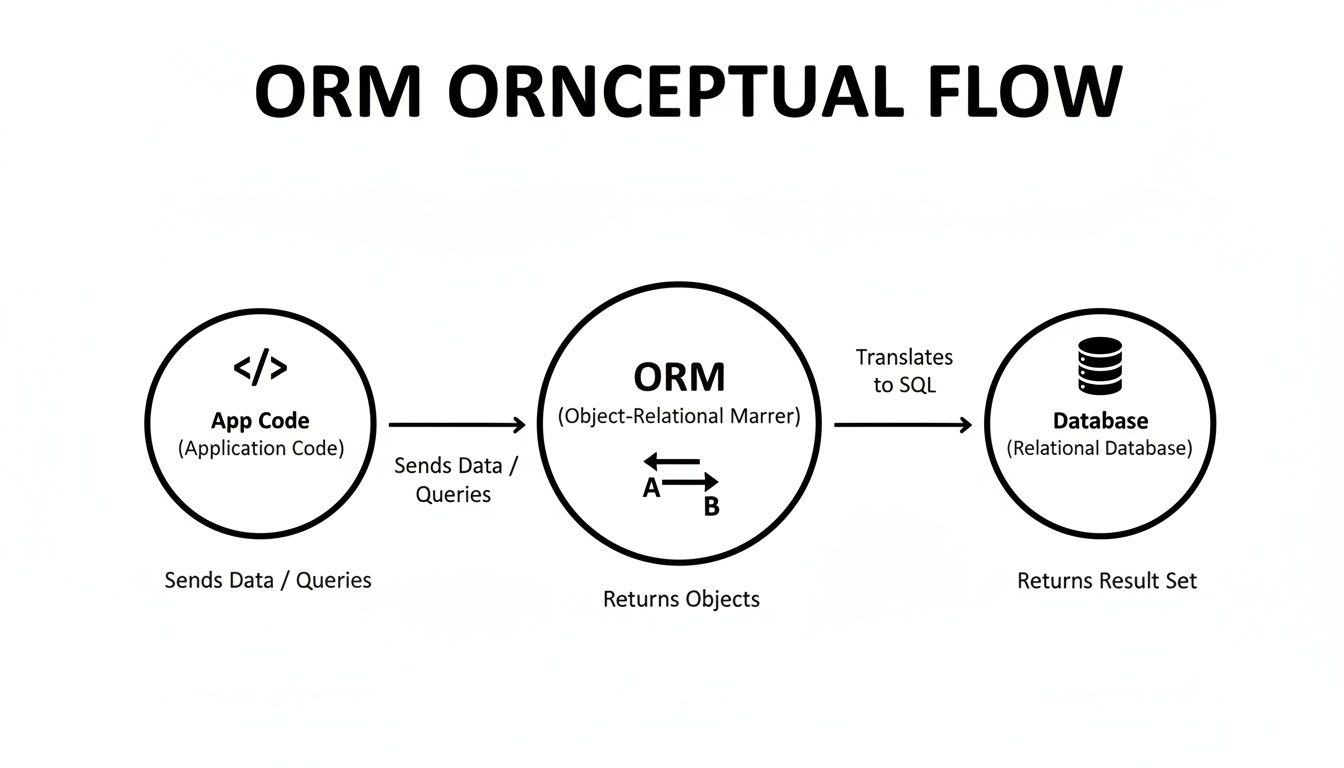
This abstraction allows your developers to work with familiar objects and methods in JavaScript or TypeScript, while the ORM handles the complex SQL generation behind the scenes. Now, let’s see how the most popular tools stack up.
Prisma: The Modern, Type-Safe Contender
Prisma has quickly become a favorite, especially for teams building with TypeScript. It’s often called a "next-generation ORM" because it takes a completely different approach. Instead of the classic model of mapping classes to database tables, Prisma uses a single, declarative schema file (schema.prisma) as the ultimate source of truth for your entire data model.
From this one file, Prisma generates a highly optimized and fully type-safe database client. This schema-first method gives fast-moving teams some serious advantages:
- Ironclad Type Safety: The auto-generated client ensures your database queries are checked at compile time, wiping out an entire class of common bugs before they ever reach production.
- Intuitive API: The query API is refreshingly clean and predictable. Complex operations like filtering, pagination, and fetching related data are remarkably straightforward.
- World-Class Autocompletion: Since the client is generated directly from your schema, your code editor provides incredibly accurate suggestions, which genuinely speeds up the development process.
Prisma has fundamentally changed database workflows for many SaaS builders since its approach gained major traction around 2019. Its focus on type safety and developer experience can drastically cut down development time. You can find more analysis of the top Node.js ORMs to master in 2026 and see how it compares to other industry leaders.
The main trade-off is that it’s not a traditional ORM. It generates a dedicated query engine that runs alongside your Node.js application, which adds another moving part to your architecture.
Sequelize: The Battle-Tested Veteran
As one of the oldest and most established ORMs in the Node.js world, Sequelize is a true workhorse. It follows the Active Record pattern, which will feel instantly familiar to anyone coming from frameworks like Ruby on Rails. It's stable, packed with features, and has a massive community behind it, meaning you can find a solution for almost any problem you run into.
For projects that need to support multiple SQL dialects—like PostgreSQL, MySQL, and SQLite—right out of the box, Sequelize's maturity is a huge advantage. It's a dependable, battle-hardened solution that has proven its worth in thousands of production applications.
Here’s what defines Sequelize:
- Broad Database Support: It’s compatible with nearly every major relational database, giving you the flexibility to choose the right one for your needs.
- Mature Feature Set: It handles transactions, complex associations, eager/lazy loading, and even raw SQL queries with ease.
- Large Ecosystem: With a huge library of community plugins and extensive documentation, it’s a safe and reliable choice for long-term projects.
The downside? Its API can sometimes feel a bit "magical" and less explicit, which can make debugging tricky. Achieving rock-solid type safety with TypeScript also requires more manual setup and discipline compared to a tool like Prisma.
TypeORM: The TypeScript-First Decorator Champion
Just as its name implies, TypeORM was built from the ground up for TypeScript. It leans heavily on decorators (@Entity(), @Column()) to define models and their relationships, a pattern that developers coming from frameworks like Java's Spring or C#'s Entity Framework will appreciate.
TypeORM gives you the choice to work with either the Active Record or Data Mapper pattern. This flexibility is a big plus, as the Data Mapper pattern, in particular, promotes a clean separation of concerns by keeping your business logic independent from your database code.
Its core strengths are obvious:
- First-Class TypeScript Support: Using decorators makes schema definitions feel native to TypeScript and keeps your model files clean and organized.
- Architectural Flexibility: The ability to choose between Active Record and Data Mapper lets you pick the best pattern for your project's complexity.
- Broad Feature Base: It comes with built-in support for migrations, connection pooling, and a wide range of databases.
While powerful, some developers find the decorator-heavy syntax to be another form of "magic" that can hide what’s actually happening. The project has also gone through periods of slower maintenance in the past, which can be a point of concern for teams that need consistent, active support.
Mongoose: The Go-To for MongoDB
We have to talk about Mongoose, because so many Node.js applications are built on MongoDB, a NoSQL database. Mongoose isn't technically an ORM—it's an Object Data Modeling (ODM) library. However, it serves a very similar purpose: it gives you a schema-based way to model your application data, handle validation, and build queries.
If your SaaS product is built on MongoDB’s flexible, document-based structure, Mongoose is the undisputed industry standard. It brings order to the otherwise schemaless world of NoSQL, making it far easier to maintain data consistency as your application grows. You simply define a schema, create a model from it, and start interacting with your data collections using a clean, predictable API.
Node.js ORM Feature Comparison for SaaS Teams
To make the choice clearer, here’s a head-to-head comparison of these tools, focusing on what matters most to a growing B2B or SaaS development team.
| ORM | Best For | Type Safety (TypeScript) | Performance | Ecosystem Maturity |
|---|---|---|---|---|
| Prisma | Teams prioritizing developer experience and ironclad type safety. Excellent for new projects and startups. | Excellent. Auto-generated client provides best-in-class, compile-time safety. | High. The separate query engine is highly optimized for common access patterns. | Growing Rapidly. Very active development and a passionate community. |
| Sequelize | Projects needing broad database support, stability, and a massive ecosystem of existing solutions. | Fair. Requires manual typing and careful configuration for full type safety. | Good. Mature and well-understood performance, but can be slower if not optimized. | Very High. The most mature and battle-tested ORM in the ecosystem. |
| TypeORM | TypeScript-first teams who prefer decorators and want architectural flexibility (Active Record vs. Data Mapper). | Very Good. Designed for TypeScript, but relies on reflect-metadata which can feel "magical". |
Good. Generally performant, with well-documented patterns for optimization. | High. Widely used, but has had periods of slower maintenance in the past. |
| Mongoose | Any team building a Node.js application on top of MongoDB. It's the de facto standard. | Good. Supports TypeScript, but requires more manual effort than Prisma. | Good. Well-optimized for MongoDB's document model. | Very High. The standard for the Node.js + MongoDB stack for over a decade. |
| Objection.js | Teams who love the power of SQL and want a lightweight "query builder" with some ORM features. | Good. Offers strong TypeScript support through official types. | High. Thin layer over Knex.js, resulting in minimal overhead and fast queries. | Moderate. Solid and stable, but a smaller community than Sequelize or Prisma. |
Ultimately, each of these tools can be used to build a successful application. The "best" choice depends entirely on your team's existing skills, your project's specific requirements, and your long-term architectural goals.
Mastering Migrations and Transactions
Alright, let's get into the two concepts that separate a toy project from a production-ready application: migrations and transactions. When your Node.js ORM is set up, these aren't just optional extras; they're the bedrock of a reliable and scalable system. Getting them right from day one will save you countless headaches down the road.
Imagine your team manually tweaking the production database. Someone SSHs in to add a column, another developer renames a table on their local machine… it's pure chaos. This is where the real work of managing a database begins.
Migrations: The Version Control for Your Database
A migration is just a structured, repeatable way to change your database schema. The best analogy? It’s Git, but for your database. Instead of cowboy-coding ALTER TABLE commands directly on a server (a truly terrifying thought), migrations give you a safe, version-controlled process.
This is absolutely critical for keeping your data and system stable. When you’re making changes, having solid database migration steps is non-negotiable. Thankfully, a good Node.js ORM makes this process almost trivial.
- Prisma: You run
prisma migrate dev, and it automatically creates SQL migration files from the changes you made in yourschema.prismafile. It's beautifully simple. - Sequelize: You use the
sequelize-clito generate files that containupanddownfunctions. Theupapplies the change, anddownrolls it back. - TypeORM: It works very similarly, offering CLI commands that generate migration files with
upanddownmethods based on your entity code.
This approach brings sanity to database development. It creates an auditable history of every change, ensures every developer’s database looks exactly like the production one, and makes deployments predictable.
Transactions: Guaranteeing All-or-Nothing Operations
Now, let's talk about keeping your data consistent when you're actually using the application.
Picture a simple bank transfer. You need to perform two actions: debit Account A and credit Account B. What if the server crashes right after the debit but before the credit? The money is just… gone. It's vanished from one account and never appeared in the other. Your entire dataset is now corrupt, and a customer is furious.
A database transaction wraps a series of operations in a protective bubble. It follows one simple rule: either every single operation inside succeeds, or the entire group is rolled back as if nothing ever happened.
This guarantees atomicity, a fancy term for ensuring your database moves from one valid state to another, with no messy in-between states. This is your safety net. For teams that want to build rock-solid architectures, digging into design principles like the Third Normal Form (3NF) in data modeling can also provide a huge advantage in preventing these kinds of data anomalies from the start.
Transaction Patterns in Popular ORMs
Modern Node.js ORMs make this powerful concept surprisingly easy to implement. With async/await, the code for a transaction is often clean, readable, and intuitive.
Here’s what a transaction for placing an order might look like with a Prisma-style API. Notice how both database calls happen inside one function.
await prisma.$transaction(async (tx) => {
// 1. Decrement the product's stock quantity.
const updatedProduct = await tx.product.update({
where: { id: productId },
data: { stock: { decrement: 1 } },
});
// If stock goes below zero, the transaction will fail and roll back.
if (updatedProduct.stock < 0) {
throw new Error('Not enough stock!');
}
// 2. Create the new order for the user.
await tx.order.create({
data: {
userId: userId,
productId: productId,
},
});
});
In this block, if anything goes wrong—like the stock check throwing an error—the product.update is automatically undone. The database is left untouched. This elegant pattern is the cornerstone of building backend systems that people can actually trust.
Avoiding Common ORM Performance Pitfalls

While a Node.js ORM can feel like a superpower for your development team, it's not without its kryptonite. The very abstraction that makes you so productive can also hide some nasty performance problems just below the surface. If you're not careful, these issues can quietly bog down your application and bring it to a crawl as your user base grows.
Getting a handle on these common pitfalls isn’t about pointing fingers at the ORM. It's about developing the wisdom to use the tool effectively. Often, a few small tweaks to how you approach your queries can mean the difference between an app that flies and one that sputters. The most infamous of these is the dreaded N+1 query problem.
The N+1 Query Problem Explained
Let's paint a picture. Imagine you have two tables in your database: Users and Posts. A user can write many posts. You get a feature request to build a page that lists all users and the title of their most recent post.
A common, almost instinctive, way to code this with an ORM might look something like this:
- Query 1: First, you ask the ORM to fetch all the users. (
SELECT * FROM "users";) - N Queries: Then, you loop through that list of users. For each and every user, you run another query to grab their posts. (
SELECT * FROM "posts" WHERE "userId" = ?;)
If you have 100 users, this seemingly innocent code just made 101 separate trips to the database. That's the N+1 problem in a nutshell, and it’s a silent killer for application performance. The overhead adds up incredibly fast, leading to sluggish API responses and a frustrating experience for your users.
The N+1 problem is so common because it feels logical in code but is disastrous in practice. The solution is to tell the ORM your intention upfront, allowing it to fetch all the required data in a minimal number of optimized queries.
Solving N+1 with Eager Loading
Thankfully, the fix is straightforward: a technique called eager loading. Instead of fetching related data in a loop after the fact, you tell the ORM to get everything you need all at once.
Nearly every modern ORM provides a clean way to do this. For example, using a Prisma-like syntax, you simply "include" the related data in your primary query.
// Eager loading solves the N+1 problem
const usersWithPosts = await prisma.user.findMany({
include: {
posts: true, // Tell the ORM to fetch posts at the same time
},
});
With this small change, the ORM now generates a highly efficient query (or maybe two, depending on the strategy) that grabs all the users and their associated posts in one go. It's a simple adjustment that can boost performance by an order of magnitude.
When to Drop Down to Raw SQL
An ORM is a tool, not a dogma. There are times when the abstraction, as helpful as it is, simply gets in the way. For particularly complex reports, analytics dashboards, or queries that involve multiple gnarly joins and custom aggregations, trying to bend the ORM to your will can be a frustrating and inefficient exercise.
In these scenarios, the smartest move is to use the ORM’s built-in “escape hatch” and write raw SQL. This gives you full-bore control over the exact query being executed, letting you tap into database-specific optimizations that the ORM might not expose.
Yes, you sacrifice a bit of portability and the pure object-oriented model, but you gain maximum performance for the queries that matter most. Knowing when to step outside the ORM's boundaries to optimize is a hallmark of a seasoned developer. It's part of a broader strategy for building high-performance, I/O-heavy applications, just like understanding how to effectively manage concurrency through techniques like multithreading in Node.js.
A Practical Checklist for Picking Your Node.js ORM
Alright, we've covered a lot of ground. Choosing a Node.js ORM is a big commitment, one that will shape your application's architecture for a long time. It’s easy to get stuck weighing the pros and cons.
This checklist is designed to cut through the noise. It’s not about finding the one "best" ORM in a vacuum, but about finding the right fit for your team, your product, and where your business is headed.
Team and Technology Alignment
First things first, take a look at your own team. The most powerful tool is useless if your developers can't get up to speed with it or find it frustrating to use.
- TypeScript vs. JavaScript: Is your team all-in on TypeScript? If the answer is a resounding "yes," then an ORM with baked-in, end-to-end type safety like Prisma is a game-changer. It eliminates entire classes of bugs at compile time. If your codebase is primarily JavaScript, the battle-tested maturity of Sequelize might feel more natural.
- Developer Philosophy: Do your engineers prefer a "batteries-included" tool that handles almost everything (like Sequelize or TypeORM)? Or would they rather have a specialized, lean tool that does one job extremely well, like Prisma’s query engine?
- SQL Comfort Level: How close to the database do your developers want to be? If they want to abstract SQL away entirely, most ORMs fit the bill. But if they're SQL veterans who want a powerful query builder without losing control, something like Objection.js keeps them much closer to the metal.
Project and Business Requirements
Next, zoom out and look at the project's goals. The needs of a quick-and-dirty MVP are wildly different from those of a complex B2B platform built for the long haul.
Your ORM choice is a bet on a technology's future and its community. A vibrant, active community means better support, faster bug fixes, and a larger talent pool to hire from as you scale.
- Project Stage: Are you just trying to get a prototype out the door as fast as possible? Or are you laying the foundation for an enterprise-grade application where stability and ease of maintenance are non-negotiable?
- Database Choice: Is your heart set on a specific database like PostgreSQL? Or do you need the flexibility to potentially swap databases later? And of course, if you’re working with MongoDB, Mongoose is the undisputed king.
- Community and Ecosystem: What kind of support system do you need? A huge, established community like Sequelize's means you can find a tutorial for almost anything. A newer, fast-growing community like Prisma's often means more modern tooling and enthusiastic support.
Walking through these questions with your team will bring a ton of clarity. You’ll be able to make a confident choice for a Node.js ORM that not only works for you today but also helps you grow for years to come.
Frequently Asked Questions About Node.js ORMs
As you get your hands dirty with different database tools, a few questions tend to pop up again and again. Let's clear the air and tackle some of the most common debates surrounding Node.js ORMs.
Is an ORM Slower Than Raw SQL?
This is the classic question, and the honest answer is: yes, but it almost never matters in the real world. Because an ORM sits as a translation layer between your application code and the database, there's a tiny bit of overhead. You can't get around that.
However, for 95% of use cases, any performance difference is so small you'd never notice it. The productivity boost and improved code safety you get from an ORM far outweigh that minuscule cost. Modern tools like Prisma have incredibly smart query engines that produce clean, efficient SQL. The real performance bottlenecks almost always come from bad query design (like the dreaded N+1 problem), not from the ORM itself.
Can I Use Multiple ORMs in One Project?
Technically, you can do anything. But should you? Almost certainly not. Juggling multiple ORMs in the same application is a recipe for headaches. You'd be wrestling with separate database connections, clashing model definitions, and conflicting ways of handling migrations.
Key Takeaway: Stick to one primary ORM for your relational database. A single, consistent data access layer is crucial for building a scalable and maintainable application. The only common exception is using an ODM like Mongoose for MongoDB alongside a SQL ORM for a relational database.
Do I Still Need to Know SQL If I Use a Node.js ORM?
Yes, one hundred percent. A Node.js ORM is a massive productivity tool, but it's not a substitute for understanding how databases actually work. Thinking you can skip learning SQL is a common trap for new developers.
You'll find that SQL knowledge is indispensable for:
- Debugging: When a query is slow or acting weird, you need to be able to read the raw SQL your ORM is generating.
- Optimization: You can't fix a slow query if you don't understand what makes a query slow in the first place.
- Complex Queries: For complex reports or data analysis, you'll eventually hit a wall where the ORM’s methods aren't enough, and you’ll need to drop down to raw SQL to get the job done.
Think of an ORM as a power tool. It handles all the repetitive, manual work, freeing you up to apply your expert knowledge where it truly counts.
Ready to streamline your business operations and accelerate growth? MakeAutomation specializes in creating scalable, automated systems for B2B and SaaS companies. Explore our tailored frameworks and see how we can optimize your workflows today.