
TypeScript Conditional Type: Master Advanced Typing
You’re probably dealing with this already.
A workflow pulls lead data from a form, enriches it through an API, pushes it into a CRM, and then hands it off to an AI step for routing or scoring. Everything looks clean until one field arrives as null, one endpoint returns a different shape than expected, or one helper function accepts an input your team never meant to support. The code compiles. Production breaks later.
That’s where typescript conditional type patterns stop being “advanced TypeScript trivia” and start becoming business infrastructure. They let your type system react to input types, filter bad states out of unions, and extract useful information from complex shapes before those mistakes become runtime incidents. In a B2B or SaaS product, that matters because your code isn’t only serving pages. It’s moving customer records, syncing billing events, validating payloads, and protecting downstream automation from bad assumptions.
The Common Typing Problem You Can't Escape
A familiar problem shows up when you try to write one reusable function for several valid inputs.
Say your automation workflow can identify a user in two ways. Sales ops may pass a numeric internal ID. Support tooling may pass an email string. Both should return a User. Anything else should be treated as invalid and return null.
At first, many teams type it like this:
type User = {
  id: number;
  email: string;
  name: string;
};

function findUser(input: string | number | boolean): User | null {
  if (typeof input === 'string') {
    return { id: 1, email: input, name: 'Ada' };
  }

  if (typeof input === 'number') {
    return { id: input, email: 'ada@example.com', name: 'Ada' };
  }

  return null;
}
That works, but the type tells callers too little. Even if a caller passes a string, TypeScript still says the result is User | null. The function is more precise than the type system can express.
In a SaaS codebase, that gap spreads fast. A broad union pushes uncertainty downstream. Then your enrichment layer needs extra guards. Your CRM sync code adds duplicate null checks. Your AI step starts accepting shapes it shouldn’t.
Why broad return types get expensive
The issue isn’t only aesthetics. Broad types make teams guess.
- Callers lose certainty. A valid input still produces an uncertain output type.
- Guards spread everywhere. Every consumer adds defensive code.
- Refactors get risky. The compiler can’t help as much because your types are already vague.
A lot of teams reach for any at this point. That buys short-term speed and creates long-term cleanup.
When a function knows more than its type signature admits, your team pays the difference in runtime checks and debugging time.
Conditional types solve this exact mismatch. They let the return type depend on the input type in a way that stays reusable, expressive, and safe. Instead of saying “this function returns some broad union,” you can say “if the input fits this rule, return that type, otherwise return this other type.”
That shift is why conditional types feel like a power tool. They let your type definitions match the actual decision logic already in your code.
The Core Logic A Fork in the Road for Your Types
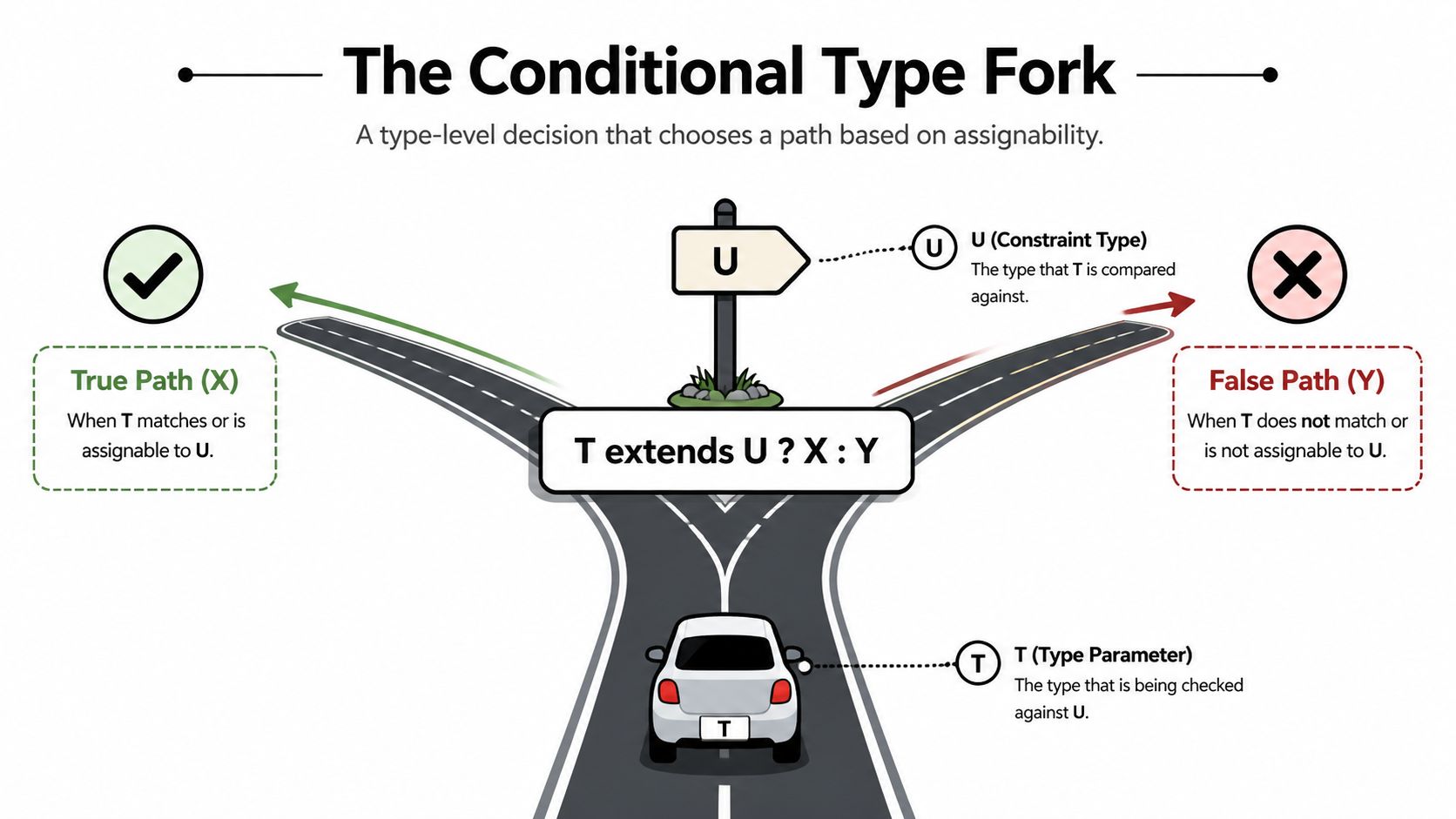
At the center of a typescript conditional type is one expression:
T extends U ? X : Y
Read it like an if statement for types.
If T is assignable to U, TypeScript picks X. If not, it picks Y. The official TypeScript handbook describes this pattern and shows how the check is based on assignability in TypeScript’s structural type system, not on inheritance in the class-heavy sense of the word, in the conditional types handbook entry.
A tiny example that makes the syntax click
Start with something simple:
type IsString<T> = T extends string ? true : false;
Now evaluate it mentally:
type A = IsString<string>; // true
type B = IsString<number>; // false
type C = IsString<'hello'>; // true
That third example matters. 'hello' is a string literal type, and it’s assignable to string, so the condition resolves to true.
Here’s the same idea as a short table:
Input T |
Check | Result |
|---|---|---|
string |
string extends string |
true |
number |
number extends string |
false |
'hello' |
'hello' extends string |
true |
The keyword extends can confuse people here. In a conditional type, think “is assignable to,” not “inherits from.”
Why this matters in real code
Suppose you want a helper type that only accepts object payloads:
type ObjectOrNever<T> = T extends object ? T : never;
Examples:
type Good = ObjectOrNever<{ id: number }>; // { id: number }
type Bad = ObjectOrNever<string>; // never
That gives you a strong compile-time gate. If someone tries to pass a primitive where your pipeline expects a structured payload, the type system rejects it.
A mental model that helps under pressure
Conditional types are easier to reason about if you break them into three parts:
- The candidate:
T - The rule:
U - The branch result:
XorY
For example:
type ApiInput<T> = T extends string ? { query: T } : never;
- Candidate:
T - Rule: must be assignable to
string - True branch: wrap it as
{ query: T } - False branch: reject with
never
That is its significant strength. A conditional type doesn’t just label a type. It transforms it.
Practical rule: If your type needs to answer “what should happen when the input has this shape,” you’re in conditional-type territory.
From toy examples to business-safe helpers
In business software, types often carry policy.
A lead-import function might only accept records with required identifiers. A webhook transformer might return one shape for valid event payloads and another for unsupported payloads. A route helper might derive a typed response from a string endpoint. All of those are “if this type matches, produce that type” problems.
Once your team sees T extends U ? X : Y as a fork in the road instead of mysterious syntax, the rest of the feature gets much easier. You stop memorizing patterns and start composing them.
Understanding Distributive Conditional Types
A common SaaS problem looks innocent at first. One integration sends string | null, another sends string, and a third sends undefined when a field is missing. Your code has to treat those inputs differently, but your team does not want every workflow step filled with repeated null checks and defensive branches.
Distributive conditional types solve that by filtering a union one member at a time.
Here is the classic example:
type NonNullable<T> = T extends null | undefined ? never : T;
The part that surprises people is how TypeScript handles a union input:
type Result = NonNullable<string | null | undefined>;
TypeScript does not test the whole union as one unit. If the checked type is a bare type parameter like T, the conditional runs separately for each member of the union. That means the compiler rewrites the example into this:
NonNullable<string> | NonNullable<null> | NonNullable<undefined>
Then it evaluates each branch:
string extends null | undefined ? never : string
null extends null | undefined ? never : null
undefined extends null | undefined ? never : undefined
So the result becomes:
string | never | never
And that simplifies to:
string
That behavior is called distribution. It works like a quality-control checkpoint on a conveyor belt. Each union member passes through the same rule, and the members that fail get removed.
Why never matters so much
never is what makes the filtering useful. In a union, never disappears.
That gives you a clean way to keep only the members that match a business rule. If a type does not qualify, return never. TypeScript drops it from the final union.
type OnlyStrings<T> = T extends string ? T : never;

type Mixed = string | number | boolean;
type StringsOnly = OnlyStrings<Mixed>; // string
This matters in product code because unions often represent real states in a workflow, not abstract type puzzles. A webhook payload might be InvoiceCreated | CustomerDeleted | undefined. A CRM field might be string | null. A job result might be SuccessResponse | ErrorResponse. Distribution lets you write one rule and apply it across every case without hand-maintaining separate helper types.
Why B2B teams should care
At a company like MakeAutomation, this pattern maps directly to integration safety.
Suppose your automation platform accepts payloads from multiple systems. Some send complete objects. Some send null during retries. Some return primitive status values instead of structured records. If your downstream sync step expects only valid object payloads, distributive conditional types let you express that rule once and let the compiler enforce it everywhere the helper is used.
That reduces two expensive categories of mistakes:
- sending invalid data into internal processing steps
- widening API helper types until every caller has to guess what might arrive
Here is a filtering helper in that spirit:
type SafePayload<T> = T extends object ? NonNullable<T> : never;
And here is how it behaves:
| Input type | Final SafePayload<T> |
|---|---|
{ id: string } |
{ id: string } |
null |
never |
undefined |
never |
string |
never |
That kind of helper keeps pipeline contracts clear. If a sync step requires an object with fields, a primitive or nullable value gets rejected during compilation instead of surfacing later as a failed CRM write or a broken webhook transformation.
The mistake that causes confusion
Developers often expect unions to stay grouped together during the check. That expectation causes a lot of head-scratching.
If a conditional type gives you a result that feels too aggressive, ask a simple question first: did TypeScript distribute over a union? In many cases, that is the whole story. Once your team sees that pattern, helpers like Extract, Exclude, and NonNullable become easier to reason about and much easier to use in API and automation code.
Unlocking Dynamic Types with the infer Keyword
Conditional types become much more useful when they stop only checking types and start extracting parts of them. That’s what infer does.
Inside the extends clause, infer lets you capture a type variable from a matching structure. You can think of it as telling TypeScript, “if this pattern matches, pull out the interesting piece and name it.”
A compact example looks like this:
type UnpackPromise<T> = T extends Promise<infer R> ? R : T;
If T is Promise<User>, the inferred R becomes User. If T isn’t a promise, the type falls back to T.

A promise example you’ll actually use
type UnpackPromise<T> = T extends Promise<infer R> ? R : T;

type A = UnpackPromise<Promise<string>>; // string
type B = UnpackPromise<number>; // number
That alone is handy for API wrappers, async helpers, and SDK utilities. But the deeper lesson is more important than the promise itself. infer turns a conditional type into a pattern matcher.
If the input looks like Promise<something>, capture something.
Extracting a property type
The TypeScript handbook includes a strong example of this pattern:
type MessageOf<T> = T extends { message: infer M } ? M : never;
That means:
- if
Thas amessageproperty - capture its type as
M - return
M - otherwise return
never
Examples:
type EmailEvent = { message: string; status: 'sent' };
type RetryEvent = { retries: number };

type A = MessageOf<EmailEvent>; // string
type B = MessageOf<RetryEvent>; // never
The handbook notes that the true branch narrows the generic, so inference only happens when that shape exists. That’s a major reason conditional types work so well in generic APIs. You can safely extract data only when the input proves it has the right structure.
Why this changes how you design helpers
Without infer, you often hard-code access paths into generic types or pile up indexed lookups that only work after extra constraints.
With infer, you can define shape-driven helpers:
type ArrayItem<T> = T extends (infer U)[] ? U : never;

type Lead = { id: string; company: string };
type LeadList = Lead[];

type Item = ArrayItem<LeadList>; // Lead
That style scales well because it follows structure, not naming conventions.
Mentor advice: Use
inferwhen you want the type system to discover part of a shape for you. Don’t use it to show off.
Where readers usually get stuck
The confusion usually comes from trying to understand two things at once:
- the conditional check
- the extraction
Split them apart.
Take this:
type Return<T> = T extends (...args: any[]) => infer R ? R : never;
The check is “is T a function type?”
The extraction is “if yes, capture the return type as R.”
That separation helps a lot when reading more advanced types.
A business example with payload extraction
Suppose an internal event system emits several event objects, but only some include a payload:
type PayloadOf<T> = T extends { payload: infer P } ? P : never;

type LeadCreated = {
  type: 'lead.created';
  payload: { leadId: string; ownerId: string };
};

type Heartbeat = {
  type: 'system.heartbeat';
};

type LeadPayload = PayloadOf<LeadCreated>; // { leadId: string; ownerId: string }
type HeartbeatPayload = PayloadOf<Heartbeat>; // never
That lets your event-processing code express a rule clearly. If an event carries a payload, extract it. If it doesn’t, don’t pretend one exists.
Why infer matters for APIs and SDKs
Modern SaaS applications are full of wrapper layers:
- a fetch helper around REST endpoints
- a client SDK around third-party services
- a background job processor around event queues
- an automation layer around CRM and AI actions
Each layer needs to derive types from existing structures instead of duplicating them manually. infer lets you build those derivations.
For example, if a route handler returns Promise<{ data: Lead[] }>, a helper can infer the resolved object or the nested data shape. If an SDK method accepts a callback, a utility can infer the callback’s parameter type. Once your team starts using infer well, type definitions become less repetitive and easier to evolve.
A small rule set for using infer well
- Match a real structure. Promise, array, function, or object shape.
- Capture only what you need. One inferred variable is often enough.
- Use
neverproperly. If the shape doesn’t match, reject it at the type level.
That’s the shift from static type checking to dynamic type construction. You’re no longer only asking whether a type qualifies. You’re building a new type from the parts that qualify.
Real-World Patterns for B2B Automation and APIs
A sales ops team ships a small change on Friday. One endpoint that used to return a list now returns a single object for one customer tier. The frontend still expects an array. The CRM sync job assumes the old shape. Nothing crashes at compile time, so the mistake reaches production and shows up as broken dashboards, stalled automations, and support tickets.
That is the typing problem B2B teams run into again and again. Shared utilities sit in the middle of API calls, queue workers, CRM actions, billing events, and AI-assisted workflows. One helper accepts many inputs, but each input follows a different contract. If the type system treats all of them as one broad union, uncertainty spreads through the codebase.
Conditional types help you keep those contracts aligned without writing a separate type layer for every variation. For a company like MakeAutomation, that matters because the expensive failures are rarely academic. They are missed syncs, invalid payloads, and automation branches that fire with the wrong data.
Typed API routes for modern SaaS apps
A useful pattern combines conditional types with template literal types so the route string helps determine the response type.
type ApiResponse<T> =
  T extends `/api/${infer Route}`
    ? Route extends '/users'
      ? User[]
      : Error
    : never;
The first time you see this, it can feel a little magical. The practical idea is simple. Your route already carries business meaning, so your types can read that meaning too.
A simplified version looks like this:
type Lead = { id: string; company: string };
type OutboundJob = { id: string; status: 'queued' | 'sent' };

type RouteResponse<T> =
  T extends '/api/leads' ? Lead[] :
  T extends `/api/leads/${string}` ? Lead :
  T extends '/api/outbound' ? OutboundJob[] :
  Error;

async function fetchTyped<T extends string>(route: T): Promise<RouteResponse<T>> {
  const res = await fetch(route);
  return res.json();
}
Now fetchTyped('/api/leads') resolves to Lead[], while fetchTyped('/api/leads/123') resolves to Lead. The helper stays generic, but the caller gets precise types.
That precision saves real work in SaaS products. A reporting screen usually wants a collection. A detail page wants one record. An outbound queue endpoint may return job statuses instead. If your fetch layer returns unknown, every caller has to rebuild the same checks. If the route drives the return type, the compiler catches mismatches closer to the change that caused them.
Route-aware typing also helps with external integrations. Teams building purchasing or fulfillment flows often wrap third-party APIs behind internal service clients. The programmatic Walmart purchasing API is a good example of an integration surface where route-specific typing can reduce mistakes in request builders and response adapters.
Safer SDK surfaces for internal platforms
Growth-stage SaaS teams often end up with an internal SDK even if they never name it that way. It might wrap CRM actions, campaign orchestration, lead enrichment, or support workflows. Over time, those helpers become the backbone of daily operations.
Conditional types let one interface branch into the right contract based on a known input. A command router is a clear example:
type AutomationRoute = '/leads' | '/outbound';

type Handler<T> = T extends '/leads'
  ? (payload: { leadId: string }) => Promise<'accepted'>
  : T extends '/outbound'
  ? (payload: { campaignId: string }) => Promise<'queued'>
  : never;
This pattern works like a switch statement for your type system. Pass '/leads', and the compiler expects a lead payload. Pass '/outbound', and it expects a campaign payload. The business rule lives in one place instead of getting copied into docs, comments, and runtime guards.
That is much safer than this:
(payload: any) => Promise<any>
Teams building these kinds of abstractions in Node often need both runtime structure and type discipline. If you are designing the surrounding service layer, this guide to building a Node.js app for production workflows fits that same engineering problem.
A few high-value uses show up often in B2B systems:
- CRM actions need different payload shapes for create, enrich, assign, or archive operations.
- Outbound systems return different result types for draft, queued, failed, and sent jobs.
- Support automations receive event unions where only some event types contain the fields a handler needs.
Compile-time payload safety for automation pipelines
One of the highest-return patterns is payload gating. The goal is straightforward. Let valid automation inputs pass through, and reject invalid ones before they can enter the queue.
type SafePayload<T> = NonNullable<T> extends object ? T : never;

function queueForCrmSync<T>(payload: SafePayload<T>) {
  // enqueue payload
}
Results:
queueForCrmSync({ id: 'lead_1' }); // ok
queueForCrmSync(null); // type error
queueForCrmSync('lead_1'); // type error
This can look small on the page. In production systems, it is a boundary check for business data.
If a scoring job, enrichment flow, or AI routing step receives null where an object was expected, the bug often appears far downstream. Someone investigates a failed sync, traces it through logs, and discovers that a bad payload slipped through a generic helper twenty minutes earlier. Conditional types let you stop that class of error at the entry point.
For B2B automation companies, that is why conditional types matter so much. They turn shared utilities from loose wrappers into policy-enforcing layers. Your API helpers can return the right shape. Your SDK commands can demand the right payload. Your queues can reject invalid input before it spreads to the expensive parts of the system.
A short walkthrough helps if you want a visual explanation before applying these patterns in a real codebase:
A decision framework for where conditional types belong
Not every helper needs this level of type logic. The best fits tend to be the places where one input clearly determines one output contract.
| Situation | Good conditional-type fit | Why |
|---|---|---|
| Generic fetch helpers | Yes | Route or input string often determines response shape |
| CRM payload validation | Yes | Invalid states can be rejected before runtime |
| Event extraction | Yes | Union members often need filtering or payload inference |
| One-off business functions | Maybe not | Overloads or explicit types may read better |
The business payoff is straightforward. Reusable utilities become more precise. Precise utilities produce fewer ambiguous states. In API-heavy and automation-heavy SaaS systems, that means fewer bad assumptions reaching production.
Common Anti-Patterns and Readability Traps
Conditional types are powerful enough to become a problem.
Teams discover them, realize they can encode almost any rule at the type level, and then build a maze that nobody wants to touch six months later. The compiler may still accept it. Your teammates won’t.

The nested-ternary type that scares everyone
A common smell looks like this:
type ResolveInput<T> =
  T extends string ? { kind: 'email'; value: T } :
  T extends number ? { kind: 'id'; value: T } :
  T extends { externalId: infer E } ? { kind: 'external'; value: E } :
  T extends null | undefined ? never :
  { kind: 'unknown'; value: T };
Is it clever? Yes.
Will a new team member understand it quickly? Usually not. They now have to parse assignability rules, branch ordering, and infer behavior before they can change a business rule. That’s friction, not elegance.
Readability beats raw type power
Use a simple test. If you’d struggle to explain a type in one minute during code review, it’s probably too dense.
A lot of those cases improve if you split one giant conditional into named helpers:
type EmailInput<T> = T extends string ? { kind: 'email'; value: T } : never;
type IdInput<T> = T extends number ? { kind: 'id'; value: T } : never;
type ExternalInput<T> = T extends { externalId: infer E } ? { kind: 'external'; value: E } : never;

type ResolveInput<T> = EmailInput<T> | IdInput<T> | ExternalInput<T>;
This isn’t always shorter, but it’s often easier to maintain because each helper answers one question.
Don’t optimize a type for cleverness. Optimize it for the teammate who has to debug a failing build while a release is waiting.
Sometimes overloads are the better tool
A mature TypeScript codebase uses multiple techniques. Conditional types are one of them, not the whole language.
If your problem is “this function accepts three known input shapes and returns three known outputs,” function overloads may be clearer:
function getUser(input: string): User;
function getUser(input: number): User;
function getUser(input: boolean): null;
function getUser(input: string | number | boolean): User | null {
  if (typeof input === 'string' || typeof input === 'number') {
    return { id: 1, email: 'a@example.com', name: 'Ada' };
  }
  return null;
}
Compare that with a generic conditional return type. The overload version is more explicit and often easier for application developers to read.
Here’s a quick comparison:
| Approach | Best when | Trade-off |
|---|---|---|
| Conditional type | Input-to-output mapping is reusable across many APIs | Can become abstract |
| Function overloads | You have a small fixed set of cases | More repetitive |
| Plain union types | Precision isn’t critical | Less compiler guidance |
Hidden technical debt at the type level
Unreadable types are still technical debt. They don’t slow customers directly, but they slow the team that serves customers.
If you’re trying to keep a codebase healthy as it grows, these practical strategies for code quality are worth reviewing because the same principles apply to type definitions. Complexity that nobody revisits becomes a drag on delivery.
Type complexity also affects test code. The more conditional logic your types encode, the more your tests need clear mocking boundaries and explicit assumptions. If your team struggles there, this guide on mocking functions in Jest is a useful companion for keeping implementation tests readable while your types stay strict.
Rules I give teams before approving advanced types
- Name intermediate types when a single conditional does more than one conceptual job.
- Prefer explicitness if the logic is tied to one function and won’t be reused.
- Stop at the business boundary. Don’t model every microscopic distinction if the product doesn’t benefit.
- Make failure obvious. Returning
nevershould communicate a real invalid state, not punish callers with mystery errors.
The goal isn’t to avoid conditional types. The goal is to use them where they increase clarity and remove risk, then stop before they become puzzles.
From Type Puzzles to Predictable and Scalable Code
Conditional types earn their place when they make business code safer and simpler to evolve.
The core pattern is straightforward: T extends U ? X : Y. From there, distribution lets you filter unions cleanly, and infer lets you extract useful pieces from matching shapes. Those aren’t academic tricks. They’re practical tools for route-aware APIs, event processing, SDK design, and compile-time payload validation.
That matters in SaaS and B2B systems because the code usually sits between valuable records and expensive actions. A bad payload can break a CRM sync. A vague fetch helper can leak uncertainty through a dashboard. A weakly typed automation step can hand the wrong shape to an AI workflow and fail far from the original source of the bug.
Conditional types help you shift those failures left. They turn hidden assumptions into explicit contracts.
If you’re hiring for that level of engineering maturity, this hiring guide for TypeScript engineers is a useful reference for spotting developers who can move beyond syntax and design safer systems. And if your stack also needs stronger runtime guarantees alongside better types, this guide to a JavaScript data validation library for production apps is a practical next step.
Mastering typescript conditional type patterns isn’t about writing the fanciest type alias in the room. It’s about making your codebase more predictable, your APIs more trustworthy, and your automation layers harder to break.
If your team wants help turning that kind of type safety into real operational reliability, MakeAutomation can help design and implement AI automation, CRM workflows, and scalable process systems that don’t collapse under messy real-world data.