
Data Pipeline Kafka: data pipeline kafka for scalable real-time flows
At its core, a data pipeline with Kafka uses Apache Kafka as the central hub for all your real-time data. Think of it as a super-fast, incredibly reliable nervous system that moves continuous streams of information from all your sources (producers) to any destination that needs it (consumers).
Why Kafka Is the Backbone of Modern Data Pipelines
Let's get real. Your business data is probably all over the place. Sales information is sitting in your CRM, user activity logs are in an analytics tool, and your marketing campaign results are siloed on another platform. Trying to get a single, unified view often means waiting for slow, manual data dumps. This old-school approach kills any chance of making smart, real-time decisions.
A data pipeline built on Kafka completely flips that script. It creates a central, flowing stream of data, allowing different applications and services to communicate instantly and reliably. This isn't just about shuffling data around; it's about building a living, event-driven architecture that powers immediate insights and automated actions.
From Data Silos to a Central Stream
For any B2B or SaaS company, acting on data the second it's created is a massive competitive edge. Kafka was built for this, designed from the ground up to handle huge volumes of events without even blinking.
What makes it the go-to standard?
- It Decouples Your Systems: Producers, like your website's clickstream tracker, don’t need to know anything about the consumers, like a real-time dashboard or a data warehouse. They just fire events into Kafka, and any system with the right permissions can tap into that stream.
- It's Built for Durability: Kafka stores data in a distributed, replicated log. If one of your consumer applications crashes, the data is safe. Once the app is back online, it can pick up right where it left off. No more lost events.
- It Scales with Your Growth: Kafka scales horizontally. As your data grows from thousands to billions of events a day, you can just add more brokers (servers) to the cluster to handle the increased load, all without downtime.
The big idea is simple but incredibly powerful: treat everything as a stream of events. A new user signs up? That's an event. A payment goes through? Event. An AI agent updates a CRM record? You guessed it—another event. Kafka is designed to capture every single one.
Understanding the Core Components
To really get a feel for how a Kafka pipeline works, let's look at its essential parts. Imagine a typical SaaS scenario where you want to connect your product, sales, and marketing data.
Here's a quick reference table breaking down Kafka's essential parts and their real-world roles in a business automation scenario.
Kafka Components in a B2B SaaS Context
| Component | Role in Your Pipeline | Practical SaaS Example |
|---|---|---|
| Producers | These are the applications that publish (write) data to Kafka. | Your web application sends a "User Signed Up" event. |
| Topics | A topic is a named category or feed where records are stored. | You might have topics named signups, invoices, or support_tickets. |
| Brokers | These are the servers that make up the Kafka cluster. | They store the data, handle replication, and serve requests from producers and consumers. |
| Consumers | These are the applications that subscribe to topics and process the data. | A data warehouse ingests from the signups topic to update a master user table. |
This setup is far from theoretical; it’s a proven model. Apache Kafka is the clear leader in the big data processing market, holding a commanding 18.13% market share worldwide. That puts it far ahead of the alternatives, cementing its status as the go-to choice for businesses that depend on real-time data.
Kafka is especially critical for effective marketing data integration, as it pulls together disparate sources into a unified, live feed. This structure allows your teams to build sophisticated automation and analytics without creating a tangled mess of point-to-point connections. To dig deeper into this, check out our guide on data integration best practices.
Architecting Your First Kafka Data Pipeline
Alright, let's move from theory to practice. This is where building a data pipeline with Kafka gets interesting. The real goal isn't just to connect a few systems; it's to design a flow of data that solves an actual business problem. Are you capturing webhook events? Synchronizing databases? Or maybe enriching data streams on the fly? The architectural pattern you land on will make all the difference.
Picture a fast-growing e-commerce platform. They need to process user clickstream data the second it happens to feed their personalization engine. For them, a simple, direct pipeline from their web servers (producers) to a stream processing application (consumer) is the perfect fit. The trick is to map this flow out clearly before you write a single line of code.
Choosing the Right Ingestion Pattern
First things first: how are you getting data into Kafka? Your decision here really depends on where the data is coming from and the resources you have.
- Direct API Integration: This is the most hands-on approach. Your applications use a Kafka client library (in Python, Java, Go, etc.) to publish events directly to a topic. It offers total control and is ideal for custom-built applications, like firing a
NewUserSignedUpevent from your backend service. - Log Scraping: Got legacy systems or apps that just spit out log files? No problem. You can use an agent like Fluentd or Logstash to tail these files and push new entries into a Kafka topic. It’s a fantastic way to integrate systems you can’t easily change.
- Change Data Capture (CDC): This one is a game-changer for databases. Tools like Debezium can watch your database's transaction log. Every
INSERT,UPDATE, orDELETEgets captured as a distinct event and streamed into Kafka. This turns your database into a real-time source without adding any load to the application layer.
This diagram shows a clean, high-level view of a common pipeline, moving data from producers through Kafka's central log to the final consumers.
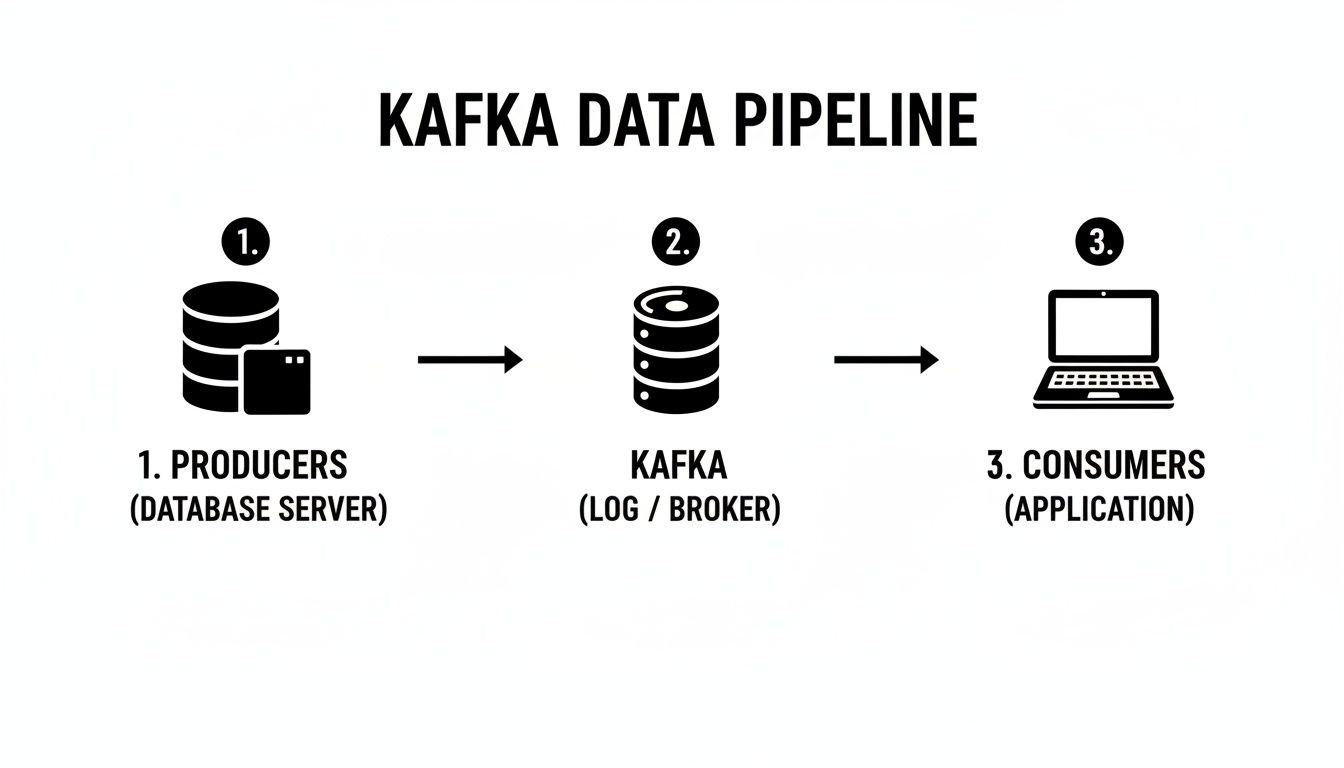
You can see how Kafka acts as a central buffer, decoupling the producers from the consumers. This lets them all work independently and at their own pace, which is a huge win for resilience.
Leveraging Kafka Connect for Rapid Integration
So, what happens when you need to pull data from a standard source like PostgreSQL or send it off to a destination like Elasticsearch? Writing custom producer and consumer code for every single integration is a slow, error-prone nightmare. This is exactly why Kafka Connect should be your best friend.
Kafka Connect is a framework designed to run pre-built connectors that shuttle data into and out of Kafka. Think of it as a huge library of plug-and-play integrations. Instead of building a custom Java app to constantly poll a database, you can configure the official JDBC source connector with just a few lines of JSON.
I can't stress this enough: by using Kafka Connect, you can often build an entire data pipeline without writing a single line of custom code. This frees you up to focus on the business logic, not the low-level plumbing.
Let's say a marketing agency wants to pipe data from a client's CRM into their analytics warehouse. With Kafka Connect, they could:
- Ingest: Use a source connector to stream all new lead data from the CRM into a
leadstopic in Kafka. - Process: A small consumer application reads from the
leadstopic to enrich the data with information from a third-party service. - Load: A sink connector picks up the enriched lead data from a new topic and writes it into their data warehouse for analysis.
For many businesses, mastering financial data integration is a core challenge. Using pre-built connectors for various financial systems can save an unbelievable amount of development effort.
Defining Your Topics and Schemas
One of the most common mistakes I see teams make is treating Kafka topics as an afterthought. Your topic naming convention and your partitioning strategy are foundational architectural decisions, not just minor details. A good habit is to adopt a consistent naming pattern, like source.entity.version (e.g., crm.leads.v1).
Just as important is defining the shape of your data. It's tempting to just sling unstructured JSON blobs around at first, but that quickly turns into a maintenance headache. Using a schema registry with a format like Avro forces a contract between your producers and consumers. It guarantees that your data is always structured correctly and gives you a clear path for evolving your data model over time without breaking everything downstream.
As you think through the pipeline's infrastructure, applying principles from https://makeautomation.co/devops-and-continuous-delivery/ will help ensure your deployment is both smooth and scalable from day one.
Building Producers and Consumers That Actually Work

Once you have a solid architecture in place, the real work begins: writing the applications that send and receive data. These are your producers and consumers, and they're the heart of any Kafka-based pipeline. This is where your business logic comes alive, turning a raw stream of events into tangible business value.
Producers are the entry point. They could be anything from a microservice firing off an event when a customer signs up, to a fleet of IoT devices reporting telemetry. Their one job is to package up data and send it to the right Kafka topic.
Consumers, on the other hand, are the action-takers. They subscribe to topics, read the incoming events, and do something meaningful with them—whether that’s updating a database, powering a real-time dashboard, or kicking off an automated workflow.
Crafting Reliable Kafka Producers
A producer’s main job is to get data into Kafka without any hiccups. But reliability is more than just hitting "send." It means making sure the data is well-structured, durable, and understandable for any consumer, both today and five years from now.
One of the most common mistakes I see teams make is just throwing unstructured JSON into their topics. It feels fast and easy at first, but it quickly becomes a maintenance nightmare when requirements change. A far better approach is to adopt a schema-driven format like Avro.
When you pair Avro with a Schema Registry, you unlock some powerful benefits:
- Data Validation: Producers physically can't send junk data. This keeps your pipeline clean from the start.
- Schema Evolution: Need to add a new field to an event? No problem. You can evolve your schemas over time without breaking all your existing consumer applications.
- Compact Serialization: Avro is a binary format, which means your messages are significantly smaller and faster to send over the network compared to text-based JSON.
This focus on data quality is more than just a "nice-to-have." The streaming analytics market, which is built on technologies like Kafka, is projected to skyrocket from USD 41.84 billion to an incredible USD 442.74 billion by 2035. This growth is fueled by reliable, event-driven systems. You can dig into more details on the streaming analytics market growth and what it means for data engineering.
Implementing Idempotent Producers
Here's a classic problem: a producer sends a message, but a temporary network glitch prevents it from receiving a confirmation. So, it tries again. Now you have duplicate events in your topic, which could lead to everything from skewed analytics to double-charging a customer.
Thankfully, Kafka has a built-in solution: idempotency.
By simply setting enable.idempotence=true in your producer's configuration, Kafka takes care of the rest. The broker assigns a unique ID to each batch of messages from the producer. If a retry occurs, the broker sees the duplicate ID and just ignores it, guaranteeing each message is written to the topic exactly once.
Choosing the Right Data Serialization Format
Deciding between JSON, Avro, Protobuf, or something else is a critical architectural choice. There's no single "best" answer; it depends entirely on your needs for performance, flexibility, and long-term maintainability.
This table breaks down the key trade-offs to help you make an informed decision.
| Format | Key Advantage | Best Use Case | Schema Evolution Support |
|---|---|---|---|
| JSON | Human-readable and ubiquitous | Prototyping, debugging, simple pipelines with no strict schema requirements | None (unless enforced by external tools) |
| Avro | Strong schema enforcement and evolution, excellent for data lakes | The standard for most Kafka-based data pipelines, especially when integrating with Hadoop or Spark | Excellent (backward, forward, full compatibility) |
| Protobuf | High performance, language-agnostic, good for gRPC | Microservices communication, performance-critical pipelines | Good (backward compatibility for new fields) |
| JSON Schema | Combines JSON's readability with schema validation | APIs, web-based systems where readability is a top priority | Good (supports validation and evolution rules) |
Ultimately, for most serious data pipelines, the structured nature of Avro or Protobuf pays dividends down the line by preventing data quality issues before they even start.
Building Scalable Consumers and Consumer Groups
Your consumers need to be just as tough as your producers. A single consumer trying to sip from a high-volume topic will quickly get overwhelmed. This is where Kafka’s killer feature, consumer groups, comes into play.
When you launch multiple instances of your consumer application with the same group.id, Kafka automatically distributes the topic's partitions among them. If one consumer crashes, Kafka rebalances the load across the healthy ones. It’s built-in scaling and fault tolerance, right out of the box.
Expert Tip: Your goal should always be to design stateless consumers. If an instance dies and its partitions are handed off, the new consumer should be able to pick up right where the old one left off by reading the last committed offset, without needing any shared state.
This model is incredibly effective. Imagine a B2B SaaS platform processing user activity events. As customer traffic surges during peak business hours, the engineering team can simply deploy more consumer instances. They automatically join the group and start sharing the workload, ensuring the pipeline keeps up without any manual intervention.
Mastering Offset Management for Processing Guarantees
Every message in a Kafka partition has a unique ID number called an offset. Consumers use this offset to track their progress, essentially bookmarking the last message they successfully processed.
The consumer client automatically commits these offsets back to Kafka, but you have full control over when this happens. This timing is what determines your processing guarantee.
- At-Least-Once Processing: The default and most common setting. The consumer processes a batch of messages first, then commits the offset. If it crashes before the commit, the next consumer will re-process that same batch, which can lead to duplicates. This is often solved by making the consumer's logic idempotent.
- At-Most-Once Processing: The consumer commits the offset before processing the message. If it crashes after the commit but before finishing its work, those messages are lost forever. This is risky and rarely used.
- Exactly-Once Processing: The holy grail. This involves using Kafka's transactional capabilities to tie the offset commit to the results of the processing. It ensures every message is processed once and only once, but it adds complexity. It's essential for financial systems or other critical workflows where duplicates or data loss are unacceptable.
For the vast majority of use cases, at-least-once processing is the right choice. By building your consumer logic to handle potential duplicates (idempotency), you get a robust and practical system without the overhead of exactly-once semantics.
How to Make Your Kafka Pipeline Scalable and Resilient
A data pipeline that buckles under pressure isn’t just an inconvenience; it's a liability. For any B2B or SaaS company that's growing, the real test of a data pipeline with Kafka is its ability to handle today’s load and tomorrow’s unexpected spikes without breaking a sweat. Building for resilience and scalability isn't something you bolt on later—it needs to be baked into your design from day one.
Kafka’s real strength is its distributed nature. It was engineered from the ground up to run across a cluster of servers (or brokers), creating a system that can tolerate failures and scale out horizontally. This isn't just a nice feature; it's the core reason so many companies rely on it for their most critical data flows.
The platform's reputation for being rock-solid is well-earned. In fact, industry analysis predicts that by 2026, over 40% of Fortune 500 companies will depend on Apache Kafka for everything from financial trading platforms to healthcare analytics. That kind of widespread adoption tells you a lot about its strength as a resilient backbone for real-time data. You can find more details in this guide on modern data streaming on angeloprea.com.
Protecting Your Data with Replication
At the very heart of Kafka’s resilience is data replication. When you create a topic, you aren’t just storing it on one machine. You’re creating copies, or replicas, that live on other brokers in the cluster. Think of this as your primary insurance policy against server failure.
You manage this safety net with a simple setting: the replication factor. For any production environment, a replication factor of 3 is the non-negotiable standard.
Here’s what that means for every partition in your topic:
- One leader replica: This is the active copy that handles all incoming writes from producers and serves data to consumers. It does all the work.
- Two follower replicas: These copies are constantly syncing with the leader, maintaining an exact, up-to-date backup of the data.
If the broker hosting the leader replica suddenly goes offline—whether from a hardware failure, a network glitch, or even just routine maintenance—Kafka’s controller automatically elects one of the followers as the new leader. This failover is incredibly fast, often happening in seconds, allowing your producers and consumers to carry on, completely unaware that anything even happened.
A replication factor of 1 might seem fine for a quick dev setup, but it’s a ticking time bomb in production. A single broker failure would lead to permanent data loss. This is one corner you should never, ever cut.
Scaling Your Throughput with Partitions
Replication takes care of fault tolerance, but partitions are how you unlock massive throughput. Every topic is split into one or more partitions, and these are the true unit of parallelism in Kafka. Simply put, more partitions mean more producers can write and more consumers can read at the same time.
Imagine your topic is a highway. A single-partition topic is just a one-lane road where all traffic gets stuck in a single file line. By adding more partitions, you’re adding more lanes. This allows your data traffic to flow much faster because it can be spread out across all the available lanes.
When you're planning your partitioning strategy, keep these tips in mind:
- Start with a solid baseline. A good rule of thumb is to have at least as many partitions as you have brokers. But always plan for growth. You can always add more partitions to a topic later, but you can never reduce the number.
- Match partitions to your consumers. To get the most out of parallel processing, you should have at least as many partitions as you have consumer instances in your largest consumer group. If you have a topic with 10 partitions but only 5 consumers, each consumer will end up handling 2 partitions.
- Think about your message key. When a producer sends a message with a key (like a
user_idororder_id), Kafka guarantees that all messages with that same key will always go to the same partition. This is absolutely critical for maintaining the correct order of related events.
This ability to scale horizontally is what makes modern systems tick, especially in architectures that lean on many interconnected services. To see how this concept applies more broadly, you might find our deep dive into Node.js and microservices useful.
Expanding Your Cluster Without Downtime
So what happens when your business takes off and your existing cluster starts to feel the strain? With Kafka, the answer is refreshingly simple: just add more brokers.
The beauty of Kafka’s design is that you can add new servers to a live cluster with zero downtime. Once a new broker is up and running, you can use Kafka's built-in tools to reassign partitions, which automatically spreads the existing data and workload onto the new machine. This rebalancing act happens seamlessly in the background, giving you more storage capacity and processing power to handle whatever comes next.
Keeping Your Pipeline Healthy: Monitoring and Security

Getting your data pipeline with Kafka into production is a huge win, but the real work starts now. A running pipeline isn't a "set it and forget it" system. Without proper monitoring and security, you're essentially flying blind. You risk everything from subtle data delays and processing failures to major security breaches that could expose sensitive customer data.
This isn't just a technical exercise. When you're handling customer information, robust security and observability are table stakes for building trust and meeting compliance frameworks like GDPR or SOC 2. It's a core responsibility.
Key Metrics You Absolutely Must Track
To keep your Kafka pipeline humming, you need to know what's happening under the hood. The trick isn't to track everything, but to focus on the metrics that give you the clearest signal when trouble is brewing. For this, most of us in the field lean on a combination of Prometheus for scraping metrics and Grafana for building dashboards.
Here are the vital signs I always put front and center on my dashboards:
- Consumer Lag: If you only track one thing, make it this. Consumer lag shows you how many messages behind your consumers are from the end of the log. If this number is steadily climbing, your consumers aren't keeping up. That's a direct path to stale data and downstream delays.
- Broker Health: Two things here are crucial: under-replicated partitions and resource utilization. Under-replicated partitions mean you've lost your data redundancy, putting you one failure away from data loss. High CPU or memory on a broker is an early warning that it's about to fall over.
- Network Throughput: Watch your bytes-in and bytes-out per second. A sudden, unexplained nosedive could mean a producer just died. A massive, unexpected spike could signal a misconfigured upstream app flooding your topics.
The real game-changer is moving from watching dashboards to getting automated alerts on these metrics. Set a threshold for consumer lag, for example. An alert lets you investigate and scale your consumers before your users start complaining about old data. That's the difference between firefighting and engineering.
Implementing Essential Security Layers
A fresh Kafka install is wide open. By default, anyone who can reach the brokers on the network can produce, consume, and read any topic they want. In any real-world environment, that’s a non-starter. Securing your data pipeline with Kafka means locking it down with three critical layers of defense.
1. Encrypt Data in Transit with SSL/TLS
First things first: encrypt the traffic. All the data flowing between your clients (producers and consumers) and the Kafka brokers needs to be scrambled. This prevents anyone on the network from eavesdropping on potentially sensitive information as it flies by.
Configuring SSL/TLS is the baseline for this. It ensures that even if someone manages to intercept the network packets, all they'll see is gibberish. This is a hard requirement for pretty much any security or compliance audit.
2. Authenticate Clients with SASL
Encryption protects the data, but it doesn't say anything about who is sending or receiving it. That's what authentication is for. We use SASL (Simple Authentication and Security Layer) to force every single client to prove its identity before it can establish a connection.
There are a few SASL mechanisms, but SASL/PLAIN (username and password) is a solid, straightforward choice for many internal systems. This simple step ensures that only your approved applications can even talk to the cluster.
3. Authorize Access with ACLs
Okay, so a client is authenticated. Now what? You still need to control what it's allowed to do. Can the billing-service write to the orders topic? Should the analytics-dashboard be able to read from the user_profiles topic? You manage these permissions with Access Control Lists (ACLs).
ACLs let you get incredibly specific with your rules:
- The
payment-processorprincipal can WRITE to thetransactionstopic. - The
fraud-detection-serviceprincipal can READ from thetransactionstopic. - No one else can touch it.
This is the principle of least privilege in action, and it’s a security best practice for a reason. It drastically shrinks your blast radius. If one of your services is ever compromised, the attacker's access is limited to only what that service was permitted to do, protecting the rest of your data pipeline. These three layers—encryption, authentication, and authorization—are your foundation for a production-ready, secure Kafka environment.
Your Kafka Pipeline Questions, Answered
When you're building your first data pipeline with Kafka, the architectural diagrams are one thing, but the real-world "what ifs" are another. It's natural to wonder about the trade-offs and decisions you'll face. Let's tackle some of the most common questions that pop up when engineers and founders start working with Kafka.
"Why Not Just Use Postgres as a Simple Queue?"
This comes up a lot, especially for teams that live and breathe relational databases. The idea is simple: just use a Postgres table as a basic job queue. It feels familiar and quick. But this approach misunderstands what Kafka is really for. Kafka isn't just a queue; it's a persistent, replayable log built from the ground up for event streaming.
Trying to use Postgres for this job usually creates a pile of operational headaches down the road:
- Performance Hits: You'll have multiple services constantly polling a table, which hammers your primary database. This can slow down your main application—the last thing you want.
- Scaling Walls: Postgres relies on a single-writer model. As your data volume explodes, you can't just spin up more consumers to increase throughput like you can with Kafka's distributed partitions. You'll hit a wall.
- DIY Features: You'd be on the hook for building critical streaming features yourself. Things like consumer groups for load balancing, fault tolerance, and a rich connector ecosystem simply don't come out of the box.
Postgres is fantastic for managing structured, relational data. Kafka is exceptional for streaming event data. Forcing one to do the other's job is a recipe for building a system that's less reliable and far more complex than it needs to be.
"How Is Kafka Different from a Regular Message Queue?"
This question really gets to the core of Kafka’s unique design. Traditional message queues, like RabbitMQ or Amazon SQS, work on a different principle. Once a consumer reads and acknowledges a message, it’s usually gone for good—deleted from the queue.
A data pipeline with Kafka is fundamentally different. Messages, or events, are written to a durable, append-only log. They aren't deleted just because someone read them. This one design choice unlocks some incredibly powerful patterns:
- Event Replayability: A consumer can rewind to any point in the log—even the very beginning—and re-process events. This is a lifesaver when you need to recover from a bug in your code or onboard a brand new service that needs to build its state from historical data.
- Multiple, Independent Consumers: Different teams and services can tap into the same event stream without getting in each other's way. Your analytics team can be loading events into a data warehouse while a separate real-time alerting service is watching for anomalies—both reading from the same topic at their own pace.
A simple analogy: a traditional queue is like a mailbox where you remove the letters after you read them. Kafka is more like a library's permanent archive; anyone with a library card can come in and read the books whenever they want, but the books always stay on the shelf for the next person.
"What's the Best Way to Handle Large Messages in Kafka?"
Out of the box, Kafka is tuned for smaller, high-frequency messages, usually under 1 MB. If you try to stuff large payloads—like high-resolution images or massive JSON documents—directly into Kafka, you're going to give your brokers a really bad day. Performance will suffer.
Thankfully, there’s a well-known solution for this: the Claim Check pattern.
Instead of pushing the huge payload into a Kafka message, you first upload it to a dedicated object store like Amazon S3 or Google Cloud Storage. The Kafka message itself then contains only a small "claim check"—basically a pointer or a URL to where the large object is stored.
The consumer’s workflow becomes simple: it reads the tiny message from the Kafka topic, uses the pointer to fetch the full payload from the object store, and then gets to work. This approach lets you keep your pipeline snappy and efficient by letting each system do what it does best.
At MakeAutomation, we specialize in designing and building robust automation and AI systems that help B2B and SaaS businesses scale. If you're looking to implement data pipelines that cut out manual work and fuel real growth, we have the expertise to make it happen. Find out how we can help at https://makeautomation.co.