
How to Implement AI in Business A Guide for SaaS and B2B
A successful AI initiative is built on a solid strategy, not just shiny new technology. It all starts by zeroing in on a specific business problem, building a rock-solid business case that screams ROI, and getting your team on board before you even think about picking a tool.
Laying the Groundwork for AI Success
Jumping into an AI project without a clear plan is a recipe for disaster. Before you start demoing complex models or signing contracts, the most important thing you can do is define why you need AI in the first place. The goal isn't just to "do AI"; it's to solve a real, nagging business problem that's costing you time, money, or your competitive edge.
So many B2B and SaaS companies get swept up in the hype, but a practical implementation always begins with simple, honest questions. Are you bleeding customers due to slow support times? Is your sales team burning hours on manual lead qualification instead of selling? Could your client onboarding be faster and less prone to human error?
These are the kinds of high-impact challenges where AI can deliver results you can actually measure.
Pinpoint the Problem and Define the Opportunity
Instead of asking, "How can we use AI?" try flipping the script: "What's our biggest operational bottleneck, and could AI help fix it?"
Let's say a SaaS company's support team is constantly swamped with the same basic questions over and over. The real problem isn't a lack of AI; it's a massively inefficient support workflow. An AI-powered chatbot could be the perfect solution to handle those tier-one queries, freeing up your human agents to tackle the truly complex issues that require their expertise.
This problem-first approach ensures your investment is targeted and purposeful. Once you have a crystal-clear pain point in your sights, you can start building a business case that stakeholders can't ignore.
This initial flow is all about getting the fundamentals right: find the problem, build the case, and then get your team aligned.
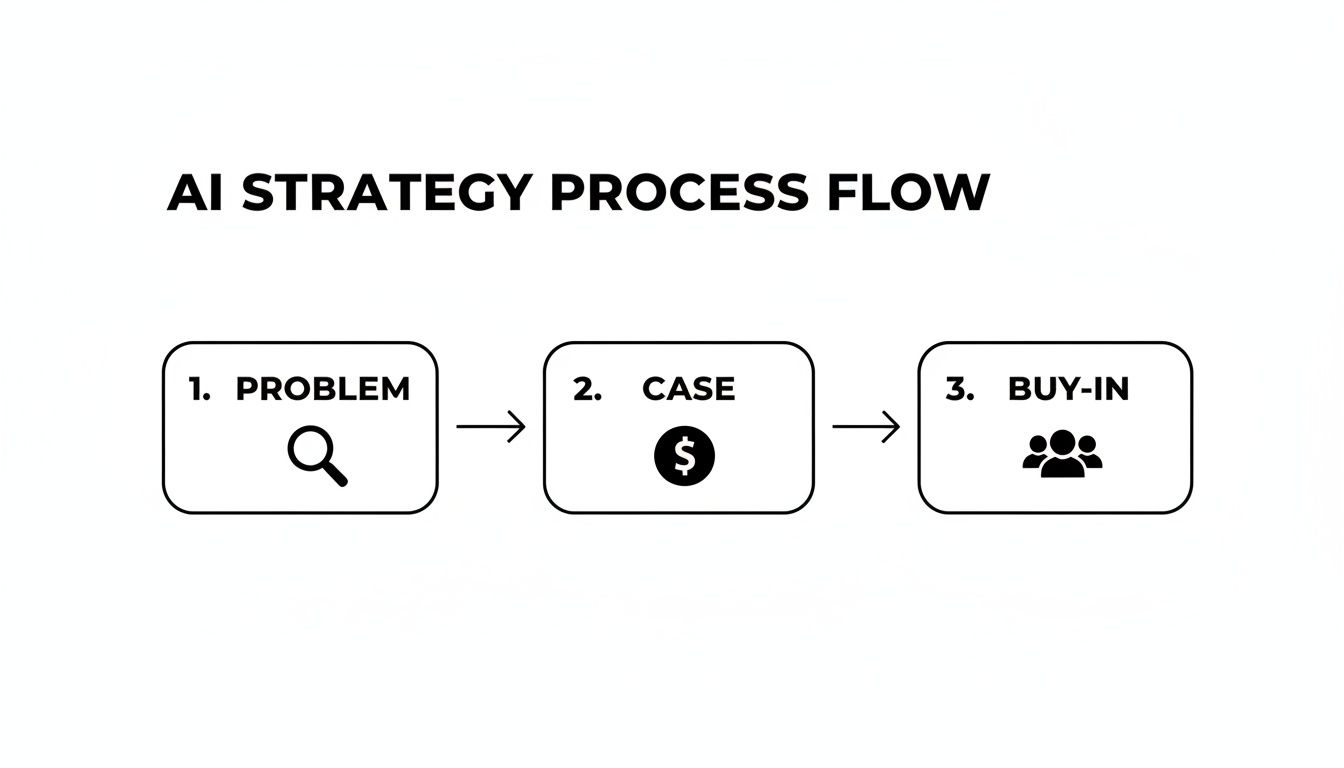
As you can see, the technology is the last piece of the puzzle, not the starting point.
To help structure this thinking, you can use a simple framework to map out and score potential AI projects across the business.
AI Opportunity Assessment Framework
| Business Area | Problem to Solve | Potential AI Solution | Estimated Impact (1-5) | Implementation Feasibility (1-5) |
|---|---|---|---|---|
| Sales | High volume of unqualified leads wasting reps' time. | AI-powered lead scoring to prioritize high-intent prospects. | 5 | 4 |
| Customer Support | Long wait times for simple, repetitive questions. | An intelligent chatbot for instant Tier-1 support. | 4 | 5 |
| Marketing | Generic email campaigns with low engagement. | AI-driven personalization to tailor content to user behavior. | 4 | 3 |
| Product | Difficulty identifying at-risk users before they churn. | Predictive analytics model to flag churn indicators. | 5 | 2 |
This kind of analysis helps you move from vague ideas to a prioritized list of initiatives with the best chance of delivering real value.
Build a Business Case Focused on ROI
A solid business case is what elevates AI from a "nice-to-have" experiment to a strategic imperative. To get that crucial buy-in from leadership, you have to connect the dots between your proposed AI project and measurable business outcomes.
Focus on the metrics that matter:
- Cost Reduction: Do the math. If an AI tool automates 10 hours of manual data entry per week for five employees who make $30/hour, that's a direct savings of $1,500 every single week.
- Revenue Growth: Show how AI can directly boost sales. An AI lead scoring system that helps your team focus on the top 10% of prospects could easily increase conversion rates by 2-3%. That's new revenue in the bank.
- Efficiency Gains: Frame improvements in terms of raw productivity. Shaving client onboarding time from two weeks down to three days doesn't just improve customer satisfaction; it lets you serve more clients with the exact same team.
Despite the obvious upside, a surprising number of companies miss this step. According to the 2026 AI in Professional Services Report, while AI adoption has nearly doubled to 40%, a mere 18% of organizations actually track its ROI. They get stuck on internal metrics instead of the bottom-line revenue impact—a critical mistake for any business serious about results.
Chasing technology for its own sake is a classic mistake. The most successful AI implementations I've seen were all born from a deep, almost obsessive understanding of a business challenge, not from a fascination with a new tool.
Getting your team on board is the final, essential piece. You have to communicate the "why" behind the change. Frame AI as a partner that will obliterate tedious tasks and empower everyone to focus on more strategic, high-value work.
When your team sees AI as an ally rather than a replacement, adoption becomes a shared goal. By starting with a clear problem, building a powerful business case, and aligning your team, you're setting the stage for a successful AI journey. If you're looking for more ideas on this process, check out this excellent guide on how to create an AI program.
Getting Your Data and Tools in Order

Any AI model is only as good as the data it's trained on. It’s a simple truth, but one that’s often overlooked. Think of your data as the fuel for your AI engine—if you're using low-grade, contaminated fuel, you can't expect high performance. This is why getting your data house in order is a non-negotiable first step, long before you start looking at vendors or shiny new tools.
So many businesses fall into the trap of jumping straight into flashy AI demos. The problem is, they quickly discover their own data is a chaotic mess, fragmented across a dozen disconnected systems. The old principle of "garbage in, garbage out" gets put on steroids with AI, where flawed data leads directly to skewed predictions and flat-out bad business decisions.
Auditing Your Current Data Sources
Before you can get AI working for you, you need a crystal-clear inventory of your data assets. Start by mapping out every system that holds valuable information. We're talking about your CRM, project management tools, financial software, and even your customer support ticketing platforms.
Once you have that map, it's time for a health check. For each data source, you need to ask some tough questions:
- Is the data accurate and consistent? Are you seeing duplicate entries, outdated contact info in the CRM, or conflicting project statuses between different tools?
- Is it complete? Do you have significant gaps in customer histories? Are there empty fields that would be crucial for training an AI model?
- Is it even accessible? Can you actually get to the data you need? Information siloed in old systems or stuck in bizarre formats is a huge roadblock.
If you want to go deeper on this, our guide on how to improve data quality offers a solid framework for cleaning and structuring your information. Catching these issues early will save you a world of headaches down the line.
An AI is a powerful tool, but it's not a mind reader. If your CRM is riddled with typos and incomplete records, an AI sales assistant won't magically know which leads to prioritize. It will just amplify the chaos you already have.
Sorting out your data readiness is the foundation for any successful AI project. It's the unglamorous but absolutely essential work that makes the exciting results possible.
Off-the-Shelf SaaS vs. Building a Custom Solution
With your data audit in motion, the next big decision is whether to buy a pre-built AI tool or build one from scratch. For most B2B and SaaS companies, especially those just starting their AI journey, the choice is pretty clear.
An off-the-shelf AI SaaS product is your fastest path to seeing value. These tools are built for specific jobs—like a Voice AI agent for sales calls or an AI-powered project manager—and can often be integrated in days, not months. The vendor handles all the complex model training and maintenance, which frees you up to focus on how the tool impacts your business.
Building a custom solution, on the other hand, is a massive undertaking. It requires a dedicated team of data scientists and engineers, a serious budget, and a much longer timeline. This path really only makes sense if you're tackling a truly unique problem that no existing tool on the market can solve.
As you look at different tools, it helps to understand the tech behind them. Many advanced systems now rely on powerful architectures like Large Language Models (LLMs) to understand and generate text that sounds remarkably human.
Ultimately, your choice boils down to your goals, timeline, and resources. Here’s a quick breakdown to help you decide:
| Factor | Off-the-Shelf SaaS | Custom Build |
|---|---|---|
| Speed to Implement | Fast (Days to Weeks) | Slow (Months to Years) |
| Upfront Cost | Low (Subscription-based) | High (Development Costs) |
| Technical Expertise | Minimal required | Extensive team needed |
| Customization | Limited to vendor options | Fully customizable |
| Best For | Common business problems with proven solutions | Unique, proprietary challenges |
For the vast majority of companies, starting with a well-vetted SaaS tool is the smartest move. It lets you test the waters, prove ROI with a pilot program, and learn what works for your team before you commit to a bigger, more complex AI strategy.
Running a Smart AI Pilot Program

Jumping headfirst into a company-wide AI implementation is a classic mistake. The smart move? A focused, carefully designed pilot program. This is your secret weapon to prove value, learn on the fly, and sidestep major risks before you commit serious time and money.
Think of it as a controlled experiment. You're aiming for a quick, measurable win that gets the whole organization buzzing.
The trick is to fight the urge to do everything at once. A successful pilot doesn't try to solve every problem; it tackles one specific, high-impact challenge. This gives you a low-stakes environment to work out the kinks, gather real-world data, and build a compelling success story.
Pinpoint a Narrow Scope with Crystal-Clear Metrics
The success of your pilot lives and dies by its scope. Vague goals like "make sales more efficient" are dead on arrival. You need a specific, measurable target that leaves no room for interpretation.
For example, don't just aim to "help the support team." A much better goal is to reduce customer support response times for tier-one tickets by 30% within 90 days. Now you have a clear finish line and an undeniable metric for success.
Here are a few real-world examples that work for B2B and SaaS companies:
- For your sales team: Pilot an AI lead scoring system with a handful of reps. The goal? Increase their sales-qualified lead (SQL) conversion rate by 15% over the next quarter.
- For your HR department: Roll out an automated resume screener for a single, high-volume job opening. The target is to cut the time-to-hire by 25% by getting top candidates in front of managers faster.
- For your operations crew: Use a Voice AI agent to handle inbound qualification calls for a specific service. Your metric is to schedule 20% more qualified demos without adding to your headcount.
This is the kind of specificity you need. It turns a vague experiment into a targeted initiative with a clear return on investment.
Build Your Dedicated Pilot Team
You can't do this with a part-time effort. A pilot needs a dedicated, cross-functional team that can move fast and make decisions. This isn't a new department; it's a small "tiger team" ready to execute.
Your dream team should include:
- A Project Champion: A leader from the department you're testing in, like the VP of Sales. They're there to clear roadblocks and champion the project internally.
- A Technical Lead: This is the person who gets the tech, whether they're an in-house developer or your main contact at the AI vendor.
- End-User Reps: Grab two or three people from the team who will actually use the new tool every day. Their hands-on feedback is pure gold.
Keeping the group small ensures communication stays tight and you can iterate quickly—both are critical for getting a pilot off the ground.
A pilot program's primary job isn't just to test technology; it's to test an outcome. By keeping the scope small and the goals sharp, you create a sandbox where you can learn what works without risking the entire business on an unproven idea.
This measured approach is crucial. Research shows that while 77% of companies are exploring AI, only 42% feel fully prepared to implement it, often because of gaps in their tech infrastructure. A pilot helps bridge that gap by proving value on a small scale. You can find more insights on this in Deloitte’s 2026 report on the state of AI in the enterprise.
By building your pilot around a clear problem, specific metrics, and a dedicated team, you set yourself up for a quick win—the kind that justifies a bigger, more ambitious AI rollout down the line.
Weaving AI into Your Daily Business Rhythm
An AI tool that sits on the shelf, untouched, is a sunk cost. The real magic happens when it stops being a separate "thing" and becomes a natural part of how your team gets work done. We're talking about moving beyond isolated experiments and truly weaving AI into the fabric of your business.
This is more than just a technical puzzle. Sure, you need systems to talk to each other so data can flow freely. But the real challenge—and the biggest opportunity—is redesigning how work gets done and making it second nature for your team to use these new superpowers. If you skip this part, even the most brilliant AI is just an expensive novelty.
Getting AI to Talk to Your Existing Tech
Your business already has a heartbeat. It’s your CRM, your ERP, your project management software. These are the systems your team lives in every day. The trick is to make your new AI tools plug directly into this central nervous system.
Thankfully, most modern AI platforms are built for this. They come with powerful Application Programming Interfaces (APIs), which are basically translators that let different software share information automatically. This completely kills the need for mind-numbing manual data entry and slashes the risk of human error.
Imagine this: an AI lead-scoring tool is connected directly to your CRM. When a prospect's engagement score hits a certain threshold, the AI automatically flags them as a "hot lead" in real-time. Your sales team doesn't have to check a separate dashboard; the highest-priority leads just appear at the top of their list inside the tool they already use.
Platforms like Zapier or Make are fantastic for this, acting as the digital glue between your systems. For instance, a new urgent ticket in your support system could trigger an AI to analyze the text, summarize the problem, and then automatically create a task for the right engineering team in Jira. No human needed. For more on this, check out our guide on AI-powered workflow automation.
Redesigning Workflows and Getting Your Team On Board
The tech is only half the story. The human side of this change is where AI projects live or die. Just dropping a new tool into your team's lap and hoping for the best is a surefire way to get low adoption rates and a lot of grumbling.
First things first, you need to update your Standard Operating Procedures (SOPs). Don't leave it to guesswork. Clearly document where, when, and how the new AI fits into an existing process. This gives your team a clear playbook to follow.
When it comes to training, focus on the "why," not just the "what." Instead of a boring tour of every button and menu, show your team how this tool will help them hit their targets faster or make their customers happier. Make it real for them.
Here are a few practical training ideas that work:
- Practice Runs: Have your sales reps role-play calls with leads that were prioritized and profiled by the AI.
- Live Demos: Walk your support team through how an AI assistant can instantly draft replies to common questions, freeing them up to focus on the human touch.
- A Safe Sandbox: Give everyone a test environment where they can play around with the new tool without worrying about breaking something in the live system.
To really dig into this, you need a solid strategy for how AI automation for business can fundamentally reshape your core processes.
The real win is when AI becomes an invisible, intuitive extension of your team’s skills. You know you’ve succeeded when people stop saying they’re "using the AI" and it just becomes "the way we do things now."
Finally, you absolutely need a feedback channel. Set up a dedicated Slack channel or regular check-in where people can share what’s working, what’s a pain, and their ideas for making it better. This on-the-ground feedback is gold for fine-tuning your workflows and proving the AI is actually making life easier for the people using it.
Scaling Your AI Initiatives Across the Organization

A successful pilot is a massive win, but it's just the opening act. The real magic happens when you turn that isolated success into a company-wide competitive advantage. This means moving beyond a small, controlled experiment to a strategic, scalable rollout that weaves AI into the very fabric of your organization.
This transition requires a completely different mindset. Piloting is about proving value; scaling is about operationalizing that value across multiple teams, workflows, and systems without breaking anything. It demands a deliberate, phased approach, solid governance, and a clear vision for how AI will drive growth and efficiency everywhere.
Develop a Phased Rollout Plan
Trying to jump from a ten-person pilot to a 200-person company-wide launch in one go is a recipe for disaster. A phased plan allows you to expand methodically, gathering feedback and fine-tuning your process at every step. Your pilot data is the perfect roadmap for this.
Start by prioritizing the departments or teams that will see the biggest, most immediate impact. Did your sales pilot on AI-powered lead scoring absolutely crush its targets? The logical next step is to expand it to the entire sales department. From there, you might bring in the marketing team to align their lead generation with the new scoring model.
A smart rollout plan needs to include:
- A Clear Sequence: A roadmap that details which teams get the AI solution and in what order.
- Dedicated Resources: The budget and people needed for each expansion phase.
- Tailored Training: Updated training materials specifically for each new group of users.
This iterative approach ensures each new phase builds on the success of the last, creating unstoppable momentum.
Use Pilot Data to Secure Further Investment
To scale effectively, you're going to need more resources—and that means getting continued buy-in from leadership. The hard data from your pilot is your most powerful argument. Don't just report that it "went well"; build a clear, data-driven story that ties the results directly to bottom-line business metrics.
For example, you can build a compelling case by showing them the money:
- Proven ROI: "Our pilot increased the sales team's qualified demo bookings by 22% in 60 days, which directly led to $50,000 in new pipeline."
- Scalable Efficiency: "By automating tier-one support queries, we cut agent response times by 40%. Expanding this company-wide will save an estimated 1,200 support hours per quarter."
This tactic turns your pilot's success into a powerful forecast for future gains, making it much easier to justify the investment needed for a full rollout.
The narrative you build around your pilot is just as important as the numbers themselves. Frame it as the first chapter in a larger story of organizational improvement, where a wider rollout is the logical and profitable next step.
A Rollout Checklist to Keep You on Track
A well-structured plan is crucial for a smooth expansion. This checklist breaks down the typical phases, activities, and metrics you'll need to consider as you move from a successful pilot to a full-scale deployment.
AI Implementation Rollout Checklist
| Phase | Key Activities | Timeline | Department(s) Involved | Success Metric |
|---|---|---|---|---|
| Phase 1: Foundation | Secure leadership buy-in with pilot data. Finalize budget & resource allocation. Establish a cross-functional AI governance team. | Month 1-2 | Leadership, Finance, IT, Project Lead | Approved budget and formal project charter. |
| Phase 2: Initial Expansion | Onboard the first expansion group (e.g., entire Sales team). Conduct tailored training sessions. Deploy updated workflows. | Month 3-4 | Sales, IT, Enablement | 95% user adoption; performance metrics match or exceed pilot results. |
| Phase 3: Cross-Departmental | Begin rollout to adjacent departments (e.g., Marketing). Integrate AI insights across team boundaries. Collect user feedback. | Month 5-7 | Marketing, Sales, Customer Success | Measurable improvement in lead-to-close conversion rate. |
| Phase 4: Optimization | Analyze performance data across all active teams. Refine AI models and workflows based on feedback. Identify the next expansion targets. | Month 8-9 | Data Science, IT, Ops | 10% increase in overall process efficiency post-optimization. |
| Phase 5: Full-Scale | Complete rollout to all planned departments. Standardize AI-driven processes company-wide. Establish long-term monitoring. | Month 10-12 | All relevant departments | AI tools fully integrated as standard operating procedure. |
This checklist serves as a high-level guide. Remember to adapt the timelines and activities to fit your organization’s specific needs and the complexity of the AI solution you're implementing.
Establish Strong Monitoring and Governance
As AI's footprint in your company grows, so does the need for serious oversight. A tool used by a small pilot team requires minimal governance, but one integrated across the entire business demands a formal framework for monitoring performance, ensuring security, and upholding ethical standards.
You need a central dashboard to track key performance indicators (KPIs) in real-time. This isn’t just about watching the AI's accuracy; it's about tracking its business impact. Are sales conversions still climbing? Are customer satisfaction scores holding steady? This continuous monitoring lets you spot issues early and make data-backed adjustments before they become major problems.
This trend of scaling AI is quickly becoming the norm. The 2026 Small Business AI Outlook Report found that 57% of U.S. small businesses now invest in AI, a 58% jump in just two years. It's the larger SMBs leading the charge, with over 60% using AI in marketing and customer service. You can learn more about these AI usage trends among SMBs to see how your competitors are moving.
Finally, establish crystal-clear ethical guidelines. Define how customer data will be used, ensure full compliance with regulations like GDPR, and create a transparent process for how AI-driven decisions are made and reviewed. This governance isn't red tape; it's the foundation of trust that allows you to scale AI responsibly and sustainably.
Common Questions About Implementing AI
Even with a detailed roadmap, bringing AI into your business can feel like a huge leap. It’s totally normal to have questions. Getting straight answers is the best way to move forward with confidence and sidestep the common traps that trip up so many companies.
Let's dig into the most frequent questions I hear from B2B and SaaS leaders. The goal here is to give you practical, no-fluff advice to help you make smarter decisions right from the start.
How Much Does It Cost to Implement AI?
This is the big one, and the honest answer is: it varies wildly. You could be looking at less than $100 a month for a simple tool or well into the six figures for a custom-built system. There's no single price tag, so it's more helpful to think in tiers.
For most small and medium-sized businesses, the best starting point is an off-the-shelf SaaS tool with AI already baked in. Think of an AI-powered CRM, a smart chatbot for your website, or a Voice AI agent that handles inbound calls. These usually have a predictable monthly subscription, making them easy to fit into your existing budget.
A custom AI solution is a whole different ballgame, often starting in the tens of thousands and going up from there. Frankly, this path only makes sense if you're tackling a unique problem that no existing software can solve.
When you're crunching the numbers, don't forget to look beyond the software license. There are other costs that can sneak up on you:
- Data Prep: Getting your data clean, organized, and ready for an AI model can be a surprisingly time-consuming (and therefore costly) step.
- Integrations: You’ll need to factor in the cost of getting your new AI tool to talk to your existing CRM, ERP, or other business-critical systems.
- Training Your Team: Your people need time and resources to get comfortable with new tools and workflows. Don't underestimate this.
- Ongoing Upkeep: Set aside a budget for software updates, model retraining, and continuous monitoring to keep everything running smoothly.
Nine times out of ten, the smartest move is to start with a cost-effective pilot program using a proven SaaS tool. It lets you prove the ROI without making a massive upfront financial gamble.
What Are the Biggest Mistakes to Avoid?
Sometimes, knowing what not to do is more valuable than anything else. From what I’ve seen, most businesses stumble into the same few preventable traps when they start with AI. Steering clear of these can save you a world of headaches.
The number one mistake is falling in love with the tech before identifying a real business problem. It’s easy to get wowed by a flashy new AI tool, but if it isn't solving a specific, painful issue, you're just burning cash and creating a solution in search of a problem.
Another huge one is ignoring the quality of your data. The old saying "garbage in, garbage out" is on steroids when it comes to AI. A model trained on messy, incomplete, or biased data will only spit out unreliable, flawed results. Data readiness isn't a "nice-to-have"; it's a non-negotiable prerequisite.
Finally, too many leaders completely underestimate the human side of the equation—change management. You can't just drop a new tool on your team and expect them to use it. Without proper training, clear communication about "what's in it for them," and updated workflows, even the most brilliant AI initiative is dead on arrival.
Which Business Areas See the Fastest AI Wins?
If you're looking for quick, tangible returns, focus on automating the repetitive, data-heavy tasks that are bogging your team down. These are the areas where manual processes create bottlenecks and suck up your team's most valuable hours.
For most B2B and SaaS companies, the low-hanging fruit is usually found in three departments:
- Sales & Marketing: This is often the perfect place to start. AI can deliver immediate value by handling automated lead scoring to surface the hottest prospects, writing personalized outreach emails at scale, and segmenting your customer base for hyper-targeted campaigns.
- Customer Support: AI-powered chatbots and virtual agents are game-changers here. They can resolve common, tier-one customer questions 24/7, freeing up your human agents to tackle the complex, high-value conversations that really matter.
- Operations & HR: Think about all the repetitive admin work that no one wants to do. AI can streamline tasks like invoice processing, data entry between different systems, and even the initial screening of résumés.
The best starting point is almost always where your team feels the most pain from manual work. Solve that one problem first, and you'll build the momentum and internal buy-in you need for a much bigger AI strategy down the road.
Ready to stop wasting time on manual processes and start scaling your business with intelligent automation? At MakeAutomation, we specialize in building AI-powered systems that drive growth. We can help you implement everything from automated lead generation to Voice AI agents that transform your outreach. Book a consultation with MakeAutomation today and let's build your 7-figure foundation.