
A Founder’s Guide to Improving Internal Communication
Fixing your internal communication isn't about buying another piece of software. It’s a culture change. It's about moving mission-critical updates out of the chaos of chat threads and into a single source of truth everyone can rely on. Why? Because disconnected teams don't just feel frustrating—they actively kill your ability to scale.
Why Disconnected Teams Tank SaaS Growth
Poor communication is a quiet but lethal problem for any scaling SaaS company. This isn't just about people complaining; it's about the very real, very expensive failures that happen every single day when information gets lost.
Let's get specific. A salesperson misses a critical update to your CRM because the notification was buried under a mountain of GIFs in a busy Slack channel. A project manager can't get a new AI workflow off the ground because the SOPs are vague, old, or scattered across five different Google Docs. These aren’t just little hiccups. They're operational failures.
The Real Cost of Communication Gaps
When your teams are working in silos, the consequences hit the one thing every founder and exec watches like a hawk: the bottom line. These breakdowns show up in ways you simply can't afford to ignore.
- Delayed Product Launches: Engineering builds a feature based on outdated specs from marketing because the final update never made it to the right Jira ticket.
- Lost Deals: The sales team quotes old pricing or pitches a feature that’s been sunset because they missed an update in a channel they muted weeks ago.
- Sky-High Employee Burnout: People are wasting hours every week just trying to find the right information or redoing work that was already done. It’s no wonder 74% of employees feel they're missing out on important company news. The frustration is real, and it leads to good people leaving.
This whole mess is ten times worse in a remote or hybrid setup. The quick "water cooler" chats that used to patch over sloppy communication are gone. Without a deliberate system for sharing information, teams drift apart, work gets duplicated, and accountability evaporates.
"A lack of clear, accessible information forces your best people to become professional detectives instead of innovators. They spend their energy searching for context rather than creating value, and that's a tax no growing company can afford to pay."
From Silos to Synergy
If you want to scale successfully, you have to build systems that make sharing information clear and efficient. This isn't some fluffy HR initiative; it's a core operational requirement. It means creating structured channels, maintaining clear documentation, and making cross-functional collaboration a non-negotiable. For a deeper look at this, our guide on what is cross-functional collaboration breaks down how to tear down those departmental walls.
At the end of the day, a connected team is a productive team. When information flows freely and accurately, every department—sales, marketing, product, support—can finally operate in lockstep. That alignment is what turns a group of smart people into a high-performance machine ready for serious growth. The time you invest in building these communication frameworks will pay you back with faster execution, better morale, and a massive competitive advantage.
First, Let's Find the Cracks: Diagnosing Your Communication Bottlenecks
Before you can start fixing your internal communication, you have to figure out where it’s actually broken. You can't solve a problem you don't understand, and jumping to solutions based on assumptions is a surefire way to waste time and effort. This isn't about bringing in expensive consultants; it's about becoming a detective inside your own company to map out how information really moves, not just how it’s supposed to.
The goal here is to get way more specific than "our communication is bad." Is the sales team constantly out of the loop on product updates? Does your support team struggle to get clear project details from account managers? These are the real-world friction points that kill productivity and hold your company back. Nailing them down is the first, most important step toward building a team that's truly in sync.
When these small miscommunications happen, they don't just stay small. They create a domino effect that ripples across the company, leading to subpar work and, eventually, total burnout.
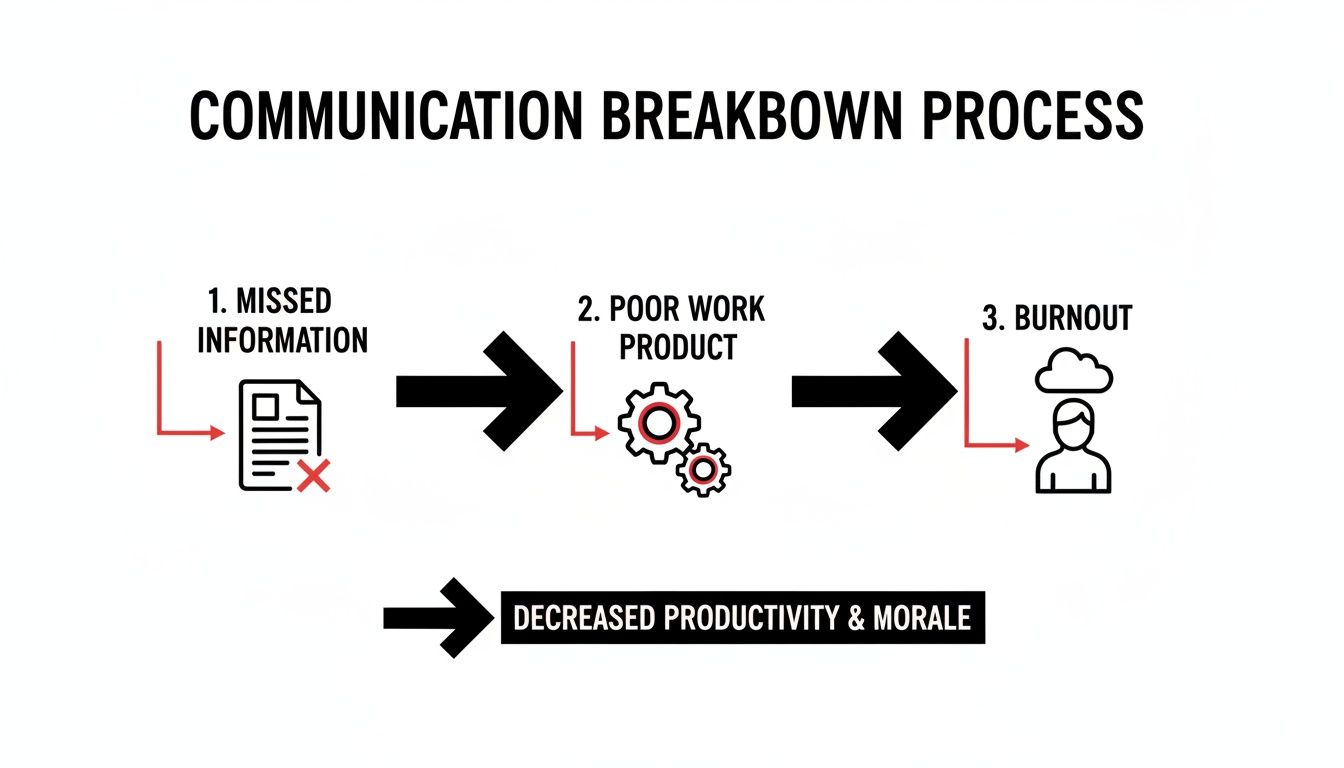
As you can see, what starts as a simple missed update doesn't end there. It's the first link in a chain reaction that directly damages your team's performance and morale.
Where is Everyone Talking? Auditing Your Current Channels
First things first: make a list of every single tool your team uses to talk to each other. I'm talking about the obvious ones like Slack and email, but also project management software like Asana or Jira, shared Google Docs, and even the informal backchannels. It's shockingly common for companies to fall into The WhatsApp Trap, where critical business conversations get lost in personal messaging apps, creating information silos and chaos.
For every tool on your list, ask yourself these three questions:
- What’s it for? Is this for urgent pings, deep-dive project discussions, or company-wide announcements?
- Who uses it? Is it a company-wide tool, specific to one department, or just for certain project teams?
- Is its purpose actually clear? Does every single person know why they should use Slack for a quick question but send an email for a formal client summary?
You'll almost certainly find a ton of overlap and confusion. When the lines between channels are blurry, important messages get dropped. It's inevitable.
Talk to Your Team to Get the Real Story
Next, you need to hear from your people. Anonymous surveys and quick one-on-one chats are gold mines for uncovering the pain points that numbers and data alone will never show you. Forget generic questions. You need to get tactical and ask about specific scenarios to get feedback you can actually use.
A communication audit isn't about blaming people. It's about finding clarity. The real goal is to build a system so simple and intuitive that your team doesn't have to waste brainpower figuring out how to communicate—they can just focus on their work.
Here’s a practical checklist you can steal or adapt to start gathering this feedback.
A Quick Diagnostic Checklist
- Company-Wide News: Where’s the first place you look for a major company announcement? If you miss it, how do you track it down later?
- Project Handoffs: Think about when a project moves from your team to another (like from sales to customer success). How is that information passed along? What details get lost in translation most often?
- Getting Strategic Feedback: If you have a new idea for a campaign or client strategy and need input, what’s your process? How long does it usually take to get what you need?
- Finding Key Documents: When you need the latest version of an SOP or a process doc, where do you look? How confident are you that you've found the most up-to-date version?
- Handling Urgent Issues: If something is on fire and needs immediate attention, what is the fastest, most reliable way to get the right people looped in?
The answers will be incredibly revealing. You’ll probably find that different people have completely different answers for the exact same situation—and that's a massive red flag for a broken process. This is the raw data you'll build everything on, ensuring that the changes you make will solve the right problems from the get-go.
Building Your Single Source of Truth
We’ve all seen it: tool fatigue is killing your team's momentum. When crucial information lives in a dozen different places—scattered across Slack threads, buried in emails, lost in Google Drive, or tucked into an Asana task—your team spends more time hunting for answers than actually doing the work. This digital chaos is a major roadblock to clear communication and a black hole where important knowledge simply disappears.
The fix is to create a centralized hub, what we call a single source oftruth (SSOT). This isn't about adding yet another tool to the pile. It's a strategic move to bring all your vital information under one roof, making it reliable, easy to find, and genuinely useful for everyone.
For a fast-moving SaaS team, a modern intranet or a well-integrated knowledge base can be a total game-changer. Just imagine a world where a new lead-gen playbook or an updated AI agent protocol is instantly available to the entire company, complete with version history and a clear owner. That's the power of getting this right.
What Your Central Hub Absolutely Needs
Not all platforms are created equal. To be a true SSOT, your hub has to be more than a digital filing cabinet for old documents. It needs to be a living, breathing part of how you operate day-to-day.
At a minimum, your communication hub should have these key components:
- A Dynamic SOP Library: Standard Operating Procedures shouldn't be dusty PDFs. A truly useful library lets you update processes on the fly, embed training videos, and create interactive checklists. If you need a solid framework for creating these guides, our article on what is process documentation is a great place to start.
- Automated Update Feeds: Manually announcing every small tweak is a massive time sink. Your hub should connect with your other tools (like your CRM or project management software) to automatically push the right updates to the right people. No more "did you see the memo?" messages.
- Powerful Search: The ability to find what you're looking for in seconds is non-negotiable. A robust search function saves countless hours and stops people from defaulting to asking questions in a public Slack channel for the tenth time.
- Clear Ownership and Version Control: Every document and process needs a designated owner and a clear revision history. This completely eliminates the confusion around which version is the latest and who to ask if you have questions.

By organizing resources into intuitive categories like "Sales Playbooks" or "Product Roadmaps," teams can find exactly what they need without any guesswork.
Choosing Your Platform and Getting It Right
The best platform really depends on your team's size, budget, and how comfortable you are with tech. A giant enterprise might build a custom intranet from scratch, but a growing SaaS startup can get the same—or better—results with more agile tools like Notion or Guru.
Here’s a real-world example. I worked with a B2B SaaS company that was struggling with inconsistent messaging from their sales team. Their "system" was a messy Google Drive folder full of old Word docs. Reps were constantly using outdated pitch decks and quoting the wrong product specs. It was a disaster.
We helped them implement a dedicated knowledge base using Guru and integrated it directly with their CRM. Suddenly, sales reps could pull up the latest battle cards and case studies right from a client's record. The result? They saw a 40% reduction in onboarding time for new hires and a huge improvement in message consistency across the entire team.
In a 2023 survey, 50% of employees pointed to intranets as the most effective channel for staying connected with their company—beating out email by a significant margin. This isn't just a statistic; it's a clear signal that people are tired of the digital scavenger hunt.
This data highlights a critical insight: your team wants a single source of truth. Giving them a well-organized, central hub is one of the most powerful things you can do to fix your internal communication and boost productivity. It turns scattered, unreliable information into one of your most valuable assets.
Using AI and Automation to Streamline Updates
Once you’ve established your single source of truth, the next real game-changer is making that hub intelligent. Let's be honest, manually updating every document, posting every announcement, and pinging every team member is a fast track to burnout. It's also riddled with human error.
This is where you can build an ecosystem where information actually flows to the right people at the right time—without you having to push it there constantly.
The goal isn't just to bolt on more tech. It’s about creating an intelligent, automated layer over your communication framework. Imagine a sales SOP gets updated in your central hub. Instantly, an automated alert hits the sales team's Slack channel with a quick summary of what changed. The "I never got the memo" excuse just vanished.
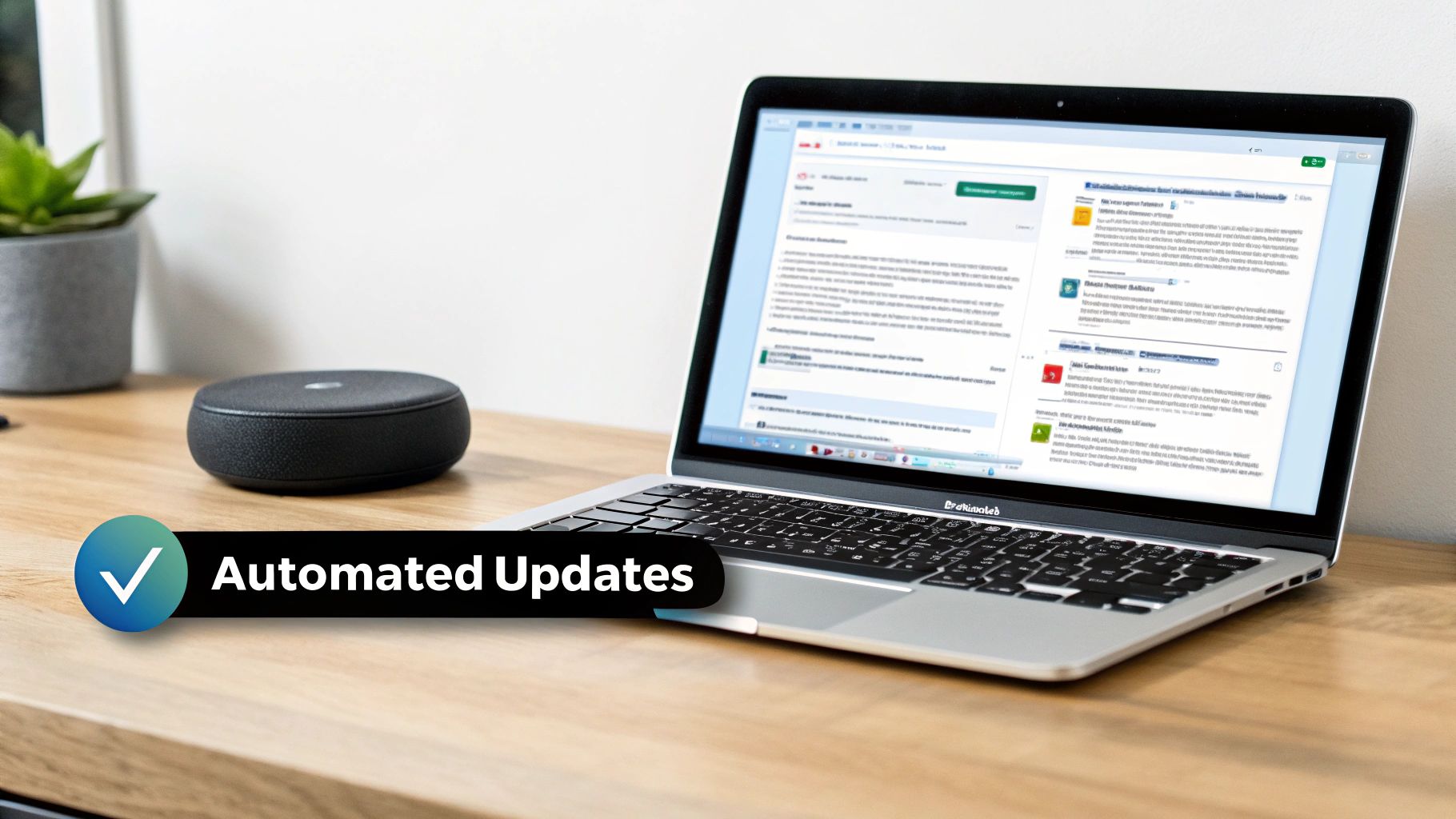
This kind of integration turns communication from a reactive chore into a proactive, self-managing system. That’s how you free up your team for work that actually moves the needle.
Creating Practical Automation Recipes
Diving into automation doesn't mean you need a team of engineers. With modern tools like Zapier or Make, an ops lead or even a scrappy founder can set up some seriously powerful workflows. I like to call these "automation recipes"—simple connections between your apps that handle the repetitive communication tasks eating up hours every week.
Just think about your common friction points. Is your support team manually copying client feedback into your product board? Automate it. Is your sales team forgetting to update the CRM after a big call? An AI agent can nudge them.
Here are a few practical recipes you can set up this week:
- SOP Update Alerts: This is a must-have. Create a workflow that watches a specific folder in your knowledge base (Notion, Guru, etc.). When a doc is edited, it automatically posts a summary of the change to a designated Slack or Teams channel. Everyone sees procedural updates without fail.
- Automated Project Kickoffs: The moment a deal is marked "Closed-Won" in your CRM, trigger a workflow. It can instantly create a new project in Asana, spin up a standard client folder in Google Drive, and send a kickoff notification to your project management and client success channels.
- AI-Powered Meeting Summaries: Use an AI tool to transcribe and summarize your Zoom calls. From there, an automation can post the key takeaways and action items directly into the relevant project channel, tagging whoever is responsible.
"The real power of automation in communication isn't just saving time. It's about creating a system of radical consistency. When information delivery is predictable and reliable, trust in your processes skyrockets."
This systematic approach takes the guesswork out of the equation. It builds a foundation of reliability that your teams can actually depend on, ensuring critical information never gets lost in the shuffle.
Taking it a Step Further with AI
Simple trigger-action workflows are great, but AI can bring a much deeper level of intelligence to your communication. Think of AI agents as smart assistants that can understand unstructured data—like emails and messages—and turn it into something your team can act on.
Here’s a real-world scenario. A hot prospect sends a long, dense email with a dozen questions about your SaaS product. Instead of one person spending 20 minutes trying to unpack it all, an AI agent can:
- Summarize the entire inquiry so the core needs are clear in seconds.
- Extract the key questions and check them against your internal knowledge base to pull existing answers.
- Draft a complete response for the sales rep to quickly review, personalize, and send.
- Create a follow-up task in the CRM so nothing gets dropped.
This isn't science fiction; it’s completely doable with today's tools. For anyone looking to dig deeper, understanding AI-powered workflow automation opens up even more possibilities, like routing support tickets based on sentiment or auto-generating weekly progress reports from project data.
By weaving these smart systems into your operations, you’re not just cleaning up internal comms—you’re building a genuine competitive advantage. You’re creating an operational backbone that scales, cuts down on manual drag, and empowers your team to focus on strategy instead of administrative noise. The result? A far more agile, informed, and productive organization.
Driving Adoption and Measuring Your ROI
Rolling out a new system is the easy part. The real work begins when you have to convince your team to actually use it. A brilliant communication framework is useless if everyone just defaults to their old, messy habits.
This final step is all about making your new communication protocols stick and proving their value. It's a blend of smart change management, clear training, and a sharp focus on the metrics that actually matter. When you get this right, you're not just launching a tool; you're building a culture of clarity that pays off in a big way.
Create a Rollout That People Actually Like
How you introduce these changes really sets the tone. A rushed or confusing launch will breed resistance from the start. Instead, your best bet is a phased approach that builds confidence and shows your team the immediate benefits.
The goal is to make this transition as smooth as possible. After all, nobody likes change that feels forced on them.
Here’s what a successful rollout looks like in practice:
- Develop "Just Enough" Documentation: Forget hundred-page manuals no one will read. Create short, scannable guides with plenty of screenshots and quick videos. Zero in on the top 3-5 tasks someone will do in the new system and make those guides easy to find.
- Run Quick, Targeted Training Sessions: Host brief, role-specific trainings. A 20-minute walkthrough for the sales team on the new CRM process is way more effective than a two-hour “all-hands” meeting where 80% of the content is irrelevant to most people.
- Establish a Clear Feedback Loop: Set up a dedicated Slack channel or a simple form for questions, issues, and suggestions. When you actively respond, you show the team you're listening, which makes them feel like they have a stake in the process.
This user-first approach turns a potentially disruptive change into a team effort, which is absolutely critical for getting buy-in.
A new system should solve problems, not create them. If your team sees the new process as a direct answer to a frustration they've been feeling—like finally knowing where to find the latest SOP—they won't just adopt it, they'll champion it.
Measuring What Actually Moves the Needle
To prove your efforts are working, you have to track the right things. Forget vanity stats like "messages sent." Focus on data that connects your communication improvements to real business outcomes. This is how you show leadership a clear return on their investment.
The right digital tools can make a huge impact. Studies have shown they can lead to a 67% increase in productivity, a 53% rise in employee engagement, and a 43% boost in revenue growth. You can explore more about these findings and how they impact business success.
To capture your own results, start tracking a mix of quantitative and qualitative data.
Key Metrics to Monitor:
| Metric Category | Specific Metrics to Track | Why It Matters |
|---|---|---|
| Engagement | – Read/acknowledgment rates on announcements – Views and comments on SOP pages – Active users in your central hub |
Shows if people are actually seeing critical information and using the new systems. |
| Efficiency | – Decrease in "where can I find…" emails/messages – Faster project handoff times – Reduction in time spent searching for documents |
Directly measures productivity gains and proves you're getting rid of information bottlenecks. |
| Qualitative Feedback | – Employee satisfaction survey scores – Anecdotal feedback from team leads – Questions asked in your feedback channel |
Provides the story behind the numbers and helps you understand the human impact of your changes. |
Before you roll anything out, get a baseline for these metrics. Then, track them quarterly to show a clear trend. Presenting data like, "We've seen a 30% reduction in support tickets asking for document links since launching the new hub," makes your impact undeniable. It shifts your work from a "nice-to-have" initiative to a core driver of business performance.
Answering Your Top Communication Questions
Okay, let's get real. The theory behind better internal communication is great, but what does it actually look like in the trenches? Founders and ops leaders always ask us the same practical, on-the-ground questions. They want to know where to start, what's worth the money, and how to get their teams on board without sparking a mutiny.
Let's dive into the questions we hear most often.
What’s the Best First Step on a Shoestring Budget?
You don’t need to throw money at this problem to see a massive improvement. The single most effective, lowest-cost move you can make is to standardize the communication channels you already have. This costs nothing but a bit of focused time and clear thinking.
Get everyone on the same page by defining the specific job of each tool. It might look something like this:
- Email: This is for formal, external communication and detailed weekly summaries that need to live on forever. Nothing else.
- Slack/Teams: The spot for quick, informal questions, fast-paced project updates, and team chatter. If it's urgent, it happens here.
- Asana/Jira: This is your single source of truth for all things project-related—tasks, deadlines, and discussions. No task updates get lost in Slack DMs ever again.
Just by creating and enforcing these simple rules, you kill the constant "where did I see that?" headache and cut through the noise. It’s a foundational fix that makes everything else you do far more powerful.
How Can AI Actually Help My Team Communicate Better?
Cutting through the hype, AI offers some very real, tangible wins for team communication. It's not about replacing people; it's about giving them superpowers by automating the soul-crushing admin work that creates information gaps.
For example, imagine an AI meeting assistant that automatically transcribes your sales calls, pulls out the key takeaways, and then creates and assigns the action items in your project management tool. Just like that, you've eliminated manual note-taking and missed follow-ups.
Another practical use? An AI agent that triages your support inbox, instantly categorizes tickets by urgency, and even drafts initial responses for your team to quickly review and send.
The real magic of AI in communication isn't the chatbot gimmickry. It's in handling the "information logistics"—summarizing, routing, and translating—so your team can focus on the actual conversation, not the busywork around it.
How Do I Get My Team to Adopt New Tools Without a Fight?
Pushing new software on your team can feel like a losing battle. But that resistance usually comes from a fear of disruption and a lack of clarity on how it will make their lives easier. The secret to getting buy-in is to make them part of the process and show them exactly "what's in it for me."
First, pull your team leads into the selection process. Let them trial a couple of options and give you their raw, honest feedback. When they feel a sense of ownership, they become your most powerful champions.
Next, frame the training around solving their biggest headaches. Don't just demo features; show them how the new tool fixes a problem they complained about last week. For example, "Remember how we can never find the latest version of the sales deck? With this new system, it's always one click away, right inside the client's record."
When you present it as a solution to a shared frustration, adoption feels like a relief, not another chore. For more practical advice on getting everyone on the same page, check out these 7 expert tips for improving workplace communication.
At MakeAutomation, we build the intelligent systems that turn communication chaos into a scalable asset. We design and implement the exact AI and automation frameworks that get rid of manual work, make sure information flows where it needs to, and free up your team to focus on growth. Book a call with us today to see how we can build a smarter communication engine for your business.