
Master Mongoose for MongoDB: Build Scalable Apps
MongoDB feels great at the start of a SaaS project. You move fast, ship features, and enjoy not fighting a rigid relational schema every time product changes its mind.
Then six months pass.
Your users collection has three shapes for the same account type. Trial tenants store billing metadata one way, paid tenants another way, and some old imports skipped validation entirely because the script wrote directly through the driver. A support ticket comes in, and the actual problem isn't the query. It's that nobody can trust what a document looks like anymore.
That's where Mongoose for MongoDB earns its keep. Not as a beginner convenience layer, but as a way to put guardrails around a flexible database so your application stays predictable under real production pressure. If you're building B2B software, that predictability matters. Contracts, permissions, invoices, audit trails, and lifecycle events don't tolerate “mostly consistent” data.
From Flexible Chaos to Structured Control
A common SaaS pattern starts like this: the first version stores account records in MongoDB with almost no structure. A team just needs to get onboarding live. Later, sales wants workspace-level roles, customer success wants lifecycle tags, finance wants subscription state, and product wants feature flags by plan.
Now every write path carries hidden assumptions.
One API route expects plan to be a string. Another assumes plan is an object with limits and add-ons. A background job updates status but forgets to update statusChangedAt. None of these bugs look dramatic in code review. They become expensive when they leak into renewals, access control, or reporting.
Mongoose helps because it gives MongoDB a disciplined application layer. MongoDB is still the database. Mongoose sits above it in your Node.js app and imposes structure where your code needs it most. That means schemas, validation, middleware, and model-level behavior instead of raw document writes scattered across services.
Practical rule: In B2B systems, the cost of inconsistent data is usually higher than the cost of writing a schema.
That doesn't mean Mongoose solves every problem. It won't fix poor modeling, sloppy indexing, or a service boundary that's already muddled. But it does give you a strong center. You define what a document should look like, what should happen before it's saved, and what relationships your app expects.
For teams moving from “it works locally” to “this backs revenue,” that shift matters.
What Mongoose Is and Why It Exists
Mongoose is a Node.js Object Data Modeling library for MongoDB, not the database itself. MongoDB describes it as a library that enables elegant object modeling, and MongoDB's product release notes also note that Mongoose 8.15.0 added native support for Queryable Encryption and Client-Side Field Level Encryption, showing that it continues evolving with MongoDB's security stack rather than staying a thin wrapper (MongoDB's Mongoose QE and CSFLE release notes).
Think of MongoDB as a warehouse with very few restrictions on what you can store. That flexibility is useful. It's one reason document databases fit fast-moving product teams well. But warehouses get messy when every team labels boxes differently.
Mongoose is the inventory system you install on top of that warehouse. It gives you blueprints, rules, and a consistent way to find and update what's inside.
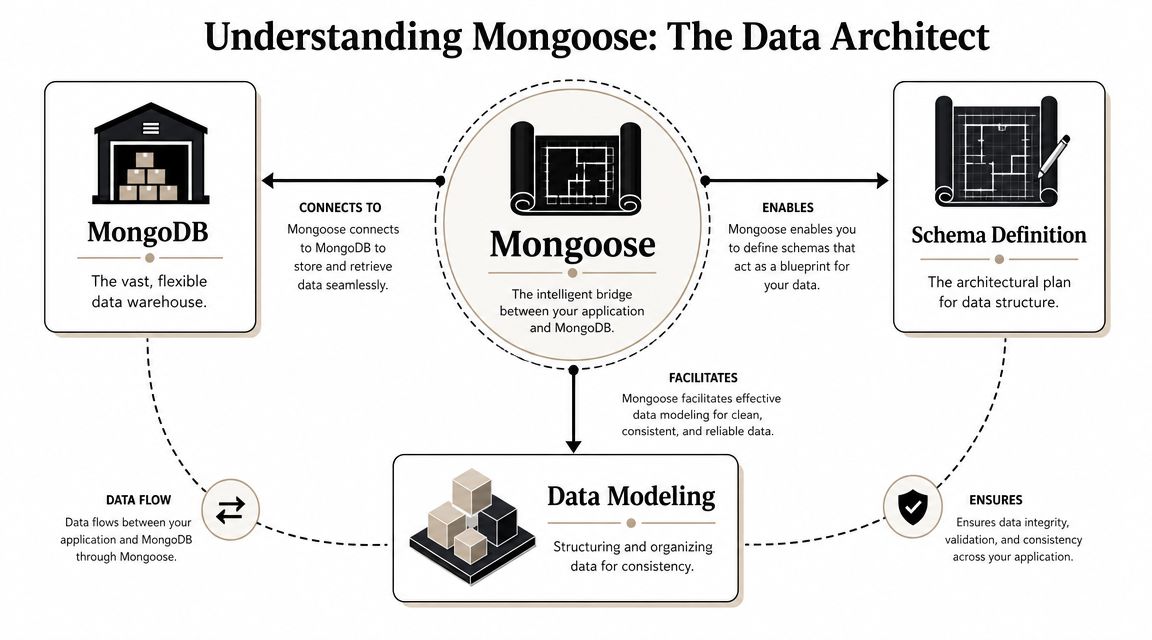
The core job Mongoose does
At a practical level, Mongoose translates between your application objects and MongoDB documents. You define a schema, then compile it into a model, and use that model to create, validate, query, and update records.
That gives you a few things raw driver calls don't provide by default:
- Schema enforcement so document shape stays predictable in your app
- Validation before bad data reaches critical paths
- Middleware hooks for behavior around saves, updates, and deletes
- Query helpers and model APIs that are easier to standardize across a team
If you're brushing up on broader database patterns in Node.js, Mongoose fits squarely into the “application-level data modeling” layer. It's less about replacing MongoDB's strengths and more about making them manageable in a large codebase.
Why teams keep choosing it
Mongoose exists because application code wants structure even when the database allows flexibility. A sales platform may need custom CRM fields per customer, but it still needs hard rules around tenant IDs, billing state, ownership, and permissions.
That tension is a key reason Mongoose became a standard part of many Node.js back ends. It lets you be flexible where the product needs room and strict where the business needs safety.
Here's the part that mid-level engineers usually learn the hard way: “schema-less” doesn't mean “model-less.” If you don't define structure explicitly, your production data model still exists. It's just undocumented, inconsistent, and enforced by scattered assumptions in handlers, jobs, and services.
A raw MongoDB driver gives you freedom. Mongoose gives your team shared discipline.
Connecting and Structuring Your Data with Schemas
The first production decision isn't your first query. It's whether your data model will remain understandable after the third feature rewrite.
A clean Mongoose setup starts with a connection layer you can trust.

Start with a single connection module
Don't open ad hoc connections across route files. Centralize connection logic and fail loudly when the app can't reach MongoDB.
import mongoose from 'mongoose';

const MONGODB_URI = process.env.MONGODB_URI;

if (!MONGODB_URI) {
  throw new Error('Missing MONGODB_URI');
}

export async function connectToDatabase() {
  try {
    await mongoose.connect(MONGODB_URI);
    console.log('MongoDB connected');
  } catch (error) {
    console.error('MongoDB connection failed', error);
    process.exit(1);
  }
}

mongoose.connection.on('disconnected', () => {
  console.warn('MongoDB disconnected');
});

mongoose.connection.on('error', (err) => {
  console.error('MongoDB error', err);
});
That pattern isn't glamorous, but it prevents a lot of confusion in staging and production. One entry point. One error strategy. One place to tune connection behavior later.
Design the schema for business rules, not just fields
For a B2B SaaS app, a User model usually does more than hold profile data. It may drive permissions, invitations, audit trails, and account lifecycle logic.
import { Schema, model } from 'mongoose';

const userSchema = new Schema(
  {
    workspaceId: {
      type: Schema.Types.ObjectId,
      required: true,
      index: true,
    },
    email: {
      type: String,
      required: true,
      trim: true,
      lowercase: true,
    },
    fullName: {
      type: String,
      required: true,
      trim: true,
    },
    role: {
      type: String,
      enum: ['owner', 'admin', 'member', 'viewer'],
      default: 'member',
    },
    status: {
      type: String,
      enum: ['invited', 'active', 'suspended'],
      default: 'invited',
    },
    lastLoginAt: {
      type: Date,
      default: null,
    },
    preferences: {
      timezone: { type: String, default: 'UTC' },
      locale: { type: String, default: 'en' },
    },
  },
  {
    timestamps: true,
  }
);

export const User = model('User', userSchema);
The value of Mongoose becomes evident. The schema becomes executable documentation. New engineers can inspect the model and understand what the application expects.
If your team already uses JSON Schema for API payload validation, it's worth understanding how that layer complements Mongoose rather than replacing it. A good reference point is this guide to AJV and JSON Schema validation. AJV is strong at request validation. Mongoose is strong at persistence rules and model behavior.
Strict mode is a governance decision
One practical detail matters a lot in real systems. Mongoose supports strict mode, and when developers need dynamic keys they may set { strict: false } to allow fields outside the defined schema. That's a real tradeoff between flexibility and governance, as noted in this Mongoose vs MongoDB explanation.
Use strict: false rarely. It's tempting when enterprise customers demand custom metadata, but it can become a junk drawer.
A better pattern is usually one of these:
- Use a dedicated
metadataobject for controlled custom fields - Whitelist dynamic keys through application logic before persistence
- Split custom fields into a separate collection when they need their own lifecycle
Schema and model are not the same thing
A schema is the blueprint. A model is the interface you use to work with documents built from that blueprint.
That distinction sounds basic, but it matters when your codebase grows. Keep schema definition close to domain logic. Keep model exports stable. Don't redefine models inside request handlers.
For a practical walkthrough of setup and modeling, this video is a useful companion before you move into more advanced patterns.
Mastering CRUD Operations and Advanced Queries
CRUD is where many Mongoose articles stop. Production apps start there.
What matters in a SaaS codebase isn't whether you can call find() or save(). It's whether you can make reads predictable, updates safe, and relationship queries understandable when the data model gets dense.
Create with intent
For writes, prefer model methods that match the operation clearly. create() is good for straightforward inserts. save() is useful when you need document instance behavior before persistence.
const user = await User.create({
  workspaceId,
  email: 'ops@acme.com',
  fullName: 'Ava Chen',
  role: 'admin',
});
When creation involves workflow logic, make the sequence explicit.
const user = new User({
  workspaceId,
  email: 'owner@acme.com',
  fullName: 'Nina Patel',
  role: 'owner',
});

await user.save();
In B2B systems, I prefer wrapping creation inside service functions rather than calling models directly in controllers. It's easier to centralize invariants like tenant checks, audit entries, and side effects.
Read with query discipline
A lot of backend pain comes from vague reads. “Get users for workspace” sounds simple until someone needs sorting, filtering, role checks, and pagination in the same endpoint.
const users = await User.find({
  workspaceId,
  status: 'active',
})
  .sort({ createdAt: -1 })
  .limit(25)
  .skip(0);
For more realistic filters, use MongoDB operators through Mongoose:
const users = await User.find({
  workspaceId,
  role: { $in: ['admin', 'member'] },
  createdAt: { $gt: new Date('2024-01-01') },
});
That's still MongoDB underneath. Mongoose just gives you a cleaner way to model and compose those queries in application code.
Update without accidental damage
Updates are where teams often create silent data bugs. updateOne() is useful, but it bypasses the “load document, inspect state, modify safely” rhythm many business rules depend on.
For straightforward field changes:
await User.updateOne(
  { _id: userId, workspaceId },
  { $set: { status: 'suspended' } }
);
For logic-heavy updates, prefer fetching the document first:
const user = await User.findOne({ _id: userId, workspaceId });

if (!user) {
  throw new Error('User not found');
}

user.status = 'active';
user.lastLoginAt = new Date();

await user.save();
That pattern is often slower than a blind update, but it's safer when rules depend on current state. In subscription systems, approval workflows, and entitlement changes, safety usually wins.
If an update affects permissions, billing, or auditability, optimize for correctness first and micro-optimizations later.
Delete carefully in SaaS systems
Hard deletes are easy to code and painful to unwind. In most B2B apps, soft deletion or archival status is the safer default.
await User.updateOne(
  { _id: userId, workspaceId },
  { $set: { status: 'suspended' } }
);
If you need removal:
await User.deleteOne({ _id: userId, workspaceId });
Use hard deletion for things like expired invite tokens, temporary import artifacts, or data with a clear retention policy. Don't use it casually for user-facing entities tied to analytics, permissions, or support history.
Populate is useful, but not free
populate() is one of Mongoose's most attractive features because it makes relationships feel easy. For example, an Invoice can reference a Workspace, and Mongoose can hydrate that reference for you.
const invoiceSchema = new Schema({
  workspaceId: { type: Schema.Types.ObjectId, ref: 'Workspace', required: true },
  total: { type: Number, required: true },
});

const Invoice = model('Invoice', invoiceSchema);

const invoices = await Invoice.find({})
  .populate('workspaceId', 'name plan')
  .limit(10);
That reads well. It's also where people create hidden performance problems.
Use populate() when it improves developer clarity and the query volume is controlled. Don't chain deep population across multiple layers in a hot path unless you've profiled it and know the cost is acceptable.
A simple query playbook
| Query need | Good default |
|---|---|
| Admin list page | filter + sort + limit + lean read |
| Tenant-scoped detail page | findOne with exact tenant filter |
| Cross-collection display data | selective populate() |
| Bulk state change | targeted update query |
| Export job | batched reads, explicit projection |
That table isn't doctrine. It's a starting bias. Mongoose works best when your query shape reflects the product use case instead of chasing a one-size-fits-all pattern.
Leveraging Advanced Features for Production Apps
The reason Mongoose stays relevant in production isn't CRUD. It's the layer around CRUD.
Mongoose sits on top of the MongoDB native driver, so queries still execute against MongoDB, but they pass through a schema-driven abstraction layer that adds casting, validation, and middleware hooks before or after operations. That makes it useful when you need application-level data integrity without changing the database itself, as described in this deep dive on Mongoose and the native driver.
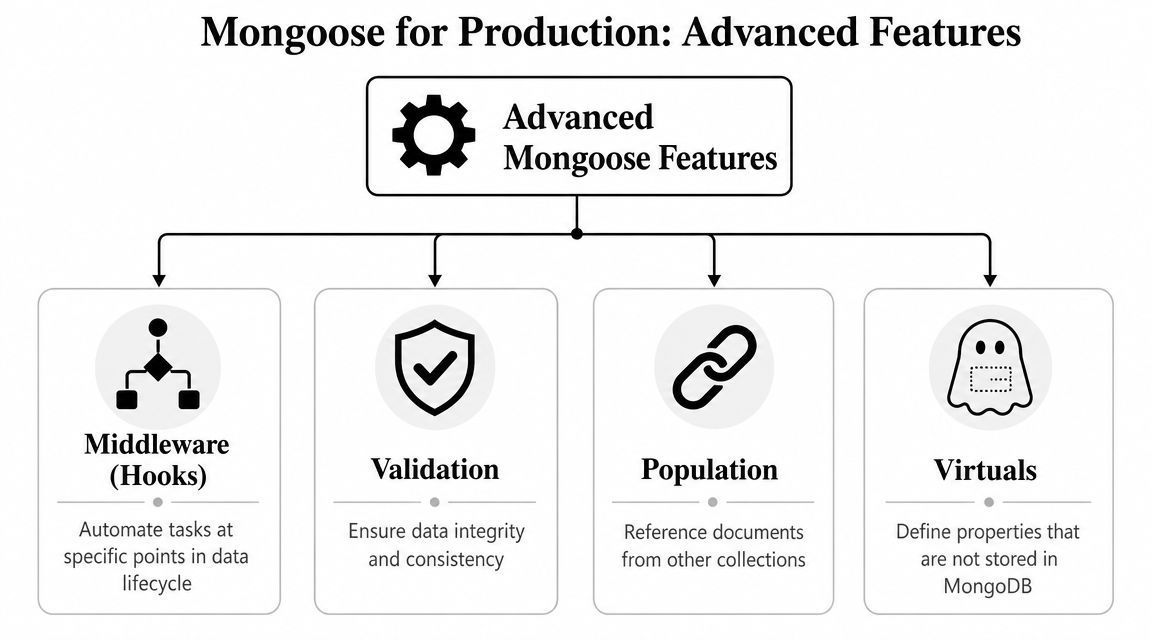
Middleware for lifecycle rules
Middleware helps when the same business rule must run every time a document changes. Password hashing is the classic example, but its primary value in SaaS is broader: normalizing fields, creating audit records, updating search indexes, or enforcing status transitions.
userSchema.pre('save', async function (next) {
  if (!this.isModified('email')) {
    return next();
  }

  this.email = this.email.trim().toLowerCase();
  next();
});
Hooks are powerful, but they can also hide behavior. If a save triggers three side effects nobody expects, debugging becomes painful. Use middleware for repeatable model concerns, not for orchestrating half your business logic.
Transactions for operations that must stay atomic
When one action touches multiple collections, partial success isn't acceptable. Creating a workspace, assigning the owner, and seeding plan entitlements should either all happen or none of it should.
import mongoose from 'mongoose';

async function createWorkspaceWithOwner(input: {
  workspaceName: string;
  ownerEmail: string;
  ownerName: string;
}) {
  const session = await mongoose.startSession();

  try {
    await session.withTransaction(async () => {
      const [workspace] = await Workspace.create(
        [{ name: input.workspaceName }],
        { session }
      );

      await User.create(
        [{
          workspaceId: workspace._id,
          email: input.ownerEmail,
          fullName: input.ownerName,
          role: 'owner',
          status: 'active',
        }],
        { session }
      );

      await Subscription.create(
        [{
          workspaceId: workspace._id,
          status: 'trialing',
        }],
        { session }
      );
    });
  } finally {
    await session.endSession();
  }
}
Use transactions for billing transitions, inventory changes, credits, entitlement updates, and migration-style write sequences. Don't wrap every write in a transaction just because you can. Atomicity has a cost. Spend it where business correctness requires it.
“Use transactions where the business would care about half-finished work.”
Virtuals keep storage clean
Virtuals let you expose computed properties without storing redundant data in MongoDB.
userSchema.virtual('displayLabel').get(function () {
  return `${this.fullName} <${this.email}>`;
});
That's useful for admin panels, exports, and API formatting. The document stays compact, and the presentation concern remains close to the model.
A good model usually combines these tools carefully: middleware for repeated lifecycle logic, transactions for atomic workflows, and virtuals for derived values. That's where Mongoose stops being a convenience layer and becomes a real part of your application architecture.
Integrating Mongoose with TypeScript
If you're building a long-lived SaaS product, TypeScript isn't decoration. It's one of the cheapest ways to reduce category errors in a growing codebase.
Mongoose with TypeScript works best when your schema and domain types are aligned, but not blindly duplicated. You want enough typing to make query results useful and refactors safe, without turning every model into a maze of generic gymnastics.
A solid baseline pattern
Start with an interface for the document shape your application cares about.
import { Schema, model, HydratedDocument } from 'mongoose';

interface IUser {
  workspaceId: string;
  email: string;
  fullName: string;
  role: 'owner' | 'admin' | 'member' | 'viewer';
  status: 'invited' | 'active' | 'suspended';
  lastLoginAt: Date | null;
}

type UserDocument = HydratedDocument<IUser>;

const userSchema = new Schema<IUser>(
  {
    workspaceId: { type: String, required: true },
    email: { type: String, required: true },
    fullName: { type: String, required: true },
    role: {
      type: String,
      enum: ['owner', 'admin', 'member', 'viewer'],
      required: true,
    },
    status: {
      type: String,
      enum: ['invited', 'active', 'suspended'],
      required: true,
    },
    lastLoginAt: { type: Date, default: null },
  },
  { timestamps: true }
);

const User = model<IUser>('User', userSchema);
That already buys you better editor support, clearer service contracts, and fewer sloppy assumptions about nullable fields or enum values.
Type queries for the shape you actually return
A common mistake is typing everything as a fully hydrated Mongoose document even when the code only needs plain data. If the endpoint is read-only, shape the result intentionally.
const user = await User.findOne({ email }).lean();

if (!user) {
  throw new Error('User not found');
}

user.fullName;
user.status;
This is also where advanced TypeScript patterns can help, especially when you build reusable repository utilities or conditional return types across service functions. If you want a refresher on that style of typing, this guide on TypeScript conditional types is useful background.
Keep the rule simple
Use TypeScript to make invalid states harder to represent. Don't use it to prove theoretical correctness while your actual schema remains muddy.
The best Mongoose and TypeScript setups are boring in a good way. Clear interfaces. Predictable query results. Fewer runtime surprises when the app starts evolving faster than the original team expected.
Common Pitfalls and Performance Best Practices
The fastest way to make Mongoose feel “slow” is to use it without discipline.
For production systems, the core tradeoff is straightforward. Mongoose's schema enforcement improves consistency but can add CPU overhead and extra query-processing steps compared with using the native MongoDB driver directly. In practice, that overhead is most valuable when you need deterministic document shapes, pre and post hooks, and population across collections, as outlined in this comparison of MongoDB and Mongoose use cases.
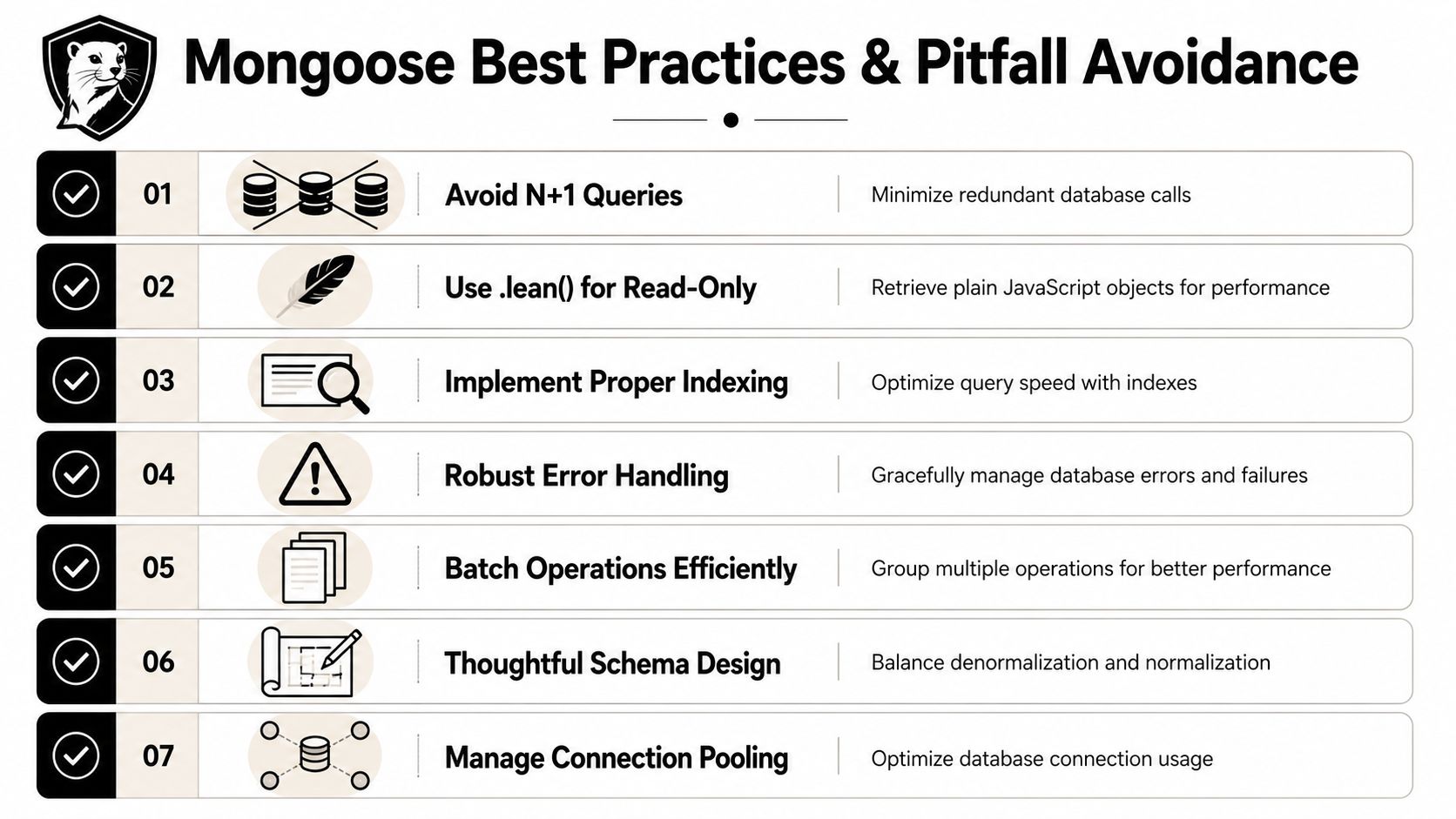
Mistakes that show up under load
Most performance issues come from habits, not from Mongoose itself.
- Overusing
populate()when a simpler projection or denormalized field would do - Skipping indexes on tenant filters, lookup fields, and common sort keys
- Fetching full Mongoose documents for read-only endpoints instead of using
.lean() - Letting connection handling drift across workers, scripts, and API processes
- Embedding too much logic in hooks until writes become hard to reason about
The habits worth keeping
A practical baseline for scalable apps looks like this:
- Index around access patterns: If your app filters by
workspaceId,status, orcreatedAt, design indexes for those queries early. - Use
.lean()for read-heavy paths: Admin tables, analytics feeds, and export previews usually don't need hydrated documents. - Batch work intentionally: Bulk updates and migration jobs shouldn't loop one document at a time unless there's a clear reason.
- Be selective with Mongoose itself: For highly specialized hot paths, the native driver may be the better fit.
Hard-won advice: Use Mongoose where structure and lifecycle rules matter. Reach for the native driver when a path is performance-sensitive and doesn't benefit from ODM features.
That's the mature position. Not “Mongoose everywhere” and not “Mongoose is slow.” Use the tool where its abstraction pays rent.
If your team is tightening backend workflows, cleaning up data operations, or building more reliable automation around a SaaS stack, MakeAutomation can help design and implement the systems behind it. That includes process design, AI-enabled operations, and practical automation work that supports growth without adding more manual overhead.