Web accessibility consulting: Boost WCAG Compliance and Conversions
So, what exactly is web accessibility consulting? At its core, it's a partnership where experts help you make your website, app, or SaaS platform genuinely usable for people with disabilities. But don't mistake it for a simple technical check-up. It's a foundational business strategy that protects you from legal headaches, elevates your brand, and opens the door to a much wider audience.
Why Web Accessibility Consulting Matters Now
I like to think of a web accessibility consultant as a specialized architect for your digital real estate. When constructing a new office building, you wouldn't dream of forgetting ramps, elevators, or accessible restrooms. It’s a basic requirement to serve everyone. A consultant applies that same critical thinking to your website, ensuring it’s built to code and welcoming to all visitors.
Without that expert guidance, you’re navigating a minefield. The reality is that the vast majority of the web is broken. A recent analysis found that a staggering 94.8% of websites have basic accessibility failures. This isn't just a technical problem—it's a compliance crisis that has fueled a massive spike in lawsuits. In 2025 alone, 5,114 ADA lawsuits were filed over inaccessible websites, a number that starkly illustrates the urgency.
For B2B and SaaS businesses, ignoring this is a direct threat to your bottom line.
The Business Case for Accessibility at a Glance
To put it plainly, inaction on accessibility creates tangible business risks while proactive investment delivers clear benefits. This table breaks down the core value proposition.
| Area of Impact | Risk of Inaction | Benefit of Action |
|---|---|---|
| Legal & Compliance | Exposure to costly lawsuits, fines, and forced remediation under the ADA and other laws. | Mitigated legal risk and a defensible position against accessibility claims. |
| Brand Reputation | Perceived as exclusionary or uncaring, leading to negative PR and customer backlash. | Enhanced brand image as an inclusive, socially responsible company. |
| Market Reach | Losing a significant market segment with substantial disposable income. | Access to millions of new potential customers and their networks. |
| User Experience (UX) | A clunky, frustrating experience for all users, not just those with disabilities. | Improved overall usability, SEO, and higher customer satisfaction scores. |
| Financial ROI | Increased customer churn, higher support costs, and lost sales opportunities. | Increased conversion rates, higher customer lifetime value, and a strong competitive edge. |
As you can see, the consequences of a "wait-and-see" approach are steep, while the rewards for building an inclusive platform are substantial and directly impact growth.
A Strategic Imperative for Growth
Ultimately, bringing in a web accessibility consultant is a smart, proactive business decision. It shifts the conversation from a grudging compliance task to a core piece of your growth strategy. In an economy where your website is your front door, you can't afford to have it locked for a huge portion of your potential customers.
This is especially true with the dominance of mobile devices. A fantastic user experience today is inseparable from effective mobile web page design, since many people with disabilities depend on the built-in accessibility features of their phones. This guide will show you how the right consulting partner helps you move beyond just avoiding lawsuits and into a position where accessibility becomes a powerful engine for your business.
Navigating Accessibility Laws and Compliance Standards

Let's be honest, the maze of accessibility regulations is a major reason why businesses first look into web accessibility consulting. This isn't just about technical best practices; it's about legal mandates with very real consequences. Getting it wrong can mean facing expensive lawsuits, damaging your brand, and paying hefty fines.
It's easy to get lost in the alphabet soup of acronyms. But for any B2B or SaaS leader, understanding how these standards and laws fit together is crucial. They form a framework for digital inclusion that cuts across industries and countries.
The Foundation: WCAG Explained
The cornerstone of all this is the Web Content Accessibility Guidelines (WCAG). These guidelines are the technical blueprint for digital accessibility worldwide, developed by the World Wide Web Consortium (W3C).
It's important to know that WCAG is not a law. Instead, it’s the instruction manual that shows you how to make your website or software accessible.
Think of it like a building code. A law might state that a building must be safe for public use, but the building code gives you the specifics—the required number of fire exits, the standards for electrical wiring, the grade of a wheelchair ramp. WCAG does the exact same thing for your digital properties, offering clear, testable criteria. Nearly every accessibility law on the books points to WCAG as the benchmark for compliance.
The Legal Mandates You Must Follow
While WCAG gives you the "how-to," a handful of powerful laws provide the "must-do." These are the legal frameworks that carry the weight of enforcement, and which ones apply to you depends on where you do business and who your customers are.
For B2B and SaaS companies, these are the big ones:
Americans with Disabilities Act (ADA)
The ADA is a sweeping U.S. civil rights law that prohibits discrimination based on disability. Though it was enacted before the internet was a part of daily life, U.S. courts have consistently ruled that its rules for "public accommodations" also apply to websites and apps. For most businesses operating in the U.S., this means your digital front door must be accessible.Section 508 of the Rehabilitation Act
If you sell to the U.S. government, Section 508 is non-negotiable. This federal law mandates that any technology bought or used by the federal government must be accessible. For a SaaS company, this means your platform must comply with Section 508—which directly references WCAG standards—if you want to land lucrative government contracts.European Accessibility Act (EAA)
The EAA is a directive from the European Union designed to standardize accessibility rules for key products and services across the EU. It covers a wide swath of technology, from e-commerce platforms and banking services to computer operating systems. If you have customers in the EU, you need to pay close attention to the EAA.
Understanding how these pieces connect is where the real clarity comes. The ADA creates the legal need for accessibility in the U.S., and when a lawsuit happens, courts often use WCAG as the ruler to measure whether a website is compliant. A good accessibility consultant helps you connect those dots, translating vague legal duties into a concrete action plan.
Key Takeaway: Laws like the ADA and EAA tell you that you must be accessible, while WCAG tells you how to do it. Ignoring this isn't just a technical oversight; it's a direct business risk with serious legal and financial teeth.
Imagine your SaaS company is trying to close a deal with a U.S. federal agency. That agency is legally required to follow Section 508. A consultant would audit your platform against the specific WCAG criteria that Section 508 requires, then create a roadmap to fix every issue. Without that expert guidance, your bid would likely be dead on arrival.
The Consulting Process From Audit to Remediation
So, what does bringing in a web accessibility consultant actually look like in practice? It can seem like a huge, nebulous project, but a good consultant will walk you through a clear, structured process. Think of it less like a generic scan and more like a deep, collaborative health check for your website or SaaS platform.
This isn't just about running a tool and getting a pass/fail grade. It’s a hands-on partnership that plugs directly into your team's workflow. The demand for this human touch is skyrocketing—the market for digital accessibility services is on track to blow past $6 billion by 2033. That growth tells you one thing: software alone can't solve this puzzle. You need human expertise. You can see more on this trend from datainsightsmarket.com.
Let’s walk through the five key phases of a typical engagement.
Step 1: Initial Discovery and Scoping
Every solid project kicks off with a discovery phase. This is where we, as consultants, sit down with you to get the lay of the land. We need to understand your business goals, who your users are, and what your legal landscape looks like. It’s exactly like a doctor taking a patient’s full history before even thinking about running tests.
During this conversation, we'll nail down the project's scope by asking things like:
- What specific pages, user flows, or app features are we focusing on?
- What are the absolute critical paths for your users (e.g., signing up, checking out, using a dashboard)?
- What level of WCAG conformance are you aiming for? Most B2B and SaaS companies target AA.
- What are your team's technical resources and development cycles like?
Getting this alignment right from the start is non-negotiable. It prevents "scope creep" down the road and makes sure everyone is working toward the same goal. This step is the foundation for a successful project, much like a good client onboarding process sets the stage for a great relationship.
Step 2: The Comprehensive Audit
Here’s where the real diagnostic work begins. The audit isn't a single action but a two-pronged approach, blending the efficiency of automated tools with the critical thinking of manual testing.
Automated scanners are fantastic for catching the low-hanging fruit. They can quickly identify about 30-40% of WCAG issues—things like missing image alt text or obvious color contrast problems.
But they can't tell you if your site is actually usable. That's where a human expert comes in. We’ll get in there and test everything manually: navigating with just a keyboard, using screen readers like JAWS or NVDA, and stress-testing complex parts like checkout forms, pop-up modals, and dynamic dashboards. This is how we find the serious, experience-breaking bugs that automated tools always miss.
Step 3: The Prioritized Remediation Roadmap
After the audit, we won’t just dump a 200-page PDF filled with hundreds of errors in your lap. The real value of web accessibility consulting is turning that raw data into a clear, actionable plan. We deliver what’s called a prioritized remediation roadmap.
Key Deliverable: The roadmap is your game plan. It organizes every issue by severity and impact. Critical blockers—like a keyboard trap preventing a user from completing a purchase—are at the top. Minor cosmetic tweaks are at the bottom.
This roadmap is built to be used. We often plug it straight into your team's project management software, whether that's Jira, Asana, or something else. Each ticket gives your developers everything they need:
- A plain-English description of the problem and who it affects.
- The specific WCAG rule being violated.
- Screenshots or screen recordings showing the issue in action.
- Code-level suggestions and snippets to guide the fix.
Step 4: Hands-On Remediation Support and Training
A great consultant doesn’t just write a report and disappear. We stick around to become an extension of your team during the fixing phase. This means providing direct, hands-on support for your developers.
This support can look like a lot of different things: joining your Slack channel for quick Q&A, running pair programming sessions to solve a tough coding problem, or reviewing pull requests to make sure the fixes are solid. At the same time, we focus on training your team—developers, designers, and content writers—so they can build accessibility in from the start, not bolt it on at the end. The goal is to build that expertise in-house.
Step 5: Verification and Ongoing Monitoring
Once your team has pushed the fixes, we don't just assume they work. We perform a full verification audit to confirm that every single issue on the roadmap has been properly resolved. After verification, we can help you prepare crucial compliance documents like a Voluntary Product Accessibility Template (VPAT) or an Accessibility Conformance Report (ACR). These are often mandatory for selling to enterprise or government clients.
But accessibility isn’t a one-and-done project. It’s a process. Every time you ship a new feature or update your website, you risk introducing new barriers. That’s why many businesses keep a consultant on retainer for ongoing monitoring and quick re-audits, ensuring their platform stays accessible and compliant as it evolves.
Understanding Consulting Costs and Measuring ROI
Let's get straight to the point. The two biggest questions on any leader's mind are: "What will web accessibility consulting actually cost?" and "What's the real return on that money?"
Getting a handle on the financials is what turns a good idea into a funded project. This isn't just about ticking a box; it’s an investment that can unlock new revenue, slash legal risk, and build a brand people genuinely trust.
Web Accessibility Consulting Pricing Models
To help you budget, it helps to know how consultants typically price their services. The cost can swing quite a bit depending on your site's size, the complexity of its features, and how deep you need the engagement to go. Most proposals, however, will fall into one of a few common structures.
Here’s a quick breakdown of what you can expect to see:
| Pricing Model | Best For | Typical Cost Structure | Pros & Cons |
|---|---|---|---|
| Project-Based Fee | Businesses needing a complete, one-time audit and a clear remediation plan. | A single, flat fee for a defined scope of work. | Pro: Predictable budget and clear deliverables. Con: Less flexible if scope changes. |
| Hourly Rate | Quick questions, developer support during fixes, or auditing small features. | Billed by the hour for time spent on specific tasks. | Pro: High flexibility; pay only for what you need. Con: Costs can be unpredictable if issues are complex. |
| Monthly Retainer | Companies committed to long-term accessibility and continuous compliance. | A recurring monthly fee for ongoing access to an expert. | Pro: Proactive approach; expert on-call. Con: Higher long-term cost; requires commitment. |
Choosing the right model really comes down to your immediate goals. Are you trying to fix a known problem, or are you building accessibility into your company's DNA for the long haul?
This simple infographic lays out the high-level process your investment typically funds, moving from discovery to a concrete action plan.
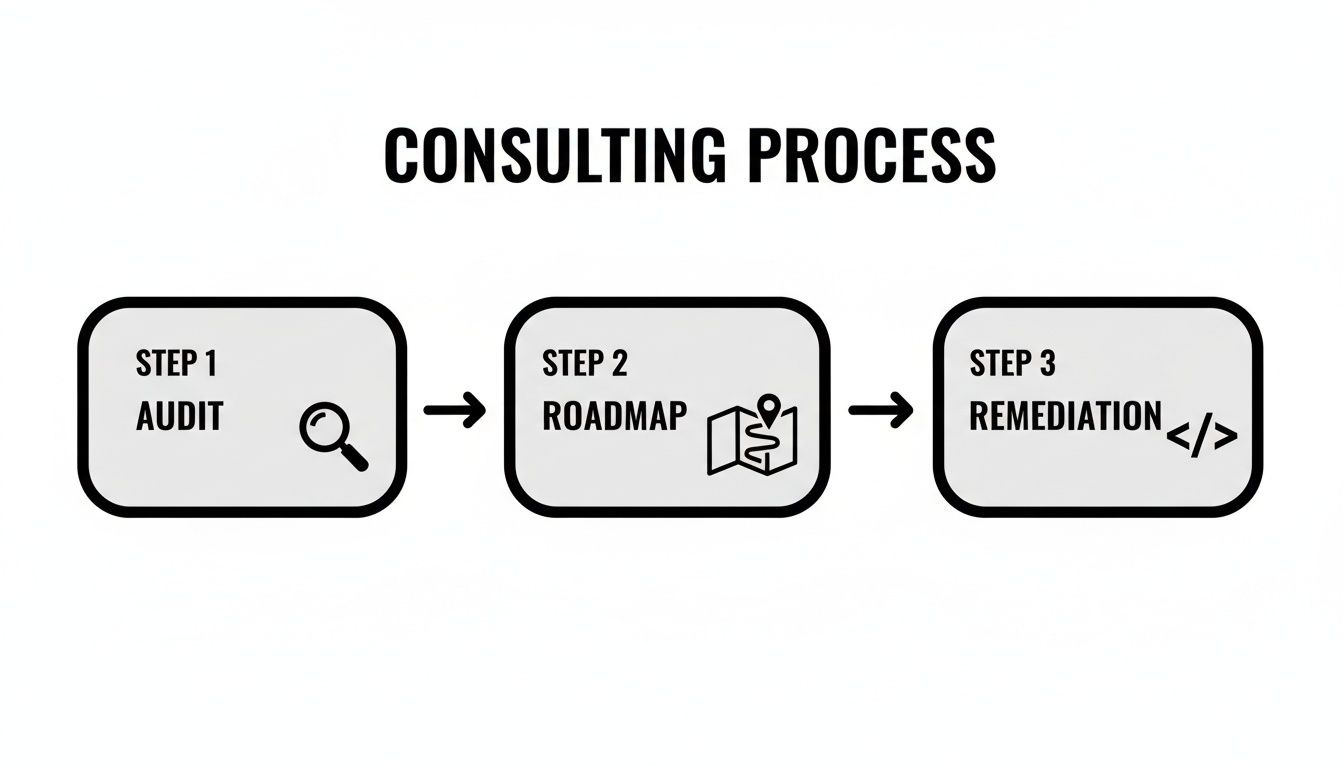
As you can see, a good engagement is structured. It starts with a comprehensive Audit, leads to a strategic Roadmap, and guides the hands-on Remediation to ensure you actually get to the finish line.
Shifting from Cost to Return on Investment
While it's smart to budget for the cost, the real conversation leaders should be having is about the return. Investing in accessibility is one of the rare initiatives that's both a defensive and offensive play—it protects the business while actively growing it.
If you want to build a full financial model, our complete guide on how to calculate return on investment is a great place to start.
Here’s where you’ll see the return on your consulting investment show up:
Risk Mitigation: An ADA lawsuit can easily cost tens of thousands of dollars before you even count legal fees and the hit to your brand's reputation. A proactive audit is a fraction of that cost and acts as a powerful form of insurance.
Market Expansion: Making your platform or site usable for everyone opens your business to millions of potential customers. This is a market segment with real spending power that is often overlooked.
Better SEO Performance: As it turns out, Google loves accessible websites. Many of the things required for accessibility—like proper heading structures, image alt text, and logical navigation—are strong signals of a high-quality site that search engines reward with better rankings.
An Improved Experience for All Users: Here's the secret: accessibility improvements make your site better for everyone. A clear, easy-to-navigate site keeps all users engaged, lowers bounce rates, and boosts conversions.
It's not just theory. Businesses that get this right see real, measurable gains. Accessible websites can see up to 19% higher conversion rates than their inaccessible competitors, proving that inclusive design is a direct path to more revenue.
The market is waking up to this reality. The global website accessibility software market, which includes consulting services, was valued at USD 642.8 million in 2024 and is on track to hit an estimated USD 1,897.3 million by 2033.
For SaaS founders, this is more than just a compliance trend; it's a competitive edge. An inclusive platform can boost engagement by 20-30% among users with disabilities, turning a legal requirement into a powerful growth lever. You can discover more insights about this market growth on openpr.com.
How to Choose the Right Accessibility Consultant
Finding the right accessibility partner can make or break your entire digital inclusion effort. This decision is about more than just hiring a technical auditor; it's about bringing on a strategic guide who will feel like an extension of your own team. The right consultant will empower you to build accessibility into your company’s DNA, while the wrong one can burn through your budget and leave you with the same legal risks you started with.
Don't just listen to the sales pitch. To find a true partner, you need to dig into their experience, their process, and their core philosophy. Your goal is to find someone who gets the unique challenges of B2B and SaaS platforms and can deliver more than a simple list of errors.
Evaluating a Consultant’s Expertise and Process
A great consultant will have a portfolio filled with projects like yours. As you start talking, ask them about their specific experience with complex SaaS applications, multi-step user flows, and dynamic content. Auditing a simple marketing website is a completely different ballgame than tackling a feature-rich software platform.
Next, get a feel for their methodology. The best audits are a blend of art and science—they combine the speed of automated tools with the critical, nuanced eye of a human tester. Anyone leaning too heavily on automation is just scratching the surface; they will miss the real-world, user-impacting issues that automated scans can't find.
Here’s what to look for:
- Relevant Experience: Have they worked with other B2B or SaaS companies? Ask for case studies or references that mirror your business.
- Comprehensive Testing: Do they live and breathe manual testing with tools like screen readers and keyboard-only navigation? What’s their ratio of manual to automated testing? A healthy balance is key.
- Regulatory Knowledge: How well do they know the laws that affect you, whether it’s the ADA, Section 508, or the EAA? Can they speak to recent legal precedents?
- Team Collaboration: How do they plug into your development workflow? Are they comfortable working in Agile sprints and using tools like Jira or Asana? This is where their value truly shines, much like how a skilled CI/CD consultant integrates to smooth out the entire development pipeline.
Critical Questions to Ask Potential Consultants
Once you have a shortlist, it's time to dig in. A confident, seasoned consultant will welcome tough questions and see it as a chance to show you how they think.
Here are a few sharp questions to guide your conversations:
- "How do you prioritize fixes for the biggest impact?" A great answer will focus on a risk-based approach—tackling critical user blockers and high-traffic areas first, not just the low-hanging fruit.
- "Can you show us an example of the training materials you provide for developers?" This tells you if they’re invested in upskilling your team for the long haul or just dropping off a report and disappearing.
- "What’s your process for verifying that our fixes actually work?" Look for a clear process that includes a re-testing or verification phase. This ensures the effort your team puts in truly resolves the issues.
- "How do you handle situations where the 'right' accessibility fix conflicts with a design choice?" This question uncovers their problem-solving ability and whether they can collaborate effectively with designers and product managers to find a solution that works for everyone.
Red Flags to Watch Out For
Knowing what to avoid is just as important as knowing what to look for. Some promises are just too good to be true and usually signal a superficial approach that won't actually protect your business or help your users.
A massive red flag is any talk of "100% automated compliance" or a quick-fix "widget." In fact, recent data shows 25% of accessibility lawsuits were filed against websites using these overlay tools, which often introduce new bugs.
Be skeptical of any firm that:
- Guarantees instant ADA compliance with a single line of code.
- Is vague about their manual testing process.
- Can't provide concrete, code-level advice for your developers.
- Relies almost exclusively on automated reports.
Choosing a web accessibility consulting partner is a major investment of time and resources. By being thorough and asking the right questions, you can find a partner who will help you build a more inclusive product, strengthen your brand, and safeguard your business.
Combining Human Expertise With Smart Automation

The conversation around accessibility and AI often misses the point. It’s not about replacing human experts with code. The reality is that the most effective approach to web accessibility consulting today involves a smart partnership between the two.
Think of AI-powered tools as a tireless assistant. They can scan a massive codebase in minutes, finding thousands of predictable issues like missing alt text or basic color contrast errors. This is the grunt work—the kind of volume-based checking that no human team could ever match for speed or scale.
But that’s where automation hits a wall. Even the best automated scanners can only flag about 30-40% of all WCAG issues. They can't understand context, logic, or whether an experience feels broken. They’re great at spotting technical errors, but they have no idea what it’s actually like to use your site.
The Role of Human-Led Expertise
This is where a seasoned consultant steps in. With the low-hanging fruit cleared away by an automated scan, an expert can dedicate their time to the complex, nuanced problems that make or break a user's experience.
AI simply can’t tackle these critical human-centric tests:
- Keyboard-Only Navigation Testing: Can someone actually buy your product or submit a support ticket using only their keyboard? The path needs to be logical and free of traps.
- Screen Reader Usability: Does the site make sense when read aloud? Is a screen reader user getting the same information and context as a sighted user?
- Logical Flow and Context: Does the user journey flow intuitively from one step to the next, or does it become a confusing maze?
A consultant doesn't just find a bug; they understand its impact. They connect a technical flaw to the real person it affects and can prioritize fixes based on human value, not just code-level severity.
By blending the sheer scale of AI-driven audits with the depth of manual, human-led testing, you get the best of both worlds: speed and genuine usability.
Integrating Automation Into Your Workflow
For B2B and SaaS companies, this hybrid model is the only practical way to build and maintain an accessible product. The goal is to integrate automated checks directly into your development pipeline (often called a CI/CD pipeline).
This creates an automated safety net. Every time a developer pushes new code, it’s scanned for common accessibility mistakes before it can go live. This helps your team catch and fix small issues on their own, preventing accessibility debt from accumulating.
Meanwhile, your human consultant can focus on bigger-picture challenges like training your team, guiding complex remediation efforts, and performing the deep-dive audits that automation can’t handle. It's a far more efficient and sustainable way to achieve true digital inclusion.
Common Questions (and Honest Answers) About Web Accessibility
Even when you're committed to making your digital products inclusive, some practical questions always come up. We get it. Let's walk through some of the most common ones we hear from business leaders so you can move forward with total clarity.
What About Those Quick-Fix Accessibility Widgets or Plugins?
It's tempting to look for a silver bullet, and automated widgets often market themselves that way. Unfortunately, they rarely, if ever, solve the real problems.
Think of it like putting a fresh coat of paint over a crack in your house's foundation. It might look fixed from a distance, but the underlying structural issue is still there, waiting to cause bigger problems. These "overlay" tools can even clash with a user's own assistive technology, making your site less accessible than when you started.
Legal experts are clear on this: overlay widgets don't offer real protection from ADA lawsuits. In fact, a staggering 25% of accessibility lawsuits filed in 2024 were against websites using one of these tools.
How Long Does an Accessibility Project Usually Take?
That's a great question, and the answer really depends on the scale and complexity of your website or app. There's no one-size-fits-all timeline.
For a smaller marketing site, a thorough audit might take two to four weeks. But for a large-scale SaaS platform with intricate user flows, you could be looking at two to three months just for the initial audit and to map out a remediation plan.
The actual hands-on-keyboard fixing phase can then take anywhere from a few weeks to several months. This all comes down to your development team's availability and how many issues the audit uncovers. A good consultant will work with you from day one to set a realistic schedule.
Is Web Accessibility Just a One-Time Project?
Definitely not. It's much better to think of accessibility as an ongoing practice, not a one-and-done project. Your website is a living thing—every new feature, blog post, or design update can accidentally introduce new barriers.
The best approach is to weave accessibility into your standard development lifecycle, just like you would with QA or security. Many companies keep a consultant on retainer for ongoing monitoring, periodic check-ups, and team training. This ensures your platform stays compliant and inclusive as it grows and changes over time.
Ready to make your SaaS platform truly accessible and find new avenues for growth? At MakeAutomation, we specialize in building smart processes that get real results. Book a discovery call today and let's talk about building an accessibility strategy that scales with your business.