What Is Workflow Optimization and How Can It Grow Your Business
Let's get straight to it: Workflow optimization is about taking a hard look at every single step your business takes—from chasing a new lead to finishing a project—and making it smarter, faster, and more dependable. This isn't just about speed. It’s about methodically redesigning how work actually happens to cut out wasted motion and prevent expensive mistakes.
What Is Workflow Optimization, Really?
To really get what workflow optimization is, forget the dictionary definition. Think of your business as a busy restaurant kitchen on a Saturday night. Without a clear system, you have total chaos. Chefs are tripping over each other, orders are getting lost, and angry customers are getting cold food. That's a business running on manual, unoptimized workflows.
Now, imagine a Michelin-star kitchen. Every station is perfectly organized, each chef knows exactly what to do, and ingredients are prepped and waiting. Orders flow from the ticket machine to the customer's table without a hitch. That kitchen has mastered workflow optimization. It’s not about the chefs working harder; it’s about the system itself being intelligent.
A Mindset Shift: From Doing Work to Designing It
This is where the real change happens. Optimization moves you from simply reacting to tasks as they appear to stepping back, analyzing, and rebuilding the entire process from the ground up. It’s a continuous discipline, not a one-and-done project. Your market, tools, and team are always evolving, so your workflows have to keep up.
To show the contrast, here's a quick snapshot of the old way versus the new way of working.
Manual vs Optimized Workflows: A Snapshot
| Aspect | Manual Workflow (The Old Way) | Optimized Workflow (The New Way) |
|---|---|---|
| Process | Reactive, inconsistent, and often undocumented. | Proactive, standardized, and clearly defined. |
| Team Focus | Bogged down in repetitive, low-value tasks. | Focused on strategic, high-impact activities. |
| Efficiency | Prone to bottlenecks, delays, and human error. | Smooth, fast, and highly reliable. |
| Scalability | Difficult and expensive to scale; more people means more chaos. | Easily scalable with consistent quality. |
| Outcomes | Unpredictable results and frustrated teams. | Consistent, high-quality results and empowered teams. |
This table makes it clear: the goal is to leave the chaos of manual work behind for a system built for growth.
The demand for this kind of efficiency speaks for itself. The global workflow automation market was valued at a massive USD 26.01 billion in 2026 and is expected to climb to USD 40.77 billion by 2031, growing at a 9.41% CAGR. This boom is fueled by companies desperate to slash operational costs by adopting automation. You can dig deeper into the numbers by checking out the market analysis from Mordor Intelligence.
The Four Pillars of an Optimized Workflow
So, what does this look like in practice? It usually boils down to focusing on four key areas:
- Finding the Bottlenecks: Pinpointing exactly where work slows down, gets stuck, or demands someone to step in manually.
- Cutting Out Redundancy: Getting rid of duplicate steps, pointless approvals, or any other action that adds no real value.
- Automating the Routine: Handing off predictable tasks like data entry, follow-up emails, or report generation to technology.
- Standardizing the Process: Creating a single, documented "best way" to do things to ensure everyone is on the same page and mistakes are minimized.
By concentrating on these pillars, you can start applying different process optimization techniques that create a more robust and scalable business. Think of it as the engine that powers sustainable growth.
The Business Case for Workflow Optimization
So, you understand the what of workflow optimization. The next logical question for any leader is, "Why should I sink time and money into this?" The reality is, optimizing your workflows isn't some abstract corporate initiative. It's a direct path to the tangible results that matter most.
We're talking about a calculated investment aimed squarely at cutting operational costs, unlocking your team's true productivity, and delivering an experience that keeps customers coming back. In the crowded B2B and SaaS markets, efficiency isn't just a "nice-to-have" anymore. It's the bedrock of scalable growth and, frankly, survival.
From Cost Center to Competitive Advantage
Let’s get specific. Think about your current sales process. How many manual hoops does a new lead jump through before they become a customer? Every bit of manual data entry, every delayed follow-up, and every clumsy internal handoff creates friction. This friction doesn't just annoy your team; it stretches your sales cycle, inflates customer acquisition costs, and leaves the door wide open for your competitors.
Now, picture that same process, but optimized. A lead comes in and is instantly logged in your CRM. It's automatically scored against your ideal customer profile and routed to the perfect salesperson with all the context they need. Smart follow-up sequences kick in immediately, so no one ever falls through the cracks. This isn't science fiction—it's how modern companies are winning by shortening their sales cycles and dramatically improving conversion rates.
Workflow optimization is really about reclaiming your team's most valuable, non-renewable resource: time. When you systematically strip away the repetitive, administrative grunt work, you free up your best people to focus on strategy, innovation, and building high-value client relationships.
This shift is already happening at scale. The business workflow automation market shot up from USD 13.06 billion in 2025 to USD 14.96 billion in 2026, a staggering 14.5% CAGR. This explosion is fueled by leaders who are tired of watching manual tasks drain their resources. Companies that get on board are seeing operational cost savings of 20-30% and are slashing turnaround times on critical functions like lead generation.
Real-World Impact Across Your Business
The ripple effect goes far beyond just your sales team. Imagine a digital agency juggling a dozen client projects. Without solid workflows, they're constantly fighting scope creep, blowing past deadlines, and watching budgets evaporate. Critical information gets buried in endless email threads, and project managers spend their days chasing people for simple status updates.
But with an optimized system in place, the entire picture changes:
- Project Management: New projects kick off with standardized templates, ensuring nothing gets missed. Automated task assignments and deadline alerts keep the whole team in sync. A central dashboard gives managers a real-time view of project health, letting them spot and resolve bottlenecks before they become full-blown crises.
- Client Onboarding: A smooth, automated onboarding sequence makes a great first impression. It ensures new clients get the right information, sign contracts without delay, and feel confident they made the right choice. This cuts down on manual back-and-forth and sets the tone for a fantastic long-term partnership.
- Customer Support: Optimized support workflows get tickets to the right expert instantly. Agents have immediate access to a customer's full history, and common questions are handled with smart templates. The result? Faster resolutions and happier customers who stick around.
To see the real ROI behind these changes, you can review customer success stories from companies that have already made this investment. The evidence is overwhelming: sharpening your internal processes is one of the most powerful moves you can make to drive sustainable growth.
How to Measure Your Current Workflow Efficiency

Before you can fix a single inefficiency, you have to know exactly where you stand. Trying to optimize a workflow without hard data is like trying to find a leak in a pipe just by listening—you might have a general idea, but you're mostly just guessing. You can't improve what you don't measure.
This is why a workflow audit is your essential first step. It's a systematic review that takes you from vague "gut feelings" about slowdowns to a concrete, data-backed map of your process's weak points. This audit creates the baseline you need to set realistic goals and, down the line, prove the ROI of your changes.
Defining Your Key Performance Indicators
To measure efficiency, you need the right yardsticks. Forget vanity metrics that look good on a dashboard but don't actually tell you anything useful. You need to focus on Key Performance Indicators (KPIs) that are directly tied to the speed and health of your workflows.
Here are the essential KPIs you should be tracking:
- Cycle Time: How long does a single task take from the absolute start to the very end? For instance, what’s the average time from when a new lead hits your CRM to when a sales rep makes the first contact? Long cycle times are a dead giveaway that you have hidden bottlenecks.
- Throughput: Think of this as your team's output rate. How many work items are they completing in a given period? For a customer support team, it could be the number of tickets closed per day. If throughput is low, it might mean your team is swamped or the process itself is just too clunky.
- Error Rate: What percentage of completed work needs to be corrected or completely redone? High error rates don't just waste time; they point to deeper issues like unclear instructions, poor training, or a lack of standardized procedures. In fact, well-structured workflows have been shown to cut down time spent on administrative rework by nearly 30%.
- Cost-per-Process: This calculates the total expense—including labor and tools—to execute a workflow one time. Knowing this number is crucial for building a business case for automation, as it puts a clear dollar amount on the cost of inefficient manual work.
The point of tracking these KPIs isn’t just to collect numbers; it’s to uncover the story they tell. This data shows you precisely where time, money, and your team's potential are being wasted, giving you a clear starting point for making targeted improvements.
Conducting Your Workflow Audit
With your KPIs in place, it's time to map your current processes. This isn't about documenting the "official" workflow from a manual. It's about uncovering how things actually get done day-to-day, complete with all the unofficial shortcuts and workarounds your team has invented to get by.
The best way to start is by talking to the people on the ground—the ones who live and breathe these workflows every day. Sit down with your team and ask some pointed questions:
- Where do handoffs between people or departments always seem to cause delays?
- Which tasks take up the most manual hours every week?
- What information is always missing when a task gets passed to you?
- Are there approval steps that feel redundant or just make you wait around?
- What parts of the process cause the most confusion or questions?
This method of mapping and questioning is a core part of process mining, which is all about discovering and improving how work really flows by looking at the digital footprints left behind in your systems. By getting honest answers to these kinds of questions, you'll quickly identify the specific bottlenecks, redundancies, and manual burdens that are holding your business back. This evidence-based approach is the only way to effectively prioritize what to fix first.
Using AI And Automation To Power Your Workflows
Once you’ve mapped out your processes and pinpointed the bottlenecks, it’s time to bring in technology to do the heavy lifting. This is where modern AI and automation completely change the game. We're not talking about abstract buzzwords here; these are practical, accessible tools that can deliver a level of efficiency and scale that was simply out of reach just a few years ago.
Think of automation as your new digital workforce. It takes on the predictable, rules-based tasks that eat up your team's day—freeing them to focus on work that matters. AI is the brain behind the operation, making intelligent decisions, understanding messy, unstructured data, and even handling complex interactions that require a bit of judgment.
The Tools That Drive Hyper-Efficiency
When we talk about injecting power into a business process, a few key technologies are leading the charge. Each has its own job, but they work best together, creating a seamless and intelligent system.
- Robotic Process Automation (RPA): This is the workhorse. RPA bots are built to mimic human actions on a computer—like clicking, typing, and moving data between different apps. They execute high-volume, repetitive tasks with perfect accuracy, 24/7.
- AI-Powered Decision Engines: These systems use machine learning to analyze data and make smart recommendations. For instance, an AI engine can score new leads based on company data and past behavior, instantly telling your sales team which prospects are hot and which are not.
- Generative AI: This technology is all about creating new content. It can summarize meeting notes, draft personalized emails, or turn a long, rambling customer call into a neat, actionable summary.
The financial impact of this shift is staggering. According to market analysis from Precedence Research, the AI for process optimization market is projected to jump from USD 23.50 billion in 2025 to USD 31.97 billion in 2026. Looking ahead, experts see it rocketing toward USD 509.54 billion by 2035, growing at an incredible 36.02% CAGR. This explosive growth shows just how aggressively businesses are adopting AI to cut down on manual work—with some seeing 40-50% workload reductions in areas like project management and recruitment.
AI And Automation Use Cases For B2B And SaaS
So, how does all this theory translate into real-world business results? The applications are nearly endless, but for B2B and SaaS companies, certain use cases deliver an immediate and powerful impact. We've laid out a few high-value examples below.
| Business Function | Example Use Case | Key Benefit |
|---|---|---|
| Sales & Marketing | Automatically score and route incoming leads in your CRM based on AI-driven analysis of their profile and behavior. | Shortens the sales cycle and ensures high-potential leads get immediate, focused attention. |
| Customer Support | Deploy an AI chatbot to handle initial customer questions and gather key information before a human agent steps in. | Provides instant 24/7 support, frees up your agents, and improves customer satisfaction. |
| Employee Onboarding | Create an automated sequence that sends new hires their paperwork, assigns training modules, and schedules intros. | Ensures a consistent, professional onboarding experience and liberates HR from tedious admin. |
These examples show how AI and automation can solve specific problems. But the real magic happens when you connect them into a single, cohesive workflow.
The true power of modern workflow optimization lies in combining these tools. An RPA bot can pull a new lead from an email, an AI engine can score it, and another automated workflow can assign it to a sales rep with a pre-written follow-up email ready to go—all in a matter of seconds.
The Rise of Voice AI Agents
One of the most significant developments in this space is the use of Voice AI Agents for both inbound and outbound calling. Forget the clunky, frustrating phone bots of the past. Modern Voice AI, a core specialty here at MakeAutomation, can manage complex, natural-sounding conversations, understand a caller's intent, and perform critical business functions around the clock without any human intervention.
For example, a Voice AI Agent can take over your entire inbound lead qualification process. It can answer calls 24/7, ask the right qualifying questions, and even book appointments directly onto your sales team’s calendars. This ensures you never miss a lead, and just as importantly, it means your human team only spends their valuable time talking to well-qualified, pre-vetted prospects. You can find more detail in our complete guide to AI-powered workflow automation.
To make this even more powerful, you can also use AI to transform phone conversations into structured notes, ensuring every detail is captured and actionable.
Your 5-Step Roadmap to Implementing Workflow Optimization
Knowing a process is broken is one thing, but actually fixing it is a different beast entirely. Diving headfirst into a massive overhaul of your company's workflows is often a recipe for chaos. A successful implementation isn't about one giant leap; it's a series of deliberate, measured steps.
This five-step roadmap is designed to guide you through a phased, low-risk approach. We'll start with a single, manageable process and build from there. This lets you demonstrate value quickly, learn as you go, and build the momentum needed for bigger changes across the organization.
Step 1: Identify and Map a Pilot Workflow
Before you try to optimize everything, just focus on one thing. Pick a single, high-impact pilot workflow that’s causing noticeable pain but isn't so critical that a small hiccup would bring the business to its knees. Good candidates usually have clear start and end points and are bogged down by repetitive, manual work.
Some common starting points we see are:
- Lead Qualification: The whole journey a new lead takes from entering your system to getting handed off to a sales rep.
- Customer Onboarding: The sequence of steps you take to get a new client fully set up and feeling confident.
- Content Approval: The path a blog post or social media update travels from first draft to final publication.
Once you’ve chosen your workflow, map it out. A visual, step-by-step diagram is perfect for this. Document who does what, the tools they use, and roughly how long each step takes. This map becomes your treasure map for finding the biggest and easiest opportunities for improvement.
Step 2: Set Clear Goals and Metrics
With your workflow mapped out, it's time to define what "success" actually looks like. Fuzzy goals like "make it better" won't cut it. You need to set specific, measurable objectives using the KPIs we talked about earlier.
Your goals should be concrete and tied directly to a business outcome. For instance:
- Reduce our average lead response time from 4 hours to under 30 minutes.
- Eliminate at least two manual data entry steps from the customer onboarding process.
- Cut the cycle time for content approval by 50%.
Having these clear targets does more than just focus your efforts—it gives you the hard data you'll need to prove the ROI of your changes down the line.
Step 3: Select the Right Tools and Technology
Now we get to the fun part: choosing the tech that will bring your new workflow to life. The trick is to find tools that fit your process, not the other way around. Look for platforms that integrate cleanly with your existing systems, like your CRM or project management software, to avoid creating more data silos.
This is where many companies stumble. They sink money into complex software that’s a poor fit for what they actually need. Partnering with a specialist like MakeAutomation helps you sidestep that costly trial-and-error phase. We can help select and implement the right automation tools, from RPA for simple tasks to sophisticated Voice AI Agents for your sales and support teams.
This diagram shows how different AI tools can connect to form a seamless, automated process that just works.
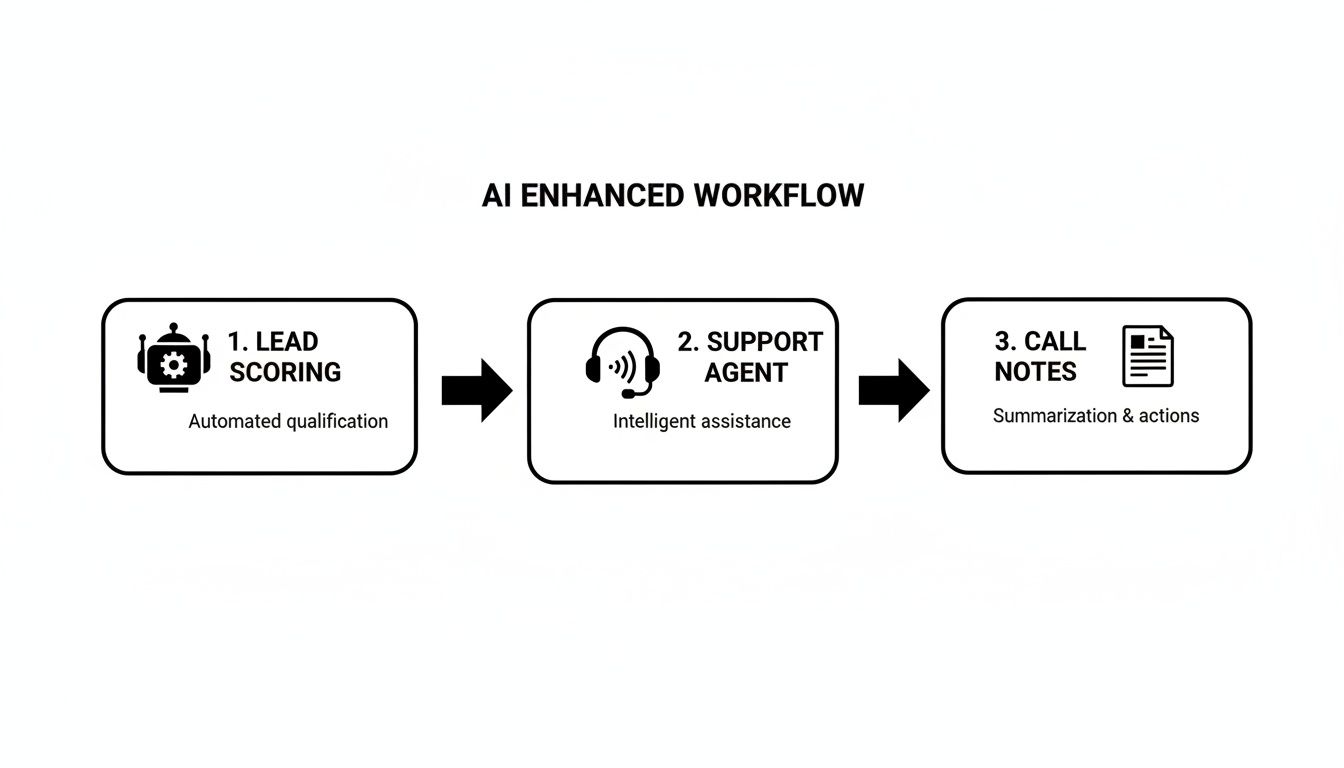
You can see how a lead scoring bot, an AI support agent, and an automated note-taker can work together, handling customer interactions without a human needing to step in at every stage.
Step 4: Implement, Test, and Document
With your tools picked out, you can start implementing the changes on your pilot workflow. A great strategy is to automate the most repetitive, lowest-value tasks first. These are your quick wins. As you roll out the new process, it's absolutely crucial to test it thoroughly in a controlled environment before unleashing it on the world.
Document everything. Create a clear, simple guide that explains the new workflow from start to finish. This documentation ensures everyone on the team understands their role and how the new process works, which is essential for getting consistent results and smooth adoption.
Step 5: Monitor, Iterate, and Scale
Workflow optimization is never really "done." Once your new process is live, keep a close eye on the metrics and goals you set back in step two. Are you actually hitting your targets for reduced cycle time or fewer errors?
Gather feedback from your team. They’re on the front lines and are your best source of truth on what’s working and what isn’t. Use that real-world data and feedback to make small, continuous adjustments—always iterating on the process to make it even better.
Once you’ve perfected your pilot workflow and have clear results to show for it, you can use that success story to get the buy-in you need to scale your optimization efforts to other parts of the business.
How We Help You Put This All Into Action
Knowing you need to optimize your workflows is one thing. Actually doing it—and getting it right—is a whole different ballgame. The road from manual, clunky processes to a smooth, automated system can be a minefield of expensive trial-and-error, confusing tech, and wasted time.
That’s where having an expert partner in your corner makes all the difference. At MakeAutomation, we don’t just talk theory; we roll up our sleeves and build the solution for you. We take the proven frameworks from this guide and apply them directly to your business, helping you skip the common mistakes and see a return on your investment much faster.
From Vague Problems to Concrete Solutions
Most businesses we talk to know they have a problem. They feel the pain of tasks that don’t scale or the high cost of manual work, but they’re not sure where to even begin fixing it.
We solve that by starting with frameworks we’ve already built and perfected for B2B and SaaS companies. You’re not starting from a blank page; you’re starting with a system that works.
Here’s what that looks like in practice:
- Lead Generation & CRM Automation: We build you an end-to-end machine that captures, qualifies, and nurtures leads on its own. Your sales team can finally stop chasing cold trails and focus only on hot, qualified prospects.
- Scalable Project Management: If you run an agency or service business, you know the pain of admin overhead. We build automated project kickoffs, task assignments, and reporting dashboards that give you a perfect bird's-eye view without the busywork.
- Hands-On AI Implementation: We’re not just consultants. We actively deploy sophisticated tools for you, like the Voice AI Agents that can handle your inbound and outbound calls 24/7, so you never miss an opportunity.
The real goal of workflow optimization is to build a business that can grow without piling on more costs and complexity. We provide the expertise to design and execute that vision, turning your biggest bottlenecks into your greatest strengths.
Your Expert Partner for Advanced Automation
Let's be honest—implementing something like a Voice AI can sound intimidating. But the results are too good to pass up. The companies who get this right see a massive drop in manual work and a huge leap in what their team can accomplish.
We make this process straightforward. Our team handles the entire setup, from the initial technical configuration to the final testing, making sure your AI agents are perfectly aligned with your goals.
Whether you need to qualify inbound leads around the clock or have an AI book appointments for your team, we configure the technology to fit perfectly into your newly optimized workflow. This isn’t about just giving you a tool; it’s about making sure that tool delivers real, immediate value.
Ready to stop managing chaos and start building an operation that can truly scale? Let's find the single biggest bottleneck holding you back and draw up a plan to eliminate it.
Connect with us to see how we can help. A custom workflow assessment is the first step toward reclaiming your time and unlocking what your company is truly capable of.
Frequently Asked Questions About Workflow Optimization
As you start thinking about optimizing your workflows, it’s only natural for some practical questions to pop up. Let's tackle the most common ones I hear from business owners so you can move forward with confidence.
How Much Does Workflow Optimization Cost?
This is usually the first question people ask, and the honest answer is: it depends. A simple automation for one small task might just be the cost of a monthly software subscription. On the other hand, a complete overhaul of a core business process that touches multiple departments and requires custom AI will be a more significant investment.
But here’s a better way to frame it: think in terms of Return on Investment (ROI). The upfront cost is often dwarfed by the savings you’ll see from reduced labor, fewer costly mistakes, and a much more productive team. If you spend $1,000 to automate a task that saves 20 hours of manual work every month, that investment pays for itself almost instantly. The real question isn't what it costs, but what it's costing you not to optimize.
Which Workflow Should I Optimize First?
Great question. The key is to start with a process that's causing you the most pain but also offers the biggest potential for a quick, visible win. You want to build momentum.
Look for a workflow that checks these boxes:
- High Volume and Repetition: If your team does it over and over again, every single day, it's a prime candidate for automation.
- Clear Bottlenecks: Where does work always seem to get stuck? Fixing that one spot can have a massive ripple effect.
- Measurable Outcomes: Choose a process where you can easily track the "before and after," like lead response time or the number of support tickets closed.
For most B2B and SaaS companies, things like lead qualification or new client onboarding are perfect starting points. They’re repetitive, have a direct line to revenue, and it’s easy to see the improvements on a dashboard.
Can My Small Business Benefit from Workflow Optimization?
Absolutely. It’s one of the biggest myths that you need to be a huge enterprise to see the benefits of understanding what is workflow optimization. Not too long ago, that might have been true, but the game has completely changed.
With the explosion of no-code automation platforms and affordable AI, powerful optimization is no longer just for corporations with massive IT budgets. A small team can see just as much—if not more—of a relative boost.
Think about it: for a small business, freeing up just one person from a few hours of busywork a week is huge. That’s more time they can spend talking to customers, closing deals, or developing your product—the exact things that fuel growth. These tools are built to scale, so you can start with one small, automated task and expand as you grow.
Ready to stop managing chaos and start building a business that runs like clockwork? At MakeAutomation, we specialize in implementing the exact automation and AI solutions that transform how B2B and SaaS companies operate. We'll help you pinpoint your biggest bottlenecks and build a clear roadmap for growth.
Schedule your free workflow assessment today and discover what's possible.