What is ai voice assistant: How it works
An AI voice assistant is, quite simply, software that understands what you say and acts on it. It’s the brains behind smart speakers and hands-free systems, turning your voice into a command center.
Your Digital Teammate Explained

Think of it as a dedicated teammate that never takes a break. Its job is straightforward but incredibly powerful: listen to a person's words, figure out what they mean, and then do something about it. We're not just talking about recognizing keywords here. It's about understanding the intent behind the words to give a genuinely helpful response, whether that's booking a demo, answering a support ticket, or updating a CRM.
At its core, an AI voice assistant is a sophisticated conversational tool. It acts as a translator between natural human language and the rigid logic of computers, giving us a much more intuitive way to get things done. Forget clicking through menus or typing out long commands; you can just speak.
This is why we're seeing them pop up everywhere, from our homes to our offices. The global market for voice assistants was valued at around USD 7.35 billion and is expected to skyrocket to USD 33.74 billion by 2030. That kind of growth shows just how much businesses are banking on this technology. You can dig into the full report on voice assistant market trends to see the data for yourself.
Core Capabilities of a Modern AI Voice Assistant
So, what can this digital teammate actually do for a business? It all boils down to a few essential functions that make it so valuable.
Here’s a quick look at the core capabilities that define what a modern AI voice assistant brings to the table.
| Capability | Description | Real-World Example |
|---|---|---|
| Active Listening & Interpretation | Constantly listens for a command and translates spoken words into actionable data for the system. | A customer calls your support line and says, "I need to check the status of my order." The AI understands the intent is "order status inquiry." |
| Task Execution & Automation | Carries out specific actions based on the user's request, often by integrating with other software. | After qualifying a lead over the phone, the AI automatically schedules a follow-up meeting in a sales rep's calendar and updates the lead's status in Salesforce. |
| Information Retrieval | Pulls answers from a connected knowledge base, database, or the internet to respond to questions accurately. | An employee asks, "What is our company's policy on remote work?" and the AI assistant instantly provides the relevant HR document. |
| Natural Conversation Flow | Manages multi-turn dialogue, remembering context from earlier in the conversation to provide a coherent experience. | The AI asks a caller, "Which product are you calling about?" and uses their answer to guide the rest of the troubleshooting conversation. |
These capabilities work together to create an experience that feels less like talking to a machine and more like delegating a task to a capable assistant.
A truly effective AI voice assistant does more than just follow orders. It anticipates needs, learns from interactions, and becomes an integrated part of a workflow, saving time and reducing friction for both employees and customers.
Ultimately, the best way to understand an AI voice assistant is to see it not as a standalone gadget, but as a functional part of your business operations. It’s a tool designed to automate communication, boost efficiency, and free up your human team to focus on the work that matters most.
How AI Voice Assistants Actually Understand You
Ever wonder what really happens in the milliseconds after you say, "Hey, book a meeting for tomorrow at 10 AM"? It isn't magic. It's a rapid, four-step process where sophisticated technologies work in perfect harmony, almost like a well-oiled assembly line. Understanding this process is the key to seeing how an AI assistant turns your spoken words into a real calendar invite.
The whole sequence is designed for one thing: to create a conversation so seamless that the technology just fades into the background. Let’s pull back the curtain and look at the four pillars that make this possible.
Step 1: Automatic Speech Recognition (The Transcriber)
The journey starts the moment the sound waves from your voice hit a microphone. The first piece of the puzzle to snap into place is Automatic Speech Recognition (ASR). Think of ASR as a highly skilled transcriber whose only job is to convert your speech into written text.
This is a much bigger challenge than it sounds. The ASR system has to filter out background noise, tell the difference between words that sound alike (like "two" and "too"), and handle a huge range of accents and speaking speeds. It deconstructs your speech into tiny phonetic bits and uses complex algorithms to figure out the most likely sequence of words. To get a better sense of this first step, you can learn more about how audio transcription works and its mechanics.
Step 2: Natural Language Understanding (The Interpreter)
Once your voice is turned into text, the real "thinking" begins. This is where Natural Language Understanding (NLU) comes into play. If ASR is the transcriber, then NLU is the interpreter—its job is to read the text and figure out what you actually mean.
NLU doesn't just do a literal, word-for-word translation. It’s looking for two critical things:
- Intent: What is the user's main goal? In our example, the intent is to "schedule a meeting." Other intents might be "get information," "play music," or "send a message."
- Entities: What are the key details needed to fulfill that intent? Here, the entities are "tomorrow" (the date) and "10 AM" (the time).
Without NLU, the assistant would have the words "book a meeting for tomorrow at 10 AM" but no clue what to do with them. NLU provides the crucial context that turns a simple sentence into an actionable command. This process is a core part of what we call conversational AI.
Step 3: Dialog Management (The Strategist)
With the intent and entities sorted out, the Dialog Manager takes the baton. This component is the conversation's strategist and short-term memory, managing the back-and-forth flow and keeping track of context.
For a simple command like booking a meeting, its job might seem easy. But what if you had just said, "Book a meeting for tomorrow"?
The Dialog Manager would instantly recognize that a key piece of information—the time—is missing. It would then decide the next logical step is to ask a clarifying question, like, "What time would you like to book it for?"
This ability to handle multi-turn conversations is what makes an AI voice assistant feel intelligent, not just like a clunky command-line interface. It remembers what you said a moment ago and uses that to guide the conversation toward a successful outcome. It’s the reason you don’t have to keep repeating yourself.
Step 4: Text-to-Speech (The Spokesperson)
Finally, once the assistant has its response ready—whether it’s a confirmation, an answer, or a question—it needs to talk back to you. This is the job of Text-to-Speech (TTS) technology. TTS is essentially the spokesperson of the group.
It takes the system's text-based response (e.g., "Okay, I've scheduled your meeting for tomorrow at 10 AM.") and converts it back into natural-sounding human speech. Modern TTS systems are incredibly sophisticated, able to generate speech with realistic intonation, pitch, and rhythm. The quality of the TTS voice is a massive factor in the user experience, deciding whether the assistant sounds robotic or genuinely human-like.
Together, these four pillars—ASR, NLU, Dialog Management, and TTS—form the technological backbone of any AI voice assistant. They work in a continuous loop, enabling a fluid and dynamic exchange that turns a simple spoken command into a completed task.
Exploring The Different Kinds Of Voice Assistants
When you hear "AI voice assistant," you probably think of the helpful voices on your phone or smart speaker that play your favorite songs and set kitchen timers. But that's just scratching the surface. The world of voice AI is much bigger, with different assistants designed for very different jobs.
Think of it like this: you have general practitioners and you have specialists. Both are doctors, but you wouldn't ask your family doctor to perform brain surgery. Similarly, voice assistants can be split into two main camps: the general-purpose assistants we use at home and the specialized assistants built for business.
General-Purpose Consumer Assistants
These are the big names you already know and use every day. They're the jacks-of-all-trades, designed to handle a huge variety of personal requests, from answering random trivia to dimming the lights in your living room. Their real power lies in how seamlessly they connect with all the apps and gadgets in our daily lives.
The battle for your home and phone is fierce. On mobile, Apple's Siri has a massive 45.6% market share, while Amazon's Alexa is the queen of the smart speaker castle with 37.1%. Not to be outdone, Google Assistant claims the most total users across all devices. You can dive deeper into these numbers by exploring more data on voice assistant adoption trends.
These assistants are designed for breadth, not depth. They can do a lot of things pretty well, but they don't have the focused skills needed for complex business tasks.
Here’s a quick look at how the main players stack up against each other.
Comparing Popular AI Voice Assistants
While they all answer to a wake word, each major consumer assistant has its own unique strengths and fits best into a particular ecosystem.
| Assistant | Primary Platform | Key Strengths | Best Use Case |
|---|---|---|---|
| Amazon Alexa | Smart Speakers (Echo) | Smart home control, e-commerce, vast library of "Skills." | Managing a connected home and shopping. |
| Google Assistant | Android Phones, Google Home | Superior search, contextual awareness, Google ecosystem integration. | Getting quick, accurate answers and managing your schedule. |
| Apple's Siri | iOS, macOS, watchOS | Deep integration with Apple devices and services, strong on-device processing. | Seamlessly controlling your Apple hardware and software. |
Ultimately, the "best" one often comes down to which tech ecosystem you're already invested in.
Specialized Business and Enterprise Assistants
Now, let's step out of the living room and into the office. Specialized AI voice assistants are a completely different breed. They are built from the ground up to solve specific business problems, acting as experts in a single domain like sales, customer support, or recruiting.
Instead of general knowledge, they're armed with deep, industry-specific information. Their true value comes from their ability to handle complex, multi-step workflows with total accuracy. They plug directly into the tools you already use—like your CRM, helpdesk software, or applicant tracking system—to automate tasks that would otherwise eat up hours of your team's time.
No matter the type, every voice assistant follows the same basic four-step process to understand and respond. It's elegantly simple.
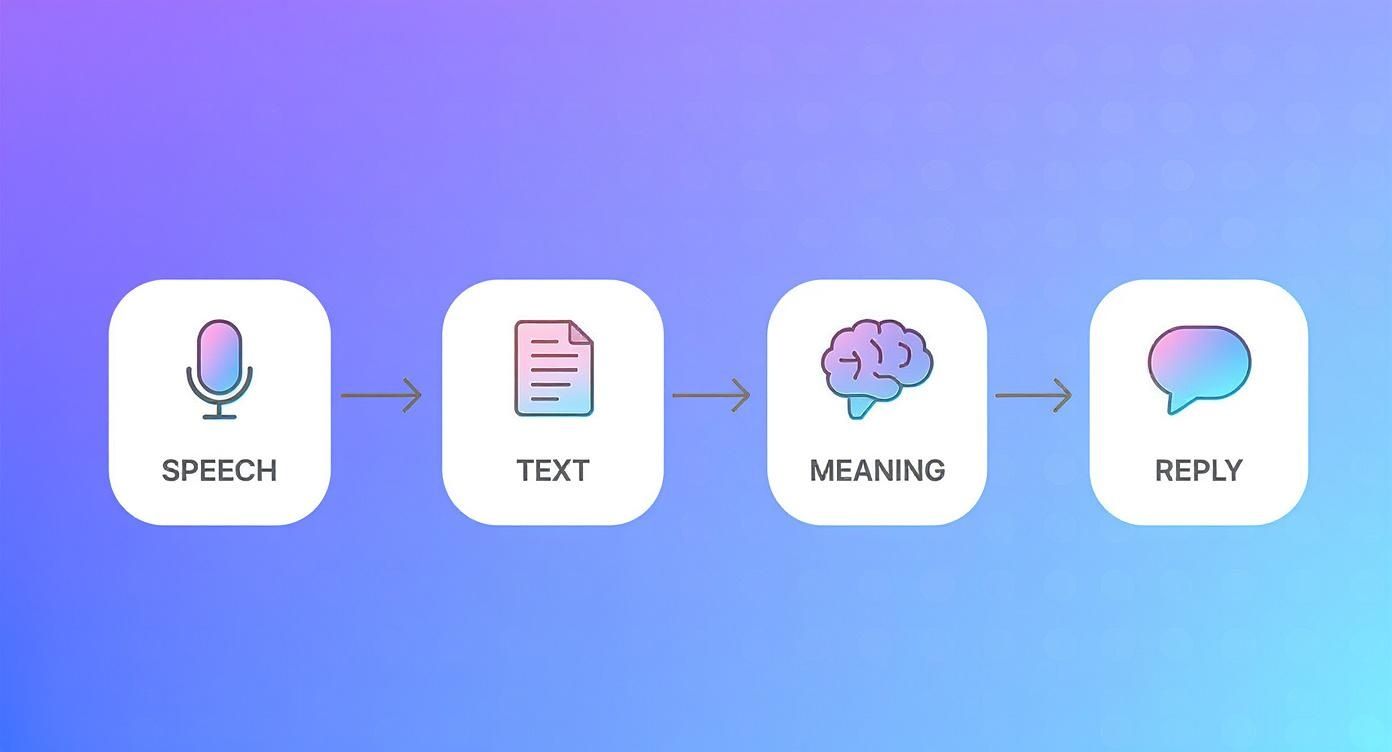
This journey from spoken words to a meaningful action is the engine that powers every voice AI.
The real magic for businesses happens after the "Meaning" step. A business-focused assistant takes that meaning and triggers a specific action in a business system, like updating a lead's status in your CRM or booking a demo for a qualified prospect.
Spotting The Key Differences
So, how do you choose? It all comes down to the job you need done. A consumer assistant is great for convenience, but a specialized one is built to deliver business results.
Let’s put them side-by-side to make the distinction crystal clear.
| Feature | General-Purpose (e.g., Alexa) | Specialized Business (e.g., MakeAutomation) |
|---|---|---|
| Primary Goal | Broad user convenience and engagement. | Solving a specific business challenge (e.g., lead qualification). |
| Knowledge Base | General world knowledge from the internet. | Deep, domain-specific data from business systems. |
| Integrations | Smart home devices, music apps, consumer services. | CRMs, ERPs, helpdesks, and other enterprise software. |
| Key Metric | Daily active users, user satisfaction. | ROI, cost savings, lead conversion rate, call deflection. |
Here’s a practical example: you could ask Siri to remind you to call a sales lead. In contrast, a specialized voice assistant from MakeAutomation could actually make the outbound call for you, qualify the lead using your criteria, and schedule the follow-up meeting in a sales rep’s calendar. All without a human lifting a finger.
That’s the fundamental difference, and it’s why specialized assistants are becoming such a powerful tool for growing businesses.
How Businesses Use Voice Assistants to Grow

It’s one thing to understand the tech, but it’s another to see what it can actually do for a business. Companies aren't just playing around with voice assistants anymore; they're putting them to work to solve real-world problems, boost revenue, and completely reshape customer interactions. This isn't science fiction—it's about getting practical, measurable results right now.
Think of a business-grade AI voice assistant as your most reliable employee. It works 24/7, never gets tired of repetitive tasks, and frees up your human team to focus on the creative, strategic work that actually moves the needle.
Let's dig into the specific ways companies are making this happen.
Supercharging Sales with Automated Outreach
What if your sales team could qualify every single lead around the clock without ever picking up the phone for a cold call? That’s exactly what a voice assistant can do, turning the top of the sales funnel from a manual grind into a smooth, automated machine.
Here's a look at how it works in the real world:
- Automated Inbound and Outbound Calls: The AI can instantly call new leads the moment they fill out a form or work its way through a huge prospect list. No lead is ever left to go cold.
- Intelligent Lead Qualification: It doesn't just dial; it has a real conversation. The assistant asks the right qualifying questions about needs, budget, and timeline to see if there’s a genuine opportunity.
- Seamless Handoff: Once a lead is confirmed as sales-ready, the AI agent can book a demo directly on a sales rep's calendar and automatically log the conversation notes in your CRM.
This completely changes the game for sales development reps (SDRs). Instead of burning hours on dead-end calls, they can walk in every morning to a calendar full of appointments with people who are actually interested. The result is a much shorter sales cycle and a huge leap in productivity.
The biggest win here isn't just about speed—it's consistency. An AI assistant follows the script perfectly every single time, captures all the critical data, and makes sure every lead gets contacted. That’s how you build a predictable, scalable pipeline.
Delivering Effortless 24/7 Customer Support
Today's customers want answers now, not tomorrow morning. But staffing a support team 24/7 is a massive expense that most growing businesses can't justify. An AI voice assistant is the perfect solution, acting as a smart and efficient first line of defense for customer questions.
Let's be honest, most support calls are about the same handful of simple things: "Where's my order?" or "How do I reset my password?" An AI can handle these instantly, slashing wait times and keeping customers happy. If a problem is too tricky, the assistant smoothly transfers the call—along with all the context it has already gathered—to a human agent.
This approach pays off in several ways:
- Immediate Resolutions: Customers get their problems solved without sitting on hold, which makes for a much better experience.
- Reduced Agent Burnout: Your human support agents can stop answering the same questions all day and focus their brainpower on complex issues that require a human touch.
- Cost Savings: You can scale up your support capacity without needing to hire more people, keeping operational costs in check.
By putting an automated customer service software in place, companies ensure their customers feel valued and supported at any hour. This doesn't just solve problems; it builds the kind of loyalty that keeps customers coming back.
Streamlining the Recruitment Process
The first phase of recruiting is a volume game. You're sifting through hundreds of applications and making endless screening calls, all of which slows down the hiring process and can cause you to lose great candidates to faster-moving competitors. An AI voice assistant can take over these initial steps, making your recruitment cycle faster and far more efficient.
You can set up a voice AI to:
- Conduct Initial Screenings: The assistant calls applicants to run through basic screening questions about their experience, salary expectations, and when they can start.
- Schedule Interviews: For candidates who tick all the boxes, the AI can check the hiring manager's calendar and book the next interview automatically.
- Answer Candidate FAQs: The assistant can field common questions about the role or the company, making sure every applicant has a great first impression.
This frees up your HR team to do what they do best: actually interviewing qualified people and making smart hiring decisions. We're already seeing how AI Voice Recognition in Healthcare is changing how doctors work, and now those same efficiency boosts are coming to HR. By automating the top of the hiring funnel, you can spot top talent faster and get a serious leg up on the competition.
What to Consider Before Implementing Voice AI
Bringing an AI voice assistant into your business is a major strategic move, not just another software update. Before you jump in, it’s really important to map out a clear plan and define what a successful rollout actually looks like for your company. Getting this right from the start saves a lot of headaches and money down the line and makes sure the tech actually delivers on its promise.
The whole process kicks off by asking some honest questions about your current setup and where you want to go. A solid strategy acts as your roadmap, guiding every decision, from which vendor you choose to how you’ll measure your return on investment.
Technical and Integration Readiness
First things first, you have to figure out how a voice AI will actually plug into your existing tech stack. A brilliant AI that can’t talk to your core systems is like hiring a star employee who doesn't speak the same language as the rest of the team—talented, but totally ineffective.
Think through these key technical points:
- API and CRM Integration: How smoothly can the voice assistant connect to your CRM, helpdesk software, or other critical platforms? This is non-negotiable. You need it to do things like log calls or update lead statuses automatically without any friction.
- Scalability and Performance: Can the platform handle your current call volume and, more importantly, can it grow with you? You need to be sure the system can manage your busiest hours without slowing down or dropping calls.
- Customization and Control: How much say will you have over the AI's scripts, voice, and conversational flows? Your business has a unique brand and personality, and your AI assistant should be a reflection of that.
Nailing these technical checks ensures the tool you pick will enhance your workflows, not break them. A detailed integration plan is one of the first things to tackle when you decide to build an AI agent for your business.
Data Privacy and Security Compliance
Any time an AI voice assistant interacts with your customers, it’s likely handling sensitive information. Protecting that data isn't just a nice-to-have; it's a legal and ethical must-do that’s absolutely central to keeping your customers' trust.
Security cannot be an afterthought. From the moment a customer's voice is recorded, every piece of data must be managed according to strict privacy protocols. This includes encryption during transit and at rest, as well as clear policies for data retention and access control.
Before you commit to a solution, triple-check that it complies with regulations relevant to your customers, like GDPR in Europe or HIPAA in healthcare. Don't be shy about asking potential vendors direct questions about their security architecture and how they handle data.
Total Cost of Ownership
The upfront price of a voice AI solution is just the tip of the iceberg. To get the real financial picture, you need to look at the Total Cost of Ownership (TCO), which covers every direct and indirect cost you'll encounter over the life of the tool.
Your TCO calculation should factor in:
- Subscription or Licensing Fees: The regular cost for using the platform.
- Implementation and Setup Costs: Any one-time fees for integration, configuration, and getting your team up to speed.
- Ongoing Maintenance and Support: The price of technical support and any necessary system updates.
- Internal Resource Allocation: The time your own team will need to spend managing, tweaking, and optimizing the AI.
Thinking in terms of TCO helps you avoid nasty surprises on your budget and ensures you're making a financially sound investment for the long haul.
Defining Success with Clear KPIs
Last but not least, you can't improve what you don't measure. Before you go live, you need to define exactly what a "win" looks like by setting clear Key Performance Indicators (KPIs). These metrics will be your north star for judging the AI's real-world impact.
A few great KPIs for a voice assistant might include:
- Lead Qualification Rate: The percentage of calls that successfully result in a sales-qualified lead.
- Call Deflection Rate: The number of inbound support calls the AI resolves completely without needing a human.
- Cost Per Resolution: The average cost to handle a customer issue with the AI compared to a human agent.
- Customer Satisfaction (CSAT) Scores: Direct feedback gathered after AI interactions to see how customers actually feel about the experience.
By setting these KPIs from day one, you can objectively track the ROI of your voice AI and use real data to make smart decisions and continuously improve its performance.
Common Questions About AI Voice Assistants
Even after diving into the tech, it's natural to have a few questions pop up. Let's tackle some of the most common ones to clear up any confusion and give you a solid handle on what this technology really means for your business.
Voice Assistant vs. Chatbot: What's the Real Difference?
The biggest giveaway is how you talk to them. An AI voice assistant is all about spoken conversation—it listens with speech recognition and talks back using text-to-speech. A chatbot, on the other hand, lives in the world of text, usually on a website or in a messaging app.
Think of it this way: a voice assistant is your hands-free helper for when you're driving or have your hands full. A chatbot is perfect for when you're already typing and can use visual cues like buttons and images to get things done faster. They both use similar brains (Natural Language Processing) to figure out what you want, but they operate in totally different environments.
How Secure Is My Data with a Voice Assistant?
This is a huge deal, and any serious voice AI provider treats it that way. The best platforms use multiple layers of security, like encrypting your data both while it’s in transit and when it's sitting on a server. For business use, you absolutely need to make sure the provider complies with industry rules like HIPAA for healthcare or PCI DSS for payments.
Before you commit to a provider, dig into their security policies and ask about their data handling protocols and compliance certifications.
Security isn't just about what the provider does; it's also about control. Your business needs to set clear rules on what information gets shared and maintain total control over who can access your data.
Can a Voice Assistant Actually Understand Different Accents?
Absolutely. Modern AI voice assistants are trained on massive, diverse libraries of human speech from all over the world. This helps them get remarkably good at understanding a wide array of accents, dialects, and even multiple languages. Plus, the technology is always getting smarter with every conversation it has.
This is critical for business. You'll want to find a solution that's already proven to work well with the specific accents and languages of your customers. Enterprise-level assistants often go a step further, offering support for dozens of languages and the ability to be fine-tuned to recognize niche industry jargon.
Should I Build a Custom Voice Assistant or Just Buy One?
This classic "build vs. buy" question really boils down to your company's resources, timeline, and what you're trying to accomplish.
-
Building it yourself gives you maximum control and a perfectly customized tool. The downside? It demands a huge upfront investment, a team of specialized AI experts, and a long-term plan for maintenance and updates.
-
Buying a ready-made solution from a vendor like MakeAutomation gets you up and running incredibly fast with much lower initial costs. You get access to a proven, mature platform without the headache of building it all from scratch.
For most businesses, buying or using a hybrid approach is the most sensible route. It lets you tap into powerful AI capabilities right away and focus your team on what they do best—growing the business, not building tech infrastructure. You'll see a return on your investment much, much faster.
Ready to see how an AI voice assistant can completely change your operations? At MakeAutomation, we specialize in implementing AI agents that handle your inbound and outbound calls, qualify leads, and simplify your workflows. Book a call with us today to see how we can help you get your time back and grow faster.