A Developer’s Guide to the Jest Mock Function
Ever found yourself staring down a complex integration test that just won't stop failing? It's a common story. Your code rarely works in isolation—it's constantly talking to databases, third-party services like Stripe or Salesforce, and a whole web of internal APIs.
These dependencies are vital for your app to function, but they can turn testing into a real headache. They’re slow, sometimes unreliable, and often just plain unavailable in your local environment. The result? Flaky tests and a development cycle that feels like two steps forward, one step back.
Why Mocking Is Your Secret Weapon in Modern Testing
This is where mocking becomes an essential part of your toolkit. The idea is simple: instead of making a real network call to an external service, your test interacts with a controlled, "fake" version that you manage. The Jest mock function is the engine that drives this, letting you dictate exactly how that dependency should behave.
With mocking, you gain precise control over your test environment.
- Isolate Your Logic: You can finally test a single unit of code on its own terms. If a test fails, you know the bug is in your code, not in some downstream service you have no control over.
- Run at Full Speed: Mocks are lightning-fast. By cutting out network latency, you can run your entire test suite in a fraction of the time, making for a much tighter feedback loop.
- Test Every Edge Case: What happens when an API returns a 500 error? Or a network request times out? Mocking makes it trivial to simulate these scenarios, allowing you to build truly resilient applications that can handle the unexpected.
In a world where speed and efficiency are everything, mastering practices like mocking is no longer optional. This is especially true as the industry moves toward more sophisticated workflows, including trends in AI-Driven Software Development and Testing.
The Business Case for Mocking
This isn't just a technical win; it's a move that directly impacts the bottom line. It’s no surprise that Jest mock functions have become a staple in JavaScript testing, with adoption hovering around 78% among professional teams.
The data speaks for itself. Teams that embrace Jest's mocking capabilities report a 56% improvement in test reliability and a 42% reduction in flaky tests that bring development to a halt. In practical terms, this can save a team an estimated 15-20 hours per sprint that would have been wasted on debugging and test maintenance. You can dive deeper into Jest's powerful mocking capabilities on their official site.
Here's an overview of the Jest website, which provides extensive documentation for these features.
The official docs are an incredible resource, and I'd recommend keeping them bookmarked. They are the ultimate source of truth for Jest's API.
Key Takeaway: Mocking isn't just a trick to make tests pass. It's a fundamental shift in how you approach development. It leads to higher-quality code, faster release cycles, and a more robust and dependable product for your users.
The Core Trio: jest.fn, jest.mock, and jest.spyOn
When it comes to writing solid unit tests, you'll quickly find yourself needing to isolate your code from its dependencies. This is where mocking comes in, and Jest gives you a powerful trio of tools to handle almost any situation: jest.fn, jest.mock, and jest.spyOn.
Think of them as different tools for different jobs. Knowing which one to grab is the key to writing clean, effective tests without the headache. We'll start with the simplest building block, move to the module-level powerhouse, and finish with the subtle observer.
Creating a Blank Slate with jest.fn
Let's start with the most fundamental tool in the box: jest.fn(). At its core, it creates a completely blank, trackable function. It's a "dummy" function that doesn't do anything by default but meticulously records every time it's called, what it was called with, and what it returned.
It's the perfect solution when you need to test if a function—like a callback—is being used correctly by the code you're testing.
Here’s a classic scenario: a function that processes some data and then fires a callback.
// src/dataProcessor.js
export function processData(data, onComplete) {
const result = data.map(item => item * 2);
onComplete(result);
}
To test processData, we don't care what the onComplete callback actually does. We just need to confirm that our function called it with the right data. This is a perfect use case for jest.fn().
// src/dataProcessor.test.js
import { processData } from './dataProcessor';
test('should call the onComplete callback with processed data', () => {
const mockCallback = jest.fn();
const inputData = [1, 2, 3];
processData(inputData, mockCallback);
expect(mockCallback).toHaveBeenCalled();
expect(mockCallback).toHaveBeenCalledWith([2, 4, 6]);
});
Here, our mockCallback is essentially a spy. We set it up, pass it into our function, and then ask it what happened. This keeps our test laser-focused on the logic inside processData, which is exactly what a good unit test should do.
Replacing Entire Modules with jest.mock
Sometimes, a single fake function isn't enough. You need to replace an entire external dependency—like an API client, a database connector, or a third-party library. This is where jest.mock() comes in. It operates at the module level, letting you swap out an entire file with a mocked version.
Imagine you have a service that pulls user data from a CRM. In a test, you absolutely don't want to make a real network request. It's slow, unreliable, and makes your test dependent on an external system.
Here's the real client:
// src/services/crmClient.js
export const fetchUser = async (userId) => {
// Makes a real API call…
const response = await fetch(https://api.crm.com/users/${userId});
return response.json();
};
And here's a component that uses it:
// src/components/UserProfile.js
import { fetchUser } from '../services/crmClient';
export async function getUserProfile(userId) {
const user = await fetchUser(userId);
return { …user, fullName: ${user.firstName} ${user.lastName} };
}
Now, let's test getUserProfile in isolation. By placing jest.mock('./services/crmClient') at the top of our test file, Jest automatically intercepts that import and replaces all its exports with mock functions.
// src/components/UserProfile.test.js
import { fetchUser } from '../services/crmClient';
import { getUserProfile } from './UserProfile';
// Tell Jest to replace the crmClient module with a mock
jest.mock('../services/crmClient');
test('should return a user profile with a full name', async () => {
const mockUser = { id: 1, firstName: 'Jane', lastName: 'Doe' };
// Now we can control the mock's behavior
fetchUser.mockResolvedValue(mockUser);
const profile = await getUserProfile(1);
expect(fetchUser).toHaveBeenCalledWith(1);
expect(profile.fullName).toBe('Jane Doe');
});
See the magic? We can now dictate what fetchUser does right inside our test, forcing it to return predictable data. This kind of isolation is crucial for testing complex application logic. If you're working in other frameworks, the same ideas apply; our guide on structuring Angular unit tests explores similar techniques for creating independent, reliable tests.
Observing Real Functions with jest.spyOn
What if you don't want to completely replace a function? Maybe you just want to watch it, to see if it's being called, while still letting it run its original code. Or perhaps you need to temporarily override it for just one test. For these more surgical tasks, we have jest.spyOn().
jest.spyOn(object, 'methodName') attaches a spy to an existing method on an object. This gives you all the tracking power of a mock while preserving the original implementation, which you can call if you choose.
It's all about making a smart decision on when to mock, when to spy, and when to let things run as they are. A simple flowchart can help guide your thinking when an integration test fails and you need to figure out how to isolate the problem.
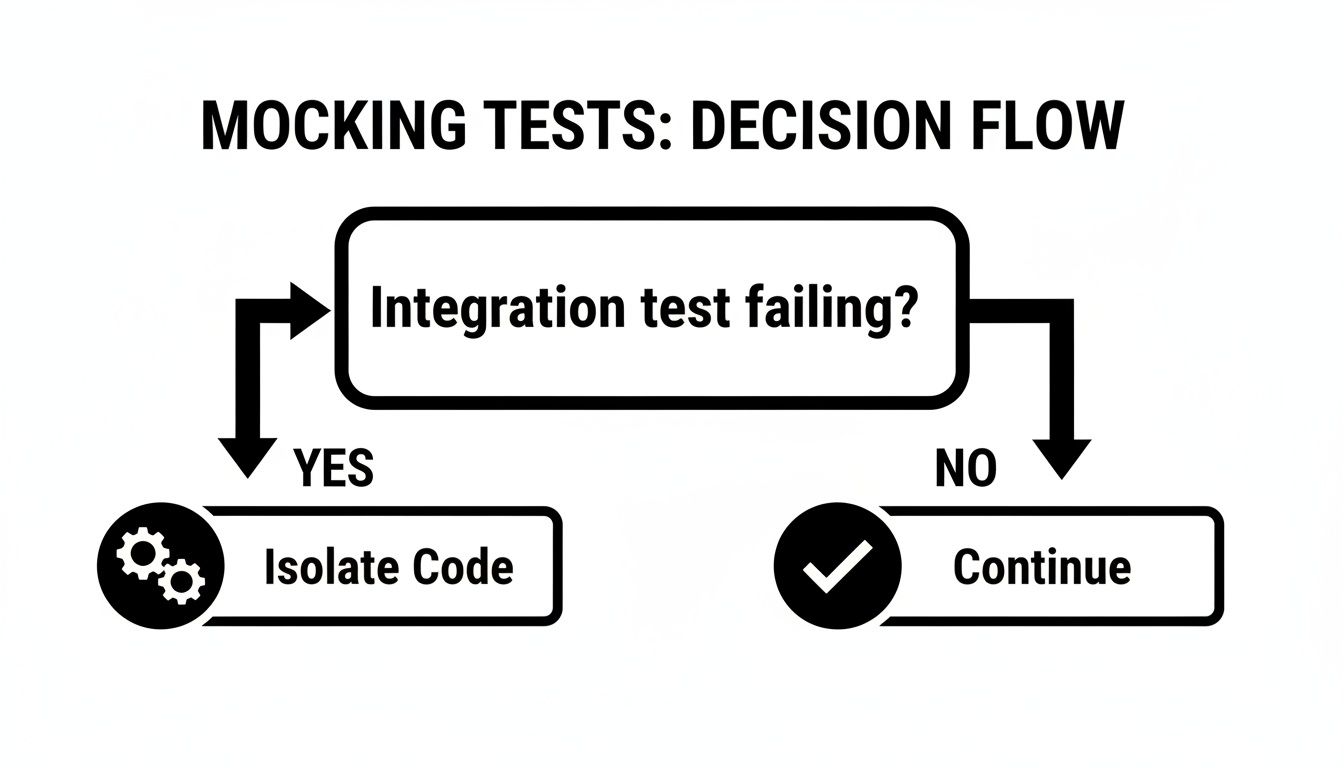
This decision-making process is more than just a good habit for B2B and SaaS developers. Mastering these mocking patterns has a measurable impact. Teams that lean heavily on jest.spyOn and other advanced mocking strategies often see code coverage rates jump to 92%, a huge leap from the industry average of 58%. This translates into real savings: a 71% reduction in production incidents and an average annual cost reduction of $185,000 in bug-fixing and remediation.
Let's see jest.spyOn in a practical example. Imagine you have a logger utility, and you want to verify that a specific message gets logged without completely disabling the logger.
// src/utils/logger.js
export const logger = {
log: (message) => {
console.log([LOG]: ${message});
},
};
In your test, you can "spy" on the log method to see when it's called.
import { logger } from '../utils/logger';
test('should log a specific message', () => {
const logSpy = jest.spyOn(logger, 'log');
// Some code that should trigger a log message
logger.log('Process started');
expect(logSpy).toHaveBeenCalledWith('Process started');
// CRITICAL: Clean up the spy after the test!
logSpy.mockRestore();
});
Key Insight: That
mockRestore()call is the most important part of usingjest.spyOn. It removes the spy and restores the original function, ensuring your mock doesn't "leak" into other tests and cause confusing, hard-to-debug failures. This is a non-negotiable step for a clean and maintainable test suite.
Choosing the Right Mocking Method for Your Test
Deciding between jest.fn, jest.mock, and jest.spyOn can be confusing at first. This table breaks down the common scenarios I've encountered to help you pick the right tool for the job quickly.
| Scenario | jest.fn() |
jest.mock() |
jest.spyOn() |
|---|---|---|---|
| Testing a callback function | Perfect. Create a blank function and check if it was called. | Overkill. You don't need to mock the whole module. | Not suitable, as the callback doesn't exist on an object to spy on. |
Isolating from a 3rd-party library (e.g., axios) |
Not applicable. It can't intercept module imports. | Ideal. Replaces the entire library with a mock at the module level. | Possible, but jest.mock is cleaner and more direct for this use case. |
| Checking if a method on an object was called (while still running it) | No. It creates a new function, it can't watch an existing one. | No. This replaces the entire module, not just one method. | The only tool for this. It observes the real method without replacing it. |
| Temporarily overriding a method for one test | No. It can't modify an existing object's method. | Possible, but clumsy. It affects all tests in the file. | Perfect. Use .mockImplementation() and then .mockRestore() to clean up. |
| Creating a simple, standalone fake function | Yes. This is exactly what it was designed for. | No. You don't need to mock a file that doesn't exist. | No. There's no original function to spy on. |
Ultimately, think about the scope of what you need to fake. A single function? jest.fn. A whole file? jest.mock. A single method on a real object? jest.spyOn. Getting this right will make your tests simpler, faster, and much easier to maintain.
Advanced Mocking Patterns for Complex Applications
As an application matures, especially in a B2B or SaaS environment, things get complicated. Your code isn't just running isolated functions anymore; it's making API calls, instantiating classes, and depending on large, shared utility modules. The simple mocking techniques that worked perfectly for small functions start to feel brittle.
This is the point where you need to expand your testing toolkit. We're about to dive into the patterns you'll absolutely need for testing the dynamic, asynchronous, and object-oriented code that defines modern applications. Honestly, mastering these techniques is what separates a fragile test suite from a truly robust and reliable one.
Handling Asynchronous API Calls
Modern web apps live and breathe asynchronous communication. Whether you're fetching user data, submitting a form, or polling for a status update, your code is constantly talking to a server. Testing this means you have to tame the unpredictable nature of network requests.
Thankfully, Jest mock functions come with specialized helpers for exactly this: mockResolvedValue and mockRejectedValue. They let you dictate the outcome of any promise-based function, giving you full command over your test’s execution flow without ever making a real network call.
Let’s say you have a function that fetches customer details from your backend.
// src/api/customerApi.js
import axios from 'axios';
export const getCustomer = async (customerId) => {
const response = await axios.get(/api/customers/${customerId});
return response.data;
};
To test a component that relies on getCustomer, you can simulate a successful API response with ease.
import { getCustomer } from './api/customerApi';
jest.mock('./api/customerApi'); // Jest auto-mocks the module
test('should handle a successful customer fetch', async () => {
const mockCustomerData = { id: 123, name: 'Acme Corp' };
getCustomer.mockResolvedValue(mockCustomerData);
// Now, you can run the part of your app that uses getCustomer…
// …and then assert that it correctly handles the data.
});
Simulating the failure path is just as straightforward. You can fake a server error or a 404 Not Found by using mockRejectedValue.
test('should handle an API error gracefully', async () => {
const apiError = new Error('Customer not found');
getCustomer.mockRejectedValue(apiError);
// Your code should ideally have a try/catch block for this.
// This test lets you confirm that the catch block is triggered
// and the UI shows a helpful error message instead of crashing.
});
By using
mockResolvedValueandmockRejectedValue, you're not just testing the "happy path." You're building confidence that your application can handle real-world network issues gracefully, which is a non-negotiable for any enterprise-grade software.
Simulating Sequential and Chained Mock Values
What if a function gets called multiple times in one test, and you need it to return something different each time? This happens all the time in scenarios like polling for a job status or processing items from a paginated API.
For these situations, Jest gives us mockReturnValueOnce. You can chain these calls to create a first-in, first-out queue of return values. Every time the mock is invoked, it pulls the next value from the queue.
Imagine a function that retries a failing operation three times before giving up.
// A simple function that retries a fetch call
async function fetchWithRetries(apiCall) {
for (let i = 0; i < 3; i++) {
try {
return await apiCall();
} catch (error) {
if (i === 2) throw error; // Rethrow on the last attempt
}
}
}
test('should retry a failing function twice before succeeding', async () => {
const mockApiCall = jest.fn();
// Here we set up the sequence of events
mockApiCall
.mockRejectedValueOnce(new Error('Attempt 1 Failed'))
.mockRejectedValueOnce(new Error('Attempt 2 Failed'))
.mockResolvedValueOnce('Success!');
const result = await fetchWithRetries(mockApiCall);
expect(mockApiCall).toHaveBeenCalledTimes(3);
expect(result).toBe('Success!');
});
This pattern gives you surgical control for testing complex retry logic, state machine transitions, or any sequence of operations without writing messy, convoluted test setups.
Working with Manual Mocks for Scalability
As your project grows, you'll start to notice you're mocking the same things over and over again. A global API client, a logging service, or a big utility library are classic examples—they get used across dozens, sometimes hundreds, of test files.
Rewriting jest.mock() with a complicated setup function in every single file is not just tedious; it's a maintenance nightmare. When the real module’s API inevitably changes, you have to go on a scavenger hunt to update every mock.
This is the perfect job for manual mocks. By creating a __mocks__ directory next to your node_modules folder, you can provide a persistent, reusable mock for any module in your project.
- project-root/
__mocks__/axios.js
- src/
package.json
With this structure in place, any time you call jest.mock('axios') in a test, Jest will automatically grab your custom implementation from __mocks__/axios.js instead of auto-generating one.
Here’s what a simple manual mock for axios might look like:
// mocks/axios.js
const mockAxios = {
get: jest.fn(() => Promise.resolve({ data: {} })),
post: jest.fn(() => Promise.resolve({ data: {} })),
// …mock any other methods your app uses
};
export default mockAxios;
This approach is a lifesaver on large applications for a few key reasons:
- Consistency: It guarantees a module is mocked the exact same way across your entire project.
- Maintainability: If the library's API changes, you only have one file to update. That’s a huge win.
- Simplicity: Your test files become much cleaner and easier to read without all the boilerplate mock setup.
Manual mocks are an incredibly powerful tool for managing dependencies at scale. They help you build a test suite that is both durable and easy to maintain in the long run—a true cornerstone of effective testing in large SaaS codebases.
Mastering Mocks in a TypeScript Environment
Switching a codebase to TypeScript is a huge win for long-term maintainability, giving us static type checking and fantastic IntelliSense. But when it comes to testing, it can feel like you've introduced a whole new set of problems. We've all been there: wrestling with the compiler, trying to mock a function, and finally reaching for as any just to make the errors go away.
That little as any shortcut is tempting, I get it. But it's a code smell that completely defeats the purpose of using TypeScript in the first place. It’s like installing a state-of-the-art security system and then leaving a window wide open—it creates a blind spot where bugs love to hide.
Thankfully, you don't need to choose between type safety and easy testing. Jest has a clean, built-in solution.
Unlocking Type-Safe Mocks with jest.Mocked
The secret weapon for type-safe mocking is a generic type baked right into Jest: jest.Mocked. This utility is designed to wrap your original type, adding all the Jest mock properties (.mockReturnValue, .toHaveBeenCalledWith, etc.) while perfectly preserving the original function’s signature and return types.
The result is a dream. You get complete type safety, and your IDE can provide helpful autocompletion for both the mock’s implementation and its assertions. No more guesswork.
Imagine we have a standard apiClient with a fetchData method that we need to isolate in a test.
// src/utils/apiClient.ts
export const apiClient = {
fetchData: async (id: string): Promise<{ success: boolean; data: string[] }> => {
// … implementation that calls a real API
},
};
When you mock this module in a test file, the default mock functions are untyped. This is exactly where jest.Mocked shines.
import { apiClient } from '../utils/apiClient';
import { someFunctionThatUsesApi } from '../my-service';
// Mock the module before any imports use it
jest.mock('../utils/apiClient');
// Here's the magic: cast the mocked module using jest.Mocked
const mockedApiClient = apiClient as jest.Mocked
test('should process data from the API correctly', async () => {
// Now, everything is fully type-safe!
const mockResponse = { success: true, data: ['item1', 'item2'] };
mockedApiClient.fetchData.mockResolvedValue(mockResponse);
await someFunctionThatUsesApi('123');
// The compiler knows .fetchData is a mock function and what it expects
expect(mockedApiClient.fetchData).toHaveBeenCalledWith('123');
});
By casting our imported apiClient to jest.Mocked<typeof apiClient>, we're giving the TypeScript compiler the exact information it needs. It now understands that fetchData isn't the original function anymore—it's a Jest mock function that knows its own arguments, return values, and all the special assertion methods.
Typing Custom Mock Implementations
This type safety extends to custom implementations with .mockImplementation(). This is another common spot where any tends to sneak in, but jest.Mocked helps us keep things clean.
Let's say we need to mock a utility function that transforms a data object.
// src/utils/transformer.ts
interface Input {
id: number;
value: string;
}
interface Output {
key: string;
processed: boolean;
}
export const transformData = (input: Input): Output => {
// … real-world transformation logic
};
In our test, we can provide a mock implementation that is fully type-checked.
import { transformData } from '../utils/transformer';
jest.mock('../utils/transformer');
// Cast the imported function directly using jest.Mock
const mockedTransform = transformData as jest.Mock
test('should use a type-safe mock implementation', () => {
// The compiler will check the types of 'input' and the return object here.
// If you get them wrong, you'll get an immediate error.
mockedTransform.mockImplementation((input) => {
return {
key: processed-${input.id},
processed: true,
};
});
const result = mockedTransform({ id: 1, value: 'test' });
expect(result.processed).toBe(true);
});
Key Insight: Did you notice the small difference? For a whole module with multiple exports, you'll use
jest.Mocked<typeof myModule>. But for a single, standalone function,jest.Mock<typeof myFunc>is the correct type. Getting this right is crucial for applying the correct typings and ensuring your tests are not only robust but also self-documenting and easier to refactor down the road.
Writing Clean and Maintainable Mock Tests
Anyone can write a mock. But writing one that doesn't shatter the moment you refactor your code? That's a different skill entirely. As an application grows, a messy test suite can cause more headaches than the bugs it's supposed to catch. That's why the long-term health of your mock tests is so incredibly important.
A test suite full of brittle, overly-specific mocks is a maintenance nightmare waiting to happen. The goal isn't just to make tests pass; it's to build a reliable safety net that’s flexible, easy to read, and actually speeds up your development cycle. Let's walk through some battle-tested practices I've picked up over the years to keep tests lean, effective, and maintainable.
Enforce Test Isolation with Automatic Cleanup
One of the golden rules of testing is test isolation. A single test should never, ever be able to affect the outcome of another. If your tests only pass when run in a specific order, you've got a ticking time bomb on your hands. Shared mock state is almost always the culprit.
Thankfully, Jest gives you a straightforward way to handle this with beforeEach and afterEach hooks. By resetting your mocks before or after each test, you guarantee a clean slate every single time.
// A common setup for ensuring test isolation
beforeEach(() => {
// Resets the state of all mocks, clearing call history and mock implementations.
jest.resetAllMocks();
});
// Or a more surgical approach if you only want to clear call counts
afterEach(() => {
// Clears the .mock.calls and .mock.instances properties of all mocks.
jest.clearAllMocks();
});
Using jest.resetAllMocks() in a beforeEach block is a foundational practice. It stops mock call counts from one test from "leaking" into the next, which wipes out an entire class of confusing, hard-to-debug failures. This simple discipline makes your tests far more predictable and reliable.
Pro Tip: I make this a non-negotiable part of my team's workflow. I've found it incredibly helpful to add a
beforeEachwithjest.resetAllMocks()in the global test setup file. This ensures every test in the project gets a clean slate by default and reinforces good habits. You can find some excellent starting points in these community-provided unit test templates.
Avoid Brittle Tests by Mocking at the Boundary
A common trap I see developers fall into is mocking too deeply. When a test mocks a function that’s buried several layers deep in your logic, it becomes tightly coupled to implementation details. The moment someone refactors an internal function name, the test breaks—even if the user-facing behavior hasn't changed at all.
The solution is to mock at the boundary.
This just means you should only mock functions that represent the "edges" of your unit of work:
- API Calls: Any function making a network request to an external service.
- Database Queries: Code that hits your database directly.
- Third-Party Libraries: Modules you're pulling in from
node_modules.
By only mocking these boundary dependencies, your tests can focus on the business logic inside your system. You're free to refactor internal code, and as long as the final output or interaction with that boundary is correct, your tests will keep passing. This creates a resilient test suite that’s a whole lot easier to maintain.
In B2B and SaaS environments, this is a huge win. Being able to mock external dependencies like payment gateways or CRM APIs has been shown to cut down integration testing time by an average of 44%. The ROI is clear, with many teams recovering the initial setup costs within months and seeing productivity gains valued at 215% of that cost annually. You can read the full research about these findings to learn more.
Answering Your Toughest Mocking Questions
Once you get the hang of the basics, you'll start running into those specific, tricky scenarios that can stop you dead in your tracks. These are the kinds of problems that burn an hour of your day for a one-line fix.
Let's walk through some of the most common questions I hear from developers wrestling with Jest mocks and get you back to writing code that works.
How Do I Mock a Default Export?
This one trips up everyone at some point. Mocking a default export feels like it should be straightforward, but it requires a slightly different approach than a named export. The key is remembering that the jest.mock factory function needs to return an object with a default property.
Say you're trying to mock a simple apiClient module.
// apiClient.js
export default apiClient;
Your mock needs to explicitly create that default key.
jest.mock('./apiClient', () => ({
__esModule: true, // This part is crucial!
default: jest.fn(),
}));
Don't forget __esModule: true. It’s a small detail, but it tells Jest how to handle the module correctly. Forgetting it is probably the #1 reason this mock fails.
What's the Real Difference Between jest.fn() and .mockImplementation()?
This is a fundamental concept, but it's easy to get them mixed up. They work hand-in-hand but have very distinct jobs.
jest.fn(): Think of this as the constructor for a spy. It creates a completely new, blank-slate mock function for you. By itself, it doesn't do anything—it just returnsundefinedand waits to be called so it can track what happened..mockImplementation(fn): This is a method you call on a mock that already exists. It's how you give your spy its mission. You're telling the mock function, "When you get called, run this specific logic instead of your original code (or instead of returningundefined)."
So, you build the spy with jest.fn(), and you give it instructions with .mockImplementation(). If you just need to verify that a function was called, jest.fn() is often enough. But when your test's logic depends on what that function returns, you'll need .mockImplementation() to supply a value.
When Should I Use a Manual Mock Instead of jest.mock()?
The choice between a quick jest.mock() at the top of a test file and a full-blown manual mock in a __mocks__ directory really comes down to reusability.
My rule of thumb is this: if you find yourself writing the same complex mock implementation in more than one test file, it's time for a manual mock.
Use a manual mock for dependencies that are used all over your application. Think of things like:
- A global API client
- A third-party library like
lodash - Core services that underpin many features
Creating a single, project-wide mock in the __mocks__ folder keeps your tests consistent and makes refactoring a breeze. When the real module changes, you only have one mock file to update. This is also a solid strategy for handling the complex setups you might see in comprehensive Cypress integration tests.
For simple mocks needed in just one or two tests, an inline jest.mock() is perfectly fine. It’s simpler and keeps the mocking logic right next to the test that depends on it.
Key Takeaway: If you're copy-pasting a mock factory function, stop. Take five minutes to create a manual mock instead. Your future self will thank you.
Can I Mock Just One Function from a Module?
Yes, and this is an incredibly powerful technique for surgical testing. You don't always want to blow away an entire module. Sometimes, you just need to stub out one specific function.
The trick is to use jest.mock with a factory function, but inside that function, you pull in the real module with jest.requireActual. Then you can spread the original module's exports and just override the one function you want to control.
jest.mock('./utils', () => {
const originalModule = jest.requireActual('./utils');
return {
…originalModule, // Keep all the original exports…
functionToMock: jest.fn(), // …but override just this one.
};
});
This gives you the best of both worlds: you isolate the piece of code you're testing against while letting the rest of the module's functions work as they normally would.
At MakeAutomation, we specialize in implementing advanced automation and AI solutions that refine your development and business processes. If you're looking to optimize your workflows and accelerate growth, explore our services at https://makeautomation.co.