Master Multithreading in Node JS: Boost Performance & Scalability
Let’s get one thing straight: the idea that Node.js is purely single-threaded is one of the biggest myths in backend development. While its famed single-threaded event loop is a masterpiece of asynchronous I/O, Node.js has always had powerful, built-in ways to handle heavy-duty, CPU-intensive work using true multithreading.
Debunking the Single-Threaded Node JS Myth

If you've ever watched your SaaS platform's performance tank under heavy load, you might have been told the culprit was Node.js and its single thread. It's a common misconception, but it’s just that—a misconception. We need to look at how Node.js actually operates under the hood.
The Power of the Event Loop
At the heart of Node.js is its non-blocking event loop. Imagine an incredibly efficient mailroom clerk. This clerk doesn't personally deliver every single package and wait for a reply. Instead, they quickly receive and sort incoming mail (like API calls or database queries) and hand them off to a fleet of couriers (the underlying system) for delivery.
While those couriers are out, the clerk is already processing the next wave of mail, never stopping or waiting. This is why a single Node.js instance can juggle a massive number of concurrent connections, often up to 10,000, without breaking a sweat.
To put that into perspective, let's compare it to the more traditional multithreading model.
Node JS Event Loop vs Traditional Multithreading
This table breaks down the fundamental differences in how Node.js and traditional servers handle concurrent requests.
| Aspect | Node JS Event Loop | Traditional Server Multithreading |
|---|---|---|
| Request Handling | A single thread handles all requests, delegating I/O tasks. | A new thread is often created for each new request or connection. |
| Concurrency Model | Non-blocking, asynchronous I/O. | Blocking I/O, where a thread waits for a task to complete. |
| Resource Usage | Very memory-efficient. A single process can handle many connections. | High memory consumption, as each thread requires its own stack. |
| Best For | I/O-bound applications (APIs, web servers, chat apps). | CPU-bound applications (scientific computing, data analysis). |
| Complexity | Simpler to manage state; avoids complex thread synchronization issues. | Requires careful management of threads, locks, and synchronization. |
As you can see, the traditional server model, which creates a thread per connection, often results in 30-50% higher memory usage. The event loop is a leaner, more efficient machine for I/O tasks. For a deeper dive, Bitovi's blog offers some great insights into how Node.js manages this.
The single-threaded event loop is a strategic advantage, not a limitation. It makes Node.js exceptionally fast and scalable for most web applications, which are primarily I/O-bound.
The Achilles Heel: CPU-Intensive Tasks
But this system isn't without its weakness. What happens if our expert mail clerk receives a task they can't delegate? Something that requires complex assembly right there on the sorting table? The entire mailroom grinds to a halt.
This is precisely what happens when a CPU-intensive task hits the event loop. These are operations that require serious number-crunching, such as:
- Generating a complex financial report for a B2B dashboard.
- Transcoding a large video file uploaded to your SaaS.
- Running a machine learning model for data analysis.
- Encrypting a huge dataset for backup.
When a task like this comes along, it seizes control of the main thread and refuses to let go until it's finished. Every other request is left waiting in line. This is called "blocking the event loop," and it’s a direct path to unresponsive APIs and frustrated users.
This is where the real conversation about multithreading in Node JS begins. By understanding the critical difference between I/O-bound and CPU-bound work, you can strategically offload heavy computations, keeping your event loop free and your application snappy. The rest of this guide will show you exactly how.
Your Node.js Parallelism Toolkit Explained
While the event loop is a beast at handling I/O, it has an Achilles' heel: heavy, CPU-intensive work. When a task hogs the CPU, the entire event loop grinds to a halt, and your application becomes unresponsive. To get around this and achieve true parallelism, Node.js gives you a powerful set of built-in modules.
Think of it like a specialized workshop. You wouldn't use a sledgehammer to hang a picture frame, right? The same logic applies here. Knowing which tool to grab for which job is the key to building fast, scalable backend systems. Let's open up the toolbox.
Worker Threads for CPU-Bound Tasks
When you run into a task that chews up CPU cycles—think complex calculations or heavy data processing—your first port of call should be the worker_threads module. Available since Node.js v12, this is the modern way to do multithreading in Node.js, allowing you to spin up separate OS-level threads within the same process.
Worker threads are like hiring a specialist assistant for a single, tough job. You hand them a complex task, and they get to work on it without interrupting your main flow (the event loop).
This is a perfect fit for operations like:
- Processing large image or video files.
- Running heavy algorithms for data analysis or machine learning models.
- Performing intensive encryption or decryption.
What makes worker threads so effective is their ability to share memory using SharedArrayBuffer. This drastically cuts down on the overhead of passing large chunks of data between threads, making them both powerful and efficient.
Cluster for Scaling Network Applications
Worker threads are for running a specific task in parallel. The cluster module, on the other hand, is for running your entire application in parallel. It lets you create child processes (workers) that all listen on the same server port, with a master process distributing incoming connections between them.
Imagine a busy restaurant. Instead of one giant kitchen struggling with every order, a manager (the master process) directs new customers (network requests) to several smaller, identical kitchens (worker processes). Each kitchen works on its own, letting the restaurant serve far more people at once.
That's the cluster module in a nutshell. It’s designed to let a single Node.js application take full advantage of a server's multi-core CPU. By creating a worker for each core, you can essentially multiply your server's capacity to handle HTTP requests. This is the go-to strategy for scaling APIs and web servers to handle serious traffic. If you're building a large-scale application, getting expert advice from Node.js consulting services can help you architect it for performance from day one.
Child Process for External Commands
Sometimes the job you need done isn't written in JavaScript at all; maybe it's a command-line tool or an executable program. For that, you have the child_process module. This tool lets your Node.js app spawn entirely new processes to run system commands or external scripts.
This is like delegating a task to a completely different department or an outside contractor. You give them the instructions, and they do the work in their own separate environment, reporting back when they’re done. It's fundamentally different from worker_threads, which run code inside your main app's process.
child_process is the right choice for:
- Interacting with command-line tools like
gitorffmpeg. - Executing scripts written in other languages, like Python or Bash.
- Running another Node.js script in total isolation.
These processes are fully isolated and don't share memory, communicating through standard input/output streams instead. This makes them heavier than worker threads, but they are absolutely essential for when your application needs to interact with the broader system.
Libuv Thread Pool: The Unseen Engine
Finally, we have the unsung hero working tirelessly behind the scenes: the libuv thread pool. You don't interact with this directly, but it’s a cornerstone of Node.js's efficiency. Libuv is the C library that gives Node.js its event loop and asynchronous I/O power.
While the event loop itself runs on a single thread, libuv quietly maintains a small pool of its own threads (usually four by default) to handle certain operations that can be slow or blocking at the system level. This includes things like file system access (e.g., fs.readFile()) and some cryptographic functions.
When you call one of these async functions, Node.js offloads the actual work to a thread in the libuv pool. Once the task is done, the result is passed back to the event loop, which then executes your callback. It’s a clever, built-in optimization that keeps your main thread free and is precisely how Node.js achieves its "non-blocking" I/O magic without needing a new thread for every single operation.
Executing CPU-Intensive Tasks with Worker Threads
When the Node.js event loop slams into a heavy, CPU-bound operation, everything grinds to a halt. Your entire application freezes. This is exactly the kind of performance roadblock the worker_threads module was built to demolish. For anyone looking to crush these bottlenecks, this module is the definitive answer for true multithreading in Node.js.
Here’s a simple way to think about it: your main application is a busy factory floor manager, expertly directing a constant stream of lightweight tasks. A worker thread is a specialist you hire for one specific, difficult job. You send them off to an isolated workshop to do their work. They won't interrupt the main factory floor, and when they're done, they simply send the finished product back.
This separation is the key. It keeps your main thread completely free to handle incoming user requests and other I/O, ensuring your app stays snappy and responsive, no matter how much heavy lifting is happening in the background.
Putting Worker Threads into Practice
So, how does this actually look in code? Let's say we have a function called heavyCalculation() that would normally block the event loop for seconds. We can easily offload it to a worker.
First, we need to create the script for our worker, which we'll call worker.js:
// worker.js
const { parentPort } = require('worker_threads');
// A slow, blocking function
function heavyCalculation(data) {
// Simulate a CPU-intensive task like data processing
let result = 0;
for (let i = 0; i < data * 1000000000; i++) {
result += 1;
}
return result;
}
// Listen for messages from the main thread
parentPort.on('message', (data) => {
const result = heavyCalculation(data);
// Send the result back to the main thread
parentPort.postMessage(result);
});
Now, from our main application file, main.js, we'll create the worker and hand off the job.
// main.js
const { Worker } = require('worker_threads');
console.log('Main thread: Starting…');
// Create a new worker and pass it the path to the worker script
const worker = new Worker('./worker.js');
// Send data to the worker to start the calculation
worker.postMessage(5);
console.log('Main thread: Task offloaded to worker. I am still responsive!');
// Listen for messages (the result) from the worker
worker.on('message', (result) => {
console.log(Main thread: Received result from worker - ${result});
});
worker.on('error', (error) => {
console.error('Worker error:', error);
});
worker.on('exit', (code) => {
if (code !== 0) console.error(Worker stopped with exit code ${code});
});
This simple pattern is incredibly powerful. The heavy calculation never touches the event loop, so the main thread remains unblocked and ready for anything.
The official Node.js documentation on worker_threads is your best friend for diving deeper into the API. It covers the core building blocks like Worker, parentPort, and workerData that you'll use to manage your threads.
High-Speed Data Sharing
While postMessage is perfect for many scenarios, copying very large chunks of data between threads can introduce its own overhead. For those high-performance cases, you can turn to SharedArrayBuffer. This tool allows multiple threads to read from and write to the very same block of memory, which completely sidesteps the need to copy data back and forth.
Analogy: Think of
postMessageas sending a full photocopy of a huge blueprint by courier.SharedArrayBufferis like giving multiple architects simultaneous access to the original blueprint on a shared digital whiteboard. It's just a far more efficient way to collaborate on large datasets.
Real-World B2B and SaaS Use Cases
Worker threads aren't just an academic exercise; they solve critical business problems every day.
- Complex Report Generation: A user on your SaaS platform requests a massive, data-heavy analytics report. A worker thread can generate it in the background, allowing the user to continue navigating the app without a single stutter.
- Bulk Data Processing: Your B2B service just received a giant CSV of new leads. Instead of freezing the system, a worker can parse, validate, and process the entire file in the background, feeding validated data into your CRM without anyone noticing a dip in performance.
- AI and Machine Learning: When you need to run an inference on a machine learning model—say, for sentiment analysis on incoming customer support tickets—you can do it in a worker thread. This keeps your API snappy while the model does its work.
The performance impact is undeniable. We've seen CPU-intensive tasks that took 15 seconds on the main thread drop to under 4 seconds when split across 4 workers—that's a 73% performance boost. It's why, by 2026, it's projected that over 40% of high-scale Node.js SaaS applications will have worker threads as a core part of their architecture. You can explore more real-world numbers in these multithreading benchmarks.
Scaling Network Applications with the Cluster Module
While worker_threads are fantastic for offloading a specific, heavy computation, what happens when your entire application is the bottleneck? This is a common growing pain for high-traffic APIs and B2B services where the sheer volume of incoming network requests is the main challenge. For this job, we need a different tool from the toolbox: the cluster module.
The cluster module is Node.js's built-in solution for letting a single application take full advantage of a server's multi-core CPU. It essentially multiplies your app's capacity to handle network traffic, a foundational technique for building highly available and performant services.
How the Cluster Module Works
At its heart, the cluster module uses a simple but powerful master-worker model. It creates a primary "master" process that then forks several "worker" processes. Each worker is a complete, independent instance of your application, running in its own process with its own event loop.
Think of it like a busy restaurant kitchen. The master process is the head chef who takes the orders. Instead of cooking every dish, the chef passes each order to one of several line cooks (the worker processes), who all have their own station and tools.
This division of labor is incredibly effective for network-bound applications. With each worker handling requests on its own, your app can serve thousands of concurrent users without buckling under the pressure. While the cluster module handles internal load balancing, it's also worth understanding how this fits into the bigger picture. The decision between a hardware load balancer vs software load balancer, for example, will shape your overall system architecture.
Code Example: Spawning Workers for Each CPU
One of the most common and effective strategies is to create one worker process for each available CPU core on your server. This ensures you're squeezing every last drop of performance out of your hardware.
Here’s what that looks like in practice:
const cluster = require('cluster');
const http = require('http');
const numCPUs = require('os').cpus().length;
if (cluster.isMaster) {
console.log(Master ${process.pid} is running);
// Fork workers for each CPU core.
for (let i = 0; i < numCPUs; i++) {
cluster.fork();
}
cluster.on('exit', (worker, code, signal) => {
console.log(worker ${worker.process.pid} died. Forking another...);
cluster.fork(); // Automatically replace a dead worker
});
} else {
// Workers can share any TCP connection.
// In this case, it's an HTTP server.
http.createServer((req, res) => {
res.writeHead(200);
res.end('hello world\n');
}).listen(8000);
console.log(Worker ${process.pid} started);
}
This code first checks if the current process is the master. If it is, it loops through the number of CPUs and calls cluster.fork() for each one. Any process that isn't the master becomes a worker and immediately starts the HTTP server. This simple pattern transforms a single-process application into a multi-process powerhouse.
Business Benefits and Simplified Management
The business case for using cluster is straightforward: superior application availability and faster API response times. When your B2B service can handle more traffic more quickly, you improve client satisfaction and can often manage infrastructure costs more effectively.
This model is so powerful that it's a key reason Node.js can handle massive scale. It's how services like Netflix can serve over 1.3 billion streams monthly using Node.js clusters that function like threads at the system level.
Better yet, managing a clustered application is surprisingly simple with tools like PM2 (Process Manager 2). PM2 can automatically handle creating the cluster, restarting dead workers, and monitoring performance, making this powerful scaling technique accessible to any team. This approach is often a crucial component in a larger architecture, which we explore in our guide on combining Node.js and microservices.
Best Practices For High-Performance Automation
Knowing how to use Node.js's parallel processing tools is just the beginning. The real trick is knowing when and why to use each one. If you treat multithreading like a blunt hammer, you'll likely create more problems than you solve. But used correctly, it’s how you build truly scalable and resilient automation systems.
Your first decision point is always whether to stick with the main event loop, spin up a worker thread, or scale out with the cluster module. For network-heavy applications, this decision tree offers a great starting point.
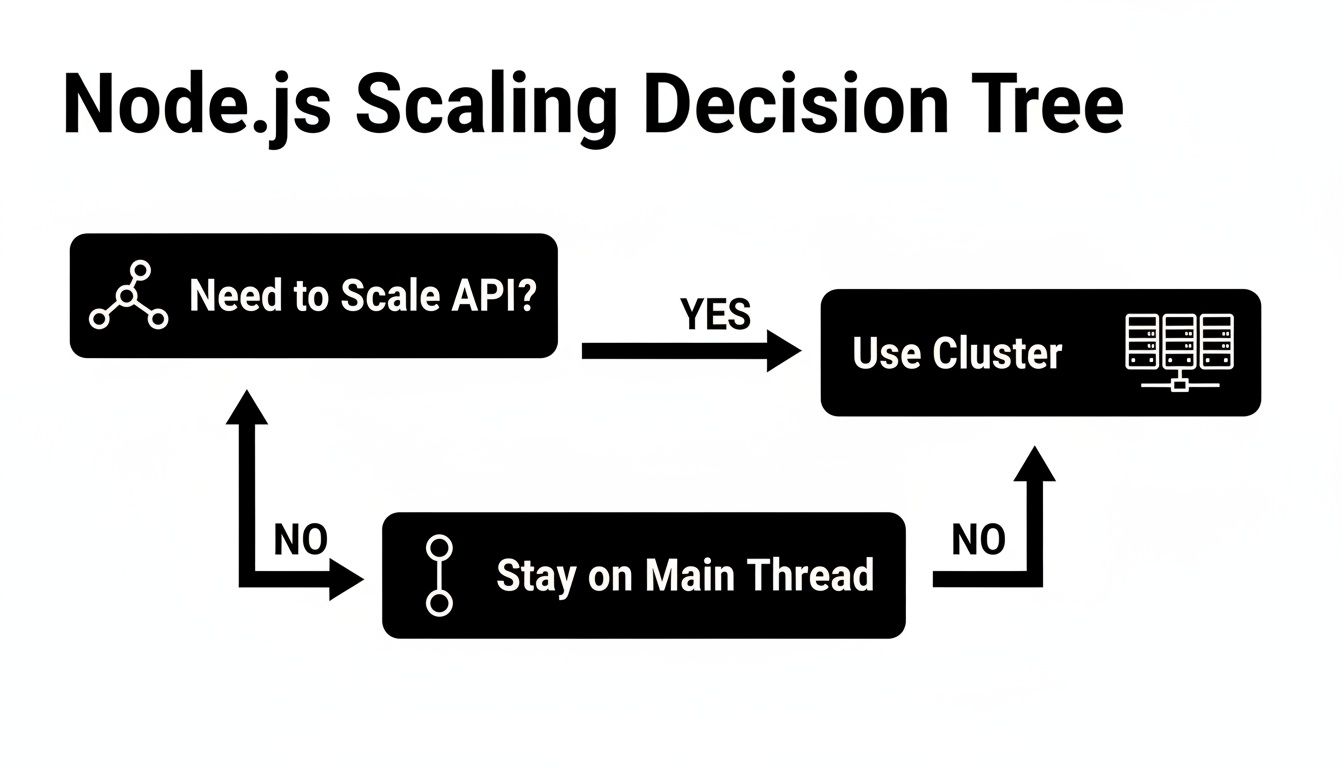
As you can see, if you're trying to scale a web server to handle more traffic, the cluster module is almost always the right answer. For other tasks, the choice isn't always so clear-cut.
Choosing Your Node JS Concurrency Model
Picking the right tool for the job is everything. Using a worker thread for a simple I/O task just adds needless complexity, while trying to run a heavy computation on the main thread will block your entire application.
This table breaks down the decision process based on the kind of work you need to do.
| Task Type | Best Node JS Approach | Example Use Case |
|---|---|---|
| I/O-Bound | Main Event Loop | Handling thousands of concurrent API webhooks or database queries. |
| Short CPU-Bound | Main Event Loop | Simple data validation or small JSON manipulations. |
| Heavy CPU-Bound | Worker Threads | AI-driven data enrichment, video transcoding, or large report generation. |
| Network Scaling | Cluster Module | Scaling an HTTP server to handle a massive influx of user traffic. |
Thinking this way helps you design better systems. For example, a single automation workflow might use the main event loop to receive a webhook, then immediately hand off a heavy data transformation job to a dedicated worker thread.
Implement a Worker Pool
A common mistake I see developers make is spawning a new worker thread for every single task. It feels intuitive, but it's a trap. Creating threads isn't free—it costs both memory and CPU time. If you’re constantly creating and destroying them, that overhead can become a serious performance bottleneck all on its own.
Best Practice: Implement a worker pool—a fixed number of reusable worker threads. This lets you avoid the startup cost of creating new threads and prevents you from accidentally overwhelming the system with more threads than you have CPU cores.
A worker pool functions like a checkout line. Tasks get added to a queue, and the next available worker picks up the job. This pattern is a must-have for any B2B or SaaS app that handles a steady stream of CPU-intensive jobs, like processing user-uploaded images or running complex analytics. If you're building systems like this, our guide on how to dockerize a Node.js application can help you package it all for deployment.
Ensure Graceful Shutdowns and Error Handling
What happens when a worker thread hits an error? In a poorly designed system, it might just crash silently, leaving its task half-finished and creating a "zombie" process that leaks resources. This is a recipe for data corruption and slow-burning server failures.
You absolutely need solid error handling and shutdown logic.
- Centralized Error Logging: Don't let workers fail in silence. They should catch any errors and send a structured message back to the main thread. This gives you a central place to log what went wrong and decide whether to retry the job or notify an admin.
- Graceful Shutdown: When your app needs to restart, it can't just kill active workers. A worker might be halfway through writing a critical file. Instead, send a signal telling all workers to finish their current job and then exit cleanly.
Beyond the tools inside Node.js, it's also worth looking at broader architectural patterns. For instance, many microservices architecture examples show how to build decoupled systems where one component failing won't cascade and take down the entire application—a very useful concept when building complex automation platforms.
Common Questions About Multithreading in Node.js
Even with a solid grasp of the tools, putting multithreading into practice in Node.js brings up a lot of practical questions. I’ve seen both developers and managers wrestle with the same kinds of challenges around performance, debugging, and making the right architectural calls. Let's walk through some of the most common questions I hear.
Is Multithreading in Node.js "Real" Multithreading?
This is a fantastic question, and the honest answer is a confident "yes, but it's specific." By design, Node.js itself operates on a single main thread, which is why it's a rockstar at handling thousands of concurrent I/O-bound tasks like API calls or database reads. The event loop is a masterpiece of efficiency for that workload.
But when you need to do some heavy lifting, the worker_threads module lets you break out of that single-threaded model. It gives you the ability to create genuine, OS-level threads that run your JavaScript code in parallel on separate CPU cores. These threads are completely independent of the main event loop.
So, while the core architecture is intentionally single-threaded for I/O, you absolutely have access to true multithreading for your CPU-intensive work. It’s a hybrid approach that gives you the best of both worlds.
When Should I Use Worker Threads Instead of a Child Process?
This is a frequent point of confusion, but the line between them is actually quite clear once you understand their intended roles. They're built for different jobs.
Use
worker_threadsfor heavy computation within your application. Think of them as lightweight helpers for parallel JavaScript execution. Because they can share memory usingSharedArrayBuffer, they're perfect for tasks like video encoding, crunching large datasets, or complex cryptographic operations where passing data back and forth needs to be fast.Use
child_processwhen you need to run an external program or command. A child process is a completely separate, heavier-weight process. This is your go-to when you need to execute a shell command (likegit), run a Python script for a machine learning model, or even spin up an entirely separate Node.js script with total isolation.
Here’s a simple way to think about it: worker_threads are for parallel work inside your app, while child_process is for interacting with the world outside of it.
Can Using Too Many Worker Threads Hurt Performance?
Absolutely. This is probably the most critical mistake you can make when getting started. More is not always better.
Remember, creating and managing threads isn't free. Each thread consumes memory and requires the CPU to spend time coordinating everything.
The rule of thumb is to create a "thread pool" that matches the number of available CPU cores on your machine. If your server has 8 cores, you create an 8-worker pool.
If you spawn, say, 50 threads on that 8-core machine, the operating system gets bogged down in "context switching." It starts spending more time pausing and resuming threads than it does doing the actual work, often making your application slower than it was with just a single thread. Always benchmark your workload to find that sweet spot.
How Do I Debug Code Running in a Worker Thread?
Debugging across multiple threads can feel intimidating, but you’re not flying blind. Modern tools have made this a completely manageable process.
Your main weapon is the built-in Node.js inspector. Launch your app with the --inspect flag to open a debugging port. From there, you can connect tools like Google Chrome DevTools or the debugger built into Visual Studio Code.
These debuggers are smart enough to see both your main thread and all your active worker threads. This lets you set breakpoints, step through code, and inspect variables inside a worker just like you would with any other code.
On top of that, good logging is non-negotiable. By implementing structured logging in your workers and sending messages back to the main thread, you create a single, clear picture of everything happening across your application. This is a lifesaver for tracking down bugs.
At MakeAutomation, we specialize in building these kinds of high-performance, scalable systems. If you're ready to move beyond manual processes and implement robust automation that can grow with your business, visit us at https://makeautomation.co.