
A Practical Guide to Micro Front End Architecture
So, what exactly is a micro front end? In simple terms, it's a way of building a web application's user interface not as one giant, single piece of code, but as a collection of smaller, independent parts.
This approach allows different teams to build, test, and deploy their specific features autonomously, which dramatically speeds up development and lowers the risk of something going wrong.
Deconstructing the Monolith

To really get it, let's use an analogy. Think of a traditional web app as a massive, intricately built Lego castle. It looks impressive, but if you want to change one small tower, you have to be incredibly careful not to knock over the whole thing. Every tiny update requires deploying the entire frontend codebase. This "monolithic" approach inevitably creates bottlenecks, stifles innovation, and makes it a real pain to adopt new technologies.
A micro front end architecture, on the other hand, breaks that castle down into a collection of independent Lego sets. The search bar is one set. The user dashboard is another. The checkout process is a third. Each team gets to own its own set, allowing them to build, update, and deploy their piece without waiting for anyone else or breaking another team's work.
This model gives teams the freedom to innovate much faster and drastically cuts down on deployment risks. If one team’s new feature has a bug, it doesn’t bring down the entire application.
This idea started gaining real traction around 2016 as engineering teams looked for an escape from the scaling pains of large, monolithic frontends. Since then, its adoption has exploded. Some organizations have reported delivering new features up to 40% faster, and developer surveys consistently show a 70% preference for this architecture in enterprise companies with over 50 engineers.
For B2B and SaaS businesses, this isn't just a technical detail—it's a competitive advantage. Sales and ops leaders can get new features for their CRM dashboards or lead generation tools in days, not weeks, bypassing the huge coordination effort a full app redeploy requires. You can explore the foundational ideas behind this trend and discover more insights about its growth.
Monolith vs Micro Front End at a Glance
To make the differences crystal clear, let's put the two approaches side-by-side. This table offers a direct comparison between traditional monolithic frontends and the modern micro front end approach, highlighting key differences for business and technical leaders.
| Aspect | Monolithic Frontend | Micro Front End |
|---|---|---|
| Team Structure | One large team working on a single, shared codebase. | Multiple small, autonomous teams owning specific features. |
| Release Cycle | Slow, coordinated releases involving the entire application. | Fast, independent deployments on a per-team basis. |
| Technology Stack | Locked into a single framework (e.g., all React or all Angular). | Each team can choose the best tech for its specific job. |
| Scalability | Scaling requires scaling the entire application at once. | Features can be scaled independently based on demand. |
| Fault Isolation | An error in one part can bring down the entire application. | An error is typically contained within a single feature. |
| Onboarding | New developers must understand the entire complex codebase. | Developers only need to learn the part of the app they work on. |
Ultimately, the real win with micro frontends is organizational agility. By decoupling your teams and their work, you eliminate the dependencies that grind development to a halt. This frees up your business to respond to market changes faster, test new ideas with less risk, and deliver more value to your users—quicker than ever before.
Understanding Key Architectural Patterns
So, you’ve decided to break up your monolith. That's the first step. The next, and arguably more critical, question is: how do you put all those independent pieces back together into something that feels like a single, cohesive application to your users?
This is where architectural patterns come in. A micro frontend architecture isn't just about splitting codebases; it's about defining the strategy for composing those pieces. Think of each micro frontend as a LEGO brick. The architectural pattern is the instruction manual that shows you how to connect them to build the final model. Your choice here will shape everything from team autonomy and deployment speed to runtime performance.
Build-Time Integration
Let's start with the most straightforward approach: build-time integration.
Imagine you publish each micro frontend as a package to a private registry like npm. The main "container" application then installs these packages as dependencies. When you build the main app, everything gets bundled into a single, deployable file. Simple, right?
Here’s the catch: it completely undermines one of the biggest benefits of micro frontends.
- Each micro frontend is treated like a versioned library.
- The main application pulls in these libraries during its build cycle.
- The result is a single, monolithic bundle deployed to the user.
If the team working on the "search" micro frontend wants to push a tiny change, they can't just deploy it. The entire container application has to be rebuilt and redeployed. This creates a tight coupling that forces teams to coordinate releases, reintroducing the very bottleneck you were trying to escape.
Server-Side Composition
A much more flexible pattern is composing the pieces on the server.
Picture a web page being assembled on a server before it's ever sent to the browser. A central service or gateway receives a request, then fetches fragments of HTML from the various micro frontend services responsible for the header, the sidebar, the main content, and the footer. It stitches them all together into a complete page and sends it down the wire.
This technique, often called Server-Side Includes (SSI), is fantastic for content-heavy sites. It gives you a fast first-paint time and is great for SEO since search engine crawlers receive a fully-formed HTML document. The downside is that it requires a more sophisticated server setup and can introduce complexity on your backend.
Client-Side Composition
This is where most of the action is today. Client-side composition is the most popular and dynamic approach, offering the highest degree of team independence.
The core idea is that a minimal "shell" or "container" application loads in the browser. This shell is responsible for rendering the main layout and then, based on the URL or user interaction, it dynamically fetches and renders the appropriate micro frontends right inside the user's browser.
Each team can build and deploy their piece of the application completely on their own schedule. The "products" team can deploy five times a day without ever needing to tell the "checkout" team. This level of autonomy is a game-changer. For this to work well, having a solid foundation is key; for example, a team of skilled React.js developers can build a robust and performant shell application that makes this pattern shine.
A major leap forward for this pattern was the introduction of Module Federation with Webpack 5. Before this, a common problem was dependency duplication—each micro frontend might bundle its own copy of React, bloating the total page weight.
Module Federation solves this elegantly. It allows completely separate applications, built and deployed independently, to share code and dependencies at runtime. One micro frontend can dynamically load a component or library from another as if it were part of its own application. It's a true game-changer that makes client-side composition far more efficient and scalable.
Learning from Real-World Success Stories
Theory is great, but nothing proves a point like seeing a micro frontend architecture thrive in a real, high-stakes environment. It’s one thing to talk about diagrams and definitions; it's another to see how top companies are using this approach to move faster and build better products. These stories show the tangible benefits of giving teams true ownership and the freedom to deploy independently.
Imagine a large e-commerce site built the old monolithic way. The team working on the shopping cart is completely dependent on the product search team, the recommendations team, and everyone else. A simple bug fix for the cart? That could be stuck for weeks, waiting for the next big, risky release. With micro frontends, the shopping cart team owns their code, their feature, and their release schedule. They can deploy updates multiple times a day without asking for anyone's permission.
This is the core idea. The diagram below shows some of the common integration patterns that make this autonomy possible, from build-time composition to dynamic client-side assembly.
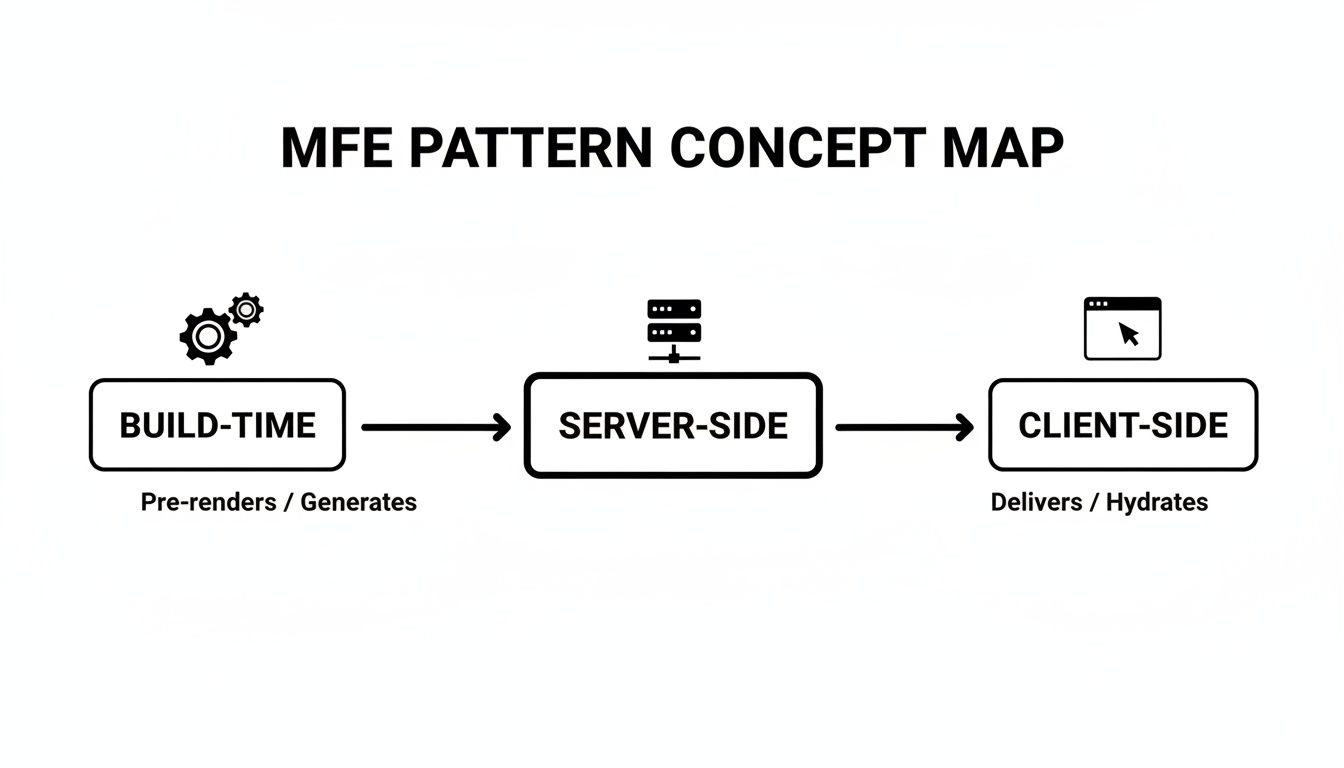
As you can see, different patterns offer different trade-offs, but the goal is always to reduce dependencies and empower teams.
Capital One's Shift to Hyperspeed
If you want a powerful example, look no further than the heavily regulated world of finance. Capital One's move from a slow, monolithic frontend to a nimble, modular one is a perfect case study for any B2B or SaaS company feeling the pain of slow release cycles. This wasn’t just a technical exercise for them—it was a fundamental change in how they operated.
Before they made the switch, their releases were agonizingly slow, happening only on a bi-monthly basis. Every deployment was a massive, high-pressure event. By breaking their monolith into over 100 independently deployable Micro Frontends (MFEs), they completely changed the game.
The result? Their development velocity exploded. Teams went from struggling with bi-monthly releases to shipping multiple updates every single day. That's a release frequency boost of over 500%.
This change didn't just make their developers more productive; it made their entire business more agile. And Capital One isn't an anomaly. Broader industry analysis shows similar trends. Recent data reveals that Fortune 500 companies adopting micro frontends have seen 25-35% productivity increases in their frontend teams and a 40% drop in deployment failures. You can read the full details about these case study insights to dig deeper into the data.
How Different Industries Benefit
The power of this architecture isn't limited to a single industry. The core principles of team autonomy and focused scalability are valuable everywhere.
SaaS Platforms: Think of a typical B2B SaaS product. You can have one team focused on the main user dashboard, another on analytics and reporting, and a third on billing settings. Each team can innovate and ship features on its own timeline without creating a bottleneck for the others.
Media and Content: For a major news organization, the homepage, article pages, and video player can all be separate micro frontends. This allows the team managing the high-traffic homepage to push updates constantly without risking the stability of the core article experience.
Travel and Hospitality: An online travel agency is a perfect fit. The user interface can be split into a flight search MFE, a hotel booking MFE, and a rental car MFE. This allows specialized teams to obsess over and optimize each distinct part of the customer's journey.
In every case, the outcome is the same: faster innovation, less risk, and more empowered, productive teams. By breaking down large, tangled applications into discrete, ownable parts, companies can finally remove the friction that stifles growth. For modern SaaS businesses, turning this technical decision into a strategic advantage is what it's all about.
Building Your Micro Frontend Migration Roadmap
Let's be honest: staring down a monolithic frontend can feel overwhelming. But shifting to micro frontends doesn’t have to be a high-stakes, all-or-nothing gamble. The biggest mistake I see teams make is trying to pull off a "big bang" rewrite, where they attempt to replace the entire frontend in one go. That path is almost always a recipe for blown budgets, missed deadlines, and a whole lot of stress.
A much smarter—and safer—way forward is a gradual, piece-by-piece migration. You strategically carve off one part of your application at a time, rebuilding it as a micro frontend. This lets your team learn as you go, deliver value sooner, and build momentum with every small win.
The real goal isn't a massive, overnight rewrite. It's about systematically extracting features in a way that's safe, proves the architecture's value, and keeps a working product in your users' hands the entire time.
This approach keeps the business running smoothly. Each successfully migrated feature builds confidence, shows a real return on the effort, and makes it much easier to get buy-in for the next piece of the puzzle.
Phase 1: Find the Seams
Your first job is to play detective with your old monolith. You need to look for the logical "seams"—the natural boundaries that separate different functions in your app. It's like a tailor studying a suit, looking for where to make the first cut.
So, where do you look? Start with features that are mostly self-contained and don't have a ton of messy dependencies.
- User Profile or Settings Pages: These are often perfect candidates. They’re usually isolated and deal with data specific to one user, making them easier to pull apart.
- Analytics Dashboards: While they pull data from multiple places, dashboards often live in their own self-contained view, separate from your core app logic.
- Admin Panels: Internal admin tools are a fantastic starting point. They're typically lower-risk because if something goes sideways, it won’t affect paying customers.
You're looking for that one piece you can cleanly detach without having to build a tangled web of communication channels right out of the gate.
Phase 2: Choose a Pilot Project
After you've mapped out a few potential seams, it's time to pick your first pilot project. You're looking for the sweet spot: low-risk but high-impact. Low-risk means that if it breaks, it won’t take down your entire application. High-impact means that when you succeed, everyone will notice the benefits, like a faster UI or quicker updates.
Migrating some obscure, rarely-used feature won't prove much. On the flip side, starting with your core checkout flow is just asking for trouble. A new reporting dashboard or a customer support widget, however, often strikes the perfect balance.
As you plan, thinking about how to modernize legacy systems in parallel can make a huge difference, especially if you're wrestling with an older, more brittle codebase.
Phase 3: Extract and Deploy Iteratively
With a pilot project in your sights, you can now start the real work. This process becomes your repeatable blueprint for every migration that follows. You might also find that this roadmap approach is useful in other areas, much like when you implement business process automation.
- Pick Your Integration Strategy: How will the new micro frontend actually plug into the old monolith? Will you load it on the client-side with JavaScript, or use a server-side approach?
- Define the Communication Lines: Figure out exactly how the new piece will talk to the old one. This could be as simple as passing URL parameters or firing browser events.
- Build It in Isolation: Now your team gets to build the new feature as a completely separate, standalone app. This is where you start feeling the freedom and autonomy of the new architecture.
- Deploy and Flip the Switch: Once it's ready, deploy the new micro frontend. The final step is to update your routing so users are directed to the new, shiny feature instead of the old one.
- Monitor, Learn, and Repeat: Keep a close eye on the performance and stability of your new component. When you're confident it's solid, it’s time to head back to step one and pick the next piece to liberate from the monolith.
This iterative loop is the engine that will drive your migration, letting you transform your architecture one safe, deliberate step at a time.
Automating Deployments with CI/CD Pipelines
The real promise of a micro front end architecture isn't just about slicing up your codebase. It’s about giving your teams true autonomy—the power to ship their work safely, on their own terms. But without automation, you're not creating autonomy; you're just creating new bottlenecks.
This is where dedicated CI/CD (Continuous Integration/Continuous Deployment) pipelines come in. By building an independent pipeline for each micro frontend, you give every team a clear, automated path from code commit to production. No more waiting for a coordinated "release train" or untangling another team's deployment mess.
When one team pushes a feature, it shouldn't block another team from fixing a bug. Independent pipelines make this a reality, allowing teams to release five times a day or once a week, whatever their cadence demands.
Anatomy of an Independent Pipeline
So, what does one of these pipelines actually do? Think of it as an automated quality control assembly line, tailored specifically for one micro frontend. While your toolchain might differ, the fundamental stages are designed to build confidence and catch problems early.
A well-architected pipeline for a single micro frontend typically flows like this:
- Code Commit: The journey starts when a developer pushes their changes to Git. This single action is the trigger for everything that follows.
- Automated Testing & Linting: The pipeline immediately wakes up and gets to work, running unit tests and linters. This is the first line of defense—if the code is broken or doesn't meet style standards, the process stops here and notifies the developer. No bad code proceeds.
- Build Artifact: Once the code passes its initial checks, the pipeline builds the micro frontend, compiling it into a deployable package of static files (JavaScript, HTML, CSS).
- Deploy to Staging: This new build is then automatically pushed to a staging environment that mimics production as closely as possible.
- End-to-End (E2E) Testing: Here, the pipeline runs automated tests that act like a real user, clicking through the application in the staging environment. This crucial step verifies that the new changes play nicely with the rest of the application and haven't caused any surprise side effects.
- Deploy to Production: With all checks passed, the final step is the rollout to production. This is often handled with zero-downtime strategies like blue-green deployments or canary releases to ensure a seamless user experience.
This automated gauntlet provides the safety net teams need to move fast without breaking things. For a deeper dive into this kind of workflow, see what a complete auto DevOps pipeline can look like.
The Critical Role of Containerization
We’ve all heard it: "But it works on my machine!" This classic developer headache can bring a CI/CD pipeline to a screeching halt. Inconsistency between developer laptops, testing environments, and production servers is a recipe for disaster.
This is exactly the problem that containerization, most notably with Docker, was born to solve.
By packaging each micro front end and its entire runtime environment—every library, dependency, and configuration file—into a single, self-contained unit, you create a guarantee. The guarantee is that your code will run the exact same way, every single time, no matter where it’s deployed.
Wrapping each micro frontend in a container delivers some massive wins:
- Environment Consistency: The "works on my machine" problem is officially a thing of the past.
- Isolation: Each container is a world unto itself. One micro frontend's dependencies can't clash with another's.
- Scalability: Need to handle a surge in traffic to your search feature? Orchestration tools can spin up more containers for just that micro frontend, instantly.
When you combine independent CI/CD pipelines with containerization, you create a truly resilient and scalable system. You're not just giving your teams the freedom to deploy; you're giving them the guardrails to do it safely and predictably. This is how a micro front end architecture stops being a theoretical concept and starts delivering real business velocity.
Establishing Governance and Team Best Practices
Giving every development team full autonomy in a micro frontend architecture sounds liberating, but it's a fast track to chaos without the right guardrails. If you're not careful, your sleek, modern application can quickly become a disjointed mess of clashing styles, inconsistent user experiences, and technical debt.
The goal isn't to lock everything down with top-down control. That just reintroduces the very bottlenecks you were trying to escape. Instead, think of governance as building a system of paved roads and clear signposts—it makes it easy for everyone to get where they’re going without crashing into each other.
Building Your Governance Toolkit
Effective governance starts with a shared foundation. You need a common set of tools and standards that every team can build upon, ensuring that all the individual pieces fit together into a cohesive whole.
- Shared Component Libraries: This is your most powerful tool for visual consistency. A central library of reusable UI elements—buttons, forms, modals—is like giving every team the same set of high-quality Lego bricks. The end result always looks like it was built from the same box.
- Design Tokens: Take it a level deeper than components. Store your core design DNA (colors, typography, spacing) as "tokens." These are just variables, but they allow teams to apply the brand’s visual identity perfectly, even if they’re working in totally different frameworks.
- Decision Records: Your architecture will evolve, and teams will make important decisions along the way. Use Architecture Decision Records (ADRs) to document why a particular choice was made. Think of it as a captain's log for your codebase—it’s an invaluable resource for anyone who joins the project later.
These resources provide the technical backbone for collaboration. Just as important are well-defined standards and processes. This is where creating clear SOPs becomes crucial for managing workflow complexity. You can find excellent guidance on how to create SOPs for your business to see how structured documentation can make a world of difference.
Fostering Collaborative Practices
Tools are only half the battle. You also need to build a culture where people share ownership and knowledge. Governance is about people, not just code. A fantastic way to do this is by forming a frontend guild or a center of excellence.
This is a cross-team group of frontend developers who meet regularly. They act as stewards of the frontend architecture, championing best practices, solving common problems, and ensuring that knowledge isn't siloed within individual teams.
Finally, you need practices that protect the integrity of the application as a whole.
This is where Contract Testing becomes non-negotiable. Instead of trying to test the entire, sprawling application at once, teams define "contracts" that spell out exactly how their micro frontend expects other services or frontends to behave. If Team A pushes a change that breaks the contract Team B relies on, the test fails immediately—long before it can impact a user.
This proactive approach is the secret to maintaining stability in a distributed system. When you pair contract testing with diligent performance monitoring, you ensure your application stays fast, cohesive, and ready to scale.
Common Questions We Hear About Micro Frontends
Whenever we talk about micro frontends, a lot of the same questions pop up. It’s a big change from the way most teams have been building software for years, so it makes sense that business leaders and engineers want to get the full picture before jumping in. Let's walk through some of the most common ones.
Is This a Good Fit for Our Project?
Honestly? Probably not for every project. A micro frontend architecture isn't a magic wand you can wave at any development challenge.
This approach really comes into its own on large, complex applications. Think of a sprawling SaaS platform where you have several teams working on different features—one on the dashboard, another on user settings, and a third on the billing portal. For projects like that, micro frontends break up the logjams and coordination headaches that always seem to grind development to a halt in a traditional monolith.
But if you're a startup, a small team, or working on a more straightforward app, the overhead can be a real killer. You suddenly have to juggle multiple codebases, separate deployment pipelines, and figure out how they all talk to each other. In those cases, a well-organized monolith is almost always the more practical and efficient way to go.
The rule of thumb we use is pretty simple: Match your architecture to your team structure. If you have a bunch of independent teams, micro frontends are a natural fit. If you're one team in a single room, a monolith will keep your life a lot simpler.
How Do You Keep the User Experience from Falling Apart?
This is a huge concern, and rightly so. How do you make sure the app feels like one cohesive product when it's being built in separate pieces by different teams? The most reliable way is by creating a shared design system or component library.
This library becomes the single source of truth for your UI. It's where you store all your pre-built and pre-styled components—the buttons, form fields, navigation menus, and so on. When every team pulls from the same set of building blocks, the end user gets a seamless, on-brand experience, and they'll never know that different teams built different parts of the page.
What About Performance and SEO? Is This Going to Hurt Us?
This is a critical one. And the answer is: it absolutely can if you aren't careful.
Loading multiple JavaScript bundles to render one page can definitely slow down your initial load time, which is bad for users and bad for your performance scores. But this is a solved problem. We have a few solid techniques to keep things speedy:
- Code Splitting & Lazy Loading: The idea here is to only load the code you absolutely need right now. The code for the user settings page, for example, doesn't get loaded until someone actually clicks to go there.
- Smart Composition: Tools like Module Federation are great for this. They prevent you from loading duplicate copies of shared libraries (like React), which keeps your total bundle size in check.
- Server-Side Rendering (SSR): For your SEO, this is non-negotiable. You need to render the most important parts of your page on the server. This sends fully-formed HTML to search engine crawlers, so they can actually read and index your content.
How Do the Different Frontends Talk to Each Other?
To keep teams truly independent, you want to keep direct chatter between micro frontends to an absolute minimum. When they do need to communicate, you should use loosely coupled methods.
Custom browser events are a common choice. One micro frontend can fire off an event—like "user-profile-updated"—and any other part of the application can listen for it without being directly tied to the sender. For even simpler cases, you can just pass information back and forth in the URL.
At MakeAutomation, we specialize in putting the right processes and automation in place to make sophisticated architectures like micro frontends work smoothly. We partner with B2B and SaaS businesses to build scalable systems that fuel growth. See how we can help you streamline your development and ops by visiting us at https://makeautomation.co.