
AWS Secret Manager Resource Policy A How-To Guide
You're probably in one of two situations right now. Either a central AWS account holds the credentials your workloads need, or you're trying to clean up a sprawl of per-account secrets that became hard to audit. In both cases, aws secret manager resource policy is the control that decides who can reach a specific secret, especially across account boundaries.
The part that catches teams off guard isn't writing the first JSON document. It's making that policy work in a real environment where IAM roles, KMS keys, CloudFormation, and CI/CD pipelines all have a say. A secret can look correctly shared in the console and still fail at runtime because one of the other permission layers blocks access.
That's why this topic matters. If you treat resource policies as a simple checkbox, cross-account secret sharing turns brittle fast. If you treat them as one piece of a broader authorization design, they become predictable, auditable, and safe to automate.
Why Resource Policies Are Your Key to Secure Secret Sharing
A familiar SaaS setup looks like this. The security team keeps database credentials, API tokens, and third-party integration secrets in a dedicated AWS account. Product teams run services in separate application accounts. Those services need access to secrets, but the security team doesn't want to copy the same credential into every account.
That's where a resource-based policy on the secret becomes useful. An identity-based policy answers, “What can this role do?” A resource-based policy answers, “Who can access this secret?” For cross-account sharing, that second question is the one that makes the design possible.
AWS states that Secrets Manager resource-based policies can grant access to a single secret to multiple users or roles, including users or roles in other AWS accounts, in the Secrets Manager documentation on resource-based permissions for secrets. That single capability is what lets a central secret stay central while still being consumed by workloads elsewhere.
What this solves in practice
Without a resource policy, teams usually end up with one of two bad patterns:
- Secret duplication everywhere: each account stores its own copy, and rotation becomes messy.
- Over-broad IAM permissions: engineers try to solve a resource-sharing problem only with identity permissions, which doesn't work cleanly across accounts.
Resource policies give you a narrower option. You keep the secret in one place and explicitly list the roles allowed to read it.
Practical rule: Share the secret, not the process. Keep ownership centralized, grant retrieval only to the workloads that need it.
This is also easier to reason about during audits. A reviewer can open one secret and see exactly which principals are allowed to access it.
Why growing teams can't skip this
As your AWS footprint expands, cross-account access stops being an edge case. It becomes normal. New app accounts, staging environments, data pipelines, and platform services all need some controlled path to shared credentials.
That's why engineers preparing for security-heavy AWS work often spend time on policy evaluation and cross-account design. If you want extra reps on that mindset, the AWS Certified Security practice tests from Mindmesh Academy are useful because they force you to think through the permission chain rather than just memorize service names.
A solid resource policy doesn't just provide access. It creates a boundary. That boundary is what lets a central security model scale without turning every application account into a manual exception.
Understanding Secret Manager Resource Policy Fundamentals
A Secrets Manager resource policy decides who the secret will trust. Engineers who struggle with an aws secret manager resource policy usually do so because a copied example looks correct, but only one of the three authorization layers was updated. The secret policy can allow access and the request can still fail if the caller's IAM policy or the KMS key policy does not also permit the operation.
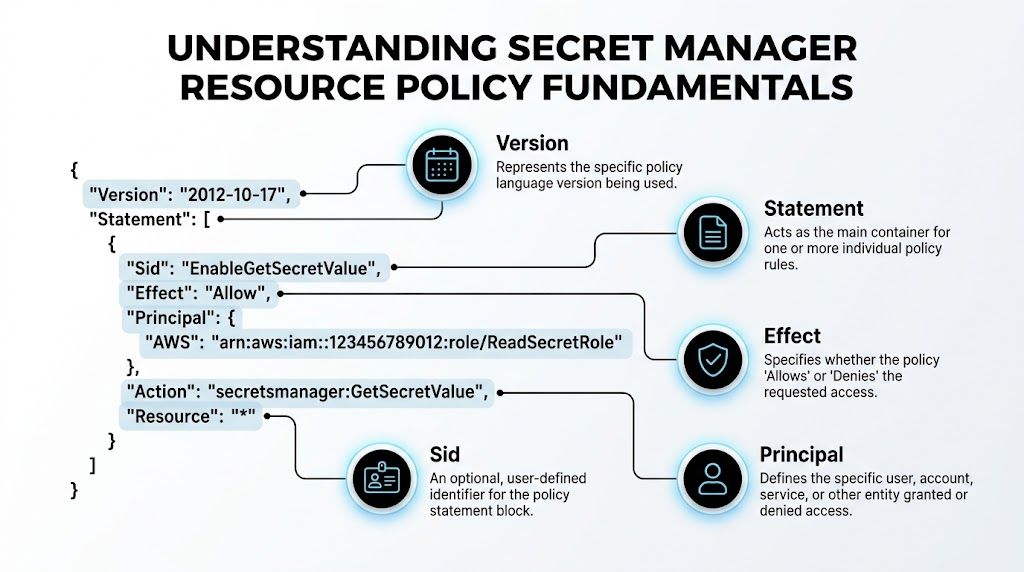
Here's a minimal example that grants one role permission to read one secret:
{
  "Version": "2012-10-17",
  "Statement": [
    {
      "Sid": "AllowAppRoleToReadSecret",
      "Effect": "Allow",
      "Principal": {
        "AWS": "arn:aws:iam::222222222222:role/app-prod-reader"
      },
      "Action": [
        "secretsmanager:GetSecretValue",
        "secretsmanager:DescribeSecret"
      ],
      "Resource": "*"
    }
  ]
}
That document is only one-third of the access path.
For cross-account reads, AWS evaluates three separate controls:
- Secret resource policy: names the external principal that may call
GetSecretValue. - Identity-based IAM policy on the caller: allows that role to call Secrets Manager against the target secret ARN.
- KMS key policy: allows the same principal to use the KMS key that encrypts the secret, usually for
kms:Decrypt.
Miss one layer and the result looks inconsistent. DescribeSecret may work while GetSecretValue fails. Teams often read that as a Secrets Manager bug. It is usually a KMS authorization miss.
How to read each field
Versionsets the IAM policy language version.2012-10-17is the standard value.Statementcontains one or more permission rules.Sidgives the statement a readable name. AWS does not require it for evaluation, but it helps during audits and diffs.Effectsets the outcome, usuallyAlloworDeny.Principalnames the caller the secret will trust. In cross-account setups, use the role ARN you expect to assume at runtime.Actionlists the API calls allowed by this policy.GetSecretValueandDescribeSecretare the normal read pair.Resourceis often*in a secret resource policy because the policy is attached directly to that secret.
Principal is the field I check first. If that ARN points to the wrong role, or to the account root when the workload uses an assumed role, the rest of the document does not matter.
The three-layer authorization pitfall
The hard part is not writing valid JSON. The hard part is keeping all three policies aligned over time.
A common failure pattern looks like this: a platform team adds the external role to the secret policy, the application team confirms their role has secretsmanager:GetSecretValue, and the request still fails because the secret uses a customer managed KMS key whose policy only trusts the owning account. Basic tutorials often stop at the secret policy and leave out the encryption layer. In production, that omission wastes hours.
This layered model should feel familiar to teams that already practice effective network security management. Access depends on multiple controls agreeing, not on one oversized allow statement.
What changes in infrastructure as code
Resource policies also have a lifecycle problem. The policy is attached to the secret, but the principals and KMS keys often live in different stacks, accounts, or repositories. If one team renames a role or replaces a key, the secret policy can stay syntactically valid while access breaks at runtime.
That is why these policies belong in the same review and deployment flow as the rest of your platform code. Teams that already work through DevOps and continuous delivery usually handle this better because policy changes, principal changes, and key changes are versioned together and tested before release.
Common patterns you'll see
A few patterns show up repeatedly:
- A Lambda execution role reads one secret:
Principalis the Lambda role ARN, and the role also needs identity permission plus KMS decrypt rights. - An EC2 instance profile reads an application credential: same model, but confirm the instance role ARN matches what the workload assumes.
- A role in another account retrieves a shared secret: all three layers must reference that cross-account role explicitly, or via a condition that still resolves to it.
Keep the policy narrow. Name specific roles. Avoid using broad principals just to make a failing test pass.
One more constraint matters as these documents grow. Secrets Manager resource policies have a size limit, but the operational problem usually appears first. Large allow lists become hard to review, easy to drift, and painful to refactor when accounts or roles change.
Authoring and Attaching Your Resource Policy
There are four ways to attach an AWS Secrets Manager resource policy. The right one depends less on personal preference and more on how your team operates. If security owns secrets manually, the console might be enough. If you run everything through pipelines, manual edits will create drift.
Using the AWS Management Console
The console is the fastest way to prove the model works.
- Open the target secret in AWS Secrets Manager.
- Go to Resource permissions.
- Add or edit the resource policy.
- Save, then test access from the intended principal.
This method is good for early validation and incident response. It's not good for long-term control because changes are easy to make and easy to forget to codify later.
A small example policy for a cross-account role looks like this:
{
  "Version": "2012-10-17",
  "Statement": [
    {
      "Sid": "AllowSharedReadFromAppAccount",
      "Effect": "Allow",
      "Principal": {
        "AWS": "arn:aws:iam::222222222222:role/app-runtime-role"
      },
      "Action": [
        "secretsmanager:GetSecretValue",
        "secretsmanager:DescribeSecret"
      ],
      "Resource": "*"
    }
  ]
}
Using the AWS CLI
The CLI is better when you want repeatable changes and easy diffing in version control.
Create a file called secret-policy.json:
{
  "Version": "2012-10-17",
  "Statement": [
    {
      "Sid": "AllowAppRuntimeRead",
      "Effect": "Allow",
      "Principal": {
        "AWS": "arn:aws:iam::222222222222:role/app-runtime-role"
      },
      "Action": [
        "secretsmanager:GetSecretValue",
        "secretsmanager:DescribeSecret"
      ],
      "Resource": "*"
    }
  ]
}
Attach it:
aws secretsmanager put-resource-policy \
  --secret-id arn:aws:secretsmanager:us-east-1:111111111111:secret:central/db-prod-AbCdEf \
  --resource-policy file://secret-policy.json
Read it back to confirm what's attached:
aws secretsmanager get-resource-policy \
  --secret-id arn:aws:secretsmanager:us-east-1:111111111111:secret:central/db-prod-AbCdEf
This approach works well in shell scripts and lightweight automation. The downside is state management. If multiple engineers or pipelines mutate the same policy document, it's easy to overwrite changes unless one source of truth owns the file.
Using CloudFormation
CloudFormation is where lifecycle details start to matter. The resource type is AWS::SecretsManager::ResourcePolicy, and it's straightforward until you hit an existing manually attached policy.
AWS CloudFormation documents that if a secret already has a resource policy, you must remove it before attaching a new one through AWS::SecretsManager::ResourcePolicy, and the deployment role needs secretsmanager:PutResourcePolicy and secretsmanager:GetResourcePolicy in the CloudFormation reference for AWS::SecretsManager::ResourcePolicy. That's the kind of CI/CD failure basic tutorials rarely mention.
Example:
Resources:
  SharedSecretPolicy:
    Type: AWS::SecretsManager::ResourcePolicy
    Properties:
      SecretId: arn:aws:secretsmanager:us-east-1:111111111111:secret:central/db-prod-AbCdEf
      ResourcePolicy:
        Version: "2012-10-17"
        Statement:
          - Sid: AllowAppRuntimeRead
            Effect: Allow
            Principal:
              AWS: arn:aws:iam::222222222222:role/app-runtime-role
            Action:
              - secretsmanager:GetSecretValue
              - secretsmanager:DescribeSecret
            Resource: "*"
If CloudFormation owns the policy, let CloudFormation own it completely. Mixed manual and IaC management usually ends with failed updates.
Using Terraform
Terraform is practical when you already manage cross-account infrastructure through Terraform workspaces or modules. The exact resource shape varies by provider version, but the pattern is the same: define the policy document and attach it to the secret.
Example:
resource "aws_secretsmanager_secret_policy" "shared" {
  secret_arn = "arn:aws:secretsmanager:us-east-1:111111111111:secret:central/db-prod-AbCdEf"

  policy = jsonencode({
    Version = "2012-10-17"
    Statement = [
      {
        Sid    = "AllowAppRuntimeRead"
        Effect = "Allow"
        Principal = {
          AWS = "arn:aws:iam::222222222222:role/app-runtime-role"
        }
        Action = [
          "secretsmanager:GetSecretValue",
          "secretsmanager:DescribeSecret"
        ]
        Resource = "*"
      }
    ]
  })
}
Terraform's main advantage is consistency across cloud resources and environments. Its main risk is the same as any IaC tool. If someone edits the policy directly in AWS, drift appears and the next apply may surprise them.
Comparison of Policy Management Methods
| Method | Best For | Pros | Cons |
|---|---|---|---|
| Console | Fast testing, one-off fixes | Immediate, visual, easy for beginners | Hard to review, easy to drift |
| AWS CLI | Scripting and quick automation | Simple, repeatable, easy to inspect | Weak state management without process |
| CloudFormation | AWS-native IaC pipelines | Declarative, stack-managed, auditable | Existing-policy lifecycle edge case can break deployments |
| Terraform | Multi-environment IaC teams | Strong reuse, module patterns, policy as code | Drift and provider behavior need discipline |
A simple rule works well. Use the console to learn, the CLI to test, and IaC to own the final state.
The Cross-Account Access Playbook
At some point, every shared-secrets design hits the same failure. The application role looks correct, the secret policy looks correct, and GetSecretValue still returns AccessDeniedException. In cross-account setups, Secrets Manager authorization is a three-layer check. The secret policy must trust the external principal, the caller's IAM policy must allow the API call, and the KMS key policy must allow decrypt if you use a customer-managed key.
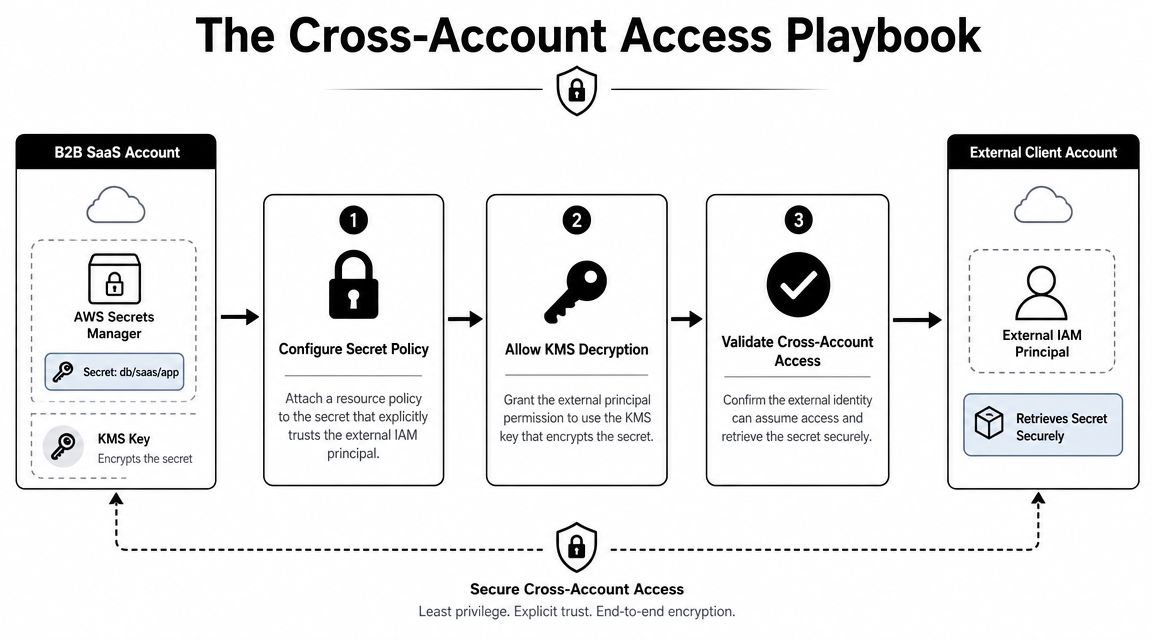
Use a concrete model:
- Account
111111111111is the central security account. - Account
222222222222runs the application. - Secret
db/prodlives in the security account. - Role
app-runtime-rolein the application account needs read access.
Layer one is the secret resource policy
The owning account must allow the external role to read the secret.
{
  "Version": "2012-10-17",
  "Statement": [
    {
      "Sid": "AllowCrossAccountAppRole",
      "Effect": "Allow",
      "Principal": {
        "AWS": "arn:aws:iam::222222222222:role/app-runtime-role"
      },
      "Action": [
        "secretsmanager:GetSecretValue",
        "secretsmanager:DescribeSecret"
      ],
      "Resource": "*"
    }
  ]
}
This grants trust at the secret boundary. It does not grant the caller permission to invoke the API from its own account.
Layer two is the consuming role's IAM policy
The role in account 222222222222 still needs an identity-based policy that allows access to the specific secret ARN.
{
  "Version": "2012-10-17",
  "Statement": [
    {
      "Sid": "ReadSharedSecret",
      "Effect": "Allow",
      "Action": [
        "secretsmanager:GetSecretValue",
        "secretsmanager:DescribeSecret"
      ],
      "Resource": "arn:aws:secretsmanager:us-east-1:111111111111:secret:central/db-prod-AbCdEf"
    }
  ]
}
This is the mistake I see most often in shared-services account designs. Security teams wire the resource policy correctly, then the application team tests with a role that has no matching IAM allow statement.
Here's a short walkthrough if you want a second visual explanation before wiring the policies together:
Layer three is the KMS key policy
If the secret is encrypted with a customer-managed KMS key, the key policy must also permit the consuming role to decrypt. Without that, Secrets Manager can find the secret and still fail when it asks KMS for plaintext.
A simplified key policy statement can look like this:
{
  "Sid": "AllowAppRoleDecryptForSharedSecret",
  "Effect": "Allow",
  "Principal": {
    "AWS": "arn:aws:iam::222222222222:role/app-runtime-role"
  },
  "Action": [
    "kms:Decrypt",
    "kms:DescribeKey"
  ],
  "Resource": "*"
}
Keep the KMS scope tighter in production. Add conditions such as kms:ViaService for Secrets Manager and, where possible, an encryption context tied to the secret ARN. That reduces the blast radius if the role is ever reused outside the intended path.
One denied layer blocks the request.
A practical sequence that works
Build and test cross-account access in this order:
- Create the secret and decide who owns lifecycle. This matters in IaC because changing the secret, key, and policy from different stacks often creates drift.
- Attach the secret resource policy in the owning account.
- Update the KMS key policy if the secret uses a customer-managed key.
- Attach IAM permissions to the consuming role in the application account.
- Assume the consuming role and test with
GetSecretValue. - Codify the final state in one pipeline or clearly separated stacks so one team does not overwrite another team's policy changes on the next deploy.
That last step gets ignored in basic tutorials. In real environments, the access model is usually right, but the deployment model is wrong. Terraform in one repo, CloudFormation in another, and an urgent console edit during an outage is how good policies disappear.
For local verification, I prefer testing the exact application role path instead of a broad admin session. If your consumer is Lambda, a guide to running Lambdas locally before validating Secrets Manager access helps catch ARN, region, and role-assumption mistakes before you blame the secret.
Validating and Troubleshooting Policy Issues
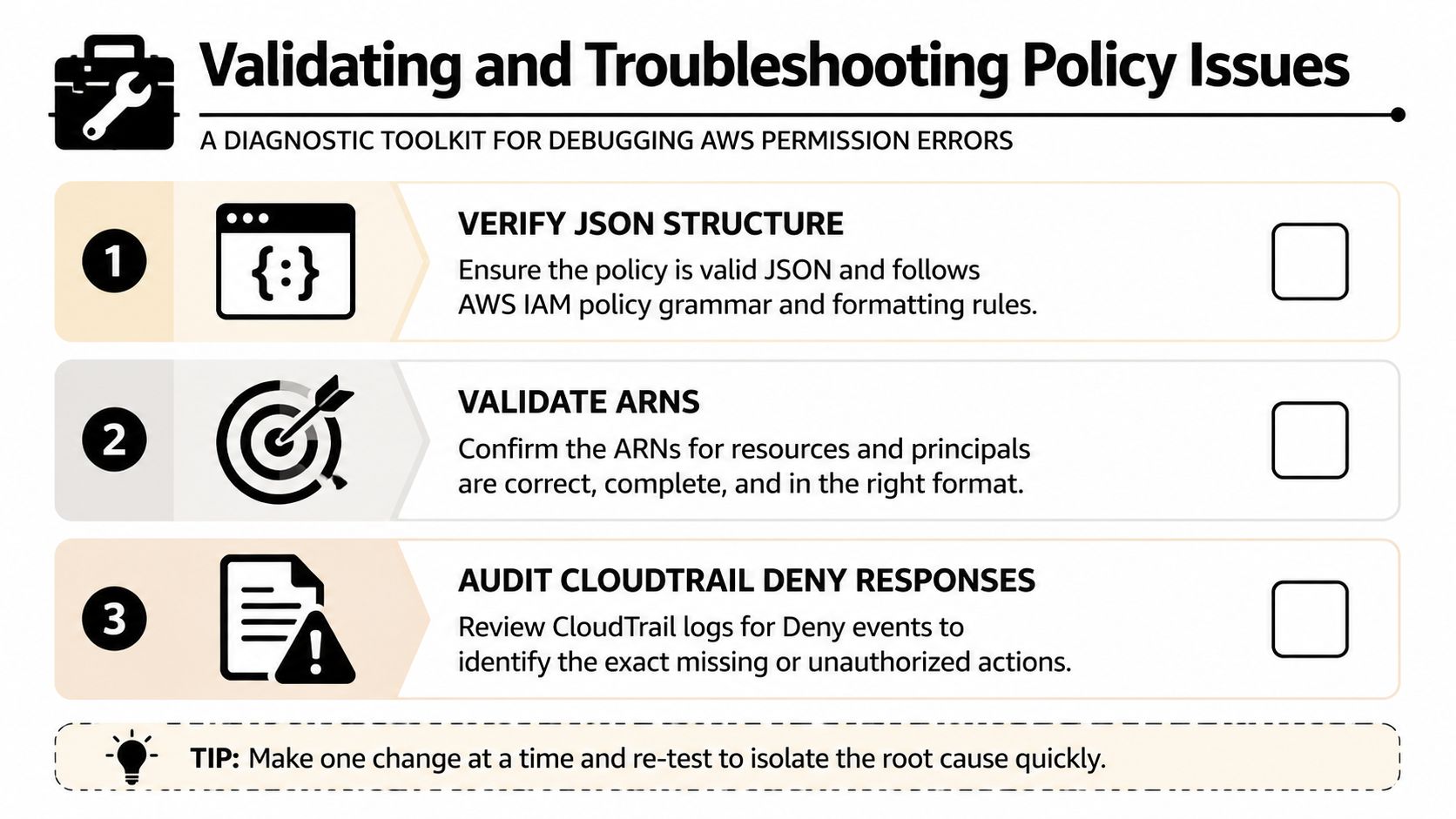
Permission problems around Secrets Manager rarely fail in a neat way. You'll usually see an AccessDenied response somewhere and then have to determine which policy layer caused it. The fastest path is to inspect the live policy, simulate the caller's permissions, and check the event trail around the failed request.
Start with the policy attached to the secret
Before doing anything else, confirm that the secret has the policy you think it has.
aws secretsmanager get-resource-policy \
  --secret-id arn:aws:secretsmanager:us-east-1:111111111111:secret:central/db-prod-AbCdEf
This catches the simplest failures fast:
- Wrong principal ARN: the role name, account ID, or path doesn't match.
- Wrong secret target: you updated a different secret than the application uses.
- Missing action:
GetSecretValueorDescribeSecretwasn't included.
Check the caller side before blaming the secret
If the secret policy looks right, move to the consuming role. Use IAM Policy Simulator to verify whether the role is allowed to call secretsmanager:GetSecretValue on that secret ARN.
That sounds basic, but it saves time. In local testing workflows, engineers often validate app behavior before validating the assumed role itself. The same discipline that helps when running Lambdas locally applies here too. Test the permission boundary directly, not just the application wrapped around it.
When debugging cross-account access, verify the caller identity first. Many “secret policy” issues are really “wrong role assumed” issues.
Use CloudTrail to identify the blocking layer
CloudTrail is where permission debugging becomes precise. Look for denied calls involving Secrets Manager or KMS around the test window.
A practical checklist:
- Search for Secrets Manager denies: if you see
AccessDenied, inspect the role and action. - Search for KMS denies:
KMS.AccessDeniedExceptionusually points to the key policy or a missing decrypt permission. - Compare principal ARNs: make sure the ARN in the event matches the one you intended to authorize.
- Review sequence: if
DescribeSecretworks andGetSecretValuefails, the issue may be narrower than you think.
Sanity checks that solve a lot of incidents
Use this quick review before changing anything:
- Validate JSON structure: broken syntax is less common than logical errors, but it still happens.
- Verify exact ARNs: account IDs, role paths, and secret ARNs must match exactly.
- Check all three layers: secret policy, identity-based IAM policy, and KMS key policy.
- Retest with the actual runtime role: don't validate with an admin session and assume the app role behaves the same way.
Most troubleshooting time gets wasted when engineers keep editing the same layer repeatedly. If one update doesn't explain the failure, move to the next layer instead of doubling down on the first assumption.
Security Best Practices for B2B Environments
In B2B and SaaS environments, secret sharing tends to grow unnoticed. A role gets temporary access for one service. Then another environment needs the same credential. Then a migration project adds more principals. A policy that started small turns into a durable access surface.
That's why the right question isn't just “Does this policy work?” It's “Will this policy still be safe and maintainable after the next few teams touch it?”
Keep policies narrow and deliberate
Least privilege matters more with resource policies because they sit directly on sensitive data.
A few habits help immediately:
- Grant only read actions when that's all the workload needs:
GetSecretValueandDescribeSecretare often enough. - Name exact principals: avoid broad principal patterns when a single role ARN will do.
- Use conditions where appropriate: restrictions tied to your environment can reduce accidental overexposure.
A mature access model should feel intentional. If the policy reads like a catch-all exception list, it probably is one.
Design for policy growth before it becomes a problem
AWS limits a secret's resource-based policy to 20,480 characters in the Secrets Manager limits documentation on service quotas for Secrets Manager. That limit matters less because teams frequently hit it immediately, and more because it forces you to think about policy shape early.
If one secret needs a long list of direct principals, stop and reconsider the design. Consolidating access through well-defined roles or account patterns is usually easier to audit than adding principal after principal to the same document.
Small policies are easier to trust. Large policies are easier to misunderstand.
Audit continuously, not occasionally
Access to secrets deserves the same audit discipline as any other high-value control. Enable CloudTrail and review both secret access and policy modification events. In practice, this is how teams catch permission drift, unexpected callers, and manual edits that bypass the normal deployment path.
For teams building broader operating standards, references like Cloudvara's security for professionals can be useful because they frame access control as an operational habit, not a one-time configuration task. The same mindset applies here.
If your organization manages delivery through platform standards, connect secret governance to the rest of your engineering workflow. Treating policies as code, reviewing them in pull requests, and integrating them into a broader approach to DevOps secrets management is usually what separates stable environments from fragile ones.
The safest aws secret manager resource policy is the one your team can still understand six months later, under pressure, during an incident.
If your team wants help turning AWS policies, secrets workflows, and operational guardrails into repeatable automation, MakeAutomation can help design and implement the systems around them. That includes policy-aware deployment workflows, secrets handling inside CI/CD, and AI-powered operational automation that reduces manual handoffs without weakening security.