Order Fulfillment Automation: A Complete Guide for 2026
Growth creates a strange kind of operational pain. Sales look healthy, customers are happy, and then the back office starts slipping. Orders sit in inboxes waiting for approval. Someone exports a CSV from Shopify, another person updates the ERP, a third checks stock in a spreadsheet, and a fourth emails the warehouse. One missed field turns into the wrong shipment, a delayed onboarding kit, or a client escalation that should never have happened.
This doesn't only hit e-commerce brands. I see it in B2B companies shipping samples, replacement parts, demo units, event kits, onboarding boxes, printed collateral, and regulated products. I see it in SaaS firms that bundle hardware with software. I see it in agencies mailing client swag and campaign materials while account managers waste time chasing fulfillment status instead of serving accounts.
At that point, the problem isn't shipping. The problem is that fulfillment depends on people remembering steps. That's where order fulfillment automation stops being a warehouse topic and becomes a growth topic.
The Hidden Costs of Manual Fulfillment
Manual fulfillment usually looks manageable right up until volume becomes unpredictable.
A B2B team might process only a modest number of shipments each week, but each one carries outsized value. A welcome kit for a new enterprise client, a device for a pilot deployment, or a compliance-sensitive package for a regulated buyer can't be treated like a casual parcel drop. If one order goes out late or incorrectly, the cost isn't just reshipping. Sales loses credibility, customer success absorbs the complaint, and leadership gets pulled into cleanup.

The hidden cost is decision fatigue. Every manual handoff asks someone to check inventory, confirm the address, choose a carrier, apply a rule, and notify the customer. Teams don't notice how much time this consumes because the work is scattered across Slack messages, inboxes, spreadsheets, and warehouse stations.
Where the pain shows up first
- Client-facing errors: The wrong item, wrong quantity, or wrong destination lands in front of the customer.
- Founder drag: Leaders end up approving edge cases and firefighting shipment issues instead of focusing on pipeline, hiring, or product.
- Headcount creep: Each growth step seems to require another coordinator, ops assistant, or warehouse admin.
- Compliance exposure: If your business ships restricted products, screening by hand gets risky fast. Teams dealing with regulated workflows should study automating firearms shipping compliance because it shows how quickly manual review turns into a bottleneck.
Manual fulfillment rarely breaks in one dramatic moment. It leaks margin through rework, interruptions, and avoidable exceptions.
The broader market reflects that shift. Warehouse automation is projected to grow from USD 31.21 billion in 2025 to USD 36.24 billion in 2026, with Walmart targeting 65% of stores to be serviced by automation by FY2026 and expecting a 20% improvement in unit costs according to Synkrato's warehouse automation statistics roundup. That matters because large operators aren't treating automation as an experiment anymore. They're tying it directly to cost and throughput.
For smaller B2B and SaaS companies, the lesson is simpler. If fulfillment quality affects revenue, renewal, or client trust, manual processing is already more expensive than it looks.
What Order Fulfillment Automation Really Means
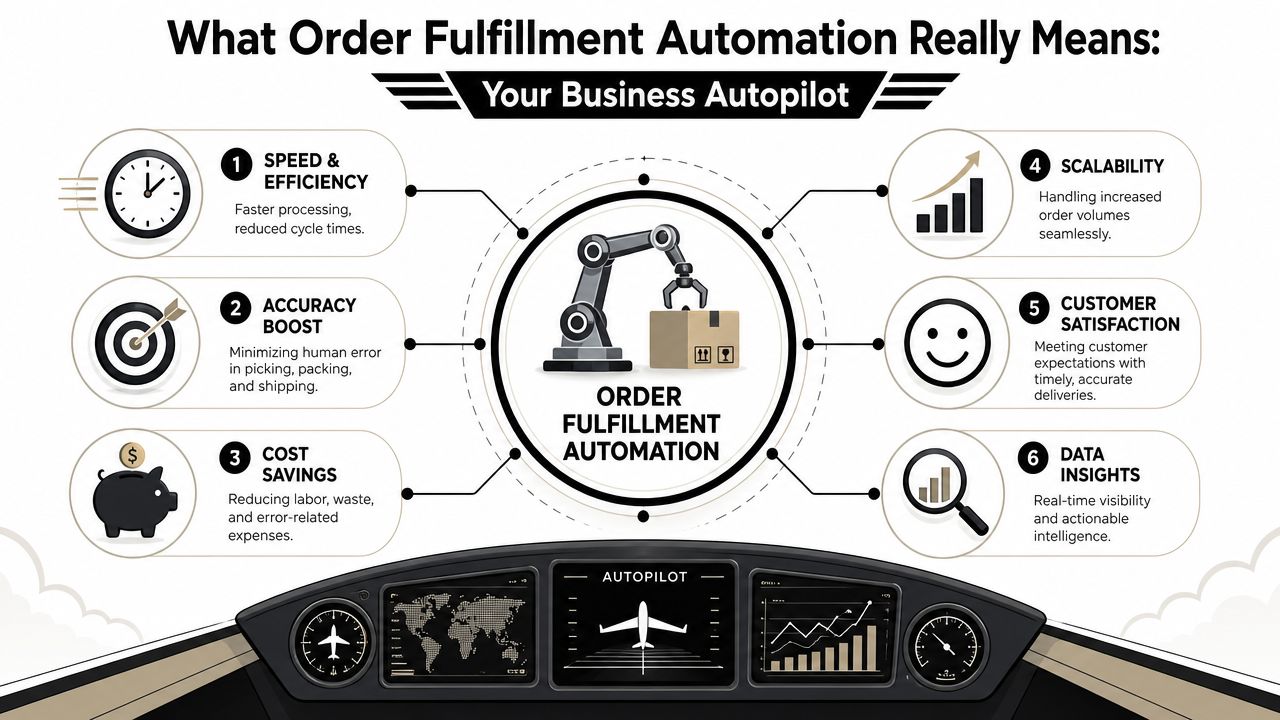
The term “automation” often evokes images of robots moving pallets. That's only part of it. In practice, order fulfillment automation is closer to an autopilot for operations. It takes a process that depends on memory and turns it into a sequence of rules, triggers, and system actions.
When an order comes in, the system shouldn't wait for someone to notice it. It should capture the order, validate the data, check inventory, assign the right fulfillment path, create the shipping task, and return status updates without a person stitching those steps together by hand.
Before automation
In a manual workflow, an order often travels like this:
- A rep receives the order from a storefront, email, EDI feed, or form.
- Someone checks stock in a separate system.
- Another person decides which warehouse, supplier, or 3PL should handle it.
- Shipping details get re-entered.
- Status updates go out late, or not at all.
This is why teams feel busy but not in control. The work isn't difficult. It's fragmented.
After automation
A properly designed workflow routes orders based on pre-set logic. If stock is available at location A, the order goes there. If the product is backordered, the system can create a purchase order or trigger an alternate path. If the package ships, tracking updates push back to the customer automatically.
That's especially useful for companies that don't think of themselves as “fulfillment businesses.” A SaaS company sending onboarding hardware, or an agency managing branded merchandise, still needs the same level of orchestration. The order just starts in a different channel.
Practical rule: If your team has to retype the same order data into more than one system, you don't have a fulfillment process. You have a chain of manual patches.
For teams working in Shopify-based environments, SelfServe's expert guide on Shopify orders is useful because it highlights the operational side of managing order flow, not just storefront setup.
It's less about machines than handoffs
The core shift is this:
- Capture automatically: Pull orders from the systems customers already use.
- Validate immediately: Check addresses, SKUs, inventory, and routing rules.
- Trigger downstream actions: Generate picks, labels, notifications, and updates.
- Close the loop: Sync shipment events back to the customer-facing system.
That's what people miss. Order fulfillment automation isn't only about moving boxes faster. It's about removing silent delays between systems, people, and decisions.
The Critical Components of an Automated System
A workable automation stack needs more than one app and a shipping plugin. It needs a reliable flow of data between the systems that sell, store, route, ship, and reconcile the order. If one piece is disconnected, the team falls back to email, spreadsheets, or manual overrides.
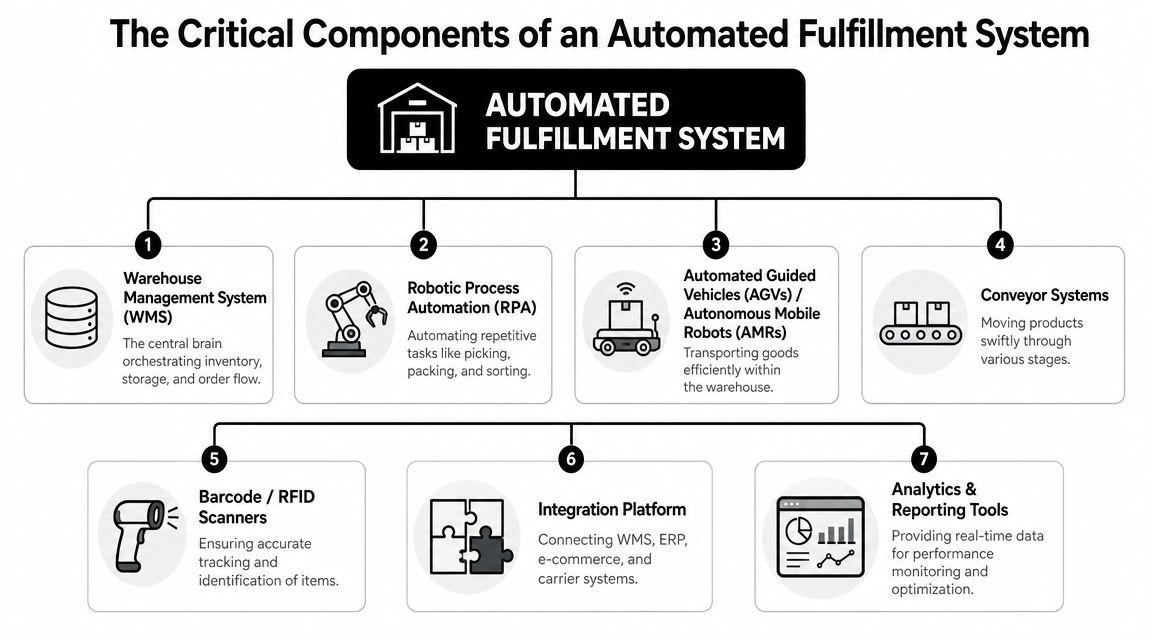
A robust stack typically integrates OMS, WMS, ERP, and carrier systems so orders from channels like eCommerce, EDI, email, or portals can be validated against live inventory and routed without manual intervention. It also uses event-driven workflows to create purchase orders and push shipment updates in real time, as outlined by Flxpoint's breakdown of fulfillment automation architecture.
The systems that actually matter
OMS as the decision layer
The Order Management System decides what should happen to an order. It receives demand from storefronts, sales teams, procurement channels, or customer portals. Then it applies routing logic.
For B2B teams, that logic often matters more than speed. One customer may require a specific carrier. Another may need split shipments. A third may only be served from a designated warehouse. The OMS enforces those rules consistently.
WMS as the execution layer
The Warehouse Management System controls what happens on the floor. It tells staff or equipment where stock sits, what gets picked, and how work is sequenced.
Even in low-volume environments, a WMS matters because it creates discipline. If your team still relies on “John knows where those kits are stored,” you don't have inventory control. You have tribal knowledge.
ERP as the financial and operational ledger
The ERP connects fulfillment to purchasing, accounting, inventory valuation, and often customer records. Many automation projects fail at this critical integration point. Teams automate order intake but forget to sync the back-office consequences of those decisions.
That creates a polished front end with a messy close.
The connectors that remove friction
The core applications won't do much if they can't talk to each other. That's where the rest of the stack earns its keep:
- Carrier integrations: Pull rates, generate labels, return tracking numbers, and keep shipping statuses current.
- Barcode or RFID checkpoints: Confirm that the right item was picked, packed, and staged.
- Smart scales and IoT feeds: Keep shipment data and stock positions aligned with what's physically happening.
- Integration layer: A workflow platform connects systems and handles triggers, conditions, exceptions, and notifications.
For many mid-market businesses, this integration layer is where the practical work lives. Tools and partners vary, but the job is the same: translate business logic into repeatable workflows. Teams evaluating options can compare categories of business process automation tools to understand where iPaaS, workflow orchestration, and AI-assisted automation fit.
The best stack isn't the one with the most features. It's the one that preserves one source of truth from order capture to delivery confirmation.
The overlooked component
Returns and reverse logistics rarely get enough attention. In B2B and SaaS, returns may mean replacement devices, swap-outs, RMA workflows, or retrieval of loaner equipment. If outbound is automated but returns still rely on inbox triage, your team keeps absorbing preventable work.
A complete system handles both directions. Otherwise, operations staff spend all their savings on exception management.
Benefits Beyond Faster Shipping for B2B and SaaS
For service-led companies, the biggest payoff from order fulfillment automation usually isn't warehouse speed. It's operational advantage.
A SaaS company shipping setup kits, access devices, or branded onboarding materials needs the first physical touchpoint to match the product experience. If that shipment is wrong, late, or missing tracking, the customer doesn't separate “logistics” from “software.” They judge the business as a whole.
Where service businesses win
B2B and SaaS teams benefit in different ways than retail brands do.
- Cleaner onboarding: New customer shipments happen on time when the trigger comes from the signed deal, completed payment, or completed implementation milestone.
- Less admin between teams: Sales, customer success, finance, and ops stop forwarding order details across tools.
- Better handling of high-value orders: A low number of shipments doesn't mean low importance. Enterprise orders often need more controls, not fewer.
- Non-linear scaling: Revenue can grow without adding coordinators every time order volume or client count rises.
Many operators err in their assumption. They think automation only pays off at massive consumer volumes. In reality, a lower-volume, higher-value environment can justify automation faster because each error has commercial consequences.
Accuracy changes the economics
In warehouse execution, automation improves throughput and accuracy because robots, pick-to-light systems, and automated scanning can operate continuously and standardize pick-pack steps. The larger gains come when software orchestration is combined with physical execution tools, reducing manual data entry and shrinking order-processing errors, as described by Prime Robotics' overview of the automated fulfillment process.
That principle matters outside a traditional warehouse too. If your “warehouse” is a back room, a fulfillment closet, a 3PL partner, or a hybrid supplier network, the same rule applies. Better orchestration removes avoidable human decisions.
Strategic outcomes leaders care about
The business outcomes tend to show up in four places:
- Client experience improves. Customers get timely shipments, clearer communication, and fewer surprises.
- Managers reclaim focus. Instead of checking order status manually, they can work on pricing, vendor strategy, or expansion.
- Ops becomes easier to forecast. Standard workflows create fewer emergency escalations.
- Growth becomes less fragile. The company isn't depending on one coordinator who “knows how it all works.”
Good automation doesn't remove people from the process. It removes people from repetitive control points so they can handle the exceptions that actually need judgment.
Your Implementation Roadmap from Manual to Automated
Most automation projects go sideways for one reason. Teams buy software before they define the operating model. If the workflow is unclear, the tech just accelerates confusion.
The safer path is phased. You don't need to automate everything at once. You need to automate the points where delay, rework, and human inconsistency hurt the business most.
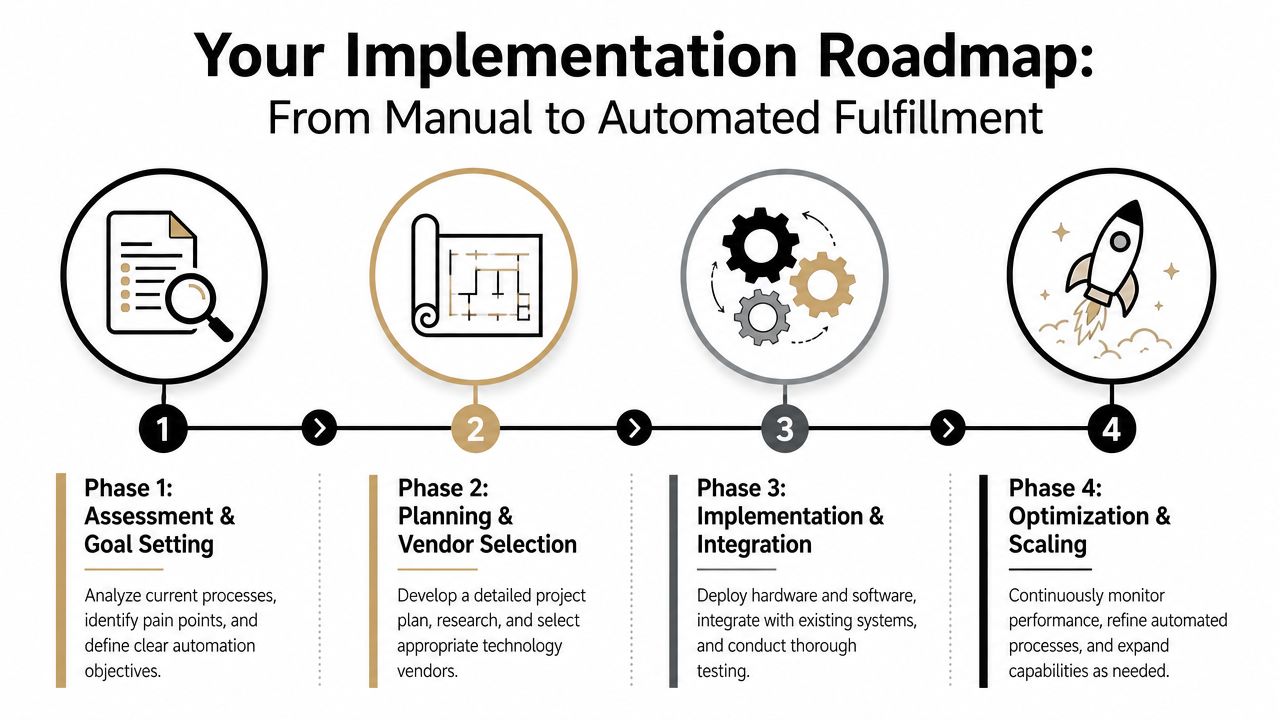
Phase 1 Assessment and goal setting
Start by mapping the current workflow from order creation to delivery confirmation. Don't map the ideal version. Map what happens, including inbox approvals, spreadsheet updates, and off-system exceptions.
Look for recurring friction:
- Data re-entry: Where does the same information get typed twice?
- Approval bottlenecks: Which steps wait for a person to notice and act?
- Exception clusters: Which order types create the most manual work?
- Visibility gaps: Where do customers or internal teams lose status updates?
Set goals that are operational, not aspirational. Faster processing is too vague. Better targets include fewer manual touches, lower exception volume, cleaner inventory sync, or more consistent client communication.
Phase 2 Planning and vendor selection
Choose architecture based on process reality. A B2B company shipping from multiple suppliers may need routing logic more than robotics. A SaaS business sending onboarding devices may need CRM-to-fulfillment triggers more than a complex warehouse suite.
At this stage, teams compare an OMS, WMS, ERP extensions, shipping platforms, and integration tools. Some businesses also work with implementation partners. MakeAutomation's roadmap to implementing business process automation is a useful reference for structuring this phase because it focuses on staged rollout, documentation, and workflow clarity.
Phase 3 Implementation and integration
This is the part people underestimate. The software may be easy to buy, but the integration logic is where the project succeeds or fails.
Build around events and decision rules:
- Order received
- Inventory checked
- Routing selected
- Fulfillment task created
- Shipment confirmed
- Status updated back to customer-facing systems
Test edge cases before go-live. Include partial shipments, out-of-stock scenarios, returns, address issues, and customer-specific rules. If you only test happy-path orders, your team will become the exception engine the moment the system launches.
Run a pilot on a controlled slice of order volume first. It's easier to fix routing logic in a narrow lane than in the middle of a full cutover.
Phase 4 Optimization and scaling
Go-live is not the finish line. It's the start of operational learning.
After launch, review where people still intervene. Some interventions are good. They reflect judgment calls. Others reveal weak rules, poor master data, or broken handoffs between systems.
A practical optimization cycle looks like this:
- Watch exception queues: Which orders still require manual rescue?
- Review routing outcomes: Did the system choose the right node, supplier, or carrier?
- Tighten data standards: Clean SKUs, addresses, customer rules, and inventory records.
- Expand carefully: Add new workflows only after the first lane is stable.
Companies that treat automation as an operating discipline usually outperform those that treat it as a one-time systems project.
Calculating ROI and Measuring Success
Automation becomes a worthwhile investment when it changes economics, not when it looks modern in isolation. That's why the business case should start with break-even, not enthusiasm.
The strongest case for order fulfillment automation is often in high-volume or labor-constrained environments, but not in every business by default. The right way to evaluate it is through a break-even analysis that considers SKU mix, order volume, and payback period. The economics also depend on the implementation choice, not just the decision to automate, as noted in Fabric's analysis of automated order fulfillment.
The metrics worth tracking
For most B2B, SaaS, and agency teams, I'd focus on a compact scorecard:
- Order accuracy rate: Are customers receiving the correct items and quantities?
- On-time shipping rate: Are shipments leaving when promised?
- Cost per order: What labor, packaging, and admin effort sit behind each shipment?
- Exception rate: How many orders require a manual save?
- Inventory discrepancy frequency: How often do system records conflict with physical stock?
- Time to status visibility: How quickly do customers and internal teams get usable updates?
A simple ROI framework
You don't need heroic forecasting. Build the model from current operational pain.
| Metric | Before Automation (Monthly) | After Automation (Monthly) | Monthly Impact |
|---|---|---|---|
| Manual order handling time | Baseline from current team activity | Reduced through workflow automation | Time returned to ops team |
| Order errors requiring rework | Current error count | Lower error count | Fewer reships and service escalations |
| Shipment status inquiries | Current inbound requests | Lower inquiry volume | Less customer success overhead |
| Temporary or incremental admin support | Current spend or allocated time | Reduced need | Lower operating load |
| Orders processed without intervention | Current baseline | Higher automated share | More scalable capacity |
What matters is discipline in the inputs. Pull a representative sample of recent orders. Measure how many touches each one required, how often exceptions happened, and what internal labor was consumed resolving them.
If you need a finance-ready structure, this ROI calculation guide is a practical starting point for turning workflow improvements into a defensible business case.
Don't ignore soft returns
Some gains won't show up neatly in the first spreadsheet review:
- smoother customer onboarding
- fewer account management escalations
- less dependence on individual employees
- more confidence when entering new channels or product lines
Those are real returns. They matter most in service businesses where fulfillment quality affects retention and reputation.
Common Pitfalls and How to Succeed
The most common mistake is automating a broken process. If your SKU data is inconsistent, customer rules aren't documented, and teams handle exceptions differently, the software will expose those flaws immediately.
The second mistake is overbuying. Many businesses don't need a massive warehouse stack on day one. They need clean routing logic, reliable integrations, and a way to keep customer, inventory, and shipment data synchronized. Complexity should follow need, not vendor demos.
The failure patterns I see most often
- Weak process definition: Teams can't describe the current workflow clearly enough to automate it.
- Integration blind spots: The storefront works, but ERP, carrier, or inventory updates break downstream.
- No exception design: Manual interventions remain, but nobody decides who owns them.
- Poor adoption: Staff get new tools without SOPs, training, or operational accountability.
One way to avoid this is to treat the project as an operations redesign, not a software install. Document the rules, choose the narrowest high-impact use case first, and give the team clear ownership over data quality and exception handling.
For B2B and SaaS companies, that often means working with specialists who understand both workflow automation and service business operations. MakeAutomation supports that kind of work through process mapping, documentation, AI and workflow automation design, and hands-on implementation support for teams trying to replace manual operational drag with scalable systems.
The companies that succeed don't automate for the sake of automation. They automate the moments where inconsistency damages margin, customer trust, or leadership focus.
If your team is still managing fulfillment through inboxes, spreadsheets, and memory, MakeAutomation can help you map the workflow, identify the most impactful automation opportunities, and build a rollout plan that fits your actual operation.