Data Migration Automation: The Ultimate SaaS Playbook
Most advice on data migration automation starts in the wrong place. It starts with speed, tooling, and throughput. That sounds sensible until a team automates the movement of duplicate records, stale accounts, broken foreign keys, outdated custom fields, and regulated data that never should've left the source system in the first place.
The hard truth is simple. Bad migration projects usually aren't ruined by a lack of scripts. They're ruined by bad decisions made before the first script runs.
In SaaS environments, migration is rarely a one-time event. Teams move from one CRM to another, re-platform billing, consolidate product databases after acquisition, split tenant data, adopt a warehouse, or shift workloads across cloud environments. That's why data migration automation needs to be treated less like a technical utility and more like operational redesign. If your process still assumes every record deserves a new home, you're not automating well. You're just accelerating clutter.
Why Smart Automation Is About What You Don't Migrate
The market is telling the same story many delivery teams have already learned the hard way. The global data migration automation market was valued at $4.2 billion in 2024 and is projected to reach $14.7 billion by 2033, reflecting a 14.6% CAGR according to Market Intelo's data migration automation market analysis. Organizations aren't buying more migration tooling because migration got easier. They're investing because migrations now sit inside larger cloud, hybrid, and modernization programs.
That doesn't mean the common advice has improved. A lot of migration guidance still treats automation as a faster conveyor belt. Extract. Transform. Load. Done. In practice, the strongest migrations begin with a harder question: what should stay behind?
If a source system has years of obsolete entities, low-value attachments, duplicate accounts, deprecated product attributes, or records that no downstream team uses, moving all of it creates more work in the target. Search gets noisier. analytics gets dirtier. Support teams inherit old exceptions. Compliance reviews become harder.
Smart automation reduces future system complexity, not just current migration effort.
This is why migration planning often overlaps with process redesign. A team that's replacing a CRM or warehouse usually isn't just changing systems. It's changing ownership, definitions, approvals, and reporting logic. That's the same discipline behind business process reengineering in operations-heavy organizations. The migration succeeds when the new system reflects better rules, not when it perfectly preserves every historical mistake.
In SaaS, the winning move usually isn't full preservation. It's selective continuity. Keep what still drives revenue, support, reporting, compliance, and product operations. Archive what must be retained. Delete what has no business value. Then automate the part that deserves to survive.
Laying the Foundation for Flawless Migration
Migration failures often get blamed on mapping bugs or API limits. That's late-stage thinking. The project usually goes off track much earlier, when nobody creates a reliable inventory of the data estate.
A solid planning phase starts with business usage, not schemas. Which objects support active workflows? Which datasets feed finance, customer success, renewals, product analytics, or support operations? Which ones exist only because an old system made them easy to create?
A useful planning discipline is a Data Taxonomy Refresh. One migration best-practice checklist recommends classifying data as hot, warm, frozen, or toxic, so teams can archive or delete low-value data instead of migrating it, as described in this 2026 migration guidance on pre-migration data culling.
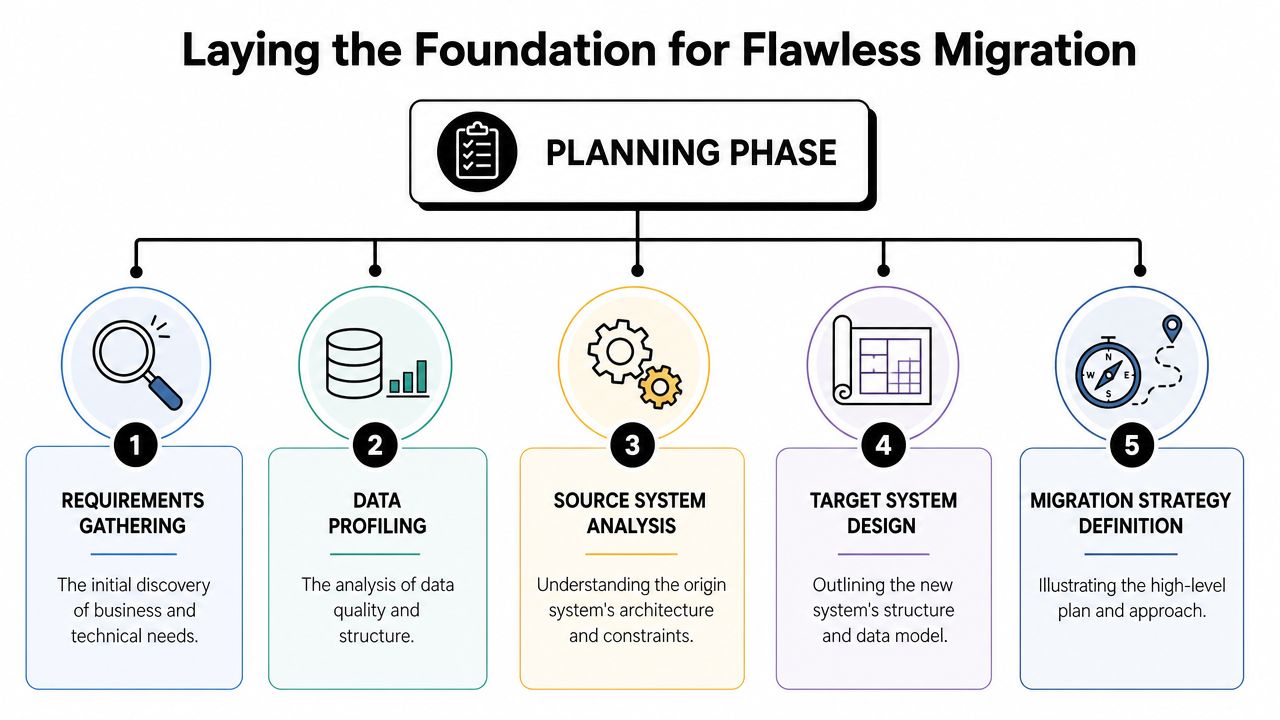
Classify before you extract
Those four labels are practical in SaaS environments:
- Hot data includes records used in live operations. Active customers, open tickets, in-flight invoices, current subscriptions, active users, current opportunities.
- Warm data still matters, but not every team needs it daily. Closed-won deals from prior periods, completed support cases, historical usage snapshots, older product events needed for trend analysis.
- Frozen data needs retention but not operational access. Legacy audit logs, old tenant exports, prior contract versions, decommissioned product metadata.
- Toxic data is the category teams avoid naming. Duplicates, abandoned custom objects, malformed fields, stale test records, non-compliant data, orphaned rows, and assets with no clear owner.
That classification changes scope immediately. If data is frozen, archive it. If it's toxic, clean it or delete it. If it's warm, decide whether the target system really needs native access or whether read-only storage is enough.
Define ownership early
Schema discovery isn't enough. Each major object needs a business owner and a technical owner.
Use a working model like this:
| Data area | Business owner asks | Technical owner asks |
|---|---|---|
| CRM accounts | Do sales and CS still use this? | Is the key stable and unique? |
| Billing data | What must finance retain? | What references downstream systems? |
| Product events | Which events still drive reporting? | Can raw history stay in storage? |
| Support records | What must agents access live? | Are attachments portable and structured? |
Without named owners, teams default to "migrate everything." That's how scope balloons.
Practical rule: if nobody will approve deleting a dataset, nobody has really taken ownership of it.
Turn planning into a decision log
The planning output shouldn't be a slide deck. It should be an operating artifact.
Create a decision log with fields like:
- Dataset or object name
- System of record
- Business purpose
- Classification
- Migration action
Migrate, archive, transform, merge, or delete - Owner sign-off
- Dependencies and downstream consumers
If your team needs a supplementary checklist, F1 Group's write-up on data migration best practices is a useful external reference because it reinforces the basics teams tend to skip under deadline pressure.
This stage also intersects with platform rollout planning. If the migration supports a larger system replacement, the operational side matters just as much as the data side. That's especially true in projects tied to CRM implementation planning for growing teams, where bad source hygiene gets baked into the new process if nobody intervenes before cutover.
Designing Your Data Mapping and Transformation Blueprint
Once scope is under control, the migration stops being philosophical and becomes architectural. At this stage, good projects separate from chaotic ones. A team needs one source of truth for how each source field lands in the target, what changes on the way, and what assumptions are allowed.
Start with object-level fit
Before anyone maps individual columns, compare source and target models at the object level. Don't ask whether account_name maps to company_name yet. Ask whether the target system even represents the same business entity in the same way.
This matters most when moving between platforms with different operating models. Salesforce, HubSpot, NetSuite, Stripe, Snowflake, BigQuery, and Postgres don't organize customer, subscription, usage, or billing concepts the same way. Teams get in trouble when they assume one object in the source equals one object in the target.
A practical object-level review usually answers these questions:
- Does the target combine entities that were split across several source tables?
- Does the target require stricter keys than the source ever enforced?
- Will one source object feed multiple target objects for analytics, application logic, or reporting?
- Are there legacy custom fields that should become standardized attributes instead?
Build a field mapping document people can execute
The mapping sheet isn't paperwork. It's a control plane.
A useful field-level mapping document includes:
| Source field | Target field | Rule | Notes |
|---|---|---|---|
| Legacy account ID | External ID | Preserve exactly | Used for reconciliation |
| Billing status text | Subscription state | Normalize values | Match target allowed states |
| Full name | First name and last name | Split on defined logic | Flag exceptions |
| Country free text | ISO country code | Standardize | Reject invalid values |
That "Rule" column is where real migration discipline lives. Write exactly what happens. Preserve, trim, split, merge, cast, normalize, default, enrich, reject, or archive. Avoid vague language like "clean up if needed." Engineers can't automate ambiguity.
Handle transformation rules like product requirements
Most hard migration work happens in transformations, not transfer. Typical examples include:
Data type mismatches
A free-text source field has to become an enum, date, integer, or boolean in the target.Field consolidation
Several old attributes collapse into one target field because the new platform simplifies the model.Field splitting
A single overloaded source value has to be broken into structured components.Value normalization
Different teams stored the same concept in different ways, and the target accepts only one standard.Derived fields
The target needs a value computed from multiple source attributes or lookup tables.
If a transformation rule would surprise a business user during UAT, it belongs in the mapping spec before development starts.
Version your blueprint
Teams often treat mappings as static. They aren't. During migration, UAT uncovers edge cases, exceptions, and old assumptions that don't hold up. That's normal. What's dangerous is letting those changes happen in Slack threads and ad hoc SQL edits.
Version the mapping document. Tie every change to an approver. Keep transformation logic in source control. If you're using dbt, Python, Talend, Informatica, Azure Data Factory, or custom SQL pipelines, connect code changes back to the mapping spec ID or ticket.
That discipline prevents a common failure mode. The engineering pipeline and the business definition drift apart, and nobody notices until a finance report or customer record looks wrong after cutover.
Choosing and Orchestrating Your Automation Engine
Teams usually ask the wrong question. They ask, "Which migration tool is best?" The better question is, "Which approach can this team operate reliably six months after go-live?"
I've seen well-funded teams overbuy enterprise ETL, then route all exceptions through one specialist who becomes a bottleneck. I've also seen strong data engineers ship migrations in Python and SQL with excellent results because they kept the workflow observable, versioned, and narrow in scope. The right engine depends less on vendor demos and more on team shape, complexity, and maintenance tolerance.
The three approaches that matter
Most SaaS migrations land in one of three buckets:
- Custom scripts using Python, SQL, shell jobs, or orchestration layers such as Airflow
- ETL or ELT platforms such as Talend, Informatica, Matillion, Fivetran, or Stitch
- iPaaS tools such as Workato, Boomi, Zapier, or Make for application-centric flows
Each can work. Each can also fail badly.
Data Migration Automation Approaches Compared
| Approach | Best For | Key Advantage | Key Disadvantage |
|---|---|---|---|
| Custom scripts | Teams with strong engineering skills and unusual transformation logic | Maximum control over mappings, validation, and orchestration | Higher maintenance burden and more custom support work |
| ETL or ELT platforms | Structured migrations with repeatable pipelines and multiple systems | Strong pipeline management, connectors, and operational visibility | Licensing and platform overhead can be heavy for smaller teams |
| iPaaS solutions | SaaS application migrations with API-first workflows and simpler objects | Fast to assemble and easier for ops-heavy teams to understand | Can become brittle with volume, complex dependencies, or advanced transformations |
What works in practice
Custom scripting works well when the migration includes odd business rules, multi-step reconciliation, or database-heavy transformations. Python with pandas or Polars, SQL in the warehouse, and orchestration through Airflow or Prefect gives experienced teams excellent control. The downside is supportability. If two engineers understand everything and then leave, the migration asset becomes tribal knowledge.
ETL and ELT platforms fit organizations that need standardization across multiple pipelines. Talend, Informatica, Matillion, and Azure Data Factory all help when governance, scheduling, connectors, and auditability matter. These tools reduce hand-built plumbing, but they also introduce platform-specific ways of modeling logic. That can make debugging slower if your team doesn't already know the product.
iPaaS tools are often underestimated. For CRM, support, and SaaS admin-system migrations, they can be perfectly adequate, especially when the workflow is API-led and object counts are manageable. Workato and Boomi are more suitable for structured enterprise integrations. Zapier and Make can support lighter operational flows. The danger appears when teams try to force warehouse-grade transformation logic into an app automation tool.
Pick for the exception path, not the happy path
Vendor demos focus on the clean path. Real migrations are decided by edge cases:
- How will you replay failed batches
- Where will rejected records land
- How will you inspect transformed payloads
- Can you resume without duplicate writes
- What happens when source data violates target constraints
Choose the platform your team can debug at 2 a.m., not the one with the nicest connector catalog.
A practical pattern for SaaS teams is hybrid orchestration. Use ETL or ELT where structured bulk movement makes sense. Use Python or SQL for the nonstandard transformations. Use iPaaS only where application workflows and operational handoffs benefit from it. That avoids forcing one tool to do every job poorly.
Embedding Automated Data Quality and Validation
Most migration teams still treat validation like a final exam. They move the data, run a few counts, spot-check some records, and hope UAT catches the rest. That approach fails because migration defects don't announce themselves at the moment they're created. They surface later, when a report breaks, a workflow misfires, or a user opens a record that looks complete but isn't.
One industry checklist cites research showing that 30 to 40% of migration issues are discovered only after a project is considered complete, including incomplete mappings, duplicates, format inconsistencies, and business-rule mismatches, as summarized in Valorem Reply's migration checklist. That's why strong teams push validation left and wire it into the pipeline itself.
A good companion habit is improving source quality before extraction. Operational teams dealing with recurring CRM or support data issues will recognize the same principles used in practical data quality improvement work.
Build a validation harness, not a final checklist
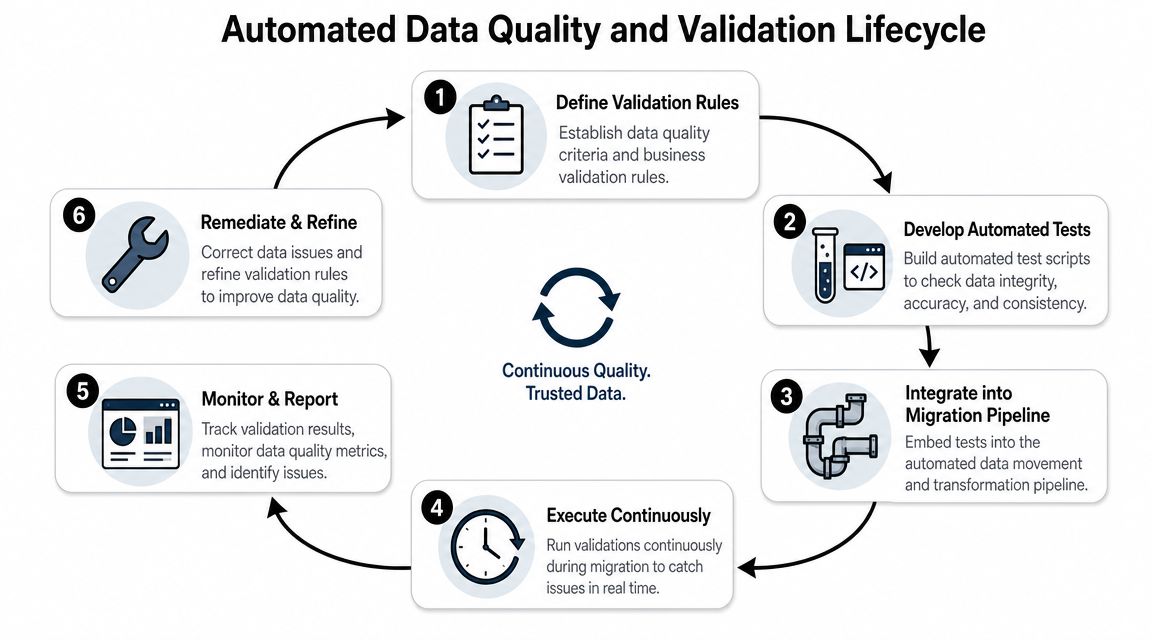
A validation harness runs before, during, and after transfer. It should be executable, repeatable, and tied to release gates.
Core validation layers usually include:
Pre-flight profiling
Check null patterns, uniqueness, referential integrity, field formats, allowed values, and obvious anomalies in the source.Transformation validation
Assert that mapping rules behave correctly. If a field is split, merged, normalized, or cast, test the output against expected logic.Load validation
Confirm target inserts and updates complete without silent truncation, dropped references, or rejected states.Business validation
Verify that downstream behavior still makes sense. Dashboards run. invoices reconcile. Support views display correctly. Segment logic still works.
Automate the checks teams usually leave manual
Record counts matter, but they're only the first line of defense. Stronger validation includes:
| Validation type | What it catches |
|---|---|
| Row and object counts | Missing or duplicated records across stages |
| Checksums and hashes | Unexpected content changes during transfer |
| Referential integrity checks | Broken parent-child relationships |
| Schema conformance tests | Invalid types, lengths, formats, and enums |
| Business rule assertions | Records that load but violate operating logic |
For warehouse-oriented migrations, dbt tests are useful because they turn assumptions into executable checks. For application migrations, Python test suites, SQL assertions, and API-level validation scripts usually work better. Great Expectations can help when teams want a dedicated framework for declaring expectations and collecting results.
This walkthrough is worth watching if your team wants a visual overview before building the validation layer:
Treat failed validation as product defects
Validation should produce a queue, not a shrug. Every failed rule needs an owner, severity, root-cause note, and disposition. Some failures require source cleanup. Others require transformation changes. Others expose target model problems.
A migrated record isn't valid because it exists. It's valid when the business can use it without hidden correction work.
Many teams underinvest. They automate transfer and leave exception handling manual. That creates a polished pipeline with an unscalable back office. If your validation harness produces too many ambiguous failures, refine the rules until they separate structural errors from acceptable edge cases.
Executing the Migration Pilot, Cutover, and Rollback
A migration should never go from design straight to full production cutover. High-reliability programs use a phased sequence: profile and audit the source, define mappings and rules, run a pilot on a representative subset, then execute full transfer with automated validation at each stage. That sequence reduces risk and preserves rollback options, as outlined in Kanerika's data migration framework guidance.
Run a pilot that looks like production
The pilot is not a sample for comfort. It's a rehearsal for reality.
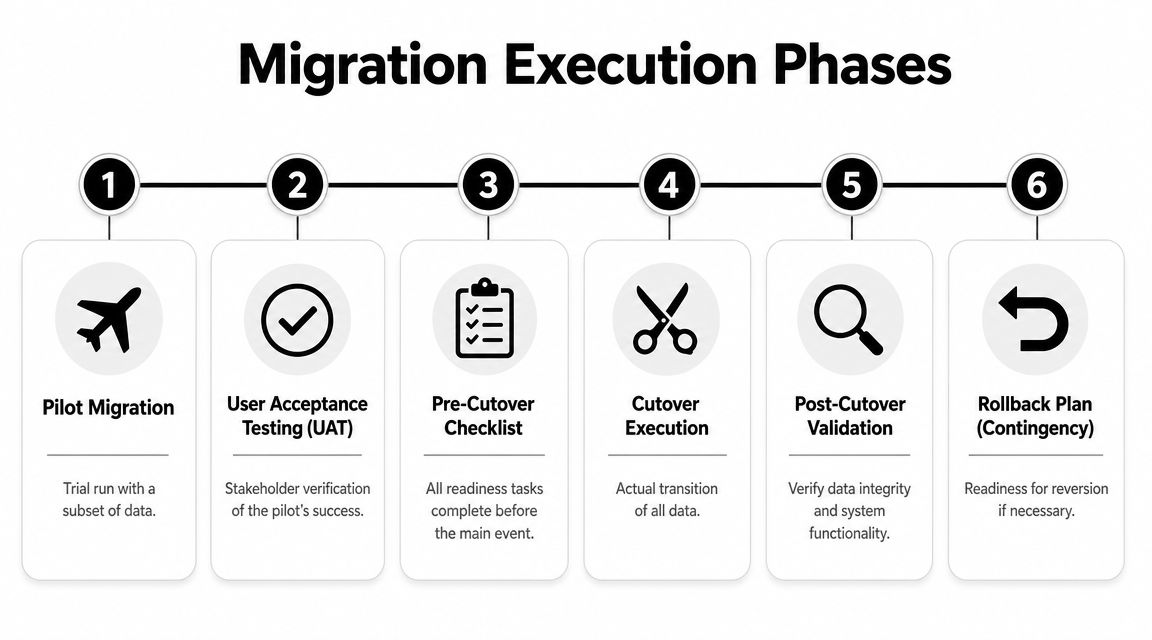
A useful pilot subset includes enough variety to trigger the hard paths:
- active and inactive customers
- records with attachments or notes
- edge-case values
- parent-child relationships
- historical records that still affect reporting
- records likely to fail target constraints
If the pilot only contains clean records, the team learns very little. Include mess on purpose.
Use UAT to validate operations, not just fields
In one common SaaS scenario, a team migrates CRM accounts, contacts, opportunities, subscriptions, and support links into a new operating stack. The pilot loads successfully. Counts reconcile. Mapping looks right. Then sales ops notices that account hierarchies flatten in the target, customer success can't filter by renewal ownership, and finance sees subscriptions tied to the wrong customer entity after a product bundle transformation.
That isn't a failed pilot. That's exactly what the pilot is for.
UAT should involve real users performing real workflows:
- Sales checks live records used in pipeline reviews and handoffs.
- Customer success verifies ownership, health indicators, and renewal context.
- Finance validates invoice, contract, or subscription associations.
- Support confirms searchable histories and linked entities.
If users only review exported CSVs, they won't catch operational defects.
Choose cutover based on dependency risk
Teams love the idea of a clean big-bang migration because it feels decisive. It also concentrates risk. A phased cutover reduces blast radius but adds temporary complexity because both environments may need to coexist.
A practical decision lens looks like this:
| Cutover style | Good fit | Main trade-off |
|---|---|---|
| Big bang | Simpler systems with fewer integrations and a short freeze window | Higher operational risk if anything fails |
| Phased | Multi-team environments where domains can move independently | More coordination and interim complexity |
| Parallel run | High-risk operations where old and new outputs need comparison | Duplicate effort and tighter governance needs |
Write the rollback plan before cutover approval
Rollback isn't a paragraph in the runbook. It's a tested procedure.
At minimum, define:
- Trigger conditions for rollback
- Decision authority on who can call it
- Source-of-truth rules during the cutover window
- Reversal steps for writes already made to the target
- Communication paths to users and stakeholders
The best rollback plans are boring. Everyone knows the trigger, the order of operations, and who makes the call.
The most dangerous cutovers are the ones where rollback exists in theory but not in automation. If the team can't revert permissions, integrations, write paths, and user workflows in a controlled way, then rollback is just wishful thinking.
From One-Off Project to Reusable Migration Capability
A mature SaaS company shouldn't relearn migration every time it changes platforms. That wastes delivery capacity and keeps the risk profile high. The better outcome is to turn one migration into a reusable operating capability.
That matters because the underlying demand isn't slowing down. The global data migration market is projected to grow from $12.8 billion in 2025 to $36.8 billion by 2033, and 55% of organizations already use two or more cloud providers, according to DataM Intelligence's market view of data migration and cloud complexity. In that environment, migration isn't an edge case. It's recurring infrastructure work.
Package the assets, not just the lessons
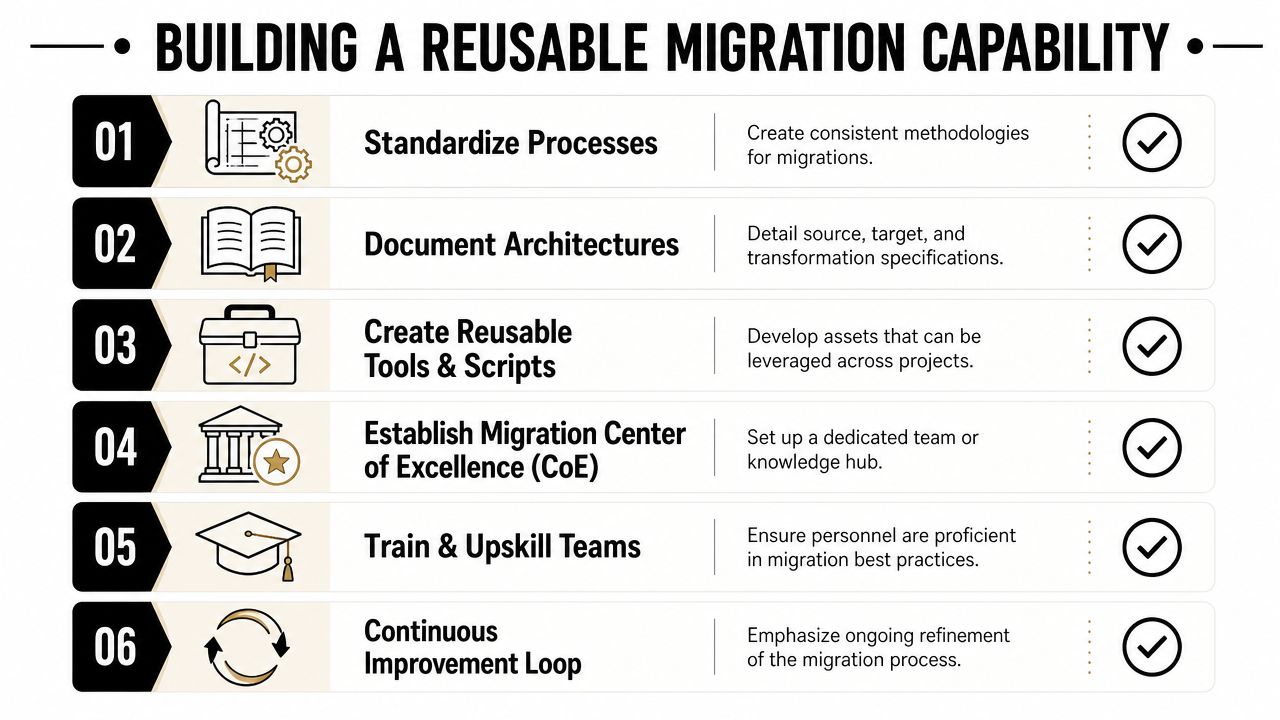
After cutover, many organizations archive tickets and move on. That's a missed opportunity. The durable value sits in the assets you can reuse:
- Mapping templates for common object patterns such as accounts, users, subscriptions, invoices, tickets, and product entities
- Validation script libraries for counts, referential integrity, schema conformity, and business-rule assertions
- Cutover runbooks with role assignments, checkpoints, approvals, and rollback triggers
- Exception taxonomies so common failure modes are already categorized and easier to triage next time
Store these where delivery teams will find them. Confluence or Notion can hold human-readable SOPs. Git should hold executable logic, test suites, transformation code, and versioned mapping artifacts.
Create an SOP that survives team turnover
A reusable migration SOP needs more than a checklist. It should answer the operational questions a new team will have under pressure:
| SOP component | What it should specify |
|---|---|
| Intake | What qualifies as a migration project and who approves scope |
| Discovery | How data classification, ownership, and dependency analysis are run |
| Design | How mappings are authored, reviewed, versioned, and approved |
| Validation | Which tests are mandatory before pilot and before cutover |
| Execution | Who owns pilot, UAT, cutover command, and rollback authority |
| Closeout | How assets, issues, and post-migration monitoring are documented |
Monitor the target after the migration ends
A migration can pass cutover and still degrade afterward. Data drift, broken sync jobs, new invalid values, and permission changes often appear after teams declare victory.
Set post-migration monitoring around the areas most likely to decay:
- Integrity drift between operational systems and analytical copies
- Unexpected nulls or enum violations in newly created records
- Workflow failures caused by missing target assumptions
- Reporting mismatches between old and new definitions
- Performance issues in queries or screens built on migrated structures
The best organizations eventually create a lightweight migration center of excellence, even if they don't call it that. A small cross-functional group owns templates, standards, review gates, and retrospectives. That keeps future migrations from starting from zero.
Data migration automation becomes valuable when it stops being a heroic one-time project. The long-term win is a repeatable capability: classify first, migrate selectively, validate continuously, cut over carefully, and retain the artifacts so the next project starts with a playbook instead of a blank page.
If your team wants help turning messy, one-off migration work into a documented, repeatable operating system, MakeAutomation can help design the SOPs, validation workflows, automation logic, and scalable process architecture behind it. The value isn't just faster delivery. It's giving your business a migration capability you can reuse across CRM changes, platform upgrades, and multi-system growth.