Accessibility Consulting Services: A B2B & SaaS Guide
An enterprise prospect is ready to buy your SaaS product. Security review is done. Legal is mostly done. Then procurement sends one more request: your accessibility documentation, your testing process, and proof that the product can support disabled users in real workflows.
That's the moment many teams realize they don't have an accessibility problem. They have an operations problem.
In B2B and SaaS, accessibility usually shows up first as friction. A stalled deal. A renewal risk. A public-sector questionnaire your team can't answer cleanly. A customer success escalation because keyboard navigation breaks in one critical workflow. Accessibility consulting services matter because they turn that chaos into a repeatable system your product, engineering, sales, and compliance teams can run.
What Are Accessibility Consulting Services
A familiar pattern looks like this: sales promises the prospect that the product supports enterprise requirements, then the buyer asks for a VPAT, testing evidence, known exceptions, and a remediation plan. Product says engineering can fix issues. Engineering says they need specifics. Legal asks what standard the company is claiming against.
Accessibility consulting services sit in that gap.
They help companies evaluate whether digital products are usable by people with disabilities, identify barriers, prioritize fixes, and build a defensible process around accessibility. In practical terms, that usually includes audits, remediation guidance, testing support, team training, and documentation that outside buyers can review.
What the service actually solves
At a surface level, consultants find issues. At an operational level, they do more than that:
- Clarify the target standard: Teams need to know what they're aligning to across web apps, documents, support flows, and procurement responses.
- Turn abstract rules into engineering work: A consultant can translate failed keyboard behavior, poor focus management, inaccessible forms, or weak semantic structure into fixable tickets.
- Create a usable decision trail: Buyers and internal stakeholders want to see what was tested, what passed, what failed, and what's scheduled for remediation.
Accessibility isn't about a tiny edge case. The World Health Organization has estimated that more than 1.3 billion people experience significant disability, and the UN has long cited that about 15% of the world's population lives with a disability (BarrierBreak on disability access and accessibility consulting). For SaaS companies, that means this work affects customer reach, employee usability, partner procurement, and brand credibility.
Accessibility work lands better inside a SaaS company when leaders stop treating it like a surprise legal task and start treating it like product quality with procurement consequences.
Where consultants fit in a B2B company
Most internal teams don't need a consultant because they're incapable. They need one because accessibility crosses too many functions for a single team to own alone. Product manages priorities. Design controls patterns. Engineering ships implementation. QA validates behavior. Sales and legal answer buyer questions.
A strong consultant aligns those groups around the same operating model.
Why Accessibility Is a Modern Business Imperative
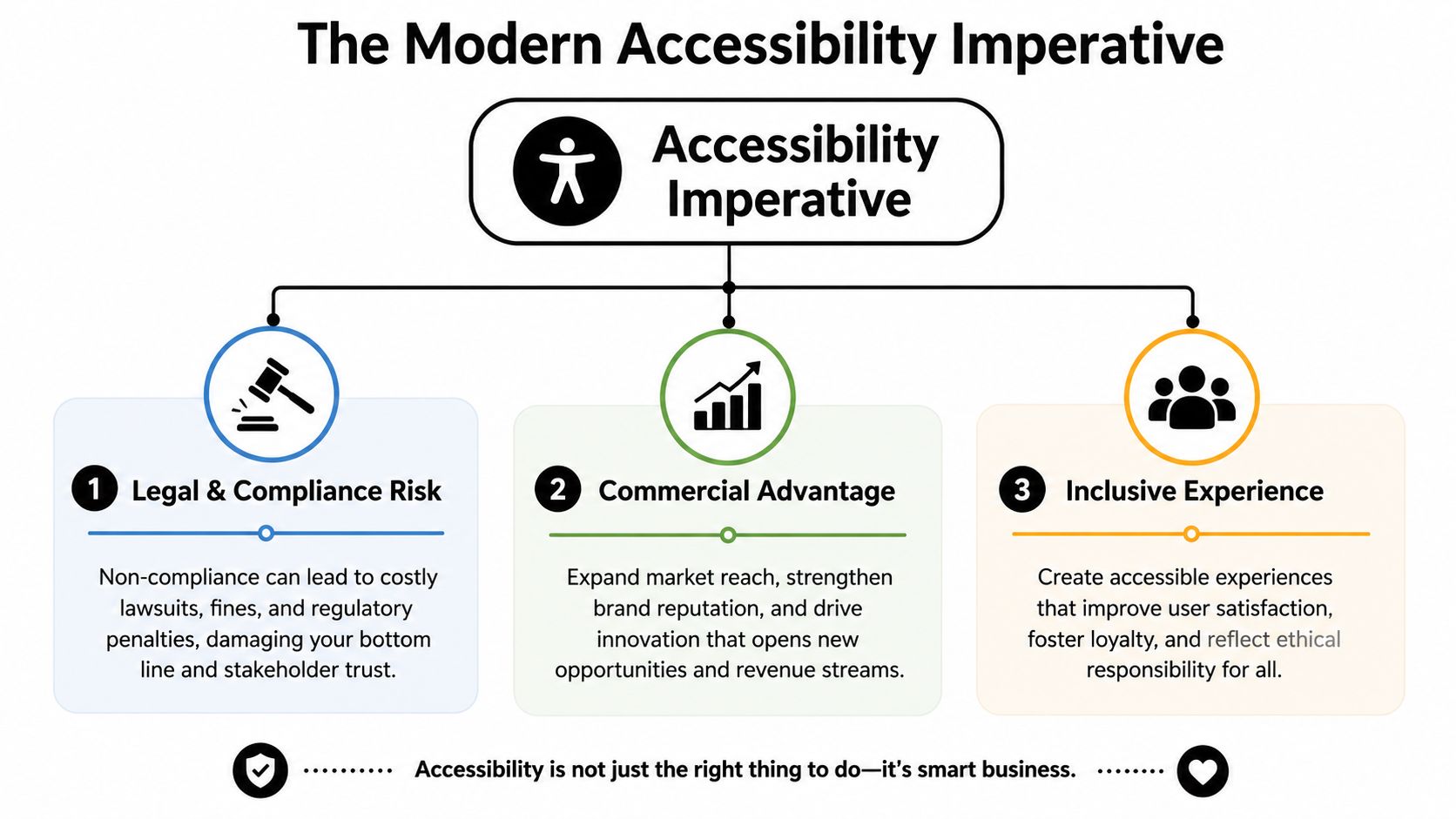
The strongest reason to invest in accessibility isn't moral language alone. It's that enterprise software companies already operate inside standards-heavy buying environments. Accessibility now sits alongside security, privacy, and vendor governance as part of how serious buyers evaluate risk.
The current consulting market didn't appear out of nowhere. It grew from standards and legal frameworks that accelerated after the ADA became law in 1990 and matured through WCAG 2.0 in 2008 and WCAG 2.1 in 2018, shaping compliance expectations under frameworks such as the ADA, Section 508, and AODA (Accessibility Innovations on the evolution of accessibility standards).
Legal exposure is only one part of the picture
A lot of teams begin with fear. They worry about complaints, contract language, or noncompliant workflows being exposed during procurement. That concern is valid, but it's incomplete.
For B2B SaaS, accessibility affects:
- Contract readiness: Enterprise buyers often require formal responses on accessibility support before they'll approve purchase.
- Expansion paths: The same issues that block a new logo can also slow upsells into regulated departments or larger account tiers.
- Operational credibility: If a company can't explain how it tests accessibility, buyers may assume the product organization lacks discipline elsewhere too.
Accessibility changes how buyers compare vendors
Procurement teams rarely reward vague promises. “We care about inclusion” isn't useful when a buyer needs product-specific evidence. The vendor that wins is often the vendor that can answer clearly:
- what standard they test against
- which parts of the product were reviewed
- how often testing happens
- what known gaps exist
- how remediation is tracked
That's why accessibility has become commercial infrastructure, not just compliance overhead.
Practical rule: If your sales team can't package accessibility answers in the same way they package security answers, your process is underbuilt.
Product quality and accessibility overlap more than teams expect
The teams that treat accessibility as separate from usability usually create more work. Focus order, form labels, error messaging, contrast, captioning, and keyboard flows are all product experience issues. They show up during onboarding, reporting, settings, billing, and admin workflows. In SaaS, those are often the exact screens buyers test hardest.
Accessibility also forces useful rigor. It exposes weak component design, inconsistent interaction patterns, and poor QA coverage. That's uncomfortable at first. It's also why companies that operationalize accessibility often end up with cleaner design systems and fewer downstream exceptions.
Understanding Core Consulting Offerings
Founders often buy the wrong engagement because they ask for “an accessibility audit” when they need a combination of diagnosis, remediation support, and procurement-ready documentation.
Accessibility consulting services usually fall into a few distinct categories. The useful question isn't “what does the consultant offer?” It's “what business problem are we trying to remove?”
Common service lines
A strong consulting partner typically helps with work such as:
- Accessibility audits: Manual and tool-assisted reviews of key screens, components, workflows, documents, or mobile experiences.
- Remediation guidance: Clear issue descriptions, severity context, and practical implementation notes for designers and developers.
- Design review: Feedback on component behavior, color use, interaction states, and pattern consistency before code ships.
- Assistive technology validation: Testing against real user flows so teams catch issues scanners won't explain well.
- Training: Sessions for design, engineering, QA, support, and content teams so the same problems don't keep coming back.
- Documentation support: Inputs for VPATs, ACRs, accessibility statements, exception logs, and customer-facing compliance responses.
Automated scans are useful, but limited
Automated tools are good at catching recurring classes of issues. They're not good at judging whether a workflow is understandable, whether focus lands where a user expects, or whether a modal behaves correctly with keyboard and screen reader interaction.
That's why the most useful consulting relationships blend automation with manual review. In my experience, teams waste time when they rely on one or the other in isolation. Scanner-only programs produce false confidence. Manual-only programs become hard to scale unless the consultant also helps build internal checkpoints.
Choosing the right engagement model
The right model depends on whether you need a one-time baseline, a procurement package, or ongoing operating support.
| Model | Best For | Typical Cost Structure | Key Outcome |
|---|---|---|---|
| One-time audit | Teams preparing for a release, renewal, or immediate buyer request | Fixed project fee | A prioritized issue list and baseline view of risk |
| Remediation sprint support | Product teams already fixing known defects | Time-based or sprint-based scope | Faster handoff from findings to shipped fixes |
| Procurement documentation engagement | SaaS vendors selling into enterprise or public-sector accounts | Fixed scope tied to deliverables | Evidence package buyers can review |
| Ongoing advisory retainer | Companies building accessibility into regular product operations | Monthly retainer | Repeated testing, governance support, and internal accountability |
| Embedded training plus review | Teams with design system or SDLC gaps | Workshop plus follow-up scope | Better internal capability and fewer repeated failures |
What to ask for in the statement of work
Bad statements of work stay abstract. Good ones define artifacts, workflows, and owners.
Look for items like:
- Named surfaces in scope: Which product areas, templates, PDFs, emails, or mobile screens are included.
- Testing method: Whether the consultant uses both automated and manual review.
- Severity and prioritization logic: How the consultant distinguishes blockers from lower-impact defects.
- Developer-ready outputs: Whether findings map cleanly into tickets with reproducible steps.
- Process guidance: Whether they'll help your team prevent recurrence through patterns and governance.
If your design system is still inconsistent, accessibility work gets slower because every fix becomes bespoke. Teams doing broader interface cleanup often benefit from improving pattern governance in parallel. This practical design system implementation guide is useful because it frames components, ownership, and reuse as operational decisions rather than visual polish.
Navigating Procurement and Proof of Compliance
A lot of accessibility consulting pages still sell the audit as the main event. For B2B SaaS, that's outdated. The bigger commercial issue is whether your company can produce evidence that procurement, legal, and security reviewers can use without chasing five internal teams.
That's where the market has shifted. The value of accessibility consulting is moving from merely finding violations to reducing procurement friction by helping teams produce defensible evidence such as VPATs and ACRs, especially as the European Accessibility Act takes effect on 28 June 2025 and increases the need for proof of compliance in major markets (ACB on accessibility compliance services and procurement evidence).
What enterprise buyers usually want
Large buyers rarely stop at “are you compliant?” They want a package that demonstrates your level of maturity.
That package often includes:
- A current VPAT or ACR: Not just a template, but a document grounded in actual review.
- Testing notes: Which workflows, platforms, and components were evaluated.
- Known exceptions: Honest disclosure matters more than inflated claims.
- Remediation tracking: Evidence that the team can fix issues and govern future releases.
- Accessibility contact path: A real way for customers or evaluators to report barriers.
If your VPAT reads like marketing copy, procurement will treat it like marketing copy.
Documentation without process doesn't hold up
Many SaaS teams rush to produce a VPAT only when a deal requires it. That's workable once. It breaks down when multiple opportunities ask for updates, customer-specific language, or proof that the document reflects current product behavior.
The consultant's job here isn't just writing support. It's operational translation.
A capable consultant should help you answer questions such as:
- Which product version does this documentation represent?
- What evidence backs each conformance statement?
- Who approves updates after releases?
- How do support and sales route accessibility questions?
- What happens when a customer flags an issue that wasn't in prior testing?
Video and multimedia are another area where buyers ask sharper questions than many teams expect. If your platform includes webinar playback, training content, or embedded product education, it helps to understand the practical differences in captioning obligations. This guide to captioning laws and accessibility is useful context for teams packaging evidence around media support.
Build a procurement packet, not isolated files
The companies that handle accessibility well don't send scattered attachments from three departments. They maintain a coherent packet.
A simple structure works:
| Document | Why it matters in review |
|---|---|
| VPAT or ACR | Gives the buyer a standardized conformance summary |
| Testing summary | Shows how claims were evaluated |
| Remediation log | Proves issues are managed, not ignored |
| Accessibility statement or contact route | Shows governance and support readiness |
| Internal owner list | Prevents sales from scrambling for answers |
If your pre-sales and product teams don't already have a repeatable review flow for buyer questionnaires, building one helps. A structured usability test plan template and process guide is a practical companion because it forces teams to define scope, scenarios, evidence, and ownership before requests become urgent.
Your Step-by-Step Consultant Hiring Checklist
The biggest hiring mistake isn't choosing the wrong specialist. It's hiring before your company has defined what success looks like. Accessibility consulting goes sideways when the consultant thinks they were hired to audit, while leadership expects buyer-ready paperwork, training, and ongoing QA guidance.
Use a checklist. It keeps the process concrete.
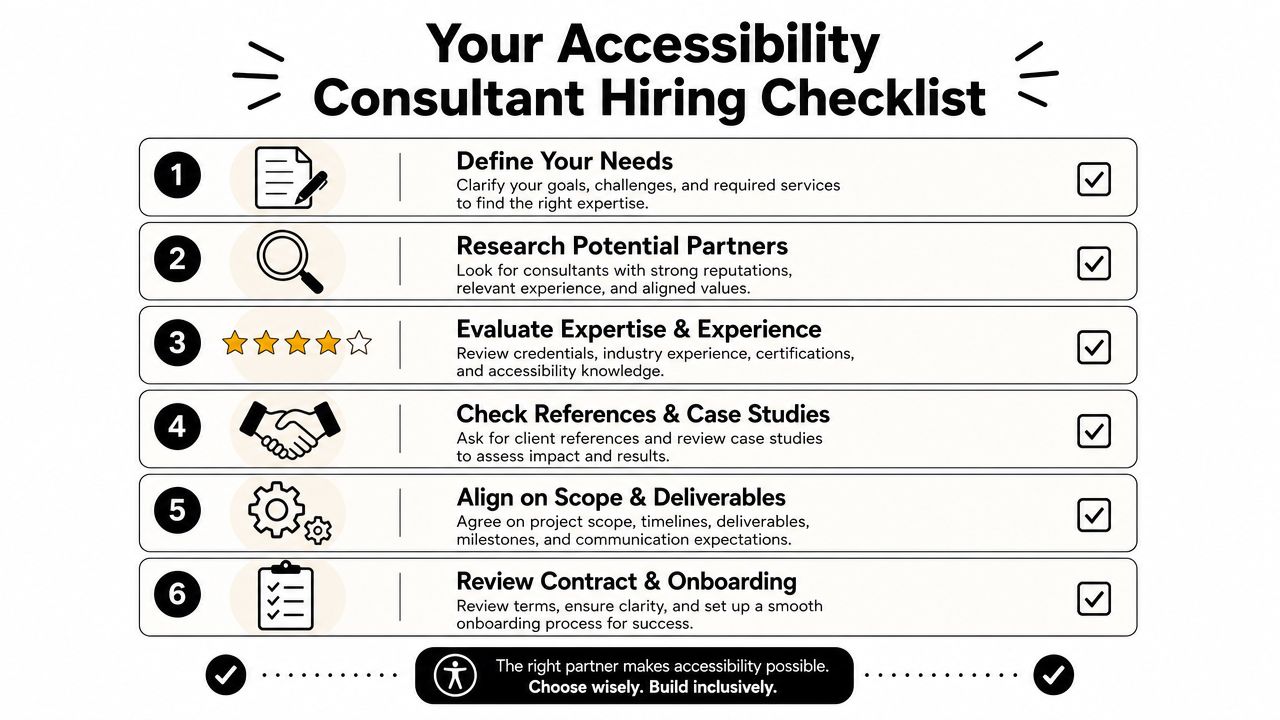
Start with the business trigger
Write down what caused the project. Be specific.
Examples include:
- A blocked enterprise deal: The buyer needs evidence before signing.
- A product release risk: A major workflow has known usability barriers.
- A governance gap: Multiple teams ship UI changes with no accessibility review.
- A market expansion need: New buyers require stronger documentation and process control.
This first step matters because the right consultant for procurement support may not be the same consultant you'd hire for component-level design coaching.
Define scope before you interview anyone
Don't ask consultants to guess what your product includes. Build a scope brief that names the surfaces under review.
Include items such as:
- Core user flows: login, onboarding, reporting, billing, admin settings, support interactions
- Platforms: web app, mobile web, native app, embedded content, documents
- Artifacts needed: issue log, remediation guidance, VPAT inputs, training sessions
- Internal team owners: product, engineering, design, QA, legal, sales enablement
A vague scope creates a vague outcome.
Vet for operational fit, not only technical knowledge
Plenty of consultants understand standards. Fewer can work well inside a SaaS delivery environment.
Ask questions like:
- How do you separate blocker issues from lower-priority improvements?
- What does a developer-ready finding look like in your process?
- How do you review dynamic interfaces like dashboards, modals, tables, and settings panels?
- How do you help teams keep documentation current after release?
- What do you need from design, QA, and engineering to make the engagement work?
Hiring signal: The best consultants can explain how findings move from audit report to sprint planning to customer-facing evidence.
A short primer can help align your internal team before interviews. This video gives a useful overview of consultant evaluation and accessibility thinking in practice.
Review sample deliverables before signing
Don't settle for a polished slide deck and generic promises. Ask to see anonymized examples of:
- Issue reporting format: Can your engineers work from it immediately?
- Documentation support: Does the consultant understand evidence, not just defects?
- Training materials: Are they role-specific or generic awareness sessions?
- Governance recommendations: Do they map to actual product operations?
Lock down ownership and follow-through
Most failed consulting engagements break after the report arrives. Nobody owns triage, nobody prioritizes fixes, and sales keeps answering buyer questions with outdated language.
Before kickoff, define:
- An internal DRI: one person who coordinates decisions
- A remediation path: where issues land and how they're prioritized
- A publication process: who updates VPATs, statements, and customer responses
- A re-test trigger: when the consultant validates fixes
Consultants can accelerate maturity, but they can't replace internal ownership.
How to Operationalize Accessibility in Your Team
Accessibility consulting creates value when it changes how your team ships product. If the engagement ends with a PDF report in a shared drive, you've bought information, not capability.
The stronger model treats accessibility as an operational control system. The Colorado OIT service catalog describes effective consulting as assessing all technology touchpoints, remediating issues, and building accessibility into roles and processes to avoid future accessibility debt across design, development, and QA (Colorado OIT on accessibility consulting operations).
Put accessibility inside the delivery workflow
Experienced SaaS teams gain an advantage. They stop checking accessibility at the end and start placing controls earlier.
A workable operating model usually includes:
- Design controls: Accessibility annotations in Figma, reusable accessible components, clear interaction states, and copy guidance for errors and labels.
- Development controls: Component standards, linting, semantic HTML discipline, and PR checks for common interaction failures.
- QA controls: Keyboard walkthroughs, assistive technology spot checks, and test cases tied to critical user journeys.
- Release controls: Accessibility review for materially changed workflows, not just visual regression.
Assign ownership by role
Accessibility falls apart when everyone supports it conceptually and nobody owns it in practice.
A pragmatic split looks like this:
| Team | Primary responsibility |
|---|---|
| Design | Pattern decisions, states, annotations, content clarity |
| Engineering | Correct implementation, component reuse, defect resolution |
| QA | Workflow validation, regression coverage, bug reproduction |
| Product | Prioritization, acceptance criteria, release gating |
| Sales and success | Accurate customer communication and issue escalation |
If your team needs a lightweight baseline before building a deeper program, this simple website accessibility guide is a useful reference for common practices and terminology.
Build repeatable artifacts, not heroic effort
The easiest way to make accessibility sustainable is to turn lessons into reusable assets. That means:
- issue templates with reproduction steps
- acceptance criteria for common interaction patterns
- design system guidance for forms, modals, tables, and alerts
- QA scripts for keyboard and screen-reader-adjacent review
- customer response templates for procurement and support
This is also where automation can help. Tools can route findings, standardize documentation, and keep handoffs from breaking between product, QA, and revenue teams. For companies formalizing broader product operations alongside accessibility, universal design principles in practice can help align design and process decisions. Teams that need workflow support across these handoffs may also use platforms such as MakeAutomation to document SOPs, structure ownership, and automate recurring operational tasks around reviews and follow-up.
Mature accessibility programs don't depend on one careful designer or one knowledgeable engineer. They depend on repeatable defaults.
Conclusion From Compliance to Competitive Advantage
Accessibility consulting services are easy to misclassify as a niche compliance purchase. In B2B and SaaS, they're closer to revenue operations for the product itself. They help companies answer buyer questions, reduce procurement friction, improve product quality, and create a system that scales beyond one urgent audit.
The commercial reality is simple. Enterprise buyers don't just want good intentions. They want evidence, ownership, and a product team that can explain how accessibility is handled over time. When a consultant helps you build that muscle, the outcome is bigger than a cleaned-up report. You get a more resilient design system, clearer QA practices, stronger documentation, and fewer deal-stalling surprises.
The companies that do this well don't wait for a crisis. They start with one critical flow, one buyer-facing document set, or one release process that needs tightening. That's enough to create momentum.
If you're deciding where to begin, pick the workflow that matters most to customers and revenue. Audit that path, document the findings, assign owners, and make the fixes visible internally. That's usually the point where accessibility stops feeling like overhead and starts functioning as a competitive advantage.
If your team needs help turning accessibility requirements into a repeatable operating process, MakeAutomation can support the workflow side of the work, including SOPs, handoff design, documentation structure, and automation around cross-functional execution for B2B and SaaS teams.