Mastering Your Project Plan for Website Development
You’re probably dealing with one of two situations right now. Either the website project hasn’t started yet and internal opinions are already colliding, or the build is underway and the warning signs are showing up: unclear requirements, slow approvals, content still missing, sales asking for “one more thing,” and development waiting on decisions that should’ve been made weeks ago.
That’s why a strong project plan for website development matters so much. It isn’t paperwork for its own sake. It’s the operating system for the entire build. It defines what gets built, who approves what, how automation fits into the architecture, and what success looks like once the site is live.
This matters even more in B2B and SaaS. Your website isn’t just a brand asset. It’s tied to lead capture, CRM workflows, demo bookings, onboarding, analytics, and often the first layer of customer qualification. If those systems aren’t planned from day one, the team ends up bolting them on later. That’s where costs rise, timelines slip, and the site launches without doing the work the business needs.
Define Your Website's Blueprint Scope and Stakeholders
Most website problems start long before design. They start when the business says “we need a new site” but can’t answer what the site must do, what’s in scope, and who gets final approval.
A project plan for website development begins with scope. Not a vague wish list. A working definition of the product. If the scope is weak, every later phase gets noisier. Design becomes subjective. Development gets blocked. QA tests moving targets.
Turn business goals into user stories
Start with business outcomes, then convert them into user stories. A founder may say, “We need more qualified demos.” That’s not a feature. It becomes planning input.
For a B2B SaaS site, that often turns into stories like these:
- Buyer path: As a prospect, I want to understand the product by use case so I can decide whether to book a demo.
- Sales handoff: As a sales rep, I want new leads routed into the CRM with source data so I can follow up fast.
- Recruiting path: As a candidate, I want role pages and a clean application flow so I can apply without friction.
- Support path: As an existing customer, I want answers to common questions without opening a ticket.
That process forces precision. It also reveals the difference between an MVP requirement and a nice-to-have.
A practical prioritization method is MoSCoW:
- Must have: Core pages, messaging architecture, CRM-connected forms, analytics, essential integrations
- Should have: Resource hub, advanced filtering, personalized CTAs
- Could have: Interactive calculators, gated content journeys, chatbot variations
- Won’t have now: Anything interesting but non-essential that threatens launch discipline
Practical rule: If a feature can be delayed without hurting launch readiness, it doesn’t belong in the first release.
For teams that need a clean structure for scope, user stories, and acceptance-ready requirements, an agile requirements document template helps keep planning specific enough for design, development, and QA to work from the same baseline.
Build a stakeholder map before approvals start
The second failure point is stakeholder chaos. A project usually has more decision-makers than the kickoff deck admits. In B2B website work, common stakeholders include the CEO, marketing lead, sales leader, product team, operations, legal, and customer success.
Don’t treat them equally. Map them by influence and review responsibility.
| Stakeholder | What they should own |
|---|---|
| CEO or founder | Final business direction, not button colors |
| Marketing lead | Messaging, campaigns, lead capture goals |
| Sales leader | Lead qualification logic, CRM handoff |
| Product team | Accuracy of features, use cases, workflows |
| Operations or RevOps | CRM, automation, routing, reporting |
| Legal or compliance | Required language, policy review |
Then set a communication plan:
- Weekly operating update: Progress, blockers, upcoming approvals.
- Stage-gated reviews: Sitemap sign-off, wireframe approval, design approval, UAT sign-off.
- Single decision owner per area: One owner for content, one for design, one for integrations.
- Deadline-based feedback: Comments due by a set date or the deliverable is considered approved.
Instead of more meetings, cleaner authority is often the key. When stakeholders know exactly when they’re needed and what they’re approving, feedback improves and the project moves.
Navigate the Core Phases of Website Development
A B2B website project usually feels healthy right up until one hidden dependency stops everything. Sales wants lead routing changed after design sign-off. RevOps asks where form data lands. Legal is still reviewing claims on core product pages. The teams that ship on time handle those phase transitions early, because each stage exists to answer a different delivery question.
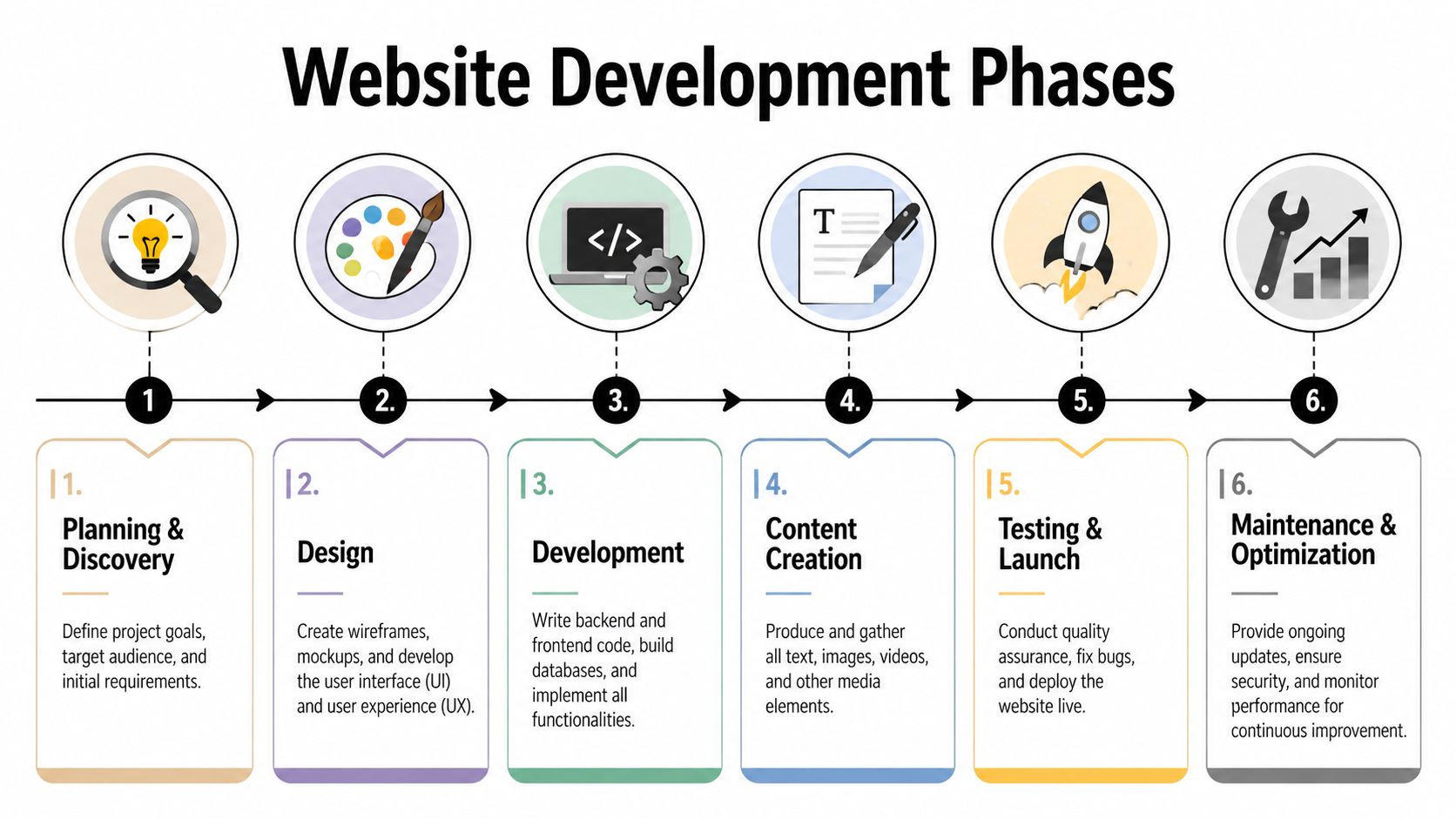
A solid website plan still follows the same core sequence. Discovery and Strategy. Planning and Architecture. Design and Content. Development. Testing and QA. Launch. Post-Launch. That structure keeps the work ordered and reduces rework, as outlined by DLL Studios’ website development framework.
What each phase is really for
Phases are risk controls, not labels on a Gantt chart.
Discovery and strategy confirm the business case. The team defines goals, audience, positioning, constraints, and success metrics. For B2B and SaaS sites, this is also where revenue questions should be settled early. What counts as a qualified lead? Which actions should trigger CRM creation? Where should AI chat, qualification, or support automation appear in the user journey? If those answers come later, the project usually pays for them twice.
Planning and architecture turn intent into a buildable system. That includes sitemap, page types, user flows, wireframes, CMS model, analytics events, integration requirements, and operational rules for forms, routing, and reporting. Teams that treat automation as post-launch optimization usually end up retrofitting HubSpot, Salesforce, scheduling logic, enrichment tools, or AI agents into a structure that was never designed for them.
Design and content shape conversion, not just aesthetics. On a B2B site, copy often does more selling than visuals, so content strategy cannot wait for polished mockups. The better approach is parallel progress. Messaging, page structure, CTAs, and component design should evolve together, especially on high-intent pages like product, solution, pricing, demo, and comparison pages.
Where projects usually slow down
Development exposes every unresolved decision from the earlier phases. I see the same pattern across agency and in-house teams. A page template gets approved before content hierarchy is final. A form gets designed before the CRM field map exists. An AI chatbot gets requested after development starts, but no one defined ownership, escalation logic, or training inputs.
The delay is rarely caused by code alone.
Typical middle-phase deliverables include:
- Architecture outputs: Sitemap, wireframes, component inventory, data capture plan, integration list
- Design outputs: High-fidelity mockups, responsive states, style guide, content drafts, CTA logic
- Development outputs: Staging site, reusable components, CMS configuration, form handlers, integration endpoints
One missed approval in content or systems planning can compress QA by days or weeks.
That is why lifecycle discipline matters. A defined project lifecycle for digital delivery gives teams a clearer way to place deliverables, approvals, and handoffs than a generic task list. For teams evaluating stack decisions during this phase, it also helps to discover dev utilities for 2026 and identify which tools belong in planning versus implementation.
Launch is an operational handoff
Testing, launch, and post-launch work decide whether the site functions as a marketing asset or just looks finished.
Testing and QA should cover functional testing, browser and device checks, accessibility review, form validation, analytics verification, CMS editing, and user acceptance. For B2B websites, QA also needs to confirm that leads create the right records, trigger the right automations, notify the right team, and pass the right data into CRM and reporting systems.
Launch and deployment require a controlled checklist. Redirects, indexing rules, event tracking, backups, DNS changes, rollback procedures, cookie compliance, and CRM connection tests should all be signed off before go-live.
Post-launch is where the website starts proving its value. Review conversion paths, traffic quality, form completion rates, pipeline attribution, page performance, and automation accuracy. If AI agents, lead scoring, or enrichment workflows are part of the plan, monitor them like production systems, because that is what they are. A modern website should not stop at publishing pages. It should support a repeatable, measurable revenue process.
Map Your Timeline Resources and Methodology
A timeline only works when it reflects how websites are built. Clean-looking schedules fail all the time because they assume perfect handoffs, instant approvals, and uninterrupted developer time. That isn’t how agency or in-house delivery works.
Waterfall, Agile, and the model that works in practice
Pure Waterfall gives you structure. It’s good for budgeting, contracting, and executive visibility. It’s weak when requirements evolve or content changes force design and development updates.
Pure Agile gives you flexibility. It’s strong for iteration and feedback. It’s weaker when leadership needs fixed milestones, approval gates, and launch coordination across multiple departments.
For most B2B and SaaS website work, the better approach is a hybrid. The major phases stay sequenced, but the team uses iterative sprints inside design and development. According to JHK Infotech’s planning analysis, an Agile-Adapted Waterfall Hybrid delivers SaaS website projects on time and on budget 75% of the time versus a 35% industry average, while reducing risk and rework by over 40%.
That lines up with how experienced teams already work. Strategy, architecture, and launch planning benefit from fixed gates. Interface details, component behavior, and integration handling benefit from iteration.
| Method | Best use | Main weakness |
|---|---|---|
| Waterfall | Fixed scope, formal sign-offs | Slow to adapt once work starts |
| Agile | Fast iteration, evolving needs | Can blur timelines and approvals |
| Hybrid | Structured phases with sprint-based execution | Requires stronger PM discipline |
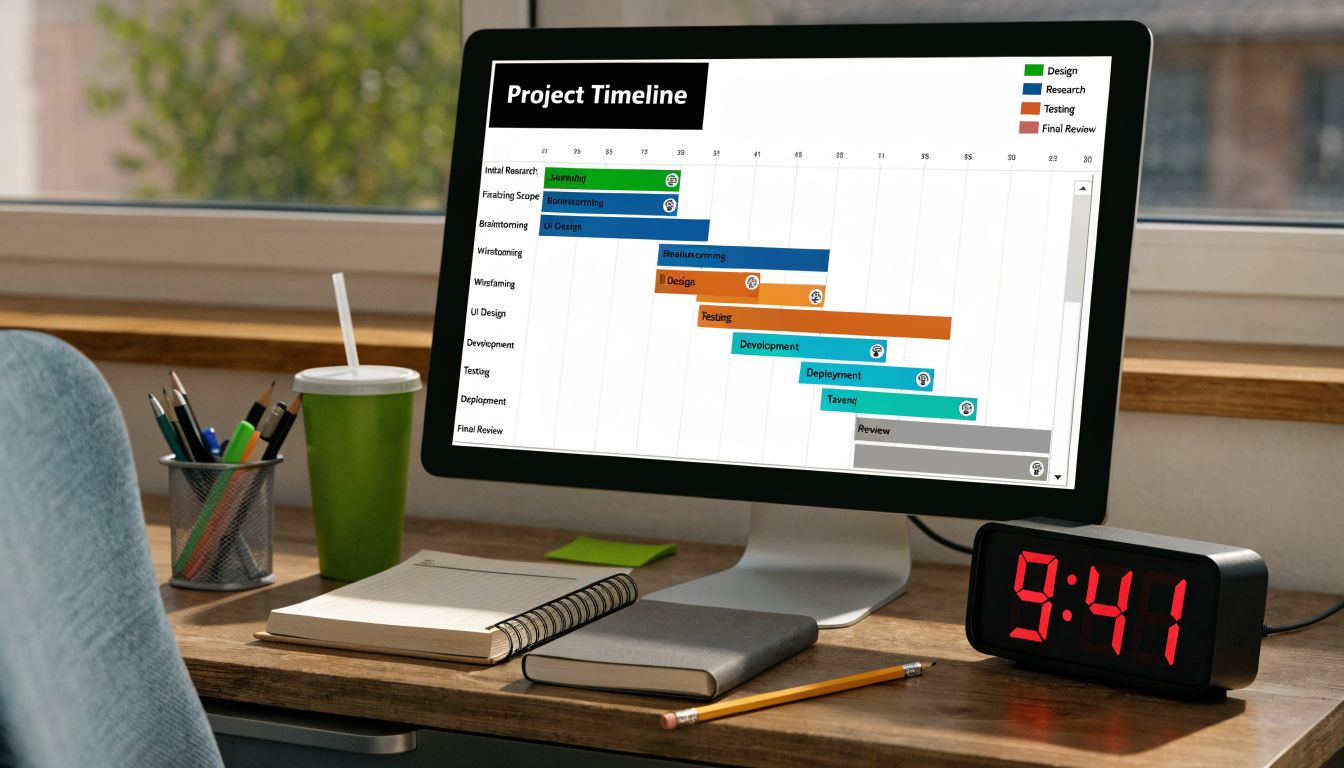
Build a high-level Gantt chart, not a fantasy schedule
A useful Gantt chart shows milestones and dependencies. It doesn’t pretend every task is predictable to the hour.
Start with these layers:
- Phase bars: Discovery, architecture, design, content, development, QA, launch
- Decision gates: Sitemap approval, wireframe sign-off, design approval, UAT sign-off
- Dependency markers: Content needed before page build, CRM field map needed before form integration
- Risk buffers: Time for revisions, legal review, vendor response delays
Resource planning should cover more than developer capacity. A real project plan for website development also needs named ownership for copy, SEO inputs, analytics setup, automation mapping, QA, stakeholder reviews, and launch support.
Teams often underestimate the tooling side as well. Design platforms, QA environments, project management systems, analytics tools, form systems, and deployment workflows all affect delivery speed. If you’re reviewing your stack before planning the build, it’s useful to discover dev utilities for 2026 and identify which tools reduce handoff friction versus adding process overhead.
For estimation discipline, a structured software project estimation approach helps teams separate effort assumptions from actual dependencies, which is where most schedule errors start.
A visual explanation helps when stakeholders need to understand why dates move when approvals slip.
Supercharge Your Site with AI and Automation
Most website plans still treat automation like a post-launch enhancement. That’s outdated. In B2B and SaaS, automation belongs in planning because it changes architecture, page logic, CRM fields, routing rules, and reporting requirements.
The website isn’t just where leads arrive. It’s where qualification, enrichment, assignment, and follow-up should begin automatically.

What to plan from day one
A generic website brief says “connect forms to HubSpot.” That’s not enough. You need to define what happens after submission.
A stronger plan answers questions like these:
- Lead routing: Which fields determine owner assignment?
- Qualification logic: What counts as sales-ready versus nurture-ready?
- Enrichment: What data should be appended before a rep sees the lead?
- Response workflow: Does the lead get a confirmation email, a meeting link, or a chatbot follow-up?
- Reporting: Which campaign, page, and source values need to flow into the CRM?
Many projects frequently fall short. According to Beetle Beetle’s website redesign planning guide, most website project plans severely undervalue AI and automation, even though Gartner data cited there shows 68% of B2B firms using automation cut project timelines by 30% to 50%.
That isn’t just an operations story. It’s a planning story. If the team waits until after launch to design automation, they usually discover missing fields, broken event logic, weak attribution, and handoffs that still depend on humans copying data between systems.
The automation stack that actually changes outcomes
For B2B sites, the highest-impact automations usually sit in three areas.
Lead capture and CRM orchestration
A form submission should create or update the correct record, tag the source, apply routing logic, and trigger the next action. That might mean assigning enterprise leads to an account executive, routing smaller accounts to SDR nurture, or sending partner inquiries to a separate workflow.
AI-assisted qualification
An on-site AI chatbot can do more than answer simple questions. It can guide visitors by use case, recommend the right page path, capture intent, and book meetings. If you’re evaluating practical use cases, this guide on improving lead capture with AI is a useful example of how chat workflows can support marketing and qualification together.
Operational automation behind the site
CI/CD pipelines, automated QA checks, content workflow triggers, and internal alerts all reduce manual work. These aren’t flashy, but they make ongoing iteration safer. A site that can’t be updated cleanly becomes expensive to improve.
Operational advice: Plan the data model before the interface. If the CRM fields, event taxonomy, and routing rules are wrong, the nicest front end in the world won’t save the funnel.
Where AI belongs in the website plan
The best time to define AI and automation is during architecture, not after design approval. By then, key decisions have already been baked into layouts and user flows.
Use this checklist during planning:
- Identify automation moments: Form submits, chatbot conversations, demo requests, trial signups, support deflection.
- Map systems involved: CRM, email platform, scheduling tool, analytics platform, internal notifications.
- Define data requirements: Required fields, hidden attribution values, lead status rules, owner routing.
- Write acceptance criteria: What must happen after each interaction.
- Design for governance: Who maintains prompts, workflows, fallback rules, and escalation paths.
A modern website plan should treat automation as part of the product. That’s especially true when the business depends on fast response, high lead volume, or lean teams that can’t afford manual triage.
Anticipate Risks and Define Project Success
Projects rarely fail because one dramatic thing goes wrong. They fail because small unmanaged issues compound. Scope drifts. Stakeholders disappear for a week. Content arrives late. Integrations take longer than expected. QA gets squeezed.
That pattern is why risk planning belongs in the core of a project plan for website development. According to Connective Web Design’s planning analysis, approximately 90% of website projects that fail before launch do so because of inadequate planning, scope creep, and poor stakeholder alignment.
Use a simple risk register
A risk register doesn’t need to be complex. It needs to be active. The project manager should review it in weekly status meetings and update owners when conditions change.
Use four fields:
- Risk: What might go wrong
- Impact: What delivery, quality, or launch issue it creates
- Mitigation: What the team will do now
- Owner: Who is responsible for watching it
Here’s a simple version:
| Risk | Impact | Mitigation | Owner |
|---|---|---|---|
| Scope creep | Timeline slips, budget pressure | Change control and release prioritization | Project manager |
| Slow stakeholder feedback | Design and dev delays | Pre-book approval dates and default approval rules | Client lead |
| Delayed third-party integration | Build blocked or partial launch | Confirm vendor requirements early | Technical lead |
| Late content delivery | Empty pages, rushed QA | Content deadlines tied to design milestones | Marketing owner |
If you want a broader framework for identifying technical and delivery risks, this article with expert advice on IT project risks is a solid companion read.
Write acceptance criteria that can be tested
Teams waste a lot of time arguing over whether something is “done.” Acceptance criteria solve that.
Bad acceptance criteria sound like this: “The contact form should work.”
Good acceptance criteria describe observable outcomes. For example:
- Validation: Required fields must prevent incomplete submission
- Submission behavior: The user sees a success message after submission
- System action: The lead is created in the CRM with the correct source data
- Notification: The right owner is alerted based on routing rules
- Fallback: If the CRM is unavailable, the submission is logged for recovery
“Done” means the feature behaves correctly, creates the right downstream action, and passes review without interpretation.
That level of clarity protects the project twice. First during build, because developers know what they’re implementing. Then during QA, because testers know exactly what to verify.
Your Action Plan and Website Project Templates
A strong project plan for website development is a living document. It sets scope, controls approvals, maps dependencies, defines automation, and gives the team a shared definition of success. When it’s done well, the website stops being a creative project with shifting opinions and becomes an operational build with clear business intent.
That’s the shift needed. Not more software. Not more meetings. Better planning decisions made earlier, with automation treated as part of the core product instead of an afterthought.
Use that approach on your next build:
- Start with scope: user stories, priorities, and release boundaries
- Control stakeholders: one owner per approval area
- Run a phase-based plan: with real dependencies
- Choose a hybrid methodology: fixed gates, iterative execution
- Design automation early: CRM, lead routing, AI, reporting
- Define done clearly: risk register plus acceptance criteria
Then put it into a reusable system. Templates for scope definition, risk tracking, approval planning, and launch readiness make every future project faster and cleaner.
If you want help turning that framework into a working system, MakeAutomation helps B2B and SaaS teams build practical project documentation, AI workflows, CRM automation, and Voice AI processes that make websites operate like scalable growth assets, not static marketing pages.