Real Time Automation: A Guide for B2B & SaaS Growth
A lead fills out your demo form at 10:07 a.m. They've just read your pricing page, invited two teammates to evaluate your product, and asked a specific question about integration. Sales doesn't see it until after lunch because the form sync runs on a schedule, enrichment happens later, and routing waits for a CRM update. By the time a rep replies, the buyer has already booked a call with someone else.
That's the core problem real time automation solves.
For growth-stage SaaS teams, the cost of delay usually doesn't show up as a line item. It shows up as slower pipeline movement, support queues that escalate too late, onboarding friction, and managers making decisions from stale dashboards. Most founders don't need more software. They need their systems to react while the opportunity still exists.
When Seconds Cost You Deals
A lot of teams think they have automation because forms sync to the CRM, tasks get created, and alerts eventually arrive in Slack. But “eventually” is where revenue leaks.
A common pattern looks like this. A prospect requests a demo. The form submission lands in a marketing platform first. A scheduled workflow pushes it into the CRM. Another tool enriches the company record later. Routing rules depend on fields that aren't populated yet, so the lead sits in a queue. No one designed that process to be slow. It became slow because every handoff introduced waiting.
The delay usually hides inside handoffs
In practice, the biggest losses don't come from one catastrophic system failure. They come from small gaps between systems.
- Form to CRM lag means high-intent leads wait.
- CRM to rep assignment lag means ownership is unclear.
- Rep notification lag means the team responds when urgency has already cooled.
- Reporting lag means leadership sees the problem after the quarter slips.
This is why real time automation matters. It shrinks the gap between an event and a response. A new lead doesn't just get stored. The system recognizes it, enriches it, scores it, routes it, and notifies the right person while the buyer is still active.
Practical rule: If a workflow touches revenue, risk, or customer experience, waiting for a scheduled sync is usually a design flaw, not a harmless delay.
This shift isn't limited to SaaS. The broader automation market shows how much organizations value faster operational response. The industrial automation market, which includes real-time technologies, is projected to reach $250.3 billion in 2026, and the average payback period for robot investments dropped to 1.3 years in 2024, according to Grand View Research on industrial automation market growth.
The same logic applies to software operations. Fast response changes outcomes. Slow response creates rework.
If you're already trying to improve throughput across sales or service operations, the same thinking behind cycle time reduction in business workflows applies here. Remove waiting, and the system starts producing better outcomes with the same team.
Real Time vs Batch Automation Explained
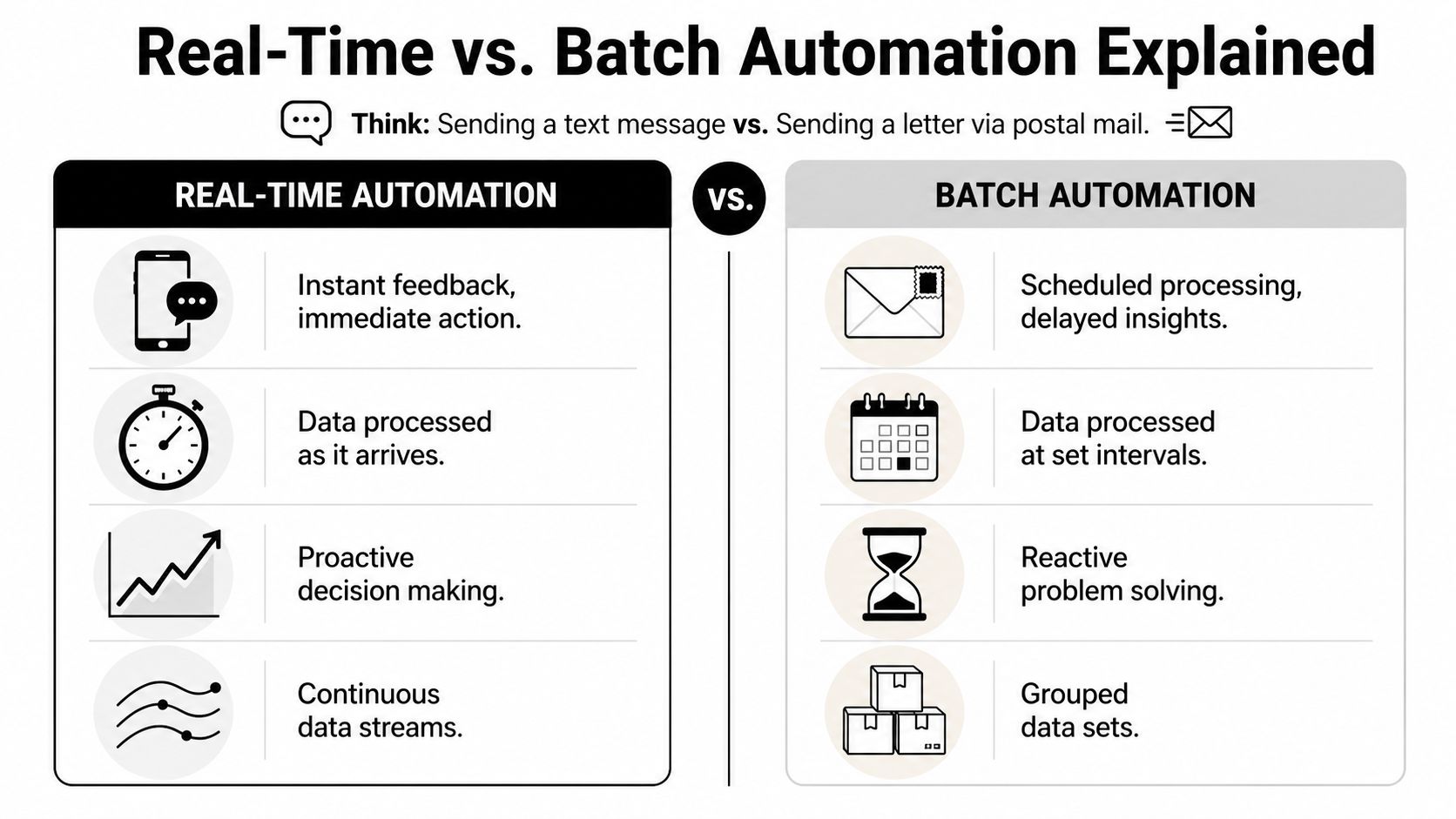
Real time automation reacts when something happens. Batch automation waits, collects items, and processes them later.
The simplest analogy is sending a text message versus sending a letter. A text is triggered and delivered immediately. A letter gets grouped into a larger delivery process and arrives on a schedule. Neither is wrong. They solve different problems.
What real time actually means
In business systems, real time doesn't always mean nanoseconds. It means the workflow acts within a short, defined window that still preserves business value.
A useful benchmark comes from retail automation. In that context, the maximum acceptable lag between an in-store event and data availability in the cloud is 2 seconds, as described in this real-time system benchmark overview. For a SaaS company, the acceptable window depends on the use case. Fraud review may need near-instant action. Board reporting doesn't.
Where founders get this wrong
Many teams try to force every process into real time. That creates complexity without adding value. Real time is best for workflows where speed changes the result. Batch still makes sense for lower-priority aggregation, reporting, or cleanup work.
Here's the practical difference:
| Characteristic | Real-Time Automation | Batch Automation |
|---|---|---|
| Trigger | Event-driven | Schedule-driven |
| Data processing | As data arrives | In grouped intervals |
| Latency | Seconds or less, depending on design | Minutes, hours, or longer |
| Best fit | Lead routing, alerts, fraud checks, in-app triggers | Daily reports, payroll prep, archive jobs |
| Operational style | Continuous monitoring and response | Periodic processing |
A good rule is simple. If acting late changes the business outcome, use real time automation. If delay doesn't matter, batch is usually cheaper and easier to maintain.
Real time is about timing tied to value. Not about making every workflow more technical than it needs to be.
If your team is still sorting out the fundamentals, this primer on what process automation is and how it works helps frame where real-time workflows fit inside a broader operating model.
The Business Impact of Instant Operations
Speed matters because it changes unit economics. When systems respond faster, teams waste less time waiting, correcting, and coordinating. That shows up in sales execution, customer retention, and operational scale.

Companies that fully deploy workflow automation tools report an average productivity gain of 30 to 40% within the first year, with ROI often ranging between 30% and 200%, according to workflow automation ROI and productivity data from Quixy. Those numbers matter less as bragging rights and more as a budgeting signal. Eliminating manual latency has measurable financial consequences.
Faster sales cycles
A high-intent buyer doesn't care that your rev ops stack has three systems updating on different schedules. They care whether someone responds with relevance while they're still evaluating.
Real time automation improves sales velocity by removing dead air between intent and action. Common examples include:
- Instant lead routing so the right rep gets ownership immediately
- Qualification triggers based on form fields, product usage, or firmographic signals
- Sales alerts when a target account returns to pricing, invites teammates, or requests technical detail
The value isn't just speed. It's context at the moment of contact.
Stronger customer retention
Retention work often fails because teams notice churn risk too late. A weekly dashboard may confirm that usage dropped, but by then the customer has already disengaged.
Real time systems let support, success, and product teams react when behavior changes. If usage falls, a key workflow breaks, or a customer hits an error pattern, the system can trigger outreach, education, or escalation before the account goes dark.
Teams don't keep customers by knowing what happened last week. They keep customers by reacting while the issue is still recoverable.
A quick explainer on the operational side of this is worth watching:
Scalable operations without proportional headcount
Founders often hire around broken timing. They add coordinators, analysts, or ops managers to manually move information between systems. That works for a while, then turns into expensive glue work.
Real time automation reduces that burden because the system handles routine decisions and handoffs as events happen. In practical terms, that means fewer manual checks, fewer duplicate updates, and fewer avoidable errors. Your team spends more time on exceptions and judgment, which is where people add real value.
Actionable Use Cases for SaaS and B2B
The easiest way to spot a good use case is to ask one question. What event happens in your business that should trigger action immediately, but currently waits on a person or a scheduled sync?
That question usually surfaces the same set of opportunities.
Lead handling that doesn't lose momentum
A visitor requests a demo and selects enterprise implementation support. That single event can trigger enrichment, territory matching, owner assignment, and a Slack alert to the correct account executive. If the company is already in your CRM, the workflow can append the request to the existing account record instead of creating duplicates.
The business outcome is simple. Sales starts with context instead of cleanup.
Onboarding that adapts to behavior
A new user signs up, but doesn't complete the core setup step. Instead of dropping them into a generic email sequence, the system can trigger an onboarding path based on what they did or didn't do. Someone who connected an integration needs different help than someone who stalled at invite teammates.
Real time automation surpasses static lifecycle design. The workflow reacts to behavior, not to an arbitrary day count.
Churn warnings before the account goes cold
A customer who used to log in daily stops using one critical feature. Support tickets increase, or usage narrows to only one admin user. Those signals rarely matter in isolation. Together, they tell a clear story.
A real-time workflow can collect those events and create a retention task for customer success, attach the relevant context, and trigger a personalized check-in. Not every risk signal deserves an email blast. Some deserve a human call.
Operational workflows in sectors where timing affects service quality
This isn't only a SaaS issue. Logistics, healthcare, and regulated operations also depend on timely system responses. If you want a grounded look at how operational complexity affects execution in transport, this guide to UK container haulage solutions gives useful context on how coordination challenges show up in real-world service environments.
Finance and billing actions that shouldn't wait
An invoice fails, usage crosses a billing threshold, or a contract renewal window opens. These aren't glamorous workflows, but they directly affect cash flow and customer trust.
Useful triggers include:
- Failed payment response that routes the account into the right dunning sequence
- Usage threshold alerts that notify sales or success before overages become a complaint
- Renewal signal detection based on adoption, stakeholder activity, or support history
The pattern across all of these use cases is the same. A meaningful event occurs, the system interprets it quickly, and the next action happens without waiting for a human to notice.
Choosing Your Architecture and Tech Stack
A founder usually feels the architecture decision only after something breaks. A lead submits a demo request, sales never sees it, support gets the complaint first, and the team spends two days arguing about which system failed. That is not a tooling problem. It is an operating model problem.
Real time automation works when the architecture matches the speed and reliability the business needs. For most growth-stage SaaS companies, that means event-driven design. Systems publish an event when something meaningful happens, then the right service decides what action follows. The goal is not technical elegance. The goal is a dependable path from signal to action.
The stack you actually need
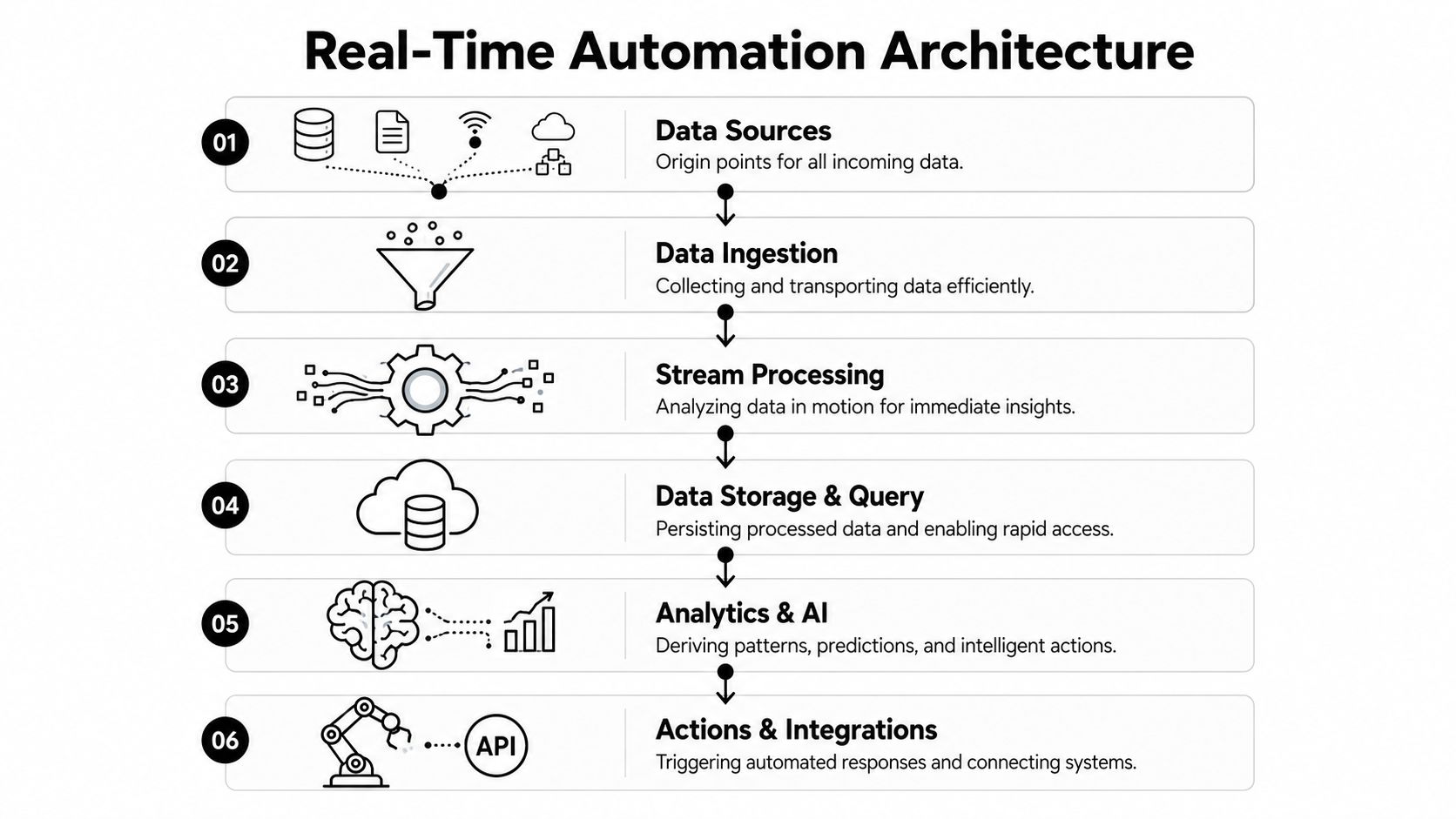
The simplest way to assess your stack is to follow one event from start to finish.
- Source systems create the event. Your product, CRM, billing app, support desk, website, and data warehouse all qualify.
- Ingestion captures it through webhooks, APIs, SDKs, or connectors.
- A broker or queue holds and routes the event so traffic spikes do not knock over downstream systems.
- Processing logic checks the payload, adds context, applies rules, and decides whether the event should trigger anything at all.
- Destination systems execute the action. That might be a CRM update, Slack alert, onboarding task, billing workflow, or escalation to a person.
Queues work like a loading dock. Trucks can keep arriving, but the warehouse still processes inventory in the right order instead of dumping everything on the floor.
Architecture choices that prevent expensive failures
The biggest mistake I see is teams choosing tools before they define ownership, schemas, and failure handling. Real time systems fail in ordinary ways. Duplicate events fire. Payloads arrive half-empty. One app changes a field name and breaks three downstream workflows.
That is why operational readiness matters more than feature lists.
Before you choose a platform, answer four practical questions:
- Which system is the source of truth for this workflow
- What event format will downstream systems expect
- How will you handle retries, deduplication, and out-of-order events
- Who gets alerted when the workflow fails without notification
If those answers are fuzzy, the project is not ready for production.
Build versus buy
Custom infrastructure gives engineering teams control over event routing, logic, and observability. It also creates ongoing work. Someone has to maintain schemas, monitor retries, manage version changes, and debug edge cases at odd hours.
Managed platforms reduce that overhead and get a team live faster, but they also impose constraints. You may get less flexibility in complex branching, throughput limits, or lower-level control over message handling. For many SaaS teams, the sensible approach is hybrid. Use managed orchestration for standard workflows. Reserve custom code for processes tied directly to margin, product differentiation, or compliance.
If your team is comparing streaming patterns, this guide to Kafka data pipeline design and implementation is a useful reference point.
Choose for your operating reality, not your ideal diagram
A five-person product team does not need the same stack as a company processing regulated medical events across multiple systems. The right architecture depends on event volume, tolerance for delay, internal engineering capacity, and audit requirements.
In regulated categories, design choices tighten fast. HealthTech teams, for example, need speed, traceability, and governance at the same time. AI strategies for HealthTech is a useful example of how automation decisions change when compliance is part of the architecture, not an afterthought.
Good architecture creates confidence. The team knows which event fired, which system processed it, what action followed, and what happens if any step fails. That is what keeps real time automation from turning into a collection of brittle workflows.
Your Implementation Checklist for Success
Most real time automation projects fail before the first workflow goes live. Not because the logic is wrong, but because the team automates a broken process with fragmented data.
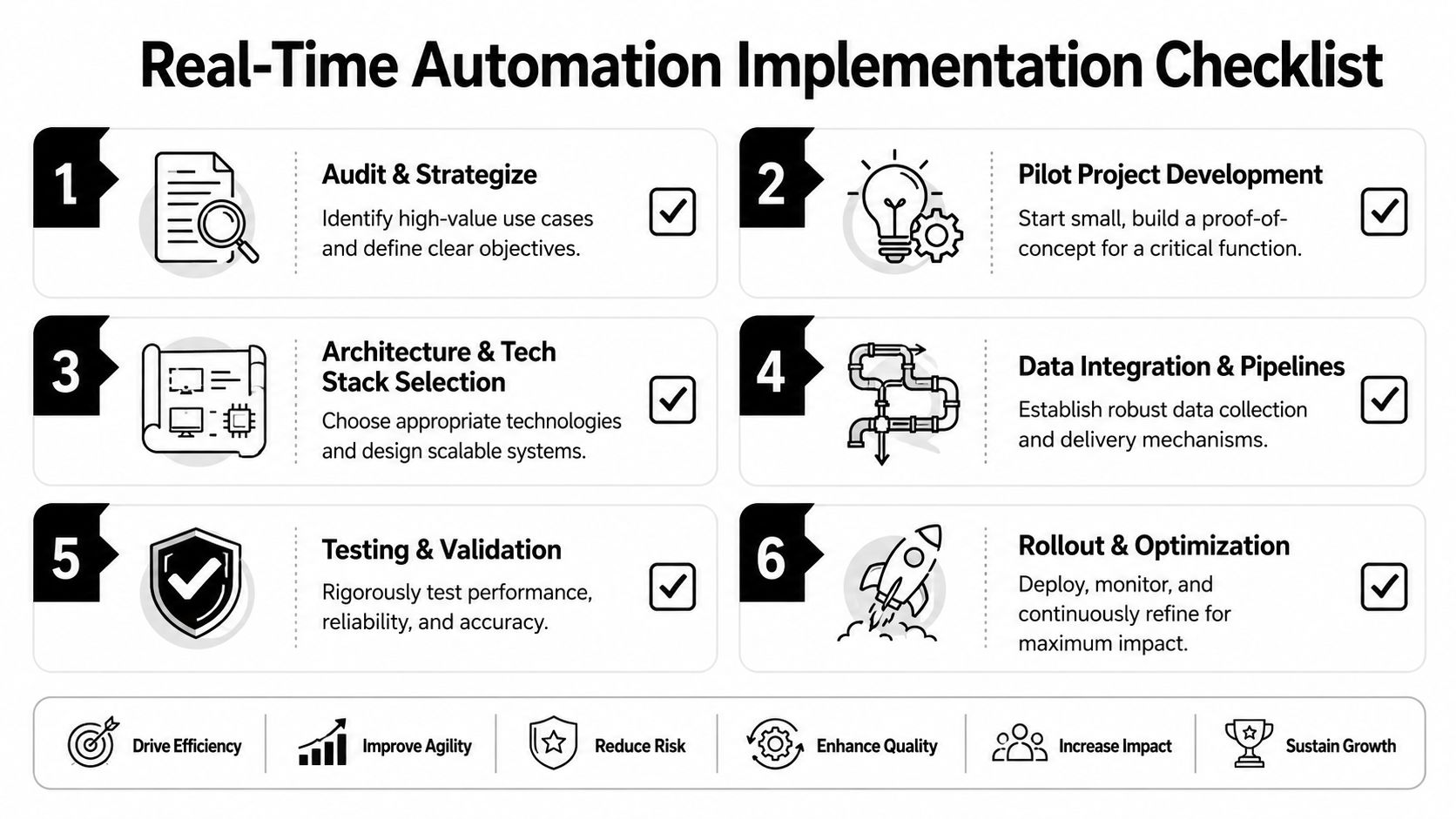
The safer path is phased. Audit first. Pilot second. Scale after you've proven the event, action, and business outcome all line up.
Audit and strategize
Start with one workflow where timing clearly affects revenue, customer experience, or risk. Then inspect the data path end to end.
Ask practical questions:
- What event should trigger action
- Where does that event originate
- Which system owns the source of truth
- What data fields are required for the action
- What happens if the event is missing, duplicated, or delayed
Many projects often reveal ugly realities. IDs don't match across systems. Webhook payloads are incomplete. Teams rely on fields populated manually after the fact. You want to find that now, not after launch.
Run a pilot with hard boundaries
Pick a narrow use case with visible value. Lead routing, failed payment handling, or onboarding intervention are all reasonable starting points.
During the pilot, track a small set of operational metrics:
- Event-to-action latency so you know how quickly the system responds
- Automation success rate so you know how often the workflow completes correctly
- Exception volume so you know where human intervention is still needed
- Business outcome impact such as faster lead response or reduced manual triage
Don't cram five teams into the first release. One workflow, one owner, one success definition.
Scale only after reliability is boring
Once the pilot is stable, document it and expand from a position of control. That means standardizing naming, schema expectations, error handling, and alerting.
Start with the workflow that hurts enough to matter, but is contained enough to fix without creating organizational chaos.
The companies that get long-term value from real time automation treat it like an operating capability, not a clever project. They build repeatable patterns for events, decisions, and actions. Then they reuse them.
Avoiding Pitfalls and Planning Your Next Steps
A founder approves a real time automation project after seeing a demo. Two weeks later, sales is chasing leads with stale records, support is getting duplicate alerts, and finance does not trust the trigger logic. The problem is rarely the automation tool. The problem is usually operational readiness.
Poor data foundations sink these projects early. Intradiem argues that real-time automation and AI efforts break down when companies lack unified, trustworthy data across systems, as explained in their analysis of real-time automation and AI readiness. The same failure pattern shows up in ordinary automation work. If events arrive late, fields mean different things in different systems, or no one owns exception handling, speed just exposes the mess faster.
What breaks projects in practice
I see four failure points again and again:
- The trigger is easy to automate but weak in business value. Teams pick a workflow because it is visible, not because delay costs money.
- System definitions conflict. "Qualified account," "active customer," or "failed payment" can mean different things in CRM, billing, and product data.
- Exception ownership is unclear. When an event is missing, duplicated, or ambiguous, the workflow stalls and nobody knows who should step in.
- Change management gets skipped. A small update to a form, field, or API breaks downstream logic.
This is why operational readiness matters more than feature depth. Real time automation behaves like a high-speed conveyor belt. If labels are wrong or handoff rules are fuzzy, errors move faster too.
What to do next
Start with a business delay you can price. Lost demo bookings, slow expansion outreach, late failed-payment recovery, or stalled onboarding are good examples.
Then work backward. Confirm the event source. Check whether the payload contains the fields needed to act. Define who owns exceptions. Decide what the system should do when confidence is low. That last part matters more than founders expect. Good automation is not just about automatic action. It is also about controlled fallback.
Founders do not need to become experts in queues, schemas, or orchestration tools. They do need to force clarity on three points: what must happen within seconds, what data makes that possible, and which team owns the outcome after launch.
Treat the first rollout like a production process, not a software experiment. If the inputs are clean, ownership is clear, and the architecture fits the use case, real time automation can improve response speed without creating hidden operational debt. If those pieces are still loose, fix them first.
If you want help designing a real time automation roadmap built on clean data, practical architecture, and a pilot tied to ROI, MakeAutomation can support the strategy, documentation, and implementation work needed to get it live without adding fragile complexity.