Automated Interview Scheduling Software: A B2B Guide
A growing SaaS company usually notices the scheduling problem too late. It starts as a few recruiter emails, a few calendar conflicts, a hiring manager who asks to move one panel by a day. Then headcount plans expand, engineering wants tighter interview loops, sales needs faster screening, and suddenly one coordinator is acting like a human API between candidates, interviewers, calendars, and your ATS.
That friction looks administrative, but it hits revenue and hiring quality. A strong candidate waits for replies, loses momentum, or decides your team is disorganized. A hiring manager shows up without the right meeting link. A recruiter spends the afternoon chasing availability instead of closing finalists. None of that shows up cleanly in a dashboard unless you build for it.
Automated interview scheduling software fixes the obvious problem of back-and-forth booking. The better platforms do more than that. They coordinate panel logic, enforce buffers, sync data with the rest of the hiring stack, and give candidates a smoother path through the process. That difference matters. Buying a simple booking tool when you need hiring orchestration creates a second problem you'll have to replace later.
Beyond the Calendar Chaos Introduction
At an early stage, manual scheduling feels manageable. One recruiter can handle a few intro screens with a shared calendar and a decent process. The trouble starts when your company adds layered interview loops. A single candidate might need a recruiter screen, a hiring manager interview, a technical panel, a cross-functional conversation, and a final founder touchpoint.
Now add real-world constraints. One interviewer is in London. Another blocks mornings for deep work. The founder keeps moving internal meetings. The candidate is employed and only available in narrow windows. What looked like “just scheduling” becomes a coordination job with operational risk attached to every handoff.
Where the hidden cost shows up
The cost isn't only the time spent sending emails. It's the delay between stages, the dropped context, and the signal candidates take from the process. Founders who care about respectful interview design already understand that every unnecessary step wastes candidate energy. That's one reason Underdog.io's founder interview guide is useful. It frames interviews as a scarce resource that companies shouldn't waste.
Manual coordination creates failure points that software can remove:
- Interview loop delays: A role stalls because one panel member can't make the proposed slot.
- Candidate frustration: The applicant submits availability, then waits while your team aligns internally.
- Recruiter drag: Coordinators spend prime hours doing admin instead of candidate communication.
- Manager friction: Hiring managers lose trust in the process when invites, links, and timing change repeatedly.
Practical rule: If scheduling is still handled as inbox work, your hiring operation isn't scalable yet.
What the right software actually does
Enterprise platforms such as GoodTime can automate up to 90% of the scheduling workflow while coordinating multi-person and multi-day interviews and offering candidate self-scheduling through channels like SMS and email, according to GoodTime's hiring product overview. That matters because the key upgrade isn't convenience. It's moving scheduling from a reactive task to a controlled workflow.
The strongest implementations don't stop at calendar sync. They connect candidate records, interviewer rules, reminders, rescheduling paths, and stakeholder visibility into one operating layer. That's the level founders should evaluate if they expect recruiting volume, distributed teams, or specialized hiring loops.
Defining Your Automated Scheduling Requirements
Many organizations shop too early. They watch a polished demo, see self-scheduling links, and assume they've found the answer. Then implementation starts and they realize their “simple” process includes panel interviews, role-based permissions, interviewer training constraints, and timezone complexity the vendor barely handles.
Define requirements before you look at product screenshots.
Start with your actual hiring workflow
Map every interview stage for your most common roles. Don't start with edge cases. Start with the loops you run repeatedly and the loops that cause the most stress.
Ask these questions internally:
- Which roles create the most scheduling work? Sales screens and engineering panels usually have very different needs.
- Which stages break most often? Reschedules, panel alignment, and final rounds are common pressure points.
- Who needs control? Recruiters, coordinators, hiring managers, and interviewers should not all have the same permissions.
- What must be automated versus reviewed by a human? Executive hiring may still need manual oversight.
- What candidate experience do you want to standardize? The booking step should feel clear and reliable across roles.
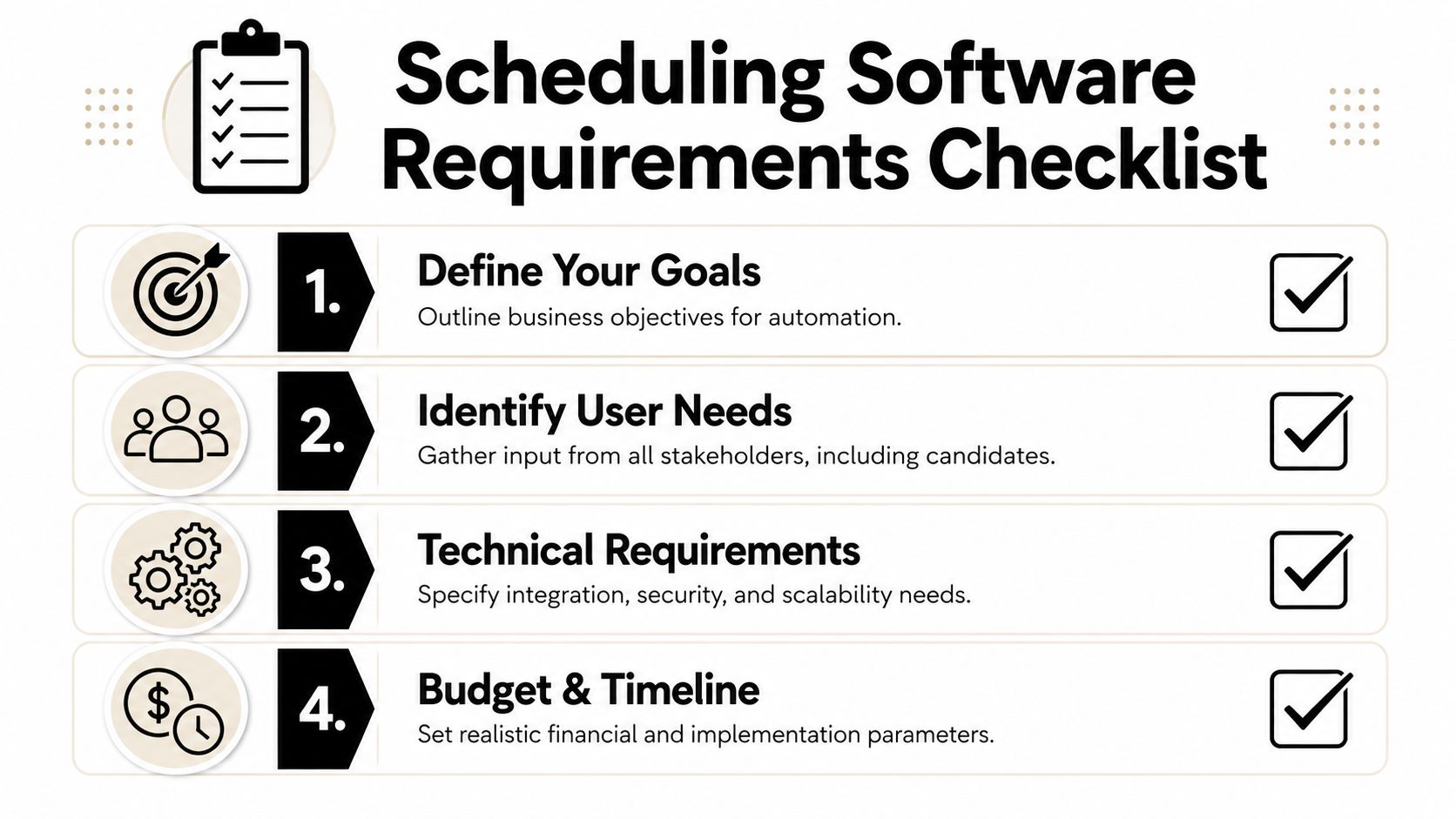
Translate pain into requirements
A useful requirements document doesn't say “we want automation.” It says what the system must do in practice.
Here's a practical way to frame it:
| Hiring need | What to document |
|---|---|
| Panel interviews | Number of interviewers, sequence rules, buffers, and fallback interviewers |
| Global hiring | Time zone handling, local availability windows, candidate-facing time display |
| Technical interviews | Room links, assessment steps, interviewer pairing, preparation materials |
| Permissions | What recruiters can edit, what managers can approve, what interviewers can see |
| Rescheduling | Who can trigger changes, what gets updated automatically, what requires approval |
Non-negotiables most teams miss
The basics are easy to list. The implementation-killers are usually buried in operating details.
- Buffer logic: You need rules that prevent back-to-back interviews from consuming a hiring manager's full day.
- Concurrent availability handling: The system should handle multiple interviewers without collapsing into manual coordination.
- Workflow templates: Reusable loops matter more than flashy AI if you hire for recurring role types.
- Auditability: Someone should be able to see who changed what and when.
- Communication controls: Candidate reminders should be standardized, but editable where tone and context matter.
If a vendor can't explain how their product handles panels, permissions, and reschedules in a live workflow, you're probably buying a calendar tool dressed up as recruiting software.
Define success before procurement
Your scorecard should include operational outcomes, not just features. Examples include shorter handoff times, fewer scheduling exceptions, less recruiter admin, and a more consistent candidate experience. Keep the language qualitative if your team hasn't measured a baseline yet. What matters is making trade-offs explicit before sales conversations begin.
How to Evaluate and Select the Right Software
A founder usually hits the selection problem after the first hiring spike. Recruiters are still getting interviews booked, but only by burning hours on follow-ups, calendar edits, and last-minute panel fixes. At that point, the question is no longer which tool sends a booking link. The question is which system can run the hiring workflow without adding friction for candidates or hidden admin work for the team.
The software market breaks into three practical categories, and the difference matters.
Basic scheduling tools fit recruiter screens and straightforward 1:1 interviews. Calendly is the familiar example. These products are quick to launch and easy for hiring teams to adopt, but they tend to break down once approvals, panel coordination, stage-based rules, or interviewer pools enter the process.
ATS scheduling modules sit in the middle. They reduce context switching because scheduling happens inside the system recruiters already use. That convenience has limits. Many ATS modules cover standard booking well enough, but they often fall short when you need the tool to coordinate complex loops, reduce candidate waiting time, and enforce process rules across multiple stakeholders.
Dedicated interview scheduling platforms are built for hiring operations. They are the better fit when scheduling is tied to business outcomes such as recruiter capacity, candidate conversion, and retention. If your team hires across functions, geographies, or recurring panel structures, this category usually deserves the closest look.
Price matters, but category fit matters more than sticker price.
The cost range is wide. Sense notes that interview scheduling products can run from low monthly seat pricing for simple schedulers to enterprise contracts that reach well into five figures annually, depending on hiring volume and workflow complexity, according to Sense's interview scheduling product overview.
That spread reflects operational scope. A cheap tool can still be expensive if recruiters spend hours patching edge cases or if candidates drop out during slow handoffs.
Use a simple filter when comparing options:
- Choose a basic scheduler if interviews are mostly 1:1, hiring volume is low, and process exceptions are rare.
- Choose an ATS module if your team wants acceptable scheduling inside an existing system and can live with process constraints.
- Choose a dedicated platform if coordination delays, panel logistics, candidate drop-off, and recruiter workload already affect hiring speed.
A better buying question is what failed coordination costs in recruiter hours, candidate drop-off, and slower hiring velocity.
For teams comparing categories side by side, this roundup of the best interview scheduling software is a useful starting point because it separates lightweight schedulers from recruiting-specific platforms.
Vendor demos should answer operational questions, not just show a polished booking flow.
- Workflow handling: Can the product run multi-stage interviews with different rules by role, region, or department?
- Rescheduling logic: What happens after a candidate changes time once interviewers, rooms, and meeting links are already assigned?
- Candidate experience: Can candidates self-schedule and reschedule without creating confusion or long gaps between stages?
- Permissions: Can hiring managers check availability and approve changes without exposing unrelated candidate records?
- Support model: Who owns implementation, and how quickly does the vendor respond when a live hiring loop fails?
Ask vendors to show a real scenario. A panel interview with one interviewer dropping out, a candidate requesting a new time, and the ATS needing the stage to stay accurate will tell you more than ten polished slides.
Selection should also account for the workflow around the interview, not just the booking event itself. Teams often expect one product to solve scheduling, interviewer readiness, and assessment consistency in a single purchase. That rarely works. If your process also depends on better interview execution, some teams review tools such as real-time interview answers alongside scheduling software so each part of the hiring stack has a clear job.
The best choice is the platform that reduces coordination labor, keeps candidates moving, and supports a hiring process people want to stay in. That is how scheduling software starts improving retention, not just calendars.
Mastering Integrations with Your Tech Stack
Integration quality determines whether scheduling software cuts recruiter workload or just adds another tool to maintain. I have seen teams buy a strong scheduling product, connect it loosely to the ATS, and then spend months fixing duplicate records, missed stage updates, and broken reschedules by hand.
The goal is not calendar sync alone. The goal is a hiring workflow where stage changes, interviewer availability, candidate communications, and interview records stay connected well enough to keep candidates moving without coordinator intervention. That is what reduces drop-off. It also protects retention later by giving candidates a hiring process that feels organized from the start.
What deep integration looks like
A useful integration keeps one system responsible for each type of data and makes the handoff predictable. In most hiring stacks, that means:
- Your ATS holds the candidate record and stage history
- Your calendar layer such as Google or Outlook supplies live availability
- Your scheduling platform applies the rules, books interviews, triggers reminders, and handles reschedules
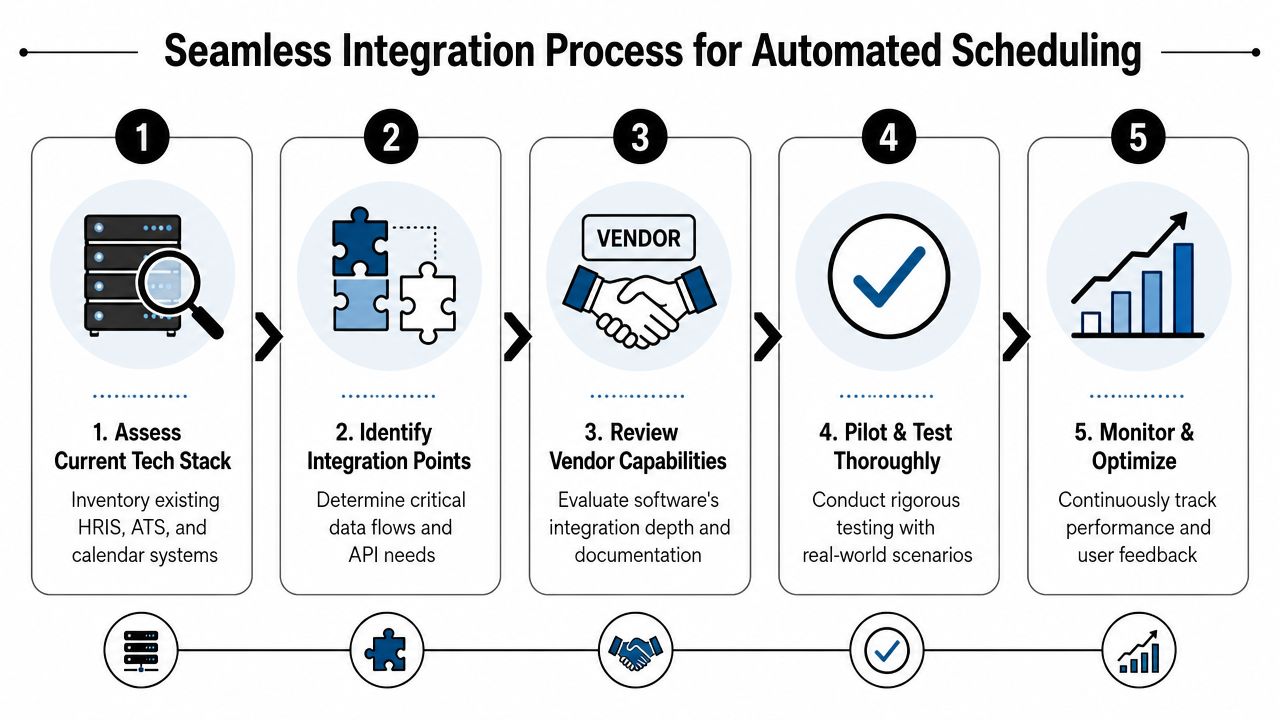
That sounds straightforward until exceptions hit. A hiring manager declines after booking. A candidate picks a slot that crosses time zones. An interviewer is replaced for one round but not the next. If the platform cannot update those changes across every connected system, the team goes back to manual cleanup and the candidate sees the cracks.
The workflow you want in production
A recruiter advances a candidate in the ATS. The scheduling platform detects the new stage, checks interview plan rules, reads live interviewer availability, offers approved time options, books the slot, sends the right communication, and writes the outcome back to the ATS.
That full loop is what separates scheduling software built for recruiting operations from general appointment tools. Dedicated products usually handle panel coordination, interviewer constraints, buffers, reminders, and exception management better than ATS scheduling features alone. That matters because every manual handoff creates another chance for delay, confusion, or candidate silence between stages.
What to verify before launch
Test the failure paths first. Happy-path demos rarely reveal the work your team will still be doing manually.
Use a pilot checklist like this:
- Stage sync: Move candidates forward, backward, and on hold. Confirm the scheduling workflow changes correctly each time.
- Availability logic: Create interviewer conflicts, PTO blocks, and last-minute calendar holds. Check whether the system prevents bad bookings.
- Reschedule behavior: Change the time after confirmations are sent and verify calendars, meeting links, reminders, and ATS records all update.
- Permissions: Confirm recruiters, coordinators, and hiring managers can do their jobs without seeing unrelated candidate data.
- Audit trail: Check whether your team can see who changed what and when, especially during a failed scheduling loop.
- Communication timing: Review every candidate message for clarity, trigger logic, and stage accuracy.
Integration test: If recruiters still copy interview details between tools, the workflow is only partially automated.
The technical baseline to insist on
Native connections to Google Calendar, Outlook, and video conferencing tools are table stakes. So is ATS synchronization that updates records in both directions, not just after the interview is booked. You also want time zone handling, duplicate booking prevention, interviewer buffers, and reminders that can be configured by stage instead of set once for every interview type.
People Managing People's guide to interview scheduling software highlights many of those baseline capabilities. Use that list as a starting point, then push further. Ask the vendor how they handle API failures, delayed syncs, canceled events, interviewer substitutions, and partial outages in Microsoft or Google. Those answers tell you whether the product can support a growing hiring team or only a clean demo environment.
If a vendor cannot map the exact flow of data between systems and explain what breaks under exception conditions, assume your coordinators will be the backup integration layer. That gets expensive fast.
Implementing Your New Scheduling Workflow
Monday morning, three candidates are ready to book, one interviewer is out sick, and your recruiting lead is still forwarding calendar screenshots in Slack. That is the point where implementation stops being a software project and starts becoming an operating model problem.
A good rollout reduces coordinator work, keeps interview loops moving under real-world exceptions, and gives hiring managers a process they will readily follow. The teams that get this right do not start by automating every role. They start by standardizing the hiring motions that create the most scheduling volume and the most avoidable delay.
Build role-based workflow templates first
Start with your highest-volume roles and your most repeatable interview loops. For an early implementation, two or three templates are usually enough to cover the majority of scheduling activity and expose the weak spots before they spread across the whole hiring process.
Common starting points include:
- Sales development representative loop: Recruiter screen, hiring manager interview, role-play
- Senior engineer loop: Recruiter screen, technical assessment, panel, final conversation
- Customer success manager loop: Recruiter screen, team panel, scenario review
Each template should define stage order, required interviewers, approved backups, scheduling windows, interviewer buffers, and candidate communication rules. If any of that still lives in a coordinator's memory, the process is not implemented yet.

Template quality affects more than booking speed. It shapes how quickly candidates move, how consistently interviewers show up prepared, and how much manual correction your team has to absorb each week. If you want a practical benchmark for the candidate-facing side of that work, use these candidate experience improvements in hiring workflows while you build your scheduling templates.
Configure communication with discipline
Candidate messages need to answer three questions fast. What is happening, who will they meet, and what should they do if something changes?
Keep confirmations, reminders, and reschedule notices short enough to scan on mobile. Include role-specific context where it matters, especially for interviews that require prep work, presentations, or case reviews. For leadership and manager hiring, that context often includes expectations around scenario interviews or people management discussions. Teams building those templates can borrow structure from Resumey.Pro's manager interview guide without turning every reminder into a long brief.
Consistency matters here because poor messaging creates hidden admin load. A vague confirmation email leads to candidate questions. Candidate questions create recruiter follow-up. Follow-up slows the next stage and increases the chance of drop-off before the loop is complete.
Create a lightweight SOP
Scheduling software adoption rises or falls on operating rules. A short SOP beats a long process document nobody opens.
A workable version usually covers five decisions:
Stage trigger rules
Define the exact point when a candidate becomes schedulable for each stage.Template ownership
Assign one owner for updating role templates, interviewer pools, and message copy.Reschedule rules
Specify what the system can handle automatically and what requires recruiter review.Exception handling
Document how to respond to interviewer cancellations, same-day candidate changes, and incomplete panels.Quality checks
Review template accuracy, interviewer assignments, and communication performance on a fixed cadence.
The best SOP is boring on purpose. Recruiters know which template to use. Hiring managers know when they are expected to respond. Coordinators are not reinventing the process every time a panel changes.
Train for exceptions, not just the happy path
Most training sessions cover how to book an interview. That is not enough. Teams need practice on failure cases, because that is where manual work rushes back in.
Run short scenario drills during rollout. An interviewer declines after the candidate has confirmed. A panel member is double-booked. A candidate needs to move one segment of a multi-step interview without resetting the whole loop. If your team can handle those cases inside the workflow, adoption sticks and time savings become real.
That is also where the business case becomes visible. Better exception handling shortens time-to-schedule, reduces recruiter intervention, and keeps candidates from stalling out mid-process. The software should not just sync calendars. It should coordinate the full hiring motion well enough that growth does not require adding scheduling headcount.
Optimizing for Candidate Experience and Retention
Candidate experience isn't a soft metric. Scheduling is one of the first operational signals a candidate gets about how your company works. If the process feels messy, slow, or opaque, people assume the company runs that way too.
Friction costs real candidates
Scheduling shifts from admin efficiency to talent retention. An estimated 34% of candidates drop out of the hiring process due to scheduling friction, and tools with automated rescheduling and intelligent buffer times can reduce that drop-off by as much as 22%, according to Phenom's discussion of interview scheduling benefits.
That number should change how founders think about scheduling software. You're not just buying convenience for recruiters. You're reducing avoidable candidate loss.
What actually improves the candidate experience
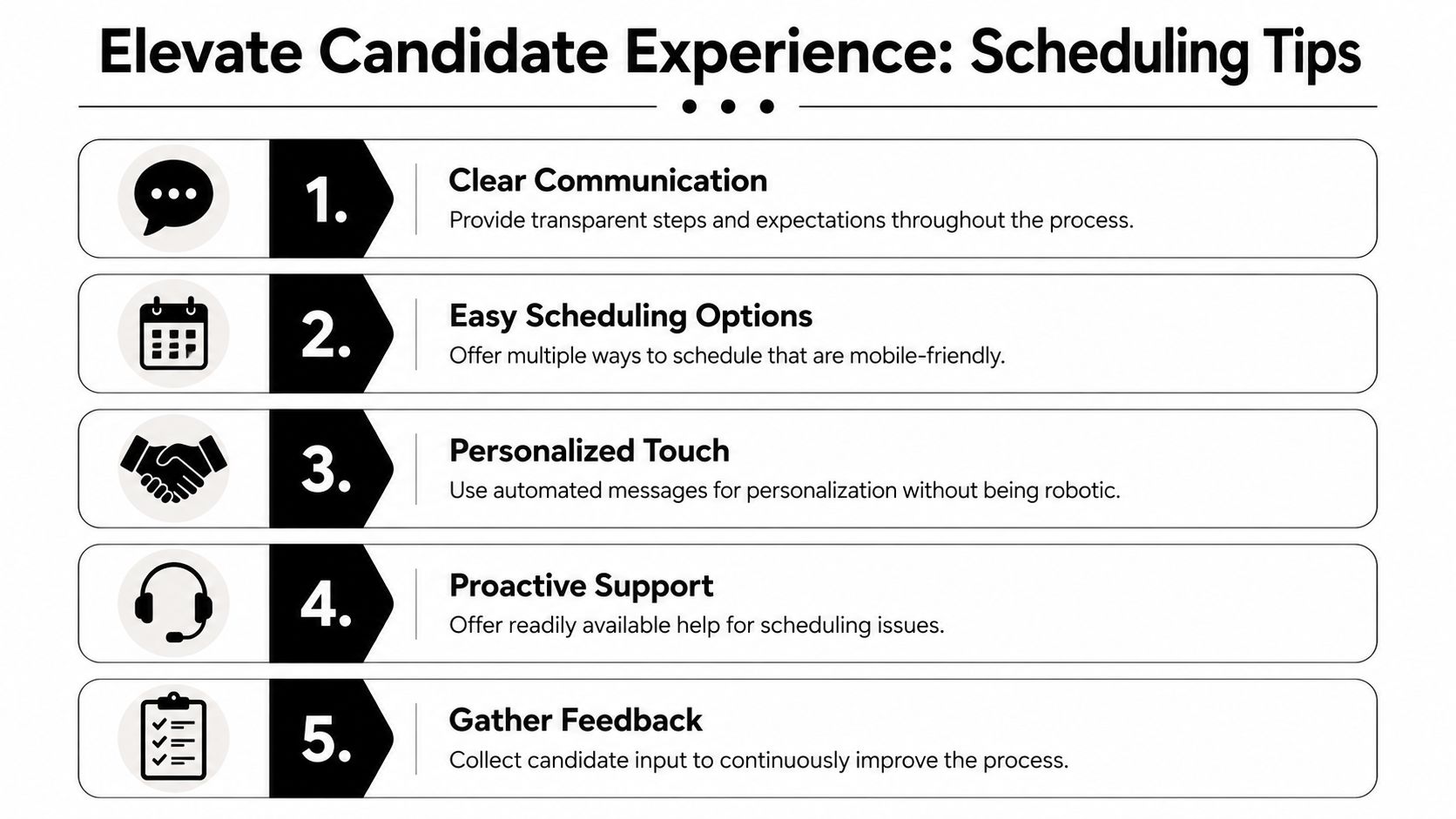
Candidates don't need a flashy scheduling page. They need clarity, flexibility, and fast recovery when plans change.
The strongest practices are straightforward:
- Offer self-scheduling: Let candidates choose from real availability instead of forcing email coordination.
- Make mobile completion easy: Many candidates book or reschedule from their phone.
- Use reminders carefully: Enough to prevent confusion, not so many that they become noise.
- Handle reschedules gracefully: A clean fallback path protects momentum.
- Write human templates: Confirmation language should feel direct and respectful.
For teams reviewing broader hiring touchpoints, this guide on how to improve candidate experience is a strong companion because scheduling rarely fails in isolation. It usually sits inside a larger communication problem.
Consistency matters more than polish
One overlooked issue is that candidate experience often breaks at the manager level, not the recruiter level. A well-timed scheduling system can still produce a poor experience if interviewers are underprepared or unclear about the role. That's why role-specific interview prep matters. Even though it serves a different hiring context, Resumey.Pro's manager interview guide is a useful example of how structured question design improves the quality of the interview itself after scheduling friction has been removed.
A fast scheduling process gets the candidate to the interview. A prepared hiring team makes them want to continue.
Retention improves when scheduling feels dependable. Candidates stay engaged when they know what's happening, when they can reschedule without drama, and when the company appears coordinated from the first interaction.
Measuring ROI and Avoiding Common Pitfalls
A founder signs off on scheduling software because the demo looks clean. Three months later, recruiters still chase hiring managers on Slack, candidates wait too long between stages, and no one can prove whether the tool improved hiring or just shifted the work around.
That outcome is common when teams measure bookings instead of workflow performance.
Automated interview scheduling software earns its budget when it increases recruiter capacity, shortens stage-to-stage delays, reduces candidate drop-off, and helps the hiring team run a process that people trust. If those gains do not show up in your numbers, the implementation is incomplete or the workflow design is off.
Metrics that show whether it's working
Start with operating metrics your team can review every week. Keep the list short enough that someone will use it.
| KPI | What it tells you |
|---|---|
| Time-to-schedule | How fast candidates move from stage-ready to confirmed interview |
| Recruiter admin load | Whether coordination work is leaving recruiter calendars |
| No-show and cancellation patterns | Whether reminders and reschedule paths are doing their job |
| Template usage | Whether teams are following the designed workflow |
| Candidate feedback | Whether the process feels clear and easy from the outside |
Those metrics matter because scheduling software should do more than fill open slots. It should keep candidates moving while reducing manual intervention. If time-to-schedule improves but no-show rates stay high, your reminders or instructions are weak. If recruiter admin load stays flat, hiring managers may be bypassing the system. If candidate feedback drops after rollout, speed may have improved while clarity got worse.
For leadership, convert those signals into cost and throughput. Estimate hours saved per recruiter, the reduction in delayed interviews, and the effect on open roles sitting unfilled. This guide on how to calculate return on investment is a useful framework for turning process improvements into a financial case a CFO can review without guesswork.
The mistakes that erode value
Implementations usually fail in predictable ways, and most of them have nothing to do with the software vendor.
- Buying for booking features instead of hiring workflow fit: A tool can look strong in a demo and still break under panel interviews, interviewer pools, and last-minute swaps.
- Treating rollout as a recruiter-only project: If hiring managers are not trained and accountable, coordinators end up doing manual cleanup behind the scenes.
- Skipping exception design: Cancellations, interviewer absences, and urgent req changes are normal. If the system cannot handle them cleanly, the team falls back to email and Slack.
- Letting templates drift across teams: Small wording differences create inconsistent candidate communication and make reporting harder.
- Reviewing adoption too late: If no one checks usage by recruiter, manager, or department in the first few weeks, bad habits become the default workflow.
I also advise founders to watch one metric many teams ignore. Measure how many candidates stall between recruiter screen and manager interview. That gap often exposes the true value of scheduling automation. If the software only syncs calendars but does not coordinate handoffs, confirmations, reminders, and reschedules, candidate drop-off will stay higher than it should.
Presenting the business case internally
The best business case is operational, not theoretical. Show how much time recruiters and coordinators spend on scheduling now. Show where candidates slow down, cancel, or disappear. Then show how a structured scheduling workflow increases interview throughput without adding headcount.
Software gets approved faster when the case is tied to throughput, hiring speed, and recruiter capacity.
That is the broader value of automated interview scheduling software. It does not just reduce calendar chaos. It helps build a hiring system that scales, keeps candidates engaged through the interview process, and supports stronger retention by making the company look organized from the first touchpoint through offer stage.