
How to Use AWS Secrets Manager: A Complete B2B Guide
Your team is probably already feeling the pain. Secrets live in .env files, CI variables, copied Slack messages, or a wiki page someone forgot to lock down. It works until the first rotation request, the first audit question, or the first outage caused by a credential changed in one place but not another.
AWS Secrets Manager fixes that, but only if you use it like an operating pattern, not just a storage bucket for passwords. Most tutorials stop at “click Store new secret.” That's not enough for a B2B or SaaS team running Lambda, ECS, GitHub Actions, multiple environments, and maybe a hybrid workload that still talks to AWS from outside AWS.
If you're trying to learn how to use AWS Secrets Manager in a way that survives production, start with the basics, then tighten access, automate rotation, and design for auditability and multi-region reality from the beginning.
Your First Secret Setup and Storage
Start with a secret you can afford to rotate today. A third-party API key is usually the right first candidate because it lets the team learn naming, tagging, encryption choices, and deployment workflow without tying the exercise to a production database cutover.
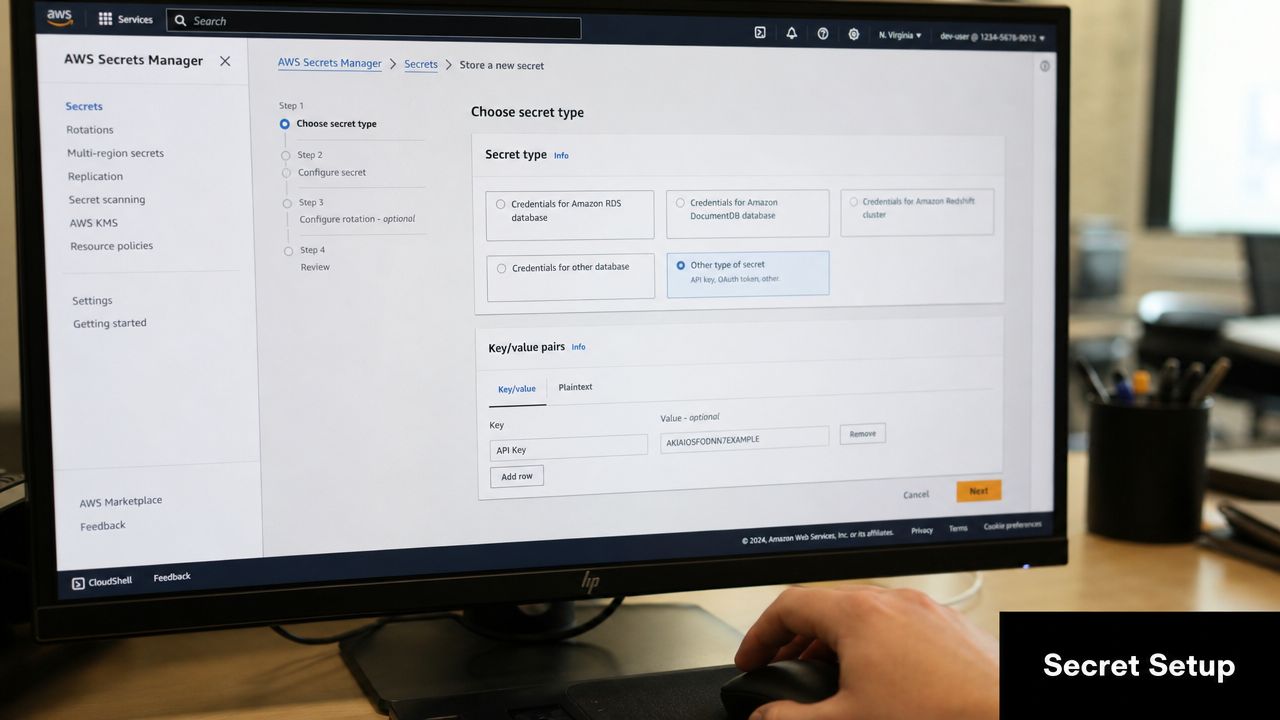
Create it in the console first
Open Secrets Manager in the AWS Console and choose Store a new secret.
For a general API key, choose Other type of secret. Two formats cover nearly every first setup:
| Secret format | Use it for | Avoid it when |
|---|---|---|
| Key/value pairs | API keys, usernames and passwords, app credentials with predictable fields | You need to store a raw blob exactly as-is |
| Plaintext or JSON text | Third-party configs, tokens, or an existing JSON secret your app already expects | You want easy field-level editing in the console |
For a first secret, key/value pairs are easier to operate because teams can read them quickly in the console and keep a consistent schema across environments. A simple example:
api_keyfor the credential valueproviderfor the vendor nameenvironmentfordev,staging, orprod
Use a naming pattern that will still make sense once you have dozens or hundreds of secrets. prod/billing/stripe-api-key and staging/app/openai-key work well because they map cleanly to service boundaries, environment scoping, and IAM policy paths.
Poor names create expensive cleanup later.
Treat the name as part of the security model. If teams mix patterns like stripeKey, prod-stripe, and billing/secret1, access policies usually grow broad because nobody can target the right resources cleanly. Consistent paths also matter in B2B and SaaS environments where the same service may run across multiple AWS accounts, regions, and a hybrid runner outside AWS.
Use the default AWS managed KMS key unless you already have a reason to separate encryption control with a customer managed key. The trade-off is simple. The default key is faster to adopt and easier for a first rollout. A customer managed key gives tighter control over key policy, cross-account access, and audit boundaries, but it adds more IAM and KMS policy work from day one. Tag the secret with at least Environment, Service, and Owner if you want cost allocation and tag-based permissions to hold up later.
If the credential is human-created, the secret still needs to be strong before it ever enters Secrets Manager. Finchum Fixes IT's password recommendations are a useful refresher for teams that still create service credentials manually.
Repeat the same action with the AWS CLI
The console is good for the first run because it shows the object shape clearly. The CLI is what makes the process repeatable across environments, CI jobs, and account bootstrap scripts.
aws secretsmanager create-secret \
  --name prod/billing/stripe-api-key \
  --description "Stripe API key for billing service" \
  --secret-string '{"api_key":"REPLACE_ME","provider":"stripe","environment":"prod"}'
That command is enough for an initial pattern, but production teams should quickly move secret creation into infrastructure code or controlled deployment tooling. Manual entry does not scale well when you have separate dev, staging, and prod accounts, or when a hybrid workload needs the same naming and tagging rules applied consistently.
Validate the secret once, then stop pulling it into local shells unless you are debugging a real issue.
aws secretsmanager get-secret-value \
  --secret-id prod/billing/stripe-api-key \
  --query SecretString \
  --output text
Terminal retrieval leaves traces in shell history, scrollback, screenshots, and copied notes. That is a small risk in a sandbox and a real problem in regulated environments.
Know what you're storing
Secrets Manager is built for credentials, tokens, and connection details. A single secret can store up to 64 KB, which is enough for common application secrets and small JSON payloads. It is a poor fit for large certificates bundles, oversized config blobs, or anything teams want to version like general application settings. Keep those somewhere else and reserve Secrets Manager for data that needs access control, auditability, and rotation.
Cost matters early because secret sprawl is easy to create and annoying to reverse. AWS charges per secret stored and per API call, so naming discipline and reuse patterns affect the bill. Duplicating the same vendor token across every microservice, account, and region can turn a tidy setup into unnecessary monthly spend. In multi-region designs, replicate only the secrets that support real failover or data residency requirements. Do not mirror everything by default.
This is also the point to decide whether the secret belongs directly in the application or behind another managed layer. For database-backed services, teams often get better connection handling and fewer direct secret consumers by combining Secrets Manager with RDS Proxy in AWS for connection pooling and credential control. That reduces how many workloads need database credentials at all, which is usually better for both cost and blast radius.
Securely Accessing Secrets from Your Applications
Most implementations either become clean and scalable or drift into a mess of static credentials. The right default is simple: applications should assume an IAM role and fetch only the secret they need.
That removes long-lived AWS access keys from your app config. It also lines up with AWS-native authentication patterns that are easier to control in production.
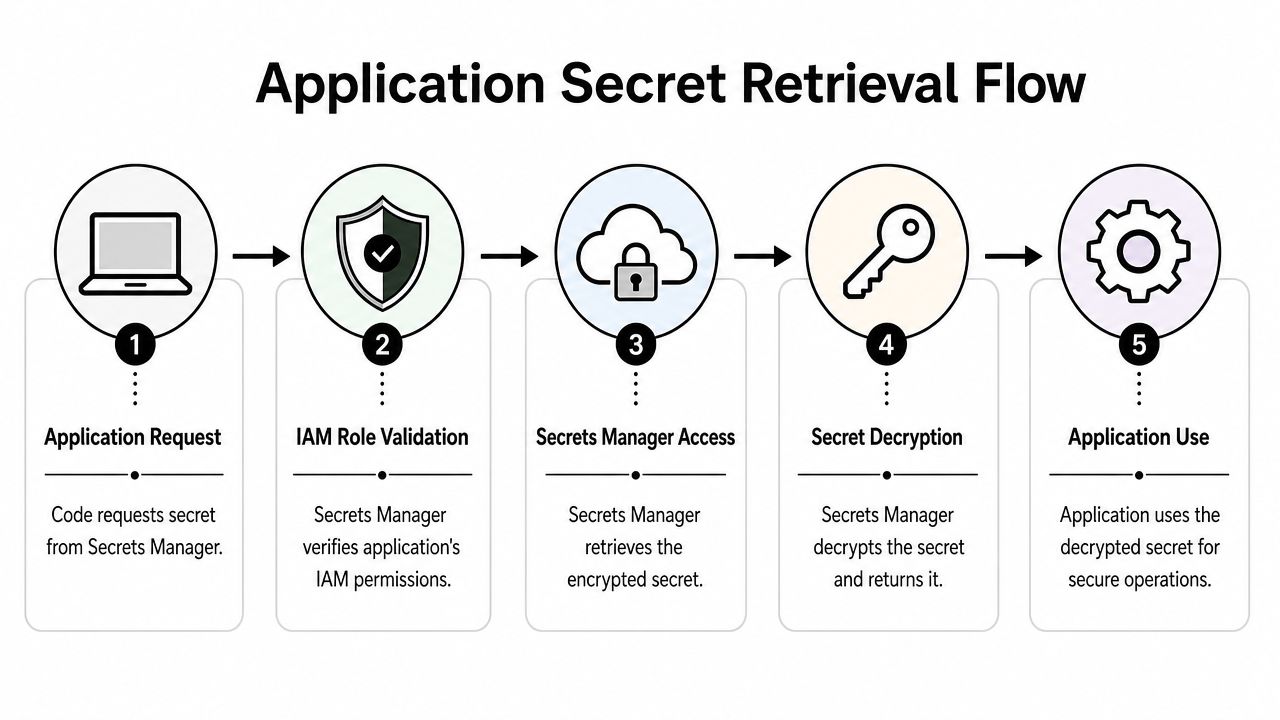
Why IAM roles beat static keys
If your Lambda function, ECS task, or build runner uses static AWS credentials to fetch a secret, you've just created another secret to manage. That's the bootstrap problem.
AWS recommends client-side caching components for Java and Python to reduce API call frequency and improve latency, and it also recommends IAM roles for AWS-to-AWS authentication so you can eliminate bootstrap secrets entirely, as documented in AWS Secrets Manager best practices.
That one pattern solves two production problems at once:
- Security control because the workload gets temporary credentials through its role
- Cost and latency control because the app doesn't need to call Secrets Manager on every request if it caches intelligently
Node.js Lambda example
A Lambda function that reads one database secret should have a role with permission for that one secret only.
Use the AWS SDK in your function like this:
import { SecretsManagerClient, GetSecretValueCommand } from "@aws-sdk/client-secrets-manager";

const client = new SecretsManagerClient({ region: process.env.AWS_REGION });

export const handler = async () => {
  const command = new GetSecretValueCommand({
    SecretId: process.env.DB_SECRET_ID
  });

  const response = await client.send(command);
  const secret = JSON.parse(response.SecretString);

  return {
    statusCode: 200,
    body: JSON.stringify({
      username: secret.username ? "loaded" : "missing"
    })
  };
};
Set DB_SECRET_ID as an environment variable that contains the secret name or ARN. Don't hardcode it in the function source.
Attach a least-privilege policy to the Lambda execution role:
{
  "Version": "2012-10-17",
  "Statement": [
    {
      "Effect": "Allow",
      "Action": "secretsmanager:GetSecretValue",
      "Resource": "arn:aws:secretsmanager:us-east-1:111122223333:secret:prod/app/db-credentials-*"
    }
  ]
}
That policy shape matters. It scopes the function to one secret family instead of giving broad read access.
If your Lambda opens database connections often, pair secret retrieval with connection pooling or a proxy layer. Teams working with Amazon RDS should also look at RDS Proxy patterns for AWS workloads so secret retrieval and database connection handling don't fight each other under load.
Python example for ECS or container workloads
In ECS, the same principle applies. The task role should read only the secret required by that service.
Python example:
import json
import boto3

def get_api_secret(secret_id, region_name):
    client = boto3.client("secretsmanager", region_name=region_name)
    response = client.get_secret_value(SecretId=secret_id)
    return json.loads(response["SecretString"])

if __name__ == "__main__":
    secret = get_api_secret("prod/integrations/hubspot-api", "us-east-1")
    print("Secret loaded:", "api_key" in secret)
The ECS task role policy can be similarly tight:
{
  "Version": "2012-10-17",
  "Statement": [
    {
      "Effect": "Allow",
      "Action": "secretsmanager:GetSecretValue",
      "Resource": "arn:aws:secretsmanager:us-east-1:111122223333:secret:prod/integrations/hubspot-api-*"
    }
  ]
}
For Python services that make repeated reads, use caching. Otherwise the app will work, but it'll pay unnecessary latency and generate avoidable API calls.
CI and deployment workflows
GitHub Actions and other CI systems are where teams often regress into bad habits. Someone stores a copied production password in repository secrets because it feels quicker.
A better pattern is to let the workflow assume a role in AWS, then fetch only the deployment secret at runtime. That way the CI platform never becomes your long-term source of truth for application credentials.
For example:
- Build role with read access only to deployment secrets
- Environment separation so staging pipelines can't pull production secrets
- Secret naming discipline so the workflow can resolve
staging/web/api-keycleanly
If your pipeline runs inside AWS, use IAM roles directly. If it runs outside AWS, treat role assumption and KMS permissions carefully, which becomes even more important in hybrid setups.
Common access mistakes
A short checklist catches most failures:
- Wrong region. The code points at
us-east-1, but the secret lives elsewhere. - Wrong secret identifier. The name changed, the ARN didn't, or vice versa.
- Role attached to the wrong compute layer. In ECS, teams often update the execution role when they meant the task role.
- No caching. The app works in dev, then becomes noisy and slow under real traffic.
When people ask how to use AWS Secrets Manager safely, this is the answer. Don't optimize for the first successful API call. Optimize for repeatable secret access without static credentials.
Implementing Automatic Secret Rotation
Storing secrets centrally is only half the job. Long-lived credentials still become liabilities. Rotation limits the time a leaked credential stays useful and reduces the cleanup pain after an incident.
AWS Secrets Manager supports automatic rotation as frequently as every four hours, including Single User and Alternating Users strategies with zero downtime, as noted in the official AWS guidance. That's the core reason many teams choose it over simpler stores.
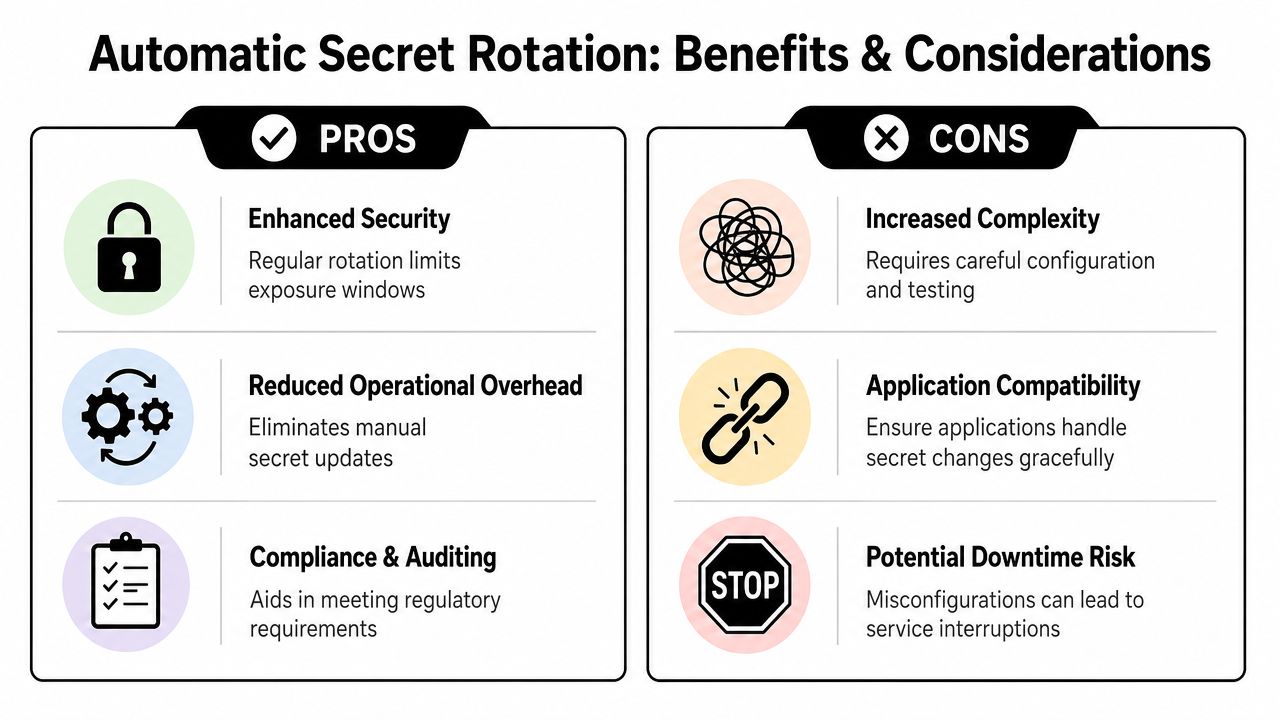
Pick the right rotation model
For an Amazon RDS password, you'll usually choose between two operational modes:
| Rotation mode | Best fit | Trade-off |
|---|---|---|
| Single User | Simpler environments and lower operational complexity | Less forgiving if apps don't reconnect cleanly |
| Alternating Users | High-availability services that can't tolerate credential transition issues | More moving parts and more setup discipline |
If your application is sensitive to reconnect behavior, Alternating Users is usually the safer production choice. If you're running a smaller internal service and want simpler mechanics, Single User may be enough.
Operational note: Rotation only helps if the application handles updated credentials correctly. Secret rotation won't save an app that assumes credentials never change.
What happens behind the scenes
For supported databases, AWS wires rotation through a Lambda function pattern. The workflow is straightforward even if you never write the function yourself:
- Create a pending secret value
- Apply that value to the target system
- Test the new credential
- Promote the working version as current
That sequence is why rotation can happen without interrupting healthy application traffic when it's configured correctly.
If you want a visual walkthrough before enabling it in production, this demo is useful:
A practical RDS rollout pattern
For a production RDS secret, keep the rollout boring:
- Start in non-production and validate the app can reconnect after credential changes.
- Enable rotation on the database secret and choose the schedule that matches your security policy.
- Watch application logs during the first rotation window for stale credential handling, reconnect failures, or connection pool issues.
- Confirm rollback confidence by understanding which secret version is current and which version was previous.
AWS also supports scheduled intervals such as 30, 60, or 90 days, plus custom schedules, and keeps version history so teams can roll back changes for recoverability and audit integrity, according to the AWS documentation described earlier.
A lot of teams fail here because they treat rotation like a checkbox. It isn't. It's an application compatibility test.
For teams building a broader operating model around credential hygiene, DevOps secrets management practices are worth folding into the process so rotation, deployment, and incident response stay aligned.
Advanced IAM and KMS Security Controls
Default settings are fine for a prototype. They're not enough for a production environment with multiple services, separate teams, and external workloads.
You stop thinking about “can the app read the secret” and start thinking about which workload, in which environment, from which path, under which encryption boundary.
Start with least privilege, not convenience
A broad policy like Resource: "*" works. It also creates future problems. If one role can read every secret in the account, every application compromise becomes much worse.
A cleaner pattern is to scope read access to named secrets:
{
  "Version": "2012-10-17",
  "Statement": [
    {
      "Effect": "Allow",
      "Action": "secretsmanager:GetSecretValue",
      "Resource": [
        "arn:aws:secretsmanager:us-east-1:111122223333:secret:prod/payments/db-*",
        "arn:aws:secretsmanager:us-east-1:111122223333:secret:prod/payments/stripe-*"
      ]
    }
  ]
}
That gives one service access to its database and payment provider credentials, not the rest of your environment.
Add structure through naming and tags. Names like prod/payments/... and staging/payments/... make it possible to separate access cleanly without maintaining giant allowlists.
Use customer-managed KMS keys only when you need the control
AWS Secrets Manager encrypts secrets at rest with AWS KMS using AES-256, and AWS managed keys (aws/secretsmanager) are available at no cost, while customer-managed keys provide extra control for cases like cross-account access, according to the AWS guidance summarized in the verified material.
That creates a practical decision line:
- Use the AWS-managed key when your workload is fully inside one account boundary and you don't need special key policies.
- Use a customer-managed key when you need tighter control, more explicit policy boundaries, or advanced sharing patterns.
This isn't about checking an enterprise box. It's about deciding whether key policy control is worth the extra complexity.
Customer-managed keys are powerful, but they also create another permission layer your team has to understand during incidents.
The hybrid environment trap
Teams with apps running outside AWS hit the same problem over and over. They grant permission to read the secret, then the client still fails at runtime.
The missing piece is usually KMS. A common but important oversight in hybrid environments is forgetting to grant separate kms:Decrypt permission. Clients outside AWS can fail without that explicit grant, as explained in this AWS Secrets Manager guide from Infisical.
A simple pattern looks like this:
{
  "Version": "2012-10-17",
  "Statement": [
    {
      "Sid": "ReadSpecificSecret",
      "Effect": "Allow",
      "Action": "secretsmanager:GetSecretValue",
      "Resource": "arn:aws:secretsmanager:us-east-1:111122223333:secret:prod/shared/vendor-api-*"
    },
    {
      "Sid": "DecryptWithSpecificKey",
      "Effect": "Allow",
      "Action": "kms:Decrypt",
      "Resource": "arn:aws:kms:us-east-1:111122223333:key/REPLACE_WITH_KEY_ID"
    }
  ]
}
Inside AWS, role-based access often hides this nuance because the managed path feels straightforward. Outside AWS, you have to account for both the secret permission and the key permission.
Resource policies for tighter sharing boundaries
Identity policies are only one layer. Resource policies attached to the secret itself can add another control boundary, especially for cross-account scenarios.
That's often the right move when a secret needs to be shared deliberately instead of opened broadly through an identity policy. If your team is designing these boundaries, AWS Secrets Manager resource policy patterns are worth studying before you ship cross-account access into production.
A good security review for Secrets Manager should answer these questions:
- Which principals can call
GetSecretValue - Which principals can decrypt the underlying key
- Which secrets are shared across accounts or environments
- Whether any role can read more than it needs
If you can't answer those quickly, the policy model needs cleanup.
Managing Costs and Multi-Region Architectures
A common production failure looks like this. The app is healthy in us-east-1, a failover shifts traffic to eu-west-1, and suddenly services cannot read the database credential they need because the secret exists in one region, the IAM policy points to another, and every retry adds latency and API cost. That is the gap between a demo setup and a system a SaaS team can operate during an incident.
Secrets Manager pricing is straightforward at a high level. You pay for stored secrets and for API requests. The bill stays small when teams keep the secret inventory clean and avoid unnecessary reads. It climbs when every service instance fetches the same value repeatedly, or when teams copy secrets across regions without a clear owner or retention plan.
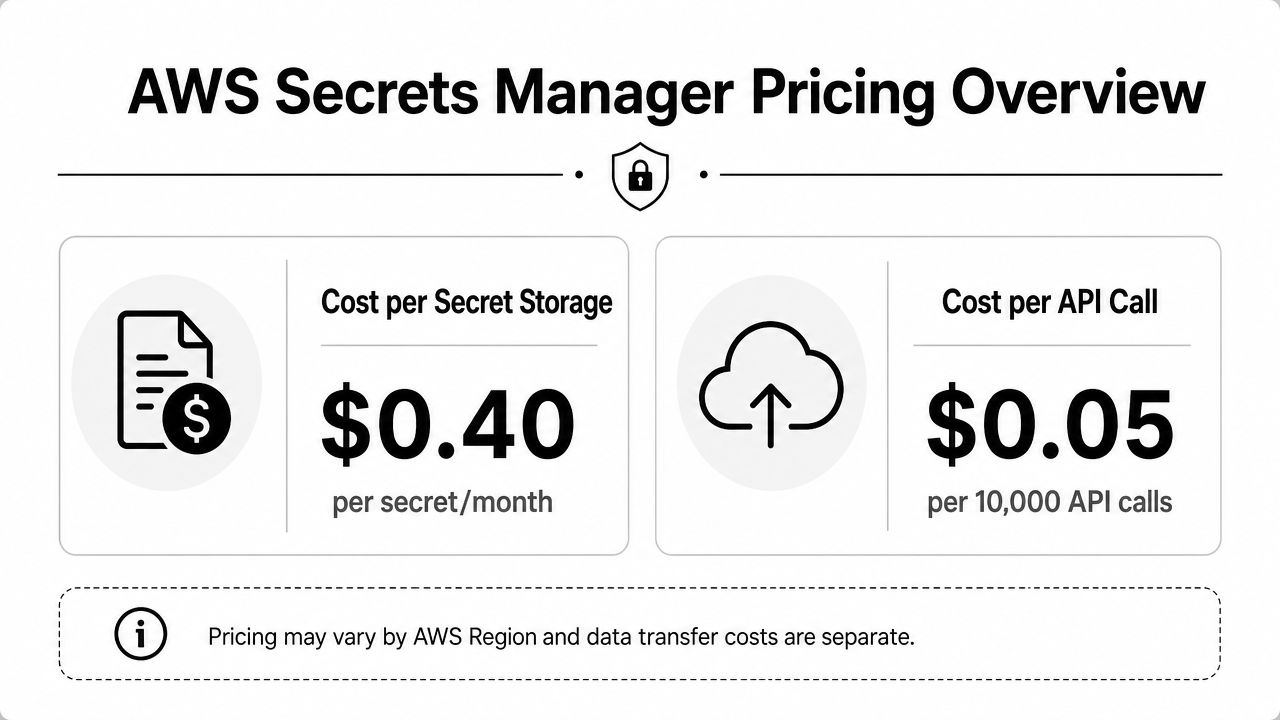
What actually drives your bill
Secret storage is usually the easy part to forecast. Retrieval behavior causes the surprises.
I have seen teams spend more time arguing about the per-secret charge than fixing code that calls GetSecretValue far too often. If a worker fetches a secret on every job, or an API service reads it on every request path, cost goes up and availability gets worse at the same time. A temporary regional issue in Secrets Manager can then hit application latency because the secret lookup sits directly in the hot path.
A better approach is to treat secret retrieval like any other remote dependency. Read it once at startup when that fits the runtime, cache it in memory with a defined refresh window, and force a refresh only when rotation or deployment makes that necessary.
| Cost driver | Expensive pattern | Better pattern |
|---|---|---|
| Secret count | Separate copies for every team, app, and environment without cleanup | Standard naming, clear ownership, and scheduled retirement of unused secrets |
| API usage | Fetching on every invocation, request, or cron run | Local caching with refresh logic that matches rotation frequency |
| Regional spread | Manual copies created during incidents and never reviewed | Planned replication only where workloads or compliance rules require it |
For teams building stronger operational visibility around these calls, this practical guide to log management is useful for deciding what to retain, alert on, and review when secret access patterns change.
Cross-region architecture needs an explicit decision
Cross-region secret access works, but it is easy to implement badly. Many tutorials stop at "store a secret" and skip what happens when a B2B platform runs active workloads in multiple regions or needs hybrid services outside AWS to read the right copy.
AWS supports multi-Region replication for Secrets Manager, which is the right starting point for workloads that need local access in more than one region. AWS documents that model in its Secrets Manager multi-Region replication guidance. The trade-off is simple. Replication improves local availability and reduces cross-region latency, but each replica is another managed secret with its own cost and its own policy surface to review.
Cross-region reads also create avoidable mistakes:
- Applications reference a secret name that only exists in the primary region
- IAM policies allow access to the wrong regional ARN
- Failover tests pass for compute and networking, but fail on secret retrieval
- Hybrid workloads in data centers or other clouds keep reaching back to one AWS region for every read
Those failures are common in SaaS environments with shared services, regional customer data boundaries, or disaster recovery requirements.
A practical multi-region pattern
Use one region as the control point for ownership, tagging, and change approval. Replicate secrets only into regions where workloads run or where compliance rules require local presence. Point each workload at its regional copy by ARN or by region-specific configuration, and keep IAM permissions scoped to that region's secret.
That pattern does three useful things. It keeps secret reads local during normal operation. It makes failover testing realistic because the application uses the same regional dependency path it would use during an incident. It also limits blast radius, because a service in one region does not need permission to read every copy everywhere.
For hybrid environments, apply the same rule. An on-prem service or workload in another cloud should authenticate to AWS, read the secret copy it is meant to use, and get kms:Decrypt only for the key tied to that region's secret. Do not centralize every secret read through one home region unless you are willing to accept the latency, dependency concentration, and wider permission scope that come with it.
Cost control and architecture design are tied together here. Fewer unnecessary API calls reduce spend. Regional placement reduces latency and incident risk. Clean replication boundaries keep both finance and security reviews easier to defend.
Auditing Access for Compliance and Troubleshooting
A secrets incident rarely starts with a dramatic breach. More often, it starts with a production secret read at 2:13 a.m. by the wrong role, from the wrong network path, in the wrong region. If no one can explain that event quickly, both the security review and the customer conversation get harder.
AWS logs Secrets Manager API activity through CloudTrail, which gives you the baseline audit trail for who called the service, when the call happened, and which principal made it. That matters for routine investigations, but it also matters during SOC 2 evidence collection, HIPAA access reviews, and GDPR-related inquiries where teams need to show how access to sensitive credentials is controlled and reviewed.
For B2B and SaaS teams, audit quality usually breaks down at the edges. Shared platform accounts, cross-region failover paths, and hybrid workloads using federated access all create legitimate secret reads that can look suspicious if logging, tagging, and identity naming are inconsistent. Clean audit trails come from architecture discipline, not from turning on CloudTrail alone.
What to monitor in practice
Review these events with the same care you give production auth logs:
- Unexpected principals reading production secrets, especially break-glass roles, old CI/CD roles, or vendor access paths
- Reads outside change windows for database, payment, or customer-isolated environments
- Cross-region access patterns that do not match your replication and failover design
- Repeated
AccessDeniedevents that can indicate a bad deployment, stale IAM policy, or credential probing - High-volume reads from hybrid or external workloads that may point to caching failures and unnecessary API cost
If your team is improving retention, alert routing, and review workflows, this practical guide to log management is useful for building operating habits around high-value security logs.
Fast troubleshooting for common failures
Most Secrets Manager incidents come down to identity, region, or rotation state.
| Problem | Likely cause | What to check |
|---|---|---|
AccessDeniedException |
IAM policy or KMS permission issue | Confirm the workload role can call secretsmanager:GetSecretValue. If the secret uses a customer managed KMS key, verify the role also has permission to use that key for decrypt operations. |
| Secret not found | Wrong region or wrong identifier | Check the application's configured AWS region first. In multi-region setups, teams often point a failover service to the primary region secret name and assume replication handled the rest. |
| Rotation failure | Lambda logic, target system permissions, or application incompatibility | Review the rotation Lambda logs, staging labels, and the target system's auth logs. Confirm the pending credential was created, tested, and promoted in the expected order. |
One practice saves time during incidents. Log the caller identity and region in the application before each secret fetch. That gives responders a fast way to separate a bad deployment from a real access anomaly, especially in hybrid environments where the failing principal may come through STS, IAM Roles Anywhere, or another federated path.
Test these paths during planned changes. Teams that recover quickly from secret failures already know which CloudTrail events, KMS errors, and rotation logs to check first.
If your team wants help operationalizing AWS Secrets Manager across app code, IAM, CI/CD, rotation, and audit workflows, MakeAutomation can help design and implement a production-ready setup that fits your B2B or SaaS stack without adding manual overhead.