RDS Proxy AWS: Your Guide to Resilient SaaS Apps
Your app usually doesn't fail because the database is slow. It fails because too many things try to talk to the database at once.
That shows up during a launch, a bulk import, a Monday morning login rush, or an autoscaling event in Lambda, ECS, or Kubernetes. The app tier expands fast. The database doesn't. New connections pile up, retries pile on top, and a routine traffic spike turns into a support incident.
That's where rds proxy aws starts to matter. Not as an AWS checkbox. As a control layer between your app and the database, one that protects a growing SaaS product from connection storms, messy failovers, and the kind of operational fragility that small teams can't afford.
Why Your SaaS Needs AWS RDS Proxy
Founders usually notice the database problem late.
The product feels healthy in staging. A few customers onboard. Then a campaign works, usage jumps, and the application starts timing out in places that seem unrelated. Login slows down. Background jobs pile up. Webhooks retry. The database isn't necessarily maxed on query time. It's often drowning in connection churn.
RDS Proxy sits between your application and Amazon RDS or Aurora. Its job is simple to describe and hard to replace well. It keeps a managed pool of database connections ready, then brokers application traffic through that layer so your database doesn't have to absorb every burst directly.
That matters even more if you're running a B2B SaaS product with uneven traffic patterns. Enterprise users don't always create steady load. They create bursts. A CRM sync kicks off. A reporting job runs for multiple customer accounts. An outbound sales workflow fans out. A batch process fires after a customer imports data. The risky part isn't just volume. It's concurrency.
Downtime hurts revenue faster than most teams expect
If you're selling into businesses, buyers don't experience outages as a technical issue. They experience them as a trust issue.
A lead capture flow fails during a campaign. An account manager can't access customer records before a renewal call. A sales team loses confidence in your system because the dashboard hangs when everyone logs in at once. You can recover the app later and still lose the account.
AWS states that RDS Proxy can reduce database failover times by up to 66% for Multi-AZ deployments (AWS RDS Proxy). That's the part many founders underestimate. Resilience isn't just about surviving traffic spikes. It's also about shortening the ugly gap between "the database failed over" and "the app is usable again."
Practical rule: If your app going offline for even a short period creates customer-facing damage, a proxy stops being an optimization and starts becoming core infrastructure.
Why this matters more for lean teams
Small DevOps teams often delay infrastructure changes because every moving part feels like future maintenance.
That logic makes sense when the alternative is another self-hosted component. It breaks down when the service removes a category of operational work. RDS Proxy is managed. You don't need to run your own pooler, patch it, or wire failover behavior yourself.
It's also especially relevant if you're learning AWS architecture and want to understand where managed database access fits into production design. The AWS Certified Solutions Architect Associate exam is one good way to sharpen that mental model because it forces you to think about resilience, not just deployment.
Where rds proxy aws is a strong fit
RDS Proxy tends to make the most sense when your stack looks like this:
- Serverless or elastic compute: Lambda, ECS, and Fargate can create sudden connection pressure.
- Customer-facing SaaS workflows: Login, billing, CRM automation, and customer portals can't tolerate flaky database access.
- Small infra teams: Managed pooling and failover handling remove work you'd otherwise own.
- Multi-tenant apps: Shared infrastructure needs better control over noisy bursts.
If your SaaS is growing and the database still sits exposed behind direct app connections, that's usually technical debt hiding in plain sight.
How RDS Proxy Manages Database Connections
The easiest way to think about RDS Proxy is as a smart concierge.
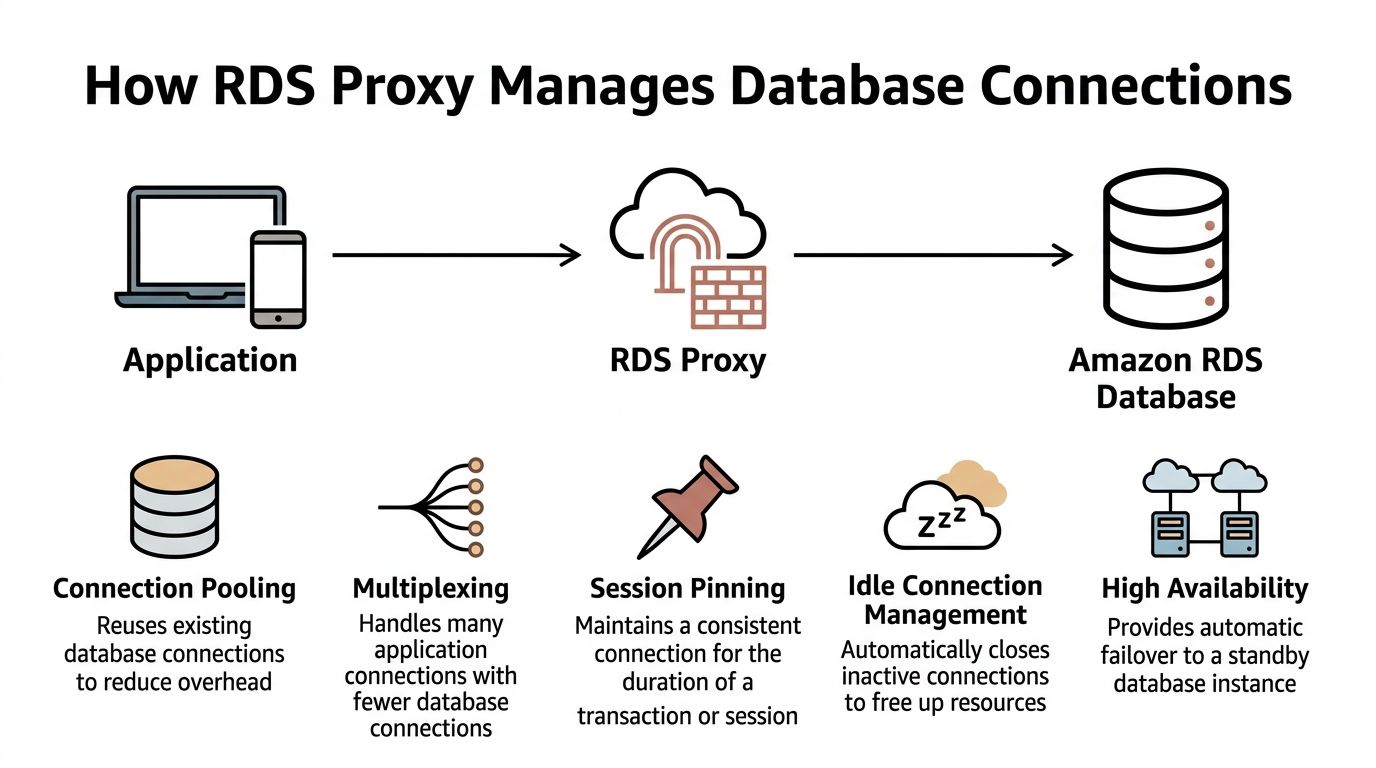
Your application has a crowd of callers. The database has limited room. Without a concierge, everyone rushes the front desk at once. With RDS Proxy in place, requests still come in from many clients, but the proxy decides how to reuse a smaller set of database connections more efficiently.
Where it sits in your architecture
The placement is straightforward:
- Application layer: EC2, ECS, Fargate, Lambda, or Kubernetes workloads
- Proxy layer: RDS Proxy endpoint
- Database layer: Amazon RDS or Aurora
Your application no longer connects straight to the database hostname. It connects to the proxy endpoint. The proxy then manages the backend database connections on your behalf.
That architectural shift changes failure behavior in ways that matter to the business. The app tier can scale aggressively, while the proxy absorbs the chaos of short-lived connection demand. The database sees a more controlled pattern.
What connection pooling actually does
Opening a database connection isn't free.
Each new connection costs time and database resources. If your application creates and tears down connections constantly, the database spends effort on connection management instead of serving useful work. That's one reason bursty apps can feel unstable even when the query workload itself isn't outrageous.
Connection pooling solves that by keeping established database connections warm and reusable.
A simpler way to view it:
| Layer | Without proxy | With proxy |
|---|---|---|
| App requests | Each worker may open its own DB connection | Workers ask the proxy for access |
| DB connections | Count rises with app concurrency | Proxy reuses a controlled pool |
| Burst handling | Database takes the full hit | Proxy smooths the burst |
Multiplexing is where the leverage comes from
Pooling helps. Multiplexing is what makes the design more efficient for modern SaaS workloads.
With multiplexing, many client-side connections can be handled through fewer actual database connections, as long as the sessions don't require dedicated state. That's particularly useful when lots of app requests are short and transactional.
This is why RDS Proxy often works well with:
- Lambda functions that scale quickly and don't hold long-lived connections well
- ECS and Fargate tasks that come and go during scaling events
- API workloads with many short reads and writes
- Background workers that process jobs in uneven bursts
Session pinning is the catch
Not every workload benefits equally.
Some database behaviors force the proxy to keep a client tied to a specific backend connection for a period of time. That's commonly called session pinning. When that happens too often, multiplexing becomes less effective.
Workloads that often struggle with proxy efficiency include:
- Long-lived sessions
- Heavy session-level settings
- Code that assumes one connection stays attached to one request flow
- Applications that already use mature client-side pooling and have predictable traffic
A proxy helps most when your compute layer is elastic and your database traffic is short-lived, bursty, and transactional.
Failover becomes less painful
Traditional database failover is ugly for applications.
The app detects an outage, existing connections die, DNS changes may take time to be noticed, clients reconnect badly, and retries can create a second wave of pressure at the worst possible moment. That sequence causes more incidents than many teams expect.
RDS Proxy changes that flow by keeping the application connected to a stable intermediary endpoint. During failover, the app is insulated from part of the backend churn because the proxy handles the database-side reconnection and routing behavior.
That's the technical reason the service matters. The business reason is simpler. Fewer dropped user actions during a maintenance event means fewer support tickets, fewer lost sales touches, and less time spent explaining "temporary instability" to customers.
A Multi-Path Guide to Setting Up Your Proxy
RDS Proxy setup is easier if you treat it like a networked application dependency, not a wizard you click through once and forget.
The basics stay the same across every deployment path. You need a target RDS or Aurora database, a VPC path between the application and the proxy, a Secrets Manager secret for database credentials, and an IAM role that allows the proxy to read that secret.

Before you create anything
Get these decisions right first:
- Choose the same network boundary: Put the proxy where your app can reach it and where it can reach the database cleanly.
- Decide which app users go through it: Separate service accounts are usually easier to reason about than one shared superuser.
- Review application behavior: If the app relies heavily on session state, test that before you switch production traffic.
- Keep deployment repeatable: If you're already shipping containers through CI/CD, tie this into your infra workflow. Teams that standardize AWS deployment patterns often benefit from a repeatable container release flow like this guide on deploying with Docker to AWS: https://makeautomation.co/docker-aws-deploy/
Path one through the AWS Management Console
The console path is fine for a first implementation, especially if you're validating connectivity and security rules.
Console steps
- Open Amazon RDS in the AWS console.
- Go to Proxies and choose Create proxy.
- Give the proxy a clear name tied to the environment.
- Select the target engine family that matches your database.
- Attach the Secrets Manager secret that holds the DB credentials.
- Choose or create the IAM role that lets RDS Proxy read that secret.
- Select the VPC subnets and security groups.
- Register the target database or cluster.
- Create the proxy, then wait for the endpoint to become available.
After creation, test from a workload that lives in the same network path as your app. Don't test from your laptop unless your network setup mirrors production access.
Path two through the AWS CLI
The CLI path is better when you want a repeatable setup without going all the way to full IaC yet.
A typical flow looks like this:
aws rds create-db-proxy \
  --db-proxy-name app-prod-proxy \
  --engine-family POSTGRESQL \
  --auth '[
    {
      "AuthScheme":"SECRETS",
      "SecretArn":"arn:aws:secretsmanager:region:account-id:secret:app-prod-db",
      "IAMAuth":"DISABLED"
    }
  ]' \
  --role-arn arn:aws:iam::account-id:role/rds-proxy-secrets-role \
  --vpc-subnet-ids subnet-aaa subnet-bbb \
  --vpc-security-group-ids sg-aaa \
  --require-tls
Then register the database target:
aws rds register-db-proxy-targets \
  --db-proxy-name app-prod-proxy \
  --db-instance-identifiers app-prod-db
A few practical notes:
- Keep secret names environment-specific.
- Use tags from the start.
- Enable TLS unless you have a very specific reason not to.
- Store these commands in your repo or deployment docs. Ad hoc CLI history isn't infrastructure management.
Watch the boundary: The proxy doesn't replace database security groups, subnet planning, or credential hygiene. It sits inside that design, not above it.
Path three through CloudFormation
CloudFormation works well if your AWS estate is already standardized there.
A minimal template skeleton looks like this:
AWSTemplateFormatVersion: '2010-09-09'
Description: RDS Proxy example

Resources:
  RdsProxyRole:
    Type: AWS::IAM::Role
    Properties:
      AssumeRolePolicyDocument:
        Version: '2012-10-17'
        Statement:
          - Effect: Allow
            Principal:
              Service:
                - rds.amazonaws.com
            Action:
              - sts:AssumeRole

  AppDbProxy:
    Type: AWS::RDS::DBProxy
    Properties:
      DBProxyName: app-prod-proxy
      EngineFamily: POSTGRESQL
      RequireTLS: true
      IdleClientTimeout: 1800
      RoleArn: !GetAtt RdsProxyRole.Arn
      Auth:
        - AuthScheme: SECRETS
          IAMAuth: DISABLED
          SecretArn: arn:aws:secretsmanager:region:account-id:secret:app-prod-db
      VpcSubnetIds:
        - subnet-aaa
        - subnet-bbb
      VpcSecurityGroupIds:
        - sg-aaa

  AppDbProxyTargetGroup:
    Type: AWS::RDS::DBProxyTargetGroup
    Properties:
      DBProxyName: !Ref AppDbProxy
      TargetGroupName: default
      DBInstanceIdentifiers:
        - app-prod-db
This isn't production-complete by itself. You'll still want:
- IAM policies for the role
- tags
- parameterized subnet and security group values
- environment-specific naming
- explicit dependencies if the DB is created in the same stack
Path four through Terraform
Terraform is usually the cleanest option for teams already managing AWS networking and compute as code.
resource "aws_db_proxy" "app" {
  name                   = "app-prod-proxy"
  engine_family          = "POSTGRESQL"
  role_arn               = aws_iam_role.rds_proxy.arn
  vpc_subnet_ids         = [aws_subnet.private_a.id, aws_subnet.private_b.id]
  vpc_security_group_ids = [aws_security_group.rds_proxy.id]
  require_tls            = true

  auth {
    auth_scheme = "SECRETS"
    iam_auth    = "DISABLED"
    secret_arn  = aws_secretsmanager_secret.app_db.arn
  }
}

resource "aws_db_proxy_default_target_group" "app" {
  db_proxy_name = aws_db_proxy.app.name
}

resource "aws_db_proxy_target" "app_db" {
  db_proxy_name          = aws_db_proxy.app.name
  target_group_name      = aws_db_proxy_default_target_group.app.name
  db_instance_identifier = aws_db_instance.app.id
}
Terraform becomes much more useful when you pair the proxy with:
- application security groups
- secret creation and rotation policies
- database module outputs
- deployment pipelines that update app config automatically
If your team prefers visual walkthroughs before committing to code, this video is a useful companion to the build process:
What works and what usually breaks
The setup itself rarely causes the hardest problems. Integration assumptions do.
A short checklist helps:
| Good setup choice | What it prevents |
|---|---|
| Separate proxy per environment | Accidental cross-environment access |
| Secret per app identity | Credential sprawl and confusion |
| Security groups scoped to app traffic | Broad internal exposure |
| Staging failover test | Production surprises during maintenance |
The teams that struggle usually skip one of these. They create the proxy correctly, then cut corners on secrets, security groups, or app-side testing and conclude the service is unreliable. Most of the time, the weak point is the implementation discipline around it.
Integrating Your Application with RDS Proxy
Provisioning the proxy is the easy part. The app switch is where production safety gets decided.
Two changes matter. First, your application should stop carrying raw database credentials in config files or environment variables where possible. Second, it should point to the proxy endpoint, not the database endpoint.
Use Secrets Manager and IAM cleanly
RDS Proxy is much easier to operate well when credentials are managed centrally.
Store the database username and password in AWS Secrets Manager, then give the proxy permission to use that secret. Your app can still fetch connection details from secure configuration, but you avoid the common anti-pattern of hardcoded credentials sitting in repos, container definitions, or ad hoc deployment scripts.
If you're building Node-based services and want a practical baseline for application structure before wiring in proxy access, this guide to building a Node.js app is a useful reference: https://makeautomation.co/build-node-js-app/
Change the endpoint, not the whole app
For many applications, the code change is smaller than expected.
Before:
DATABASE_URL = "postgresql://app_user:password@db-instance.endpoint:5432/appdb"
After:
DATABASE_URL = "postgresql://app_user:password@proxy.endpoint:5432/appdb"
Python example with SQLAlchemy:
from sqlalchemy import create_engine
import os

engine = create_engine(
    os.environ["DATABASE_URL"],
    pool_pre_ping=True
)
Node.js with pg:
Before:
const { Pool } = require("pg");

const pool = new Pool({
  host: "db-instance.endpoint",
  port: 5432,
  user: process.env.DB_USER,
  password: process.env.DB_PASSWORD,
  database: "appdb",
});
After:
const { Pool } = require("pg");

const pool = new Pool({
  host: "proxy.endpoint",
  port: 5432,
  user: process.env.DB_USER,
  password: process.env.DB_PASSWORD,
  database: "appdb",
  ssl: true,
});
Keep the app behavior proxy-friendly
Experienced teams save themselves debugging time.
Don't assume the proxy can fix poor connection behavior in the application. It helps most when the app follows sane patterns:
- Release connections promptly: Don't hold open transactions longer than needed.
- Avoid session-heavy assumptions: Connection reuse works best when requests are short and stateless.
- Set sensible retry behavior: Retries should be controlled, not explosive.
- Test background workers separately: Job runners often behave differently from API traffic.
Most integration issues aren't caused by the endpoint swap. They're caused by application code that quietly depended on direct, sticky database sessions.
Roll out with a narrow blast radius
A safe cutover looks like this:
- Switch a staging environment first.
- Validate reads, writes, migrations, and background jobs.
- Check app logs for authentication and timeout issues.
- Move one production service or one worker tier before everything else.
- Watch behavior under real concurrency before broader rollout.
If your app is already stable with direct RDS connections and predictable traffic, don't rewrite database access just to feel modern. Keep the app changes minimal. The value comes from the network path and connection management, not from inventing a new abstraction layer inside your codebase.
Monitoring, Scaling, and Troubleshooting Your Proxy
RDS Proxy isn't set-and-forget. It's lower-maintenance than running your own pooler, but you still need to operate it.
The most useful mindset is this: monitor the proxy as a traffic control point, not just another endpoint. It tells you whether the app is asking for sane levels of database access and whether the backend can keep up.
Start with the CloudWatch metrics that answer real questions
AWS exposes CloudWatch metrics that help you understand whether the proxy is healthy and whether your app behavior is efficient.
Two worth checking early are:
- AvailabilityPercentage, reported every minute using the Average statistic
- ClientConnections, which shows the current number of client connections using the Average statistic
Those metrics won't explain every issue by themselves, but they tell you whether the proxy is available and how much connection pressure the app layer is pushing into it.
A useful interpretation model looks like this:
| Metric | What you ask |
|---|---|
| AvailabilityPercentage | Is the proxy consistently reachable and healthy? |
| ClientConnections | Is app-side connection demand rising in a way that matches expected traffic? |
If ClientConnections rises sharply while the user-facing workload hasn't changed much, the problem may be in application behavior, retries, worker scaling, or connection leaks.
Service limits matter sooner in multi-tenant SaaS
For growing SaaS teams, service limits aren't an afterthought. They're part of architecture planning.
AWS notes that each AWS account supports up to 20 RDS Proxies by default, and each proxy can associate with up to 200 Secrets Manager secrets. That's enough headroom for many multi-tenant or multi-environment setups, but it's still a limit you should design around if you segment by product, environment, tenant class, or region.
This matters in practice when teams do things like:
- one proxy per environment
- one proxy per product line
- multiple user identities per tenant model
- isolated credentials for job runners, APIs, and migration tasks
If your account structure is simple, you may never hit those edges. If your SaaS is growing through acquisitions, enterprise isolation requirements, or region-specific deployments, you should model that early.
What bad proxy behavior usually points to
When teams blame the proxy, the proxy often isn't the root cause.
Common failure patterns include:
- High app-side connection churn: Lambda or autoscaled workers are opening connections too aggressively.
- Slow queries underneath: The proxy can smooth connection pressure, but it won't rescue inefficient SQL.
- Session pinning behavior: Some app patterns reduce the efficiency of multiplexing.
- Security group mistakes: Traffic failures can look like database issues when they're really network policy problems.
- Credential drift: Rotated or mismatched secrets create confusing authentication failures.
Field note: If response time gets worse after introducing the proxy, check query behavior and session assumptions before deciding the proxy is the problem.
A practical troubleshooting checklist
Use this when latency, connection issues, or intermittent failures show up:
- Check proxy availability first. If availability is unstable, stop there and verify the proxy and surrounding network path.
- Look at client connection trends. Sudden spikes often point back to the application tier.
- Review recent deploys. New workers, retry logic, or framework pool settings often change connection behavior.
- Inspect the database directly. If the database is slow, the proxy just makes that slowness easier to observe.
- Test failover behavior in staging. Some teams only discover app-side retry flaws during a real event.
- Audit secrets and IAM permissions. Authentication issues can masquerade as connectivity problems.
- Compare one service at a time. API traffic, cron workers, and batch jobs rarely stress the proxy in the same way.
Scaling decisions that actually matter
Scaling the proxy isn't usually about tweaking one magic setting. It's about cleaning up how your app uses the database.
The best results usually come from:
- reducing needless connection creation
- shortening transaction lifetimes
- isolating noisy worker patterns
- separating low-latency paths if they don't benefit from the proxy
- testing with realistic production concurrency
A proxy gives you more room to scale. It doesn't erase the cost of poor database discipline.
Cost Considerations and Key Best Practices
RDS Proxy is one of those AWS services that's easy to justify once you frame the actual trade-off correctly.
You're not only paying for a proxy. You're paying to reduce operational fragility around one of the most sensitive parts of your stack. For many SaaS teams, that means fewer outage windows, fewer emergency fixes around connection storms, and less time spent managing a self-hosted pooling layer.
What the cost looks like
AWS gives a straightforward pricing example. A 4 vCPU RDS Proxy instance in US East (N. Virginia) costs $0.015 per vCPU-hour, which comes to about $43.80 per month.
That won't answer every pricing scenario, but it does give you a useful anchor. The conversation then becomes practical: is that monthly spend worth it to reduce connection instability around customer-facing workflows?
For most B2B products, the answer isn't purely technical. It comes down to what an outage does to demos, renewals, onboarding, support load, and internal team focus.
If you're reviewing broader infrastructure spend at the same time, these actionable cloud cost optimization strategies are a solid companion read because they help frame services like this inside a larger cost discipline instead of treating them as isolated line items.
Best practices that pay off
Keep this list short and operational:
- Use the proxy for the right workloads: It shines with elastic app tiers and bursty transactional traffic.
- Keep secrets centralized: Don't drift back to hardcoded credentials. Good secrets handling matters across the stack, and this resource on https://makeautomation.co/devops-secrets-management/ is useful if your team needs a stronger operating model.
- Test failover before production: A proxy improves resilience, but your app still needs sane retry behavior.
- Minimize session-heavy patterns: The more your code depends on sticky session behavior, the less value you'll get.
- Roll out gradually: Move one service path, observe, then expand.
- Watch CloudWatch regularly: Proxy metrics are early warning signals for app-side connection problems.
- Don't use it blindly: If a latency-sensitive path performs better directly against the database and your traffic is predictable, test both paths honestly.
The strongest reason to adopt rds proxy aws isn't that AWS says it's managed. It's that a good proxy layer gives a growing SaaS company more room to scale without letting database connectivity become the bottleneck that keeps everyone awake.
If you want help designing or implementing resilient AWS automation around your app, database, and operational workflows, MakeAutomation can help map the architecture, tighten the rollout, and reduce the manual work that slows growth.