
SEO for Angular: The Ultimate 2026 Guide for SaaS
Your Angular app probably already does the hard product work. It powers onboarding, pricing flows, feature tours, and maybe even parts of the customer portal. Then organic search underperforms, branded queries look weak, and key landing pages don't show the right snippets. The problem usually isn't content quality. It's rendering, metadata, and crawlability.
That gap gets wider in B2B and SaaS. Marketing pages need to rank. Product-led pages need to convert. Authenticated areas create edge cases that basic Angular SEO guides ignore. Good seo for angular isn't about checking a few meta tag boxes. It's about choosing the right rendering model for each route, controlling what bots can see, and making sure technical decisions support pipeline growth.
The Foundation Choosing Your Rendering Strategy
Angular can be search-friendly, but only if you pick the right rendering strategy for the right page type. Difficulties often arise when a uniform approach is applied to everything. A pricing page, a blog article, and an authenticated usage dashboard don't have the same SEO requirements.
For B2B and SaaS, the rendering decision is usually a route-level business decision. Public acquisition pages need reliable crawlable HTML and fast delivery. Logged-in areas need careful handling because indexing personalized or gated content often creates more problems than value. Teams splitting Angular into domain-based surfaces often make this easier, especially in larger frontends using micro frontend Angular architectures.
SSR when the page changes with the request
Server-side rendering (SSR) is the right fit when the server needs to produce HTML at request time. That matters for pages where content changes often, depends on route parameters, or must be complete on first load for bots and social crawlers.
In SaaS, that usually includes:
- Feature pages with dynamic content like
/software/automation-for-sales - Location or industry pages generated from route params
- Public product views where API content should appear in HTML immediately
- High-intent pages where title, description, and structured data must be correct on first response
SSR gives you flexibility, but it adds operational weight. You now care about server execution, hydration stability, cache strategy, and failure handling.
Prerendering when the content is stable
Prerendering or SSG works better when the HTML doesn't need per-request computation. It shines on marketing routes that change only when you deploy.
Common fits:
- Homepage
- Pricing overview
- Docs and help pages
- Comparison pages
- Legal pages
The big advantage is simplicity. You get static HTML, CDN-friendly delivery, and fewer moving parts than full SSR. The downside is freshness. If the page depends on frequently changing API data, static output can become stale unless your build and deploy workflow is disciplined.
SSR vs. Prerendering for B2B/SaaS Angular Apps
| Criterion | Server-Side Rendering (SSR) | Prerendering (SSG) |
|---|---|---|
| Best fit | Dynamic public pages and route-driven content | Stable marketing and documentation pages |
| HTML generation | On each request | At build time |
| Operational complexity | Higher | Lower |
| Personalization | Better for controlled public personalization | Poor fit for request-specific output |
| CDN efficiency | Good with cache rules | Excellent |
| Authenticated routes | Usually not ideal for indexing directly | Usually not applicable |
| Content freshness | High | Depends on rebuild cadence |
| Typical SaaS use | Feature pages, dynamic use-case pages | Pricing, blog, docs, landing pages |
Practical rule: If a route exists to acquire demand, bots should receive complete HTML without waiting on client-side rendering. If a route exists to serve a logged-in user, indexing usually isn't the goal.
A hybrid model is usually the right answer. Use SSR for dynamic public pages. Use prerendering for stable acquisition pages. Keep authenticated app surfaces out of the index unless you have a very deliberate public version of that content.
Implementing Angular Universal for Full SEO Coverage
Most Angular SEO projects turn around when the team stops relying on client-side rendering for important public pages. The first hard shift is installing Angular Universal and making sure the server returns real HTML, not an empty shell plus JavaScript.
A good baseline starts with Angular Universal, then tightens hydration, data transfer, and deploy flow. The operational side matters too. If your team already treats deployment as part of application quality, an auto DevOps pipeline guide helps keep SSR releases predictable.
Start with the Universal install
The standard install is still the right first step:
ng add @nguniversal/express-engine
That gives you the server build, Express integration, and the wiring needed to serve Angular-rendered HTML from Node. But install alone isn't enough. Plenty of apps technically "have SSR" while still shipping poor rendered output because data loads too late or hydration breaks.
One public example is useful here. The Halodoc Angular SEO implementation reported over 95% of URLs as "quality URLs" in Google Search Console after implementing Angular Universal and improving crawlability and Core Web Vitals. That's the kind of outcome teams are chasing: cleaner indexing and fewer SPA rendering failures.
Prevent duplicate fetching with TransferState
A common Angular SSR mistake is fetching data on the server, rendering the page, then fetching the same data again in the browser during hydration. That slows the route and can create flicker or mismatched output.
Use TransferState so the browser reuses server-fetched data.
import { Injectable, inject, PLATFORM_ID } from '@angular/core';
import { HttpClient } from '@angular/common/http';
import { makeStateKey, TransferState } from '@angular/core';
import { isPlatformServer, isPlatformBrowser } from '@angular/common';
import { Observable, of, tap } from 'rxjs';

@Injectable({ providedIn: 'root' })
export class FeaturePageService {
  private http = inject(HttpClient);
  private transferState = inject(TransferState);
  private platformId = inject(PLATFORM_ID);

  getFeature(slug: string): Observable<any> {
    const KEY = makeStateKey<any>(`feature-${slug}`);
    const existing = this.transferState.get(KEY, null);

    if (isPlatformBrowser(this.platformId) && existing) {
      this.transferState.remove(KEY);
      return of(existing);
    }

    return this.http.get(`/api/features/${slug}`).pipe(
      tap(data => {
        if (isPlatformServer(this.platformId)) {
          this.transferState.set(KEY, data);
        }
      })
    );
  }
}
That pattern keeps SSR useful instead of cosmetic.
Make hydration predictable
Hydration problems usually show up when the server and client don't agree on what the DOM should look like. In B2B apps, that often happens when route guards, browser-only logic, or local storage checks run too early.
A safer bootstrap in newer Angular apps looks like this:
import { ApplicationConfig, provideClientHydration } from '@angular/core';
import { provideRouter } from '@angular/router';
import { routes } from './app.routes';

export const appConfig: ApplicationConfig = {
  providers: [
    provideRouter(routes),
    provideClientHydration()
  ]
};
Use browser-only APIs behind platform checks. Keep request-specific rendering on public routes. Don't try to SSR everything just because you can.
After the app is rendering, validate the actual output. This video gives a solid visual walkthrough of the moving parts:
Prerender the obvious wins
Not every public route needs live SSR. For stable acquisition pages, prerendering often gives a cleaner result with less operational risk.
ng run your-app:prerender
Use it for routes like:
/pricingwhen copy changes on deploy, not on request/featureswhere the page is mostly editorial/integrationsif entries are updated through releases/industries/*when those pages are generated from a controlled set
SSR isn't the win by itself. The win is shipping HTML that matches the route's search intent, metadata, and first paint requirements.
Mastering Dynamic Meta Tags and Structured Data
Rendering gets your pages seen. Metadata gets them clicked.
A lot of Angular apps make the same mistake here. They render a valid page, then reuse one generic <title> and one generic description across half the site. On a SaaS website, that's wasted demand. Searchers don't want a homepage snippet for every route. They want a specific promise that matches the query.
For route-driven landing pages, the upside is real. The Angular meta and structured data guide on Dev.to notes that proper per-route meta management can boost click-through rates by 20-30%, and adding JSON-LD structured data has been shown to increase featured snippet appearances by 35%.

Use route data instead of scattered component logic
The cleanest approach is central route-driven SEO metadata. That keeps page intent close to route configuration and avoids random Meta updates spread through the app.
// app.routes.ts
import { Routes } from '@angular/router';
import { FeaturePageComponent } from './feature-page.component';

export const routes: Routes = [
  {
    path: 'features/:slug',
    component: FeaturePageComponent,
    data: {
      seo: (route: any) => ({
        title: `Automation Software for ${route.paramMap.get('slug')}`,
        description: `Explore automation workflows, integrations, and use cases for ${route.paramMap.get('slug')}.`,
        image: `https://yourdomain.com/assets/seo/${route.paramMap.get('slug')}.png`
      })
    }
  }
];
Then wire a service to update title and meta tags on navigation:
import { Injectable, inject } from '@angular/core';
import { Router, NavigationEnd, ActivatedRoute } from '@angular/router';
import { filter } from 'rxjs/operators';
import { Title, Meta } from '@angular/platform-browser';

@Injectable({ providedIn: 'root' })
export class SeoService {
  private router = inject(Router);
  private route = inject(ActivatedRoute);
  private title = inject(Title);
  private meta = inject(Meta);

  init() {
    this.router.events
      .pipe(filter(event => event instanceof NavigationEnd))
      .subscribe(() => {
        let current = this.route;
        while (current.firstChild) current = current.firstChild;

        const seoFactory = current.snapshot.data['seo'];
        if (!seoFactory) return;

        const seo = seoFactory(current.snapshot);

        this.title.setTitle(seo.title);
        this.meta.updateTag({ name: 'description', content: seo.description });
        this.meta.updateTag({ property: 'og:title', content: seo.title });
        this.meta.updateTag({ property: 'og:description', content: seo.description });
        this.meta.updateTag({ property: 'og:image', content: seo.image });
        this.meta.updateTag({ name: 'twitter:title', content: seo.title });
        this.meta.updateTag({ name: 'twitter:description', content: seo.description });
      });
  }
}
This pattern works well for feature pages, integration pages, vertical pages, and controlled programmatic landing pages.
Add JSON-LD for software pages
B2B teams often stop at title and description. That's not enough. Search engines use structured data to understand what the page represents. For SaaS, SoftwareApplication and Product are often the useful starting points.
import { Inject, Injectable } from '@angular/core';
import { DOCUMENT } from '@angular/common';

@Injectable({ providedIn: 'root' })
export class StructuredDataService {
  constructor(@Inject(DOCUMENT) private document: Document) {}

  setSoftwareSchema(data: {
    name: string;
    description: string;
    url: string;
    category: string;
  }) {
    const existing = this.document.getElementById('software-schema');
    if (existing) existing.remove();

    const script = this.document.createElement('script');
    script.type = 'application/ld+json';
    script.id = 'software-schema';
    script.text = JSON.stringify({
      '@context': 'https://schema.org',
      '@type': 'SoftwareApplication',
      name: data.name,
      description: data.description,
      applicationCategory: data.category,
      url: data.url
    });

    this.document.head.appendChild(script);
  }
}
If you're debugging schema problems or duplicate markup across route transitions, resources like Titan Blue technical SEO services are useful because schema issues in Angular apps often come from implementation drift, not from the schema concept itself.
Keep one source of truth for metadata. If product marketing edits page intent in one system and engineering hardcodes another, your snippets get messy fast.
Advanced Optimization for Performance and Crawlability
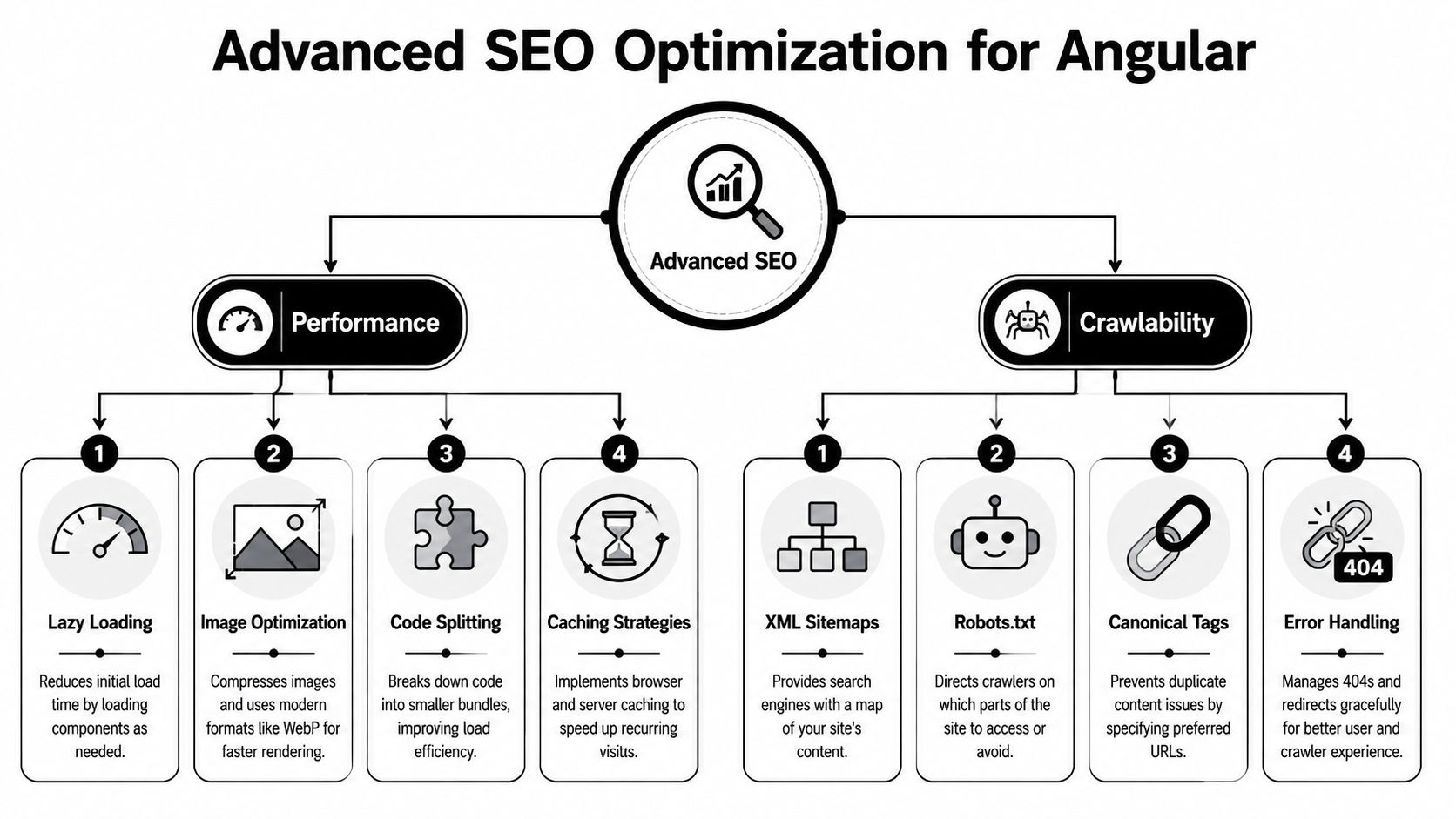
Angular SEO breaks down when teams treat performance, crawlability, and route architecture as separate projects. Search visibility comes from how those pieces work together. A route that renders HTML but ships slow bundles, duplicate URLs, or broken canonicals will still underperform.
The hard B2B problem is dynamic and authenticated content. The Digiscorp Angular SEO discussion points out that B2B and SaaS Angular apps often face 40-60% lower indexation rates for dynamic, authenticated content, and that a hybrid strategy combining SSR for public pages with dynamic prerendering for gated routes can overcome this. It also notes that Partial Hydration in Angular 18+ can produce LCP under 2.5s and has been shown in SaaS case studies to double organic leads compared to a full SSR approach that may suffer from hydration errors.
Fix what users and bots experience first
Performance work for seo for angular should focus on route entry points, not vanity bundle metrics.
A practical stack usually includes:
- Lazy-loaded feature modules so public landing pages don't pay for dashboard code
- Code splitting by route group to keep acquisition pages lightweight
- Image optimization with modern formats and controlled dimensions
- Caching rules that help repeat visits and edge delivery
If you need a broader refresher on fundamentals, this set of actionable technical SEO tips is useful because it frames crawlability and performance as one system instead of separate audits.
Canonicals and URL discipline matter more in SaaS than teams expect
SaaS sites create duplicate URLs in subtle ways. Filtered views, tracking parameters, tab states, and comparison pages can all generate multiple addresses for nearly identical content.
Use canonical tags deliberately:
import { DOCUMENT } from '@angular/common';
import { Inject, Injectable } from '@angular/core';

@Injectable({ providedIn: 'root' })
export class CanonicalService {
  constructor(@Inject(DOCUMENT) private doc: Document) {}

  setCanonical(url: string) {
    let link = this.doc.querySelector("link[rel='canonical']") as HTMLLinkElement | null;

    if (!link) {
      link = this.doc.createElement('link');
      link.setAttribute('rel', 'canonical');
      this.doc.head.appendChild(link);
    }

    link.setAttribute('href', url);
  }
}
Use this for:
- Filtered list pages where one clean URL should represent the set
- Campaign URLs carrying marketing parameters
- Near-duplicate partner pages
- Feature variants that should consolidate to a primary route
Public pages should have one indexable version, one canonical signal, and one clear purpose. Anything else creates noise.
Generate a sitemap from real routes
Static sitemaps go stale quickly in Angular apps with CMS-driven pages or route-based landing pages. A server-generated sitemap is usually safer.
server.get('/sitemap.xml', async (req, res) => {
  const urls = [
    '/',
    '/pricing',
    '/features',
    '/integrations/hubspot'
  ];

  const xml = `<?xml version="1.0" encoding="UTF-8"?>
  <urlset xmlns="http://www.sitemaps.org/schemas/sitemap/0.9">
    ${urls.map(url => `<url><loc>https://yourdomain.com${url}</loc></url>`).join('')}
  </urlset>`;

  res.setHeader('Content-Type', 'application/xml');
  res.send(xml);
});
Pair that with a simple robots.txt that points crawlers to the sitemap and blocks routes that should never be indexed, especially internal app surfaces, account pages, and private workflow URLs.
Deploying Your App and Monitoring SEO Success
A technically good Angular SEO setup can still fail after deployment. Server misconfiguration, cache mistakes, and hydration regressions often show up only in production. That's why deployment and monitoring deserve the same attention as implementation.

For SSR Angular apps, modern hosting platforms reduce a lot of friction. The LeadWithSkills Angular SEO write-up notes that installing Angular Universal and enabling transferState can reduce LCP by up to 40%, and that deploying on an edge network like Vercel or Netlify can achieve TTFB under 100ms. Those are meaningful deployment choices, not just infra preferences.
Teams already standardizing container-based release workflows often tighten SSR reliability faster once app packaging is consistent. If that's your setup, a practical Dockerize Node.js guide is relevant because Angular Universal ultimately behaves like a Node application in production.
What to verify right after launch
Don't trust local output. Check the deployed route itself.
Run this post-deploy review on your important public URLs:
- Inspect rendered HTML and verify that titles, descriptions, canonicals, and visible content appear in the first response.
- Use Google Search Console URL Inspection to confirm Google can access and render the page correctly.
- Review Index Coverage for excluded, duplicate, soft-404, or blocked routes.
- Monitor Core Web Vitals for public templates, not just the homepage.
- Test social cards on key landing pages so sales and marketing links preview correctly.
Handle authenticated content without trying to index the app itself
Most SaaS teams often get unrealistic here. Your internal dashboard usually isn't an SEO asset. Search engines don't need the logged-in UI. They need public content that captures the value of what happens inside it.
A better approach is:
- Create public teaser pages for dashboard capabilities
- Expose anonymized or template-based examples as indexable content
- Build public route versions of integration, reporting, or workflow pages
- Keep true authenticated routes noindex or blocked from discovery
That pattern aligns search intent with business value. The bot indexes the acquisition surface. The user gets the product after signup.
If a route exists only after login, ask a harder question. Should this capability have a public search-facing explanation page?
Your Angular SEO Checklist for SaaS Growth
Use this as the final audit before you call your Angular SEO setup done.
- Rendering choice is route-specific: Public dynamic pages use SSR where needed. Stable marketing pages use prerendering. Logged-in routes aren't treated as ranking assets.
- Universal is installed correctly: The app returns useful HTML on first response, not a near-empty shell.
- Hydration is stable: Browser-only logic is guarded, and server-rendered content doesn't shift or duplicate.
- TransferState is in place: The client doesn't re-fetch the same critical route data immediately after hydration.
- Metadata is route-driven: Titles, descriptions, Open Graph tags, and social previews change with route intent.
- Structured data exists where it matters: Software, product, and feature pages expose clean JSON-LD.
- Canonical rules are deliberate: Parameter-heavy or duplicate routes consolidate to one preferred URL.
- Sitemaps and robots are maintained: Search engines get a clean map of public content and stay out of private app areas.
- Search Console is part of operations: Important routes are inspected after release, not only during migrations.
- Growth content can scale: If you're building many high-intent landing pages, frameworks like Roman Sydorenko's pSEO approach are useful for thinking about route templates, structured data consistency, and editorial control.
Angular isn't the SEO problem. Bad rendering decisions, weak metadata discipline, and sloppy crawl management are the problem. Fix those, and Angular becomes a solid platform for acquisition.
If your team wants help turning Angular architecture into a real growth system, MakeAutomation helps B2B and SaaS companies streamline lead generation, automation, and operational workflows so technical improvements translate into revenue, not just cleaner code.