What Is Process Automation? a B2B Growth Guide
Growth starts to feel expensive long before the budget says it should.
A founder hires another ops coordinator because onboarding is messy. Sales adds one more RevOps workaround because lead routing breaks whenever forms, CRM fields, and handoff rules drift apart. Client delivery builds spreadsheets to track approvals, renewals, and reporting because no one trusts the systems to talk to each other. None of this looks dramatic in isolation. Together, it slows the company down.
That's usually the point where people start asking what is process automation. Not because they want a new software category, but because the business is carrying too much manual work for its current size. The problem isn't solely about effort. It's that good people are spending their best hours moving data, chasing status updates, correcting avoidable mistakes, and stitching together disconnected tools.
Process automation matters when scale stops being theoretical. If you want predictable growth, you need operations that can absorb more leads, more customers, more internal complexity, and more compliance pressure without adding friction at every step.
The Hidden Drag on Your Business Growth
A lot of B2B companies hit the same operational wall.
Sales closes a deal, then customer success waits for contract details in email. Finance needs the same information for billing setup. Delivery asks for a handoff document that nobody filled out completely. Someone on the team manually copies account data from a form into the CRM, then into a project board, then into an onboarding checklist. A week later, a field mismatch causes the wrong workflow to trigger.
Nothing is technically broken. The business still functions. But growth gets taxed at every handoff.
Where the drag shows up first
The earliest signs are usually mundane:
- Client onboarding stalls: Teams wait on approvals, files, or missing data because no system owns the sequence.
- Lead management gets noisy: Reps chase duplicates, incomplete form submissions, and inconsistent routing rules.
- Reporting becomes a monthly scramble: Staff pull data from multiple platforms, clean it manually, and hope the numbers align.
- Internal follow-up slips: Renewals, escalations, and task ownership depend on memory instead of workflows.
This kind of drag doesn't just waste time. It creates hidden costs in slower response times, preventable errors, and weak accountability.
The companies that struggle most with scale usually don't have a people problem. They have a workflow problem.
Process automation is the fix when manual coordination becomes the default operating system. Done well, it removes repetitive work, standardizes execution, and gives teams cleaner handoffs between people and systems. That frees sales, ops, finance, and customer teams to focus on judgment-heavy work instead of administrative glue.
The important part is this. Automation isn't mainly about replacing effort. It's about removing friction from the path to revenue, delivery, and retention.
Defining Process Automation for Business Impact
Process automation is the use of software, rules, integrations, and sometimes AI to run repeatable business workflows with less manual intervention. In practical terms, it means the business no longer depends on employees to move the same information through the same sequence over and over.
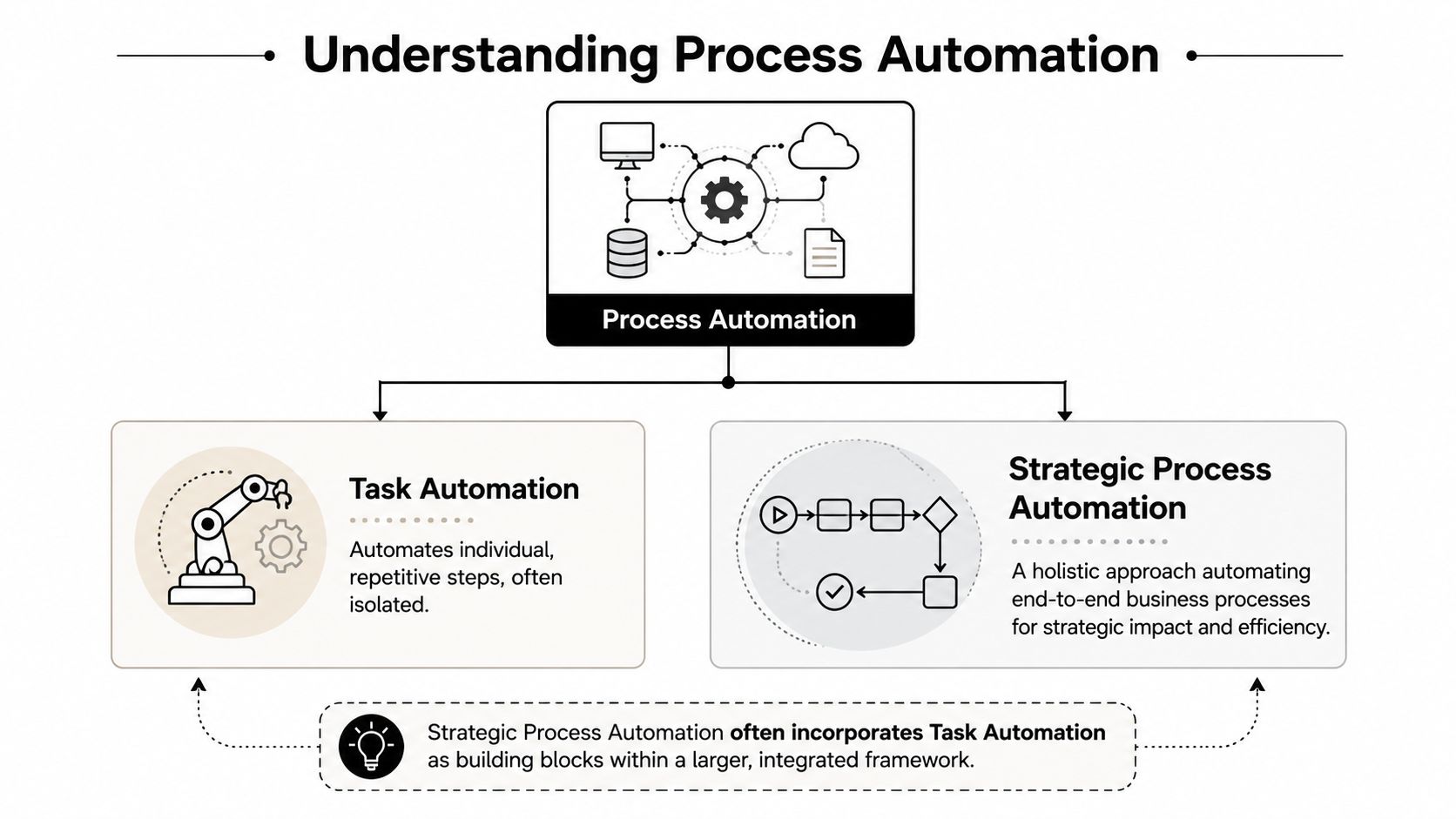
That's different from automating a single task.
If task automation is one rower pulling harder, process automation is replacing an uncoordinated crew with a synchronized engine. One saves effort on an isolated action. The other changes how work moves across the business.
Task automation versus process automation
A task automation example is auto-generating a contract from CRM data.
A process automation example is the full chain: deal marked closed, contract generated, approval requested, customer record created, billing triggered, onboarding project launched, stakeholders notified, and exceptions routed to the right person. That's a business system, not a shortcut.
For founders, that distinction matters because isolated automations often create local efficiency while leaving company-wide bottlenecks untouched. Strategic process automation looks at the full workflow, including dependencies, approvals, controls, and ownership.
A good example is sales handoff. Many teams don't need another reminder app. They need the entire sales-to-delivery transition redesigned so the right data appears in the right system at the right moment. If handoffs are breaking, this guide on how to fix sales coordination problems is useful because it focuses on workflow alignment, not just tool features.
Why leaders treat this as a business decision
The business case is already established. Deloitte survey figures cited by Flobotics show that 78% of businesses have either implemented or plan to implement RPA, 86% report increased productivity, 59% achieve cost reductions, organizations see average returns of 200% to 300% within 12 months, and 83% report faster task completion in these RPA adoption findings.
Those numbers matter, but the main takeaway is broader. Companies aren't adopting automation because it's fashionable. They're adopting it because repetitive operational work compounds as they grow.
A short explainer helps make the distinction clearer in practice:
What strong process automation looks like
You know process automation is working when:
- Work moves without chasing: Teams don't need Slack reminders to advance standard steps.
- Data stays consistent: Customer, billing, and operational records update from the same event stream.
- Exceptions are visible: Unusual cases go to humans quickly instead of hiding in inboxes.
- Leadership sees flow, not activity: You can identify where deals, requests, or onboarding stages are slowing down.
That's the answer to what is process automation in a business context. It's an operating model for reliable execution.
The Four Core Types of Process Automation
Most companies don't need “automation” in the abstract. They need to know which type fits which problem.
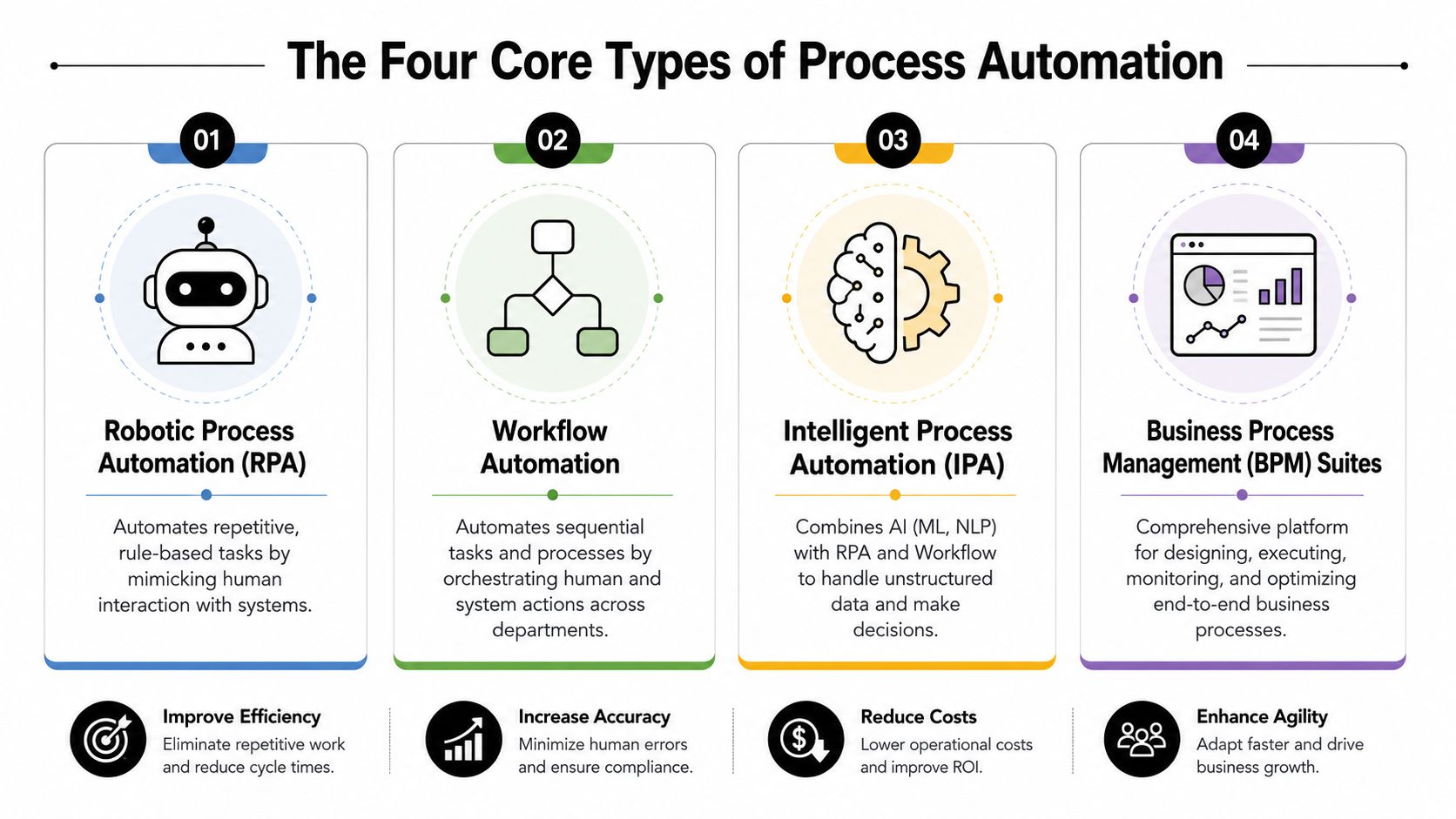
The easiest way to think about it is by scope. Some tools automate clicks. Some move work between teams. Some coordinate entire cross-system processes. Some add decision support through AI.
Robotic Process Automation
RPA is the digital worker category. It handles repetitive, rule-based actions by mimicking what a person does in software. Think copying data between systems, extracting values from structured documents, or logging into legacy platforms that don't integrate cleanly.
RPA is often the right move when a process is stable but the systems are clunky. If your team rekeys invoice details, updates records in an old ERP, or performs the same admin sequence every day, RPA fits. If you want a deeper breakdown, this guide on what robotic process automation means in practice is a useful companion.
Workflow automation
Workflow automation is closer to a smart conveyor belt. It routes work based on conditions, timing, approvals, and ownership.
Examples include lead routing, contract approvals, onboarding sequences, and support escalations. It's best when multiple people or systems need to act in order. The value isn't just speed. It's consistency.
Process orchestration
Process orchestration coordinates bigger end-to-end flows across departments and tools. If workflow automation handles a lane of traffic, orchestration manages the full intersection.
This becomes important when the same customer event should trigger actions in CRM, finance, project management, communications, and reporting. Procurement is a good example because it touches approvals, vendors, policy, budget, and compliance. Teams evaluating enterprise buying workflows should look at how CIOs approach procurement in 2026 because procurement exposes the difference between a simple workflow and true orchestration.
Practical rule: If the process crosses departments, systems, and approval layers, don't treat it like a single automation recipe.
AI and ML enabled automation
Automation moves beyond fixed rules.
AI and ML enabled automation helps when the inputs are messy or the decision logic changes over time. That includes document classification, anomaly detection, lead prioritization, support triage, and forecasting-driven routing. MarketsandMarkets projects the Process Automation and Instrumentation Market to reach USD 98.6 billion by 2029, with AI and machine learning integration into control software linked to growing IIoT adoption for real-time data collection in its process automation market outlook.
That matters because AI automation depends on data quality. If your underlying process is inconsistent, AI won't rescue it. It will scale the inconsistency faster.
A simple comparison
| Type | Best for | Strength | Limitation |
|---|---|---|---|
| RPA | Repetitive, rule-based work in existing systems | Fast relief for manual admin | Fragile if screens or steps change often |
| Workflow automation | Multi-step team processes | Cleaner routing and accountability | Limited if systems aren't well connected |
| Process orchestration | Cross-functional end-to-end operations | Strong coordination across tools and teams | Requires clearer ownership and design |
| AI and ML enabled automation | Variable inputs and decision-heavy flows | Handles complexity beyond fixed rules | Depends on good data and governance |
The mistake is picking one category and trying to force every process into it. The better approach is matching the automation type to the operational problem you have.
A Phased Roadmap to Successful Implementation
Most automation failures don't happen because the software is weak. They happen because the company tries to automate chaos.
A better approach is phased. That reduces risk, shows value early, and keeps the team from overengineering before the basics are stable. The urgency is real. The RPA market projection through 2029 points to $12.22 billion by 2029 with a 27.7% CAGR, which reflects how quickly businesses are moving to automate repetitive operational work.
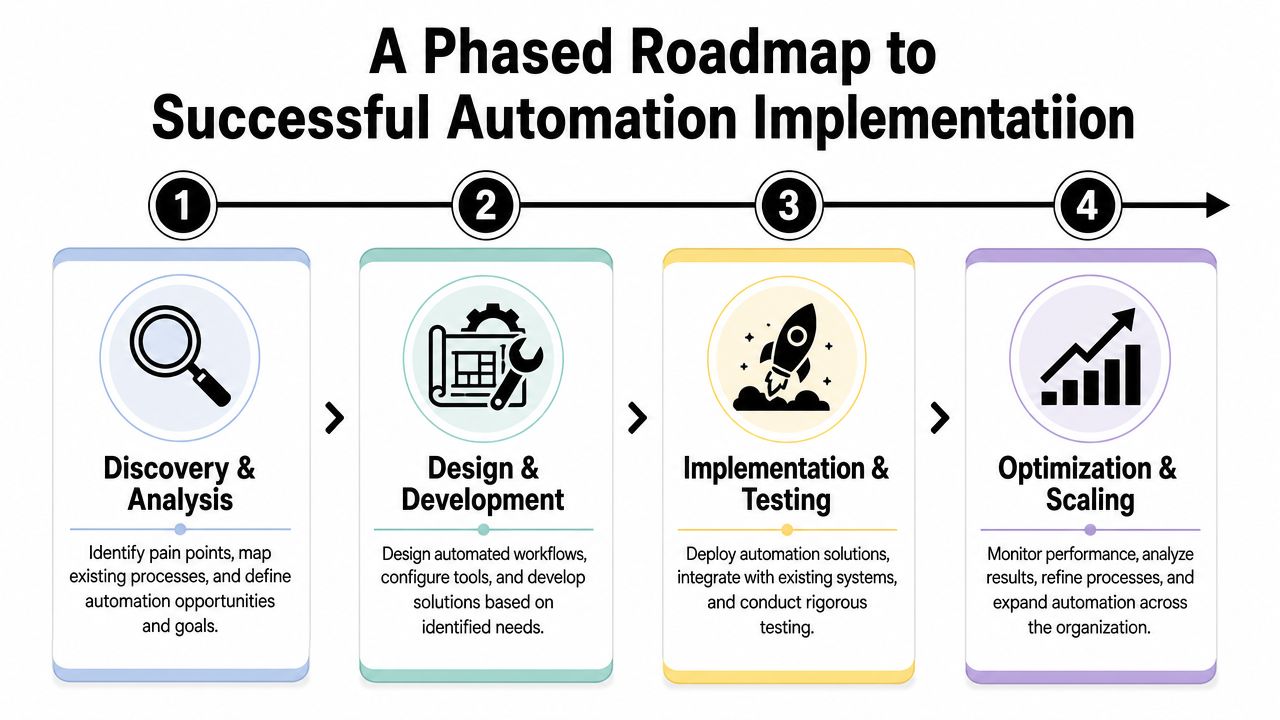
Stage one identifies and maps
Start with a process that is frequent, painful, and structured enough to improve without heroic change management.
Good candidates usually have repeated inputs, clear triggers, predictable handoffs, and visible business impact. Lead intake, client onboarding, invoicing, renewal workflows, and recruiting coordination often fit. Before you automate anything, map the current state. Document triggers, owners, systems, exceptions, approval points, and failure patterns.
What usually emerges is useful. Teams discover duplicate steps, missing ownership, workarounds no one approved, and data fields that mean different things in different tools.
Stage two pilots and proves
Run one contained pilot with a measurable operational goal.
Don't choose the most politically sensitive process. Choose the one where stakeholders care, but where failure won't halt the company. The goal is to prove that the workflow can run more cleanly, that users will adopt it, and that exception handling works.
A solid pilot has three characteristics:
- Clear scope: One workflow, limited systems, known stakeholders.
- Defined success signal: Faster cycle time, fewer manual touchpoints, fewer handoff failures, or cleaner records.
- Human fallback: Staff can intervene when edge cases appear.
Early automation should build trust, not just functionality.
If your team needs a more detailed implementation framework, this resource on building a business process automation roadmap lays out the planning sequence in a practical way.
Stage three scales and standardizes
Once a pilot works, companies often make their next mistake. They clone automations too quickly without governance.
Scaling requires standards. Naming conventions, documentation, monitoring, change control, ownership rules, and access controls all matter. Through these, operations leaders separate useful automation from a collection of brittle one-offs.
Use a shared review process before adding new automations. Decide who can request them, who approves them, and who maintains them after launch. If no one owns the automation after implementation, it won't stay reliable.
Stage four integrates and improves
Mature automation programs stop thinking workflow by workflow. They connect automation to business design.
At this stage, the company uses automation to tighten customer experience, improve forecasting, speed internal decision-making, and create more resilient operations. Teams also start integrating analytics and AI where it makes sense, especially in high-volume environments with recurring decision points.
A phased rollout sounds slower than a full transformation push. In practice, it's faster because the business learns what works before complexity multiplies.
How to Measure Your Automation Success and ROI
Automation without measurement turns into a software expense with a good story attached to it.
Founders don't need vanity metrics like number of workflows built. They need to know whether automation changed speed, quality, cost, and operational flexibility in ways the business can feel.

The KPI groups that matter
A useful scorecard usually includes four categories.
| KPI group | What to track | Why it matters |
|---|---|---|
| Efficiency gains | Cycle time, queue time, throughput, manual touches per case | Shows whether work moves faster with less intervention |
| Quality improvement | Error rate, rework frequency, failed handoffs, duplicate records | Proves the process is getting cleaner, not just faster |
| Cost impact | Manual hours displaced, cost per transaction, contractor reliance | Ties automation to margin and operating leverage |
| Business agility | Onboarding speed, time to launch, response time to customers or internal requests | Shows whether the company can absorb growth with less friction |
How to read the numbers correctly
A shorter process isn't automatically a better one. If cycle time drops but exceptions rise, you may have pushed complexity downstream.
The cleanest ROI stories combine metrics across categories. For example, a client onboarding automation is more credible when it reduces follow-up work, cuts data correction, and speeds time to kickoff. One metric alone rarely tells the truth.
A good operating habit is to measure before build, at launch, and after stabilization. Baselines matter. If you don't capture the manual version of the process first, the team will argue about results later.
Track the business outcome, not just the automation event. “Workflow executed” is less useful than “customer onboarded without rework.”
For teams that need a structured method, this guide on how to calculate return on investment is a practical starting point for turning workflow improvements into a defensible ROI model.
Questions leaders should ask monthly
- Where are humans still stepping in most often?
- Which automations create exceptions instead of preventing them?
- What process improved operational capacity, not just task speed?
- Which workflow still depends on one person knowing how it works?
Those questions usually reveal more than a dashboard alone.
Avoiding the Most Common Automation Pitfalls
The biggest automation mistake is simple. Companies automate the current process because it exists, not because it deserves to exist.
That creates the classic ROI trap. You move faster through a flawed workflow, preserve unnecessary approvals, or scale bad data hygiene across more systems. Camunda puts the issue plainly in its discussion of process automation strategy: automation initiatives must directly support business objectives, and poor alignment can mean losing out on potential cost cuts of up to 40%.
Automating bad processes
If a workflow contains duplicate approvals, unclear ownership, bad field design, or pointless status updates, automation won't fix the logic. It will hard-code it.
The right sequence is optimize first, automate second. Remove unnecessary steps. Clarify decision rights. Standardize data definitions. Then automate the cleaner version.
A fast diagnostic helps:
- Ask why the step exists: If no one can explain the business reason, remove or redesign it.
- Check exception volume: High exception rates often mean the process isn't ready for full automation.
- Trace the handoffs: Most failures happen between teams, not inside individual tasks.
Unmanaged citizen automation
Low-code and no-code tools make it easy for non-IT teams to build useful automations. That's good for speed, but risky without guardrails.
PEX Network highlights how citizen development enables non-IT employees to automate tasks through low-code tools in its report on democratizing process automation. The gap isn't access. It's governance.
Common failure modes include:
- Data silos: One team automates around the CRM instead of through it.
- Security exposure: Sensitive data gets copied into unapproved tools.
- Version confusion: No one knows which automation is current.
- Ownerless workflows: The builder leaves, and the process degrades unnoticed.
What disciplined teams do instead
They create an IT-sanctioned framework without crushing speed.
That usually means approved tools, role-based access, documentation standards, shared logging, and a lightweight review process for workflows that touch customer data, finance, or compliance-sensitive operations. Teams can still move quickly, but within boundaries that protect the business.
The goal isn't to stop people from automating. It's to stop them from creating invisible infrastructure.
There's also a softer pitfall. Some leaders try to automate decisions that still need judgment. Escalations, exception approvals, customer recovery, and high-stakes hiring decisions often work better with augmentation than full replacement. Good automation removes routine work and surfaces the right context. It doesn't eliminate accountability.
Start Your Automation Journey with an Expert Partner
The practical answer to what is process automation isn't a glossary definition. It's a business choice.
You can keep adding people to absorb manual coordination, or you can redesign how work moves through the company. The second path is what creates scalable operations. It improves execution, reduces avoidable friction, and gives your team more room for work that drives growth.
The difference between a good automation program and an expensive collection of workflows comes down to strategy. Strong teams choose the right processes, prove value in phases, measure outcomes that matter, and put governance in place before complexity gets away from them.
That's also why outside guidance helps. Most founders don't need another software demo. They need someone who can assess workflows, spot weak handoffs, prioritize high-value use cases, and build an automation model the company can realistically maintain.
If you're ready to replace manual drag with a cleaner operating system, MakeAutomation helps B2B and SaaS teams design and implement automation that supports real business goals. From lead generation and CRM workflows to AI-enhanced operations, recruitment, SOPs, and voice AI agents for inbound and outbound calls, MakeAutomation provides the strategy, documentation, and hands-on support needed to build scalable processes without falling into the usual automation traps.