HR Process Automation: Your 2026 Strategy Guide
Growth exposes weak HR operations fast. At 20 employees, a manual onboarding checklist feels manageable. At 80, it turns into missed paperwork, delayed laptop setup, payroll corrections, and managers chasing updates in Slack, email, and spreadsheets.
That drag is expensive because it doesn't stay inside HR. It slows hiring, creates compliance risk, frustrates new hires, and forces founders to spend time on issues they should never see. In B2B and SaaS companies, that usually shows up as a scaling problem before anyone labels it an HR problem.
Cloud platforms and AI have pushed this from optional improvement to operating necessity. SHRM reports HR automation use rose by 599% over the past two years, and 85% of employers using automation or AI say it saves time and increases efficiency. That's the clearest signal that HR process automation is no longer a side project for large enterprises. It's part of how modern teams run.
The practical question isn't whether to automate. It's where to start, what to buy, how to implement it without disruption, and how to tell if it's working.
Your Guide to HR Process Automation
A founder hires 15 people in a quarter, and the HR strain shows up in places that look unrelated at first. A sales rep starts late because laptop access was missed. A manager pings finance about a payroll error that came from duplicate data entry. An offer approval sits in email for two days because no one owns the next step. The company is growing, but the operating model under HR is still manual.
For scaling B2B and SaaS companies, that gap usually appears before anyone starts a formal automation project. Revenue teams already run on defined systems and tracked workflows. HR is often still held together by inboxes, spreadsheets, and a few people who know how to keep work moving. That creates risk, but it also creates a clear automation opportunity.
Practical rule: If a process only works because one person knows the sequence, you don't have a process. You have a dependency.
HR process automation converts recurring HR work into defined workflows with triggers, approvals, audit trails, and ownership. In practice, that covers onboarding tasks, document collection, payroll handoffs, leave approvals, access requests, policy acknowledgments, and employee self-service.
The business case goes beyond admin efficiency. Strong HR automation reduces errors, shortens cycle times, improves compliance coverage, and gives managers better visibility into where work is stuck. For a B2B founder, those are operating gains that support hiring velocity and cleaner scale.
The decision quality matters as much as the software. Teams that get value from automation usually start by mapping the current process, identifying where delays or rework hurt the business most, and choosing tools that fit their existing systems. If your team has not documented the actual handoffs yet, these business process mapping techniques will help you get there quickly.
A useful way to approach HR automation is as an operating system decision. Which processes should be standardized first? Which approvals need controls versus speed? Which workflows need human review because mistakes are expensive? Those choices determine ROI far more than a feature checklist does.
That is the lens for this guide. The goal is to help you make sound business decisions at each stage, prioritize for measurable return, and build HR automation that supports growth without adding another layer of operational complexity.
Assess and Prioritize Your HR Processes
A founder approves an HR automation project to speed up hiring. Three months later, HR is still chasing missing forms, IT is still getting late access requests, and managers are asking why the new system added work instead of removing it. The usual cause is simple. The workflow was automated before anyone agreed on how it should run.
That is why assessment comes first. If the underlying process is inconsistent, automation scales the inconsistency.
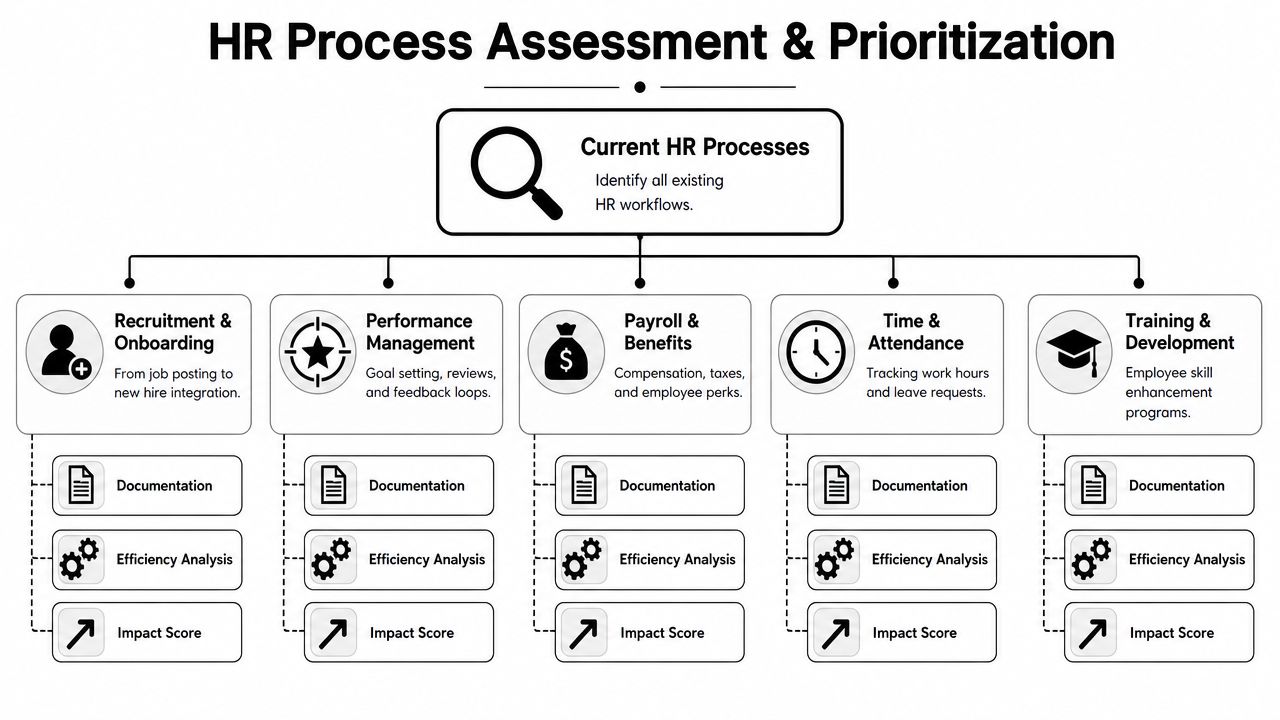
Start by documenting what happens today. Capture the precise sequence of triggers, handoffs, approvals, data entry points, exceptions, and owners. The version that matters is the one people follow under deadline pressure, not the one sitting in an SOP folder.
Map the work before you improve it
For a B2B or SaaS company, the right starting point is usually the process that creates measurable operating drag. That could mean delays in getting new hires productive, recurring payroll corrections, or approval loops that pull managers into admin work every week.
Common candidates include:
- Recruitment handoffs: Candidate status changes, interview scheduling, approvals, and offer generation.
- Onboarding administration: Document collection, policy acknowledgments, account setup requests, payroll entry, manager task assignment.
- Time off and leave requests: Submission, approvals, visibility, and policy enforcement.
- Payroll support tasks: Data collection, corrections, and cross-checks between systems.
- Offboarding actions: Access removal requests, checklist completion, and record updates.
The map itself can stay simple. A whiteboard, Miro board, Notion page, or spreadsheet is enough if it shows where work starts, who touches it, where it stalls, and what happens when something goes wrong.
If your team needs a practical way to structure that exercise, these business process mapping techniques are a useful starting point.
Fix obvious process problems before you automate them. Redundant approvals, duplicate data entry, and unclear ownership will not disappear inside a workflow builder.
Score by impact and effort
Once the current state is visible, choose priorities based on business value, not on how impressive the workflow looks in a demo. A common mistake is starting with the most ambitious cross-functional process first. It feels strategic, but it usually carries the highest integration risk, the most exceptions, and the longest time to value.
Use a simple scoring model:
- Impact score: How much the process affects cycle time, error rates, employee experience, manager workload, or compliance risk.
- Effort score: How hard it will be to standardize, integrate, test, and maintain.
- Weekly hours spent: Estimated admin time consumed today.
- Priority: Quick win, strategic build, or defer.
Here is a practical template:
| HR Process | Weekly Hours Spent (Estimate) | Impact Score (1-5) | Effort Score (1-5) | Priority |
|---|---|---|---|---|
| New hire document collection | ||||
| Interview scheduling | ||||
| Leave request approvals | ||||
| Payroll change submissions | ||||
| Offboarding checklist coordination |
In early-stage and growth-stage SaaS companies, onboarding often ranks well because it is frequent, rules-based, and tied directly to time-to-productivity. Interview scheduling is another strong candidate. It creates visible friction, touches multiple systems, and usually has clearer logic than payroll or compliance-heavy workflows.
Do not measure impact only in hours saved. Look at business consequences. A faster onboarding process gets sales, support, and engineering hires productive sooner. Fewer payroll corrections reduce employee frustration and cut rework. Better offboarding controls lower security risk.
Look for the best first candidates
The best first automation targets usually share three characteristics:
- They happen often. Repetition creates a clearer return.
- They follow consistent rules. Predictable logic is easier to automate and test.
- They already cause pain. Delays, errors, and repeated follow-ups create a measurable case for change.
Interview scheduling fits that profile in many B2B teams. The work is repetitive, the handoffs are easy to see, and the failure points are familiar. Calendars conflict, ATS records lag behind, and candidates wait too long for updates. Onboarding is similar, especially when HR, IT, payroll, and hiring managers all own part of the process.
More complex workflows can come later. Payroll-compliance coordination, employee lifecycle changes, and policy exception handling often need tighter controls and cleaner data before they are good automation candidates. Start with a workflow that proves the operating model, shows ROI within a reasonable period, and gives the team confidence to expand.
A short walkthrough helps teams align before they commit to tools:
Select the Right Automation Technology Stack
A founder buys an HR platform after two polished demos, signs the annual contract, and then learns the hard part. The ATS does not pass clean data into the HRIS. Payroll needs manual updates. Managers avoid the approval flow because it takes too many clicks. Six months later, HR has one more system to maintain and no clear return.
That outcome is common in B2B and SaaS companies that buy for features before they buy for operating fit. The stack has to support the way your team hires, onboards, approves changes, and closes out departures. It also has to hold up as headcount grows, teams split by region, and compliance needs get stricter.
Buy for operating fit
Start with the systems that already run your people operations. In most growth-stage companies, that means some combination of ATS, HRIS, payroll, email, Slack, e-signature, identity management, and ticketing. Map the handoffs between them before you evaluate any vendor. If a platform adds friction at those handoff points, the workflow will slow down right where the business needs speed.
Focus the evaluation on a few practical questions:
- How does data move? Confirm which fields sync automatically, how often they sync, and where someone still has to step in.
- How much process complexity can the system handle? Approval chains, country-specific rules, and manager exceptions show up quickly in growing companies.
- Will managers use it? If basic tasks feel awkward, HR becomes the cleanup function again.
- What controls are available? Role permissions, audit trails, and exception routing matter once more people touch the process.
- What happens during implementation? Support quality, documentation, and access to technical resources often matter more than one extra feature.
Keep the shortlist tight. Two or three serious options are usually enough if the process requirements are clear.
For teams comparing categories and platforms, this overview of business process automation tools helps frame the trade-offs.
Ask vendors to prove your process
Generic demos hide the hard parts. Give each vendor a workflow from your actual operation and ask them to show the full path, including what happens when something goes wrong.
Use scenarios like these:
- A candidate is marked hired in the ATS. Show every downstream action and every field that gets created or updated.
- A manager submits a title or compensation change. Show the approval logic, audit record, and payroll impact.
- An employee leaves. Show how HR, IT, payroll, and the manager each get the right task.
- A leave request crosses a policy threshold. Show where the exception goes and who owns the decision.
This is a buying test and an implementation test at the same time. Strong vendors can explain ownership, dependencies, and failure points clearly. Weak vendors stay at the feature level and leave your team to discover the gaps after contract signature.
If onboarding is your first high-value workflow, review how specialized onboarding solutions for growing companies handle cross-functional coordination before you decide whether to buy a broad suite or a focused tool.
Price the full change effort
License cost is only one line item. The full project usually includes workflow design, integration work, data cleanup, training, internal ownership, and post-launch support. That is where ROI gets won or lost.
A practical buying model includes:
| Cost area | What to include |
|---|---|
| Software | Core platform, modules, user tiers |
| Implementation | Setup, workflow design, vendor services |
| Integration | ATS, payroll, HRIS, identity, communication tools |
| Data work | Migration, cleanup, validation |
| Enablement | Training, documentation, internal support time |
| Ongoing operations | Admin ownership, maintenance, vendor support |
SpringVerify describes a common sequence for HR automation projects: process assessment, vendor selection, implementation planning, system configuration, data migration, training, change management, go-live, and post-launch support. The sequence matters because a stack decision changes operating responsibilities across HR, IT, finance, and managers, not just the software budget.
In practice, all-in-one platforms often simplify governance, reporting, and vendor management. Point solutions can be stronger for a narrow workflow such as recruiting coordination or onboarding. The right choice depends on where the process pain is concentrated, how many integrations your team can support, and how quickly you need the system to scale without adding more admin overhead.
Design and Build Your Automated Workflows
A good workflow design removes routine coordination without removing judgment where it's still needed. That's the balance. You want the system to handle the normal path automatically and surface exceptions to humans at the right point.
This stage is often overcomplicated. The better approach is to design one clean workflow at a time.
Build with triggers, actions, and conditions
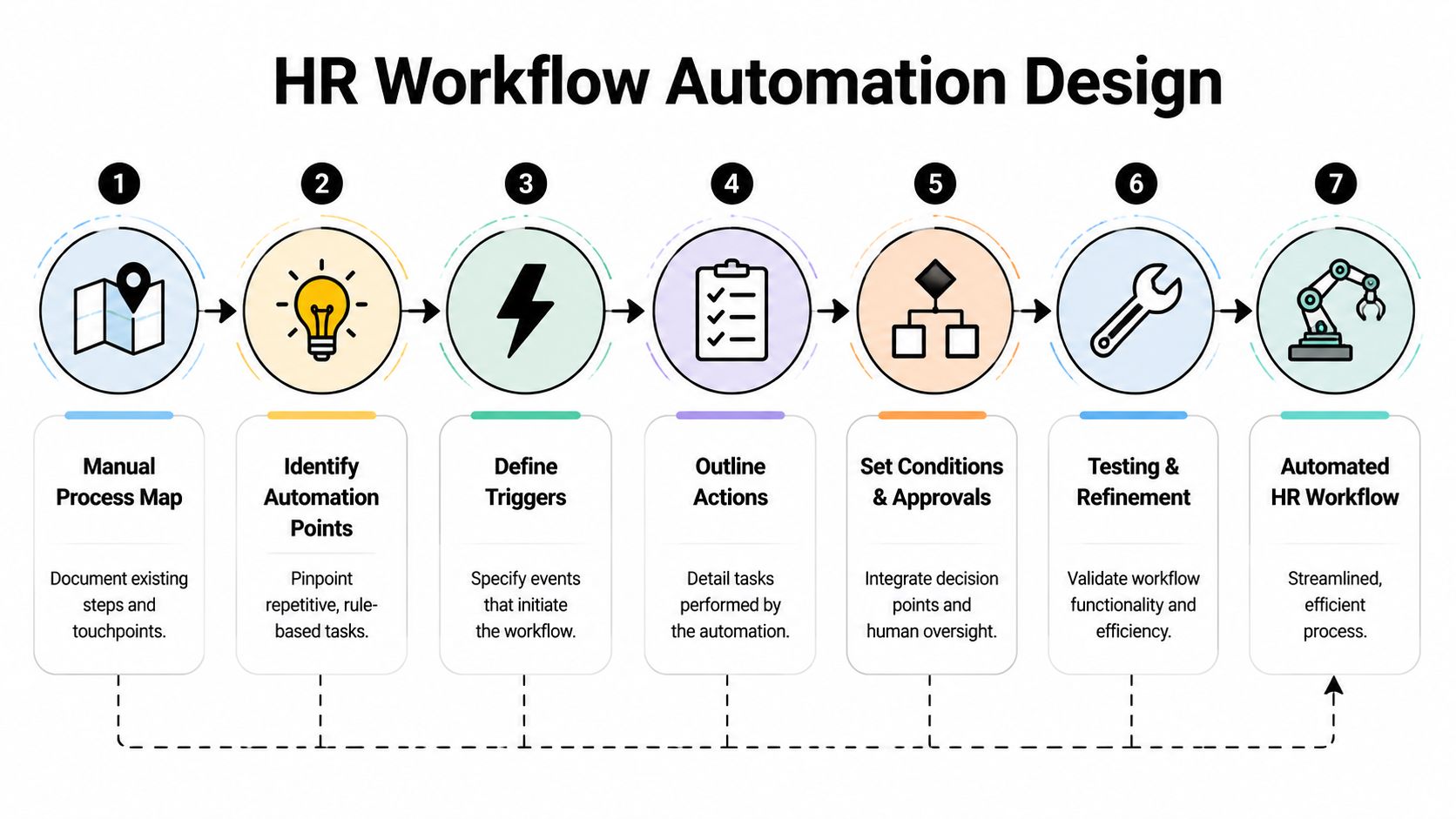
Every automated workflow has a basic structure:
- Trigger: The event that starts the workflow.
- Action: The task the system performs automatically.
- Condition: The rule that determines what path comes next.
- Exception path: The point where a person steps in.
Take onboarding. A common trigger is a candidate being moved to "Hired" in the ATS. That can launch multiple actions inside your workflow stack:
- Create or prepare the employee record in the HRIS
- Send document collection requests
- Notify payroll of a pending new starter
- Assign onboarding tasks to the manager
- Open an IT request for account and equipment setup
- Send a welcome email sequence to the new hire
If the employee type, location, or start date creates a special case, conditional logic routes the task to HR or finance for review.
That's what good HR process automation looks like. The system handles the standard path. People handle the edge cases.
Standardize before you automate
This is the point where teams need discipline. If one manager uses one checklist and another manager uses a different one, don't automate both versions. Pick the standard first.
Useful questions during design:
- Which approvals are required, and which are habits?
- Where is data entered more than once?
- Which handoffs create delays because ownership is fuzzy?
- What information must exist before the next step can fire?
- Which cases should pause automation and require review?
A lot of value comes from subtraction. Remove duplicate fields. Eliminate side-channel approvals in Slack. Stop storing the same employee information across multiple ad hoc trackers.
The fastest automation project is often the one that deletes steps before it builds them.
For teams dealing with rapid hiring, this is also where specialized resources can help clarify the operational model. PEO Metrics has a useful overview of onboarding solutions for growing companies that reflects the kind of cross-functional setup many scaling teams need.
Validate on a pilot before expanding
A workflow that works in a workshop can still fail when real users touch it. Managers miss prompts. Data arrives incomplete. An approval rule catches the wrong cases. That's normal.
The fix is not a bigger launch plan. It's a smaller initial scope.
Essium's measurement guidance is practical here. It recommends documenting the current process, setting stage-level KPIs, creating pre-automation baselines, and using pilots plus dashboards or A/B testing to validate gains before broader rollout, as described in Essium's HR automation measurement approach.
During a pilot, watch for:
- Broken handoffs: A task fires but the receiving team doesn't act.
- Data quality issues: Required fields are missing or inconsistent.
- Approval bottlenecks: The workflow still waits on the same people.
- User friction: Managers bypass the system because it's easier not to use it.
- Exception overload: Too many cases fall out of the automated path.
If those problems appear, that doesn't mean automation was the wrong decision. It usually means the workflow exposed a process weakness you needed to see.
Manage the Rollout and Drive Team Adoption
Monday morning is where HR automation gets judged. A manager tries to approve a request from their phone between customer calls. A new hire looks for the right onboarding step. HR checks whether the system routed everything correctly or created a queue of exceptions. If that experience feels unclear, people go back to email, Slack, and manual follow-up.
The rollout phase turns workflow design into operating discipline. In a B2B or SaaS company, that matters because process adoption affects more than HR efficiency. It affects manager capacity, data quality, compliance, and how much employee growth the business can absorb without adding headcount in support functions.

Roll out in phases, not all at once
Founders often want a fast company-wide launch. In practice, phased rollout is usually the cheaper decision because it contains mistakes before they spread across every team.
Start with one process, one group of managers, or one business unit. That gives you a controlled environment to test support volume, handoff quality, and whether people can complete tasks without HR stepping in. If adoption stalls in a pilot, fixing it is manageable. If the same problem hits the whole company, the cleanup cost is much higher.
A phased rollout usually includes:
- Pilot scope: One process with clear ownership and enough volume to expose real issues
- Feedback loop: A fast way for HR, managers, and employees to report confusion or failures
- Refinement pass: Updates to workflow logic, notifications, permissions, and instructions
- Wider release: Expansion only after the process works under normal operating conditions
That pacing protects ROI. It reduces rework, limits disruption, and gives leadership a clearer read on whether the automation can scale.
Explain what changes for each group
Adoption improves when each audience hears a practical answer to one question: what will I do differently next week?
HR needs clarity on which tasks now run through the system and which ones still require judgment. Managers need to know where approvals happen, what deadlines they own, and what happens if they do nothing. Employees need a simple path for requests, status updates, and follow-up. Leadership needs to understand what success should look like during rollout, especially if the first release is intentionally narrow.
That communication should be concrete enough to remove ambiguity, but honest about trade-offs. For example, a manager may have fewer ad hoc questions from HR, but they may also need to complete approvals inside a new tool. That is a fair exchange if cycle times drop and handoffs become easier to track.
| Audience | What they need to hear |
|---|---|
| HR team | What work moves into the system, what still needs judgment, and how exceptions are handled |
| Managers | What actions they own, where approvals happen, and what response time is expected |
| Employees | Where to submit requests, how updates are communicated, and who to contact if something stalls |
| Leadership | What the rollout is meant to prove, what risks are being managed, and which business outcomes matter |
If your team needs a stronger rollout structure, these change management implementation practices for operational adoption are a useful reference point.
Train people on the job they actually do
Vendor-led training usually explains product features. Your rollout needs task-based training tied to the actual process.
Show a manager how to approve a leave request, complete an onboarding checkpoint, or escalate an exception. Show HR how to correct a failed handoff, review an audit trail, or reroute a case that falls outside the standard path. Show employees how to submit a request and check status without opening a support ticket.
Short role-based walkthroughs usually work better than long documentation packs.
I usually recommend assigning support ownership before launch. One person or team should triage questions, track repeat issues, and separate training gaps from workflow defects. Without that discipline, every minor issue gets treated as a system failure, and confidence drops quickly.
A good rollout changes behavior in a measurable way. Managers complete tasks inside the workflow. HR stops chasing updates manually. Employees trust the process enough to use it the first time. That is when automation starts contributing to scale, not just convenience.
Measure True ROI and Optimize for Growth
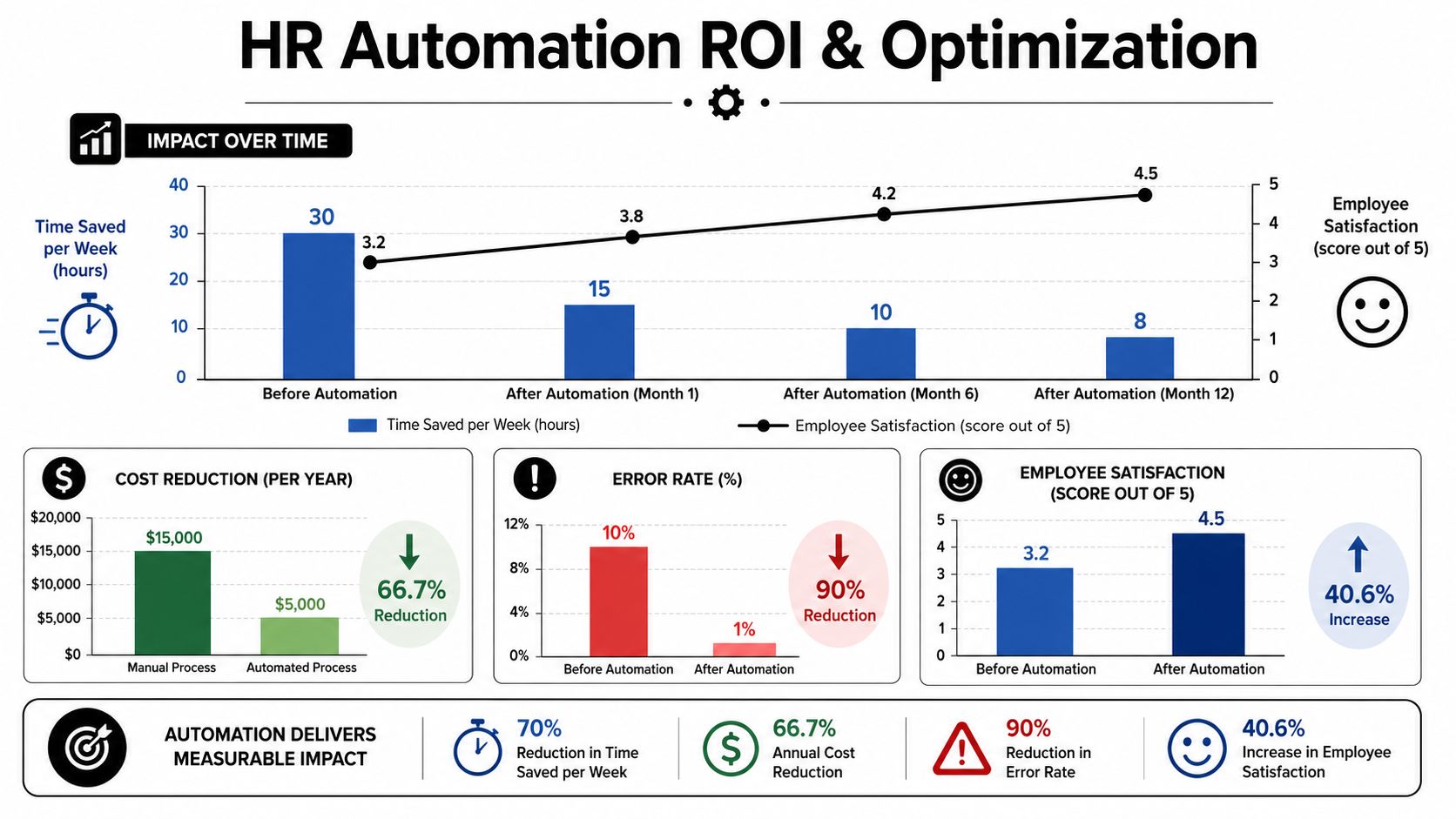
Go-live is not the finish line. It's the point where measurement becomes credible. Before launch, every benefit is a projection. After launch, you can see whether the workflow reduced effort, improved consistency, and scaled the way you expected.
Many teams stop at time saved. That's useful, but it's incomplete.
Measure the operating result, not just activity
A workflow can look busy and still fail commercially. Founders should care about business outcomes. Did hiring handoffs become faster? Did payroll corrections drop? Are managers following the process without HR chasing them? Can the company handle more employee volume without adding proportional admin load?
The strongest scorecards usually include a mix of operational and quality measures:
- Cycle time: How long the process takes from trigger to completion
- Exception rate: How often cases leave the standard path
- Error reduction: Whether corrections and rework are going down
- Adoption: Whether managers and employees are using the workflow
- Data quality: Whether records are complete and consistent
- Audit readiness: Whether evidence and approvals are easy to retrieve
- Satisfaction signals: Whether employees and managers report less friction
This broader view matters because modern HR automation increasingly touches compliance-heavy and cross-system work, where a narrow "hours saved" story misses its true value.
Track exceptions as a management signal
One of the most practical measurement ideas is to track exceptions deliberately. Naviant's HR transformation guidance says modern measurement should go beyond time saved to include metrics like exception rates, audit readiness, and cycle-time variance, and it cites reporting on exceptions per 100 cases to monitor steady-state performance.
That metric is useful because it shows whether the workflow is stable. If exceptions remain high, one of three things is usually true:
- The process rules are incomplete.
- Users aren't following the intended path.
- The workflow is automating a process that was never standardized.
Those are management issues, not just software issues.
Optimize quarterly, not continuously in chaos
Founders sometimes overreact after launch and start changing workflows every week. That usually creates confusion. A steadier rhythm works better. Review the data at regular intervals, identify the biggest friction points, and make deliberate updates.
A practical review cadence asks:
- Which workflow stage creates the most waiting time?
- Which exception category appears most often?
- Where are users still bypassing the system?
- Which approvals add control, and which add delay?
- What should be automated next based on actual results?
Done well, HR process automation becomes a scaling asset. It lets the company absorb hiring volume, compliance demands, and employee lifecycle complexity without multiplying manual overhead. That's the true return. Not just saved admin hours, but a people operation that can grow without becoming a bottleneck.
If you're planning your first major HR automation project and want experienced help with process design, tool selection, workflow implementation, or AI-enabled operations, MakeAutomation works with B2B and SaaS teams to turn manual workflows into scalable systems that support growth.