How to Make an AI Voice Assistant for Your Business
Your team probably already feels the pain that pushes companies to ask how to make an AI voice assistant in the first place. Sales reps spend time chasing low-intent leads. Support staff answer the same account questions all day. Missed calls turn into delayed follow-ups, and delayed follow-ups turn into lost revenue.
In B2B and SaaS, that inefficiency compounds fast. One caller wants to book a demo, another needs a contract update, another just wants a basic status check. None of those requests should require your best people to act as human routers. A production voice assistant changes that when it's built to take action inside your stack, not just talk.
Moving Beyond Missed Calls and Manual Follow-Ups
A common starting point looks like this. A sales director notices that inbound calls are increasing, but conversion quality isn't improving. Reps still listen to voicemails, manually qualify basic fit, send booking links, update the CRM late, and lose context between marketing, SDR, and account teams.
The problem usually isn't call volume alone. It's inconsistency. Two callers ask for the same thing and get two different experiences depending on who answered, how rushed they were, and whether they remembered to log the interaction.
That's where voice AI stops being a novelty and starts becoming an operational asset. It can answer routine requests, qualify intent, book the next step, and pass structured context to a human when the conversation needs judgment instead of automation.
The broader market is already proving that this isn't experimental. Customer satisfaction with AI voice agents reached 72% in 2026, up from 53% three years earlier, and businesses are using voice AI to handle 70% of routine inbound calls according to ADAI's 2026 AI voice assistant statistics.
That shift matters because voice is often the highest-friction channel in the business. Email can wait. Chat can queue. Calls demand an immediate response, and if your team can't provide one, the caller notices.
A useful parallel shows up in RealEstateCRM's insights on AI for agents. The operational issue is similar even outside classic SaaS support. Teams lose hours to repetitive qualification, scheduling, and follow-up, while high-value relationship work gets squeezed.
Practical rule: Don't start with “we need an AI assistant.” Start with “which call types are draining skilled labor but follow a repeatable path?”
That framing changes the project. You're no longer buying a talking interface. You're building a front-line system for qualification, routing, scheduling, and support containment.
Architecting Your Business-Focused Voice AI
A business-grade voice assistant is a pipeline, not a single model. If one layer is weak, the whole experience breaks. The caller doesn't care whether the issue came from speech recognition, intent handling, or a slow backend query. They only hear a pause, a wrong answer, or an irrelevant transfer.
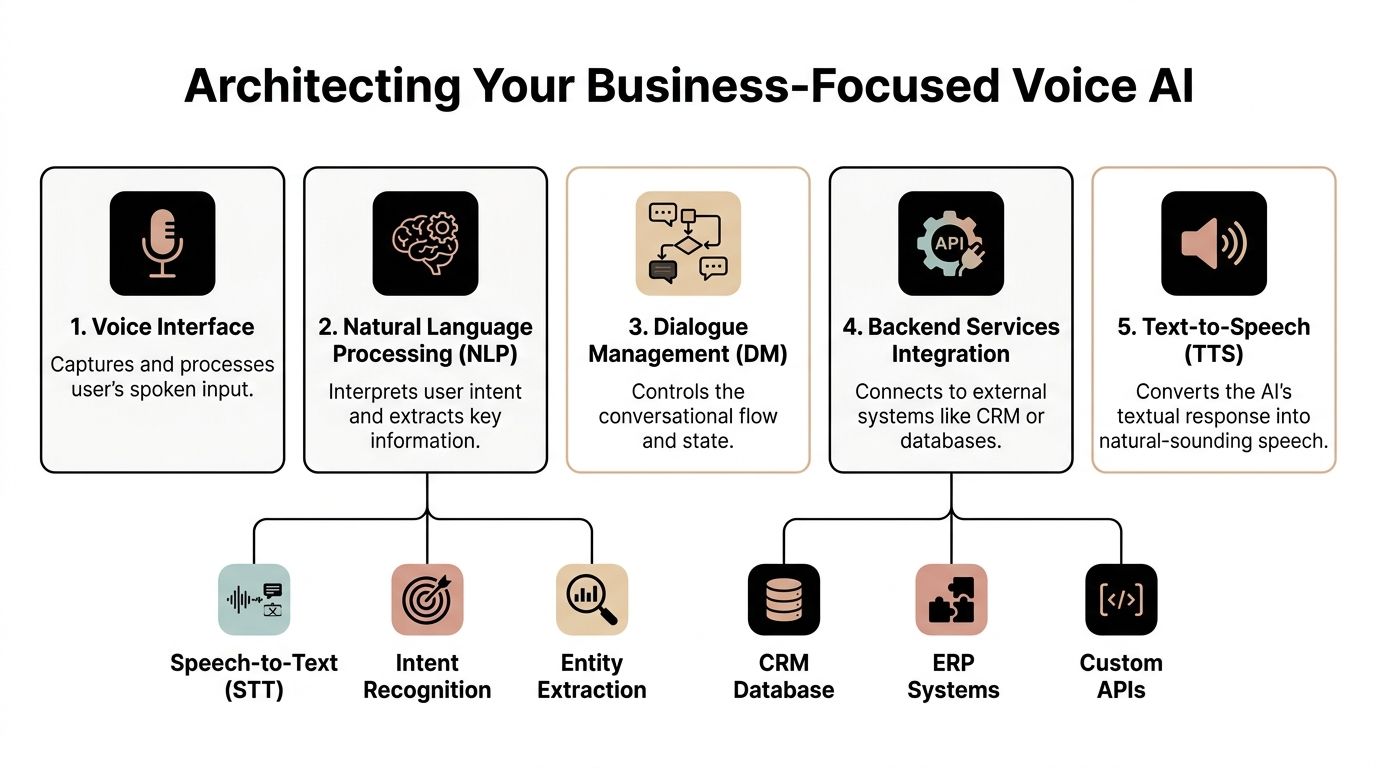
The five layers that matter
Think of the architecture like a call center operator with specialized parts.
- Voice interface: This is the entry point. It captures the caller's audio and manages turn-taking. If the input handling is clumsy, callers interrupt each other with the system or repeat themselves.
- ASR or speech-to-text: These are the assistant's ears. ASR turns audio into text. In business use, this affects lead names, product references, account details, and every downstream action.
- NLP and intent handling: The system interprets meaning in this component. It decides whether “I need pricing,” “I want a demo,” and “Can someone call me back” are the same sales workflow or three distinct ones.
- Dialogue management: This is the strategist. It keeps track of context, asks the next useful question, decides when to confirm information, and determines when a human should take over.
- Text-to-speech: This is the outward brand voice. TTS quality affects trust more than many teams expect. If the voice sounds awkward, rushed, or unnatural, callers lose confidence even if the logic is sound.
The pipeline behind natural conversations
A production-grade system relies on a multi-stage flow where ASR converts audio to text, NLP interprets intent, a dialogue manager plans the response, and TTS turns that response back into speech. For real-time performance, the critical move is to stream audio tokens directly into the language layer instead of waiting for a full audio buffer. That approach can bring round-trip latency to under 500ms, as described in DigitalOcean's guide to AI-powered voice assistant architecture.
That latency point matters more in voice than in chat. In text, a short pause is normal. In a phone conversation, silence feels like failure.
If the assistant waits too long to react, callers don't assume it's thinking. They assume it didn't hear them.
What works and what doesn't
The biggest architecture mistake is treating every layer as interchangeable. It isn't. A strong LLM won't rescue poor transcription on product names, policy terms, or account identifiers. A premium voice won't fix weak dialogue logic. A well-designed flow still fails if backend systems return data too slowly.
What usually works:
- Streaming over batch processing: Partial transcription and early intent evaluation feel conversational.
- Narrow first use cases: One clean workflow beats ten mediocre ones.
- Clear separation of orchestration and business actions: Keep conversation logic distinct from CRM writes, calendar checks, and account updates.
- Observable flows: You need to inspect where breakdowns happen.
What usually doesn't:
- Overloading the first version: If the assistant tries to support every department at launch, it becomes hard to test and harder to trust.
- Script-heavy design: Rigid trees break fast in voice because people self-correct, interrupt, and jump topics.
- Ignoring brand voice: TTS is part of customer experience, not decoration.
Choosing Your AI Voice Assistant Tech Stack
Once the architecture is clear, the primary decision is how much of the stack you want to own. Teams building an AI voice assistant for business typically end up between two models. They either use an all-in-one platform to move faster, or they assemble a best-of-breed stack for more control.
Neither is universally better. The right answer depends on how much customization, governance, and internal technical ownership your business can support.
All-in-one platform or composable stack
All-in-one tools are useful when speed matters more than deep control. You get faster prototyping, simpler setup, and fewer integration points to maintain. The trade-off is usually less flexibility around orchestration, infrastructure, model choice, and custom business logic.
A composable stack gives you more freedom. You can choose the ASR provider that handles your terminology best, the orchestration layer that fits your workflows, and the TTS voice that matches your brand. The downside is complexity. More vendors means more moving parts, more logs, and more failure points to manage.
If you're exploring the options, this curated guide to AI voice agent platforms for business teams is a practical starting point because it frames tools in terms of deployment fit rather than hype.
Voice AI component tool comparison
| Component | Tool Example | Best For | Consideration |
|---|---|---|---|
| Telephony layer | Twilio | Inbound and outbound call routing with developer flexibility | Requires careful orchestration and event handling |
| Orchestration and dialogue | Rasa | Teams that need stronger control over dialogue, escalation logic, and enterprise workflows | More implementation work than lightweight builders |
| Workflow automation | Make, Zapier, n8n | Fast CRM, calendar, and ticketing automations | Good for surrounding workflows, not a full dialogue brain |
| LLM response layer | OpenAI Assistants or similar LLM-backed agent setup | Flexible response generation and tool use | Needs guardrails and prompt discipline |
| ASR layer | Browser-native Web Speech API for MVP capture, or a dedicated speech service | Early prototypes and quick validation | Browser-native options are not the final answer for every call environment |
| TTS layer | ElevenLabs, Azure Speech, or another neural TTS provider | Branded, natural-sounding voice output | Voice quality and latency vary by environment |
Configuration choices that affect business outcomes
A voice assistant becomes useful when it can do work, not just generate language. One of the most important implementation choices is attaching a custom set of tools so the agent can call APIs, query databases, or trigger automations. That turns it from a chatbot into an operational agent, as highlighted in this walkthrough on configuring actionable voice agents.
That same configuration layer is where teams set behavior. The system prompt defines tone, boundaries, and escalation behavior. The temperature setting is often kept around 0.8 to balance coherence with enough flexibility for natural replies, based on the same source.
Selection test: If a platform can speak well but can't check availability, create a lead, update a CRM record, or hand off context, it's not solving a business problem. It's performing a demo.
A practical selection filter
Use these questions before you commit:
- How tightly must it integrate? If the assistant needs to write to HubSpot, Salesforce, or your ERP, check native support and API flexibility early.
- Who owns reliability? Vendor-managed tools reduce setup burden. Custom stacks give you more control when something breaks.
- What happens during exceptions? Ask how the tool handles interruptions, retries, and human transfer.
- Can you inspect decisions? Debuggability matters. If you can't audit what happened in a failed call, optimization gets expensive fast.
Implementation and CRM Integration Workflows
The fastest way to make this real is to build around one business workflow. For most B2B teams, a strong candidate is inbound lead handling. A prospect calls after seeing your site, paid campaign, or outbound email. They want answers now, not a voicemail box and a callback tomorrow.
This is the kind of workflow where a voice assistant earns its place quickly because the business value is obvious. Capture the lead, qualify intent, route correctly, and record everything without relying on a rep to remember admin work.
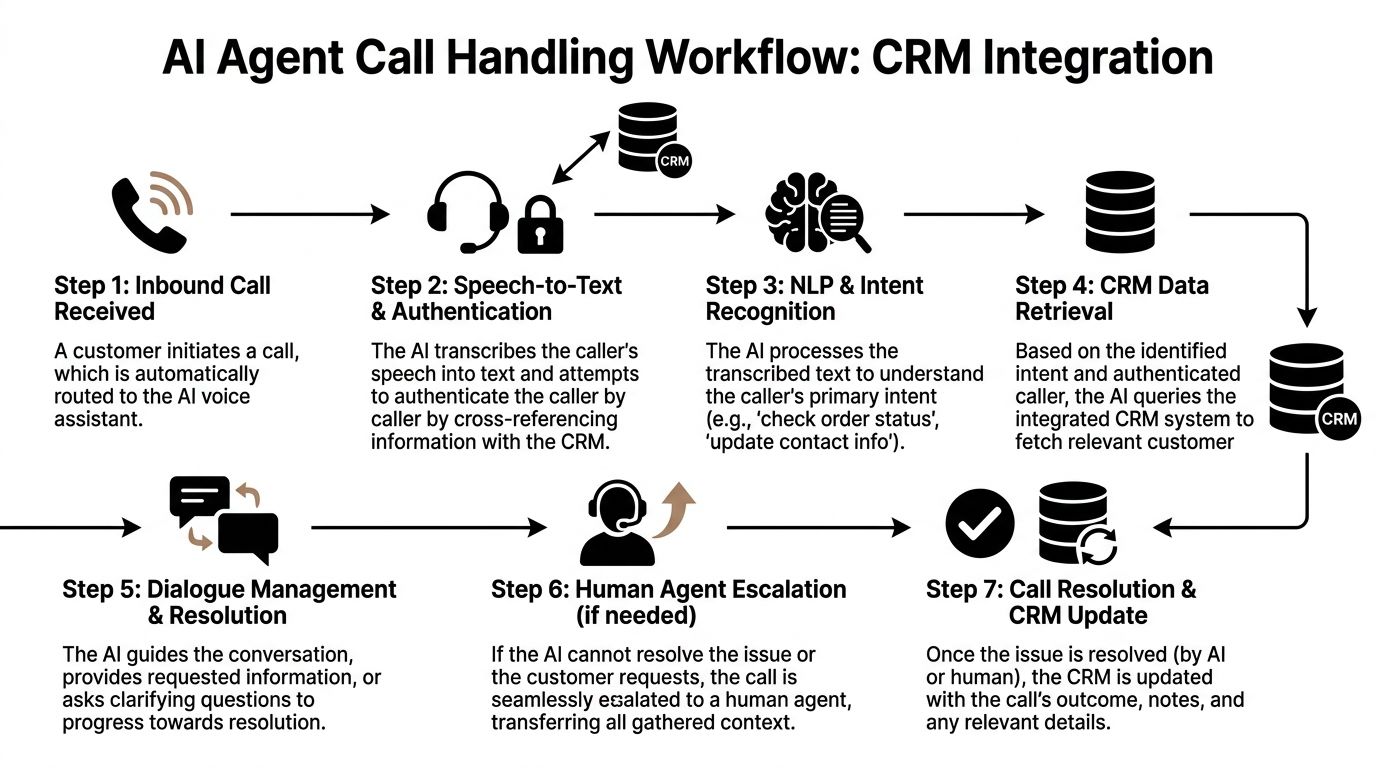
A working inbound call flow
The call comes in through your telephony layer. The assistant picks up immediately, greets the caller, and starts the core flow. Under the hood, modern voice interactions run through STT, NLU, decisioning, and TTS in milliseconds, according to Infobip's breakdown of modern AI voice assistant flows.
From there, the assistant can do the following:
- Identify intent early: “I want to book a demo,” “I need support,” and “I'm returning a call” should branch into different workflows quickly.
- Collect structured information: Company name, use case, urgency, region, and contact details.
- Check systems in real time: Query your CRM, calendar, help desk, or product database.
- Take an action: Create the lead, book the meeting, open the ticket, or route to the right rep.
- Pass context if escalation is needed: The human shouldn't restart discovery from zero.
A lot of teams underestimate the importance of the CRM step. If the assistant qualifies a lead but never writes the data cleanly into your system of record, the process still leaks value. Good automation is not just conversation. It's conversation tied to state changes in core systems.
For teams formalizing that system layer, this overview of CRM integration in business automation is useful because it frames the work as data flow and action orchestration, not just app connectivity.
What the CRM workflow should actually do
A basic but valuable implementation should include these actions:
- Lead lookup: Check whether the caller already exists in HubSpot or Salesforce before creating a duplicate.
- Record enrichment: Append notes, source details, and the assistant's summary to the contact or company record.
- Scheduling action: Query calendar availability and book directly when the use case allows it.
- Ownership routing: Assign the record to the correct AE, SDR, CSM, or support queue.
- Outcome logging: Store resolution type, escalation reason, and transcript references for review.
Here's a simple example. A caller says they need a pricing demo for a team rollout. The assistant confirms their company name, asks about team size and timeline, checks the assigned AE based on territory, offers available calendar slots, books the meeting, and writes the interaction summary into the CRM. If no rep is available, it creates a follow-up task and sends the context forward.
A visual walkthrough helps if you're mapping this internally:
KPI design before launch
Many deployments falter at this stage. Teams launch first, then ask what to measure later. That creates blind spots around quality, routing accuracy, and ROI.
Infobip notes that you should define monitoring KPIs such as resolution rates and escalation patterns before launch, then review conversation logs regularly through an ongoing improvement cycle. Those metrics matter because they show whether the assistant is solving work or merely moving it around.
Build your scorecard before the first call hits production. Otherwise you'll collect call volume, not insight.
At minimum, track:
- Resolution quality: Did the assistant complete the intended task?
- Escalation patterns: Which intents, phrases, or customer states trigger handoff most often?
- CRM completion quality: Did the system write the right records and notes?
- Conversation review themes: Where callers rephrase, abandon, or request a human.
Deploying Scaling and Securing Your Assistant
Most tutorials stop at the successful demo. They show the happy path, the clean audio, the predictable question, and the polished voice. That's not where production projects fail.
They fail when the caller is in a noisy environment. They fail when the request is outside scope. They fail when compliance teams ask where the data lives, who can access it, and how a handoff preserves context without leaking sensitive information.

Secure deployment is a business decision
If you're in healthcare, finance, legal services, or any environment with strict privacy requirements, infrastructure is not a backend detail. It shapes whether the project is viable.
One of the major blind spots in voice AI guidance is the lack of attention to secure, on-premise infrastructure for data sovereignty, especially for regulated industries. The same source also notes that human handoff should be treated as a designed outcome with intentional context passing, not a failure state, as summarized in CleverDev Software's discussion of secure voice assistant deployment.
Cloud deployment can still be the right choice for many teams. It's easier to start, faster to iterate, and often simpler for small engineering teams. But if legal, compliance, or enterprise buyers require tighter control, on-premise or private infrastructure can become a strict requirement.
The failure modes you need to test on purpose
At this stage, mature teams separate themselves from teams chasing a flashy launch.
According to Rasa, a small ASR degradation can cause a “large increase in failed interactions”, and many guides still underplay explicit testing for low-quality audio, out-of-scope requests, and rapid topic shifts. Rasa also argues that human handoff should be a “designed outcome” with context passing, as described in Rasa's guide to building an AI voice agent.
That should shape your test plan.
- Low-quality audio: Test bad microphones, speakerphone calls, background chatter, and clipped speech.
- Out-of-scope requests: Make sure the assistant can recognize when it shouldn't improvise.
- Rapid topic changes: Users do this constantly in voice. They ask for billing, then switch to account access, then mention renewal timing.
- Interruption handling: The system should recover when callers cut it off or self-correct mid-sentence.
- Escalation packaging: The human agent should receive the transcript summary, identified intent, collected fields, and action history.
The handoff is part of the product. If the user has to repeat everything to a human, the assistant didn't help enough.
Scaling without breaking trust
There's a reason experienced teams deploy in increments. A single queue, a subset of calls, or one use case is enough to expose transcript issues, confusing prompts, or bad API assumptions before those flaws hit the entire operation.
A sensible rollout usually looks like this:
| Deployment stage | Focus | What to validate |
|---|---|---|
| Pilot | One narrow use case | Core flow accuracy, CRM writes, escalation quality |
| Controlled rollout | Limited channel or call subset | Real-world phrasing, audio quality variation, edge cases |
| Broader production | More intents and integrations | Queue impact, support processes, governance readiness |
Security design should grow with that rollout. That includes access controls on transcripts, auditability around actions taken, retention policies for call data, and a clear answer to where voice data is processed and stored.
If your organization needs biometric voice verification or stronger identity controls, treat that as a dedicated workstream. Don't bolt it on late. Authentication touches compliance, user experience, and failure recovery all at once.
From Concept to Conversational Automation
A strong voice assistant project doesn't start with model selection. It starts with operational friction. Missed calls, repetitive support work, inconsistent qualification, delayed data entry, and overloaded teams are the key drivers.
That's why the best answer to how to make an AI voice assistant is not “pick a voice model and connect an API.” Instead, the answer is to design a system that can hear accurately, reason within business rules, act inside your stack, and recover gracefully when the conversation goes sideways.
What separates production systems from demos
A demo can answer questions. A production system can do useful work under pressure.
That means:
- A tight architecture: Speech, language, dialogue, actions, and voice output all need clear roles.
- A stack chosen for your constraints: Speed, control, scalability, and observability matter more than novelty.
- A workflow tied to ROI: Demo booking, support deflection, lead capture, routing, and record updates are where business value shows up.
- A deployment plan grounded in reality: Security, sovereignty, failure testing, and handoff design aren't optional extras.
The biggest strategic mistake is chasing the happy path. As Rasa points out, a small drop in ASR quality can trigger a large increase in failed interactions, which is why explicit testing for poor audio and out-of-scope requests needs to be part of the development lifecycle from the beginning.
Why this matters for growth
For B2B and SaaS companies, voice automation is really capacity automation. It gives your team more coverage without linear headcount growth. It shortens the gap between inquiry and response. It reduces the number of routine tasks handled by expensive human labor. It also improves consistency because the process no longer depends on whoever happened to answer the call.
If you're mapping that broader strategy, this guide on conversational AI in business operations is a useful companion because it places voice inside a wider automation model rather than treating it as a standalone feature.
Build narrow first. Measure aggressively. Refine from real calls. Expand only after the workflow proves itself.
That's how voice AI becomes part of your revenue and service infrastructure instead of another abandoned experiment.
If you want help turning that plan into a working system, MakeAutomation helps B2B and SaaS teams design, integrate, and deploy AI voice assistants that connect to CRM, scheduling, support, and outbound workflows. The focus is practical execution: fewer manual handoffs, better process coverage, and a voice AI setup built for real operating conditions rather than demo-day conditions.