Intent Recognition: A Guide for SaaS Automation
Your sales inbox probably has messages like these right now: “Need pricing.” “Can someone help?” “Interested.” “Question about integration.”
A human can usually guess what those mean after reading the website, checking the company name, and looking at the sender's role. Your systems can't. Without structure, every vague form fill, support email, chat message, and call transcript lands in the same pile. Sales wastes time chasing support issues. Support gets demo requests too late. Operations teams patch the gap with manual triage.
That's the core business problem. It isn't that customers communicate poorly. It's that most companies still treat incoming language as raw text instead of actionable intent. Once you can identify what a person is trying to do, you can route, prioritize, respond, and automate with far more precision. That's why intent recognition has become a practical lever for teams focused on faster lead qualification, cleaner workflow handoffs, and better customer experience. For companies looking to remove this kind of operational drag, AI for business efficiency usually starts with turning messy inputs into structured decisions.
From Noise to Signal The Power of Understanding User Intent
A founder sees ten new inbound messages before lunch. One says “pricing for 20 seats.” Another says “can't log in.” A third says “looking at this for our team.” If those all flow into the same queue, the team has to interpret each one manually before doing any useful work.
That manual layer causes more friction than most leaders realize. Sales reps spend time sorting instead of selling. Support agents ask follow-up questions they shouldn't need to ask. Marketing reports more leads, but pipeline quality looks inconsistent because the intake process never classified buyer intent properly in the first place.
Where the waste actually happens
Intent recognition fixes the step that often gets ignored. It doesn't just read words. It identifies the purpose behind the words.
If someone writes, “Need to understand enterprise pricing and security before we book,” the important signal isn't the phrasing. It's that this is likely a commercial conversation with procurement or compliance implications. If someone says, “Your API stopped syncing last night,” that's not a lead. It's a support event that may need urgency and account context.
Most workflow problems that look like staffing issues are classification issues first.
Once intent is recognized early, systems can act immediately:
- Lead routing gets sharper: Demo requests go to sales, partner inquiries go elsewhere, and job applicants stop entering the CRM as prospects.
- Response quality improves: Buyers get relevant follow-up instead of generic autoresponders.
- Internal handoffs become cleaner: Teams receive structured context, not just a copied message thread.
What changes when you stop treating every message the same
The practical shift is simple. You stop asking, “What did the user say?” and start asking, “What are they trying to accomplish?”
That one change turns unstructured communication into operational signal. For SaaS companies, that signal can drive CRM workflows, helpdesk categorization, onboarding triggers, renewal alerts, and account health logic. It also creates a foundation for more proactive systems later, including recognizing intent from product behavior itself, not only from text.
What Is Intent Recognition Really
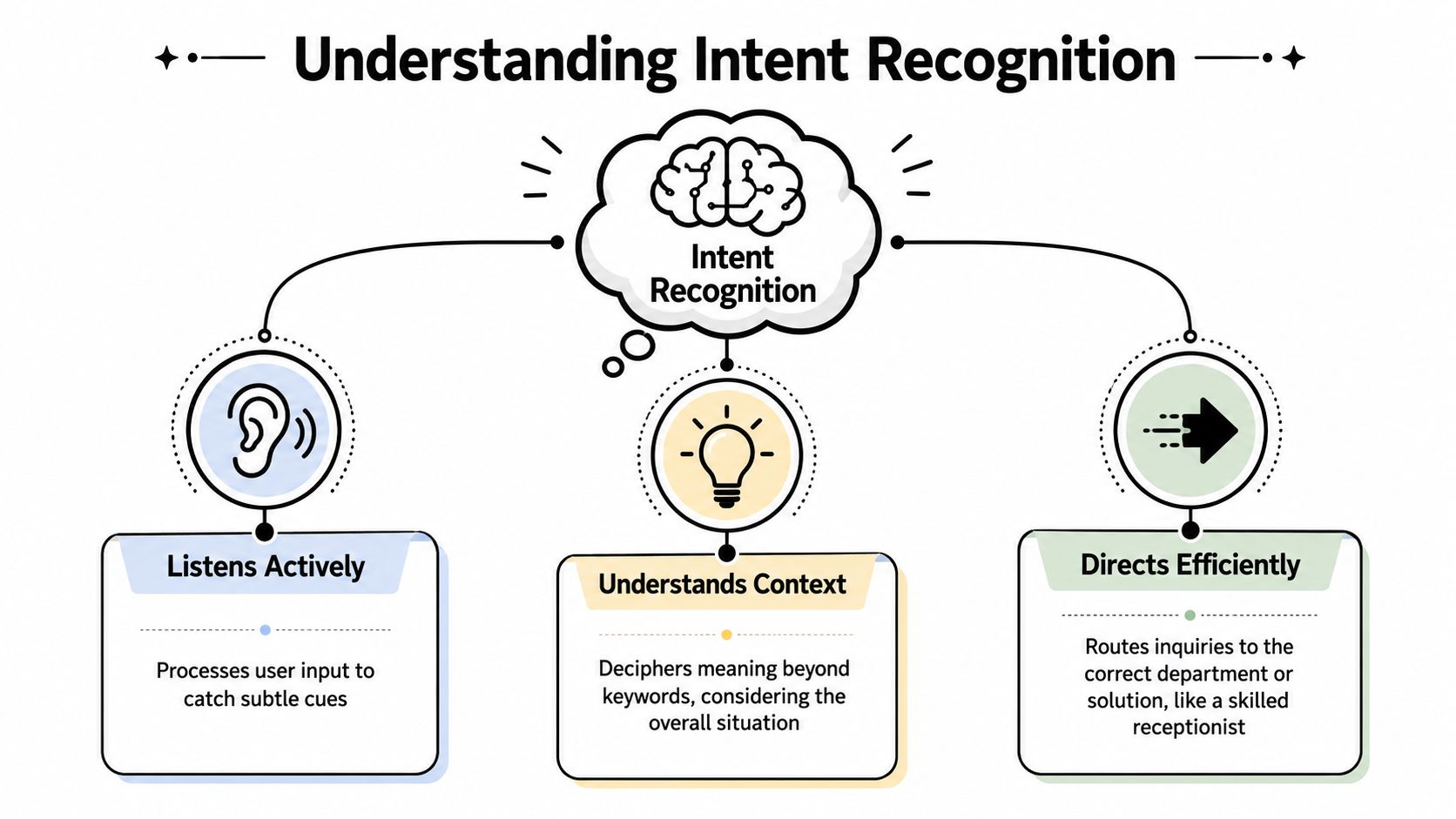
A good way to think about intent recognition is this: it behaves like a strong front-desk receptionist.
A skilled receptionist doesn't write down every word and leave the rest to chance. They listen, infer the request, identify what matters, and direct the person to the right place. If someone says, “I'm having trouble with my bill and need to talk to someone,” the receptionist doesn't label that as “customer used the word trouble.” They understand the likely intent is billing support.
That's what intent recognition does in software. It takes messy human input and converts it into a structured label that systems can use.
For a broader view of how this fits into digital assistants and workflow automation, it helps to understand what conversational AI means in practice.
Intent versus entities
This distinction matters because many teams blur the two.
Intent is the user's goal.
Examples: request_demo, cancel_subscription, report_bug, update_billing, ask_pricing.
Entities are the important details inside the request.
Examples: product name, contract date, account ID, seat count, billing period, integration name.
A message like “Need a demo for our 12-person RevOps team next week” contains both:
| Component | Example |
|---|---|
| Intent | request_demo |
| Entities | 12-person team, RevOps, next week |
If your system only detects the intent, it can route the request. If it also extracts entities, it can prepare the right next step. That might mean assigning the lead to the right rep, pre-filling CRM fields, or creating a scheduling workflow.
What this looks like in the real world
In practice, businesses usually encounter intent recognition in channels like:
- Contact forms where users leave open-text questions
- Chatbots that need to classify requests before answering
- Support email triage
- Call routing for spoken requests
- In-app prompts that react to behavior or user questions
Practical rule: If a person's request should trigger different downstream actions depending on what they mean, you need intent recognition.
The value isn't academic. It's operational. It gives your tools a way to understand purpose well enough to start the right workflow without waiting for a human to interpret the message first.
The Core Engine How Intent Recognition Works
A buyer lands on your pricing page, scrolls halfway, opens the security tab, clicks into your Salesforce integration docs, then starts a chat with “Need to confirm SSO and data residency before we book time.”
A basic workflow treats that as a single chat message. A stronger intent system reads the full pattern. The message suggests a security review. The clickstream suggests late-stage evaluation. Together, they support a very different next action, such as routing to sales engineering instead of sending a generic chatbot reply.
Teams usually begin with keyword rules because they are fast to ship.
If a message contains “pricing,” send it to sales. If it contains “bug,” send it to support. If it contains “cancel,” trigger a retention path. That can work for a small queue with predictable language. It starts to break once volume grows, product lines expand, and users express the same goal in very different ways across forms, chat, email, and in-app behavior.

Why keyword matching breaks
Keyword logic struggles because intent is rarely contained in one obvious word.
A prospect might write “cost,” “quote,” “commercial terms,” or “budget approval” instead of “pricing.” A customer reporting a defect might say “sync failed again,” “records are missing,” or “the integration stopped updating” without ever typing “bug.” In SaaS, the same user may also signal intent without saying anything at all. Repeated visits to billing settings, a long pause on the cancellation flow, or multiple clicks on API rate limit documentation can all indicate what they are trying to do before they submit a request.
Common failure modes include:
- Synonym drift: the user chooses language your rules did not cover
- Ambiguity: “account issue” might mean billing, login, permissions, or security
- Mixed intent: one message includes a product question, procurement concern, and support issue
- False positives: “the pricing page is broken” is a product issue, not a sales lead
- Behavioral blind spots: the text looks neutral, but the surrounding clicks and scroll depth show strong buying or churn intent
Once teams start patching these gaps with more rules, maintenance cost rises fast. Accuracy often still falls because the rule set gets harder to reason about.
The shift to machine learning
Modern intent recognition systems learn from examples instead of relying only on fixed triggers.
You feed the model labeled inputs such as “Can someone walk us through enterprise pricing?” as pricing_inquiry, or “Our Okta setup stopped working after the update” as integration_help. The model then learns patterns across many phrasings. It scores which intent best fits the full input, rather than checking whether one exact term appears.
In production, that engine usually follows a practical sequence. Clean the input. Turn text, and sometimes UI behavior, into features the model can use. Classify against defined intent categories. Then apply a confidence threshold to decide whether to automate, ask a clarifying question, or send the case to a human. That threshold is where a lot of business value is won or lost. Set it too low and bad routing creates cleanup work for sales and support. Set it too high and automation never handles enough volume to matter.
For SaaS teams, UI interaction data proves unusually valuable. A chat message that says “still looking into this” is vague on its own. If the same user has clicked pricing, compared plan limits, visited the security page twice, and opened the demo form, the likely intent is much clearer. The system can treat behavior as supporting evidence, not just background analytics.
Meaning, context, and business action
Modern models are better because they interpret phrases in context.
Words with related meaning tend to group together in the model's representation, so “buy,” “purchase,” and “procure” can point to a similar commercial intent even when the wording changes. Context also helps separate similar-looking requests. “I need to add seats” may indicate expansion, billing help, or an admin workflow depending on the rest of the message and what the user was doing in the product before they asked.
As Hamming AI notes in its review of intent recognition at scale, models such as BERT pushed benchmark intent-classification accuracy above 97%, and newer LLM-based approaches support zero-shot and few-shot classification with prompt-based setups: https://hamming.ai/resources/intent-recognition-voice-agents-at-scale. For a business, the practical takeaway is not “use the newest model.” It is that strong language understanding reduces how much labeled data you need to get an initial system working, especially for smaller intent sets.
The trade-off is control. More capable models usually need better evaluation, clearer fallback logic, and tighter governance around edge cases.
Ask a simple operational question: does the system route the request, or trigger the next step, the way your best human operator would?
What works and what usually doesn't
A practical comparison:
| Approach | Where it works | Where it struggles |
|---|---|---|
| Keyword rules | Small workflows, narrow vocabulary, quick prototypes | Language variation, maintenance overhead, mixed intents, no behavioral context |
| Traditional ML classification | Stable use cases with labeled data and clear categories | New intents, product changes, domain drift |
| Transformer and LLM approaches | Better paraphrase handling, broader coverage, useful with less training data | Confidence calibration, governance, prompt and evaluation design |
| Hybrid text plus UI signals | SaaS onboarding, lead qualification, churn detection, proactive in-app automation | Instrumentation quality, event noise, privacy and data-mapping complexity |
For most B2B and SaaS teams, the best system is hybrid. Use text to classify stated intent. Use clicks, page views, scroll depth, and feature usage to sharpen confidence and time the response. That is how intent recognition moves from passive routing to proactive automation. It helps qualify leads earlier, trigger support before frustration turns into churn, and keep human teams focused on the cases where judgment actually matters.
Fueling the Engine Data and Evaluation
A founder usually sees the failure only at the end. A hot lead gets routed into general support. A frustrated trial user clicks pricing, visits cancellation, opens the docs, then leaves without help. The model did classify something. It just classified the wrong business action.
That is usually a data and evaluation problem, not a model problem.
Intent recognition works only when the labels match real operating decisions. If your team cannot agree on what should trigger sales follow-up, support triage, onboarding help, or a save play, the system will mirror that confusion at scale. This matters even more in SaaS, where user intent is not expressed only through text. It also shows up in product behavior: repeated clicks on upgrade pages, scroll depth on integration docs, feature abandonment, and account activity patterns.
The first job is building an intent taxonomy that maps to actions your business will take. For a SaaS company, that might include request_demo, pricing_inquiry, report_bug, cancel_plan, integration_help, security_question, and partner_request. Good categories create clean routing, clean reporting, and cleaner automation. Bad categories create queue clutter and false confidence.
Start with workflow outcomes
A practical test is simple. If two inputs should trigger the same owner, SLA, or automation, they can usually share an intent label. If they require different handling, separate them.
The mistake I see often is teams labeling by wording instead of operational outcome. “Need help with SSO,” “Can your platform support Okta?” and “Our security team needs access controls details” may sound different, but if they all need review from the same technical or security motion, your taxonomy should reflect that.
Behavioral signals help here. A user who asks a vague question in chat might look low-intent in text alone. If that same user has viewed pricing twice, clicked enterprise features, and spent time on security documentation, the routing decision changes. That is where intent recognition becomes more useful than a basic chatbot classifier. It can help the system act on what users do, not only what they say.
Bad taxonomies usually fail in predictable ways:
- Too broad: “sales” and “support” become dumping grounds, so automation saves little time
- Too granular: labels become too hard to apply consistently, so training data degrades fast
- Too text-only: the system misses strong product signals that indicate buying intent, onboarding friction, or churn risk
The labeling process matters just as much as the category list. If one reviewer tags “Can I speak to someone about SSO?” as security_question and another tags it as request_demo, the model learns inconsistency. The downstream result is familiar. Misrouted leads, slower support, and less trust from the team supposed to rely on the system.
Why accuracy alone can mislead
A single score is easy to report and easy to misuse.
High headline accuracy can still hide expensive mistakes if the misses happen on high-value intents such as demo requests, cancellation risk, or urgent support. As noted earlier, even a small error rate turns into a steady stream of bad routing when volume is high. The business question is not “Is the model accurate?” The better question is “Which mistakes cost us revenue, time, or customer trust?”
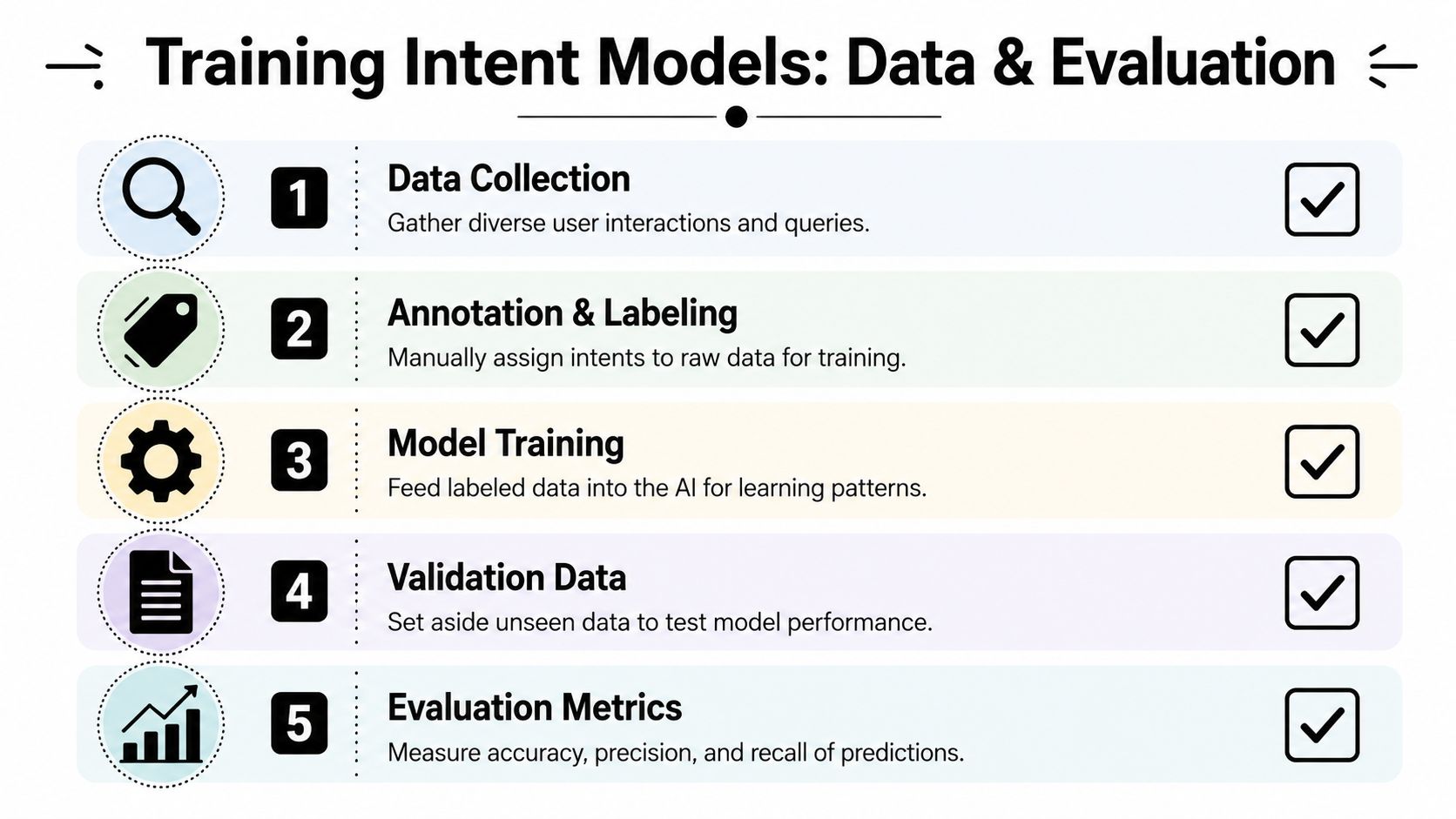
Use a small set of metrics tied to operational risk:
| Metric | Business meaning |
|---|---|
| Accuracy | Overall share of correct predictions |
| Precision | How often a predicted intent is actually right |
| Recall | How often the model catches the cases you care most about |
| Confidence score | How sure the system is before it triggers automation |
If recall is weak on request_demo, sales loses pipeline. If precision is weak on billing_support, agents waste time cleaning the queue. If confidence scores are poorly calibrated, automation fires when it should have waited for a person.
A safe automation system routes decisively when confidence is earned, and pauses when it is not.
Confidence scores are where automation becomes usable
Confidence thresholds are an operating policy, not just a model setting.
High-confidence cases can route automatically, open records, trigger in-app guidance, or notify the right team. Low-confidence cases should go to a person with context attached: likely intent, recent page views, clicked elements, account status, and prior interactions. In SaaS, that extra UI context often makes the handoff faster and more accurate than text alone.
This is especially relevant for voice interfaces inside support and productivity workflows. Teams exploring spoken requests can pair utterances with behavioral context to reduce ambiguity. For a practical example, Using voice commands with ChatGPT shows how speech input fits into real usage, but the business value comes from what happens after capture: classify the request, combine it with session behavior, and trigger the right next step.
Evaluation should follow the same logic. Test the model on messy, real traffic. Include short messages, ambiguous requests, and sessions where clicks and scrolls tell a different story than the text. Review failure cases by business impact, not only by count. That is how intent recognition starts improving qualification, triage, and customer experience instead of becoming another AI feature that looks good in a dashboard and disappoints in production.
Actionable Use Cases for B2B and SaaS
The easiest place to apply intent recognition is where your team already loses time to sorting. In B2B and SaaS, that usually means inbound forms, support channels, and product activity.
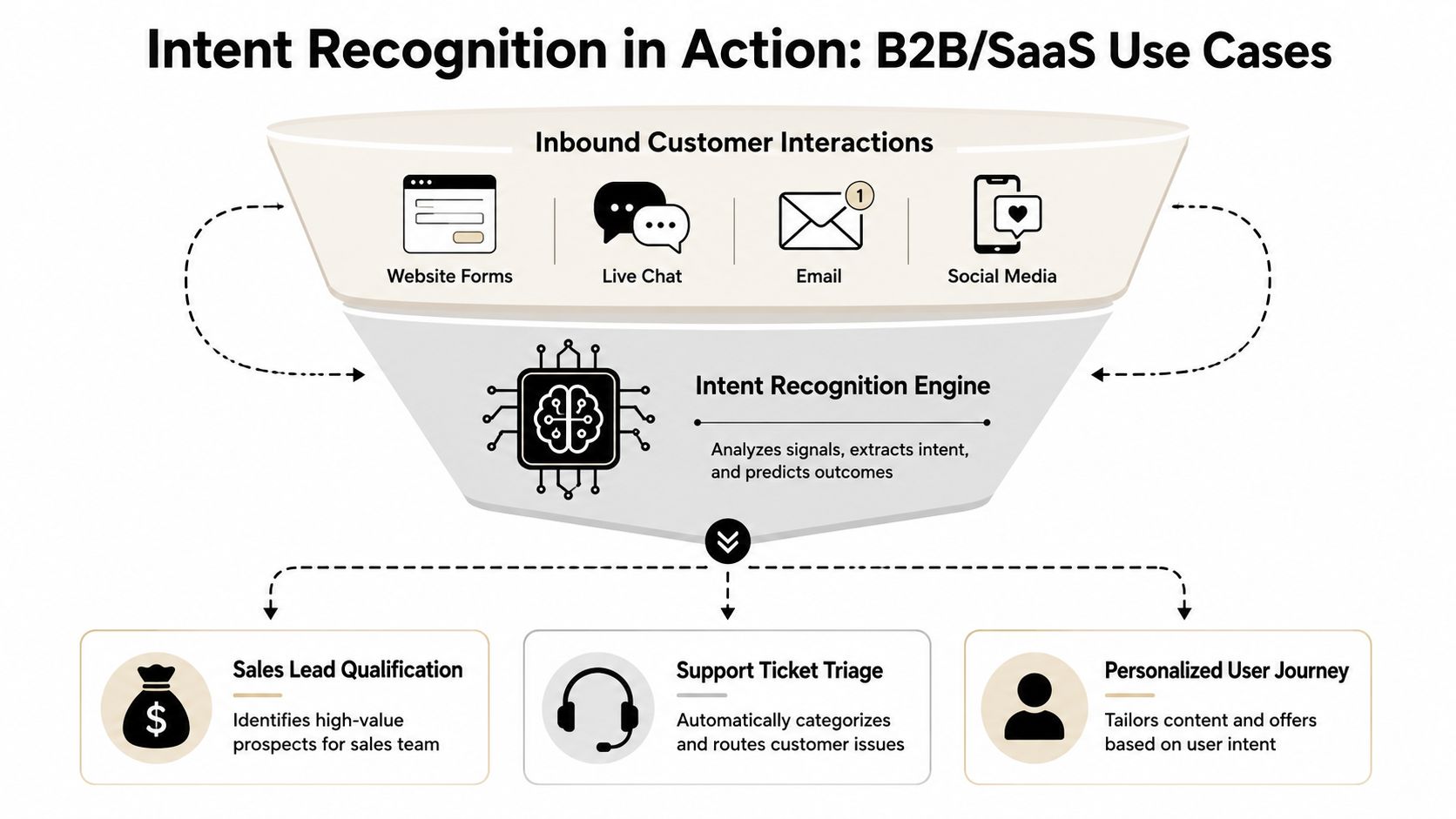
A simple example is a contact form with one open text field. Instead of sending every submission to a generic inbox, the system classifies intent first. “Need pricing for our regional team” becomes a sales workflow. “Your webhook docs don't match the API response” becomes technical support. “Do you integrate with our stack?” may go to solutions engineering or a pre-sales queue.
Three high-leverage applications
- Sales lead qualification: Intent recognition can separate active buying signals from low-intent inquiries and non-sales noise. That keeps the CRM cleaner and helps reps respond based on what the buyer is asking for.
- Support ticket triage: Incoming emails and chat transcripts can be categorized by issue type, urgency, or required team before an agent ever reads them.
- Voice routing: Callers can say what they need in natural language, and the system can route the call path based on meaning rather than keypad menus.
For teams experimenting with spoken interfaces, Using voice commands with ChatGPT is a useful reference point for how voice input changes user expectations around speed and natural phrasing.
Later in the workflow, the same classification layer can help generate better follow-up actions. A pricing inquiry can trigger a commercial reply path. A cancellation signal can open a save-play or customer success intervention. A feature question can surface relevant docs before a human joins.
Here's a quick walkthrough of the broader field:
The underused frontier inside SaaS products
Most articles stop at chatbots and call centers. That leaves out one of the most interesting directions for SaaS operators: intent recognition from UI behavior.
Google's research, discussed in its post on UI interaction trajectory decomposition, shows that analyzing user interface interaction trajectories can let small models outperform large ones like Gemini Pro on mobile datasets. The core idea is to infer intent from a sequence of user actions inside an interface, not just from what the user says.
Sometimes the strongest intent signal isn't a sentence. It's a pattern of clicks, revisits, hesitations, and abandoned actions.
For SaaS companies, that opens practical possibilities:
- Expansion intent: a user repeatedly explores admin, seat management, and billing pages
- Support intent: a customer loops through settings, docs, and error states
- Churn risk intent: a user visits downgrade or export areas, then stalls
- Onboarding friction: a new account repeats setup steps without completion
Instead of waiting for a ticket or cancellation note, the product can detect likely intent early and trigger context-aware help, account outreach, or guided flows. This capability makes proactive automation more valuable than reactive automation.
Integrating Intent Recognition Into Your Workflows
Intent recognition becomes useful only when it connects to systems your team already uses. That usually means forms, email, chat, CRM, helpdesk, and sometimes voice tooling. The common integration pattern is straightforward: an event happens, your workflow calls an intent service, and the returned label determines the next action.
If you're building this into a broader orchestration layer, an AI agent workflow builder gives a good picture of how classification, routing, and follow-up actions fit together.
The webhook pattern most teams use
A practical architecture often looks like this:
Trigger event
A user submits a form, sends an email, starts a chat, or completes an in-app action sequence.Payload sent to an intent service
The automation platform sends the text, transcript, or behavior summary to a tool such as Dialogflow, Rasa, or a custom API endpoint.Structured response returned
The service replies with an intent label, extracted entities, and a confidence score.Workflow decision made
Your automation layer checks the confidence threshold and chooses whether to proceed automatically or hand off.Downstream actions executed
The workflow creates a CRM record, opens a helpdesk ticket, posts to Slack, updates a customer profile, or alerts a human owner.
A simple end-to-end example
Here's a common B2B flow:
| Step | Action |
|---|---|
| User input | A prospect submits “Need a demo for our compliance team” |
| Automation | Workflow sends the message to the intent API |
| Model output | request_demo with relevant entities |
| System action | CRM deal is created and sales gets notified |
| Fallback logic | If confidence is low, the request goes to a shared review queue |
This architecture is effective because it isolates the intelligence layer from the action layer. You can upgrade the model later without redesigning your CRM, ticketing, or messaging systems.
Where implementations usually fail
Most integration problems aren't caused by the API call itself. They show up in workflow design.
- No fallback path: low-confidence predictions still trigger irreversible actions
- Weak schema design: intent labels don't map cleanly to actual business processes
- No audit trail: teams can't review why the system routed a request a certain way
- No feedback loop: misclassifications aren't captured and relabeled for improvement
A strong implementation treats intent recognition as a decision service inside a larger operating system, not as a magic feature bolted onto a chatbot.
Your Implementation Checklist
The cleanest way to start is with one workflow that already hurts. Don't begin with every channel at once. Pick the intake point where humans spend the most time sorting and where classification changes the next action clearly.
Eight steps that keep the project grounded
Define the business goal
Be specific. Faster lead response, cleaner support routing, better call triage, reduced manual inbox review. If the goal is vague, the taxonomy will be vague too.Map user intents
Write down the actual goals users bring to that channel. Use business actions, not abstract labels.Gather and label real examples
Pull from support emails, form submissions, chat logs, and call transcripts. Use your own language data whenever possible.Choose the tool path
Off-the-shelf APIs are faster to launch. Custom models give more control. The right choice depends on domain complexity, governance, and internal capability.Train and test with realistic edge cases
Include ambiguity, short messages, multi-part requests, and off-topic noise. That's where weak systems break.Set confidence thresholds and escalation rules
Don't automate uncertain classifications as if they're facts. Route doubtful cases to humans.Connect the result to core systems
CRM, helpdesk, Slack, email, phone routing, and product analytics are the usual destinations.Monitor errors and refine
Every misclassification is training data for the next version. Review patterns, not just isolated misses.
The best early implementation is boring in a good way. It routes work correctly, reduces manual sorting, and doesn't create new cleanup tasks.
Intent recognition works when it becomes part of daily operations, not when it stays trapped inside a demo bot. For founders and operators, that's the payoff. Faster routing, better qualification, more relevant responses, and a system that understands what users are trying to do before your team has to decode it manually.
If you want help designing or implementing intent recognition into your sales, support, CRM, or voice workflows, MakeAutomation can help you turn messy inbound activity into structured automation that saves time.