AI for Business Efficiency: Accelerate Growth in 2026
Most B2B founders don't have an AI problem. They have a workflow problem.
The team already uses ChatGPT. Sales has a meeting note tool. Support has a chatbot trial. Ops is testing a few automations in Zapier or Make. Yet the founder is still approving follow-ups at night, reps are still updating the CRM by hand, and project managers are still chasing status in Slack.
That's the stall point. AI feels useful, but the business doesn't feel lighter.
That gap is real. A 2025 Gusto survey cited by JPMorganChase found that more than 80% of small businesses using AI report productivity gains, while there is still often a gap between tool-level wins and firm-wide impact, which is why simple adoption isn't enough without workflow integration and process redesign (JPMorganChase Institute on AI use by small businesses).
The practical question isn't whether AI can help. It can. The question is whether you're using it to shave minutes off isolated tasks, or to remove entire categories of manual work across sales, service, and operations.
From Manual Grind to Automated Growth
A familiar pattern shows up in growth-stage B2B and SaaS companies.
Leads come in from forms, outbound replies, webinar signups, and partner referrals. Someone cleans the data. Someone qualifies the lead. Someone routes it. A rep writes the first reply, then a manager checks the CRM because half the fields are missing. After the call, the notes sit in a transcript tool, not in the pipeline. A week later, nobody trusts the forecast.
Nothing in that chain is individually catastrophic. Together, it creates drag.
Where founders lose time
Founders usually notice the pain in three places:
- Sales motion slows down because reps spend time researching, updating records, and writing routine follow-ups instead of moving deals.
- Operations become reactive because project updates live in inboxes, Slack threads, and spreadsheets rather than in one system of record.
- Managers become human middleware because they keep stitching together information that software should already pass between tools.
The biggest efficiency leak usually isn't a hard task. It's the handoff between tasks.
That's why AI for business efficiency works best when it's tied to a process with a visible owner, a measurable delay, and a recurring decision. If there's no recurring workflow, there's nothing to optimize. There's only one more app.
The shift that matters
The useful shift is simple. Stop asking, “Where can we use AI?” Start asking, “Where does work wait?”
Look for queue time, rework, duplicate entry, approval bottlenecks, missed follow-ups, and reporting that depends on one person exporting data on Friday afternoon. Those are the places where AI moves from interesting to operational.
In B2B and SaaS, the best results usually come when AI sits inside existing systems such as your CRM, project management stack, support desk, and internal documentation flow. That's where efficiency becomes visible in metrics like response time, pipeline hygiene, cycle time, backlog, and hours reclaimed.
How AI Transforms Processes Not Just Tasks
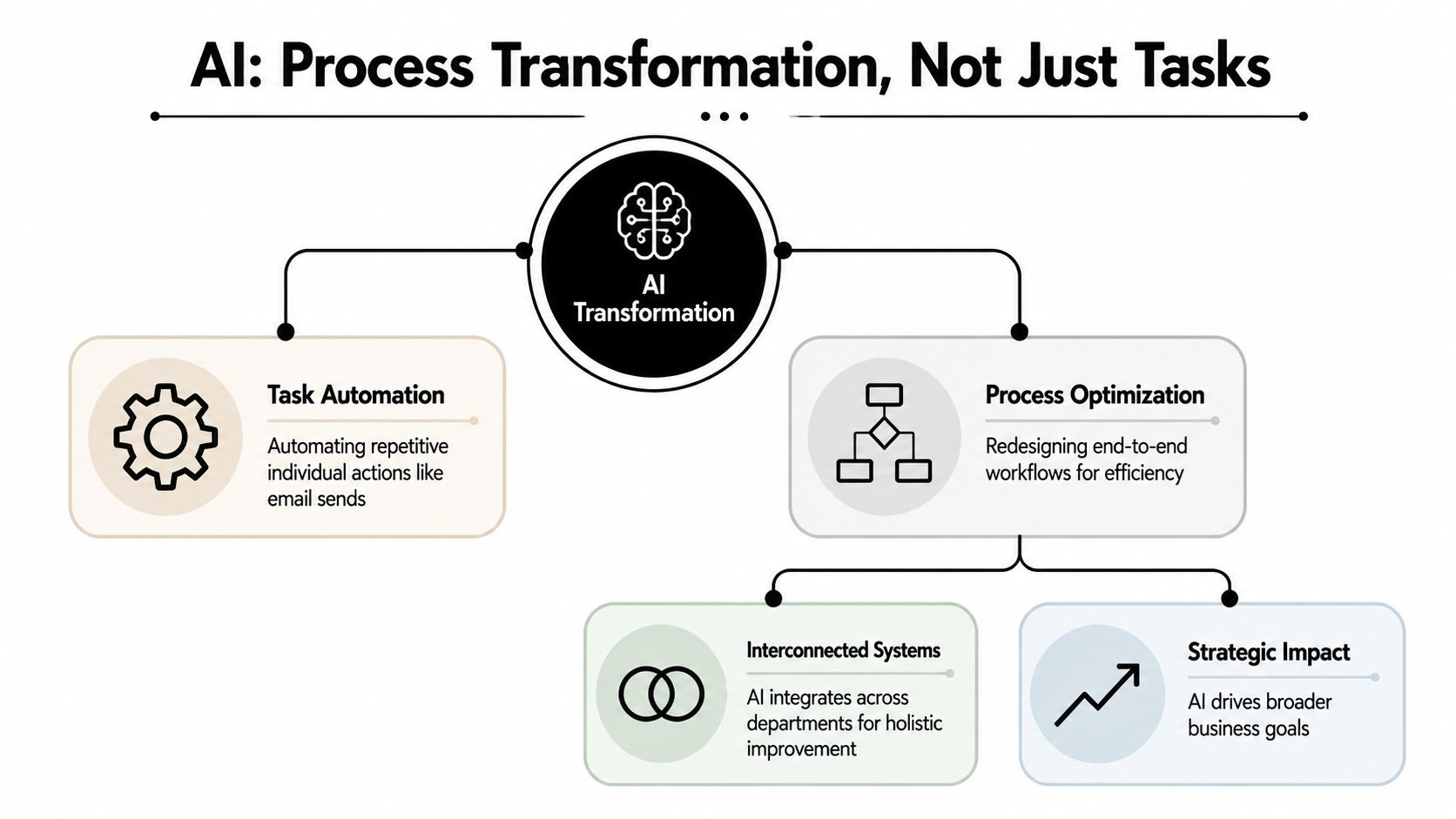
Organizations often start with task automation. This is a typical first step. A rep asks AI to draft an email. A support lead uses it to summarize a ticket. An operator uses it to clean a spreadsheet. Useful, yes. Profoundly impactful, not yet.
Task automation is like giving one person a power tool. Process transformation is redesigning the assembly line so the work moves with less friction from one stage to the next.
What task automation looks like
A task-level use case usually has one input and one output.
| Scenario | AI does | Limitation |
|---|---|---|
| Sales follow-up | Drafts an email after a call | Rep still has to decide timing, update CRM, and create next steps |
| Support ticket | Summarizes a customer issue | Summary may never trigger routing or SLA handling |
| Internal reporting | Writes a status update | Data still has to be gathered manually |
These uses save effort, but they don't remove the operational gap between systems and teams.
What process optimization looks like
Process-level AI changes the flow itself.
A stronger design looks more like this:
- A lead enters the system from a form, chat, or inbox.
- AI enriches and classifies it based on firmographic and contextual signals already available to the business.
- Routing rules assign ownership inside the CRM.
- The first-touch sequence adapts to the lead source, account type, or product interest.
- Call notes and summaries sync back into the pipeline automatically.
- Managers get exception alerts only when a deal stalls, a follow-up is overdue, or required fields are missing.
That isn't one AI feature. It's a workflow.
In a 2025 industry overview, the most common AI use cases in large enterprises were process automation (76%), chatbots (71%), and data analytics (68%), with successful adopters seeing up to 55% higher operational efficiency (2025 AI statistics overview). That matters because mature teams aren't just using AI to generate content. They're using it to reduce latency across the work itself.
The practical difference
If you want AI for business efficiency, judge every use case with one question.
Practical rule: If the output still depends on a person copying, pasting, reformatting, forwarding, or re-entering data in another tool, the process is not automated yet.
That's why the best implementations connect tools like HubSpot, Salesforce, Pipedrive, Linear, Jira, Notion, Slack, Intercom, Zendesk, and scheduling platforms into one operating flow. The win comes from fewer handoffs, cleaner data, and fewer decisions that need human intervention.
High-Impact AI Use Cases for B2B and SaaS
The most valuable use cases aren't the flashiest. They're the ones your team repeats every day.
Across AI-enabled workplaces, employees commonly report saving 2 to 3 hours per week by automating repetitive tasks, and 75% of generative AI users want to automate more of their work (artificial intelligence statistics for workplaces). In B2B and SaaS, those saved hours usually come from better routing, faster documentation, cleaner records, and less switching between systems.
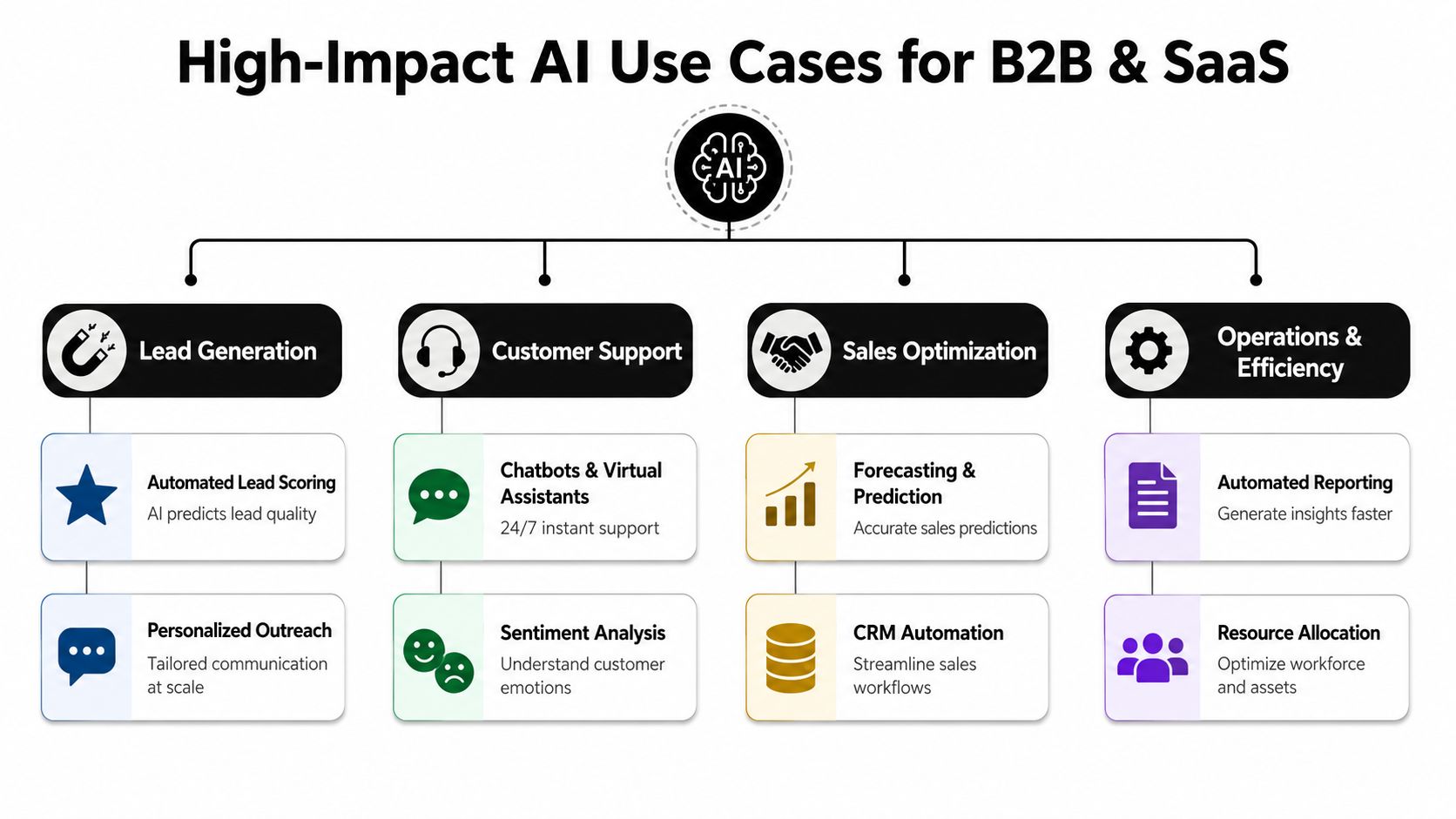
Lead generation that doesn't die in the inbox
Before AI, a marketing-qualified lead often sits untouched while someone checks company size, role, territory, product fit, and source quality.
A better workflow pulls the lead into the CRM, enriches the record, tags the likely segment, and sends the rep a structured brief with suggested first-touch messaging. If the account fits an outbound play, AI can draft personalization based on firm context and previous interactions. The rep edits, sends, and moves.
What works:
- Automated qualification logic that flags obvious fit and mismatch cases
- Research summaries that reduce prep time before outreach
- Routing based on rules instead of manager judgment calls in Slack
What doesn't work:
- Generic personalization at scale that sounds automated
- Scoring models no one trusts because nobody understands the criteria
CRM automation that keeps the pipeline honest
Most CRMs fail because the data entry burden falls on sales reps.
The fix isn't to ask reps to be more disciplined. It's to reduce the amount of admin work required to maintain clean records. AI can summarize calls, extract next steps, identify objections, draft follow-ups, and suggest field updates. The rep reviews and approves. That's a very different motion from writing everything manually after every conversation.
Here, MakeAutomation is one option teams use to connect CRM workflows, outreach steps, and operational automations across existing tools without rebuilding their full stack from scratch.
Bad CRM hygiene isn't usually a people issue. It's a process design issue.
Project management that surfaces risk earlier
Project managers in agencies and SaaS teams spend too much time collecting updates that already exist in scattered systems.
AI helps when it reads tickets, comments, deadlines, blockers, and handoff notes across tools like Asana, ClickUp, Jira, Linear, and Slack, then creates usable status summaries. Its core value isn't the summary itself. It's the early warning.
Useful patterns include:
- Detecting stalled work when dependencies haven't moved
- Summarizing client-facing updates from internal activity
- Flagging resource conflicts when the same team is overloaded across active projects
That reduces reporting overhead and makes project review meetings shorter and more concrete.
Recruitment and internal ops that stop draining managers
Hiring and internal coordination create hidden workload. Screening, scheduling, note-taking, and handoff documentation all eat time.
AI can assist with candidate intake summaries, scheduling coordination, interview note consolidation, and internal SOP drafting. It doesn't replace judgment. It removes repetitive coordination work so hiring managers spend their time evaluating people, not administrating process.
Voice and service workflows that absorb routine demand
Support and inbound sales teams often get trapped in repetitive requests. Password resets, pricing questions, booking changes, qualification calls, basic troubleshooting, and routing requests can consume hours without creating much strategic value.
That's where AI voice and chat agents are useful, especially when they're attached to a clear escalation path and a documented knowledge source. For teams exploring this area, an AI agent for customer service can fit into support intake, routing, and first-response workflows when the business has already defined what should be automated and what should go to a human.
The trade-off is straightforward. If your knowledge base is weak, the agent will expose that weakness immediately.
Measuring What Matters With AI KPIs
If you can't tie AI to an operating metric, you don't have an efficiency initiative. You have software spend.
At the macro level, generative AI is projected to raise U.S. labor productivity by 0.5 to 0.9 percentage points annually through 2030 under a moderate-adoption scenario (projection on AI and labor productivity through 2030). At the company level, that only becomes real when leaders connect AI to a small set of process KPIs that already matter.

Start with operational baselines
Before rolling out anything, document the current state.
Track:
- Time spent on repetitive admin such as note entry, scheduling, and status reporting
- Cycle time from lead capture to first touch, from ticket open to resolution, or from brief to delivery
- Error and rework rates in CRM records, project updates, or support classification
- Queue delays between handoffs
Without a baseline, teams tend to over-credit AI for improvements that came from better discipline, staffing, or cleaner process design.
A practical framework for this sits close to standard operational efficiency metrics rather than vanity metrics about prompt volume or logins.
Match the KPI to the workflow
Not every use case should be measured the same way.
| Workflow | Better KPI | Weak KPI |
|---|---|---|
| Lead routing | Time to assignment, first-response speed, qualified handoff rate | Number of AI prompts used |
| CRM updates | Manual entry time reclaimed, field completeness, follow-up adherence | Number of summaries generated |
| Support intake | Resolution speed, escalation quality, repeat-contact reduction | Chat volume alone |
| Project reporting | PM hours reclaimed, status accuracy, blocker visibility | Count of updates produced |
The right KPI should answer one business question. Did this remove labor, reduce delay, improve consistency, or lower cost to serve?
Watch for false positives
Some AI projects look successful because the demo works, not because the process improved.
If a team says the tool is helpful but managers can't see cleaner pipelines, faster handoffs, or less admin load, the implementation is unfinished.
Common false positives include polished summaries nobody uses, dashboards with no decision tied to them, and copilots that speed up drafting but create more review work downstream.
That's why measurement has to sit inside the workflow, not around it.
A Practical Roadmap to AI Implementation
Most AI projects fail before the model matters. They fail in scoping, data quality, ownership, and workflow design.
Realizing AI value depends heavily on how work is structured, and organizations using intelligent document processing can see 200-300% ROI within the first year when they address data readiness and process cleanup first (research on AI value, work structure, and document processing ROI).
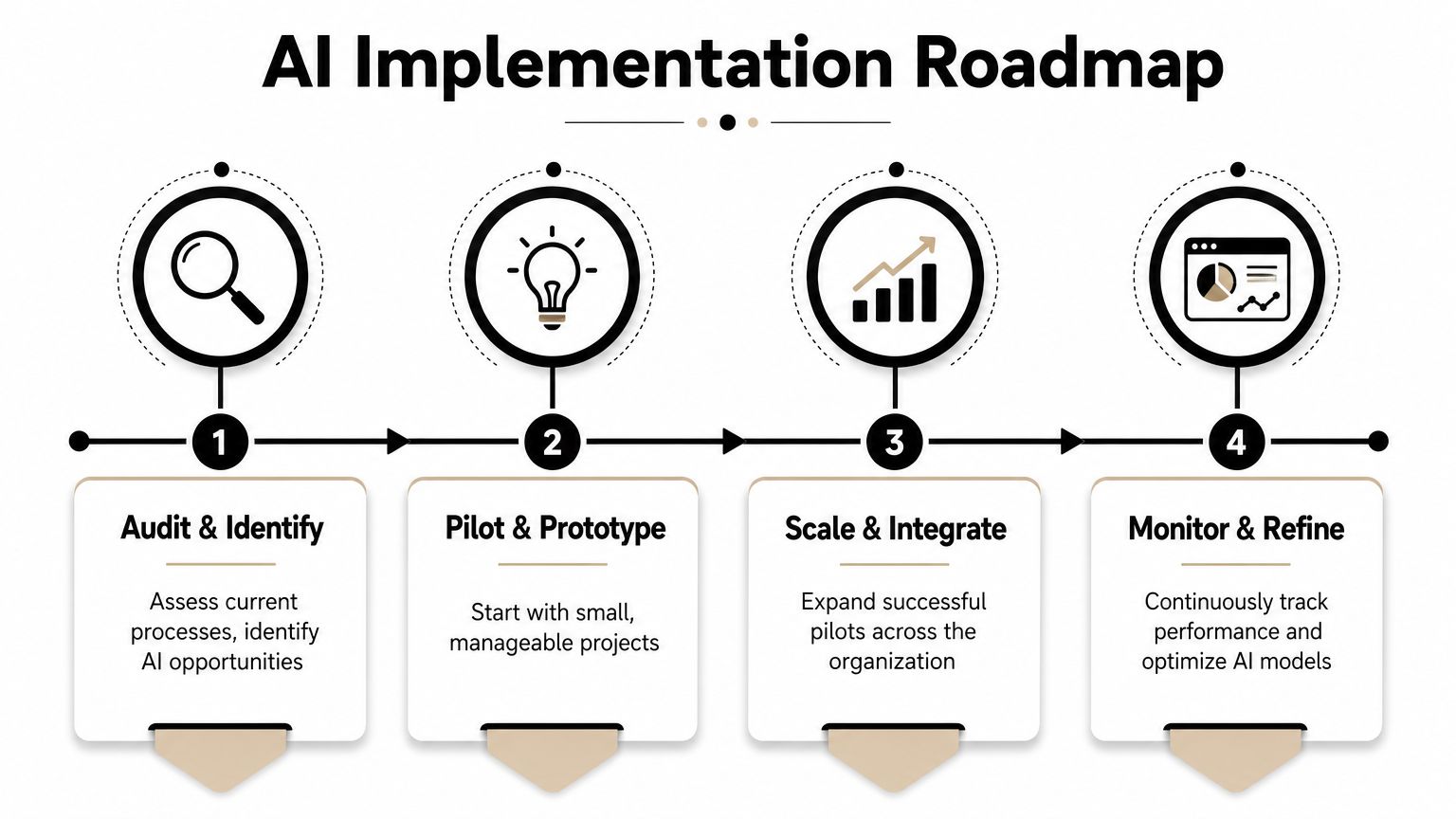
Audit the friction before you buy anything
Start with one workflow, not one tool.
Pick a process that is frequent, manual, and easy to measure. Good examples include inbound lead qualification, post-call CRM updates, support triage, project status reporting, invoice handling, or recruitment scheduling.
Ask:
- Where does the work start
- Who touches it
- Where does it wait
- What gets copied twice
- What requires judgment
- What follows clear rules
That last point matters. If a task depends on nuanced human judgment with no clear criteria, AI may assist it, but it probably shouldn't own it.
Clean inputs before expecting clean outputs
Most founders want to start with the model. The harder truth is that input quality usually determines the result.
If your CRM has duplicate records, inconsistent lifecycle stages, vague call outcomes, and missing ownership, AI will move bad data faster. If your SOPs are outdated, your support bot will automate confusion. If your docs live across Google Drive, Notion, Slack, and old PDFs with no version control, retrieval will be unreliable.
A solid implementation plan usually includes:
- Data cleanup for core systems
- Field standardization in the CRM or PM tool
- Basic governance around prompts, approvals, and access
- Clear fallback paths for edge cases and exceptions
For teams mapping that work formally, how to implement AI in business is less about choosing a model and more about defining process owners, success metrics, and integration points.
A short walkthrough can help ground the sequence in something practical.
Pilot one process end to end
Don't test AI by giving ten people ten different tools.
Choose one workflow with a clean before-and-after measure. Run it with a small team. Keep the scope narrow enough that you can observe where humans still intervene, where outputs fail, and where approvals slow the process.
Good pilot questions:
- Did the team save time
- Did quality stay stable or improve
- Did the process create less admin work overall
- Did the output land in the system of record automatically
Scale only after the handoffs work
Scaling too early creates scattered automation.
Once the pilot works, connect it to adjacent steps. For example, don't stop at call summarization. Push the summary into the CRM, create follow-up tasks, notify the owner if next steps are missing, and update the pipeline stage if criteria are met.
That's when AI for business efficiency stops being a feature and becomes part of operating rhythm.
Navigating the Human Side of AI Automation
Technology rarely causes the hardest part of implementation. Behavior does.
McKinsey-reported adoption data cited by SCU shows 88% of organizations use AI in at least one business function, and the bigger efficiency gains come when AI is used across multiple functions with connected handoffs between departments (SCU summary of McKinsey AI adoption data). That only happens when teams trust the workflow enough to use it consistently.
Why teams resist good automation
Resistance usually isn't ideological. It's practical.
People push back when:
- The workflow adds review burden instead of removing it
- The logic is opaque and nobody knows why the system routed or labeled something
- The automation threatens ownership without clarifying who approves what
- The tool arrives before training so people feel exposed, not supported
If a rep believes AI-generated notes will create compliance risk, they'll rewrite everything manually. If a support lead doesn't trust the triage labels, they'll double-check every case. If a PM thinks auto-status reports miss nuance, they'll keep chasing updates by hand.
That means your rollout has to answer human questions, not just technical ones.
The message that works
The strongest message is operational, not philosophical. Show people what work is leaving their plate.
AI adoption improves when teams can see which repetitive actions disappear, which decisions stay human, and which exceptions still need judgment.
For sales, that might mean less note entry and cleaner handoffs. For support, fewer repetitive tickets. For ops, less time collecting updates. For managers, fewer nagging reminders and less exception chasing.
Governance is part of efficiency
Good governance isn't overhead. It protects the efficiency gain.
Use a simple control model:
- Approved use cases for customer-facing and internal tasks
- Defined human review points for sensitive outputs
- Data access boundaries tied to role and system
- Fallback rules when confidence is low or context is missing
Without this, teams create shadow workflows. That's when AI spreads but efficiency doesn't.
Make AI Your Unfair Business Advantage
The promise of AI for business efficiency isn't that it writes faster. It's that your company stops paying skilled people to do low-value coordination work.
That shift happens when you redesign workflows, not when you stack more apps on top of old habits. The companies that benefit most usually start small, measure tightly, fix the handoffs, and expand only after one process works cleanly from input to outcome.
For B2B and SaaS teams, the highest-return opportunities are usually already visible. Lead routing that depends on manual triage. CRM hygiene that steals selling time. Support intake that floods humans with repetitive demand. Project reporting that turns managers into status collectors.
Those are not glamorous problems. They are profitable ones to solve.
If your goal is to save meaningful time per employee each week, start where work repeats, where information stalls, and where someone is still acting as the bridge between systems. That's where AI becomes an operational multiplier instead of software clutter.
If you want a practical plan instead of another stack of disconnected tools, MakeAutomation can help map your current workflows, identify the best automation entry points across CRM, sales, support, and operations, and turn AI from an experiment into a measurable efficiency system.