AI Agent for Customer Service: The B2B Implementation Guide
Gartner projects $80 billion in contact center cost reductions by 2026, a figure highlighted in IBM's overview of AI agents in customer service (IBM on AI agents in customer service). That number reframes the whole discussion. This isn't about adding a nicer chatbot to your site. It's about redesigning service operations around systems that can understand requests, take action, and move work across tools without waiting on a human for every step.
Most B2B founders don't have a customer service problem. They have a workflow problem wearing a customer service label. Tickets bounce between inboxes, agents retype updates into CRM records, order lookups happen in one tool while billing history lives in another, and every exception lands on a manager. A basic bot won't fix that.
A real AI agent for customer service can help. But only if you treat it like operational infrastructure, not a marketing feature. The biggest gains come when the agent has clear permissions, clean data, reliable integrations, and strict rules for when it should stop and hand work to a person.
The Urgent Case for AI in Customer Service
Gartner projects $80 billion in contact center cost reductions by 2026. For a founder, that is not a trend to watch from the sidelines. It is a sign that support operations are being rebuilt around automation, and companies that keep every routine task manual will carry a higher cost base and slower response times.

Why this has become an operations issue
Support teams are struggling to keep pace with demand, especially when requests arrive across email, chat, web forms, and phone. The pressure is not just ticket volume. It is the amount of coordination behind each resolution. An agent may need to check an order system, confirm contract status in the CRM, review billing history, update a help desk record, and send a follow-up. If those steps live in separate tools, response quality depends on people stitching the workflow together by hand.
That is where the business case gets real. The return does not come from generating faster replies alone. It comes from reducing repeat work, shortening handling time, keeping answers consistent, and giving human reps fewer chances to make avoidable errors. Companies exploring an AI voice agent for customer service usually see the same pattern. The customer conversation is only one layer. The harder part is connecting the agent to the systems that hold the truth and setting clear rules for what it can do safely.
What founders usually get wrong
Founders often misdiagnose the problem, framing it as a chatbot buying decision when it is instead an operational workflow issue.
A chat widget can answer simple questions. It will not fix messy permissions, disconnected systems, weak escalation paths, or missing approval rules. Those gaps are exactly what create compliance risk and customer frustration once an AI agent starts taking actions instead of just replying.
The practical decision is whether support stays a labor-heavy coordination layer or becomes a controlled workflow system that handles routine requests at any hour and sends exceptions to the right person with context attached. Delay has a cost. Teams answer slower, experienced reps spend time on queue cleanup, and managers become the fallback for every edge case.
Practical rule: If your team still copies information between systems to resolve common tickets, fix the workflow before you expand the bot. Otherwise you automate the conversation and keep the operational bottleneck in place.
What Exactly Is an AI Customer Service Agent
An AI agent for customer service is a software worker that can understand a request, decide the next step, and complete part of the job inside your systems. The important distinction is operational. It does not stop at answering questions. It reads context, follows rules, updates records, starts workflows, and hands off cases when the risk or complexity is too high.
That is the line between customer service automation that saves labor and automation that creates rework.
Chatbot versus agent
A traditional chatbot is limited to conversation flow. It matches prompts to prepared responses, offers a few decision branches, and breaks down when the customer asks for something slightly outside script.
An AI agent handles a broader unit of work. It can:
- Interpret intent: It identifies the task behind the message, such as changing a delivery address, checking refund status, or rescheduling service.
- Carry context: It keeps track of what the customer already said and what your team already knows.
- Use business systems: It can look up an order, open or update a ticket, write notes to the CRM, or trigger a defined process.
- Escalate with judgment: It passes the case to a human with the conversation, account details, and reason for handoff attached.
That last point is where many projects go wrong. A weak chatbot usually fails in public. A weak agent can make a quiet mistake inside the workflow, which is worse. It may update the wrong field, start the wrong process, or skip a policy check. The customer may not notice until later, but your team will.
The practical mental model
A more practical mental model is simple. A chatbot answers a question. An agent completes a task within a controlled process.
That difference matters in multi-channel support. Teams evaluating an AI voice agent for customer service usually reach the same conclusion. If voice, chat, email, and ticketing are disconnected, the customer gets a fragmented experience and the team inherits cleanup work.
Good customer service automation reduces unfinished work, not just human-written replies.
What founders are buying
When a company buys or builds an AI customer service agent, it is buying a service layer between the customer and the systems that run support.
That layer needs to do three things well:
| Capability | What it means in practice | Why it matters |
|---|---|---|
| Context handling | The agent can access prior conversation history and the account details needed for the task | Customers do not need to repeat information |
| Action taking | The agent can trigger approved operational steps instead of only describing them | Requests get resolved faster |
| Safe escalation | The agent can stop, explain why, and pass the case with notes and state preserved | Human reps spend less time reconstructing the issue |
If a vendor demo focuses on polished conversations but stays vague on permissions, system access, and escalation rules, the product is still closer to a chatbot than an agent. For a founder, that is the commercial test. The value comes from completed work, lower handling time, and fewer manual handoffs, provided the controls are strong enough to avoid compliance and data quality problems.
The Architecture of a Modern AI Agent
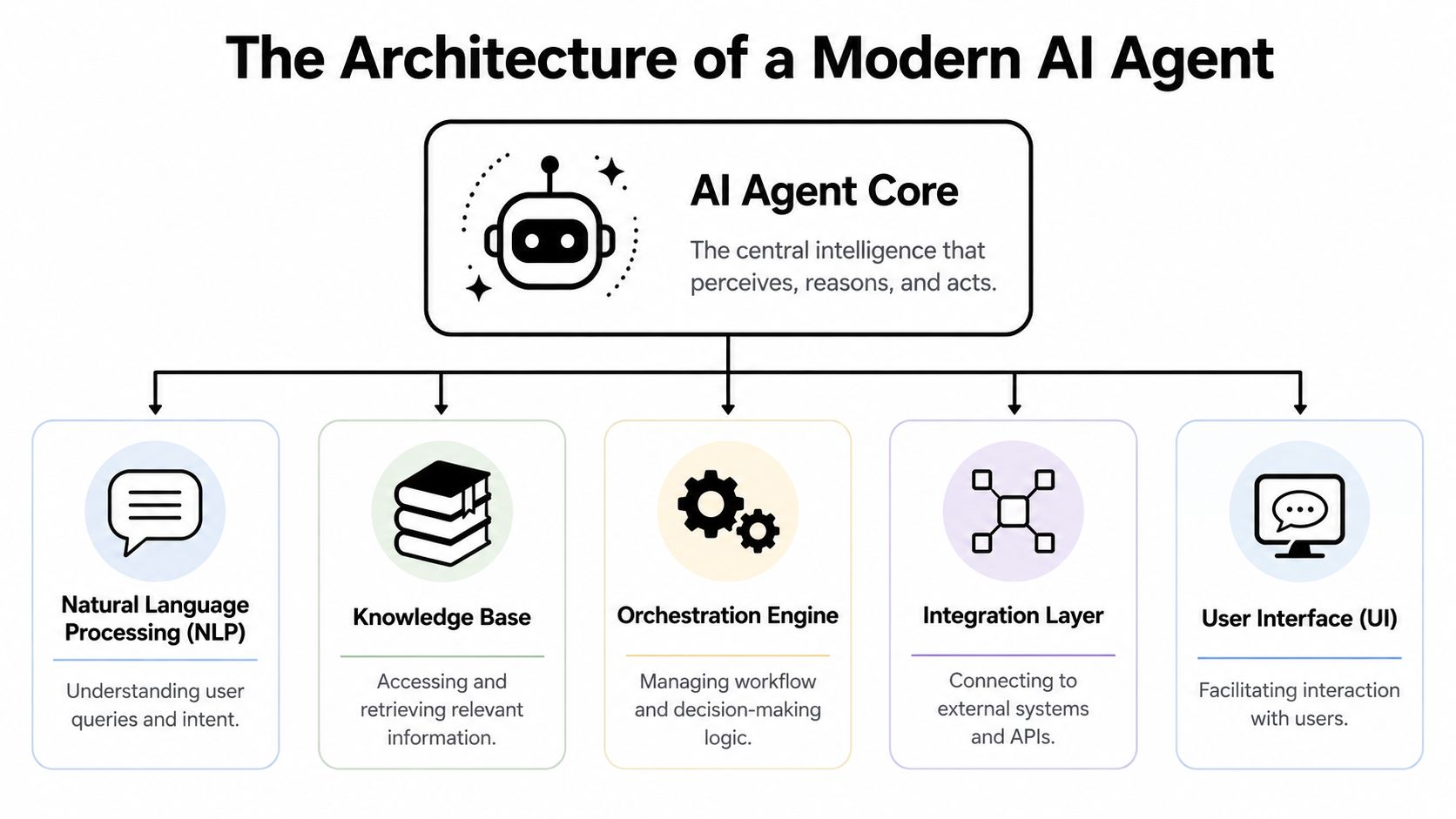
Founders often hear “AI agent” and picture a single tool. In practice, it's a stack. The interface is only the visible surface. The useful part sits underneath, where reasoning, business logic, and system connectivity meet.
The five components that matter
A workable architecture usually includes these parts:
- Language layer: This is the part that interprets what the customer means and generates the response.
- Knowledge layer: This pulls from help articles, policy docs, product instructions, and internal SOPs.
- Orchestration layer: This decides what step comes next. Ask another question, verify identity, trigger a refund review, or escalate.
- Integration layer: This connects the agent to the CRM, order system, billing platform, ticketing tool, and communication channels.
- Interface layer: User interaction occurs at this layer, through chat, email, or voice.
The orchestration layer is where many projects succeed or fail. Without it, the model may answer well but still can't complete the workflow in a controlled way.
Why integrations are not optional
A capable AI agent must combine a reasoning model with secure API connections to CRM, order-management, and knowledge-base systems so it can retrieve live context and execute actions. Decagon emphasizes that this deep bidirectional integration is a core capability for real-time transactional support (Decagon on AI agent integration architecture).
That's the architecture point most early deployments miss. If the agent can only read a static knowledge base, it can explain your returns policy but not verify whether a return has been approved. If it can't write back to your systems, it can promise a next step but still leave an agent to do the actual work later.
Here's a useful way to evaluate the stack:
| Layer | Weak implementation | Strong implementation |
|---|---|---|
| Knowledge | Static FAQs only | Structured docs plus current business data |
| Logic | Free-form replies | Controlled workflows and decision rules |
| Integration | Read-only connections | Read and write actions with permissions |
| Escalation | “Contact support” dead end | Full handoff with conversation and account context |
If you're scoping a deployment, a guide on how to build an AI agent is often more useful than another vendor demo because the hard part isn't the interface. It's the workflow and systems design behind it.
A short walkthrough helps make the architecture tangible:
Voice adds another operating layer
Voice AI introduces more than another channel. It adds turn-taking, interruption handling, identity checks, and higher expectations for continuity. In voice, a clumsy handoff is far more obvious than in chat.
That's why the architecture should be channel-agnostic at the workflow level. The same service logic should decide what the agent is allowed to do, regardless of whether the customer typed the request or said it aloud.
Calculating the Business Benefits and ROI
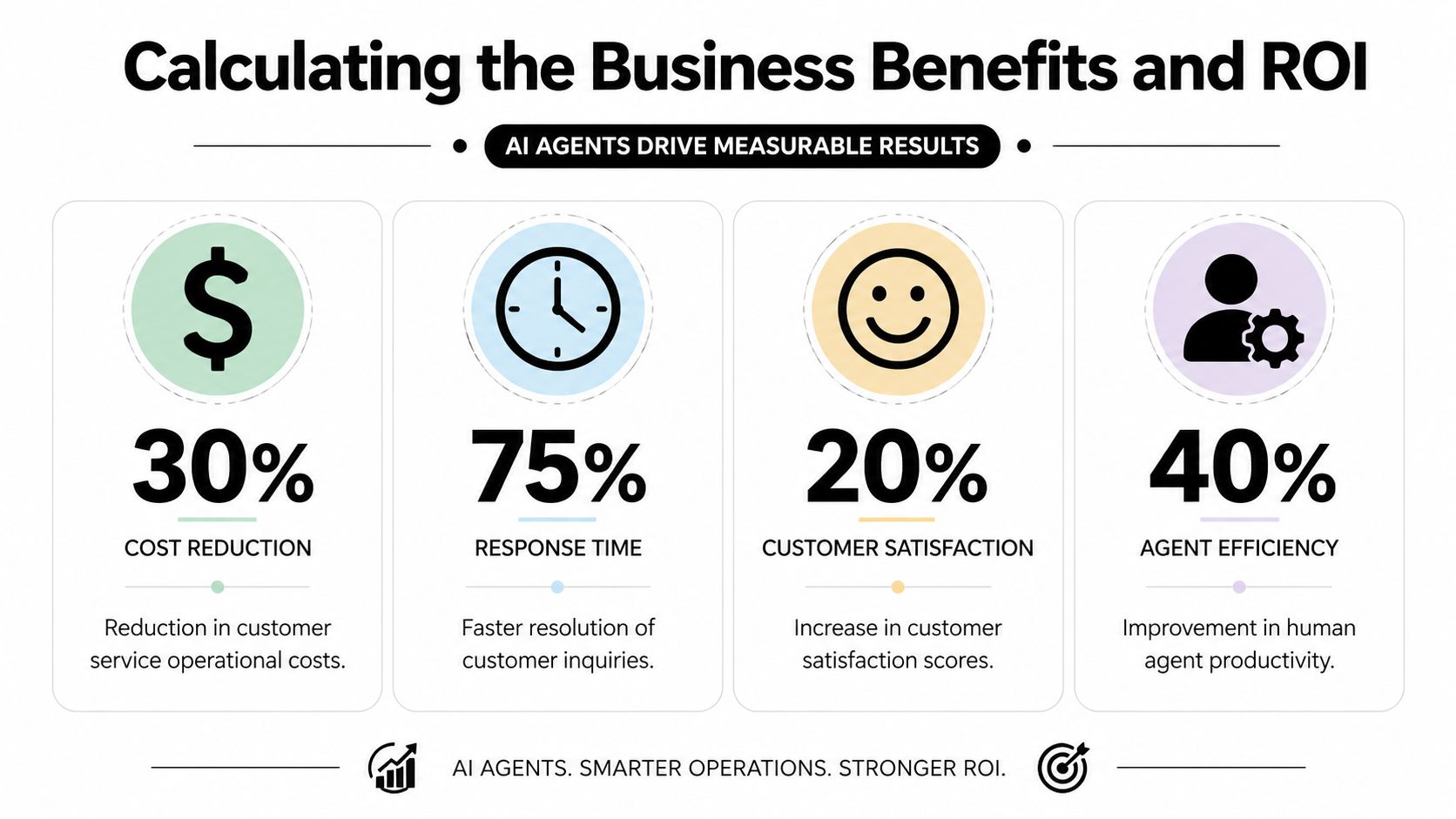
For B2B support teams, the return on an AI agent usually shows up in labor efficiency before it shows up in headcount reduction. The biggest gains come from resolving repetitive requests faster, reducing queue buildup, and giving human agents cleaner context when a case needs judgment or approval.
That matters because ROI is rarely just a support metric. It affects staffing plans, service levels, and the amount of operational drag your team carries into sales, onboarding, and account management.
Where the savings come from
The savings usually come from removing avoidable work inside the support process.
Typical examples include:
- Routine ticket absorption: Password resets, order status checks, invoice requests, and standard policy questions stop taking up agent time.
- After-hours coverage: The agent handles common first-line requests without adding overnight staffing.
- Cleaner handoffs: Human reps receive the conversation history, customer details, and the action already attempted.
- Lower queue pressure: Faster resolution of repeatable requests prevents backlog from spreading into higher-value work.
In practice, the strongest ROI appears when three conditions are true. Ticket volume is high, the requests follow clear rules, and the agent can connect to the systems required to complete the task. If the agent can answer but cannot update a record, verify an account, or trigger the next workflow step, the financial gain is smaller because the human team still has to finish the job.
This is also where governance affects return. A poorly controlled agent can create expensive rework through bad refunds, incorrect account changes, or weak documentation. An agent that resolves fewer tickets but operates within clear permissions often produces better long-term ROI than one that automates aggressively and creates compliance or customer trust issues.
A simple ROI lens for B2B teams
A practical model is enough to start.
Use three questions:
- How much routine volume can be automated without raising risk?
- How many agent hours go to status checks, information gathering, and repeat updates?
- What is that recovered time worth if the team can redirect it to escalations, renewals, or implementation support?
I usually advise founders to model capacity first, not layoffs. In the first phase, the gain is often fewer hours lost to repetitive work, better response coverage, and less queue volatility during spikes. Once the workflows are stable and the failure cases are clear, finance can decide whether that translates into slower hiring, role redesign, or direct cost reduction.
The best returns often come from the middle layer of service work. These are requests that are common enough to justify automation and structured enough to govern, but still expensive when handled manually every time.
What not to count too early
Do not count soft benefits too aggressively in the first business case. Better customer experience matters, but it only belongs in the ROI model once the agent is accurate, completes the task end to end, and escalates cleanly when it should.
The same caution applies to labor savings. Many B2B teams do not cut headcount after the first deployment. They use the recovered capacity to absorb growth, improve response times, or reduce burnout on senior agents.
A grounded rollout treats ROI as cumulative. First, reduce manual effort on repeatable requests. Next, improve consistency and coverage. Then expand into higher-value transactional work after the controls, approvals, and audit trail are in place.
Your Practical Roadmap for AI Agent Adoption
Most failed deployments start too wide. Teams try to automate the whole support function, connect every system, and cover every edge case in the first release. That creates brittle workflows and stakeholder panic the first time the agent mishandles a request.
A better path is narrower and more operational. Jeeva's implementation guidance recommends starting with high-volume, low-complexity ticket categories, defining explicit escalation triggers, and aiming to position the system to resolve roughly 70% of inquiries without human intervention while monitoring performance and retraining on failure modes (Jeeva implementation plan for AI customer support agents).
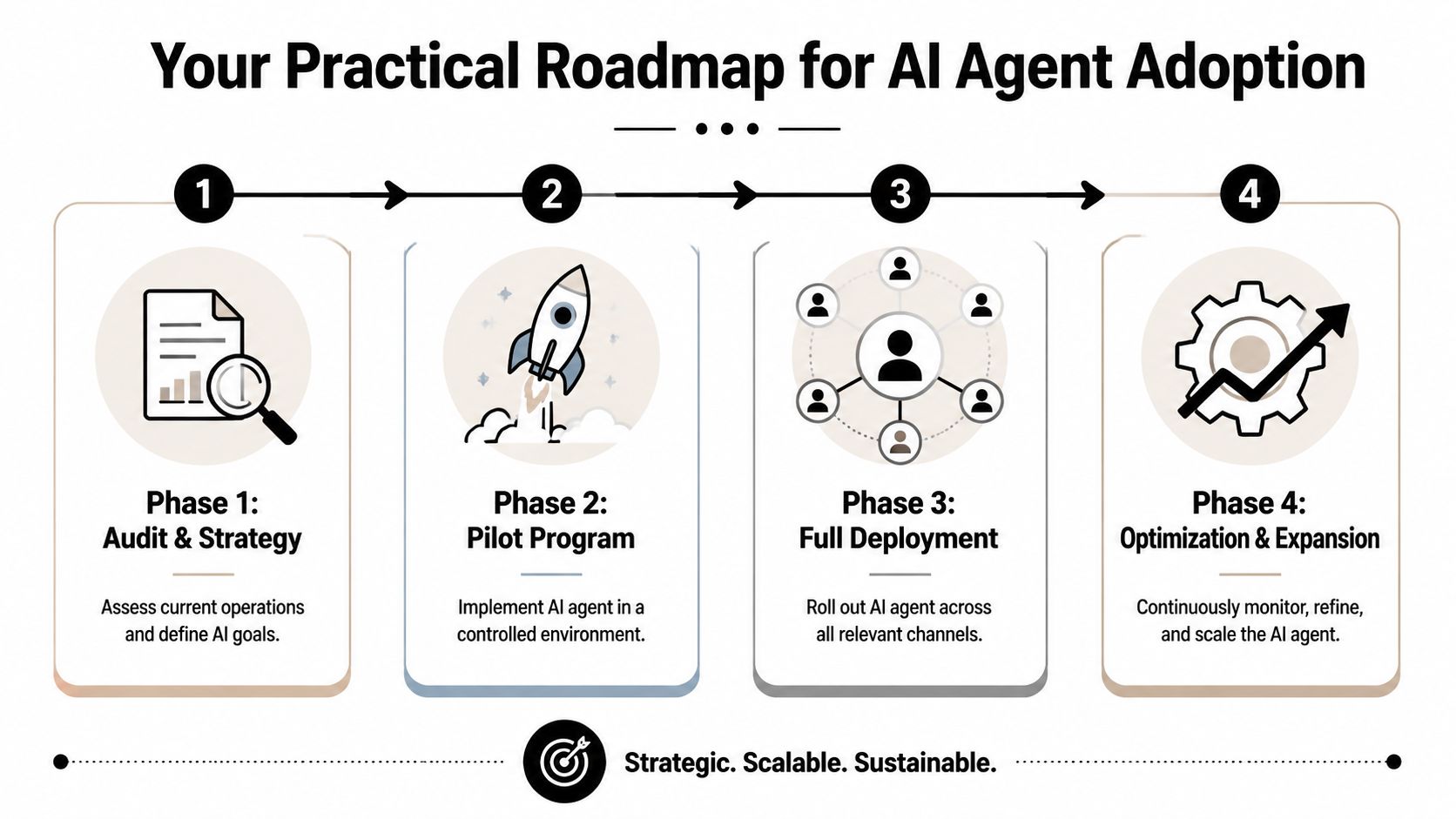
Phase one starts with ticket archaeology
Before you automate anything, review your ticket history and tag categories that meet three conditions:
- They appear often
- They follow repeatable rules
- They don't create outsized risk if the first version only partially automates them
Good starting points often include account updates, shipping or status requests, common billing questions, onboarding help, and policy clarification. Bad starting points include disputes, contract exceptions, regulated workflows, and emotionally charged complaints.
Design the escalation logic before the prompt
Many teams start with prompt writing. That's backwards.
You need clear stop conditions first. Escalate when the model has low confidence, when the customer expresses frustration, when identity can't be verified, when the workflow hits an exception, or when the customer asks for a human directly. Those rules should live outside the model in operational logic wherever possible.
Field advice: Build the handoff path before the happy path. Teams recover quickly from a cautious agent. They lose trust in an overconfident one.
Build the data foundation
The agent will only be as useful as the systems it can trust. That means:
- Clean knowledge sources: Remove duplicate articles, outdated policies, and conflicting instructions.
- Mapped system actions: Define exactly which systems the agent can read from and write to.
- Permission boundaries: Limit high-risk actions until the workflow proves reliable.
- Event logging: Record what the agent saw, decided, and changed.
Implementation, at this point, becomes less about AI and more about service operations. If your CRM is inconsistent or your SOPs contradict the ticketing workflow, the agent won't fix that. It will expose it.
Run a controlled pilot
Pilot with one queue, one region, or one subset of customers. Don't launch across every channel at once.
A good pilot asks:
| Pilot question | Why it matters |
|---|---|
| Did the agent resolve the intended category end to end? | Confirms workflow completion, not just answer quality |
| Were escalations timely and well-documented? | Protects customer experience |
| Did humans need to redo the agent's work? | Reveals hidden process debt |
| Which failures came from docs versus logic versus integrations? | Speeds retraining and redesign |
Only after those answers are clear should you expand scope.
Scale in layers
Expansion should follow business logic, not vendor enthusiasm. Add adjacent categories, then additional channels, then higher-value actions. If needed, use a workflow platform such as MakeAutomation's AI agent workflow builder or another orchestration setup that can connect systems, define logic, and support handoffs without turning your support stack into a patchwork of isolated automations.
The right pace is the one your team can govern.
Success Metrics and Common Pitfalls to Avoid
Many groups worry about the wrong failure mode. They focus on whether the agent might give a bad answer. That matters, but it's not the biggest operational risk. The bigger risk is an agent that takes the wrong action, updates the wrong record, or processes a workflow without the controls a human would normally apply.
Uniphore highlights an underexplored question here: how an AI agent safely takes action across systems without creating compliance or security risk. That matters because enterprise agents are expected to update records and process transactions, which raises implementation questions around permissions, auditability, and policy enforcement (Uniphore on governance risks in customer service AI agents).
The metrics that actually matter
Track answer quality, but don't stop there. A mature program should review:
- Resolution rate: Did the issue get solved, not just answered?
- Deflection rate: Which contacts no longer needed human intervention?
- Escalation rate: Where does the agent stop, and is that pattern healthy?
- Response time: Is the service experience getting faster?
- Customer satisfaction: Are customers happy with the outcome, not just the speed?
These metrics work together. A high deflection rate can look impressive while masking poor outcomes if customers come back later or ask for humans after a failed attempt.
The common traps
Here's where projects usually break:
| Pitfall | What it looks like | Better approach |
|---|---|---|
| Weak permissions | Agent can trigger actions too broadly | Scope actions by workflow and risk level |
| No audit trail | Team can't reconstruct what happened | Log prompts, decisions, actions, and handoffs |
| Poor handoff design | Human agents restart from scratch | Pass transcript, customer state, and next-step notes |
| Bad source control | Agent draws from stale or conflicting docs | Assign owners for policy and knowledge updates |
A governance model that works
You don't need a giant committee. You need clear ownership.
One operations owner should control workflow logic. One system owner should approve integrations and permissions. One service leader should review customer outcomes and escalation patterns. If those roles are unclear, the agent may launch quickly and drift unnoticed.
Governance for AI in support should be boring. Clear permissions, explicit logs, documented escalation rules, and routine reviews. That's what keeps a useful system from becoming a risky one.
Getting Started With MakeAutomation
The strongest customer service AI deployments don't start with a giant transformation program. They start with a contained workflow, a clear service goal, and enough operational discipline to decide what the agent should and shouldn't do.
That's also why the payoff comes from orchestration, not replacement. As ASAPP's buyer guidance notes, the value comes from coordinating AI with humans and enterprise systems, and from understanding when voice AI, proactive support, and context-preserving handoffs outperform traditional chatbots in balancing deflection and satisfaction (ASAPP on orchestrating AI with human support teams).
If you're evaluating where to begin, the practical move is to choose one service workflow with meaningful volume and low ambiguity. Then map the decisions, systems, approvals, and handoff points before touching prompts. That approach works far better than buying a platform first and hoping the process will sort itself out later.
For teams that need implementation support, MakeAutomation's AI agent workflow builder is one option for designing service workflows that connect AI decision-making to business systems, handoffs, and automations. The key is less about the tool itself and more about whether your setup can support governance, integration, and iterative rollout without losing visibility.
A founder doesn't need to automate everything at once. They need a roadmap that protects the customer experience while proving ROI on real service work.
If you're planning an AI agent for customer service and want a practical rollout instead of another surface-level demo, MakeAutomation can help map the workflow, define the guardrails, connect the right systems, and turn a support use case into a controlled automation project with clear business value.