
React Memoize Component: Boost B2B SaaS Performance
A lot of React performance work starts the same way. The product is growing, the dashboard has gained filters, charts, permissions, inline editing, and now users say the app feels slow in places that used to feel instant.
The frustrating part is that nothing looks obviously broken. API calls return on time. The browser doesn't crash. Yet a simple click on a table row, opening a side panel, or typing into a search box creates just enough lag to make the whole product feel heavier than it should.
That's where people reach for the classic fix: the React memoize component pattern. Wrap things in React.memo, add a few useMemo calls, sprinkle in useCallback, and hope the UI settles down. Sometimes that works. Sometimes it makes the code harder to reason about without solving the actual bottleneck.
For a B2B SaaS app, that trade-off matters. These products don't stay still. Teams add flags, cells, actions, panels, validation rules, and integrations every sprint. A performance optimization that turns brittle the moment props evolve isn't a win. The goal isn't just fewer renders. The goal is a UI architecture that stays fast as the product gets more complex.
Your App Feels Slow But You Can't Tell Why
An account manager opens a customer record from a busy operations dashboard. The detail drawer slides in, but the table flickers, filters feel sticky, and typing in search drops characters for a split second. Nothing is technically broken. The app is just doing too much work for a small interaction.
In React apps, that usually points to render churn. A parent updates one piece of state, and a wide section of the tree renders again. Rows receive fresh callback props. Derived arrays get rebuilt. Components that look memoized on paper still run because their inputs are unstable.
That pattern shows up often in B2B SaaS because the UI keeps expanding. A screen that started as a table becomes a table plus permissions, bulk actions, inline validation, audit history, and side panels. Performance work in that kind of codebase is less about chasing every render and more about keeping the component model predictable as features pile up.
Why this hurts more in SaaS products
Users sit in these interfaces for hours. Small delays add up fast when the same workflow repeats all day.
A few conditions make the problem more expensive:
- Dense screens: Admin panels, reporting pages, and workflow tools mount a lot of interactive UI at once.
- State held too high: Page-level containers often own filters, selection, modal state, form state, and derived data, so one update ripples through unrelated children.
- Constant product change: New props and handlers arrive every sprint, which makes memoization harder to trust unless the component boundaries are clean.
The practical rule is simple. If a dashboard feels slow, suspect unnecessary renders. Then verify the cause before adding memoization.
I treat memoization as a maintenance decision as much as a performance one. React.memo, useMemo, and useCallback can reduce wasted work, but they also add constraints. Future contributors now need to preserve prop stability, dependency arrays, and comparison behavior. In a fast-moving SaaS app, that overhead only pays off when the render cost is real and the component contract is likely to stay stable.
A lot of slow screens improve more from refactoring than from wrapping everything in memoization. Move state closer to the component that owns it. Split a large container into smaller connected sections. Keep transient UI state local instead of lifting it to the page root. Teams that care about this over time usually pair targeted React profiling with what is continuous performance testing, so regressions show up before users start reporting that the app feels heavy.
That approach scales better than memoizing first and explaining the architecture later.
Find Performance Bottlenecks Before You Memoize
If you skip profiling, you're guessing. And guessing is how teams end up memoizing ten harmless components while the actual bottleneck sits in a tiny child rendered hundreds of times.

Memoization can reduce unnecessary re-renders by up to 90% in complex component trees, and 70% of large-scale SaaS applications now use compiler or memoization patterns to prevent latency when applied correctly. That's a strong result, but only when you target the right place (official React guidance on memo).
Use the React DevTools Profiler like an investigator
Open React DevTools, switch to Profiler, and record a real interaction. Don't profile a synthetic button click you never care about. Record the user path that feels slow. Typing into the search box. Expanding a row. Toggling a filter. Opening the billing drawer.
Then inspect:
- Which interaction triggered the render
- Which components rendered
- Which components took noticeable time
- Whether they rendered because props changed, state changed, or a parent rendered
A page-level flame graph usually tells the story fast. You'll often find that the data grid isn't slow because the grid itself is bad. It's slow because every row includes a StatusBadge, PermissionChip, and ActionMenu, and all of them re-render on every top-level state change.
A realistic debugging path
Say your CustomersPage owns this state:
- current filters
- selected customer
- drawer open state
- table sorting
- search input
- inline bulk actions
A user types one letter in the search box. The page re-renders. Then every table row re-renders. Then every badge and action cell re-renders. The search input itself wasn't expensive. The blast radius was.
That's the moment to ask better questions:
- Is the slow component expensive to render?
- Is it rendering too often?
- Are props stable?
- Would moving state solve more than memoizing?
Profile first, optimize second. Otherwise you're improving code you can't prove was a problem.
Treat this as an ongoing engineering practice
For a growth-stage product, performance isn't a one-time cleanup. New features reintroduce rendering pressure all the time. That's why teams benefit from understanding what is continuous performance testing, not just one-off profiling. The point is to catch regressions when product complexity increases, before customers feel them.
A good profiling habit also protects maintainability. You can justify each optimization. You can remove ineffective ones. And you can explain to the next developer why a component is memoized instead of leaving a trail of defensive wrappers nobody trusts.
Using React.memo to Prevent Component Rerenders
React.memo is useful after you know which component is expensive and why it keeps rendering. In a B2B app, that often means dense UI such as table rows, permission matrices, billing summaries, or chart containers. The goal is not to wrap everything in memo. The goal is to reduce noisy rerenders without making the code harder to reason about six months later.
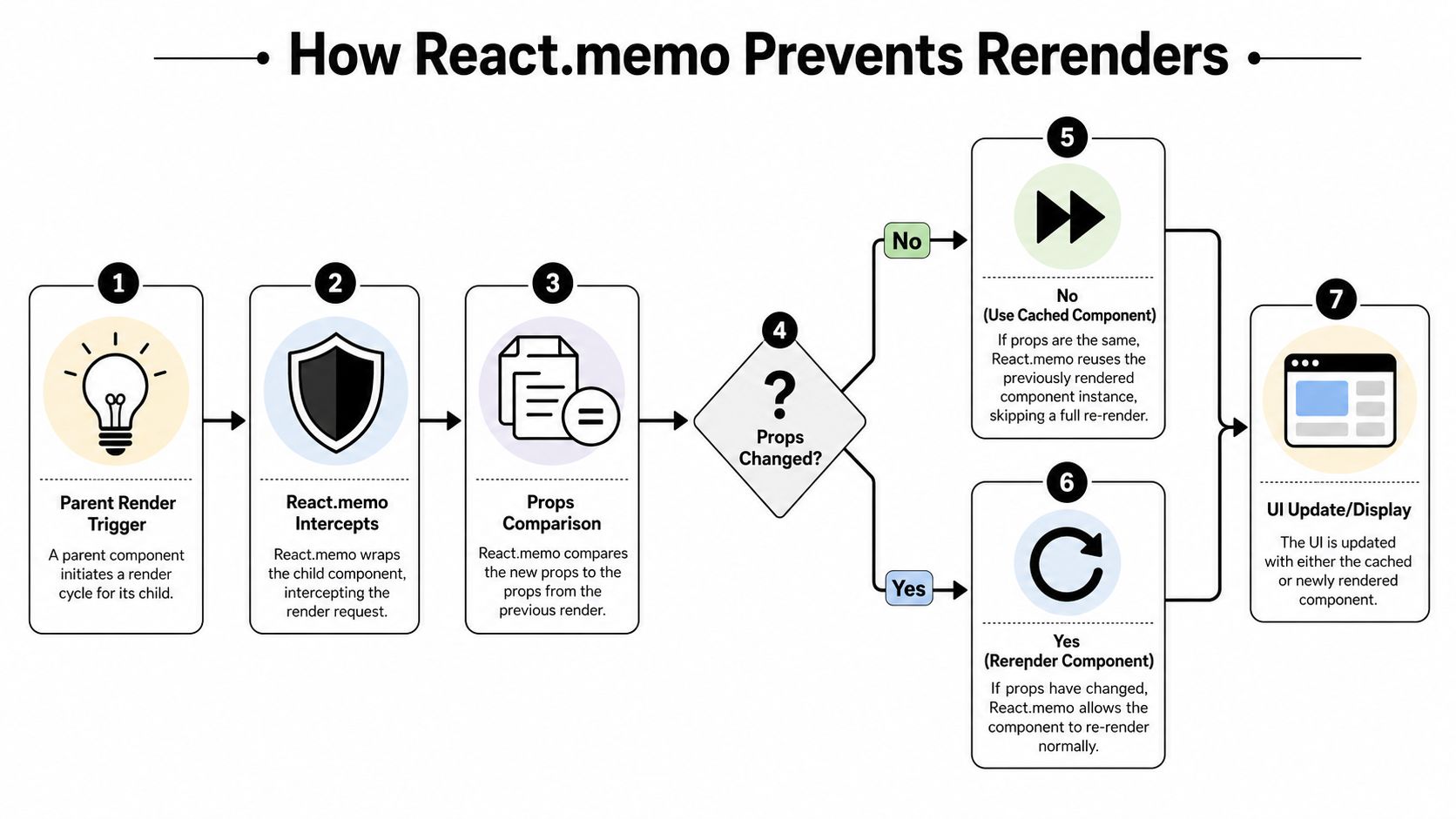
React.memo is a higher-order component that tells React to reuse the previous rendered result when props are the same. By default, React does a shallow prop comparison with Object.is. That works well for primitive props and stable references. If you need a quick refresher on the caching idea behind memoization, this guide on memoization in JavaScript gives the right background.
Start with the simple case
Here's a child component that does not need to rerender when its parent updates unrelated state:
import React, { useState } from 'react';

function UserProfileCard({ name, role }: { name: string; role: string }) {
  console.log('UserProfileCard render');
  return (
    <section>
      <h3>{name}</h3>
      <p>{role}</p>
    </section>
  );
}

export default function DashboardHeader() {
  const [search, setSearch] = useState('');

  return (
    <>
      <input
        value={search}
        onChange={(e) => setSearch(e.target.value)}
        placeholder="Search accounts"
      />
      <UserProfileCard name="Ava Patel" role="Customer Success Lead" />
    </>
  );
}
Every keystroke rerenders UserProfileCard, even though name and role never change.
Wrap it with React.memo:
import React, { memo, useState } from 'react';

const UserProfileCard = memo(function UserProfileCard({
  name,
  role,
}: {
  name: string;
  role: string;
}) {
  console.log('UserProfileCard render');
  return (
    <section>
      <h3>{name}</h3>
      <p>{role}</p>
    </section>
  );
});

export default function DashboardHeader() {
  const [search, setSearch] = useState('');

  return (
    <>
      <input
        value={search}
        onChange={(e) => setSearch(e.target.value)}
        placeholder="Search accounts"
      />
      <UserProfileCard name="Ava Patel" role="Customer Success Lead" />
    </>
  );
}
This is the version of React.memo that pays off quickly. The component is pure, the props are primitives, and the intent is easy for the next developer to understand.
A short walkthrough helps if you want a visual explanation:
Where the React memoize component pattern breaks
The rough part shows up in real product code. A customer row usually receives an object, a few flags, and at least one callback:
function AccountRow({
  account,
  onSelect,
}: {
  account: { id: string; name: string; plan: string };
  onSelect: (id: string) => void;
}) {
  console.log('AccountRow render', account.id);

  return (
    <tr onClick={() => onSelect(account.id)}>
      <td>{account.name}</td>
      <td>{account.plan}</td>
    </tr>
  );
}
You memoize it:
const AccountRow = React.memo(function AccountRow({ account, onSelect }) {
  // ...
});
It still rerenders if the parent creates a new account object or a new onSelect function on each render. React.memo only compares the prop references it receives. It does not know that two different objects happen to contain the same fields.
That limitation matters in large SaaS screens because it pushes you to ask a better design question. Should this row be memoized, or should the parent stop recreating props, or should state move closer to the search input so the table is not involved at all? In many codebases, changing component composition gives you a cleaner result than piling memoization onto a broad render tree.
When a custom comparer helps
A custom comparer can be a good fit if a component is expensive and only a subset of its props affect the UI:
import React, { memo } from 'react';

type Account = {
  id: string;
  name: string;
  plan: string;
  lastViewedAt: string;
};

type AccountRowProps = {
  account: Account;
  isSelected: boolean;
  onSelect: (id: string) => void;
};

const AccountRow = memo(
  function AccountRow({ account, isSelected, onSelect }: AccountRowProps) {
    console.log('AccountRow render', account.id);

    return (
      <tr
        onClick={() => onSelect(account.id)}
        style={{ background: isSelected ? '#f5f5f5' : 'transparent' }}
      >
        <td>{account.name}</td>
        <td>{account.plan}</td>
      </tr>
    );
  },
  (prev, next) => {
    return (
      prev.account.id === next.account.id &&
      prev.account.name === next.account.name &&
      prev.account.plan === next.account.plan &&
      prev.isSelected === next.isSelected
    );
  }
);
This works, but it creates a maintenance contract. If someone later renders account.status or depends on lastViewedAt for a tooltip state, the comparer also needs to change. Miss that update and the UI can go stale in a way that is hard to spot during a normal code review.
I use custom comparers sparingly for that reason. They fit expensive, stable components with well-defined rendering inputs. They are a poor substitute for messy state ownership.
Use it where the trade-off is clear
React.memo tends to earn its keep in components like:
- Rows in large data tables
- Chart wrappers with expensive render work
- Permission grids or pricing matrices
- Sidebar trees with many repeated nodes
- Cells inside virtualized or interactive data grids
It usually does not help much for a tiny presentational component that renders a label and a badge.
That trade-off matters. Every memoized component adds another rule the team has to preserve. Before adding a comparer or wrapping a whole subtree, reconsider whether the core issue is component boundaries, lifted state, or prop churn. Teams responsible for high-volume enterprise apps already spend time understanding software performance limits. The same discipline applies here. Fix the render surface first when architecture is the primary source of the slowdown.
Memoizing Values with useMemo and Functions with useCallback
A memoized component only helps if its props stay stable. If you pass a brand-new object, array, or function every render, React.memo can't skip anything.
That's where useMemo and useCallback come in. They solve the reference problem, not the render problem directly.
Referential equality in practice
React compares object and function props by reference, not by structure. These are different values to React, even if they look the same:
const a = { sortBy: 'name' };
const b = { sortBy: 'name' };

console.log(a === b); // false
The same applies to functions:
const fn1 = () => {};
const fn2 = () => {};

console.log(fn1 === fn2); // false
If your memoized child receives a on one render and b on the next, React sees changed props.
Stable references are what make component memoization pay off.
useCallback for functions
Use useCallback when a child component receives a function prop and that child is memoized.
import React, { memo, useCallback, useState } from 'react';

const FilterButton = memo(function FilterButton({
  onClick,
  label,
}: {
  onClick: () => void;
  label: string;
}) {
  console.log('FilterButton render');
  return <button onClick={onClick}>{label}</button>;
});

export default function FiltersPanel() {
  const [query, setQuery] = useState('');

  const handleRefresh = useCallback(() => {
    console.log('Refresh data');
  }, []);

  return (
    <>
      <input value={query} onChange={(e) => setQuery(e.target.value)} />
      <FilterButton onClick={handleRefresh} label="Refresh" />
    </>
  );
}
Without useCallback, handleRefresh would be recreated whenever FiltersPanel renders, and the memoized FilterButton would re-render too.
useMemo for values
Use useMemo for expensive calculations or to keep objects and arrays stable across renders.
import React, { memo, useMemo, useState } from 'react';

const RevenueChart = memo(function RevenueChart({
  data,
  options,
}: {
  data: Array<{ label: string; value: number }>;
  options: { showLegend: boolean; color: string };
}) {
  console.log('RevenueChart render');
  return <div>{data.length} points</div>;
});

export default function AnalyticsPanel({
  rawData,
}: {
  rawData: Array<{ label: string; value: number; region: string }>;
}) {
  const [region, setRegion] = useState('all');

  const filteredData = useMemo(() => {
    if (region === 'all') return rawData;
    return rawData.filter((item) => item.region === region);
  }, [rawData, region]);

  const chartOptions = useMemo(
    () => ({
      showLegend: true,
      color: 'black',
    }),
    []
  );

  return (
    <>
      <select value={region} onChange={(e) => setRegion(e.target.value)}>
        <option value="all">All</option>
        <option value="emea">EMEA</option>
      </select>

      <RevenueChart data={filteredData} options={chartOptions} />
    </>
  );
}
React memoization tools compared
| Tool | What It Memoizes | When to Use It | Common Mistake |
|---|---|---|---|
React.memo |
A component render result | A pure child re-renders often with unchanged props | Wrapping a component whose props always change |
useMemo |
A computed value, object, or array | Expensive calculations or stable non-primitive props | Using it for trivial values that don't matter |
useCallback |
A function reference | Stable callbacks passed to memoized children | Using it when no memoized consumer exists |
The mistake I see most often
Developers add useCallback everywhere because it feels performance-aware. But if the function isn't passed to a memoized child and isn't needed for dependency stability, it often buys nothing except extra reading overhead.
For a good refresher on the underlying idea, it helps to revisit memoization in JavaScript. The React hooks are just framework-specific tools for a broader caching concept.
A cleaner rule is this:
- Use
React.memoto stop unnecessary child renders. - Use
useCallbackto keep function props stable. - Use
useMemoto keep object or array props stable, or to avoid redoing expensive calculations.
If you can't point to the consumer that benefits from the stable reference, don't add the hook yet.
Common Memoization Pitfalls and When to Refactor Instead
A slow account dashboard rarely fails because one component forgot React.memo. The usual problem is that the render tree is doing too much work for reasons that will keep showing up until the structure improves.
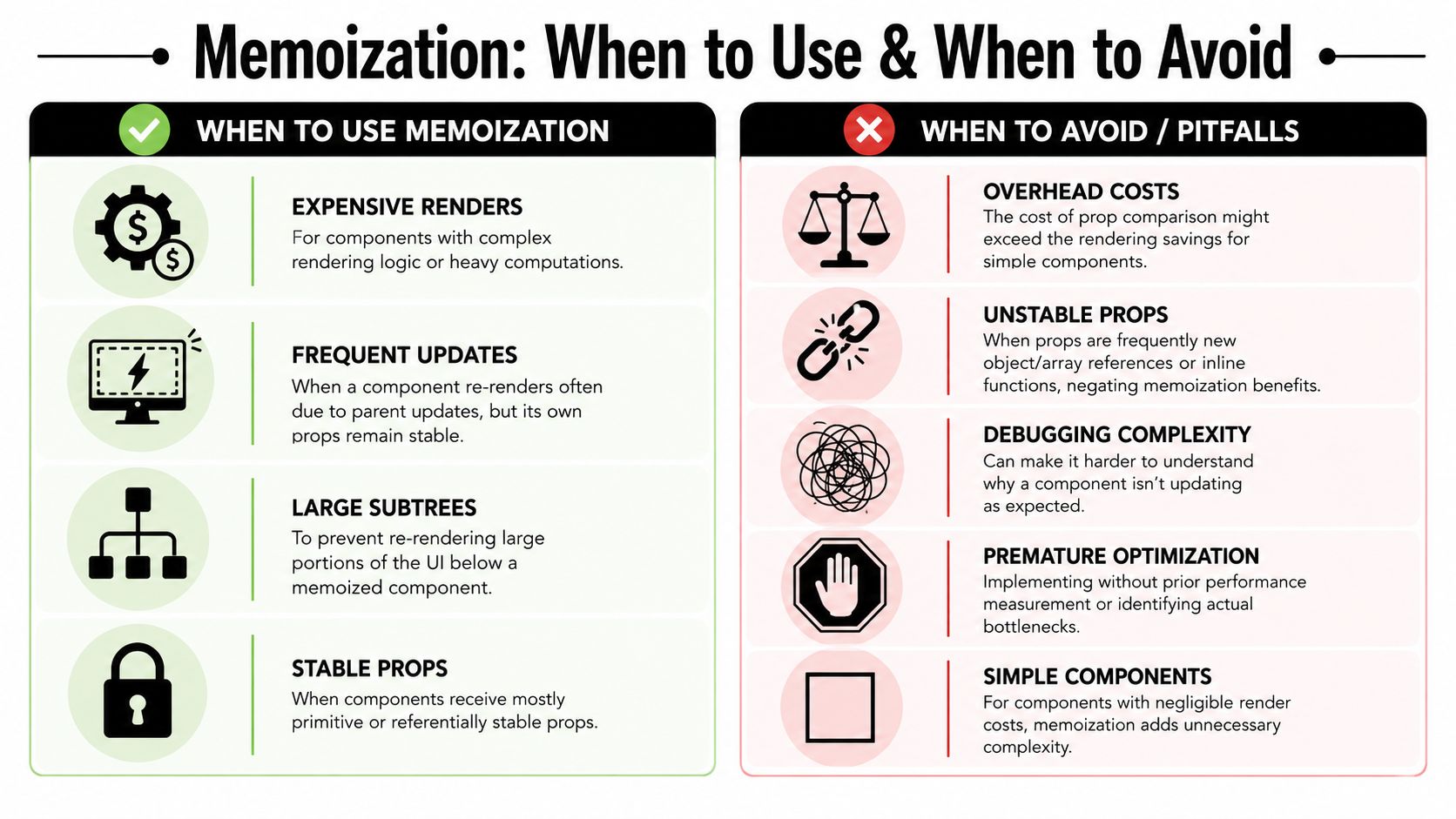
Memoization helps when inputs stay stable and the component is expensive enough to protect. In a B2B app that grows fast, those conditions are easy to break. New permission checks appear. Table cells gain inline actions. Context objects pick up more fields. A memoized boundary that looked smart in sprint one can turn into hidden coupling by sprint ten.
Pitfall one: unstable props cancel the benefit
This pattern shows up in grids, forms, and detail panels:
<MemoizedCell
  style={{ color: 'red' }}
  onClick={() => handleSelect(row.id)}
/>
MemoizedCell receives a new object and a new function on every parent render. React.memo still runs the prop comparison, but it has nothing stable to work with.
That does not mean every inline object or callback is bad. It means memoization only pays off when the child has stable inputs and a real rerender cost. If a cell is cheap, keep the code simple. If the cell renders menus, badges, permissions, and formatting logic, stabilize the props or change the component boundary.
Pitfall two: custom comparers age badly
Custom comparison functions often look precise:
const MemoizedRow = React.memo(Row, (prev, next) => {
  return prev.row.id === next.row.id &&
    prev.row.status === next.row.status;
});
The problem arrives later. Someone adds priority, assignee, or isSelected to the row UI and forgets to update the comparer. Now the component skips renders it should not skip, and the bug is subtle.
I avoid custom comparers unless the props are tightly controlled and the rendering cost is proven. In product surfaces that change often, simpler props and better state ownership usually hold up better than hand-written equality logic.
Pitfall three: memoization hiding architecture problems
If a page component owns filters, drawer state, selected rows, form draft state, and chart options, almost every interaction can reach most of the tree. Wrapping children in memo, then adding useMemo, then adding useCallback can reduce symptoms, but the design is still noisy.
Refactor first when these patterns show up:
- A modal open state causes a table, chart, and sidebar to rerender.
- One container component coordinates unrelated concerns.
- A single context value changes frequently and many consumers subscribe to all of it.
- New features keep requiring more memoization just to preserve acceptable responsiveness.
That last one matters in long-lived SaaS products. If every feature branch adds another memo layer, the codebase gets harder to reason about and easier to break during routine product work.
What to change instead
The fix is often structural, not decorative.
Move state closer to the feature that owns it. Split broad containers into smaller subtrees with clearer responsibilities. Pass primitive props when possible instead of large mutable objects. Isolate expensive regions, such as chart wrappers or dense row renderers, behind components with stable inputs.
For example, this is usually better than memoizing every child in a page shell:
function AccountsPage() {
  const [isInviteOpen, setInviteOpen] = useState(false);

  return (
    <>
      <AccountsToolbar onInvite={() => setInviteOpen(true)} />
      <AccountsTable />
      <InviteUserModal open={isInviteOpen} onClose={() => setInviteOpen(false)} />
    </>
  );
}
AccountsTable no longer receives modal state it does not care about. That single composition change can remove the need for multiple memo wrappers.
If you are refactoring aggressively, tests help keep behavior stable while you reshape parent and child boundaries. This guide on mocking React components in Jest is useful for that kind of work. Teams dealing with embedded widgets or external modules hit the same maintainability issue in Next.js React app integrations, where clear component boundaries matter as much as raw render speed.
A better question set
Use this review order on any component that feels expensive:
- Why is this subtree updating?
- Does the update belong here?
- Can state, context, or composition reduce how far the update travels?
- If the design is already reasonable, would memoization protect an expensive child?
That sequence leads to code that stays fast after the next five product changes, not just after the next profiling session.
Applying Memoization in Real-World SaaS Scenarios
In production SaaS apps, performance work rarely happens in isolated examples. It shows up in dense UI systems where tables, charts, forms, and integrations all compete for render time.

Data grids, charts, and forms need different tactics
A data grid usually benefits from memoized row or cell components, but only if row props are stable. If sorting state, selection state, and filter state all live in the page root, move some of that state closer first. Then memoize the expensive row subtree.
A charting component often benefits from useMemo around transformed datasets and config objects. If you recreate chart options on every render, the chart wrapper has no chance to stay still.
A multi-step form usually needs architecture more than wrappers. Keep validation state local to each step where possible. Avoid forcing every field to rerender because the parent wizard updates unrelated progress state.
A repeatable decision checklist
When a component feels slow, use this order:
- Measure first: Confirm the hot path in Profiler.
- Check ownership: Is the triggering state too high in the tree?
- Stabilize inputs: Use
useMemooruseCallbackonly where a memoized consumer needs them. - Memoize selectively: Apply
React.memoto expensive pure subtrees. - Re-test: Verify that render counts and interaction feel improve.
The fastest React component is often the one that never gets asked to rerender in the first place.
For teams building dashboards on frameworks and integration-heavy stacks, it also helps to think through how external tooling affects render surfaces. If you're working inside a hybrid product setup, guides on Next.js React app integrations can be useful context when you're deciding where data and UI concerns should meet.
Another pattern worth revisiting is dynamic composition. Large B2B products often render feature-specific modules, widgets, and role-based panels conditionally. That's where a practical reference on ReactJS dynamic component patterns can help you design flexible UIs without turning every screen into a rerender storm.
The point isn't to use every React optimization API. The point is to build a component tree that can survive product growth without becoming fragile, noisy, or expensive to maintain.
If your team is scaling a B2B or SaaS product and you want cleaner systems behind the UI, MakeAutomation helps businesses streamline complex workflows, remove manual operational drag, and build more scalable processes across product, operations, and growth.