Docker Compose Build From Image: A Strategic Guide
A lot of teams land on the same frustrating pattern. One developer changes the Dockerfile, another runs docker compose up, CI builds something slightly different, and production ends up pulling an image nobody can fully trace back to source. The app still "works," but nobody is confident about why.
That’s where docker compose build from image gets interesting. It isn’t really a choice between build or image in the abstract. In a serious SaaS workflow, you usually need both. Local development benefits from fast rebuilds against source. CI needs repeatable tagging and registry pushes. Production wants an immutable image reference, not an ad hoc build on a server.
The practical question isn't which directive is correct. The practical question is which directive should own each stage of your lifecycle. If you're already juggling local iteration, pull requests, release candidates, and production rollback plans, that's the difference between a clean platform workflow and a container setup that slowly turns into tribal knowledge.
Ending the 'Works on My Machine' Problem
The classic failure mode looks small at first. A backend engineer updates the app dependency tree. Another teammate still has an old cached layer. Someone else pulls an image from a registry that was tagged latest three pushes ago. The code review passes, but the runtime behavior doesn't line up across laptops, CI runners, and production nodes.
Docker Compose fixes the environment drift only when teams use it intentionally. The file alone doesn't create consistency. The contract does. That contract needs to answer two questions clearly:
- When should Compose build from source?
- When should Compose pull a known image?
If you don't answer those questions, Compose becomes a convenience tool instead of an operational standard.
A simple rule works well. Developers build locally when they're changing application code or Docker instructions. Production pulls a versioned image that CI already built and tested. That split prevents servers from becoming build machines and keeps release behavior predictable.
Practical rule: Build where code changes. Pull where stability matters.
Teams that need a refresher on how up and build behavior interact can start with this guide to Docker Compose build and up workflows. The useful mindset is to stop treating Compose as a one-command shortcut and start treating it as the interface between development, delivery, and operations.
Once you do that, build and image stop competing with each other. They become lifecycle controls.
The Two Pillars build versus image
At the Compose file level, these two fields do different jobs.
image says, "Use this already-built artifact."
build says, "Create the artifact from this source tree and Dockerfile."
That sounds simple, but many teams blur them together and then wonder why local behavior, CI behavior, and deployment behavior drift apart.
When image is the right choice
Use image when the service should come from a registry as-is. This is ideal for infrastructure dependencies and stable third-party components.
services:
  redis:
    image: redis:alpine

  postgres:
    image: postgres:16
In this pattern, Compose doesn't need your source code. It pulls a prepared image and runs it. That's what you want for services like Redis, Postgres, RabbitMQ, or Nginx when you're not customizing the image yourself.
This is also the right default for production deployments. Production should prefer known images with explicit tags, not a fresh build on a live host.
When build is the right choice
Use build when the service is your application and the image must be created from your repository.
services:
  api:
    build:
      context: .
      dockerfile: Dockerfile
Now Compose reads your Dockerfile, sends the build context to Docker, and assembles the image layer by layer. That's what you need when your app code, dependency installation, or runtime packaging is specific to your product.
For teams building internal platforms, this is usually where Docker literacy starts. If you need a solid grounding in Dockerfile structure before tuning Compose behavior, this walkthrough on building from a Dockerfile is a useful companion.
The difference that matters in practice
The cleanest mental model is this:
| Directive | What it represents | Best fit |
|---|---|---|
image |
A finished artifact | Registries, production deploys, third-party services |
build |
Instructions to create the artifact | Local development, CI image creation, custom apps |
Pulling an image is consumption. Building an image is manufacturing.
That distinction matters because mature SaaS teams do both. They manufacture the application image in controlled environments, then consume that image everywhere else.
The mistake isn't using one or the other. The mistake is using one of them everywhere.
Crafting Your Service From a Dockerfile
A SaaS team usually feels Docker build mistakes first in development. One engineer adds a native dependency, another tests on a clean laptop, CI runs on a fresh runner, and suddenly the same service behaves three different ways. A clear Compose build definition reduces that drift because it states exactly how the application image is produced from source.
A practical starting point looks like this for a Node.js API:
FROM node:20-alpine

WORKDIR /app

COPY package*.json ./
RUN npm ci --only=prod

COPY . .

CMD ["node", "server.js"]
And the Compose service:
services:
  api:
    build:
      context: .
      dockerfile: Dockerfile
    ports:
      - "3000:3000"
That setup is enough to get a service running, but the details inside build determine whether it stays fast and reproducible as the codebase grows.
What context and dockerfile really control
context defines the files Docker can access during the build. With context: ., Docker sends the current project directory to the builder. Every COPY instruction is limited to that directory, so a careless context setting can bloat the build or make it depend on files that should never ship.
dockerfile selects the instruction set for that environment. Separate files such as Dockerfile.dev and Dockerfile.prod are common in B2B products where local development needs hot reload and debug tooling, but the production image needs a smaller attack surface and faster deploys.
services:
  api:
    build:
      context: .
      dockerfile: Dockerfile.prod
That split also supports the larger build versus image strategy across the lifecycle. Development can build from a flexible Dockerfile, while CI and production standardize on a stricter one that produces the artifact you promote.
Keep the build context small
Slow builds often start with an oversized context. Docker has to send that context to the builder before it can process a single layer, so extra files cost time on every laptop and every CI job.
A .dockerignore file is required for application services. Exclude local dependencies, Git metadata, logs, secrets, and generated artifacts that do not belong in the image.
A typical example:
node_modules
.git
.env
npm-debug.log
dist
coverage
If you skip this, Docker uploads unnecessary files during the build and invalidates cache layers more often than needed.
A messy build context punishes every developer and every CI runner.
Add traceability to the image
For regulated customers, enterprise support, or a 2 a.m. rollback, the team needs to know which commit produced the running container. Build metadata gives you that audit trail.
Docker Compose supports build arguments for this:
services:
  api:
    build:
      context: .
      dockerfile: Dockerfile
      args:
        GIT_COMMIT: ${GIT_COMMIT:-latest}
And in the Dockerfile:
ARG GIT_COMMIT=latest
ENV GIT_COMMIT=$GIT_COMMIT
This does not replace proper image tagging, but it helps with inspection, debugging, and incident response. In teams that automate release promotion, commit metadata inside the image is often paired with registry tags and pipeline annotations. If you are standardizing that workflow, this Auto DevOps pipeline guide is a useful reference for turning local Compose builds into repeatable delivery steps.
A build setup that scales better
As services mature, the Compose definition should stay boring and predictable. That is the goal.
For a SaaS application, a stronger build setup usually includes:
- A production Dockerfile: Keep the runtime image lean and leave test tools, package managers, and debug utilities out of production.
- Explicit build args: Pass commit SHA, app version, or release metadata that helps operations trace a deployment.
- Clear ownership of runtime config: Put ports, environment variables, and service wiring in Compose when they vary by environment.
- Repository-relative paths: Avoid host-specific paths so the same build works on developer machines, CI runners, and ephemeral build agents.
A good Dockerfile answers a narrow question. Given this source tree, how do we produce a runnable image consistently? In practice, that discipline is what makes later choices around tagged images, CI promotion, and production pulls reliable instead of fragile.
Combining Build and Image for CI CD Pipelines
The most effective Compose pattern for SaaS delivery isn't choosing build or image. It's combining them for the same service, then letting each environment behave differently.
That gives developers local flexibility without turning production into a snowflake.
A service definition can look like this:
services:
  web:
    build:
      context: .
      dockerfile: Dockerfile.prod
    image: registry.example.com/saas/web:v1.2
    pull_policy: always
This is the core docker compose build from image pattern. Compose has build instructions, but it also has a named image target. That means local development, CI, and production can all use the same service definition with different operational behavior.
What happens when both are present
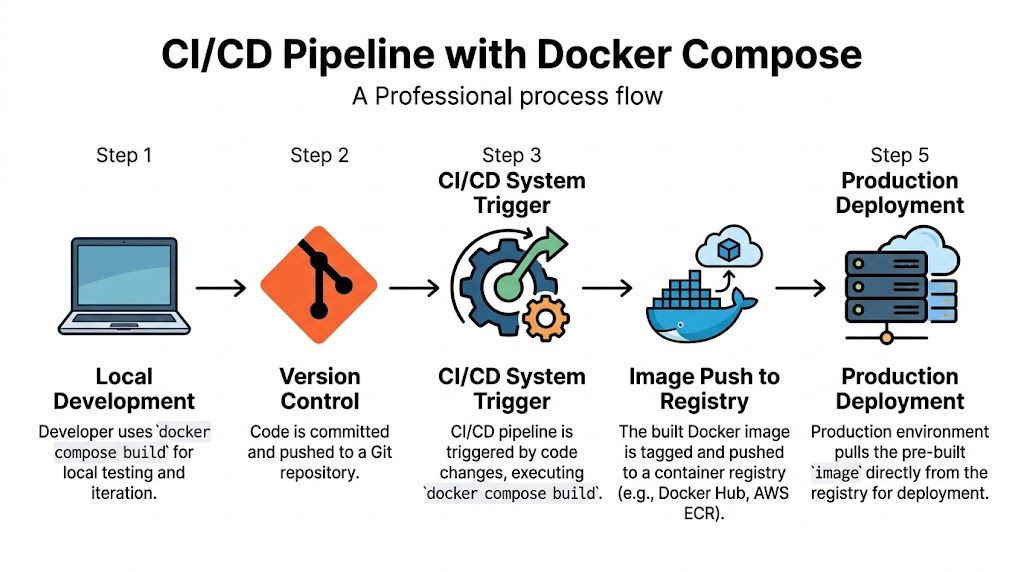
When both build and image coexist, Compose builds the image and tags it with the image name. That matters because CI can create a versioned artifact that production later pulls directly.
A practical flow looks like this:
- Developer changes code locally
Rundocker compose buildordocker compose up --build. - Code is pushed to Git
CI starts from a clean runner. - CI builds the release artifact
Compose builds using the production Dockerfile and tags it with the registry name. - CI pushes the image
The registry becomes the source of truth. - Production pulls the tagged image
The server consumes the artifact, not the source tree.
If you're formalizing this end to end, this overview of an automated DevOps pipeline maps well to the operational side of the pattern.
A concrete CI example
Here’s a realistic service definition for a release pipeline:
services:
  web:
    build:
      context: .
      dockerfile: Dockerfile.prod
      args:
        GIT_COMMIT: ${GIT_COMMIT:-latest}
    image: registry.example.com/saas/web:v1.2
    pull_policy: always
And the commands in CI:
docker compose build --push
docker compose up -d --build --force-recreate
build --push is useful when the pipeline's job is to produce the deployable image and store it in the registry immediately. After that, production infrastructure should pull the exact tagged image.
Why this works better than separate files in many teams
Some teams split this into multiple Compose files. That can work, but it often creates drift between local and CI definitions. A single service definition with both build and image keeps the artifact path visible.
The key trade-off is discipline:
- Good fit: One source of truth for service packaging, explicit tags, controlled pipeline behavior.
- Bad fit: Teams that rely on floating tags like
latest, skip registry promotion, or let production hosts rebuild ad hoc.
The more environments you operate, the more valuable it is to separate image creation from image consumption.
Dev, CI, and prod should behave differently
A simple operating model works well:
| Stage | Primary behavior | Why |
|---|---|---|
| Development | Build from source | Fast feedback when code or Dockerfile changes |
| CI | Build, test, tag, push | Produces the release artifact in a controlled runner |
| Production | Pull the tagged image | Keeps deployments reproducible and rollback-friendly |
That's the strategic use of Compose. It isn't just local orchestration. It's a practical handoff point between software delivery stages.
Advanced Techniques for Production Grade Builds
A SaaS team usually feels build problems only after the service becomes shared infrastructure. One repo feeds several environments, multiple engineers push changes daily, and a slow or inconsistent image build starts delaying releases instead of just annoying a developer.
At that point, the build versus image decision becomes operational. In development, teams often tolerate a heavier image if rebuilds are local and fast enough. In CI, the same service definition needs predictable caching, clean tagging, and a final artifact that production can pull without rebuilding.
Use multi-stage builds to cut runtime weight
A multi-stage Dockerfile keeps build tools out of the runtime image. For Node, Java, Go, and Python services, that usually means compilers, package managers, test tooling, and temporary files stay in the builder stage instead of shipping to production.
Example:
FROM node:20-alpine AS builder
WORKDIR /app
COPY package*.json ./
RUN npm ci
COPY . .
RUN npm run build

FROM node:20-alpine
WORKDIR /app
COPY package*.json ./
RUN npm ci --only=prod
COPY --from=builder /app/dist ./dist
CMD ["node", "dist/server.js"]
This pattern helps in three places. It reduces the attack surface of the final image. It cuts registry transfer time. It also makes rollouts faster when your deployment platform pulls images for many tenants or regions.
The trade-off is build complexity. Multi-stage Dockerfiles are harder to debug when a file is created in one stage and expected in another, so teams should name stages clearly and keep artifact paths explicit.
Make cache behavior intentional
Cache saves time until it hides drift.
Compose supports build options such as cache_from and no_cache, and both matter more in CI than on a laptop. A shared runner that always starts cold benefits from pulling cached layers. A release pipeline investigating an odd dependency issue often needs a clean rebuild to prove whether the problem is source code, the Dockerfile, or stale layers.
A few rules hold up well in production pipelines:
- Keep dependency layers early: Copy lockfiles and install dependencies before copying the full source tree.
- Use cache sources in CI: This avoids rebuilding unchanged layers on every run.
- Bypass cache for investigation: If package resolution, build arguments, or generated assets look wrong, rebuild cleanly first.
For release troubleshooting, forcing a clean rebuild is often the fastest truth test.
docker compose build --no-cache
docker compose up -d --force-recreate
Later in the pipeline, this walkthrough is a useful visual reference:
Handle dependent base images carefully
Monorepos add another layer of build coordination. One service may depend on a shared base image or a sibling directory that is not published separately yet. That is common in B2B platforms where API workers, admin apps, and background jobs share a hardened base.
Compose can support that pattern, but teams need to be explicit about build inputs. additional_contexts helps when one service build needs files from another location without widening the main build context and sending the whole repository to Docker.
A practical pattern looks like this:
services:
  service-a:
    build:
      context: ./service-a

  service-b:
    build:
      context: ./service-b
      additional_contexts:
        service_a: ./service-a
Then run:
docker compose build --parallel=false
Sequential builds are slower, but they reduce race conditions when service dependencies are tightly coupled. That is usually a fair trade in CI. In local development, teams may choose faster parallel builds and accept that some edge cases need a retry.
Production habits that prevent subtle failures
Production-grade builds depend as much on discipline as syntax.
- Avoid
container_namefor scalable app services: Fixed names make replicas, blue-green deployments, and temporary review environments harder to manage. - Prefer relative paths in build context: Absolute host paths break in CI runners and remote builders.
- Tag images with release meaning: Use commit SHAs, version tags, or both, so incident response and rollback are based on exact artifacts.
- Keep runtime images boring: Production should consume a tested image. CI is the right place to compile assets, run packaging steps, and publish the result.
That last point matters most for SaaS teams. Development can build from source. CI can combine build and image to create the release artifact. Production should stay on the image side of the line and pull the exact tag that already passed through the pipeline.
Decoding and Fixing Common Build Errors
Most Compose build failures aren't exotic. They're usually one of a few repeat offenders: stale images, wrong build context, Dockerfile path mistakes, or assumptions about what up will rebuild automatically.
Error one, the image didn't update
This is the most common trap. The team changes source code or the Dockerfile, runs docker compose up, and expects a rebuild. If the existing image is still present, Compose may just start containers from it.
Analysis of developer forum reports shows that 35% of "image not updating" issues come from running docker compose up without --build, and using the flag resolves 90% of those cases, as noted earlier in the Docker build reference.
Use this when you expect a fresh image:
docker compose up --build
If the cache is also suspect:
docker compose build --no-cache
docker compose up -d --force-recreate
Error two, build context is wrong
A broken build context usually shows up as missing files during COPY, especially in monorepos or nested app directories.
Common causes include:
- Wrong
contextpath: Compose sends the wrong folder to Docker. - Dockerfile expects files outside context: Docker can't copy what the context didn't include.
- Over-aggressive
.dockerignore: Required files get excluded.
A safer pattern is to point context at the actual app root and keep dockerfile explicit.
services:
  api:
    build:
      context: ./apps/api
      dockerfile: Dockerfile
If
COPYfails, check the build context before you check the application code.
Error three, Compose built something unexpected
This usually happens when a service has both build and image, but the team isn't aligned on whether the environment should build locally or pull from a registry. The YAML is valid, but the operational expectation is wrong.
Use this quick table to diagnose it:
| Symptom | Likely cause | Fix |
|---|---|---|
| Local build doesn't match registry artifact | Developer rebuilt locally with untracked changes | Rebuild from clean Git state in CI and deploy only tagged images |
| Production starts older code | Server pulled stale tag or never rebuilt | Use immutable version tags and pull explicitly |
| Build uses wrong Dockerfile | dockerfile path is implicit or incorrect |
Set dockerfile explicitly in Compose |
Error four, dependent images fail in monorepos
If one service builds from another custom base image, Compose may not order those builds the way you expect. That's a Compose limitation more than an application bug.
The fix is operational, not magical:
- Declare additional build contexts: Make dependencies visible.
- Build sequentially when order matters: Use
docker compose build --parallel=false. - Keep base-image ownership clear: Don't hide shared bases across unrelated directories.**
Most build debugging gets easier once you stop reading the error message as the root cause. It's usually just the surface symptom of a packaging decision upstream.
Frequently Asked Questions
What's the difference between docker compose build and docker compose up --build
docker compose build only creates or refreshes images. It doesn't start containers. docker compose up --build rebuilds first when needed, then starts the services. Use the first command when you want to validate image creation in isolation. Use the second when you're moving straight into a runnable environment.
Should I use build or image for production
Use image as the production deployment target. Build the image in CI, tag it, push it to a registry, then let production pull that exact artifact. That keeps production hosts focused on running services instead of compiling application images.
Why would I use both build and image in one service
Because they solve different lifecycle problems. build tells Compose how to create the artifact. image gives that artifact a stable registry identity. Together, they support local development, CI tagging, and production pull-based deployment with one service definition.
What does pull_policy actually change
It controls whether Compose should try to pull the declared image before relying on a local one. In environments where the registry is the source of truth, pull_policy helps keep nodes aligned with the published artifact instead of whatever happens to be cached locally.
Can Compose build a service that depends on another custom base image
Yes, but that's where things get tricky. In monorepos, you'll often need additional_contexts and, when ordering matters, docker compose build --parallel=false to avoid dependency-related build failures.
If your team needs a cleaner path from local Docker Compose workflows to repeatable CI/CD and production deployment, MakeAutomation can help design and implement the operating model around it. That includes build strategy, release traceability, CI/CD structure, and the automation layers that keep B2B and SaaS delivery predictable as complexity grows.