How to Deploy an AI Outbound Call Agent
Your inbound leads are coming in, your SDRs are already juggling demos and follow-up, and the same prospect who looked hot an hour ago is now half-cold because nobody called fast enough. That gap is where an AI outbound call agent starts to make sense. Not as a magic replacement for your team, but as a way to stop simple timing problems from turning into lost pipeline.
Where an AI Outbound Call Agent Fits in Your Sales Stack
A founder usually feels the need for voice automation at a very specific moment. The calendar is full, the pipeline is growing, and the two-person SDR team can't call every qualified lead while the lead is still warm. That's usually when the conversation shifts from “Should we automate calls?” to “What can call right now, without breaking our process?”
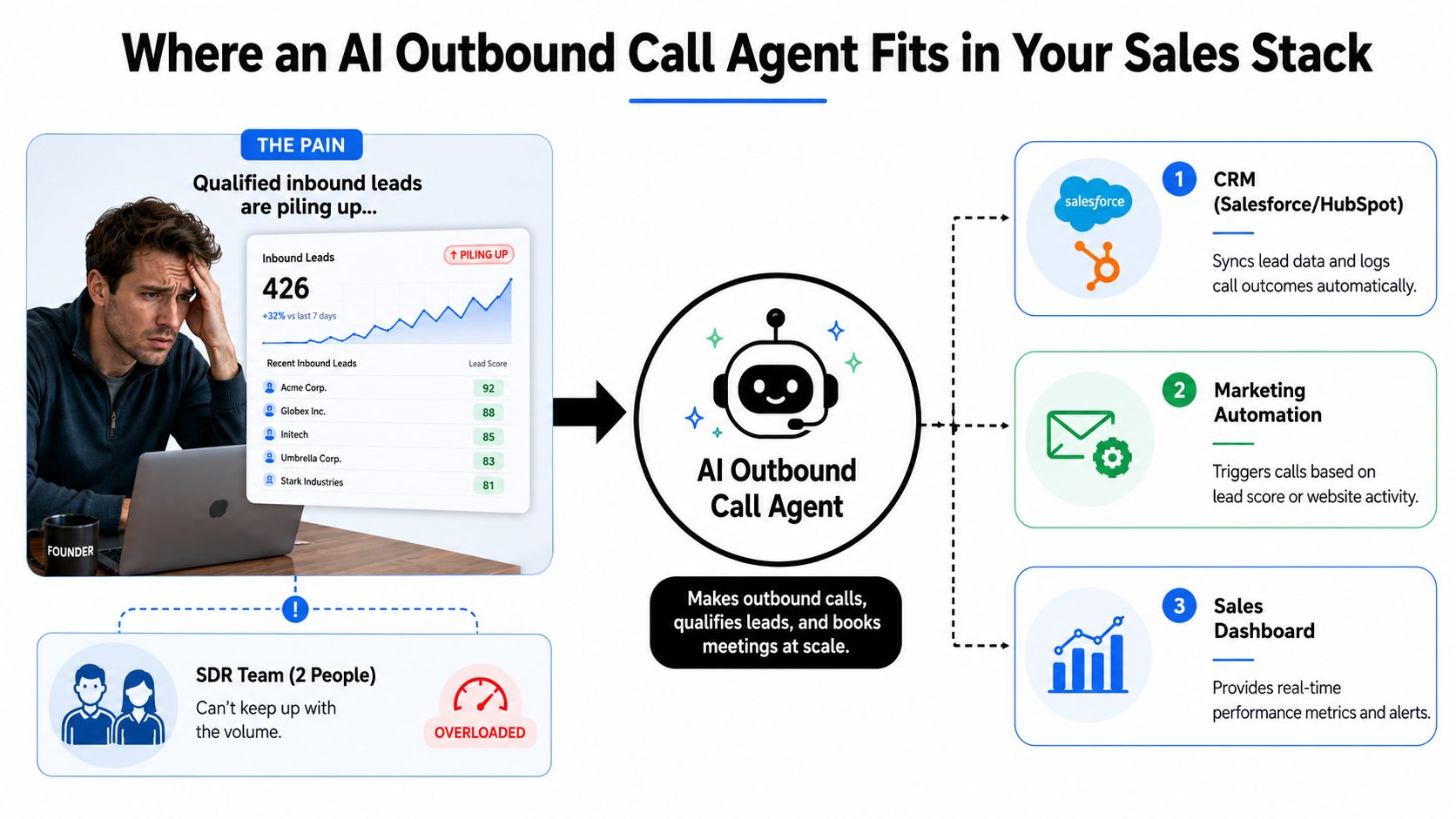
An AI outbound call agent is a voice layer that can dial, speak, qualify, and route responses into the rest of your stack. It isn't your CRM, and it isn't your closer. It sits between the trigger event and the human rep, handling structured outreach where speed matters more than deep relationship selling.
Where it earns its keep
The strongest uses are repetitive and time-sensitive. That usually means appointment setting, lead reactivation, event follow-up, and missed-call recovery. Those are the cases where a short conversation, a clear qualification question, and a booked meeting are enough to move the deal forward.
This is also where voice automation resembles other workflow automation patterns. If you've seen how automation reshapes IT support in this example from Networking2000, the logic is similar, repetitive work gets handled by a system, while exceptions still go to a person. The win comes from removing delay, not removing judgment.
What it should not try to do
A call agent is a poor fit for emotionally loaded, ambiguous, or highly nuanced conversations. If a rep needs to negotiate, reassure, or improvise through a multi-layer objection, the machine should hand off quickly. The best deployments keep humans for the calls that need trust, context, or discretion.
Practical rule: automate the conversations that can be structured, not the ones that depend on persuasion in the moment.
If your current problem is slow first contact, inconsistent follow-up, or missed callbacks, the technology probably fits. If the issue is weak messaging, bad target lists, or a broken offer, a voice agent will only make the same problem louder.
The Core System Architecture Behind a Production Call Agent
A production call agent is a chain of services, not a single model. The telephony layer places the call, the speech layer understands the prospect, the reasoning layer decides what to say next, the voice layer speaks it, and the integration layer writes the result back to your systems. When that chain is tight, the whole call feels natural. When one part lags, the prospect hears it immediately.
The five parts that matter
The first piece is telephony, usually through a carrier, SIP setup, or an API-based dialer. That layer handles the outbound call itself and determines how reliably your system can start conversations at scale. The second piece is automatic speech recognition, which turns the prospect's words into text the agent can act on.
Next comes the LLM reasoning layer. The agent follows the script, recognizes objections, and chooses the next branch. Then text-to-speech turns the response into a voice that sounds calm, fast, and credible. Finally, the tool-calling layer updates the CRM, books the calendar slot, or triggers the next workflow step.
What usually breaks first
In real deployments, latency matters more than model size. If the response pauses too long, the call feels off, even if the answer is correct. Voice quality matters too, but interruption handling is where teams get into trouble. People cut in, change direction, and talk over the agent. If the system can't recover smoothly, the conversation dies.
A clean architecture should make a single call flow like this. Dial, answer, disclosure, qualification, objection branch, disposition, CRM update. That's the operational path you should ask every vendor to demonstrate, not just a nice demo voice.
For a practical implementation pattern, the internal guide on how to make an AI voice assistant is useful if your team needs to map those components into a build plan.
What to ask before you buy
You want to know how the platform handles barge-in, voicemail, transfer logic, and CRM writes. You also want to know which parts are configurable without engineering help. If a vendor can't explain how the call stays stable when someone interrupts, you're not looking at a production system yet.
Buy a Platform or Build In-House
The build-versus-buy decision looks technical, but it's mostly about operational burden. If you're early, the cost isn't licensing, it's time and maintenance. If you're larger, the cost isn't just vendor fees, it's how much control you lose over script logic, routing, and data flow.
The fastest path is usually to buy the voice stack and customize the behavior around it. A mature in-house build only makes sense if you already have engineers who can own telephony, speech, evaluation, and call ops without turning it into a side project.
| Path | Time to First Call | Indicative Per-Minute Cost | Control Level | Best For |
|---|---|---|---|---|
| Buy a platform | Fast | Lower operational effort, varies by vendor | Moderate | Pre-seed, early-stage, lean teams |
| Hybrid build | Moderate | Mixed | High | Growth-stage teams with custom workflows |
| Build in-house | Slow | Usually highest total effort | Very high | Mature platforms with dedicated ML and voice teams |
What changes by company stage
Early-stage teams should almost always buy. The reason is simple, you need live calls, not a six-month infrastructure project. Growth-stage companies can blend the two approaches, buying the voice and telephony layer while customizing scripts, routing, and CRM writes. That keeps the team focused on revenue rather than infrastructure.
Only mature organizations with dedicated ML and platform engineering should consider a full internal build. Even then, they need a clear reason, usually data control, deep integration requirements, or a very specific calling workflow that platforms can't support cleanly.
The decision criteria that matter
Look at time to deploy, maintenance burden, data ownership, and flexibility. A build gives you control, but it also makes every change your problem. A platform gets you moving faster, but you'll want to confirm how easily it connects to your existing systems.
If you're comparing integration-heavy tools, the discipline shown in independent API evaluations is a useful mindset. Don't trust glossy feature lists, compare real workflow fit, handoff behavior, and integration friction.
If your team can't afford a dedicated voice infrastructure owner, build later.
MakeAutomation is one option in this category when you want a partner that can document workflows and implement outbound voice automations without forcing your team to reinvent the stack.
Designing Scripts and Training Your AI Caller
Most AI calling failures start with scripts that sound like a survey. The prospect feels that immediately. A better script is short, branch-based, and built to move the call toward one of three outcomes, qualified, disqualified, or handed off to a human. The agent should sound like a competent coordinator, not a script reader.
Keep the opening tight
The opening should do three things fast. Identify the company, disclose the AI nature of the call, and ask one relevant question. If the first thirty seconds feel bloated, prospects hang up before the call can earn trust.
A good script design uses branches instead of a monologue. One branch handles interest, another handles objection, and a third exits cleanly when the prospect isn't a fit. That structure keeps the agent from rambling and makes analysis easier later.
Operator rule: every line in the script should either move the call forward or move it to a human.
Train for objection handling, not just intent
The agent needs to recognize common sales friction, but it doesn't need to win every argument. Train it to hear “not now,” “send me something,” or “talk to a person” as routing signals, not as invitations to improvise. That's where your prompt design and knowledge base need to stay tightly aligned.
The internal examples in cold call script examples are useful because they show how a short script can stay natural without becoming wordy. The same pattern works in voice, except the risk is higher because a bad line can kill the live conversation.
Build the handoff like a rescue lane
When a human SDR takes over, pass the context that matters: name, company, pain point, qualification answers, and the exact reason for transfer. If the lead is warm, schedule the same-day callback instead of waiting for a loose follow-up task. That preserves momentum and keeps the AI from becoming a dead-end experience.
Training shouldn't stop at launch. Review real recordings, tighten branches, and update the prompt when the same objection keeps appearing. The best systems get better because operators keep feeding them the language prospects use.
Compliance, Disclosure, and Brand Risk at Scale
This is the part many teams underbuild. An outbound voice system can be technically impressive and still be a liability if disclosure, consent, and suppression rules are sloppy. The safe posture is straightforward, consent first, disclose clearly, and transfer to a human when the conversation turns into a situation the agent shouldn't own.
Controls that actually matter
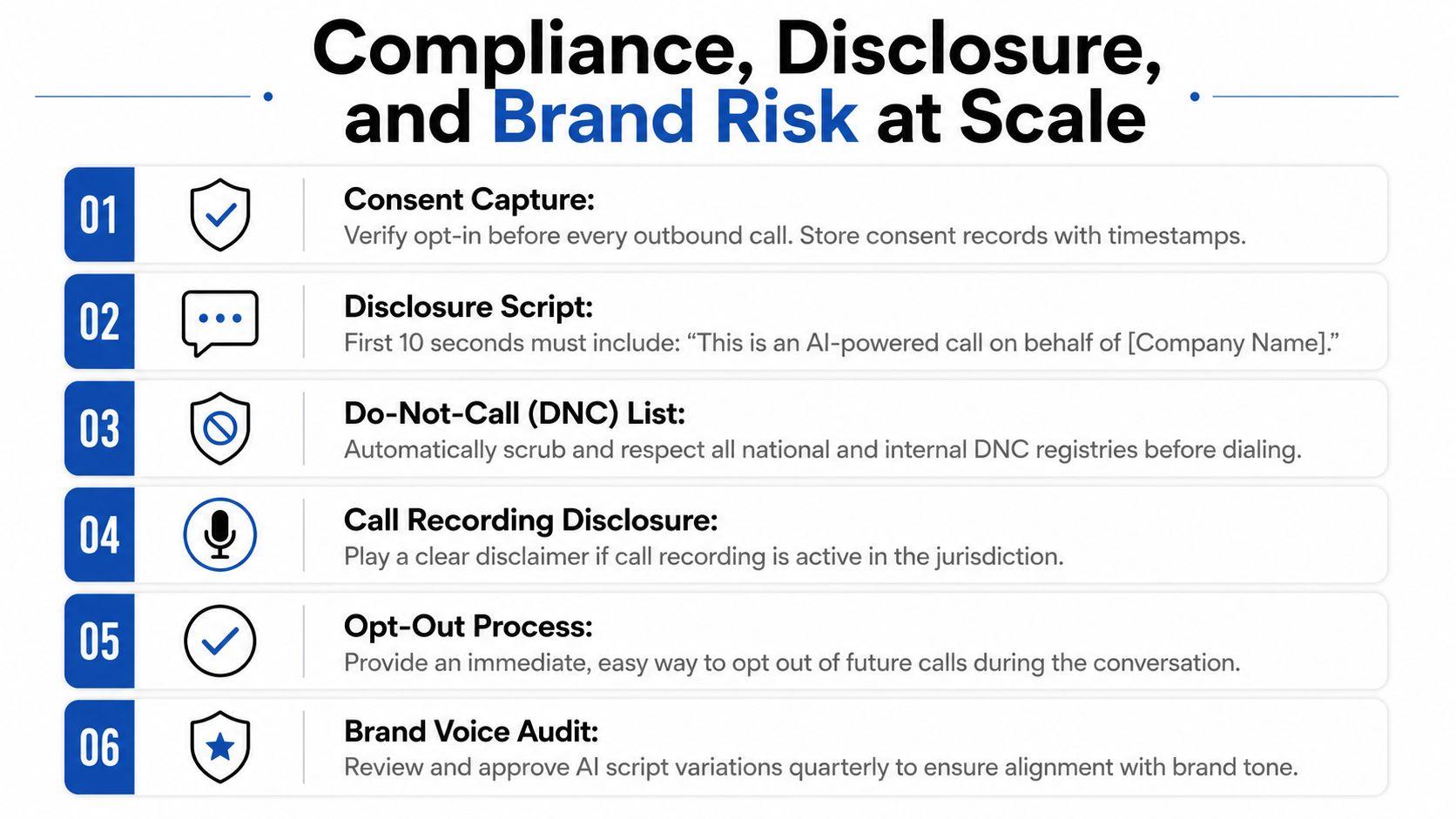
Start with consent capture and retain the record. Then scrub both the national and internal do-not-call lists before every campaign. Layer in local calling-hour and timezone rules so you don't create avoidable complaints. The prospect should also hear a clear AI disclosure early in the call, not buried after several exchanges.
A practical disclosure line is short and direct. It doesn't need theatrical wording, it needs clarity. If recording is active in a jurisdiction where disclosure is required, state that plainly before the conversation continues.
Where risk compounds
The hardest failures aren't usually technical, they're procedural. If the agent keeps pushing after someone asks for a person, or ignores a negative tone shift, the brand absorbs that friction. The same is true when opt-outs are awkward. If a prospect can't get off the list immediately, you've created a complaint path.
The internal resource on compliance documentation is worth using as a working artifact if your team needs a checklist legal can review. Don't leave this as a verbal agreement between sales and ops. Put the controls in writing, then test them.
A legal-facing checklist
- Consent records: store timestamps and source events for every outbound contact.
- Disclosure script: open with a clear AI statement before qualification starts.
- Suppression logic: respect DNC, internal opt-outs, and campaign-level exclusions.
- Transfer rule: hand off immediately if the prospect asks for a person.
- Sentiment trigger: stop automated persuasion when the call turns negative.
- Brand review: audit scripts regularly so voice and tone stay on brand.
The risk here is not abstract. Violations of automated-call rules can create per-call penalties and complaint exposure, which is exactly why the operational controls matter more than the demo.
Measuring Funnel Performance Without False Confidence
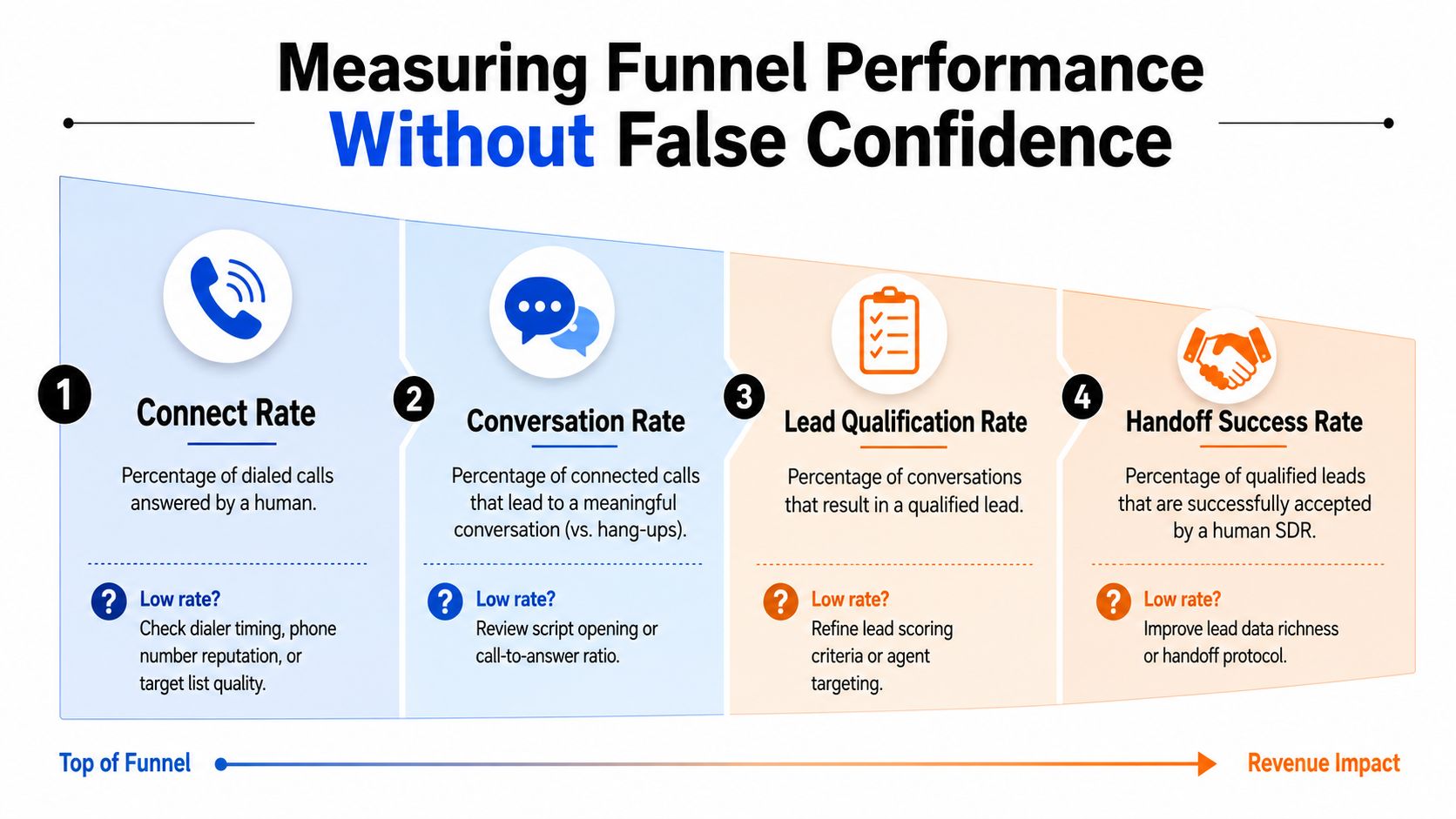
A single conversion rate hides too much. If bookings are low, the problem might be the dial list, the script opening, the disclosure, or the CRM handoff. You only find out which one it is if you measure the funnel in stages.
Use separate stage metrics
For cold prospecting, benchmark each stage independently. A practical setup uses connect rate, conversation rate, and booked-meeting rate as separate checks. For B2B cold prospecting, a useful reference range is 18% to 28% connect rate, 35% to 55% conversation rate, and 12% to 22% of conversations becoming booked meetings, which works out to 1.2% to 4.8% of attempted dials turning into meetings, according to Tested Media's AI outbound call benchmarking guide.
Diagnose the right layer
A weak connect rate usually points to list quality, dialing timing, or number reputation. A weak conversation rate often means the opening is off, the disclosure is too clunky, or the voice doesn't sound trustworthy. A weak booking rate means the qualification branch or the offer needs work. Don't collapse those failures into one headline number.
Practical takeaway: if you can't tell where the funnel leaks, you can't improve the agent, only argue about it.
You also need to know how the AI sequence and human SDR follow-up share credit. If the machine warms the lead and a rep closes the meeting later, the dashboard should reflect both touches. Otherwise the team will underinvest in the part that created the opportunity.
Build the dashboard before launch
Set up reporting for dials, connects, qualified conversations, transfers, and booked meetings before the pilot starts. That makes the pilot diagnostic instead of political. When the numbers move, you'll know which stage moved.
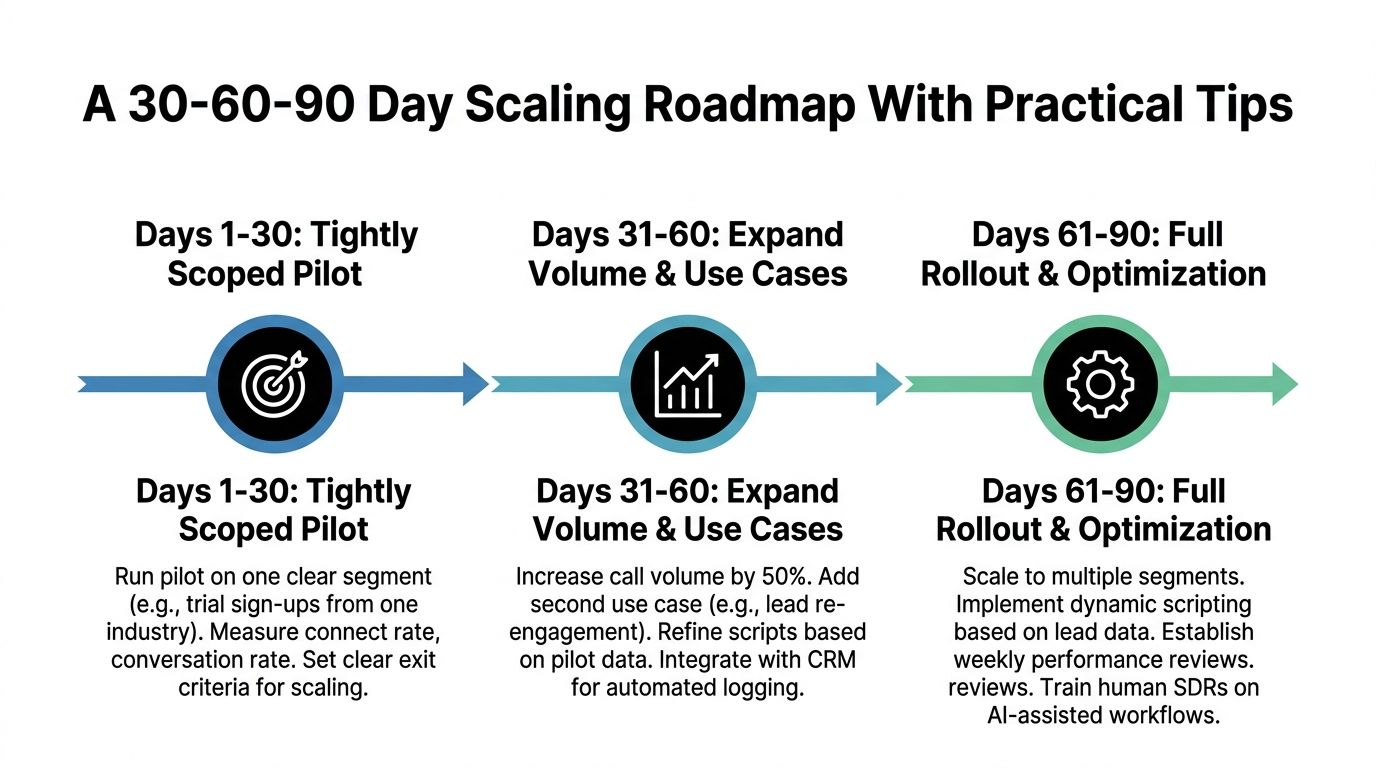
A 30-60-90 Day Scaling Roadmap With Practical Tips
Days 1 to 30 should stay narrow. Pick one segment, one script, and one clear success threshold, then review recordings daily. If the connect rate is weak, fix the list and timing before you blame the voice.
Days 31 to 60 are for expansion and cleanup. Add one new use case, like re-engagement or event follow-up, and tighten CRM logging so handoffs don't disappear. By days 61 to 90, extend to more segments and regions, then formalize weekly performance reviews with sales and ops.
Three common pilot failures
- Low connect rate: clean the list, adjust calling windows, and check number reputation.
- Robotic tone: shorten the opening and rewrite the first two exchanges.
- Weak CRM sync: fix the data handoff before adding more volume.
The biggest mistake is scaling before the handoff works. If a warm lead lands in a spreadsheet instead of a rep queue, the system is leaking value.
Start with one repeatable use case, prove the funnel stage by stage, then widen the scope.
If you want help mapping this into a live outbound workflow, MakeAutomation can document the process, define the disclosure and handoff logic, and implement the CRM and voice-agent integrations around it. Visit MakeAutomation to discuss how to put the system in place for your team.