A Practical Guide to Chatbot for Lead Generation
Let’s face it, your old-school 'Contact Us' form just isn’t pulling its weight anymore. In a world where everyone wants answers now, a chatbot for lead generation becomes your tireless sales rep. It’s on the clock 24/7, ready to engage interested prospects the second they hit your site, so you stop losing hot leads to your competitors.
Why Chatbots Are a Non-Negotiable Sales Tool
Picture this: a potential customer lands on your pricing page at 10 PM. They're ready to talk, they have questions, but all they see is a form promising a callback in "24-48 business hours." They're not going to wait. They'll bounce and find a competitor whose chatbot can answer their questions and book a demo right then and there. You just lost a deal without even knowing you were in the running.
This happens all the time to businesses stuck with passive lead capture. Today's buyers expect immediate interaction. A delay of just a few minutes can kill a potential sale. This is precisely why moving from static forms to active, conversational chatbots is so critical—it turns your website from a simple brochure into a lead-generating machine.
Meeting Modern Buyer Expectations
Modern B2B buyers are used to on-demand everything. Making them fill out a form and wait is just adding friction to their journey. A lead generation chatbot, on the other hand, meets them exactly where they are.
- Instant Answers: It’s always on, ready to field common questions about pricing, features, and integrations.
- Personalized Journeys: It can intelligently guide a decision-maker toward booking a demo while offering a useful whitepaper to someone who's just doing initial research.
- Proactive Engagement: A well-timed bot can pop up on a high-intent page—like your case studies or pricing section—to offer help right when a prospect's interest is at its peak.
To truly grasp how chatbots transform lead generation, it helps to understand the core principles of automated customer service, as this is the foundation for turning a simple website chat into a real business opportunity.
A chatbot does more than just collect an email address. It creates an experience. It makes your prospects feel heard and valued from the very first interaction, building trust long before a sales rep ever gets involved.
The difference this immediacy makes is huge. Responding to a lead in the first minute can boost your conversion chances by over 45%. In the B2B space, the numbers are even more compelling: prospects who engage with a chatbot convert at an impressive 12.3% rate, compared to just 3.1% for those who don’t. That's a nearly 4X increase in performance you simply can't ignore. This is a core concept we dive deeper into when exploring conversational AI.
Static Forms vs. Lead Generation Chatbots
It's easy to see the theoretical benefits, but putting them side-by-side really highlights the difference. Here’s a clear breakdown of how a chatbot stacks up against a traditional lead form.
| Feature | Static Lead Form | Lead Generation Chatbot |
|---|---|---|
| Response Time | Slow (hours or days) | Instant (24/7) |
| User Experience | Passive, one-way | Interactive, conversational |
| Qualification | None (manual later) | Real-time, automated |
| Data Collection | Basic contact info | Rich, contextual data |
| Engagement | Low | High |
| Conversion Rate | Typically 1-3% | Often 10% or higher |
| Personalization | None | Highly personalized paths |
Ultimately, the choice is between a passive tool that makes prospects wait and an active one that engages, qualifies, and converts them on the spot.
Designing a Conversation That Actually Converts
A great lead-gen chatbot does more than just mechanically ask for an email. It sparks a genuine conversation that feels helpful, not robotic. The gap between a hot lead and a bounced visitor often boils down to the quality of that first interaction. So, let's get past the generic scripts and actually map out a journey that turns a curious click into a qualified lead.
The real goal here is to design a conversational flow that builds trust and provides instant value. It all starts with a strong opening hook that grabs their attention and then smoothly transitions into smart questions that uncover what they actually need. When you get this right, it feels less like an interrogation and more like a helpful consultation.
This flowchart gives you a bird's-eye view of how a chatbot can intercept a visitor and guide them toward a meaningful outcome instead of just letting them wander off your site.
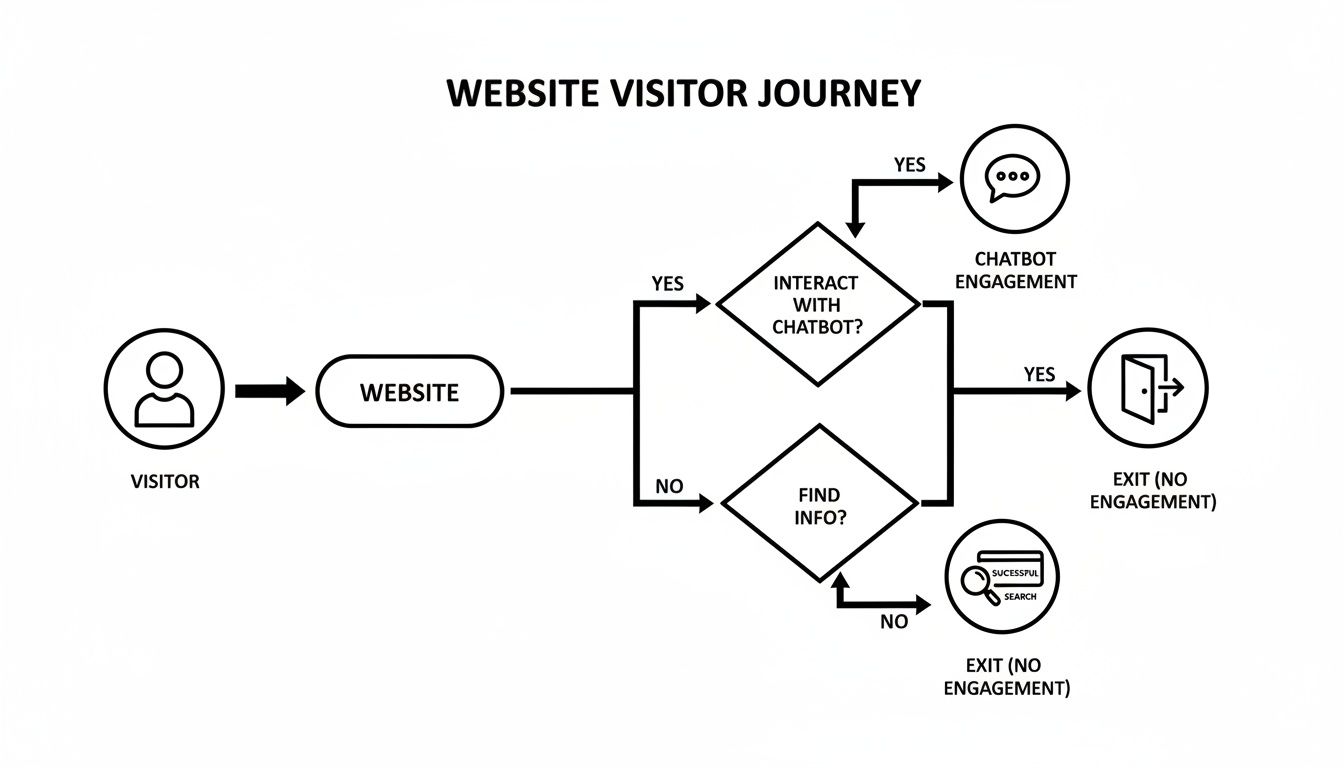
As you can see, the bot acts as an intelligent traffic controller. It directs visitors based on their intent, making sure you don't lose potential leads who might otherwise get lost and leave.
Crafting an Irresistible Opening Hook
That very first message from your chatbot is everything. It has to be compelling enough to stop someone from instinctively closing that little window. Please, stop using lazy openers like "How can I help you?" That just puts all the work back on the user to figure out what to say.
Instead, be proactive and contextual. If someone is lingering on your pricing page, the bot should pop up with something like, "Comparing our plans? I can help you find the perfect fit for your team size." Right away, you're showing the bot is aware of their context and offering specific, immediate value.
Here are a few proven ways to kick off the conversation:
- Offer a specific resource: "Hey there! While you're here, want a free copy of our guide to reducing customer churn?"
- Ask a pain-point question: "Struggling to keep your sales pipeline full? Let's see if we can help with that."
- Provide a shortcut: "Looking for something specific? I can get you answers way faster than you searching the site."
The trick is to make an offer or ask a question that's highly relevant to the page they're on. It shows the bot is smart enough to understand what they might be looking for.
Using Conditional Logic for Smarter Conversations
Let's be honest, not every visitor is a potential buyer. A junior-level researcher is hunting for very different information than a C-suite decision-maker. Your chatbot has to be smart enough to spot the difference and adjust its approach on the fly. This is where conditional logic becomes your secret weapon.
Conditional logic is what allows your chatbot to ask different questions and show different options based on how a user responds. It’s the engine that drives a truly personalized chat experience.
Think about a B2B SaaS company selling project management software. A visitor starts a chat. The bot's first move could be to ask about their role.
- Path for a Decision-Maker: If the user says they're a "Project Manager" or "Team Lead," the bot knows they likely have buying power and can steer the conversation toward a demo or sales call.
- Path for a Researcher: If the user identifies as a "Student" or "Researcher," the bot understands they're probably just gathering information, not ready to buy.
This simple branching creates two completely different conversational journeys, both equally valuable.
A smart chatbot doesn't treat every visitor the same. It segments users in real-time, guiding high-intent prospects toward sales while nurturing lower-intent visitors with valuable content. No opportunity is wasted.
Real Dialogue Examples for a B2B SaaS Company
Let's make this tangible. Imagine a company called "SyncFlow" that sells automation software. A visitor lands on their homepage and clicks the chat icon.
Bot: "Welcome to SyncFlow! Are you looking to automate specific workflows for your team, or just exploring what's out there?"
That first question is a masterclass in segmenting by intent.
Visitor Clicks: "Automate specific workflows"
Bot: "Great! To point you in the right direction, what's your current role?"
(Buttons: Manager/Director, Team Member, Researcher)
Visitor Clicks: "Manager/Director"
Bot: "Perfect. Managers love how SyncFlow cuts down on manual data entry by over 40%. To see if it's a fit, what's your team size?"
(Buttons: 1-10, 11-50, 50+)
Visitor Clicks: "11-50"
Bot: "Excellent. It sounds like our Business Plan would be a great match. Would you like to see a quick 2-minute demo video or book a live call with an automation specialist?"
In just a few clicks, the bot has qualified the lead on intent, role, and company size, then offered a high-value next step. Now, let’s see what happens on the other path.
Visitor Clicks: "Researcher" (from the second question)
Bot: "Awesome! We have some great resources for you. Our latest whitepaper, 'The State of B2B Automation,' is packed with industry data. Can I send a free copy to your email?"
Here, the chatbot smartly recognizes this person isn't a direct sales lead. Instead of pushing for a demo, it offers a valuable asset in exchange for their email. The researcher gets what they came for, and SyncFlow gets a new contact for its marketing nurture campaigns. This kind of intelligent routing is the foundation of a successful chatbot for lead generation.
Building an Automated Lead Scoring System
A busy sales pipeline is great, but let's be honest—it's a pipeline full of the right prospects that actually drives revenue. This is where a modern chatbot for lead generation really shines. It's more than just a data collector; it can become your first line of intelligent filtering.
By building an automated lead scoring system right into your chatbot's conversations, you empower your sales team to focus on high-intent, high-value opportunities instead of chasing dead ends. It turns your bot from a simple greeter into a sophisticated qualification engine, dynamically assessing a visitor's potential based on their real-time answers.
This isn't just a small tweak for efficiency. It's about fundamentally improving the quality of your sales pipeline from the very first interaction.
The data backs this up. Companies that get this right see incredible results. Globally, 55% of businesses using digital assistants report a surge in high-quality leads, and 64% confirm they're getting more qualified prospects overall. It works because predictive scoring pinpoints the most valuable leads, turning conversations into real opportunities.
Defining Your Scoring Criteria
Before your chatbot can start scoring anyone, you need to define what a "good lead" actually looks like for your business. This is where you translate your ideal customer profile (ICP) into a set of quantifiable rules. The goal is to assign point values to different attributes and answers your bot collects.
Get your sales team in a room for this one. They're on the front lines and know which characteristics signal a hot lead.
Some classic data points to consider are:
- Role and Seniority: A "Marketing Director" is almost always a higher-value lead than an "Intern."
- Company Size: If you sell to mid-market companies, a prospect from a 100-person firm is far more qualified than one from a 5-person startup.
- Industry: Do you specialize in fintech? A lead from that sector should get a higher score.
- Expressed Need: Someone who says they need a solution "this quarter" is way more urgent than a visitor who is "just browsing."
By assigning a score to each of these attributes, you start building a clear, data-driven picture of lead quality.
Your lead scoring model is a living system, not a one-time setup. Regularly review it with sales to ensure the criteria still accurately reflect the leads that are most likely to close. What defines a 'hot lead' can change as your business evolves.
Adapting Frameworks like BANT for Chatbots
You don't need to reinvent the wheel. Traditional sales qualification frameworks like BANT (Budget, Authority, Need, Timeline) are perfect for adapting to a chatbot flow. The key is to avoid making it feel like a rigid interrogation. Weave these questions naturally into the conversation to gather the data you need for scoring.
Here’s how you can do it:
- Budget: Instead of a blunt "What's your budget?", the bot can ask, "To give you the most accurate info, are you looking for a solution under $5k/month or something more enterprise-level?" This feels helpful while still gauging their investment level.
- Authority: A simple, direct question like, "What's your current role?" is all you need to establish their potential decision-making power.
- Need: Uncover their pain points by asking something like, "What's the main obstacle you're facing with lead generation right now?"
- Timeline: Get a sense of urgency with, "How soon are you hoping to have a new solution in place?"
Each answer contributes to the overall lead score. Once a lead's score crosses a predetermined threshold—say, 50 points—the bot can trigger a priority action, like an immediate handoff to a live sales agent or an option to book a demo on the spot. If you want to dive deeper into the fundamentals, you can learn more about what lead scoring is in our detailed guide.
Example B2B Lead Scoring Model for a Chatbot
Here's a simplified but practical model I've seen work well for B2B SaaS companies. This table shows how different answers can accumulate points, painting a clear picture of lead quality for the sales team.
| Attribute | Criteria | Score |
|---|---|---|
| Role | C-Level or VP | +30 |
| Director or Manager | +20 | |
| Intern or Student | -10 | |
| Company Size | 100+ Employees | +25 |
| 20-99 Employees | +15 | |
| 1-19 Employees | +5 | |
| Timeline | This Quarter | +25 |
| Within 6 Months | +10 | |
| Just Researching | +0 | |
| Expressed Need | Solves a key pain point we address | +20 |
| General inquiry | +5 |
Using this system, a Marketing Director from a 150-person company needing a solution this quarter would rack up 75 points (20 + 25 + 25). That's an instant red flag—in a good way—for the sales team to jump on it immediately. This kind of automated intelligence is exactly what makes a chatbot for lead generation an indispensable tool for scaling your sales operations.
Connecting Your Chatbot to Your Sales and Marketing Stack
A chatbot that isn't connected to your other tools is a huge missed opportunity. Sure, it might gather some great intel, but if that information just sits inside the chatbot's own dashboard, you've created a dead end. The real magic happens when your chatbot for lead generation becomes the central hub of your tech stack, talking seamlessly with the sales and marketing platforms you use every single day.
When you connect the dots, your bot transforms from a simple Q&A tool into a genuine automation engine. Imagine a hot lead comes in, and instantly a new deal is created in Salesforce, a high-priority alert pings the right sales rep in Slack, and that same contact is enrolled in a targeted HubSpot nurture sequence. This isn't science fiction; it's what a properly integrated system does, killing manual data entry and drastically shrinking your sales cycle.
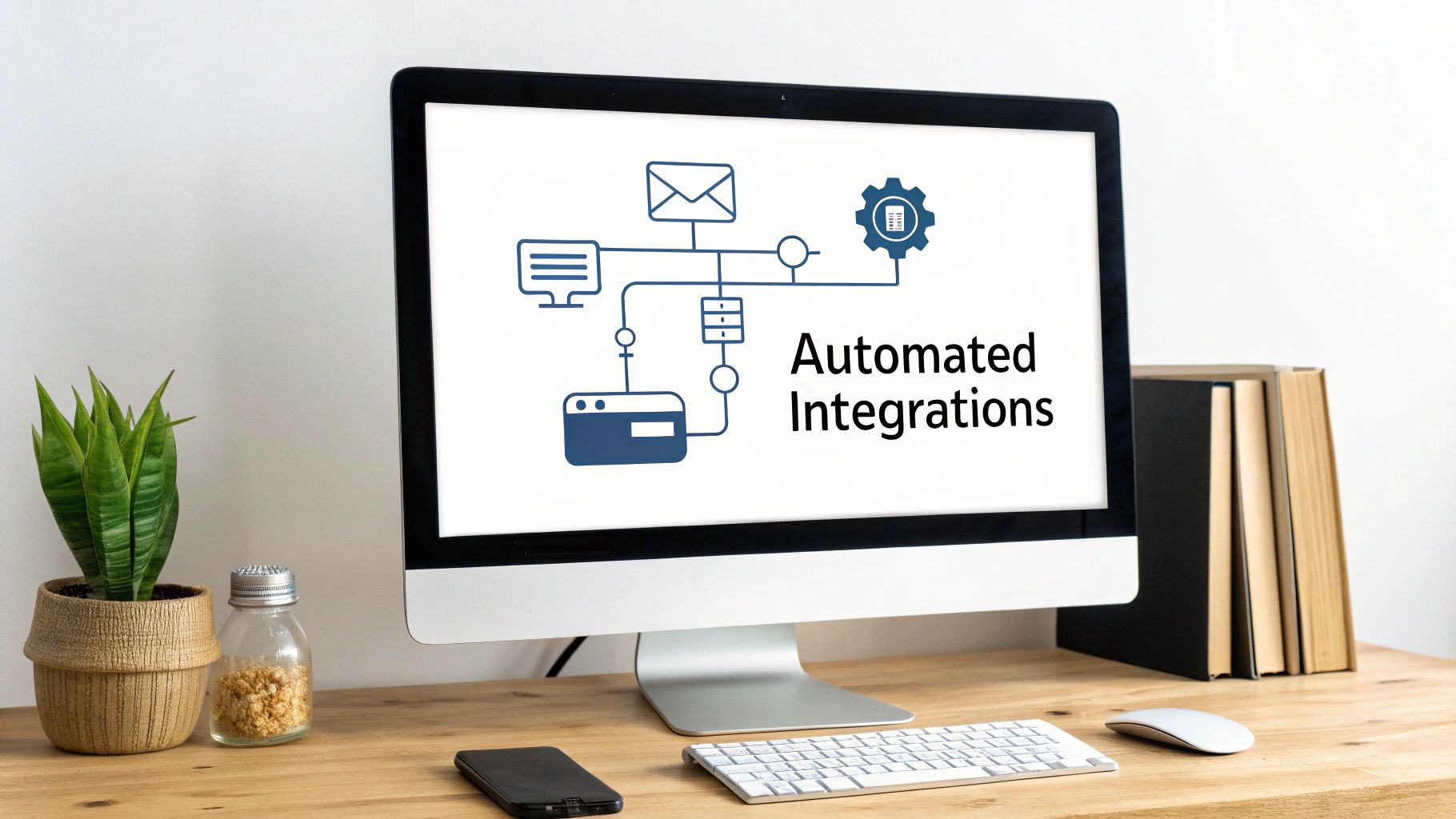
This level of automation is exactly why businesses see such incredible results. We're talking revenue jumps of 15-35% and a first-year ROI of 340%, with payback often happening in just a few months. It all comes down to efficiency. A well-integrated AI assistant can boost lead qualification efficiency by up to 40% and handle 80% of routine questions on its own. You can dig into more stats about how AI chatbots deliver ROI on hyperleap.ai.
Choosing Your Integration Method
The good news is you don't need a team of developers to get your systems talking. Most modern chatbot platforms are built with this in mind and give you a few different ways to connect everything.
- Native Integrations: These are your best friends. They're the pre-built, one-click connections to big players like Salesforce, HubSpot, or Mailchimp. This is the fastest and easiest way to handle common tasks like creating a new CRM contact.
- Integration Platforms (like Zapier or Make): Think of these as the universal translators for your apps. If a native integration doesn't exist, a tool like Zapier can probably bridge the gap using simple "if this, then that" logic to connect your bot to thousands of other tools.
- Webhooks and APIs: For truly custom or complex workflows, this is the path. It requires some technical know-how but gives you complete freedom to build bespoke automations that perfectly match your internal processes.
For most businesses, the sweet spot is starting with native integrations for your CRM and then using a platform like Zapier for everything else. It's a powerful and scalable approach that doesn't require you to write a single line of code.
Essential Integration Workflows for Lead Generation
Once you know how you'll connect your tools, you need to decide what to automate. This isn't just about shuffling data around; it's about triggering the right actions at the right moment to make you money.
Think through the entire journey. What absolutely has to happen the second your chatbot qualifies a lead? Your goal is to build an automated chain reaction that moves a prospect forward without a human having to lift a finger until it’s absolutely necessary.
A well-integrated chatbot doesn't just pass a name and email to your CRM. It enriches that contact record with the full conversation transcript, their pain points, company size, and their calculated lead score, giving sales reps invaluable context for their first call.
Here are three high-impact workflows you should set up right away:
- Instant CRM Record Creation and Enrichment: When a lead is captured, the bot should automatically create a contact and a deal in your CRM. Make sure you map the conversation data to the right fields—job title, company size, budget, timeline, etc.
- Real-Time Sales Team Notifications: Speed is everything in sales. Set up an automation that pings the right sales rep via Slack or email the moment a high-scoring lead is identified. Be sure to include key details and a direct link to the new CRM record.
- Automated Marketing Nurture Enrollment: Not every lead is ready to buy today. Create a rule so that when the chatbot identifies a lower-intent lead (maybe they're "just researching"), it automatically adds them to a specific email nurture sequence in your marketing automation platform.
These automated handoffs are your safety net, ensuring no lead ever falls through the cracks. If you want to go a bit deeper, check out this guide on what CRM integration is and why it’s the backbone of any effective sales process. By plugging your chatbot into your core stack, you build an intelligent system that works 24/7 to capture, qualify, and route leads with ruthless efficiency.
Measuring Chatbot Performance and Proving ROI
Getting your B2B lead generation chatbot live is a huge milestone, but it's really just the beginning. Now comes the critical part: turning that new tool into a predictable engine for growth. To do that, you have to know what's working, what's falling flat, and how to prove its value to the people who sign the checks.
Let's be clear—proving value goes way beyond vanity metrics like "total chats." We're talking about measuring the bot's direct impact on what really matters to the business: qualified leads, pipeline growth, and cold, hard revenue.
Without the right data, your chatbot is just another line item on the marketing budget. But with it, the bot becomes a strategic asset you can fine-tune for a clear, undeniable return. This is how you shift from a "set it and forget it" mentality to a cycle of constant improvement.
Key Performance Indicators That Actually Matter
To prove your chatbot’s worth, you need to laser-focus on the metrics that tie directly to sales outcomes. These are the numbers that get your leadership team to lean in. They tell the real story of the bot's performance.
Here are the essential KPIs you should be tracking:
- Chat-to-Lead Conversion Rate: This is your north star metric. It's the percentage of conversations that result in a captured lead (like getting an email address). If you have 100 conversations and get 15 leads, your conversion rate is a solid 15%.
- Lead Qualification Rate: Of all the leads your bot grabs, how many actually meet your MQL or SQL criteria? This metric tells you if you're attracting the right prospects or just spinning your wheels.
- Chatbot-Sourced Pipeline Value: This is where you connect the dots to real money. You need to track the total dollar value of all the sales opportunities in your CRM that started with a chatbot conversation.
- Cost Per Qualified Lead (CPQL): Take the total cost of your chatbot software and any related expenses, then divide that by the number of qualified leads it generated. This is how you compare its efficiency against your other marketing channels, like paid ads or content syndication.
Tracking these numbers changes the conversation entirely. You'll go from saying "the chatbot is busy" to "the chatbot generated $50,000 in new pipeline this quarter." See the difference?
Setting Up Your Measurement Framework
You can't track what you don't connect. For any of this to work, your chatbot, website analytics, and CRM need to be in constant communication. This setup isn't optional; it's the foundation for proving ROI.
First, your chatbot must be integrated with your CRM. We've talked about how this automates the lead handoff, but it's just as crucial for tracking. When a new lead gets passed over, make sure it’s automatically tagged with a "Lead Source" of "Chatbot." This simple tag lets you build reports that isolate the performance of this specific channel.
Next, you need to understand the user's journey. Use tools like Google Analytics to set up conversion goals for key chatbot events. You should be tracking when a conversation starts, when an email is submitted, and when a meeting is booked. This gives you a clear view of the entire funnel, from the first click to the final handshake.
Proving ROI isn't about finding one magic number. It's about building a data narrative. You need to show how the chatbot's immediate actions—like qualifying a lead in real-time—translate into long-term business outcomes, like a shorter sales cycle or a higher close rate.
A Simple Framework for A/B Testing and Optimization
Once your tracking is solid, the real fun begins: optimization. A/B testing is your best friend here. The concept is simple—test one change at a time to see what moves the needle on your conversion rates. Resist the urge to change everything at once; if you do, you'll never know what actually worked.
Start by testing the highest-impact parts of your conversation flow. Here’s a practical plan you can roll out right away:
- Test Your Opening Hook: This is the very first message a visitor sees. Try a question-based opener ("Struggling to manage your projects?") against a benefit-driven one ("See how teams like yours save 10 hours a week."). Let it run for a week or two, then see which version got more people to engage.
- Experiment with Qualifying Questions: Is asking for company size right before asking for their role causing people to bail? Try swapping the order of your questions. You might be surprised to see how a small tweak improves the completion rate.
- Vary Your Call-to-Action: For leads who are fully qualified, test offering a "Book a Demo" button versus a more direct "Talk to Sales" option. A subtle change in wording can have a massive impact on how many people take that final step.
By constantly testing and iterating, your chatbot for lead generation stops being a static tool. It becomes a dynamic, high-performing asset that gets smarter and more effective with every conversation.
Answering Your Top Chatbot Questions
Even with the best strategy in place, bringing a new piece of tech into your stack always comes with a few "what ifs." I get it. When I talk to business leaders about using chatbots for lead generation, the same handful of very practical questions almost always comes up.
Let's tackle those head-on so you can move forward feeling confident you've covered all the angles.
Will a Chatbot Feel Too Robotic for Our Customers?
This is probably the number one concern I hear, and it’s completely valid. We’ve all been trapped by a clunky, unhelpful bot before. But modern chatbot tech is a world away from those frustrating early versions. The secret isn't trying to trick people into thinking the bot is human. That almost never works.
Instead, a well-designed chatbot is upfront about what it is while being incredibly helpful and efficient. The magic is in the conversation design. By using a natural, friendly tone, giving people clear button-based options, and maybe even sprinkling in a well-placed GIF, you can create an experience that feels genuinely engaging and true to your brand—not cold and alienating.
Do We Need a Developer to Build and Manage It?
Thankfully, no. The days of needing a developer on speed dial to launch a chatbot are long gone. The game-changer has been the rise of no-code and low-code chatbot platforms.
These tools are built for marketing and sales teams. They use intuitive drag-and-drop editors to map out conversation flows, so you can set up everything from simple qualifying questions to sophisticated CRM integrations without ever touching a line of code. This puts the power right where it belongs: in the hands of the people who will actually be using it to drive revenue.
How Much Does a Lead Generation Chatbot Cost?
The cost can swing pretty widely, but it’s almost certainly more affordable than you'd guess. Most pricing models are based on things like the number of conversations you have each month, how many features you need, and the number of people on your team who will use it.
Generally, it breaks down like this:
- Entry-Level Plans: Many platforms offer free plans or low-cost monthly options, which are perfect if you're just dipping your toes in the water.
- Mid-Tier Plans: This is the sweet spot for most growing businesses. You’ll get key features like A/B testing and integrations with your other tools.
- Enterprise Solutions: These are custom-priced for big companies that have complex security, support, and compliance requirements.
Here's the thing, though: don't get too hung up on the sticker price. The real metric to watch is the return on investment (ROI). A bot that costs a few hundred dollars a month but brings in thousands in new, qualified pipeline is one of the most efficient investments you can make.
Can a Chatbot Handle Complex B2B Sales Questions?
Let's be realistic: a chatbot isn't going to close a six-figure, multi-stakeholder B2B deal by itself. Its real power is in mastering the top of the funnel with incredible speed and efficiency.
It’s an absolute workhorse for:
- Answering common questions instantly, 24/7.
- Qualifying website visitors against your ideal customer profile (think company size, industry, or role).
- Booking meetings directly on your sales team's calendars.
When a conversation gets too complex or a visitor is flagged as a hot lead, the bot’s most important job is to execute a seamless human handoff. It can ping a sales rep on Slack, send an email notification, and provide the full conversation history for context. The bot handles the repetitive work, freeing up your team to focus on what they do best: building relationships and closing deals.
Ready to stop losing leads and start automating your pipeline? The team at MakeAutomation specializes in building and implementing AI-powered systems that drive scalable growth for B2B businesses. We can help you deploy a chatbot that not only captures leads but qualifies and routes them with precision.
Learn how we can optimize your lead generation process at https://makeautomation.co.