continuous delivery devops: Fast, reliable software releases
In a DevOps culture, Continuous Delivery is all about keeping your software in a state where it's always ready to go live. Think of it as a highly efficient assembly line for your code, ensuring every single change is rigorously tested and prepared for release to users at the push of a button. It's a cornerstone practice in modern software development, built to slash risk and get value into customers' hands faster.
What Is Continuous Delivery in a DevOps Culture?
Picture a modern factory floor. Cars aren't built in one go and then tested at the very end. Instead, each part is added, checked, and seamlessly integrated along a moving conveyor belt. At any moment, a nearly finished vehicle could be pulled from the line, given one last quality check, and be ready to drive. That’s the core idea behind continuous delivery devops. It's an approach where teams build software in small, rapid cycles, guaranteeing that the code can be reliably released at any given time.
The main objective is to turn deployments into predictable, everyday events that can happen on demand. Forget about those massive, high-stakes "big bang" releases that happen once a quarter. Teams practicing Continuous Delivery can push out updates daily, or even several times a day, by automating everything from the build to the final deployment.
The philosophy is simple but powerful: if a process is painful, you should do it more often to make it better. By turning releases into frequent, low-drama activities, teams systematically remove the stress and risk that have traditionally plagued software deployment.
This capability fundamentally reshapes how a business functions. Teams that have mastered continuous delivery devops practices deploy software an incredible 46 times more frequently than their slower counterparts. At the same time, they slash the lead time for changes by up to 90%, creating a massive competitive advantage.
Clarifying Key Terms: CI vs. Continuous Delivery vs. Continuous Deployment
To really get a handle on Continuous Delivery, it's crucial to understand how it differs from two closely related concepts: Continuous Integration (CI) and Continuous Deployment. People often mix these terms up, but they represent distinct stages of automation.
-
Continuous Integration (CI): This is where it all starts. Developers regularly merge their code changes into a central repository. Every time they do, an automated build and a series of tests are triggered. The whole point of CI is to catch bugs early, boost code quality, and shrink the time it takes to validate new software updates.
-
Continuous Delivery (CD): This is the next logical step, extending directly from CI. CD automates the entire release process, pushing the integrated code all the way to a production-like environment. After all automated tests pass, the release waits for a manual go-ahead. A real person—a product manager, QA lead, or business owner—makes the final call to push the release to customers. This manual step is a critical business control point.
-
Continuous Deployment: This takes automation one step further. It automatically pushes every change that successfully passes through the entire pipeline directly to customers. There's no manual approval gate. While often confused with Continuous Delivery, Continuous Deployment represents the pinnacle of pipeline automation, where human intervention for releases is eliminated.
To make these distinctions crystal clear, let's break them down side-by-side.
CI vs Continuous Delivery vs Continuous Deployment
| Aspect | Continuous Integration (CI) | Continuous Delivery (CD) | Continuous Deployment (CDeploy) |
|---|---|---|---|
| Automation Scope | Automates the build and initial testing of code merges. | Automates the entire pipeline up to the final deployment. | Automates the entire pipeline, including the production release. |
| Release Trigger | Manual trigger for any deployment to an environment. | A human-triggered button press for the production release. | Automatic trigger for every change that passes all tests. |
| Human Intervention | Required to move code from build to any other environment. | Required only for the final "go-live" decision to release. | None required for the release process; it’s fully automated. |
This table neatly shows the progression, with each practice building on the last to increase the level of automation and speed of delivery.
In a healthy DevOps environment, these practices aren't just technical checkboxes; they are powerful drivers of cross-functional collaboration. The transparency and reliability of an automated pipeline foster trust among development, operations, and business teams. Ultimately, continuous delivery devops closes the gap between an idea and its execution, creating a fast, sustainable, and low-risk pathway to delivering real value to your customers.
Anatomy of a Modern Continuous Delivery Pipeline
The heart of Continuous Delivery is the pipeline. Think of it as an automated assembly line for your software, moving code from a developer's idea to a production-ready release. Each station on this line is a quality checkpoint, designed to catch errors early and build confidence with every step.
This isn't just a simple set of scripts running in sequence. A modern pipeline is a sophisticated feedback loop. It takes the code a developer commits and pushes it through a series of automated gates. If any single gate fails, the whole process stops, and the team is notified immediately. This simple concept prevents a bad change from ever getting close to your customers.
Let's walk through the essential stages of this software factory.
Stage 1: Source Control and Versioning
Everything starts with the Source Control Management (SCM) system, where Git is the undisputed king. This is where developers commit their changes to a central repository. That simple git push is the trigger that kicks off the entire pipeline, starting the code on its journey.
Good source control is non-negotiable for a traceable and repeatable delivery process. At this stage, teams should focus on:
- A Clear Branching Strategy: Whether you use GitFlow or Trunk-Based Development, having a consistent model is key to managing work without breaking the main codebase.
- Meaningful Commits: Commit messages should tell a story—explaining why a change was made, not just what was changed.
- Pull Requests (PRs): Using PRs for peer review isn't just about catching bugs; it's about sharing knowledge and improving code quality before it's even merged.
This first step ensures every single change is versioned, reviewed, and ready for the real work to begin.
Stage 2: The Build and Unit Test Phase
Once new code is merged, the pipeline’s first real job begins: building the software and running unit tests. Your Continuous Integration (CI) server—whether it's Jenkins, GitLab CI, or CircleCI—grabs the latest code and tries to compile it into a working application.
If the build fails, the pipeline stops dead. This is your earliest possible warning that something is fundamentally wrong. If the build succeeds, the pipeline immediately runs a battery of unit tests. These are small, lightning-fast tests that check if individual pieces of the code (like a single function or class) work correctly on their own. They are your first line of defense.
A successful build and unit test phase is a huge milestone. It proves the code isn't broken on a basic level and that the individual components are sound enough to be assembled.
Stage 3: Automated Acceptance and Integration Testing
Now that we know the individual parts work, it's time to see if they play nicely together. In this stage, the pipeline deploys the application to a dedicated test environment. Creating and managing these environments on-demand is a classic use case for cloud automation. For teams scaling up, understanding what cloud automation is is crucial for building this kind of dynamic, on-the-fly infrastructure.
In this temporary environment, a whole new set of tests kick-off:
- Integration Tests: Do different services or modules communicate with each other correctly? These tests find out.
- API Tests: These check that the application’s APIs behave as expected when they receive different kinds of requests.
- UI/End-to-End Tests: Using tools like Selenium or Cypress, the pipeline simulates a real user clicking through the app, ensuring critical workflows haven't been broken.
Think of this stage as a full dress rehearsal. It’s a powerful safety net that confirms new features didn't break old ones.
Stage 4: Creating the Release Artifact
Once the code has passed every single automated test, the pipeline’s final job is to package the application into a release artifact. This is a single, versioned, and unchangeable file—like a Docker container or a .jar file—that contains everything needed to run the software. This artifact is then uploaded to a secure artifact repository like JFrog Artifactory or Sonatype Nexus Repository.
A core principle here is to "build the binary once." The exact same artifact that passed all the tests is the one that will eventually be deployed to production. This simple rule eliminates the risk of last-minute changes or environmental differences, giving you complete confidence that what you tested is exactly what you’ll release.
The Core Habits of High-Performing Continuous Delivery Teams
Getting the theory right is one thing, but making continuous delivery work in the real world comes down to discipline and a handful of non-negotiable practices. These aren't just items on a checklist; they're the foundational habits that turn a shaky, unpredictable release process into a well-oiled machine.
Think of these practices as the guardrails for your delivery pipeline. They're what give you the confidence to ship code quickly and reliably, ensuring that every deployment is a routine, low-stress event, not a "hope for the best" crisis.
The diagram below maps out the journey of code through a typical automated pipeline, showing how these practices fit together to create a smooth, predictable flow from commit to deployment.
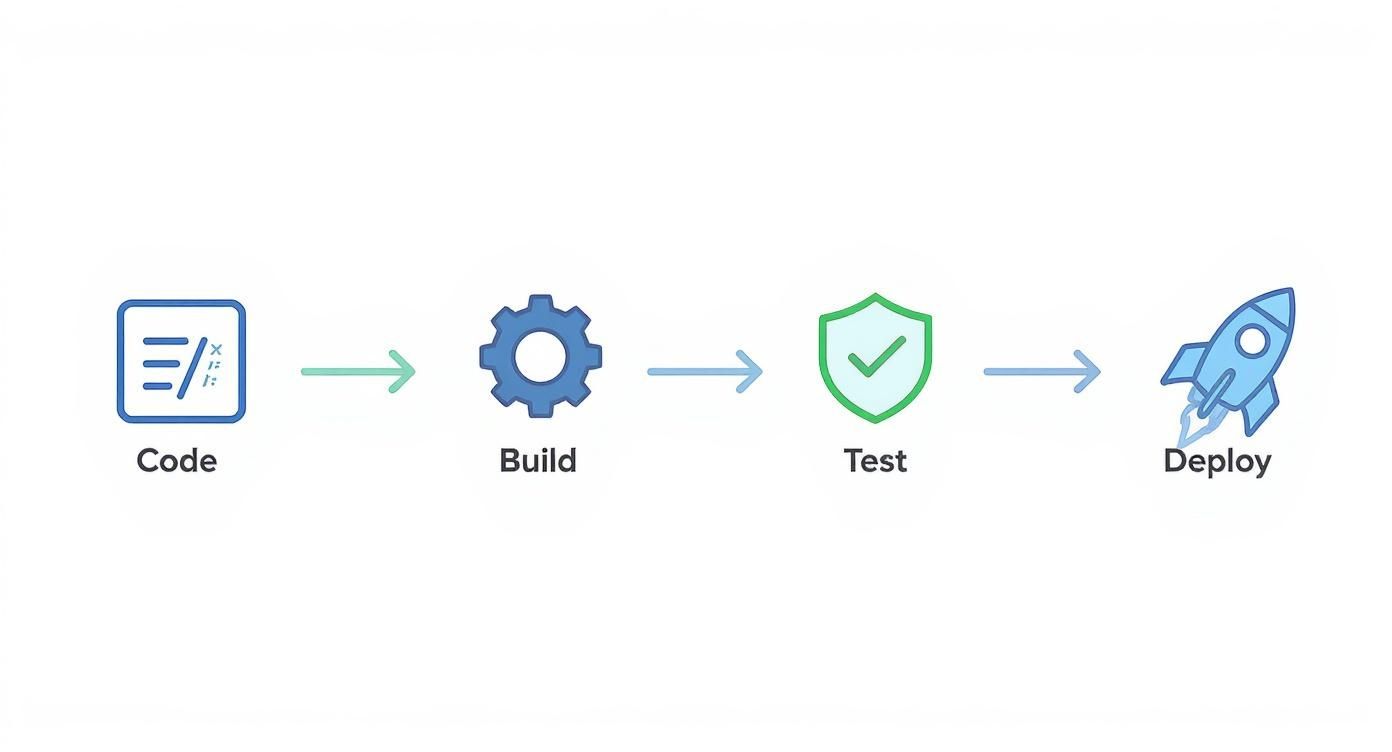
This simple flow is the goal: a linear, automated path where each stage validates the work of the previous one, building trust with every step.
Build Your Binaries Only Once
Here’s a golden rule of CD: build your deployable artifact once. Just once. The exact same package—whether it's a Docker container, a JAR file, or a compiled binary—is what should travel through every single stage of your pipeline, from testing all the way to production.
Why is this so critical? Because it stamps out a huge source of "it worked in staging!" headaches. When you recompile code for different environments, you introduce tiny, invisible changes that can cause massive failures. By creating a single, immutable artifact, you guarantee that the code you tested is the exact same code you're deploying. No surprises.
Automate Your Testing, Seriously
Automation is the heart and soul of Continuous Delivery. Without a rock-solid automated testing suite, pushing out frequent releases is just reckless. A smart testing strategy isn’t about running one giant test; it's about layering different types of tests to catch problems as early and cheaply as possible.
A comprehensive test suite typically includes:
- Unit Tests: These are your first line of defense. They check small, isolated pieces of code and should run in seconds.
- Integration Tests: These make sure different parts of your system—like your app and its database—can talk to each other correctly.
- End-to-End (E2E) Tests: These tests act like a robot user, clicking through your application to verify that critical workflows are unbroken.
- Performance and Security Scans: These automated checks proactively hunt for performance bottlenecks and common security holes before they become a real problem.
This layered approach is your safety net. It builds a shield of confidence around your code, letting the pipeline run with minimal human hand-holding.
Treat Your Infrastructure Like Code
Your application needs a place to live—servers, databases, load balancers, and all the networking in between. Infrastructure as Code (IaC) is the practice of defining and managing all of that infrastructure using code, just like you do for your application.
With IaC, you create environments that are consistent, repeatable, and version-controlled. It’s the ultimate cure for the "it works on my machine" syndrome because it guarantees your development, testing, and production environments are practically identical.
Tools like Terraform, Ansible, or AWS CloudFormation let you spin up entire, complex environments with a single command. This makes it trivial to create a fresh, clean test environment for every single feature branch, dramatically boosting the reliability of your entire process.
Separate Deployment from Release with Feature Flags
In a fast-paced continuous delivery environment, just because code is merged doesn't mean it's ready for every customer to see. This is where feature flags (also called feature toggles) are a game-changer. They're basically simple if statements in your code that let you turn new functionality on or off for different users without having to redeploy.
This powerful technique separates the technical act of deploying code from the business decision to release a feature. You can safely push new code all the way to production but keep it hidden. This unlocks some amazing capabilities:
- Test in Production: Let your internal teams or a small group of friendly customers use a new feature in the real production environment, risk-free.
- Canary Releases: Gradually roll out a feature to a small percentage of your user base (say, 1%) and watch your metrics. If all looks good, you can slowly ramp it up.
- Instant Kill Switch: If a new feature causes problems, you don't need to roll back the whole deployment. Just flip the switch and the feature is instantly turned off for everyone.
This separation gives you an incredible amount of control and makes big releases far less terrifying. The power of these modern practices is clear in industry trends; the market for CI/CD tools, valued at $1.33 billion in 2025, is projected to hit $2.27 billion by 2030. You can explore more on this growth in the full report on DevOps statistics.
Measuring Success with Key DevOps Metrics
https://www.youtube.com/embed/hbeyCECbLhk
So, you've set up a continuous delivery devops pipeline. How do you actually know if it's working? Without cold, hard data, you're flying blind. To get a real sense of how your software delivery process is performing, you have to measure what matters.
This isn't about creating complicated dashboards full of vanity metrics nobody looks at. It's about focusing on a few key performance indicators (KPIs) that tell you exactly how well your team can ship valuable software, quickly and reliably. These metrics are like a health check for your entire development cycle, giving you the data you need to spot bottlenecks and celebrate real progress.
The gold standard for measuring DevOps performance comes from the DevOps Research and Assessment (DORA) team. After years of research, they pinpointed four critical metrics that consistently separate high-performing teams from everyone else. You can think of these as the vital signs for your entire engineering organization.
The Four Pillars of DORA Metrics
What makes the DORA metrics so effective is that they provide a balanced perspective, measuring both the speed (throughput) and the stability of your delivery process. After all, deploying code multiple times a day is fantastic, but not if every other release breaks production and sends your team scrambling.
These four metrics work in tandem to give you the complete story.
Throughput Metrics: How Fast Can You Go?
Two of the metrics focus squarely on your team's velocity. They answer a simple question: how fast can we get an idea from a developer's keyboard into the hands of our customers?
- Deployment Frequency: How often does your team successfully release code to production? This is a direct measure of your delivery cadence. Elite teams don't wait for a "release day"—they deploy on-demand, often multiple times a day.
- Lead Time for Changes: How long does it take from the moment a developer commits code to that code being live in production? This reveals the efficiency of your entire pipeline, from testing and review all the way through deployment.
Stability Metrics: How Reliable Are Your Releases?
Speed is only half the equation. A fast pipeline that constantly causes outages is a massive liability. That's why the other two DORA metrics are all about the quality and stability of your releases. They measure how well your system handles change and how quickly you can bounce back when things (inevitably) go wrong.
- Change Failure Rate (CFR): What percentage of your deployments cause a production failure that requires a fix, like a hotfix or a rollback? A low CFR is a clear sign that your automated tests and quality checks are doing their job.
- Mean Time to Recovery (MTTR): When a failure does happen, how long does it take your team to fix it and restore service? A low MTTR points to a resilient system and a team that's skilled at troubleshooting under pressure.
To put it all together, here is a quick look at the DORA metrics and what top-tier teams aim for.
DORA Metrics for Continuous Delivery Performance
| Metric | Description | Elite Performance Benchmark |
|---|---|---|
| Deployment Frequency | How often an organization successfully releases to production. | On-demand (multiple deploys per day) |
| Lead Time for Changes | The amount of time it takes a commit to get into production. | Less than one hour |
| Change Failure Rate | The percentage of deployments causing a failure in production. | 0-15% |
| Mean Time to Recovery (MTTR) | How long it takes to restore service after a production failure. | Less than one hour |
As you can see, elite performers operate at a completely different level of speed and reliability.
By tracking these four metrics, you create a powerful feedback loop. You can see precisely how process improvements—like better test automation or streamlined approvals—directly impact your ability to ship software. It moves the conversation from opinions to data.
These KPIs are the compass for any serious continuous delivery devops initiative. They connect your engineering work directly to business outcomes, proving that a faster, more reliable delivery process is a major contributor to the bottom line. The first step is simple: establish a baseline for these four metrics, and then let that data guide your journey of continuous improvement.
Common Continuous Delivery Pitfalls and How to Avoid Them
Moving to a continuous delivery devops model is a game-changer, but the road is rarely a straight line. I’ve seen countless teams run into the same handful of predictable roadblocks that can kill momentum, break trust, and sometimes sink the whole initiative.
The good news is that these pitfalls are well-known. If you know what to look for, you can sidestep them entirely. Think of this as a map of the common traps, so you can turn potential stumbles into valuable lessons.
Pitfall 1: The Flaky Test Suite
We’ve all been there. A developer pushes a change, the pipeline kicks off, and a test fails. They dig into the code, find nothing wrong, and just rerun the job. Poof, it passes. That’s a flaky test—one that passes or fails without any changes to the code, seemingly at random.
Once this starts happening regularly, a dangerous thing happens: your team loses faith in the tests. Failures get ignored with a shrug and a "it's probably that flaky UI test again." This completely undermines the entire purpose of having an automated safety net in the first place.
How to Sidestep This:
- Quarantine them immediately. The second a test is identified as flaky, pull it out of the main pipeline. Isolate it in a separate suite where it can be debugged and fixed without blocking good code from moving forward.
- Treat flakes like P1 bugs. Don't let flaky tests linger. Dedicate real engineering time to making them stable, which often means rewriting a fragile UI test as a more reliable API or component test.
- Keep an eye on test health. Track your test failure rates. A test that fails even 10% of the time is a massive source of friction and needs to be fixed or removed, pronto.
Pitfall 2: The Slow and Sluggish Pipeline
The whole point of continuous delivery devops is fast feedback. If your pipeline takes an hour to give you a thumbs-up or thumbs-down, you've lost the plot. Developers get distracted, switch tasks, and lose all their momentum while waiting around.
This problem usually creeps in over time. Teams add more tests and more stages, but no one ever goes back to optimize the flow. A zippy 10-minute feedback loop slowly bloats into a 90-minute bottleneck that everyone dreads.
A pipeline that’s too slow is almost as bad as no pipeline at all. It punishes frequent commits and makes the whole development cycle feel like a grind.
How to Sidestep This:
- Run things in parallel. Stop running all your tests in a long, single-file line. Split your unit, integration, and end-to-end tests into jobs that can run at the same time. This is often the single biggest time-saver.
- Optimize the environment. Every second counts. Cache your dependencies, use more powerful build agents, and make sure your test environments are provisioned in a snap. These small savings add up to massive gains.
- Create a "fast feedback" stage. Set up an initial stage that only runs the absolute essentials, like linters and unit tests. This can give a developer feedback in under five minutes, letting them know if they've made a simple mistake long before the full suite even starts.
Pitfall 3: Neglecting the Database
So many teams build incredible automation for their application code but treat the database like it’s from another planet. Schema changes and data migrations are often handled as a separate, manual step by a DBA right before a stressful release.
This is a recipe for a weekend-ruining disaster. A last-minute schema change that doesn't work with the new code can bring a deployment to a dead stop, forcing a painful rollback and shattering everyone's confidence in the process.
How to Sidestep This:
- Automate your database migrations. Use tools like Flyway or Liquibase to manage your database schema with the same version-controlled rigor as your application code. This makes database changes repeatable, testable, and painless.
- Embrace expansion and contraction. Never make a breaking database change in one go. Instead, use a two-step pattern. First, deploy a change that supports both the old and new schema (expansion). Once all your services are updated, a second deployment can safely remove the old columns or tables (contraction).
Pitfall 4: Overlooking Cultural Friction
At the end of the day, the biggest obstacle is rarely technical; it's human. If your dev and ops teams are still working in their own silos, that shiny new continuous delivery pipeline can quickly become a battleground instead of a bridge.
This friction pops up when one team feels like automation is being "done to them" or when there’s no shared ownership over getting code all the way to production. Without a genuine DevOps mindset of "we're all in this together," even the most perfectly engineered pipeline will fall flat. A successful adoption needs everyone to be on board and pulling in the same direction.
Accelerating Your Pipeline with Automation and AI

If standard automation is the engine of a continuous delivery devops pipeline, then Artificial Intelligence (AI) is its intelligent navigation system. The goal is no longer just about making pipelines faster. It's about making them smarter, predictive, and even capable of healing themselves. This evolution turns your pipeline from a simple conveyor belt for code into a proactive system that anticipates needs.
Think about a pipeline that doesn't just react to problems but sees them coming. AI models can dig into historical data—from code commits, test results, and past incidents—to flag which new changes are likely to cause trouble. Before a risky commit even gets merged, the system can mark it for extra review, saving the team from a potential production fire drill.
This marks a fundamental shift from reactive to predictive quality control. Instead of just catching bugs, intelligent pipelines help prevent them from ever being written, cutting down on countless hours of rework.
This intelligence makes a huge difference in the testing phase, which is notorious for being a major pipeline bottleneck.
Smarter Testing and Faster Recovery
AI is completely changing the game for automated testing. Rather than running a huge, slow test suite for every single change, AI can analyze the code modifications and intelligently pick only the most relevant tests to run. This targeted approach dramatically cuts down execution times and gets feedback to developers in minutes, not hours, without sacrificing quality.
And when something inevitably does break in production, AI helps the team bounce back faster than ever.
- Automated Root Cause Analysis: AI tools can instantly parse mountains of logs, metrics, and deployment data to find the needle in the haystack, slashing the Mean Time to Recovery (MTTR).
- Intelligent Alerting: Instead of a chaotic storm of alerts, AI can correlate related signals into a single, useful notification that explains the actual problem, letting on-call engineers focus on fixing, not deciphering.
- Predictive Scaling: By watching user traffic patterns, AI can automatically scale infrastructure up or down to prevent performance issues before they ever impact customers.
As you can see, adding a layer of artificial intelligence on top of your automation can unlock some serious efficiency gains. For a deeper look, check out this guide on AI in business automation.
Orchestrating Workflows Beyond Code
The truly next-level pipelines don't just stop once the code is deployed. They use intelligent automation platforms to trigger entire business workflows connected to each release. This is where you see the real power of AI-powered workflow automation to bridge the gap between your technical pipeline and the rest of the business.
For instance, an intelligent platform can handle tasks like these on its own:
- Notify Stakeholders: Right after a successful deployment, it can post a summary of the new features to the #marketing-updates Slack channel.
- Generate Compliance Reports: It can automatically create and file away the audit logs and reports needed to meet standards like SOC 2 or HIPAA.
- Update Project Management Tools: It can find the related user stories in Jira, close them out, and move them to the "Done" column, keeping everyone perfectly in sync.
By weaving these business tasks directly into your technical workflow, you create a seamless, end-to-end process. It ensures the entire organization moves at the speed of delivery, not just the engineering team.
Got Questions? Let's Talk Continuous Delivery
Even the best-laid plans run into real-world questions. When you're making a big shift like adopting continuous delivery, a few things are bound to pop up. Let's tackle some of the most common ones we hear from teams just starting out.
How Do You Handle Database Changes in a CD Pipeline?
This is probably one of the most critical questions, because a botched database migration can bring everything to a halt. The short answer? You treat your database like you treat your code.
Think of it as database migrations as code. Using tools like Flyway or Liquibase, you can version-control, automate, and test every schema change. These changes then become just another step in your automated pipeline, running right alongside the application code they support. This pulls the risk out of what is traditionally a nail-biting, manual process done at the eleventh hour.
Is Continuous Delivery Actually Secure?
It is. In fact, when implemented correctly, continuous delivery can seriously upgrade your security posture. The key is to stop thinking of security as a final gate and start weaving it into every stage of the pipeline. This approach is often called DevSecOps.
A modern continuous delivery devops pipeline doesn't wait for a manual review. Instead, it runs automated security scans constantly:
- Static Application Security Testing (SAST): These tools scan your source code for vulnerabilities before it's even compiled.
- Software Composition Analysis (SCA): This automatically checks all your third-party libraries and dependencies for known security flaws.
- Dynamic Application Security Testing (DAST): Once the app is built and running in a test environment, these tools actively probe it for security holes, just like a hacker would.
By front-loading these checks, you catch and fix issues early when they're cheap and easy to solve. It's a massive improvement over finding a critical vulnerability right before a major release.
Continuous Delivery doesn't bypass security; it bakes it in. By making security an automated, always-on part of the pipeline, you build a fundamentally more resilient system from day one.
What's the Difference Between Continuous Delivery and Agile?
It’s easy to confuse the two, but they solve different problems. They’re partners, not competitors.
Agile is a philosophy for managing work. It's all about iterative development, getting customer feedback, and adapting to change. It answers the question, "What should we build next?"
Continuous Delivery, on the other hand, is a set of technical practices. It's the engineering discipline that automates how you release software. It answers the question, "How do we get our software to users safely and reliably?"
You need both to truly excel. Agile gives you the small, valuable chunks of work, and continuous delivery devops gives you the engine to ship those chunks to users quickly and without drama.
Ready to transform your software delivery pipeline with intelligent automation? At MakeAutomation, we specialize in building the AI-powered workflows that connect your technical processes to your business outcomes. Book a consultation with us today to discover how we can help you accelerate your journey to elite performance.