
Jira Epics Stories: jira epics stories to power your team’s workflows
When a project feels like a giant, overwhelming puzzle, Jira Epics and Stories are the corner pieces that help you bring order to the chaos. Think of an Epic as the picture on the box lid—it's your high-level goal. Stories are the individual puzzle pieces—the small, manageable steps your team takes to build that picture. This simple hierarchy is the secret to turning a complex initiative into a clear, actionable plan.
From Project Chaos to Workflow Clarity

Trying to manage large-scale B2B or SaaS projects without a solid structure is a recipe for disaster. Before you know it, you're drowning in endless spreadsheets or lost in a sea of disconnected tasks. Deadlines get missed, teams are confused, and resources go to waste because nobody has a clear view of the bigger picture. This is precisely where Jira Epics and Stories step in to provide immediate, lasting clarity.
The Blueprint and the Bricks
Let's use an analogy. Imagine you're building a new feature, say, a "User Profile Dashboard." This entire initiative is your Epic. It’s a significant piece of work that delivers real value to the user, but it's far too big to tackle in one go. The Epic provides the why—the strategic context for all the work that follows.
To make it happen, you have to break it down into smaller, concrete actions. These are your Stories:
- Story 1: Design the UI for the profile page.
- Story 2: Build the "edit account details" form.
- Story 3: Add a feature to upload a profile picture.
Each Story is a distinct chunk of work that your team can complete in a short period, usually within a single sprint. Once all the Stories tied to the "User Profile Dashboard" Epic are done, the entire feature is complete. This parent-child relationship ensures every small task contributes directly to the larger strategic goal.
This isn't just about keeping things organized. It's about creating visibility. Stakeholders can glance at the Epic and see the overall progress, while your development team can focus on the specific Story in front of them without losing sight of where they're heading.
Truly moving from project chaos to workflow clarity requires a deep understanding of project management within Jira. By adopting this structure, you build a scalable foundation that shifts your team from constantly putting out fires to delivering work proactively and predictably.
What Exactly Is a Jira Epic? Think of It as Your Strategic Blueprint
Let’s start at the top. Think of a Jira Epic as the high-level plan for a major company initiative. It’s not just another task on the list; it’s a big, chunky piece of work that groups together a whole bunch of smaller, related tasks. An Epic could be something like "Revamp the Customer Onboarding Experience" or "Launch Version 2.0 of Our Analytics Dashboard."
For a B2B founder, an Epic is the perfect container for a whole feature release, all the way from the initial idea to the day it goes live. For an operations director, it might be a project like a full-scale CRM migration. Essentially, Epics make sure that every little thing your team works on actually ties back to a bigger strategic goal. It stops people from getting stuck in the weeds working on tasks that don’t really move the needle.
An Epic is your North Star for a specific goal. It's big enough to deliver real, measurable value but focused enough that you can knock it out in a reasonable timeframe, like a single quarter. It provides the roadmap without getting bogged down in the turn-by-turn directions.
How to Write an Epic That Actually Works
The secret to a good Epic is clarity. It doesn't have to be a novel, but it absolutely has to be crystal clear about the goal. It needs a straightforward summary that anyone in the company—from the CEO to the newest developer—can read and instantly understand.
This kind of clarity is non-negotiable, and it’s why the Epic-to-Story hierarchy has become such a staple in modern agile development. In fact, Jira's own features have evolved around this model. The community pushed for better ways to track progress, leading to the dynamic dashboards we have today that make clunky old spreadsheets obsolete. A typical Epic for a SaaS product might contain 10-20 stories. According to Atlassian, 75% of teams now use the Timeline view to create their Epics, which often span an average of 8 weeks. You can learn more about how teams are using epic statistics to improve their workflows.
Bringing Your Strategic Roadmap to Life
The real power of Jira Epics and Stories clicks into place when you see them laid out visually. Tools built right into Jira, like the Timeline view, let you map out all your Epics over the coming weeks, months, or even quarters.
This isn't just a to-do list; it's a living, breathing plan. The screenshot below shows how you can organize Epics on a timeline, giving everyone a clear picture of what’s coming up and how different pieces of work depend on each other.
This visual approach transforms abstract goals into a concrete action plan. It's the command center for your project, letting stakeholders see at a glance how major initiatives are tracking and when they can expect delivery.
Mastering Jira Stories: The Tactical Building Blocks
If an Epic is the grand vision for your project, think of a Jira Story as a single, tangible step to get there. It’s a small, self-contained piece of work your team can tackle and complete within a single sprint.
Each Story represents a specific requirement from a user's perspective, ensuring that everything you build delivers real, immediate value. It's the practical, hands-on work that brings your bigger Epic to life, one piece at a time.
A Story isn't just a generic "task." The key difference is its user-centric focus. This simple shift in perspective makes sure every feature directly improves the user’s experience. The most common format is a simple but powerful one-liner:
As a [user type], I want to [perform an action] so that I can [achieve a benefit].
This structure forces you to think about why you're building something. For example, a vague task like "Implement login button" becomes a much clearer Story: "As a new user, I want to sign in with my Google account so that I can access my dashboard quickly." See the difference? Now the work is directly tied to user value.
Writing Stories That Set Your Team Up For Success
So, what makes a good story? To keep things clear and actionable, many agile teams lean on the INVEST framework. It’s a handy checklist to make sure every story is ready for development without any confusion. Good stories are a core component of any strong agile requirements document.
A high-quality Jira Story should be:
- Independent: Can it be developed and shipped on its own, without relying on other stories?
- Negotiable: It’s a starting point for a conversation, not a rigid contract set in stone.
- Valuable: Does it deliver a clear benefit to the user or the business? If not, why build it?
- Estimable: Can the team give a rough estimate of the effort it will take?
- Small: Is it small enough to be completed within a single sprint?
- Testable: Are there clear, objective criteria to confirm when it's officially "done"?
The Impact of Well-Defined Stories
Getting this right does more than just organize your backlog. When you embrace this approach for your Jira epics and stories, you give your team total clarity on what to build and why it matters.
Well-defined stories cut down on confusion, prevent painful rework, and make sure every hour of development is spent on features that actually solve customer problems. This tactical precision is what turns a great plan into a successfully delivered project.
How Jira Epics and Stories Work Together
The real magic happens when you see how Jira Epics and Stories connect. This is where high-level strategy meets the day-to-day work, creating a workflow that's both organized and easy to follow. The relationship is simple but powerful: an Epic is the parent, and Stories are its children.
Think of it like building a house. The Epic is "Build the Kitchen." That's a huge undertaking on its own. The Stories are the specific, manageable jobs that get you there: "Install the Cabinets," "Connect the Plumbing," and "Wire the Lighting." Each Story is a distinct piece of work, but together, they result in a finished kitchen.
In Jira, this parent-child connection is managed through the Epic Link. When you create a Story, you link it directly to its parent Epic. This simple step organizes your project into a clear hierarchy, making even the most complex initiatives feel manageable.
Visualizing The Project Hierarchy
To really nail this concept down, let's look at how Epics, Stories, and their sub-tasks fit together.
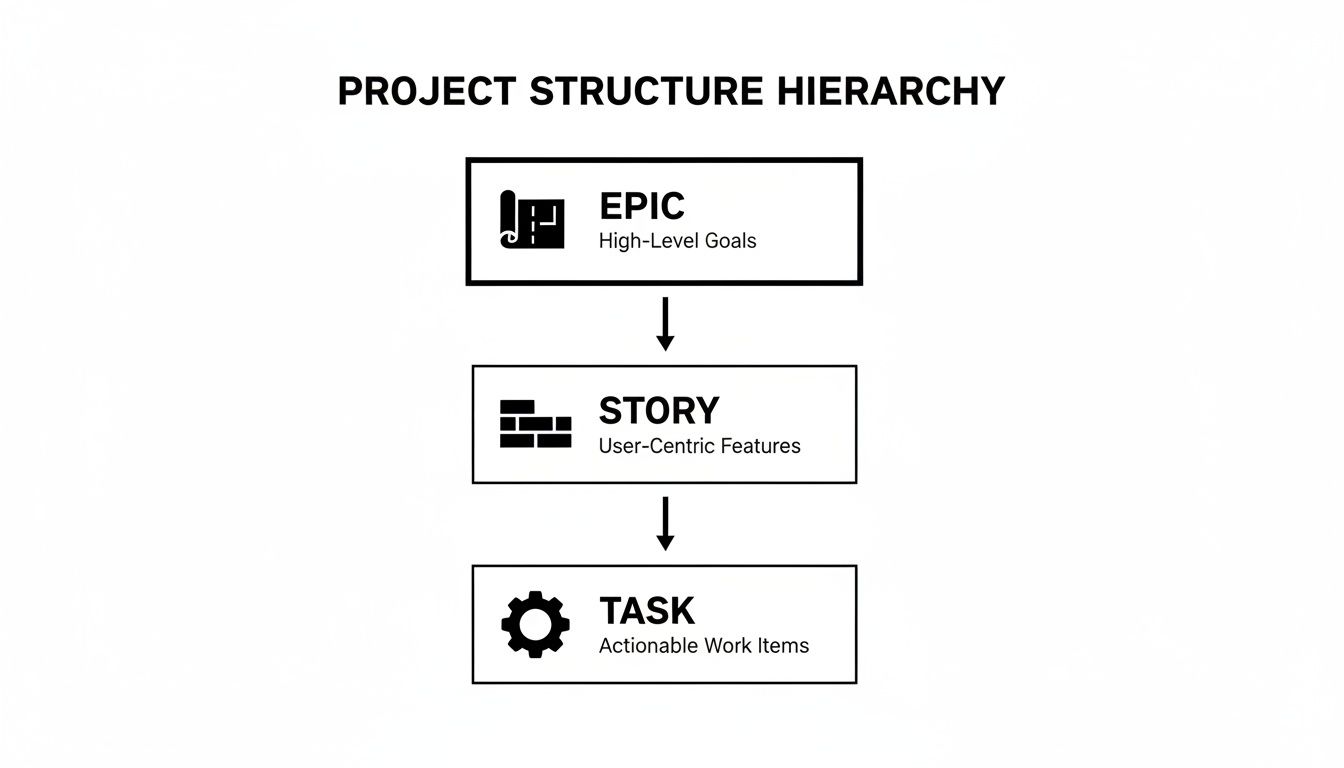
As the diagram shows, the Epic acts as a big container. It holds all the Stories that break down the larger goal into user-focused deliverables. This gives you a clear line of sight from the smallest task right up to the strategic objective.
Everything has a purpose, and you can trace that purpose all the way up. It’s how you keep teams aligned on not just what they're building, but why they're building it. For a closer look at different frameworks, you can explore our complete project management methodology comparison.
To give you a quick reference, here’s a simple table breaking down the key differences.
Jira Epics vs Stories At A Glance
This table sums up the core distinctions at a glance, helping you decide when to use one versus the other.
| Attribute | Jira Epic | Jira Story |
|---|---|---|
| Scope | Broad, high-level goal | Narrow, specific user need |
| Purpose | To organize a large body of work | To deliver a piece of value |
| Duration | Spans multiple sprints or months | Completed within a single sprint |
| User Focus | Captures a strategic initiative | Describes a user's goal or task |
Ultimately, this structure helps teams stay focused on delivering value without getting lost in a sea of disconnected tasks.
Automated Progress Tracking
One of the best parts of linking Stories to Epics is the automated progress reporting. As your team completes each Story, Jira automatically updates the progress at the Epic level. No more chasing people for updates or wrestling with spreadsheets.
For instance, if an Epic has ten Stories and the team has knocked out three, the Epic's progress bar will instantly show 30% complete. This real-time visibility is a lifesaver for stakeholders and managers who need a quick, honest look at project health without getting bogged down in the details.
In the B2B SaaS world, where things move fast, this automation is huge. In fact, teams tracking Epic progress often see their completion rates improve by as much as 25%. The system does the math for you, giving you instant clarity and keeping everyone on the same page.
Best Practices for Managing Your Jira Hierarchy
Having a structured system of Jira Epics and Stories is a great start, but the real value comes from managing this hierarchy with discipline. For B2B and SaaS teams, a clean, efficient workflow isn't just a nice-to-have; it's the difference between predictable delivery and constant chaos.
The first step is mastering the art of breaking down large Epics into well-defined Stories. A massive Epic like "Launch New Reporting Suite" is just too vague to be actionable. To make it manageable, you need to slice it vertically, focusing on delivering a complete piece of user value with each story.
Deconstruct Epics Into Actionable Stories
Instead of splitting work by technical layers like "Build Database" or "Create API," you have to think from your user's perspective. For our reporting suite epic, a much better approach is to create stories that represent actual user needs:
- "As a user, I want to see a daily sales summary so I can track revenue."
- "As a user, I want to export my sales data to a CSV file for analysis."
This method, often part of a process called user story mapping, ensures every single Story delivers a tangible benefit. The sweet spot is making each Story small enough to be completed within a single sprint but valuable enough that it could theoretically be shipped on its own.
Define Clear Acceptance Criteria
A Story is only as good as its acceptance criteria. These are the specific, testable conditions that must be met for a Story to be considered "done." If your criteria are vague, get ready for rework and misalignment.
For that CSV export story, strong acceptance criteria would look something like this:
- Given I am on the sales report page,
- When I click the "Export" button,
- Then a CSV file containing all visible data is downloaded.
Clear criteria cut through ambiguity. They empower your QA team to validate the work effectively and prevent bugs from slipping through the cracks.
Managing the hierarchy effectively means every Story has a clear definition of done. This simple practice prevents scope creep and ensures developers know exactly what to build, leading to faster, higher-quality delivery cycles.
Tracking an epic's progress by watching its stories get completed is a game-changer for operations directors. Ever since Jira's agile tutorials launched, teams creating epics via the Timeline or Backlog have seen a 35% reduction in overestimation errors. This makes sense, as epics typically bundle common patterns from 5-15 stories that span multiple sprints.
If you want to dive deeper, you can see how other Jira users are visualizing story progress within epics. By implementing these best practices for your Jira epics and stories, you’re building a predictable, scalable workflow that actually drives your projects forward.
Automating And Scaling Your Project Management

Here’s where all the hard work of organizing your Jira epics and stories really pays off. When you get this structure right, you stop just tracking tasks and start building a system that can truly scale. It's the difference between manually steering a ship and having a reliable navigation system.
Your team’s day-to-day work in Jira generates a goldmine of data. The platform’s reporting tools are designed to turn that raw data into clear, actionable intelligence, letting you make decisions based on what's actually happening, not just what you think is happening.
Turn Data Into Decisions
As your team completes stories within your epics, Jira is quietly working in the background, generating reports that give you a high-level view of your progress. Two of the most powerful reports for scaling your operations are the Velocity Report and the Burndown Chart.
- Velocity Reports: Think of this as your team's speedometer. It measures the average amount of work—usually in story points—your team gets done in a typical sprint. Over time, this gives you an incredibly reliable way to forecast how long future epics will actually take to complete.
- Burndown Charts: This is your real-time progress bar. It’s a simple visual that shows work completed versus work still left to do. A quick glance tells you if you’re on track to hit your sprint goals or if you need to make adjustments.
By keeping a close eye on these metrics sprint after sprint, you're not just managing a project; you're developing a predictable, data-backed rhythm for your entire development process. You're building a sustainable engine for growth.
This is how you get ahead of problems. The data helps you spot potential bottlenecks before they cause a major pile-up and allows you to allocate resources more effectively. If you're curious about how Jira's capabilities compare to other options, checking out a project management tools comparison can offer some valuable perspective.
Ultimately, mastering this framework moves you from being reactive to proactive. You’re building a system that doesn't just manage work—it accelerates your growth.
Frequently Asked Questions About Jira Epics and Stories
Even when you've got the hierarchy down, some practical questions always seem to pop up when you're in the trenches managing Jira epics and stories. Let's tackle a few of the most common ones that can trip people up and create roadblocks in their workflow.
Getting these little details right from the start is what keeps your project structure clean and effective, especially as things get more complex.
How Many Stories Should Be in an Epic?
There's no magic number here, but a good rule of thumb is to aim for somewhere between 5 and 20 stories. This range usually hits the sweet spot.
If you find an epic with fewer than five stories, it's worth asking: is this really an epic, or could it just be a single, slightly larger story? On the flip side, an epic ballooning with over 20 stories is a major red flag. It’s a sign that the scope is too massive and it's time to break it down into smaller, more focused epics. The goal is to keep them manageable enough to be completed in a reasonable timeframe, like a single quarter.
Can a Story Belong to Multiple Epics?
Simply put, no. In Jira's standard configuration, a user story can only be linked to one epic. This one-to-one relationship is by design, and it’s a good thing—it forces clarity and keeps your progress tracking and reporting from becoming a tangled mess.
If you ever have a story that feels like it belongs in two separate epics, take that as a cue to pause. It's often a signal that your story's scope is too broad, or that your epics have overlapping goals. This is the perfect opportunity to either split the story or refine your epic definitions.
What’s the Difference Between an Epic and a Task?
While they're all pieces of the puzzle, their roles are very different. Think of it this way:
- An Epic is the big-picture goal, the large strategic initiative that you're working towards. For example, "Launch New User Onboarding Flow." It's the container for all the related work.
- A Story is a piece of that goal described from the user's point of view. It's a feature that delivers tangible value to them.
- A Task is a specific, nitty-gritty action item required to get the work done. It's often technical and doesn't provide direct user value on its own, like "Upgrade server database."
Both stories and tasks can live inside an epic, but they serve completely different purposes in bringing the vision to life.
Ready to build a powerful, automated project management system that scales with your business? MakeAutomation provides the frameworks and hands-on support to help you optimize your workflows, eliminate manual work, and accelerate growth. Find out how we can help at https://makeautomation.co.