Program Management Jira: Mastering Scale with program management jira
When you’re trying to manage a program in Jira, the real goal is to get past just tracking tickets. You need a system that genuinely connects the day-to-day grind with the big-picture business goals. This means setting up a clear hierarchy for your projects, epics, and initiatives, picking the right tools for the job—like Advanced Roadmaps or Jira Align—and creating workflows that actually help teams work together, not against each other. Ultimately, you're building a single source of truth that gives everyone a clear, holistic view of your program's health.
Why Jira Is Essential for Modern Program Management

Let's be honest: trying to wrangle multiple, complex projects with spreadsheets and a dozen different communication tools is a recipe for disaster. As B2B and SaaS companies grow, the chaos from all those disconnected workstreams leads to blown deadlines, hidden dependencies, and a major gap between what engineering is building and what the business actually needs. This is the exact problem Jira solves when it's set up correctly for program management.
Jira's real power isn't just in tracking individual tasks; it's in its ability to roll up data from different teams and projects into one coherent, high-level picture. It gives you the framework to finally answer the tough questions that keep operations directors and program managers up at night.
- Are our most important initiatives actually on track?
- Which teams are completely overloaded, and where are the real bottlenecks?
- How does the work being done today connect to our quarterly objectives?
A Single Source of Truth
The biggest win from using Jira for program management is creating a single source of truth. Instead of hunting down updates in endless Slack threads or email chains, stakeholders can just look at a real-time dashboard or roadmap. That kind of transparency builds trust and empowers teams to make smart decisions on their own, without needing constant hand-holding.
It's really no surprise that Jira dominates the project management software market with an impressive 42.09% market share, making it the go-to tool for scaling B2B and SaaS companies. That leadership is built on a foundation of features designed for development teams, like powerful Agile support and a massive ecosystem of integrations. For founders and ops leaders, this market dominance means less risk and confidence that you're working with the industry standard. If you're interested, you can find more insights about project management statistics and trends here.
A well-structured Jira instance transforms the platform from a simple ticketing system into a strategic command center. It reveals the invisible threads connecting different projects, allowing you to proactively manage dependencies instead of reactively fighting fires.
Mapping the Journey Ahead
Getting program management in Jira right isn't something you can just wing; it requires a thoughtful, deliberate approach. Before we jump into the nitty-gritty of implementation, it helps to understand the key components that form the foundation of a system that can actually scale with you.
The table below breaks down the core pillars we'll be covering in this guide. Think of it as your high-level map for this journey, showing you how to go from structuring your work to reporting on its success.
Core Components for Program Management in Jira
Here's a quick summary of the key pillars for setting up program management in Jira, from structuring your work to reporting on success.
| Component | Purpose | Key Jira Features |
|---|---|---|
| Architecture | Establishing a clear work hierarchy to connect strategy to execution. | Custom Issue Types (Initiative, Epic), Project Linking, Components |
| Roadmapping | Visualizing timelines, dependencies, and capacity across multiple teams. | Advanced Roadmaps, Jira Align, Basic Roadmaps |
| Workflows & Boards | Standardizing processes and creating a unified view of work in progress. | Shared Workflows, Cross-Project Kanban/Scrum Boards, JQL Filters |
| Automation | Reducing manual overhead and enforcing process consistency. | Automation Rules, Smart Values, Scheduled Triggers |
| Reporting & KPIs | Tracking program health and communicating progress to stakeholders. | Dashboards, Gadgets, Custom Reports, EazyBI |
Each of these pieces plays a critical role in giving you the visibility needed to manage large-scale initiatives effectively. Let's dive in.
Getting Your Jira Architecture Right for Program Management
Let's get down to brass tacks. Theory is great, but building a solid foundation in Jira is what actually makes program management work. A good architecture isn't just about keeping things tidy; it's about creating a direct line of sight from a single developer task all the way up to a major business objective. If you skip this, you’ll end up with a program view that’s noisy, unreliable, and ultimately, useless.
The heart of a scalable Jira setup is a crystal-clear work hierarchy. While Jira is incredibly flexible, for true program visibility, you need a structure that maps strategy to execution. I've found a three-tiered model works best for most organizations.
Building Your Program Hierarchy
Think of this hierarchy as the spine of your entire operation. It's what allows you to answer the question, "How is our new AI Analytics feature progressing?" with a confident, data-backed response that rolls up from the daily grind.
Here are the essential layers you need to establish:
- Initiative: This is your big-picture container, representing a major strategic goal. For example, "Launch Q3 AI Analytics Suite" is an Initiative. It’s the ‘why’ behind all the work.
- Epic: Epics are the large chunks of work needed to deliver an Initiative. They break down that huge strategic goal into more manageable pieces. For our AI suite, Epics might be "Develop Predictive Modeling Engine" or "Design User Analytics Dashboard."
- Story/Task: These are the granular, actionable items that teams actually work on day-to-day. A story under the "Predictive Modeling Engine" epic could be something as specific as "Integrate user behavior data API."
This structure creates a clear lineage. A bunch of completed Stories finishes an Epic, and a group of completed Epics delivers the Initiative. That direct connection is non-negotiable if you want to manage programs effectively in Jira.
Your goal is a system where anyone can click on a high-level Initiative and instantly see the real-time status of every single Epic and Story contributing to it. This is how you eliminate manual status reports and kill those endless "what's the update?" meetings.
How Should You Structure Your Jira Projects?
With your issue hierarchy defined, you've got a big decision to make: how to structure your actual Jira projects. I’ve seen two main approaches work in the real world, and the right one for you really depends on your company culture and how your teams operate.
One popular method is creating one Jira project for each team.
- The upside: This gives teams a ton of autonomy. Engineering can have their board, Marketing can have theirs, and QA can have another—all tailored to how they work best.
- The downside: It makes cross-team visibility a real headache. Program managers have to constantly jump between projects to piece together the full picture. It's also much harder to spot and manage dependencies between teams.
The other way is to structure projects around a product or program.
- The upside: This gives you a consolidated view right out of the box. All the work related to the "AI Analytics Suite" lives in one place, which makes building program-level boards and roadmaps incredibly simple.
- The downside: It demands more upfront governance. All the different teams working in that project have to agree on a shared workflow and configuration, which can be a source of friction if their processes are worlds apart.
Here’s a quick look at how a roadmap can pull all this information together, no matter which structure you choose.
This kind of timeline view is invaluable. It visualizes everything in one place—epics, dependencies, teams, and deadlines—which is exactly what you need for program-level planning.
Dialing in Issue Types and Linking
Once you've settled on a structure, it's time to configure Jira to bring your hierarchy to life. The first thing you should do is create a custom issue type called "Initiative." Jira has Epics and Stories by default, but adding that top-level Initiative is the key to connecting work to strategy.
Next, you need to get really good at issue linking. Using Jira's "relates to," "blocks," and "is blocked by" link types is how you map dependencies. For instance, the "Design User Analytics Dashboard" Epic might be blocked by the "Develop Predictive Modeling Engine" Epic. Getting this linking right is what turns a static plan into a dynamic, accurate roadmap that reflects reality.
This isn’t just theory; a structured approach gets results. Organizations that implement these practices well see 2.5 times higher project success rates. It's a massive advantage for SaaS founders and ops directors trying to scale without everything falling apart. This also explains why 59% of project managers are juggling 2-5 projects at once—they rely on tools like Jira to track everything and manage risk across their portfolio. You can dig into more project management stats and find great insights over on Ravetree.
Choosing Your Tool: Advanced Roadmaps Vs. Jira Align
Once you've settled on your Jira architecture, you'll hit a critical fork in the road: which tool will you use to manage everything at the program level? This is where many teams stumble, caught between Atlassian’s two heavy hitters for high-level planning: Advanced Roadmaps and Jira Align.
Making the wrong choice here is more than just a budget issue; it leads to wasted time, frustrated teams, and an expensive tool that gathers digital dust. The secret is knowing they solve different problems at vastly different scales. One is for coordinating teams; the other is for aligning an entire enterprise.
Getting a Handle on Advanced Roadmaps
Advanced Roadmaps, which comes bundled with Jira Premium and Enterprise, is the logical next step when basic project roadmaps just aren't cutting it anymore. It's built for program managers and team leads who need to see the bigger picture across a handful of Jira projects. Think of it as the control tower for your teams, not for your entire company.
Its real power is in visualizing dependencies and managing team capacity. You can map out realistic timelines based on what your teams can actually handle and instantly spot the domino effect if one team's work starts to slip. This is a lifesaver for coordinating complex launches that involve everyone from engineering to marketing.
For instance, imagine you're a program manager building a roadmap that pulls in epics from three separate team projects. If the backend team has to push their deadline by two weeks, Advanced Roadmaps immediately flags the front-end and QA epics that are now at risk. You can make adjustments proactively instead of scrambling to put out fires later.
Advanced Roadmaps is all about tactical and operational planning inside Jira. It answers the question, "Are our teams on track to deliver this program on time?" It doesn't try to answer, "Does this program align with our C-suite's five-year strategic plan?"
Knowing When You Need Jira Align
Jira Align is playing a completely different game. It's a full-blown enterprise agile planning platform designed to connect high-level business strategy directly to the teams writing the code. While Advanced Roadmaps connects Jira projects, Jira Align connects the boardroom to the backlog.
This is a tool for large organizations, especially those adopting frameworks like the Scaled Agile Framework (SAFe®). It introduces planning layers that live above Jira's default hierarchy, like Themes and Portfolio Epics, creating a clear line of sight from a top-level business goal all the way down to a single user story.
A classic scenario is a VP of Product defining a strategic theme like "Expand into the European Market." In Jira Align, this theme is broken down into portfolio epics, which are then funded and assigned to different programs. Development teams do their work in Jira as usual, but all that progress automatically rolls up into Jira Align. Executives get a live dashboard showing exactly how day-to-day execution is tracking against that big strategic goal.
This hierarchy is key to understanding program management in Jira. The work on the ground has to roll up to something bigger.
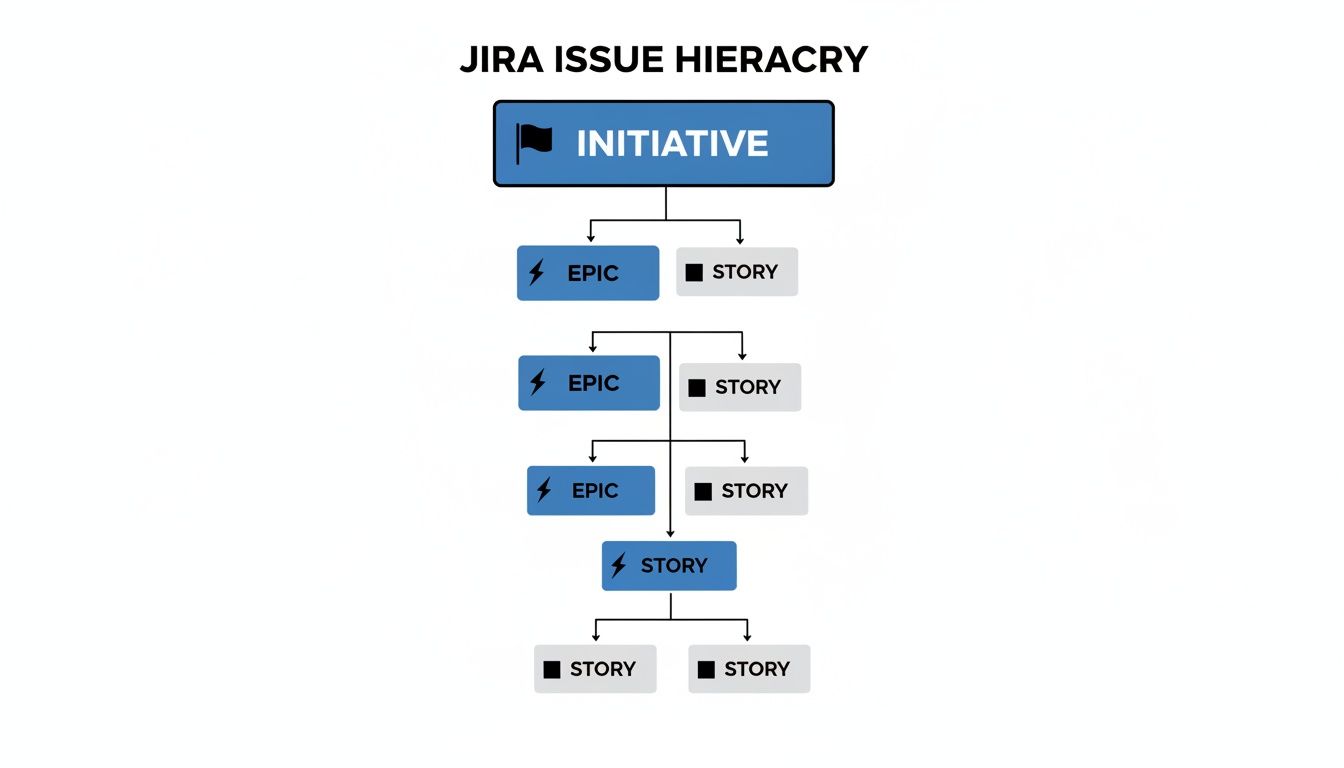
This structure shows how granular stories build up into epics and initiatives—a concept both tools manage, just at profoundly different scales.
Making the Right Decision for Your Team
To help you decide, think about the scale of the problem you're trying to solve. Don't buy a freight train when you just need a better station wagon. This table breaks down the core differences.
Advanced Roadmaps vs. Jira Align: Deciding What You Need
| Feature | Advanced Roadmaps (Jira Premium) | Jira Align |
|---|---|---|
| Best For | Program managers & teams coordinating work across 3-15 projects. | Large enterprises (50+ teams) implementing scaled agile (like SAFe®). |
| Primary Goal | Tactical cross-team planning and dependency management. | Strategic alignment of work with business outcomes and portfolio goals. |
| Scope | Program-level planning within Jira. | Enterprise-wide planning that connects strategy to execution. |
| Key Features | Capacity planning, dependency mapping, multi-project views, scenarios. | Portfolio management, strategic roadmaps, OKRs, financial planning. |
| Implementation | Simple to enable and configure for existing Jira admins. | Complex, often requires a dedicated implementation partner. |
| Cost | Included with Jira Premium/Enterprise licenses. | Significant additional investment per user, sold separately. |
Ultimately, your choice depends on your organization’s immediate needs and agile maturity. If your biggest pain point is simply coordinating work and seeing dependencies across a few teams, start with Advanced Roadmaps. Our project management tools comparison can also provide some extra context on finding the right fit.
The most practical path for many is to master cross-team planning with Advanced Roadmaps first. Once your organization grows to the point where the main challenge is aligning hundreds of people with executive strategy, that's your cue to start the conversation about Jira Align.
Building Workflows and Boards That Actually Get Used
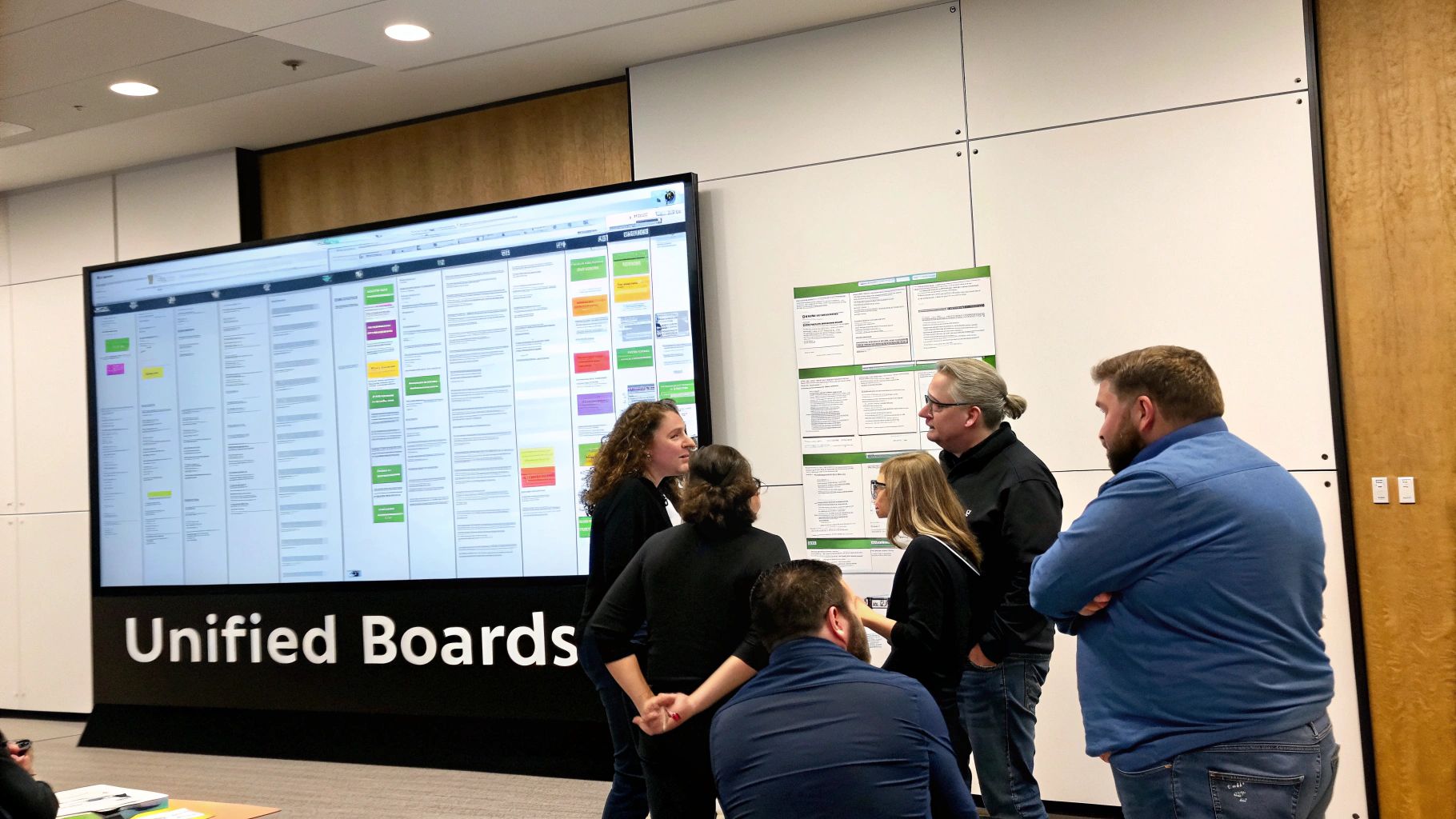
Look, a perfect Jira architecture on paper means nothing if your teams can't stand using it. If the workflows and boards don't map to how people actually work together, you've just built a very expensive source of friction. The real win in Jira program management comes when you move past the defaults and create a living, breathing system that gives you a consolidated view of everything happening across multiple teams.
What's the goal here? To stop playing detective. Program managers shouldn't have to chase down status updates every other day. By building unified, cross-project boards, you create a single source of truth. Team leads, stakeholders, and executives can all go to one place to see progress, spot bottlenecks, and understand dependencies as they unfold.
This isn't just about making things look tidy. It's about achieving genuine operational clarity. A well-designed board becomes the central hub, pulling in work from different team projects and weaving it into a single, coherent program-level story.
Crafting a Program-Level Workflow
Before you even touch a board configuration, you need to nail down a workflow that makes sense at the program level. Your engineering teams might need granular statuses like "In Code Review" or "Ready for QA," and that's fine for them. But at the program view, that's just noise. You need something simpler that focuses on the major milestones stakeholders care about.
A solid program workflow often boils down to just a few key stages:
- To Do: The work is defined and ready to be picked up.
- In Progress: Someone is actively working on at least one part of this epic or initiative.
- Blocked: A dependency or issue has brought progress to a halt.
- Done: All the underlying work is complete and it meets the criteria for being finished.
This high-level view keeps your program board clean and makes it incredibly easy for anyone to grasp the status of major workstreams in seconds.
Pro Tip: The best setups I've seen use automation to bridge the gap between team-level work and the program workflow. For instance, you can set up a simple rule that automatically transitions a program epic to 'In Progress' the instant the first child story moves into development.
Designing a Unified Program Board
This is where the magic happens. You need to create a single board that visualizes work from several different Jira projects. This board is your command center. Whether you're a fan of Kanban for its continuous flow or Scrum for its structured sprints, the secret sauce is using Jira Query Language (JQL) to pull it all together.
Let’s say your program involves three separate teams: Backend (BE), Frontend (FE), and QA, each with its own Jira project. You can create a new board and use a JQL filter to unify all their related work.
Example JQL for a Program Board:
Imagine you want to see all the epics and stories tied to your "Q3 AI Analytics Suite" initiative. Your JQL could be as simple as this:
project in (BE, FE, QA) AND "Initiative Link" = "AI-1" ORDER BY Rank ASC
With that one line of code, you’re pulling every relevant issue from those three projects that's linked to your main initiative (which we've called "AI-1" here) onto a single board. Suddenly, you have a complete, real-time view of every moving part.
Customizing Columns for Maximum Clarity
Once you have your JQL filter pulling in the right issues, you just map your board columns to the high-level program workflow statuses we defined earlier. This creates a powerful visual pipeline showing exactly where every piece of the program stands.
Of course, getting people to work together effectively goes beyond the tool itself. Exploring broader strategies for how to collaborate in real time can supercharge your team's efficiency.
For program managers, this unified view is a total game-changer. You can spot a bottleneck—like a pile-up of issues in the QA column—and jump on it before it derails the entire initiative. To get a better handle on structuring the work items themselves, our guide on https://makeautomation.co/jira-epics-stories/ is a great resource. This approach turns Jira from a simple tracking tool into a powerful, strategic asset for delivering programs successfully.
Automating Program Reporting and KPI Tracking

Let's be honest, manual reporting is a soul-crushing time-sink. It pulls program managers away from their real job: solving problems and clearing roadblocks for their teams. Instead of spending hours wrestling with spreadsheets, you can set up Jira to do all the heavy lifting for you. The goal here is to build a dynamic, self-updating reporting system that gives you an instant pulse on your program's health.
This isn’t just a matter of convenience; it’s about speed and accuracy. When stakeholders can pull up live data whenever they want, decision-making happens faster. You stop being a reactive report-gatherer and become a proactive analyst who can spot trends as they happen.
Building Proactive Alerts with Automation Rules
Jira's native automation engine is your best friend for getting ahead of problems. It lets you create simple "if-this-then-that" rules that act as a 24/7 watchdog for your projects, taking action the moment specific conditions are met. This is how you catch issues before they snowball into a full-blown crisis.
But don't just think of it as a notification machine. Good automation surfaces critical information at exactly the right moment. The trick is to pinpoint the triggers that signal genuine risk to your program’s timeline or budget.
Here are a few powerful automation recipes I've seen work wonders:
- Flag Stagnant Blockers: Set up a rule that fires when an issue with a "Blocked" status hasn't been touched in 3 days. The rule can automatically slap a "High Risk" label on it, ping a specific Slack channel, and @mention the program lead to get eyes on it immediately.
- Monitor Scope Creep: Create an automation that alerts you whenever a new story is added to an epic that's already "In Progress." This gives you instant visibility into scope changes that could throw off your capacity planning and deadlines.
- Automate Risk Escalation: Imagine an issue is blocked by a dependency. If that dependency sails past its due date, a rule can automatically escalate the risk by upping the priority of the blocked ticket and assigning it directly to the program manager for a closer look.
Crafting a Dynamic Program Dashboard
A well-designed Jira dashboard is your command center. It pulls together all your program-level Key Performance Indicators (KPIs) from across multiple teams and projects into one clean, easy-to-read view. Forget about those static PowerPoint slides that are outdated the second you send them; this dashboard is live and always accurate.
The key is to focus on metrics that truly measure the health of your program—not just vanity stats like the total number of tickets created.
Here are the essential gadgets every program dashboard should have:
- Epic Burndown Chart: This one is non-negotiable. It gives you a clear visual of your progress against an epic's scope over time, helping you forecast whether you're actually going to hit your target dates.
- Cycle Time/Lead Time Control Chart: These charts are gold. They show you the total time it takes for work to get from "In Progress" to "Done." If you see consistently high or wildly fluctuating cycle times, you've likely found a bottleneck in your process that needs digging into.
- Created vs. Resolved Chart: This is a simple but powerful gadget. It gives you a quick visual on whether your teams are closing work faster than new work is coming in. If that "created" line is constantly climbing above the "resolved" line, your program is heading for trouble.
A great dashboard tells a story. At a glance, a stakeholder should be able to understand the program's momentum, identify emerging risks, and see how daily work is contributing to the overall strategic goals.
This level of real-time visibility is no longer a luxury. A staggering 84% of product managers admit they fear product failure due to tight timelines and constant disruptions. A well-oiled Jira setup gives you a serious advantage. This trend is reflected in Atlassian's 60% year-over-year enterprise growth, as more organizations rely on its frameworks to achieve a 64% success rate with Agile projects. You can explore Atlassian's shareholder insights for more on this.
By automating your reporting, you free yourself to focus on the strategic work that truly matters. To get a better handle on the principles of effective data visualization, take a look at our guide on what is business intelligence reporting. It lays a solid foundation for building dashboards that people will actually use to make decisions.
Got Questions About Jira Program Management? We've Got Answers.
When you start using Jira for program management, a few questions always pop up. It's a natural part of scaling up, whether you're just getting your feet wet or trying to refine a setup that's been around for a while. Here are the straight-up, actionable answers to the questions we hear most often, designed to help you get past the common hurdles.
Can I Really Manage Programs in Jira Without Shelling Out for Advanced Roadmaps or Jira Align?
Yes, you can… to a point. Be ready for some manual legwork, though.
The typical "DIY" method involves setting up a dedicated Jira project just for the program level. Think of it as your command center. In this project, you create high-level issues (like initiatives) and then use Jira's standard issue linking to connect them to the epics and stories living in the individual team projects.
You can then create a cross-project board using a custom JQL filter to pull everything into one view. For a small program with maybe two or three teams who are already used to working together, this can be enough to get by.
But here's the catch: this approach hits a wall pretty fast. You miss out on the dynamic timeline planning, automatic dependency mapping, and capacity management that are the bread and butter of tools like Advanced Roadmaps. While the manual way gives you a basic line of sight, it simply doesn't scale and lacks the predictive power you need for serious strategic planning.
What’s the Single Biggest Mistake People Make When Setting This Up?
Hands down, the most common pitfall is diving in without first establishing a consistent data hierarchy and clear governance rules. It's so tempting to just start creating projects and workflows, but that initial burst of activity often leads to a massive headache later on.
If you don't agree on how to name epics, what each status in a workflow actually means, or how to estimate work consistently, you end up with a data swamp. When you try to roll up that messy, inconsistent information to the program level for reporting, the numbers are garbage. Your dashboards become unreliable, and tracking dependencies feels like you're playing detective.
Governance isn't the exciting part, but it is the absolute foundation for successful program management in Jira. Taking the time to define your standards upfront will save you from countless hours of cleanup and confusion.
How Should We Migrate Our Existing Projects Into a New Program Structure?
Whatever you do, don't attempt a "big bang" migration. It’s a recipe for chaos and will almost certainly disrupt everyone's work. The smart move is a phased, methodical rollout.
Kick things off with a pilot program. Pick two or three teams that already work together closely.
- First, define the new architecture: Solidify your initiative structure, your issue linking strategy, and the high-level workflows.
- Next, update existing work: Use Jira's bulk-edit functions to link the pilot teams' existing epics and stories to the new program-level initiatives you've created.
- Then, build the new views: Create the cross-project boards and roadmaps just for this pilot group.
This gives you a safe, controlled environment to test everything. You can work out the kinks, get real feedback, and refine the process. Only after the pilot is running smoothly should you document the plan and start onboarding other teams, one group at a time.
How Is Jira's AI Actually Helping with Program Management?
Atlassian Intelligence is becoming a genuinely useful assistant for program managers, cutting down on manual tasks and helping uncover insights you might otherwise miss.
One of the most practical applications is its ability to summarize long, rambling comment threads on initiatives or epics. It gives you the gist in seconds. It can also help auto-generate sub-tasks from a user story or help you write more complex JQL queries for custom reports without you having to become a JQL wizard.
But where it really starts to shine is in its analytical capabilities. The AI can analyze project data to flag trends and potential risks a person might not notice. For example, it might highlight a team whose velocity is trending down or identify a recurring bottleneck where work always seems to get stuck. This gives you the data you need to step in and make smarter, more strategic decisions at the program level.
At MakeAutomation, we live and breathe this stuff. We specialize in building the automations and streamlined frameworks that turn Jira into a true growth engine for B2B and SaaS companies. If you're ready to get rid of the manual overhead and build a system that truly scales, let's talk. Visit us at https://makeautomation.co to see how we can help.