How to Improve Email Deliverability for B2B and SaaS
When you're trying to improve your email deliverability, it all really boils down to three things: getting your technical setup right with things like SPF and DKIM, keeping your contact lists squeaky clean, and earning a great sender reputation by getting people to actually engage with your messages.
Nailing these fundamentals is the difference between your outreach feeling like a shot in the dark and turning it into a predictable way to grow your business.
Your Roadmap to Actually Reaching the Inbox
It's a simple truth: before anyone can open your email, it has to land in their inbox. For any B2B company, bad deliverability isn't just a small problem—it means lost leads, missed sales, and marketing dollars down the drain. Every single email that ends up in spam is a conversation that never happened.
Think of this as your game plan for hitting a 95%+ inbox placement rate. We're laying out the exact framework that separates the pros from the amateurs, so you can stop guessing and start implementing what works.
Before we dive deep, let's get a head start with a quick checklist of the most impactful actions you can take right now. These are the essentials that set the stage for everything else.
Email Deliverability Quick Wins Checklist
| Action Item | Why It Matters | Target Metric |
|---|---|---|
| Set up SPF, DKIM, DMARC | Proves to mailbox providers you are who you say you are. This is non-negotiable. | 100% Authentication Pass |
| Verify a new list segment | Removes invalid emails before you send, protecting your sender reputation. | <1% Bounce Rate |
| Warm up new sending domains | Gradually builds trust with providers like Google & Microsoft. | >50% Open Rate (Warmup) |
| Segment your most engaged users | Sending to your best contacts first boosts positive signals and improves overall delivery. | >30% Open Rate (Engaged) |
Completing these items lays a solid foundation. Now, let's explore the strategy behind them.
The Three Pillars of Deliverability
To consistently hit the inbox, you have to master three key areas. Each one is a building block for the next, creating a rock-solid email strategy.
Technical Authentication: This is where it all begins. Protocols like SPF, DKIM, and DMARC are your digital handshake with mailbox providers. They're how you verify your identity, proving you're a legitimate sender. Starting without them is like trying to run a race with your shoelaces tied together.
Pristine List Hygiene: An email list is only as good as its quality. You absolutely must get into the habit of regularly removing invalid email addresses, dormant subscribers, and hidden spam traps. This is how you keep your bounce rates low and your engagement signals high.
Strong Sender Reputation: Think of this as your credit score with inbox providers like Google and Microsoft. It’s built over time and is based on your authentication, the quality of your list, and, most importantly, how people react to your emails. When people open, click, and reply, your reputation goes up. When they mark you as spam, it plummets.
A great sender reputation isn't something you can buy or build overnight. It’s the direct result of sending valuable content to people who actually want to receive it. That’s the ultimate signal to ISPs that your emails belong in the inbox.
Getting these areas right is what ensures your messages don't just get sent—they get seen. For a complete playbook on diagnosing issues and making lasting improvements, our comprehensive guide on email deliverability best practices breaks down every step you need to take.
Getting Your Technical House in Order
Before you even think about writing a killer subject line, there's some essential groundwork to lay. The journey to the inbox starts with a technical handshake between your server and inbox providers like Google and Microsoft. This isn't just a best practice; it's a non-negotiable step to prove you're a legitimate sender, not a phisher.
Nailing this technical setup is what separates the pros from the folks who constantly wonder why their emails land in spam. It’s the foundational work that makes everything else—your campaigns, your copy, your offers—actually matter.
SPF: Your Digital Return Address
Think of Sender Policy Framework (SPF) like the return address on a letter. It’s a simple entry in your domain's DNS records that publicly lists every server and service authorized to send email on your behalf.
When an email arrives, the recipient’s mail server glances at your SPF record. If the IP address that sent the message is on your approved list, you pass the first test. If it's not, that's a huge red flag, and your email is far more likely to get flagged as spam or rejected completely.
This flowchart breaks down how authentication fits into the bigger picture of getting your emails delivered.
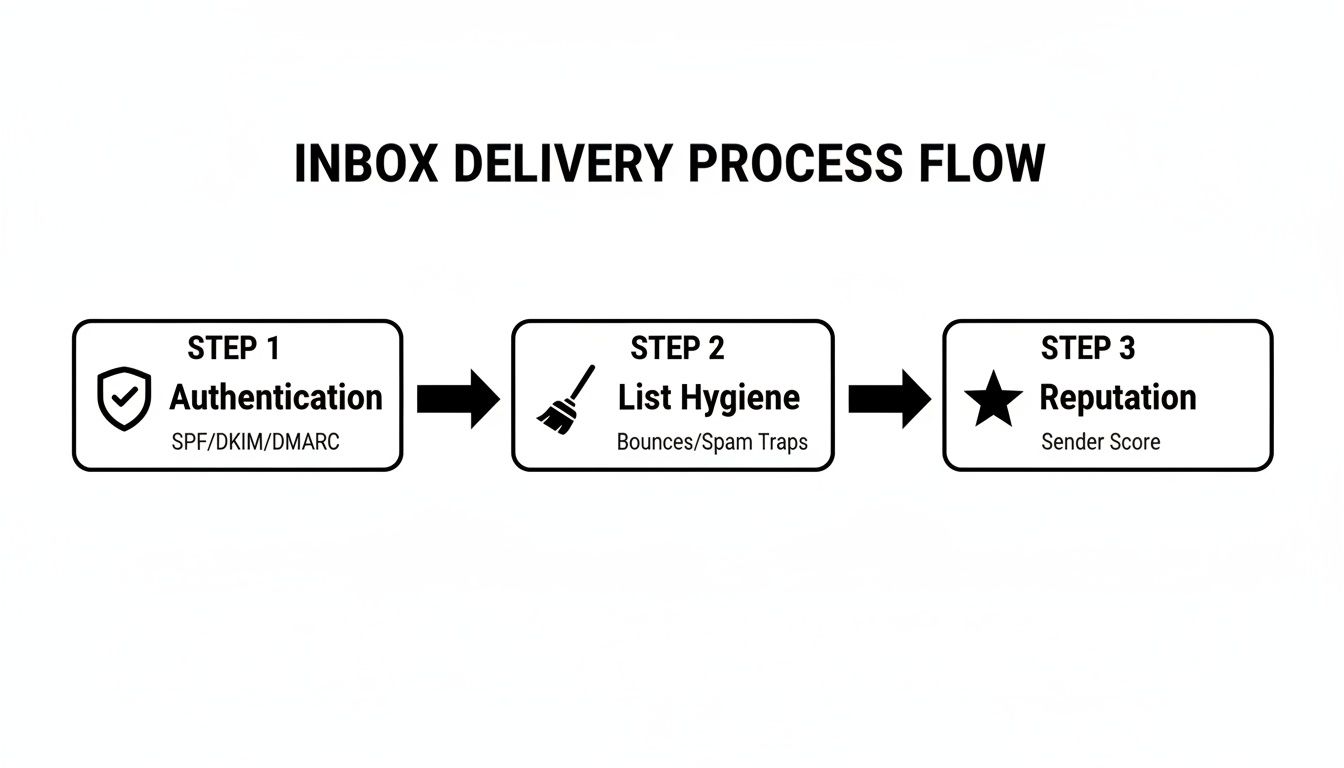
As you can see, a solid authentication setup is the first domino to fall. Without it, your list quality and sender reputation don't stand a chance.
DKIM: The Tamper-Proof Seal
While SPF verifies who sent the email, DomainKeys Identified Mail (DKIM) verifies the email itself hasn't been messed with. It’s like a tamper-proof wax seal on an old-fashioned envelope.
DKIM attaches a unique, encrypted digital signature to the header of every email you send. The receiving server uses a public key (which you also publish in your DNS) to check that signature. If it matches, the server knows two critical things:
- It’s really from you. The email is authentically from your domain.
- Nothing was changed. The content is exactly as you sent it, with no alterations along the way.
Getting DKIM in place builds a massive amount of trust with inbox providers. It shows them your messages are secure and can be relied upon.
DMARC: The Rulebook for Mail Servers
Domain-based Message Authentication, Reporting, and Conformance (DMARC) is the final, powerful piece of the puzzle. It sits on top of SPF and DKIM and tells mail servers exactly what to do if an email claiming to be from you fails those checks. DMARC puts you in the driver's seat.
With a DMARC policy, you can instruct servers on how to handle unauthenticated mail:
p=none: Just watch and report what's happening. No action is taken.p=quarantine: Send these suspicious emails to the spam folder.p=reject: Block these messages from ever being delivered.
My Advice: Always, always start with a
p=nonepolicy. Think of it as "monitoring mode." You'll get reports on all email activity tied to your domain—legitimate or not—without accidentally blocking your own emails. This gives you the visibility to authorize all your legitimate sending tools before you lock things down with a stricter policy.
For anyone doing B2B outreach, this is baseline stuff. The goal is a strong email deliverability rate of 95-99%; anything less points to a problem. It’s no surprise that over 70% of high-volume senders now use DMARC. With nearly 17% of emails globally never reaching the inbox due to deliverability issues, you can't afford to skip this. If you need help integrating these steps, MakeAutomation's CRM automation and SOP development services can build this foundation right into your outreach process. For more data, it's worth a dive into research on email deliverability rates to see how you stack up.
The Slow Burn: IP and Domain Warmup
Okay, so your authentication is perfect. You're ready to launch, right? Not so fast. If you blast thousands of emails from a brand-new domain—even a perfectly authenticated one—you'll trigger spam filters instantly. You haven't earned any trust yet.
That's where the warmup process comes in. A warmup is simply the methodical process of building a positive sending reputation with Internet Service Providers (ISPs). You have to start small and gradually increase your volume over several weeks.
Here’s a simple, effective warmup plan:
- Weeks 1-2: Keep it tiny. Send just 5-10 emails per day to your most engaged contacts—people you know will open and maybe even reply.
- Weeks 3-4: Start ramping up. Try doubling your volume every few days, but keep a close eye on your open and reply rates. If they dip, slow down.
- Weeks 4-6 & Beyond: Continue scaling your volume as long as you see positive engagement.
This patient, deliberate approach shows ISPs you're a real human building real relationships, not a spammer looking for a quick hit. It’s an investment of time that pays off massively in long-term inbox placement, helping you consistently achieve 80%+ inbox placement on your campaigns.
3. Build and Maintain a High-Quality Email List
Getting your technical authentication right is like having a key to the building. But the quality of your email list is what determines whether you’re actually welcome inside.
I can't stress this enough: a dirty, unmaintained list is the single biggest threat to your sender reputation. It's the fastest way to land your emails in the spam folder. Think of your list not as a database of addresses, but as a living reflection of your relationship with your audience.

When you send to invalid or unengaged contacts, you get high bounce rates and dismal open rates. Those negative signals tell inbox providers like Google and Microsoft that your mail isn't wanted, which poisons the well for everyone else on your list.
Stop Bad Data at the Source
The best defense is a good offense. The most effective way to keep a clean list is to stop bad emails from ever making it on there in the first place.
This is where real-time email verification becomes non-negotiable. By plugging a verification API into your signup forms, you can instantly check if an email is valid before it gets added to your database. This simple, proactive step dramatically cuts down on hard bounces—the permanent delivery failures from non-existent addresses.
A hard bounce rate over 2% is a huge red flag for ISPs and a surefire way to wreck your sender reputation.
The Siren Song of Purchased Lists
Look, I get it. The temptation to buy an email list to get a "head start" is real. But it's one of the fastest ways to absolutely destroy your deliverability. Just don't do it.
These lists are almost always a toxic cocktail of outdated, invalid, and—most importantly—unconsenting contacts.
Sending to a list you bought will inevitably lead to:
- Sky-High Spam Complaints: People who never asked to hear from you are quick to hit the spam button. Anything over 0.1% is a serious problem.
- Hitting Spam Traps: These are pristine email addresses ISPs use to catch spammers. Sending to just one can get your domain or IP blacklisted.
- Immediate Reputation Damage: The combined fallout from high bounces and spam complaints sends a clear signal to inbox providers: you're a low-quality sender.
Building your list organically takes time, but it’s the only way to build a sustainable and profitable email program. If you're serious about growth, take the time to learn what is a lead generation process that prioritizes quality from day one.
Implement a Regular Cleaning Schedule
No list stays fresh forever. People switch jobs, abandon old email addresses, or simply lose interest. That’s why list hygiene isn't a one-and-done task; it's an ongoing discipline.
I recommend setting a recurring calendar event—quarterly is a great place to start—to scrub your list of inactive subscribers. Who's "inactive"? Anyone who hasn't opened or clicked an email in a set period, like 90 or 180 days.
My personal rule of thumb is pretty straightforward: If someone hasn't engaged in the last 120 days, they're gone. Continuing to email them just drags down my open rates and tells ISPs my content isn't relevant. It feels counterintuitive, but letting them go is one of the healthiest things you can do for your list.
Pruning these contacts provides an instant lift to your overall engagement metrics, which is a powerful positive signal to the inbox providers. It shows you’re sending to people who actually want to hear from you.
Segment for Relevance and Better Engagement
Once your list is clean, the real magic begins with segmentation. This just means dividing your list into smaller, more focused groups based on what you know about them. It allows you to ditch the one-size-fits-all-blasts and send content that actually resonates.
Instead of sending the same message to everyone, you can create powerful segments based on:
- Engagement Level: Group your "super-fans"—the ones who open and click everything—and send them your best offers and early-bird announcements.
- Purchase History: Target customers based on what they’ve bought before to send relevant upsells and cross-sells that make sense.
- Demographics or Behavior: Tailor your messaging to the specific pain points of different user personas or how they've interacted with your site.
Sending targeted, relevant content always leads to higher open rates, more clicks, and fewer unsubscribes. This virtuous cycle of positive engagement is precisely what builds a rock-solid sender reputation over time.
Creating Campaigns That Earn Engagement
Alright, let's talk about the art and science of getting people to actually interact with your emails. Inbox providers like Google and Microsoft are incredibly sophisticated now. They don't just see if your email landed; they watch what happens next. High engagement isn't just a nice-to-have vanity metric—it's your best defense against the spam folder.
A strong sender reputation is built on a foundation of positive interactions. Every time someone opens your email, clicks a link, or replies, you're sending a powerful signal to those inbox providers that your content is wanted. This positive feedback loop is the absolute core of building and maintaining great deliverability for the long haul.
Writing Subject Lines That Get Opened
Think of your subject line as the gatekeeper to your entire message. It has one job and one job only: get the open. This means you need to steer clear of spammy, clickbait-style phrases and focus on sparking genuine curiosity and conveying clear value.
A great subject line is specific, relevant, and often personalized. Ditch generic phrases like "Big Savings Inside" for something that feels more like a one-to-one conversation, such as "A quick question about your team's workflow." The second one is not only more personal but also far less likely to trip spam filters. The goal isn't just the open; it's setting an accurate expectation for what’s inside.
Personalization Beyond a First Name
True personalization is so much more than dropping a {{first_name}} tag into your template. It's about sending the right message to the right person at exactly the right time. This is where all that hard work you put into segmenting your list really starts to pay off.
Reference something specific. Did they recently download a guide? Did they visit a certain page on your site? Mention a pain point you know is common in their industry. For example, "Saw you checked out our guide on CRM automation" is worlds more effective than a generic "Just checking in." This level of detail shows you're paying attention and makes your email feel less like a mass broadcast and more like a personal note.
Engagement is the ultimate currency in email deliverability. Every open, click, and reply is a vote of confidence in your favor. Inbox providers are watching these signals more closely than ever, making relevant, personalized content a non-negotiable part of your strategy.
Since Google and Yahoo rolled out their stricter bulk sender rules, keeping engagement high has become absolutely critical for inbox placement. The data backs this up. Well-targeted, automated emails have been shown to get 52% higher open rates and a staggering 332% more clicks than generic blasts.
To put this in perspective, here's a look at what "good" and "excellent" look like in the B2B and SaaS world.
Engagement Metrics and Industry Benchmarks
This table shows key engagement metrics and average benchmarks for B2B and SaaS to help you gauge your performance.
| Metric | What It Measures | Good B2B/SaaS Benchmark | Excellent B2B/SaaS Benchmark |
|---|---|---|---|
| Open Rate | The percentage of recipients who opened your email. | 20% – 25% | 25%+ |
| Click-Through Rate (CTR) | The percentage of recipients who clicked on a link. | 2% – 3% | 4%+ |
| Click-to-Open Rate (CTOR) | Of those who opened, the percentage who clicked. | 10% – 15% | 15%+ |
| Reply Rate | The percentage of recipients who replied to your email. | 1% – 3% | 3%+ |
If your numbers are falling short of these benchmarks, it's a clear sign that you need to revisit your content, personalization, and list segmentation. Constantly aiming for the "excellent" column is how you stay in the good graces of inbox providers.
Designing for Action and Readability
Your email's design needs to do one thing well: guide the reader toward a single, clear goal. Don't confuse them with a dozen different requests. Make it obvious what you want them to do next.
Here are a few design principles I’ve seen work wonders for engagement:
- A Clear Call-to-Action (CTA): Use a prominent, action-oriented button. "Get Your Demo" is infinitely better than a vague "Click Here."
- Balance Text and Images: Emails that are just one giant image are a massive spam filter trigger. Strive for a healthy 80/20 text-to-image ratio, and make sure your core message is in the text so it's readable even if images are blocked.
- Optimize for Mobile: This is non-negotiable. Most people will open your email on a phone. Use a clean, single-column layout, large fonts, and easily tappable buttons to ensure a smooth experience on any device.
Finding Your Sending Cadence
Bombarding your list with emails is a surefire way to get unsubscribes, but sending too infrequently can make subscribers forget who you are. Finding the right sending frequency, or cadence, is a delicate balancing act that depends entirely on your audience.
Start by digging into your data. Do you see higher open rates on Tuesdays? Does engagement drop off after the second email in a week? Don't be afraid to test different schedules with small segments of your list to see what resonates. For a deeper dive into building effective sequences, check out our guide on cold email best practices.
Ultimately, consistency is key. A predictable cadence helps build trust and keeps your brand top of mind without burning out your audience.
Keeping Your Emails Healthy: Monitoring and Troubleshooting
Getting your email deliverability in shape is a marathon, not a sprint. Once your campaigns are out the door, your job shifts from setup to constant vigilance and fine-tuning. This is where the real work begins.
Proactively tracking your performance is the only way to catch those little hiccups before they snowball into a reputation-damaging avalanche that gets your domain blacklisted. It's this ongoing watchfulness that separates the senders who consistently land in the inbox from those who are perpetually putting out fires. You have to keep a close eye on the vital signs of your email program and know exactly what to do when a metric starts flashing red.
Your Essential Monitoring Toolkit
The good news is, you don't have to fly blind. The major inbox providers actually give you free tools that offer a direct window into how they see your sending reputation. Setting these up isn't optional for any serious email marketer; it's a must.
- Google Postmaster Tools: This is your direct line to Google. It’s packed with invaluable data on your domain’s health, IP reputation, spam complaint rate, and authentication success. If you see a spike in user-reported spam here, you know you have an urgent problem with your content or list quality.
- Microsoft SNDS (Smart Network Data Services): Think of this as the Microsoft equivalent for Outlook, Hotmail, and their other properties. SNDS gives you visibility into your sending volume, spam complaint rates, and the health of your IPs. Watching the "color" of your IPs—green is good, yellow is a warning—is absolutely crucial.
These tools remove the guesswork. They show you exactly what the two biggest inbox providers in the world think about your sending habits, letting you fix problems based on hard data, not just a hunch.
See Exactly Where Your Emails Are Landing
Ever lie awake wondering if your emails are hitting the primary inbox, getting dumped in the promotions tab, or heading straight to spam? That’s where seed list testing becomes your best friend.
The process is simple: you send your campaign to a list of "seed" email addresses spread across dozens of major providers (Gmail, Outlook, Yahoo, etc.). The results paint a crystal-clear picture of where your email landed for each one. This insight is incredibly powerful for diagnosing delivery problems that might only be happening at one specific provider.
A sudden drop in inbox placement at Outlook, for example, often points to a specific issue they are flagging. Seed testing lets you isolate that problem and test solutions—like tweaking your subject line or content—on a small scale before you risk sending it to your entire list.
This kind of granular feedback helps you understand how different providers see your emails, so you can adjust your strategy on the fly.
A Practical Troubleshooting Framework
When your metrics suddenly take a nosedive, it’s easy to panic. Don't. Instead, take a breath and follow a methodical process to get to the root of the problem. Here’s a framework for tackling the most common deliverability emergencies.
The Problem: A Sudden Drop in Open Rates
A sharp, unexpected decline in open rates is almost always a tell-tale sign that your emails are being filtered into the spam folder.
- Check for Blacklistings: First things first, use a free blacklist checker to see if your sending domain or IP has landed on any major spam blocklists.
- Review Authentication: Go back and double-check your SPF, DKIM, and DMARC records. Are they still valid and passing? Sometimes a seemingly minor DNS change can break them.
- Analyze Recent Content: What changed? Did you recently switch up your email template, try a new subject line style, or add some new links? Try reverting to a previously successful campaign to see if the issue resolves.
The Problem: An Increase in Bounces
A rising bounce rate is a direct threat to your sender reputation. If you see a hard bounce rate over 2%, that’s a critical warning sign that demands immediate action.
- Isolate the Source: Did this spike happen right after you mailed a new list segment or a fresh batch of leads? Stop sending to that source immediately.
- Verify Your List: Take that problematic segment and run it through a trusted email verification service to scrub out all the invalid addresses.
- Review List Hygiene: If the bounces are coming from all over, it's a sign your overall list hygiene has slipped. It's time to get more aggressive about removing unengaged subscribers from your lists for good.
The SaaS industry, for instance, has one of the lowest inbox placement rates at just 80.9%, a problem often tied to poor list hygiene and cold outreach. This data underscores just how critical rigorous segmentation and monitoring are. To get a better handle on what metrics ISPs are now focused on, you can check out these email deliverability statistics. By staying on top of these troubleshooting steps, you can avoid becoming just another statistic. For a broader view on integrating this into your overall strategy, our guide on marketing automation best practices can provide additional context.
Frequently Asked Questions
Even with the best game plan, deliverability can throw you a curveball. I get asked these questions all the time, so I’ve put together some straight-to-the-point answers to help you navigate the trickier parts of keeping your sender reputation solid.
Getting these details right often makes the difference between hitting the inbox and getting lost in the spam folder.
How Long Does It Take to Warm Up a New Domain?
This is one area where you absolutely cannot rush things. A proper domain warmup is a slow burn, usually taking anywhere from 4 to 6 weeks. Trying to speed this up is a surefire way to get your shiny new domain flagged before you even get started.
You're trying to build a positive sending history from scratch. Here’s a timeline I stick to that works:
- Weeks 1-2: Start incredibly small. I'm talking 5-10 emails per day, and only send them to your most engaged contacts—people you know will open, click, or even reply.
- Weeks 3-6: Begin to slowly ramp up the volume. A good rule of thumb is to double your daily sends every few days, but only if your engagement rates are holding strong. The moment you see a dip, pause the increase until things recover.
This gradual, deliberate process proves to providers like Google and Microsoft that you're a legitimate sender, not a spammer trying to blast out a massive campaign.
What Is the Difference Between a Hard Bounce and a Soft Bounce?
Getting this right is non-negotiable for good list hygiene. Both are delivery failures, but they mean very different things for your sender reputation.
A hard bounce is a dead end—a permanent failure. It happens when an email address is invalid, doesn't exist, or has a typo. You have to remove these from your list immediately. No exceptions. Continuing to email them is a massive red flag for ISPs.
A soft bounce, on the other hand, is a temporary problem. The recipient's inbox might be full, their server could be down, or your email file is too big. Most email tools will try sending again a few times.
One of the biggest mistakes I see is people ignoring repeat soft bounces. A single one is no big deal, but if an address soft bounces three or four campaigns in a row, treat it like a hard bounce and get it off your list. It’s a sign the address is effectively dead, and it will eventually hurt your reputation.
My Open Rates Suddenly Dropped. What Should I Check First?
A sudden nosedive in open rates almost always means one thing: you're landing in spam. When this happens, you need to act fast but stay calm. Don’t just change your subject line and hope for the best—work through this checklist.
- Check for Blacklistings: The very first thing to do is run your domain and sending IP through a blacklist checker. If you’re on a list like Spamhaus, getting delisted is your immediate priority.
- Verify Your Authentication: Double-check that your SPF, DKIM, and DMARC records are all still passing. It's surprisingly common for a small DNS change made by someone else on your team to accidentally break your email authentication.
- Analyze Recent Content: Look at what changed in your last few emails. Did you use a new template? Try a "clickbaity" subject line? Add a bunch of new links? Sometimes, a seemingly small change is enough to trip spam filters.
- Review List Sources: Think about any new contacts you’ve added. If you just uploaded a fresh list of leads, they could be the culprit. Try pausing sends to that segment and see if your open rates recover with your proven audience.
By tackling these potential causes one by one, you can figure out what went wrong and get your emails back into the primary inbox where they belong.
At MakeAutomation, we specialize in building the automated systems that ensure your outreach is not only effective but also technically sound. From CRM automation that keeps your lists clean to developing SOPs for proper domain warmup and monitoring, we help B2B and SaaS companies scale their growth without stumbling over deliverability hurdles. Learn how MakeAutomation can build a scalable outreach framework for your business.