
Angular Dynamic Forms: A Production-Ready Guide (2026)
A product manager asks for three new fields in onboarding. Sales wants different qualification questions for enterprise leads. Compliance needs one region-specific consent block. Then support asks to reorder the whole form because customers keep missing a critical field.
If your Angular app still treats forms as mostly hardcoded templates, every one of those requests turns into a code change, a retest cycle, and a deployment. That’s manageable once. It gets ugly when the same pattern repeats across onboarding flows, CRM screens, quote builders, admin panels, and customer-specific configurations.
That’s where angular dynamic forms stop being a nice abstraction and start becoming a practical architecture decision. In B2B and SaaS products, form structure changes because the business changes. The UI has to keep up without turning your component tree into a maintenance trap.
Why Static Forms Fail in Modern B2B Apps
The failure mode usually starts small. A registration form begins with six fields. Then marketing adds segmentation. Sales wants company size. Legal needs a consent checkbox for one region. Customer success asks for implementation details after signup. Six fields become twenty, then thirty, and half of them are conditional.
In a static template, every change touches multiple places. You update HTML. You update validation. You update error messaging. You update submission mapping. Then you test every branch manually because one hidden field can still affect validity. That’s how simple forms become brittle.
The maintenance cost shows up in business speed
In B2B apps, forms aren’t just UI. They’re workflow entry points. A lead capture form feeds a CRM. An onboarding wizard triggers provisioning. A recruitment intake form routes candidates. When those forms are hardcoded, product teams can’t adjust quickly without developer time.
A useful way to frame the trade-off is the broader contrast in static vs dynamic forms for lead capture. The same tension applies inside Angular apps. Static forms feel simpler at first, but they slow down teams once fields, rules, and variants start multiplying.
Static forms usually fail long before they look “large.” They fail when the rate of change exceeds the team’s tolerance for rework.
Angular’s answer to that problem has been around for a while. Reactive Forms arrived in Angular 2 in September 2016, and dynamic approaches built on top of them became a major shift in how teams handled runtime-generated controls. By Angular 20, this approach had matured enough to reduce code duplication by up to 40-50% in complex UIs, with enterprise adoption moving from 25% in 2017 to over 70% by 2023 according to the verified benchmark summary tied to Ben Nadel’s Angular dynamic forms write-up.
Static templates hide duplication
The code smell isn’t only long templates. It’s duplicated intent.
You define the field in markup. Then you define rules in TypeScript. Then you duplicate the label and error text. Then you add branch logic for one customer segment. Once that pattern repeats across screens, you’re maintaining the same business rule in several places.
A dynamic form system pulls those details into metadata. Field type, label, validators, conditional visibility, and options all live in one config shape. The form renderer becomes generic. Your app stops rebuilding the same form mechanics over and over.
Where static forms still make sense
Static forms aren’t wrong. They’re often the right choice when the structure is stable and small.
Use a static form when:
- The field set is fixed: login forms, password reset, and simple profile updates usually don’t justify a schema layer.
- The UX is highly bespoke: if every field has custom behavior and layout, abstraction can get in the way.
- Change frequency is low: if the form changes rarely, metadata can become extra ceremony.
The problem starts when teams keep treating volatile forms like fixed ones. In modern B2B apps, that assumption usually doesn’t hold for long.
The Foundational Blueprint of Reactive Dynamic Forms
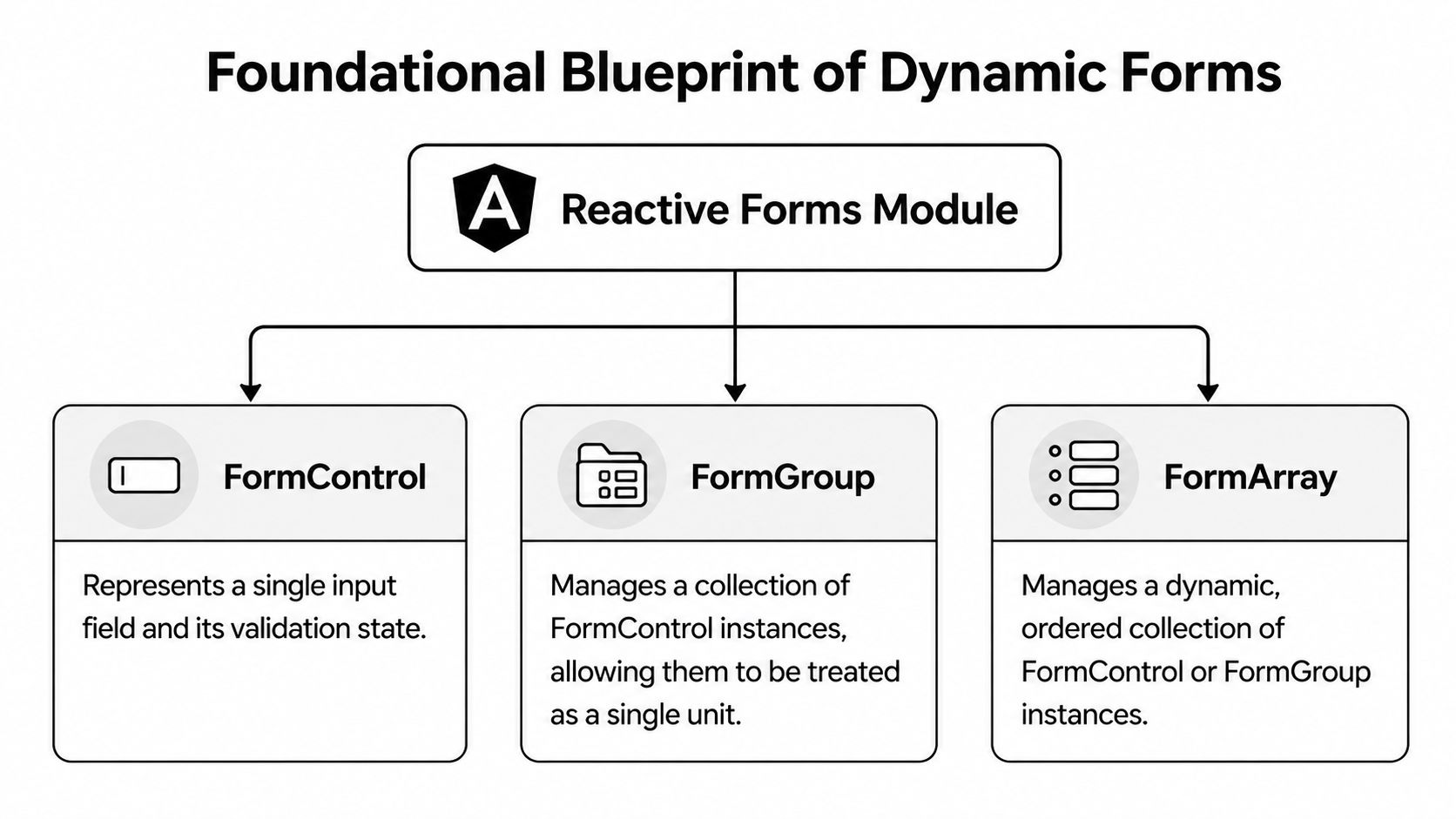
Dynamic forms work when the form model becomes the source of truth, not the template. That’s the mental shift. The HTML stops declaring the whole form structure directly. Instead, it renders an in-memory form tree built from metadata.
The three building blocks
At the center of Angular’s reactive forms model are three primitives.
| Primitive | What it represents | When to use it |
|---|---|---|
| FormControl | A single field value and its state | Text inputs, selects, checkboxes |
| FormGroup | A named collection of controls | Most fixed object-like sections |
| FormArray | An ordered collection of controls or groups | Repeating rows, dynamic sections, unknown counts |
If you’ve built large admin screens, the easiest way to think about this is as a tree. A FormGroup is a branch. A FormControl is a leaf. A FormArray is a repeatable branch where order matters more than fixed names.
Why reactive forms scale better
Reactive forms give you programmatic control over how the tree is created, updated, validated, and observed. That centralization matters. The verified benchmark summary from Angular Minds on dynamic forms states that reactive forms reduce validation logic errors by approximately 60% compared to template-driven approaches because the rules live in one programmable layer rather than being scattered across templates.
That matches what teams run into in production. Hidden fields, conditional validators, nested rows, and async checks all become easier to reason about when the control graph is explicit.
FormBuilder is not optional in real projects
You can instantiate every FormControl and FormGroup manually. You probably shouldn’t if your forms are dynamic.
FormBuilder gives you a concise way to generate the form tree from configuration. In production code, that’s not just syntactic sugar. It becomes the mechanism that converts metadata into controls in a predictable way.
A common flow looks like this:
- Load metadata from local config, a CMS-like source, or an API.
- Map metadata to controls using
FormBuilder. - Render controls using
*ngFor,formControlName,formGroupName, andformArrayName. - Apply validators and conditions from the same metadata source.
Practical rule: If the template contains repeated field markup and repeated validator wiring, you probably haven’t moved enough logic into configuration.
What the architecture should look like
A production-friendly dynamic form setup usually separates concerns into distinct layers:
- Metadata model: TypeScript interfaces that define field type, name, label, validators, options, and conditions.
- Form factory service: a service that converts that metadata into Angular controls.
- Renderer component: a component that loops over field config and picks the right UI control.
- Validation utilities: reusable sync and async validators that don’t live inline inside components.
This separation is what keeps the system usable after the second or third form type gets added.
If you want a broader perspective on UI framework decisions around maintainability and scale, the discussion in Wonderment Apps is useful context. Form architecture sits inside that bigger question. The framework matters, but the internal patterns matter more.
Common mistakes at this stage
The failures are predictable.
- Stuffing business rules into the template: that recreates the same sprawl dynamic forms are supposed to solve.
- Using
FormArrayfor everything: many sections are justFormGroups with named controls.FormArrayis for unknown or repeating counts. - Subscribing everywhere to
valueChanges: if each field wires its own subscription without discipline, memory leaks and tangled behavior follow. - Creating one giant renderer component: custom controls, nested groups, and conditional sections need composable pieces.
A good dynamic form system feels boring in the best way. Metadata in. Form tree out. UI reflects state. Validation stays centralized. That’s the baseline before adding the more advanced parts.
Building Your First Configuration-Driven Form
A static form works until product, sales, and onboarding all want different versions by quarter, account tier, region, or workflow type. In a SaaS app, that usually happens fast. The first configuration-driven form should reflect that reality, so build one around a B2B lead intake flow with fields that can change without rewriting the component.

Start with a field schema
Begin with a typed config model, not template markup. Keep the schema small at first. Teams get into trouble when they try to design a universal form DSL before they have two or three real use cases.
export type DynamicFieldType = 'text' | 'email' | 'select' | 'textarea' | 'checkbox';

export interface DynamicValidatorConfig {
  type: 'required' | 'minLength' | 'email';
  value?: number;
  message: string;
}

export interface DynamicOption {
  label: string;
  value: string;
}

export interface DynamicFieldConfig {
  name: string;
  label: string;
  type: DynamicFieldType;
  value?: unknown;
  placeholder?: string;
  options?: DynamicOption[];
  validators?: DynamicValidatorConfig[];
}
This gives the form builder a stable contract. It also leaves room to tighten typing later, especially if some field types need different config shapes. For that step, TypeScript conditional types for field-specific config models are useful when you want better editor support without splitting the whole system into unrelated interfaces.
Define a realistic form config
Use a form that resembles production work. A lead qualification flow is a good starting point because it maps well to sales intake, onboarding requests, implementation scoping, and AI automation assessments.
export const leadFormConfig: DynamicFieldConfig[] = [
  {
    name: 'fullName',
    label: 'Full name',
    type: 'text',
    placeholder: 'Jane Doe',
    validators: [
      { type: 'required', message: 'Full name is required' },
      { type: 'minLength', value: 2, message: 'Use at least 2 characters' }
    ]
  },
  {
    name: 'workEmail',
    label: 'Work email',
    type: 'email',
    placeholder: 'jane@company.com',
    validators: [
      { type: 'required', message: 'Email is required' },
      { type: 'email', message: 'Enter a valid email address' }
    ]
  },
  {
    name: 'teamSize',
    label: 'Team size',
    type: 'select',
    options: [
      { label: '1-10', value: '1-10' },
      { label: '11-50', value: '11-50' },
      { label: '51-200', value: '51-200' },
      { label: '200+', value: '200+' }
    ],
    validators: [
      { type: 'required', message: 'Select a team size' }
    ]
  },
  {
    name: 'useCase',
    label: 'What are you trying to automate?',
    type: 'textarea',
    validators: [
      { type: 'required', message: 'Describe the workflow briefly' }
    ]
  }
];
This config is intentionally plain. That restraint matters. In production, a simple schema is easier to version, store in a database, generate from admin tooling, or augment with AI-driven suggestions than a sprawling metadata format packed with presentation details.
Build the form group from metadata
Convert the config into a FormGroup in one place. Keep validator mapping separate so form construction stays readable and easy to test.
import { Component, Input, OnInit } from '@angular/core';
import { FormBuilder, FormGroup, ValidatorFn, Validators } from '@angular/forms';

@Component({
  selector: 'app-dynamic-form',
  templateUrl: './dynamic-form.component.html'
})
export class DynamicFormComponent implements OnInit {
  @Input() fields: DynamicFieldConfig[] = [];
  form!: FormGroup;

  constructor(private fb: FormBuilder) {}

  ngOnInit(): void {
    this.form = this.buildForm(this.fields);
  }

  private buildForm(fields: DynamicFieldConfig[]): FormGroup {
    const group: Record<string, unknown> = {};

    fields.forEach(field => {
      group[field.name] = [
        field.value ?? '',
        this.mapValidators(field.validators ?? [])
      ];
    });

    return this.fb.group(group);
  }

  private mapValidators(validators: DynamicValidatorConfig[]): ValidatorFn[] {
    return validators.flatMap(validator => {
      switch (validator.type) {
        case 'required':
          return Validators.required;
        case 'minLength':
          return validator.value ? Validators.minLength(validator.value) : [];
        case 'email':
          return Validators.email;
        default:
          return [];
      }
    });
  }

  getControl(name: string) {
    return this.form.get(name);
  }

  submit(): void {
    if (this.form.invalid) {
      this.form.markAllAsTouched();
      return;
    }

    console.log(this.form.getRawValue());
  }
}
The important design choice here is boring on purpose. The component does not know what a “lead” is, what plan the customer has, or which downstream workflow will consume the payload. It reads metadata, creates controls, and returns values in a predictable structure. That separation pays off when the same engine later supports onboarding forms, support escalations, procurement requests, or admin-configured AI workflow builders.
There is one trade-off. A generic builder can hide too much if every rule is pushed into metadata too early. Keep domain logic close enough that developers can still trace why a field exists and why a validator fires.
Render fields with ngFor and ngSwitch
The template should stay thin. It loops over field config and renders the matching control without burying business rules in HTML.
<form [formGroup]="form" (ngSubmit)="submit()">
  <div *ngFor="let field of fields" class="form-row">
    <label [for]="field.name">{{ field.label }}</label>

    <ng-container [ngSwitch]="field.type">
      <input
        *ngSwitchCase="'text'"
        [id]="field.name"
        [formControlName]="field.name"
        [placeholder]="field.placeholder || ''"
        type="text"
      />

      <input
        *ngSwitchCase="'email'"
        [id]="field.name"
        [formControlName]="field.name"
        [placeholder]="field.placeholder || ''"
        type="email"
      />

      <select
        *ngSwitchCase="'select'"
        [id]="field.name"
        [formControlName]="field.name"
      >
        <option value="">Select one</option>
        <option *ngFor="let option of field.options" [value]="option.value">
          {{ option.label }}
        </option>
      </select>

      <textarea
        *ngSwitchCase="'textarea'"
        [id]="field.name"
        [formControlName]="field.name"
        [placeholder]="field.placeholder || ''"
      ></textarea>

      <input
        *ngSwitchCase="'checkbox'"
        [id]="field.name"
        [formControlName]="field.name"
        type="checkbox"
      />
    </ng-container>

    <div class="error" *ngIf="getControl(field.name)?.touched && getControl(field.name)?.invalid">
      <small *ngFor="let validator of field.validators">
        <span *ngIf="getControl(field.name)?.hasError(validator.type)">
          {{ validator.message }}
        </span>
      </small>
    </div>
  </div>

  <button type="submit" [disabled]="form.invalid">Submit</button>
</form>
This pattern scales better than hardcoding each field into the template, but it is not the final state for a large application. Once you add custom date pickers, address blocks, rich selects, file uploads, or account-specific sections, move rendering into smaller field components or a registry of control renderers. Otherwise one template turns into a switchboard nobody wants to edit.
What this first version gets right
Even this small implementation solves the problems that matter first:
- Field definitions live in one place
- Validation wiring is generated from config
- The renderer can be reused across multiple flows
- Submission payloads stay aligned with the active schema
It also shows where the next set of requirements will appear. Error rendering is still basic. Accessibility needs more attention than the example shows. Conditional field visibility, cross-field rules, async validation, and nested groups are still missing. Those are normal gaps in a first production pass.
For B2B teams, this is usually the point where the form starts feeding more than one system. The same metadata may need to support CRM routing, onboarding automation, support triage, or AI prompt assembly for internal ops tools. A clear config shape makes those integrations practical because downstream services can reason about field names and values without scraping template-specific behavior.
A solid video walkthrough can help if you want to compare your mental model to another implementation style:
Keep the next refactor obvious
Add two guardrails early.
Move form creation into a dedicated service once more than one component needs it. Also keep UI-library details out of the schema. If the metadata starts containing Angular Material-specific inputs, Tailwind class names, or component internals, the form engine becomes harder to migrate and harder to test.
A good first dynamic form is flexible where the product changes often, and intentionally rigid everywhere else. That is what keeps configuration-driven forms maintainable in real SaaS codebases.
Implementing Advanced Validation and Conditional UI
A SaaS onboarding form starts basic. Then sales asks for plan-specific questions, customer success needs implementation details only for enterprise accounts, legal requires region-based disclosures, and ops wants the same answers routed into automation. At that point, validation logic stops being a template concern. It becomes part of the product workflow.
Choose the right validation layer
Angular gives you three useful validation layers, and each has a clear job.
| Validation type | Best for | Example |
|---|---|---|
| Built-in sync validators | Basic field rules | required, minLength, email |
| Custom sync validators | Business rules that run locally | banned values, cross-field matching |
| Async validators | Rules that depend on the server | username or slug availability |
Built-in validators are fast and predictable. Use them first.
Custom sync validators fit rules that come from the business model, not the framework. A common B2B example is blocking personal email domains for lead qualification or trial signup.
import { AbstractControl, ValidationErrors, ValidatorFn } from '@angular/forms';

export function noFreeEmailDomainsValidator(): ValidatorFn {
  const blockedDomains = ['gmail.com', 'yahoo.com', 'hotmail.com'];

  return (control: AbstractControl): ValidationErrors | null => {
    const value = String(control.value || '').toLowerCase();
    const domain = value.split('@')[1];

    if (domain && blockedDomains.includes(domain)) {
      return { freeEmailDomain: true };
    }

    return null;
  };
}
Attach this the same way you attach built-in validators. Keep validators pure and reusable. If a validator reaches into component state, it gets harder to test and easier to break during refactors.
Async validation needs restraint
Async validators are useful for checks the client cannot answer. Slug availability, account codes, invite token verification, or policy checks against backend rules all fit here.
import { AbstractControl, AsyncValidatorFn, ValidationErrors } from '@angular/forms';
import { map, catchError, of } from 'rxjs';

export function slugAvailabilityValidator(api: WorkspaceApiService): AsyncValidatorFn {
  return (control: AbstractControl) => {
    const value = String(control.value || '').trim();

    if (!value) {
      return of(null);
    }

    return api.checkSlug(value).pipe(
      map(isTaken => (isTaken ? { slugTaken: true } : null)),
      catchError(() => of(null))
    );
  };
}
Two decisions matter more than the validator code itself:
- Run async checks at the right time.
updateOn: 'blur'is usually better than validating on every keystroke. - Treat backend failures as operational issues, not user mistakes. If the validation service has a temporary problem, show a fallback message or let submission handle the final check.
For large admin surfaces, I also avoid scattering async validation logic across many field components. A shared form engine or validation service is easier to maintain, especially in Angular micro frontend architectures for enterprise SaaS where multiple teams own different slices of the UI.

Conditional fields must change UI state and form state together
A hidden field with active validators is a production bug. Users experience it as a broken form, and support teams end up diagnosing "random" submission failures that are state mismatches.
Suppose a dropdown asks whether the lead already uses a CRM. If the answer is yes, a second field should appear asking which CRM.
this.form.get('usesCrm')?.valueChanges.subscribe(value => {
  const crmNameControl = this.form.get('crmName');

  if (!crmNameControl) return;

  if (value === 'yes') {
    crmNameControl.setValidators([Validators.required]);
    crmNameControl.enable({ emitEvent: false });
  } else {
    crmNameControl.clearValidators();
    crmNameControl.setValue('', { emitEvent: false });
    crmNameControl.disable({ emitEvent: false });
  }

  crmNameControl.updateValueAndValidity({ emitEvent: false });
});
This works because visibility, enabled state, and validator state change together.
In production forms, I usually push this one step further. Store the condition in metadata, evaluate it in the form engine, and let the renderer react to the result. That keeps the rule in one place and avoids template-specific logic that downstream systems cannot interpret. It also helps when the same field data feeds CRM routing, ticket enrichment, or AI prompt assembly for internal support tools.
Cross-field rules belong at group level
Single-control validators only get you so far. Many business rules depend on combinations of answers:
- billing country requires a tax ID for some regions
- contract start date must be before renewal date
- selected plan changes allowed seat ranges
- "other" choices require a free-text explanation
Those rules belong on a FormGroup, not buried inside one control’s validator. Group-level validation keeps dependencies explicit and makes test coverage much cleaner.
import { AbstractControl, ValidationErrors, ValidatorFn } from '@angular/forms';

export function dateRangeValidator(): ValidatorFn {
  return (group: AbstractControl): ValidationErrors | null => {
    const start = group.get('startDate')?.value;
    const end = group.get('endDate')?.value;

    if (!start || !end) return null;

    return new Date(start) <= new Date(end)
      ? null
      : { invalidDateRange: true };
  };
}
This pattern scales better than wiring subscriptions between unrelated controls. Subscriptions still have a place, but they should mainly coordinate UI behavior, not carry all validation logic.
Nested and repeating sections need a stricter model
Repeating sections expose weak form architecture fast. Quote builders, onboarding contacts, approval chains, and product line items all need dynamic rows with their own validation rules. FormArray is the right tool for that, and template branching with ngSwitch is still a practical rendering approach when field types vary by config.
A stable pattern looks like this:
- Keep each row as a
FormGroup - Store the collection inside a
FormArray - Put row-specific dependency rules on the row group
- Remove subscriptions when rows are destroyed, or avoid per-row subscriptions when metadata-driven rules can handle the behavior
If a field becomes required only under certain conditions, put that condition in the form model. Template-only logic drifts out of sync.
Error handling should help users finish the task
Validation exists to guide completion, not to prove the form engine is strict.
Good dynamic forms usually share three traits:
- Errors appear after interaction or on submit
- Validator keys map to clear messages
- Messages stay close to the field or group that needs attention
markAllAsTouched() remains one of the simplest ways to expose missing inputs during submit. It works well, especially for long forms where users may skip collapsed sections.
The stronger pattern is to generate error messages from metadata and validator state instead of hardcoding strings in every template. That keeps messages aligned with conditional fields, supports localization, and makes it easier to test exact outcomes. In B2B systems, the primary advantage is consistency. The same rules that block submission can also drive automation decisions, audit logs, and internal AI workflows without anyone reverse-engineering UI behavior.
Enterprise Patterns for Scalability and Integration
Hardcoded config inside a component is fine for learning. It’s not the end state for serious SaaS systems. Once multiple teams need to change forms, schema has to move out of the component and into a source that the app can load.
That’s the point where dynamic forms become part of platform design, not just frontend convenience.

Move metadata to APIs or managed JSON
The strongest enterprise pattern is metadata-driven generation. The app fetches a form definition, validates it, builds controls, and renders the UI. That removes deployment from many routine form changes.
According to the verified benchmark summary linked to Angular’s dynamic forms guide, enterprise-grade implementations that fetch JSON schema metadata from APIs allow forms to change without developer intervention and reduce form maintenance overhead by 50-70% in apps that require frequent modifications.
That’s a meaningful shift for:
- customer-configurable onboarding
- region-specific compliance flows
- white-label admin screens
- internal ops tools that change often
The metadata contract matters more than the renderer
Teams often spend too much time on the rendering layer and too little on schema quality. The renderer can evolve. A weak contract creates long-term chaos.
A production metadata contract should include:
- Field identity: stable keys and labels
- Type information: text, select, checkbox, object group, repeating group
- Validation rules: built-in plus custom rule identifiers
- Display conditions: dependencies on other fields
- Option sources: static arrays or API-backed values
- Fallback behavior: what happens if metadata is malformed or incomplete
Schema validation at ingestion is worth the effort. If the backend returns a malformed field definition, fail gracefully. A broken form generated perfectly is still a broken form.
Dynamic forms fit naturally into automation workflows
In B2B products, forms usually feed downstream systems. A lead qualification form might post to a webhook, create a CRM record, enrich data, and trigger routing logic. A customer onboarding form might launch a sequence of provisioning tasks. A recruiting intake form might branch candidates into different review pipelines.
That’s why output structure matters.
A practical submission payload usually needs:
| Payload area | Why it matters |
|---|---|
| Normalized values | Easier CRM and workflow mapping |
| Schema version | Helps downstream services interpret the payload |
| Context metadata | Campaign, account, or tenant identifiers |
| Submission timestamp | Useful for audit and workflow tracing |
If your Angular app is one part of a larger platform, this is also where frontend boundaries become important. Teams using modular architectures often combine reusable dynamic form engines with distributed product surfaces. The architectural ideas in Angular micro frontend patterns become relevant when separate teams own different workflows but want a shared form foundation.
When standard inputs stop being enough
Eventually, some fields won’t map cleanly to <input>, <select>, or <textarea>. You’ll need custom controls for things like:
- role assignment matrices
- pricing configurators
- file upload blocks
- searchable entity pickers
- AI-assisted suggestion inputs
At that point, a metadata key can map to a custom component instead of a native element. Angular gives you several ways to do that, including dynamic component rendering patterns. The right choice depends on how isolated your custom fields are and whether they need to plug into a common interface.
Large form systems succeed when teams standardize the boring parts and reserve custom rendering for the few fields that actually need it.
Trade-offs that are worth acknowledging
Schema-driven forms are powerful, but they aren’t free.
What works well
- Frequent changes with shared rendering patterns
- Tenant-specific or region-specific variants
- Automation-heavy workflows where structure and payload need to stay aligned
What doesn’t work as well
- Pixel-perfect one-off experiences with bespoke layout logic
- Teams that don’t govern metadata quality
- Situations where every field behaves like its own mini application
A mature dynamic form stack is selective. It doesn’t force everything into metadata. It keeps common field behavior generic and lets exceptional UI remain exceptional.
Testing, Performance, and Final Polish
A dynamic form that renders correctly in a demo can still fail badly in production. The weak points are predictable. Validation rules drift. Conditional logic breaks after a schema change. Large forms become sluggish. Teams miss those issues because they test the happy path only once.
That’s why testing and performance aren’t cleanup tasks. They’re part of the feature.
Test the form engine, not only the screen
Start with unit tests around the logic that generates controls. If your form factory receives metadata, the tests should assert the shape of the resulting FormGroup, attached validators, default values, and conditional behavior. Custom validators deserve isolated tests too.
For Angular-specific coverage, it helps to keep a clear testing stack. The practical guidance in Angular unit tests is relevant here because dynamic forms involve both pure logic and component rendering, and those concerns should be tested separately.
A reliable test suite usually includes:
- Factory tests: verify metadata creates the expected controls
- Validator tests: confirm sync and async rules return the right errors
- Conditional logic tests: ensure hidden or disabled fields stop blocking submission
- Submission mapping tests: check raw form values transform into the expected payload
Add black-box testing for changing schemas
Dynamic forms also benefit from black-box tests because the schema changes while the renderer stays the same. You want confidence that a new field definition still produces a usable experience in the browser.
If your team wants a practical primer on this testing style, Monito’s guide on how to automate web app testing is a useful complement to Angular-focused unit coverage.
The more configurable your form engine becomes, the less you can rely on “I checked it in the browser once” as a testing strategy.
Performance gets real with large forms
Many tutorials stop before the hard part. They show how to add fields, not how to keep the UI responsive when the form grows. That gap is well described in the verified summary tied to Bitovi’s discussion of nested and dynamic forms, which notes that many resources don’t address performance degradation with hundreds of dynamic fields or the memory concerns around large FormArray instances.
For production forms, the baseline performance checklist is straightforward:
- Use
ChangeDetectionStrategy.OnPush: especially for field renderer components. - Track repeated controls carefully:
trackByprevents Angular from recreating DOM nodes unnecessarily. - Limit subscriptions: centralize
valueChangeshandling and tear subscriptions down cleanly. - Split large forms into sections: render only what the user needs now.
- Be cautious with highly nested arrays: they work, but they can become expensive quickly.
Angular’s newer signal-based patterns are worth watching for large dynamic systems because they offer a finer-grained reactive model. Even so, architecture still matters more than primitives. A messy form with signals is still messy.
Final polish users notice immediately
The last layer is usually the one customers judge hardest.
Good forms:
- Show clear field-level errors
- Disable submit only when the reason is understandable
- Display pending async validation states
- Preserve user input during rerenders
- Respect accessibility basics like labels, focus order, and error associations
A form isn’t “done” because it compiles. It’s done when users can complete it without guessing, support doesn’t file recurring tickets, and engineers can safely evolve it next month.
If your team needs help designing or implementing production-grade Angular dynamic forms, MakeAutomation can support the full system around them, from schema design and validation architecture to workflow automation, CRM integration, and AI-powered operational flows.