Using RxJS with React: A Practical Guide for 2026
You're probably in one of two situations right now. Either your React app has grown from straightforward UI state into a mess of effects, event handlers, retries, and race conditions, or someone on your team wants to introduce RxJS and you're trying to decide whether that's smart architecture or unnecessary cleverness.
Both situations are common. rxjs with react can be a strong fit, but only for a specific class of problems. It handles time, events, and async coordination well. It also adds a mental model that many teams underestimate. If you use it for the wrong reasons, it becomes expensive fast.
The practical question isn't “can RxJS work with React?” It can. The key question is whether your feature behaves like a stream of events over time, or just ordinary UI state that React already handles cleanly.
When RxJS Makes Sense in Modern React
React already gives you good primitives. useState, useReducer, and useEffect handle a lot. If your component is mostly local UI state, a couple of fetches, and some derived values, adding RxJS usually makes the code harder to read, harder to onboard into, and harder to debug.
The point where RxJS starts to earn its keep is when your feature stops behaving like a simple component and starts behaving like a system. Search with cancellation. Live dashboards. WebSocket updates. User interactions that combine typing, scrolling, retries, and server responses. Those are event streams, not just state snapshots.
The pull and push mismatch
The core friction is architectural. React renders by pulling the latest value during render. RxJS emits values by pushing them over time. The React-RxJS core concepts documentation explains that RxJS streams are declarative, don't execute until subscribed, and are unicast by default, while React needs immediate access to the latest value when rendering. That's why React-RxJS introduced shareLatest as a bridge between the two models.
That matters more than it sounds. Without a proper bridge, you can end up with duplicate subscriptions, stale values, or components rendering before the stream has a usable current value.
Where React hooks start to feel strained
I usually advise teams to look for a few warning signs before bringing in RxJS:
- You're coordinating multiple async sources: User input, API traffic, timers, and sockets all affect the same view.
- Cancellation matters: Live search and typeahead UIs break if stale responses win the race.
- The same data stream feeds multiple components: You need one shared source of truth, not several ad hoc fetches.
- Timing is part of the business logic: Debounce, retry, throttle, or “only process the latest” rules are central to the feature.
- Your effects are turning procedural: If
useEffectchains start reading like orchestration code, streams may model the problem better.
A lot of data-heavy product work lands here. Dashboards, notifications, admin panels, and collaborative interfaces tend to evolve into ongoing streams of change rather than single request-response cycles. If your UI is also built from dynamic React component patterns, stream-driven state can fit naturally because the rendered surface itself changes based on incoming events.
Practical rule: Use RxJS when time and event coordination are first-class parts of the feature. Don't use it just because the app has state.
When it does not make sense
RxJS is the wrong hammer for basic toggles, form inputs with simple validation, static settings pages, or one-off fetching that a standard hook can express clearly. If the code becomes more abstract than the problem, you've already lost.
That's the line to hold. React is the default. RxJS is the escalation path.
The Foundation A Reusable useObservable Hook
If you do bring RxJS into a React codebase, the first thing to build isn't a global store. It's a clean bridge between an observable and a component. That bridge is a reusable useObservable hook.
Without that layer, teams often subscribe directly in components, scatter cleanup logic, and accidentally create render bugs. A binding hook gives React what it needs: the latest usable value at render time.

A minimal hook that does the right things
Start simple:
import { useEffect, useState } from "react";
import type { Observable, Subscription } from "rxjs";

export function useObservable<T>(
  observable$: Observable<T>,
  initialValue: T
): T {
  const [value, setValue] = useState<T>(initialValue);

  useEffect(() => {
    const subscription: Subscription = observable$.subscribe({
      next: setValue,
      error: (err) => {
        console.error("Observable error:", err);
      },
    });

    return () => subscription.unsubscribe();
  }, [observable$]);

  return value;
}
This does three jobs.
First, it stores a current value in React state so the component can render predictably. Second, it subscribes when the component mounts or when the observable instance changes. Third, it unsubscribes during cleanup so you don't leave zombie subscriptions behind.
That cleanup matters. A missed unsubscribe won't always fail loudly. It often shows up later as duplicate events, weird state jumps, or components updating after unmount.
Why the initial value matters
React needs something to render immediately. An observable may not emit synchronously. If your hook doesn't provide an initial value, your component has to deal with undefined, loading placeholders, or conditional rendering every time.
That's one reason the pattern described in Robin Wieruch's React RxJS state management tutorial is so useful. Mutable UI inputs are modeled as hot streams with BehaviorSubject, derived state is composed with operators like combineLatest, map, and scan, and the result is exposed to React through a binding hook. The tutorial also points out the common pitfall: trying to read stream state directly without a binding layer leads to stale UI.
Here's a small example using BehaviorSubject:
import { BehaviorSubject, combineLatest } from "rxjs";
import { map } from "rxjs/operators";

const query$ = new BehaviorSubject("");
const category$ = new BehaviorSubject("all");

const filters$ = combineLatest([query$, category$]).pipe(
  map(([query, category]) => ({
    query,
    category,
    hasActiveFilters: query.length > 0 || category !== "all",
  }))
);
Then in React:
function FiltersSummary() {
  const filters = useObservable(filters$, {
    query: "",
    category: "all",
    hasActiveFilters: false,
  });

  return (
    <div>
      <p>Query: {filters.query || "none"}</p>
      <p>Category: {filters.category}</p>
    </div>
  );
}
A couple of non-obvious rules
There are a few habits worth enforcing early:
- Keep observable creation outside render: Don't create a fresh stream inside the component body unless you know exactly why.
- Prefer stable stream references: If
observable$changes every render, your hook will resubscribe every render. - Separate producers from consumers: Components should usually push events into subjects or signals, not rebuild pipelines.
For teams working heavily in TypeScript, strong stream typing pays off quickly, especially when your derived state gets more conditional. If your app already leans on TypeScript conditional type patterns, keep that same discipline here so stream outputs stay explicit instead of becoming opaque unions.
The hook should be boring. If the bridge is clever, everything built on top of it gets fragile.
Managing Global State with RxJS and React Context
Once you have a solid component bridge, combining RxJS with React Context becomes a practical way to manage shared state. Not all global state belongs in a stream, but some of it does. Session updates, live filters, notification feeds, server-driven status, and shared async workflows often fit well.
This pattern works best when the state itself changes over time because of ongoing events, not just local interactions. In that case, Context provides distribution and RxJS provides orchestration.
A lightweight store pattern
Here's a simple sketch:
import React, { createContext, useContext, useMemo } from "react";
import { BehaviorSubject } from "rxjs";

type AppState = {
  theme: "light" | "dark";
  notificationsEnabled: boolean;
};

type AppStore = {
  state$: BehaviorSubject<AppState>;
  update: (patch: Partial<AppState>) => void;
};

const AppStoreContext = createContext<AppStore | null>(null);

export function AppStoreProvider({ children }: { children: React.ReactNode }) {
  const store = useMemo<AppStore>(() => {
    const state$ = new BehaviorSubject<AppState>({
      theme: "light",
      notificationsEnabled: true,
    });

    return {
      state$,
      update: (patch) => {
        state$.next({ ...state$.getValue(), ...patch });
      },
    };
  }, []);

  return (
    <AppStoreContext.Provider value={store}>
      {children}
    </AppStoreContext.Provider>
  );
}

export function useAppStore() {
  const store = useContext(AppStoreContext);
  if (!store) throw new Error("Missing AppStoreProvider");
  return store;
}
Then a component can subscribe through the hook:
function ThemeToggle() {
  const { state$, update } = useAppStore();
  const state = useObservable(state$, {
    theme: "light",
    notificationsEnabled: true,
  });

  return (
    <button
      onClick={() =>
        update({ theme: state.theme === "light" ? "dark" : "light" })
      }
    >
      Theme: {state.theme}
    </button>
  );
}
Why this works well in the right app
The main benefit is composition. RxJS has 100+ operators, including patterns like retry and debounce, which is a big reason it remains attractive in complex React applications, especially for data-heavy SaaS products and analytics dashboards, as discussed in this RxJS in React critique and discussion.
That operator toolbox changes how you model shared state. Instead of dispatching imperative updates from everywhere, you can define transformations once and let components consume the result.
A good fit for this pattern usually looks like one of these:
| Use case | Why RxJS + Context fits |
|---|---|
| Notification center | Events arrive over time and affect multiple screens |
| Live dashboard filters | Inputs, server updates, and derived views need coordination |
| Shared async workflows | Retries, cancellation, and transformation belong in one pipeline |
Shared state is where teams either get leverage from RxJS or bury themselves in abstraction. Keep the store narrow and event-driven.
If your global state is mostly static preferences and CRUD forms, Zustand, plain Context, or React state will usually be easier to maintain.
Practical RxJS Recipes for React Components
Developers often don't need a philosophical argument for rxjs with react. They need to solve a concrete UI problem that's becoming awkward in hooks. The best uses tend to be obvious once you see them in code.
Debounced search without stale results
Search is the classic example because it breaks in subtle ways. The user types quickly. The UI should stay responsive. Old requests shouldn't overwrite newer ones.
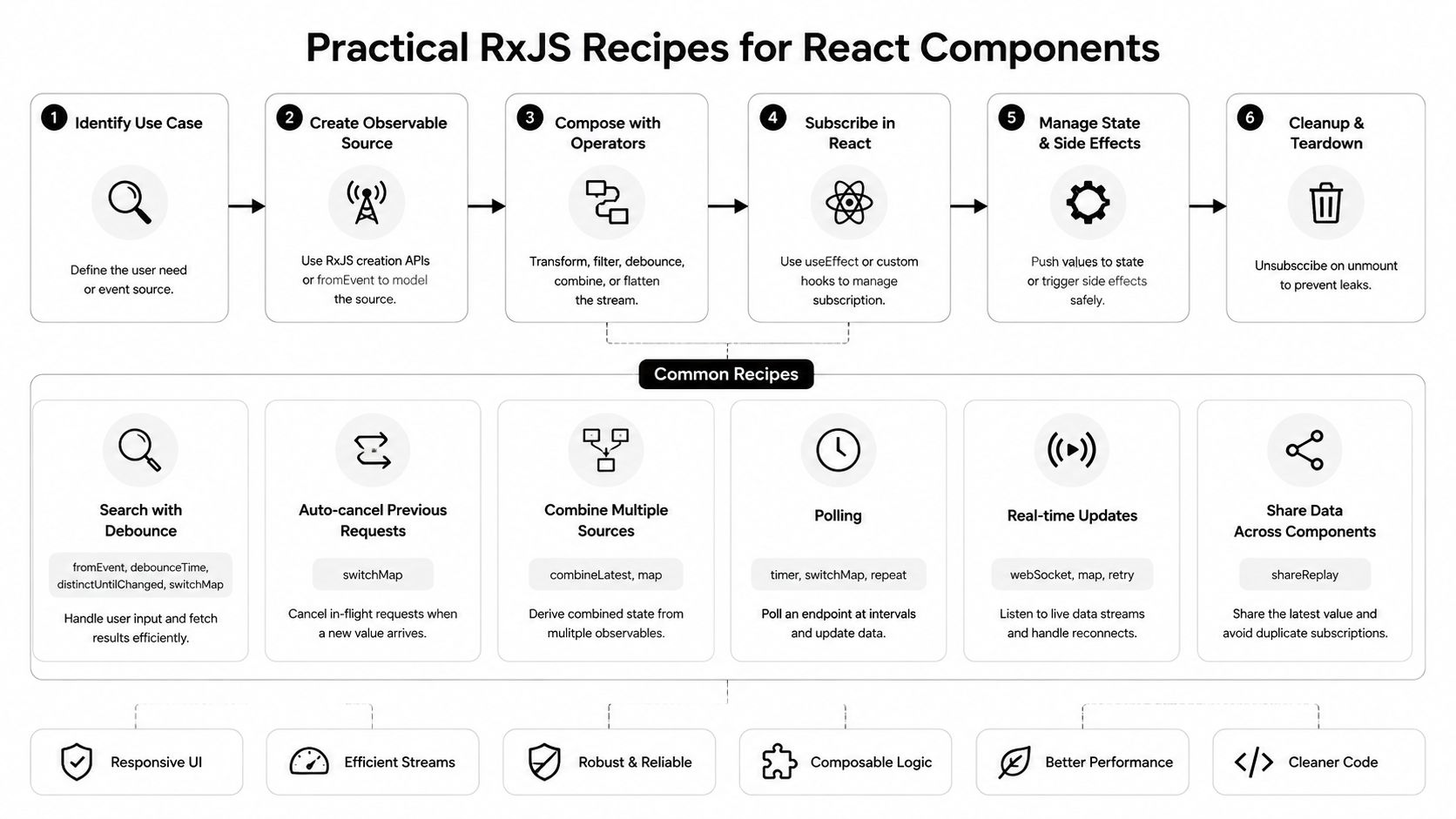
That's where RxJS is better than a pile of event handlers. For data fetching, a reactive pipeline can use operators like switchMap to cancel stale requests, which is especially useful in live search, as described in this React data fetching with RxJS article.
import { BehaviorSubject, of } from "rxjs";
import {
  debounceTime,
  distinctUntilChanged,
  switchMap,
  catchError,
} from "rxjs/operators";

const query$ = new BehaviorSubject("");

const results$ = query$.pipe(
  debounceTime(300),
  distinctUntilChanged(),
  switchMap((query) => {
    if (!query.trim()) return of([]);

    return fetch(`/api/search?q=${encodeURIComponent(query)}`)
      .then((res) => res.json())
      .catch(() => []);
  })
);
In a component:
function SearchBox() {
  const results = useObservable(results$, []);

  return (
    <>
      <input onChange={(e) => query$.next(e.target.value)} />
      <ul>
        {results.map((item: any) => (
          <li key={item.id}>{item.label}</li>
        ))}
      </ul>
    </>
  );
}
The key choice here is switchMap. If the user types again, the previous request is treated as stale and the newest one wins. That matches user intent.
Scroll handling that doesn't thrash rendering
Scroll-driven UI can be deceptively expensive. Progress bars, sticky headers, lazy panels, and active section indicators can trigger too many updates if you emit on every raw browser event.
A useful pattern is to throttle those emissions to the browser's paint cycle:
import { fromEvent } from "rxjs";
import { map, throttleTime } from "rxjs/operators";
import { animationFrameScheduler } from "rxjs";

const scrollY$ = fromEvent(window, "scroll").pipe(
  throttleTime(0, animationFrameScheduler),
  map(() => window.scrollY)
);
That throttleTime(0, animationFrameScheduler) pattern aligns updates with animation frames and helps reduce render pressure. It's one of those details that feels minor until a page becomes visibly janky.
If an event can fire dozens of times during interaction, don't stream every raw emission into React.
WebSocket updates as a stream
Real-time features are where RxJS often feels natural. A WebSocket already behaves like a source that emits over time. Wrapping it as an observable lets you transform, filter, and distribute those updates cleanly.
import { Observable } from "rxjs";

function createSocketStream(url: string) {
  return new Observable<any>((subscriber) => {
    const socket = new WebSocket(url);

    socket.onmessage = (event) => {
      subscriber.next(JSON.parse(event.data));
    };

    socket.onerror = (error) => {
      subscriber.error(error);
    };

    socket.onclose = () => {
      subscriber.complete();
    };

    return () => socket.close();
  });
}

const notifications$ = createSocketStream("wss://example.com/notifications");
Then consume it the same way:
function LiveNotifications() {
  const message = useObservable(notifications$, null);

  if (!message) return null;
  return <div>{message.title}</div>;
}
The value here isn't just subscription mechanics. It's that the socket stream can now be filtered, merged with other streams, or shared across the app using the same vocabulary as your other async logic.
Multi-input form validation
Plain React handles simple validation well. But once validity depends on multiple fields, async checks, and timing, observables can keep the logic from scattering across effects.
import { BehaviorSubject, combineLatest } from "rxjs";
import { map } from "rxjs/operators";

const email$ = new BehaviorSubject("");
const password$ = new BehaviorSubject("");

const formState$ = combineLatest([email$, password$]).pipe(
  map(([email, password]) => ({
    email,
    password,
    isValid: email.includes("@") && password.length >= 8,
  }))
);
That kind of composition is clean because the view subscribes to one derived stream instead of reimplementing the same checks in multiple handlers.
What tends to go wrong
The failures are predictable:
- Using merge-style flattening for search: Old responses can surface after new ones.
- Subscribing in several components to the same cold source: You create duplicated work.
- Pushing every keystroke or scroll event directly into render: The UI feels noisy.
- Hiding simple state inside subjects: The code becomes harder than the feature.
Use streams when they remove accidental complexity. Don't add them to create an architecture diagram.
Production-Ready RxJS Testing Performance and SSR
RxJS code that works in a demo can still fail in production for boring reasons. Tests are weak. Streams resubscribe unexpectedly. Server rendering hangs because a stream never completes. Most of the real work is here, not in the first happy-path observable.
Testing stream logic without guesswork
The first rule is separation. Keep your stream construction outside components whenever possible. Pure stream pipelines are much easier to test than effects buried in JSX.
You don't need elaborate test infrastructure for every observable, but you do need to verify the behaviors that matter:
- Cancellation behavior: In search, newer input should beat older requests.
- Derived state logic: Combined streams should produce the expected view model.
- Cleanup behavior: Subscriptions should stop when the consumer unmounts.
For component tests, render the component, drive the source stream, and assert on UI updates. For stream-level tests, marble testing is useful because it lets you express time-based behavior clearly, especially with debounce, throttle, and flattening operators.
Performance is mostly about subscription shape
Most performance problems in rxjs with react come from poor sharing strategy or the wrong flattening operator.
A few production habits help a lot:
| Concern | Good default |
|---|---|
| Repeated work from multiple subscribers | Share the source before multiple consumers read from it |
| Stale async responses | Prefer switchMap for user-driven request streams |
| Ordered async workflows | Use concatMap when sequence matters |
| Ignoring rapid repeated triggers | Use exhaustMap when one active process should block the next |
The deeper issue is maintainability. The Syncfusion discussion of React-RxJS tradeoffs makes an important point: RxJS is excellent for complex async orchestration, but it can add unnecessary complexity and cognitive load for simple UI state or basic API fetching, where React's built-in hooks are often more maintainable.
That's not just an architecture opinion. It affects performance work too. A simpler hook-based implementation is often easier to profile, reason about, and fix.
Production discipline with RxJS starts with one question: is this stream actually reducing complexity, or just relocating it?
SSR needs boundaries
Server-side rendering changes the rules. Streams that never complete, depend on browser APIs, or start long-lived subscriptions can create awkward server behavior.
A practical approach is:
- Keep browser-only streams behind client checks.
- Avoid starting sockets or DOM event streams during server render.
- Hydrate from a known initial state, then attach live streams on the client.
- Be explicit about what must exist synchronously for first paint.
This matters in mixed environments, especially if your frontend already integrates non-React UI surfaces such as React and Web Components patterns. The boundary between render-time state and client-only event streams has to stay clear.
If a feature only becomes “reactive” after hydration, that's fine. Trying to force every stream into SSR usually creates more problems than it solves.
Deciding on RxJS A Pragmatic Framework
A lot of teams adopt RxJS because they've outgrown a few useEffect blocks and assume the next step must be a more powerful abstraction. Sometimes that's right. Often it isn't.
The better test is whether the problem is primarily about events over time.
Use this checklist before adopting it
Ask these questions in order:
- Does the feature combine multiple async inputs? Think user typing, network requests, timers, sockets, or browser events.
- Does timing affect correctness? Debouncing, cancellation, throttling, retry, or sequencing are strong signals.
- Do multiple consumers need the same live data? Shared streams can help if you'd otherwise duplicate work.
- Is the current React code hard to reason about because logic is spread across effects? That's a real warning sign.
- Would plain React state still be easier if you deleted the “clever” parts? If yes, stay with React.
A simple decision table
| Situation | Better default |
|---|---|
| Local modal state, toggles, tabs | React hooks |
| Basic fetch on mount | React hooks or a query library |
| Live search with cancellation | RxJS |
| Dashboard with merged event sources | RxJS |
| Real-time notifications or socket data | RxJS |
| Simple form state | React hooks |
| Cross-component async workflow with retries and timing rules | RxJS |
The rule that saves teams trouble
Don't adopt RxJS as a state management ideology. Adopt it as a targeted solution to async orchestration problems.
That distinction matters. If you use RxJS only where it makes the code more truthful to the problem, it can be one of the cleanest tools in your stack. If you use it to replace ordinary React patterns, your team will spend more time explaining the architecture than shipping features.
Pick it feature by feature. Earn it each time.
If your team is building a data-heavy B2B or SaaS product and needs help deciding where reactive architecture, AI workflows, or automation should fit, MakeAutomation can help you design and implement systems that stay maintainable as complexity grows.