
Using AI for Lead Generation: A B2B Guide (2026)
Your reps are still building lists by hand. They bounce between LinkedIn, company sites, enrichment tools, and a spreadsheet that nobody trusts. By the time someone finally sends the first email, the buying window has already cooled off.
That's why teams start using ai for lead generation. Not because AI is trendy. Because manual prospecting is slow, inconsistent, and expensive in the exact places where B2B teams need precision.
The mistake is thinking AI fixes this by sending more messages. It doesn't. Bad targeting plus faster automation just creates spam at scale. The teams that get value use AI to identify, enrich, prioritize, and prepare leads, then keep humans in control of messaging, timing, and relationship-sensitive decisions.
The End of Manual Prospecting
Most outbound systems break in the same place. Reps spend too much time finding accounts, too much time cleaning data, and too little time talking to qualified buyers. Manual prospecting creates hidden drag long before anyone notices a pipeline problem.

The market has already moved past treating AI as a side experiment. In 2025, a Juniper Research study projected that AI agents would automate 3.3 billion customer interactions in 2025 and more than 34 billion by 2027, a signal that AI is becoming a central operating layer across prospect identification, nurturing, and conversion rather than a simple add-on (Demand Gen Report).
That shift matters because lead generation used to be split into disconnected tasks. One tool found names. Another scored them. Another pushed sequences. Sales still had to interpret half-baked records and decide what was worth touching. AI changes the shape of the work when it's wired into the workflow instead of bolted onto one step.
What actually changes
When teams use AI well, they stop asking, “How do we send more outreach?” and start asking better questions:
- Which accounts fit now based on firmographic, technographic, and behavioral signals
- Which contacts deserve immediate action instead of sitting in a generic sequence
- Which records need human review before they reach a rep or enter a campaign
Manual prospecting fills lists. A good AI workflow fills calendars with leads that sales actually wants to speak with.
The practical win isn't that AI replaces SDRs. It's that it removes low-value research, surfaces buying signals faster, and gives reps context before the first touch. That's the difference between a list-building process and a revenue system.
Building Your AI-Ready Lead Generation Strategy
Most AI lead gen projects fail before the first workflow runs. The issue usually isn't the tool. It's the target definition. If your ideal customer profile is vague, AI will just find the wrong companies faster.
A usable ICP for using ai for lead generation has to be machine-readable. “Mid-market SaaS companies” isn't enough. A model needs attributes it can filter against, compare, and score.
Build the ICP like a scoring model
Start with three layers.
Firmographics
Industry, company size, geography, growth stage, business model, and customer segment.Technographics
The systems they already use. That might be HubSpot, Salesforce, Shopify, Stripe, specific support platforms, or workflow tools that indicate process maturity.Behavioral signals
Hiring patterns, product launches, site activity, content engagement, partner changes, funding events, review activity, and other evidence that a company is moving.
Modern systems allow revenue teams to secure sharper results. A broad list of “good fit companies” is weaker than a narrow list of companies that fit and show movement.
Practical rule: If you can't explain why an account belongs in your outbound queue using clear criteria, your AI model can't explain it either.
Turn your ICP into fields, not opinions
Write the ICP as a filter set, not a brand statement. For example:
- Must-have attributes such as industry, employee range, CRM type, and target geography
- Positive signals such as recent hiring for RevOps, active content production, or new integration pages
- Negative filters such as agencies, very early-stage teams, unsupported regions, or companies with no sales function
- Priority roles such as VP Sales, Head of Growth, Revenue Operations, or founder-led sales
Teams often need category-specific data sources to enrich this properly. If you sell into logistics or operations-heavy sectors, it helps to read the Coreties supply chain database guide because vertical data quality changes how well any scoring model performs.
If you need a tighter definition process before automation starts, this guide on ideal customer profile design is a useful operating reference.
Why precision matters to ROI
The upside of getting this right is material. Companies using AI lead generation have seen up to a 50% increase in lead capture and conversion rates. Predictive lead scoring has also been linked to a 24% increase in conversions compared with non-AI approaches, and AI-driven campaigns have reported 15 to 25% reply rates versus the typical 1 to 5% for cold email (AI Bees).
Those numbers don't mean every team will get the same result. They do show where the true advantage lies. Better fit definition improves capture, prioritization, and reply quality at the same time.
A simple qualification framework
Use a three-bucket model before leads ever hit outreach:
| Bucket | Definition | Action |
|---|---|---|
| High fit | Matches core firmographic and technographic criteria, plus active signal | Route for rep review |
| Medium fit | Good company match, weak timing signal | Add to nurture or monitor |
| Low fit | Missing core ICP requirements or blocked by negative filters | Suppress |
That framework keeps your system honest. AI should narrow effort, not multiply noise.
Assembling Your AI Lead Generation Tech Stack
To achieve a stronger pipeline, a common mistake is purchasing too many tools. The underlying stack is important, but proper orchestration matters more. A lead generation system requires three layers that work together: data sourcing, AI processing, and engagement plus integration.
Data sourcing layer
Leads enter the system here. Common sources include Apollo, ZoomInfo, LinkedIn workflows, niche directories, customer communities, review sites, and custom scraping pipelines.
The decision here is build versus buy.
- Buy when coverage matters and your market is broad
- Build when your niche is narrow and public signals are stronger than vendor databases
- Mix both when you need account coverage from a vendor and intent clues from open web data
A useful comparison point is how specialized service businesses approach search visibility and local demand capture. This breakdown of how contractors leverage artificial intelligence SEO is relevant because it shows why source quality and contextual targeting beat generic volume.
AI processing layer
At this stage, raw data becomes usable. Large language models excel at classification, extraction, summarization, and draft generation. However, they are not naturally good judges of business truth without constraints.
The strongest pattern here is a human-in-the-loop pipeline. AI helps surface likely patterns, but it does not produce absolute truth. One of the biggest operational failures is when lead scores don't sync into the CRM in real time, because the rep loses the signal right when action should happen (Danish Lead Co. on human-in-the-loop lead generation).
That's why the workflow should separate these tasks:
- AI handles enrichment, preliminary classification, account summarization, and draft suggestions
- Humans handle scoring logic review, edge cases, exceptions, and final message approval
If you're evaluating stack options, this roundup of AI tools for lead generation is a practical shortlist. MakeAutomation fits in the orchestration layer for teams that want documented workflows, CRM automation, and AI-driven handoffs rather than another disconnected point tool.
Engagement and integration layer
Many implementations fail at this stage. Great scoring doesn't help if the lead lands in the wrong queue or reaches sales without context.
A strong engagement layer does four things well:
- Creates the record in the CRM with account, contact, score, and rationale
- Routes by logic based on segment, region, owner, or score threshold
- Attaches research notes so reps don't start cold
- Triggers the next action such as manual review, enrichment retry, or outreach prep
This walkthrough gives a useful visual reference for how the stack fits together in practice.
The best stack is the one your sales team can trust. If reps ignore the score, ignore the notes, or work outside the CRM, the system is broken no matter how advanced the model looks.
AI in Action Prompting for Leads and Personalization
The best use of AI in outbound isn't “write my whole sequence.” That's usually where quality falls apart. The strongest use is as a research assistant that helps your team decide who to contact and what angle deserves a human-written message.
Prompt one for ICP scoring
Use this when you have a batch of target companies and want a first-pass fit assessment.
Prompt template
You are assisting with B2B account qualification. Evaluate each company against this ICP:
- Industry
- Employee range
- Geography
- Technographic signals
- Negative filters
- Buying signals
For each company, return:
- Fit score as High, Medium, or Low
- Short explanation tied only to the provided data
- Missing data that requires enrichment
- Recommended next step as Route to sales review, Nurture, or Reject
Do not guess. If evidence is missing, label it unknown.
This works because it forces constrained output. You're not asking the model to “find great leads.” You're asking it to compare records against explicit criteria and show its reasoning.
Prompt two for personalization prep
Use this after a human has approved the account.
Prompt template
Review the following public information from the prospect's LinkedIn profile, company website, and recent company updates. Extract:
- 2 to 3 relevant icebreakers
- 1 business problem hypothesis tied to their role or company context
- 1 reason our offer may be relevant now
Rules:
- Use only details present in the supplied text
- Do not invent achievements, initiatives, or pain points
- Keep outputs concise and specific
- Avoid writing a complete email
Output format:
Icebreakers
Business problem hypothesis
Relevance trigger
That final rule matters. Don't let the model write the whole email by default. Let it prepare material the rep can turn into a credible first touch.
Good prompts narrow the task. Bad prompts ask for persuasion before the system has earned enough context.
Choosing the right AI model for your lead gen task
| Task | Recommended Model Type | Example Use Case | Key Consideration |
|---|---|---|---|
| Structured qualification | General-purpose LLM with strong instruction following | Score account lists against your ICP | Keep the rubric fixed |
| Data extraction | LLM tuned for summarization and classification | Pull buying signals from websites or profiles | Require evidence-based output |
| Message prep | General-purpose LLM with concise drafting ability | Generate icebreakers and angle suggestions | Human review stays mandatory |
| Categorization at scale | Workflow model with batch processing support | Sort large lead sets into routing buckets | Watch for drift in labels |
| CRM note creation | LLM with formatting consistency | Write clean handoff notes for reps | Standardize output schema |
What works and what doesn't
What works in the wild is narrow prompting, fixed schemas, and clear approval gates. What fails is broad prompting like “find me leads and write personalized emails.” That usually produces shallow fit logic and generic copy.
A reliable flow looks like this:
- First pass AI scores accounts
- Second pass human approves or rejects
- Third pass AI extracts relevant context
- Final pass rep writes or edits the message
That sequence protects reply quality without losing efficiency.
Automating the Entire Lead Generation Workflow
Single AI tasks save time. Connected workflows change output. The difference is whether your team still has to move data manually between systems.
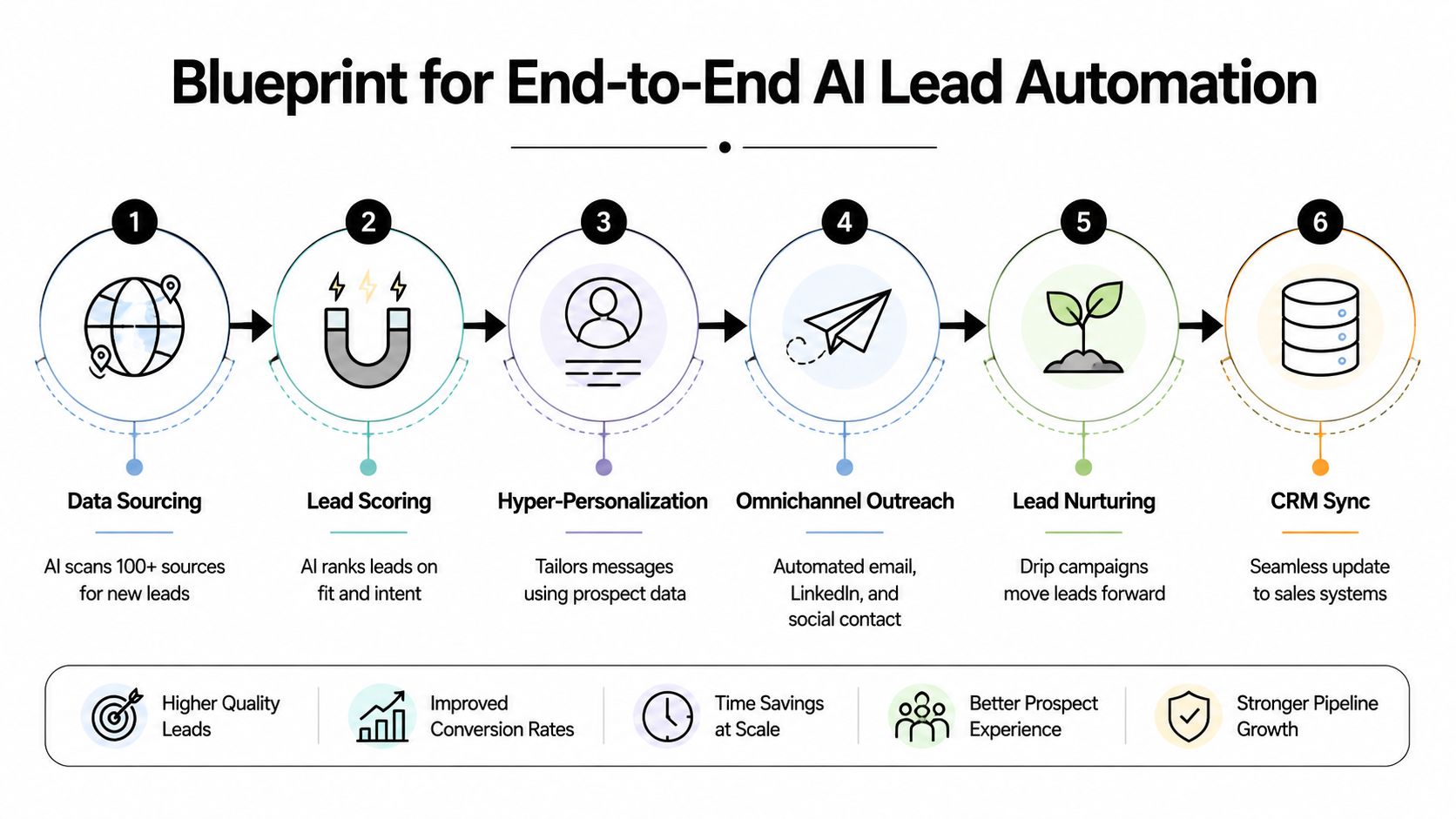
The workflow blueprint
A practical lead automation flow usually looks like this:
- Source accounts from databases, niche directories, CRM expansion lists, or monitored signals
- Normalize company data so domain, company name, and location match cleanly
- Run AI scoring against ICP and disqualifier logic
- Enrich approved accounts with contact and company context
- Generate outreach prep such as angle notes and icebreakers
- Create or update CRM records with owner, score, notes, and next-step status
That's the core machine. The details decide whether it helps or hurts.
The logic that keeps it clean
The need for conditional rules often outweighs the need for more AI. A few examples:
- If score is high and owner exists, create a task and notify the rep
- If score is medium, place the account into a nurture queue
- If enrichment is incomplete, reroute for retry instead of pushing bad records forward
- If domain already exists in CRM, update the account rather than create duplicates
These if-then decisions prevent clutter, duplicate outreach, and false urgency.
A lot of operators also benchmark tool options before locking in a workflow. If you're comparing data and engagement platforms, comprehensive platform stats for LeadShark can help as a reference point for feature evaluation.
Where human review belongs
The right checkpoints are not random. Put humans where mistakes are expensive.
| Workflow stage | AI-led | Human-led |
|---|---|---|
| Account discovery | Yes | No |
| First-pass scoring | Yes | Review exceptions |
| Data enrichment | Yes | Spot-check edge cases |
| Outreach angle generation | Yes | Approve framing |
| First message | Draft support only | Final ownership |
| Objection handling | No | Yes |
That split is what keeps the system commercially useful.
Common build mistakes
Teams usually run into the same three problems:
They automate before they standardize
If the CRM is messy and fields mean different things across teams, AI output won't be trustworthy.They push drafts directly into sequences
Spam begins with this practice. Draft generation is useful. Unreviewed send logic isn't.They forget exception handling
Every workflow needs rules for duplicates, missing enrichment, blocked segments, and owner conflicts.
A self-running workflow still needs supervision. The win is that sales reviews exceptions and high-value accounts, not every raw record.
Measuring and Optimizing Your AI Pipeline
If you can't connect AI activity to pipeline movement, you don't have an operating system. You have a software bill.
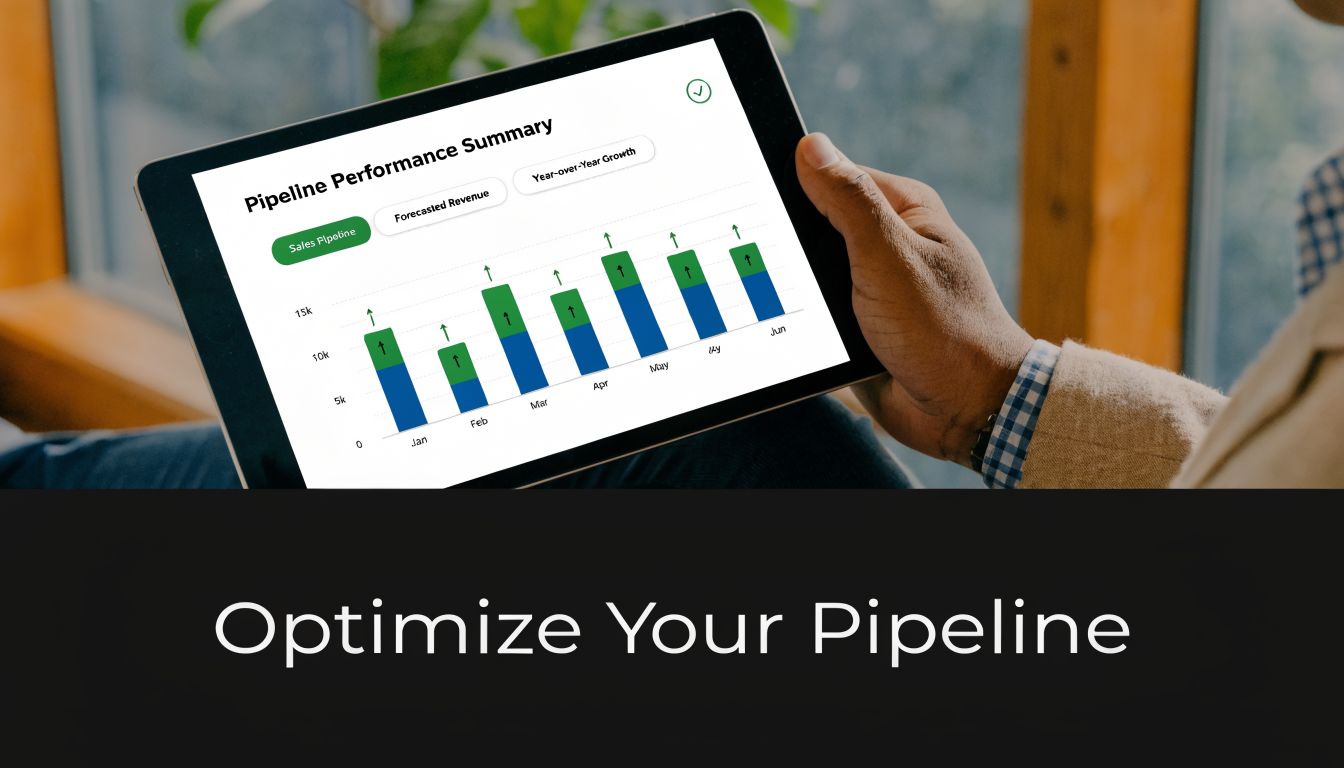
Track business outcomes, not activity volume
The wrong dashboard celebrates emails sent, records enriched, and tasks created. None of those prove revenue contribution.
Track metrics that force accountability:
- Lead-to-meeting conversion by source and segment
- SQL velocity from creation to qualification
- Reply quality on AI-assisted outreach
- Pipeline created from AI-sourced or AI-prioritized accounts
- Speed-to-lead compliance for routed records
If one source creates volume but no meetings, cut it. If one scoring logic routes too many poor-fit accounts, retrain it. This is an operations problem before it's a model problem.
Build the feedback loop into the CRM
The most useful signal often comes from sellers marking leads as irrelevant, premature, duplicate, or strong fit. That feedback should not live in Slack or in a rep's memory. It needs a structured field.
Peer-reviewed benchmark evidence from the Scrapus AI lead-generation system found that continuous correction was central to performance. The system achieved about 90% precision, and sales-team feedback on irrelevant leads helped retrain the model, supporting the idea that AI works best for discovery and triage rather than as a fully autonomous decision-maker (Scrapus review in PMC).
That matches what operators see in practice. A lead model improves when the business keeps teaching it.
For teams building score criteria and review loops, these lead scoring best practices are worth applying before you tune prompts or swap vendors.
The fastest way to ruin an AI pipeline is to collect feedback informally. If the system can't ingest the correction, the same mistake will repeat at scale.
A simple dashboard layout
Use one dashboard with four views:
Input quality
New accounts sourced, enrichment completion, duplicate rateRouting performance
High-fit volume, human-approved rate, rejected-after-review rateSales response
Time to first touch, meeting-book rate, reply quality by rep or segmentRevenue impact
SQLs created, pipeline created, win association on AI-assisted accounts
This setup keeps the conversation focused on commercial output. That's where AI earns its place.
Scaling Responsibly AI Guardrails and Compliance
The most dangerous moment in an AI lead gen program is when early results look promising and leadership decides to double the volume. Scale without guardrails usually lowers reply quality before anyone notices the damage.
Aexus makes a point many vendors avoid. AI is highly effective for prospecting but “highly ineffective” for messaging and relationship-building, especially in longer-cycle B2B sales where trust and context drive conversion (Aexus on when not to use AI in lead generation).
Keep these steps human-owned
Don't hand off the parts of the process where nuance matters most.
- Final message approval because tone and relevance affect trust
- Sequence strategy because timing and escalation depend on market context
- Objection handling because buyers rarely ask textbook questions
- Late-stage follow-up because relationship memory matters
- Named account outreach because mistakes are more visible
AI can propose. People should decide.
Build compliance into the workflow
Automated outreach needs operating rules, not just message logic.
- Consent and lawful basis must be documented where required
- Suppression lists need to sync across tools so opted-out contacts stay suppressed
- Unsubscribe handling must update quickly and consistently
- Data minimization matters. Don't enrich and store fields you don't need
- Auditability matters. Keep a trail of where records came from and how they were routed
Mature teams separate themselves from noisy ones. They don't just automate outreach. They automate restraint.
More automation is not the goal. Better judgment, applied consistently, is the goal.
If your team is trying to use AI for lead generation without turning outbound into spam, MakeAutomation can help design the workflow around that standard. The practical value is in documented ICP logic, CRM-connected routing, human review checkpoints, and automation that supports sales instead of flooding it.