
Document Automation Software: Boost B2B/SaaS in 2026
You're probably seeing the same pattern every week. A proposal sits in draft because sales is waiting on pricing edits. A contract gets copied from an old version and sends legal into cleanup mode. Finance has to chase down invoice details that already exist in the CRM. None of this feels dramatic in isolation, but together it slows the company down.
At a certain stage, manual documents stop being admin work and start becoming a growth constraint. Founders often notice it when volume rises but output quality doesn't. The team works harder, yet deal cycles still drag, onboarding still feels messy, and every exception pulls senior people into low-value work.
That's where document automation software earns its place. Not as a nicer template library. As an operating layer that turns repeatable document work into a system.
Your Scaling Bottleneck Is Manual Paperwork
A lot of SaaS teams think their bottleneck is lead flow, hiring, or product delivery. In practice, I often see the drag show up in paperwork first. Sales can't send the proposal until someone fixes the terms. Ops can't start implementation until the SOW is signed. Finance can't invoice cleanly because customer data lives in three places and none of them agree.
The result is familiar. High-value people spend their day formatting, checking, rekeying, and chasing approvals. Founders usually tolerate this longer than they should because each document feels manageable on its own.
It isn't manageable at scale.
When every quote, MSA, renewal, invoice, onboarding pack, or internal approval doc depends on manual assembly, the company builds hidden friction into revenue operations. That friction gets worse as product lines, pricing logic, and customer segments become more complex.
Document automation software fixes that by turning repeatable document creation into a controlled workflow. Data flows in from your systems, rules decide what belongs in the output, and the document is generated in a consistent format without someone rebuilding it from scratch each time.
Manual document work rarely breaks a business in one week. It keeps the business from compounding over twelve months.
For a growth-stage founder, that's the core issue. If you want to scale without stuffing the org chart with coordinators, document handling has to become systematic.
What Is Document Automation Software Really
Most founders hear “document automation” and think of mail merge with better branding. That's too narrow.
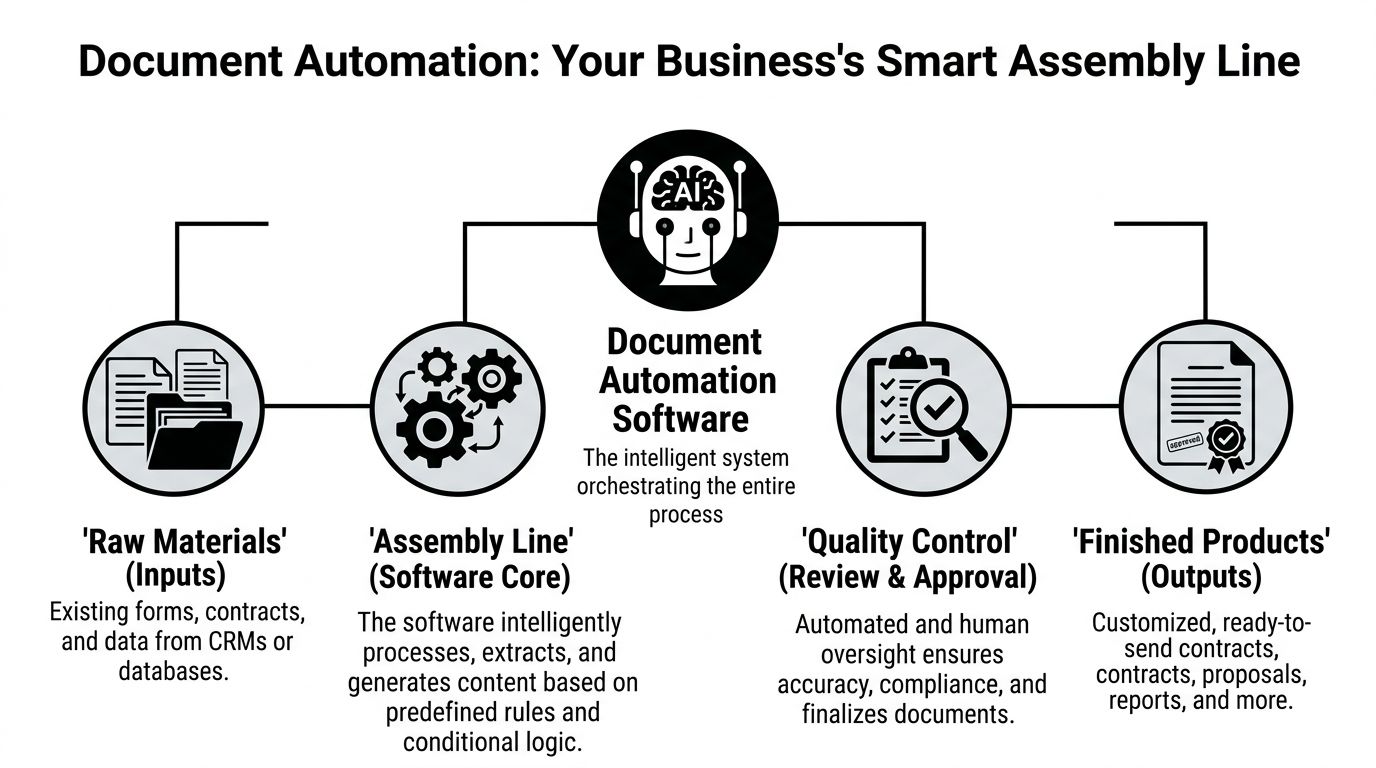
A better way to think about document automation software is as a smart assembly line for business documents. You feed it approved source material, connect it to the right data, define the rules, and it produces finished outputs that match the situation.
It starts with inputs, not files
The raw material isn't just a Word document. It's customer data from HubSpot or Salesforce, pricing from your billing system, product details from your CRM, signer information from your contract stack, and answers collected from forms or internal questionnaires.
That's why basic templates fail in growing companies. A static file can't reliably decide which clause to include for a specific region, which pricing table applies to a specific plan, or which approval path should trigger for a specific discount level.
Document automation software handles that logic through structured rules.
For example, systems can convert static templates into guided decision trees, and a template configured with 50+ conditional fields can generate over 1,000 unique document variations without human intervention, while also reducing manual data entry errors by up to 90% according to Inkit's document automation overview.
The three parts that matter
A workable system usually has three layers:
| Component | What it does | Why it matters |
|---|---|---|
| Dynamic templates | Stores approved wording, layout, clauses, and placeholders | Keeps brand, legal language, and formatting consistent |
| Data integration | Pulls live information from systems of record | Prevents rekeying and reduces mismatch between tools |
| Rules and workflow logic | Decides which content, approver, and route apply | Makes the output context-aware instead of generic |
This is the difference between “fill in these blanks” and “generate the right document for this exact situation.”
Where founders usually underestimate it
The strongest platforms don't just create the file. They also control versioning, approvals, sync behavior, and auditability. That matters when sales, legal, finance, and customer success all touch the same customer record.
If you work with location-specific contracts, property-heavy deal flow, or operationally messy file stacks, it's useful to study how other industries manage real estate documents, because they've had to solve version control and document sprawl long before many SaaS teams took it seriously.
There's also an important distinction between pure generation and document understanding. If your workflows depend on extracting data from inbound files before creating outbound ones, it helps to understand intelligent document processing in practical terms.
Good automation doesn't produce more documents. It produces fewer manual decisions.
That's what makes it operational infrastructure instead of office software.
The Transformative ROI of Automating Documents
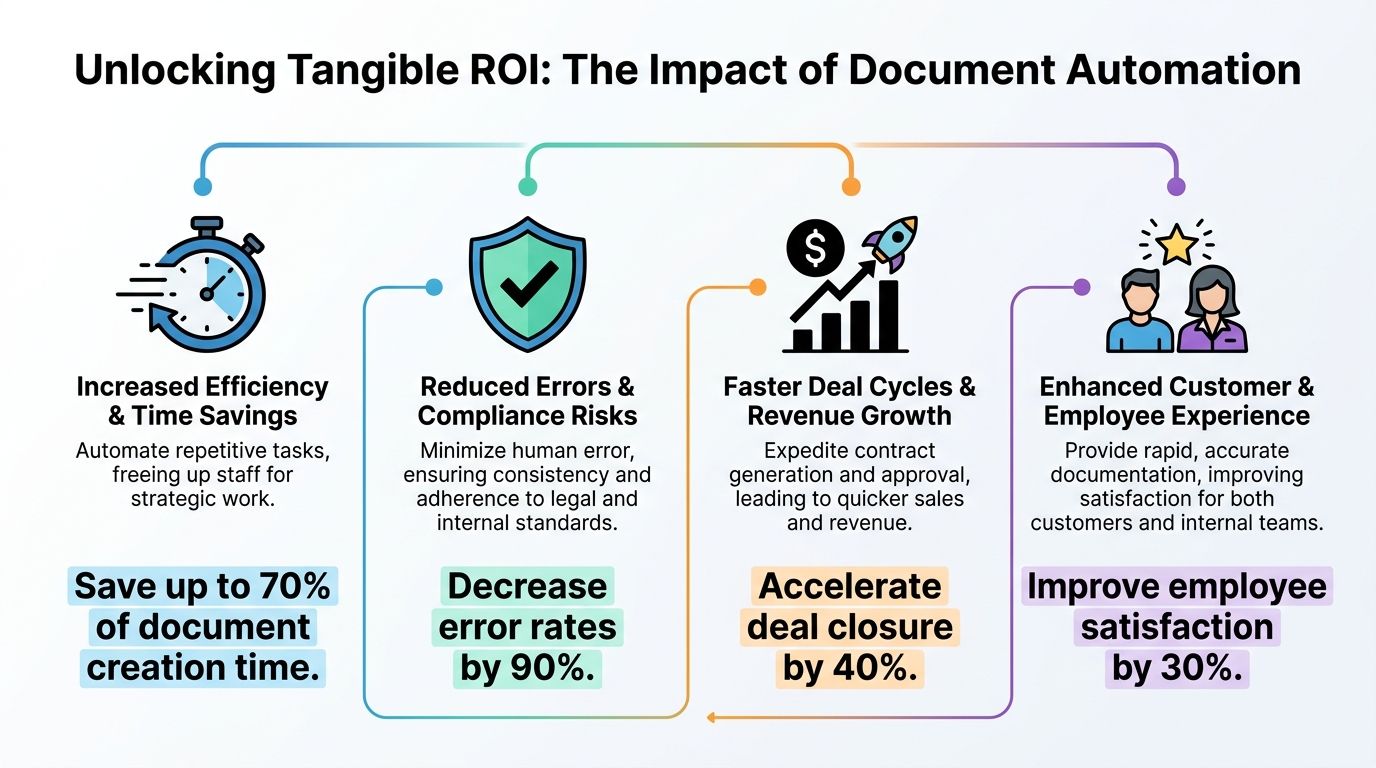
The return on document automation software isn't abstract. It shows up in labor cost, deal velocity, risk exposure, and how long your current team can keep scaling before you need more headcount.
Early in the evaluation process, founders tend to ask whether the software will save time. That's the wrong first question. The better question is where document friction is blocking revenue or pulling expensive people into repetitive work.
Cost reduction is the most visible gain
In enterprise settings, document automation can reduce operational costs by as high as 70%, and that directly correlates to a 70% decrease in the time employees spend on document drafting, according to Market.us reporting on intelligent document processing statistics.
That's not just a back-office metric. If account executives, ops managers, and legal reviewers spend less time assembling standard documents, they get more time for live deal work, customer delivery, and exception handling that requires judgment.
The cost case becomes stronger when document work is scattered across teams. One manual step rarely looks expensive on paper. Ten manual steps across sales, legal, finance, and customer success become expensive very quickly.
Revenue moves faster when documents stop waiting on people
Most SaaS operators have felt this bottleneck. The prospect says yes, then everything stalls because someone needs to rebuild a quote, reissue a contract, or route signature packets through separate tools.
Integrated workflow design matters. When generation, approval, and signature happen inside one controlled process, commercial momentum doesn't leak out between handoffs.
A useful way to model this internally is to track time from verbal approval to signed document, and then time from signed document to kickoff or billing start. If those intervals shrink, automation is affecting revenue velocity, not just admin burden. Teams that want a more disciplined finance lens on that can use an ROI framework for automation decisions before they buy anything.
Here's a short explainer worth watching if you're comparing the financial upside against the implementation effort:
Risk drops when approved logic replaces improvisation
The hidden cost of manual paperwork isn't just slowness. It's inconsistency. Old clauses get reused. Pricing tables drift. Approval paths depend on who noticed the issue. The team starts relying on memory instead of process.
Well-built document automation reduces that exposure because users stop editing from scratch and start generating from approved logic. That changes quality control from reactive review to preventive control.
Practical rule: If a document requires legal review every single time because no one trusts the template, you don't have a template system. You have a draft generator.
Scalability becomes real when output grows without role creep
The strongest ROI doesn't come from saving a few hours. It comes from letting the business process more deals, renewals, and customer changes with the same core team.
That's when document automation software stops being a productivity purchase and becomes a scaling mechanism.
Essential Features of High-Impact Automation Tools
A vendor demo can make almost any platform look polished. The true test is whether the product can survive your process complexity without creating extra work around it.
The gap between low-impact and high-impact tools usually comes down to a handful of capabilities that sound ordinary but matter a lot once volume rises.
Template control and conditional logic
The first feature to evaluate is the document builder itself. Not whether it looks nice. Whether it can handle real business logic.
You want a system that lets your team manage reusable clauses, variable fields, nested conditions, approval states, and output rules without depending on a developer for every change. If your pricing model, geography, service scope, or legal terms vary across customer types, weak conditional logic becomes a bottleneck fast.
Ask vendors to show an actual scenario, not a simple NDA. Have them generate a proposal or contract with changing terms based on plan type, region, billing structure, and signer roles.
API-first integration depth
This matters more than design polish. If the software can't connect cleanly with Salesforce, HubSpot, Pipedrive, NetSuite, your billing platform, or your form stack, your team will still end up copying data around by hand.
Look for:
- Native connectors where useful. These reduce setup time for common systems.
- A documented API. You'll need this when your process doesn't fit the vendor's default path.
- Field mapping controls. If admins can't manage mappings safely, the system becomes brittle.
- Webhook support. This is what lets downstream actions fire when status changes.
A surprising number of tools look automation-ready until you ask how data sync works after the first document is generated.
Governance and auditability
In the legal sector, enterprise departments saw a 52% improvement in document processing efficiency after deploying these solutions, and the best tools ensure near 100% documentation accuracy through automated compliance checks according to Business Research Insights on the legal document automation software market.
Those outcomes don't come from templating alone. They come from controls.
You need permission layers, version history, approval logs, and audit trails that show who generated what, from which template, using which data. Without that, you're only moving manual errors into a faster system.
Embedded approvals and signature workflow
If document generation ends with “download the PDF and email it to the next person,” the process still leaks time.
A strong platform should support approval routing and eSignature flow inside the same operating chain. That doesn't mean every company needs an all-in-one vendor. It does mean the handoff between generation and execution needs to be reliable.
Teams usually overvalue design flexibility and undervalue control points. At scale, control points win.
A short evaluation scorecard
Use this kind of lens when comparing tools:
| Capability | Low maturity | High maturity |
|---|---|---|
| Templates | Static fields, weak branching | Reusable components, deep conditional logic |
| Integrations | CSV imports, manual sync | API-first, event-driven, manageable mappings |
| Governance | Basic permissions | Audit trails, version control, approval history |
| Execution | Separate signing process | Integrated routing and signature workflows |
That's the practical difference between software that looks useful and software that changes throughput.
Practical Use Cases for Sales Marketing and Ops
The best way to evaluate document automation software is to look at where it removes repeated decision-making inside live workflows.
Sales stops rebuilding the same proposal
A sales leader usually notices the problem first in proposal turnaround. Reps chase information across CRM notes, pricing sheets, and Slack threads, then someone on ops cleans up the final document before it goes out.
With automation, the proposal pulls account data, package details, pricing, terms, and branding rules from source systems. The rep answers a few structured questions, and the software assembles the right output.
In sales enablement, document automation boosts personalized collateral generation by 75%, and integrating eSignatures in the same workflow can reduce contract closure cycles from 7 days to 24 hours according to Conga's guide to document automation software.
That's why commercial teams often see value first. They feel the pain immediately when docs slow down active revenue.
Marketing gains control over custom materials
Marketing teams don't usually think of themselves as document automation users, but they should. Any company producing one-off pitch decks, campaign briefs, partner packs, or customer-facing PDFs runs into the same issue. Customization creeps up, brand consistency slips, and turnaround depends on who has time.
Good automation doesn't remove customization. It standardizes the structure around it. The system keeps approved messaging, legal disclaimers, and visual identity intact while still letting teams tailor the document for the account or segment.
That's especially useful in founder-led sales motions where “just make a quick custom version” becomes a constant request.
Ops turns onboarding into a controlled flow
Operations gets hit from every direction. New client paperwork, implementation checklists, service agreements, internal approval packets, change orders, status reports. Each one sounds routine, but together they create drag.
A better model is to connect onboarding forms, CRM stages, and signed commercial terms into one document workflow. Once the sale closes, the system can generate the implementation packet, internal handoff summary, and customer-facing kickoff materials from the same approved data set.
If you're evaluating that broader post-sale workflow, it helps to look at contract management automation as part of the same operating design rather than treating signed documents as the finish line.
The strongest use cases are the ones where the same data should never be typed twice.
HR and internal teams benefit too
HR often gets overlooked in automation planning, even though it handles repeatable documentation constantly. Offer letters, employment agreements, policy acknowledgments, and onboarding paperwork all follow rule-based patterns.
The operational value here is consistency. New hires get accurate documents faster, managers stop editing old files, and HR avoids the common problem of outdated wording lingering in shared folders.
That matters because internal document quality shapes employee experience just as much as customer-facing documentation shapes buyer confidence.
Your Implementation Framework Avoiding Integration Debt
Most document automation projects don't fail because the template builder is bad. They fail because the software lands in a messy stack and never connects cleanly enough to replace the manual work it was supposed to eliminate.
That's integration debt. You buy a tool to simplify documents, then your team spends months patching together mappings, workarounds, duplicate fields, and human checkpoints just to make the process usable.
A 2025 Gartner report found that 68% of SaaS companies delay automation rollout due to integration debt, with average implementation timelines stretching from 3 to 9 months because vendors often focus on UI instead of backend API orchestration.
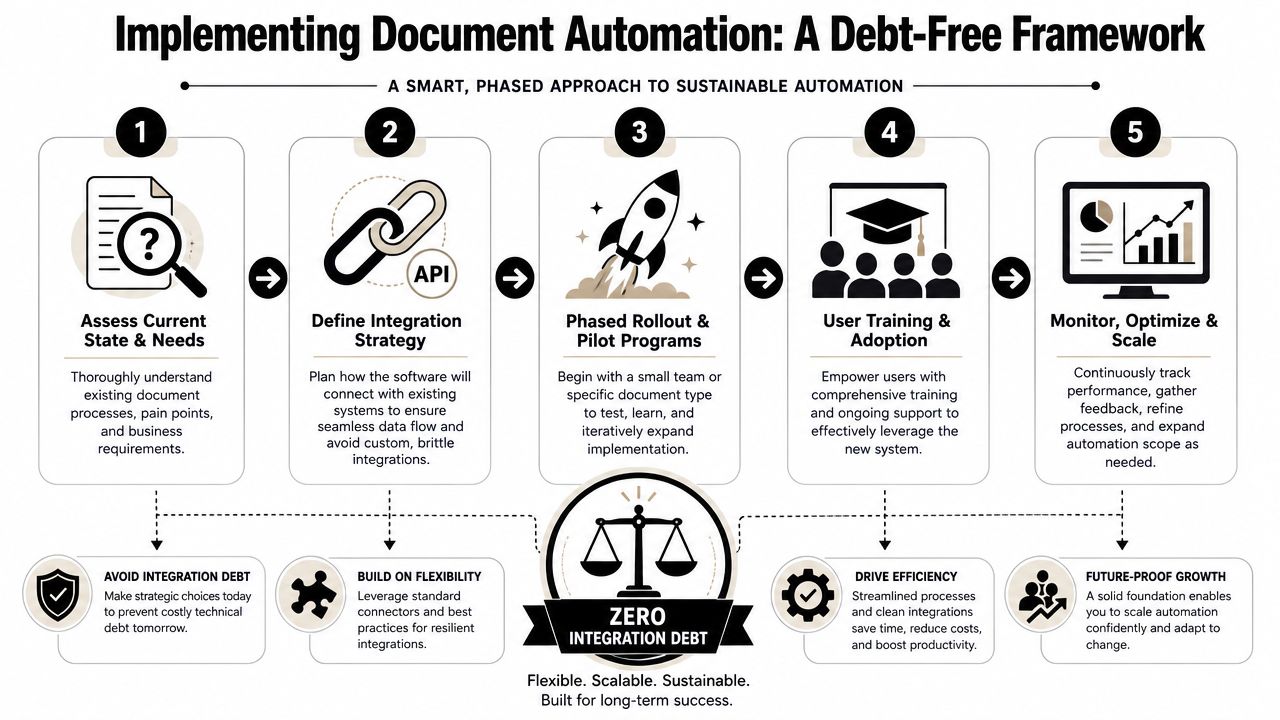
Step one map the workflow before you shop
Don't start with vendor comparison pages. Start with one document journey.
Take a live process, such as quote to signature, onboarding pack creation, or renewal paperwork. Map where data originates, who edits what, where approvals happen, and where someone currently copies information from one system to another.
Most companies discover that the document itself isn't the main issue. The issue is the number of systems involved and the lack of a single source of truth.
A simple mapping exercise should answer:
- Which system owns customer data
- Which team approves commercial exceptions
- Which fields are most likely to drift
- Which step currently causes the queue
Step two pick a pilot with visible impact
Don't automate your most complicated document family first. That's how teams burn time and lose trust.
Choose a pilot with three characteristics. It happens frequently, it touches revenue or delivery, and the logic is important but not chaotic. Sales proposals, standard service agreements, onboarding packs, and renewal paperwork are usually better starting points than heavily negotiated enterprise contracts.
Start where the workflow is painful enough to matter and stable enough to control.
That gives you cleaner feedback on process design, template behavior, and integration quality.
Step three vet the backend harder than the frontend
Founders often get trapped at this stage. A vendor shows a smooth editor, attractive outputs, and a fast demo. None of that tells you whether the platform will behave well in your stack.
Ask harder questions:
| Question | Why it matters |
|---|---|
| How are field mappings managed over time | Your schema will change |
| What happens when source data is missing | Real workflows always have edge cases |
| Can status changes trigger downstream actions | You need orchestration, not just generation |
| How are template versions tied to integrations | Prevents broken outputs during updates |
If the answers are vague, the implementation will likely rely on human cleanup.
Step four plan adoption like an ops project
A document automation rollout is a change-management project. Sales has to trust the outputs. Legal has to trust the clause logic. Ops has to trust the handoffs. If any of those groups keep side documents “just in case,” adoption stalls.
Training should focus on when to use the system, what inputs are required, and how exceptions get handled. The team doesn't need a feature tour. They need operating rules.
Step five track process health, not just usage
A vendor might celebrate how many documents were generated. That's not the metric that matters.
Track cycle time, exception rate, approval lag, and how often people leave the system to finish the job elsewhere. If usage is high but manual correction is still common, integration debt is already creeping in.
A good implementation reduces the number of unofficial steps around the process. That's the clearest sign the automation is real.
A Checklist for Successful Document Automation Adoption
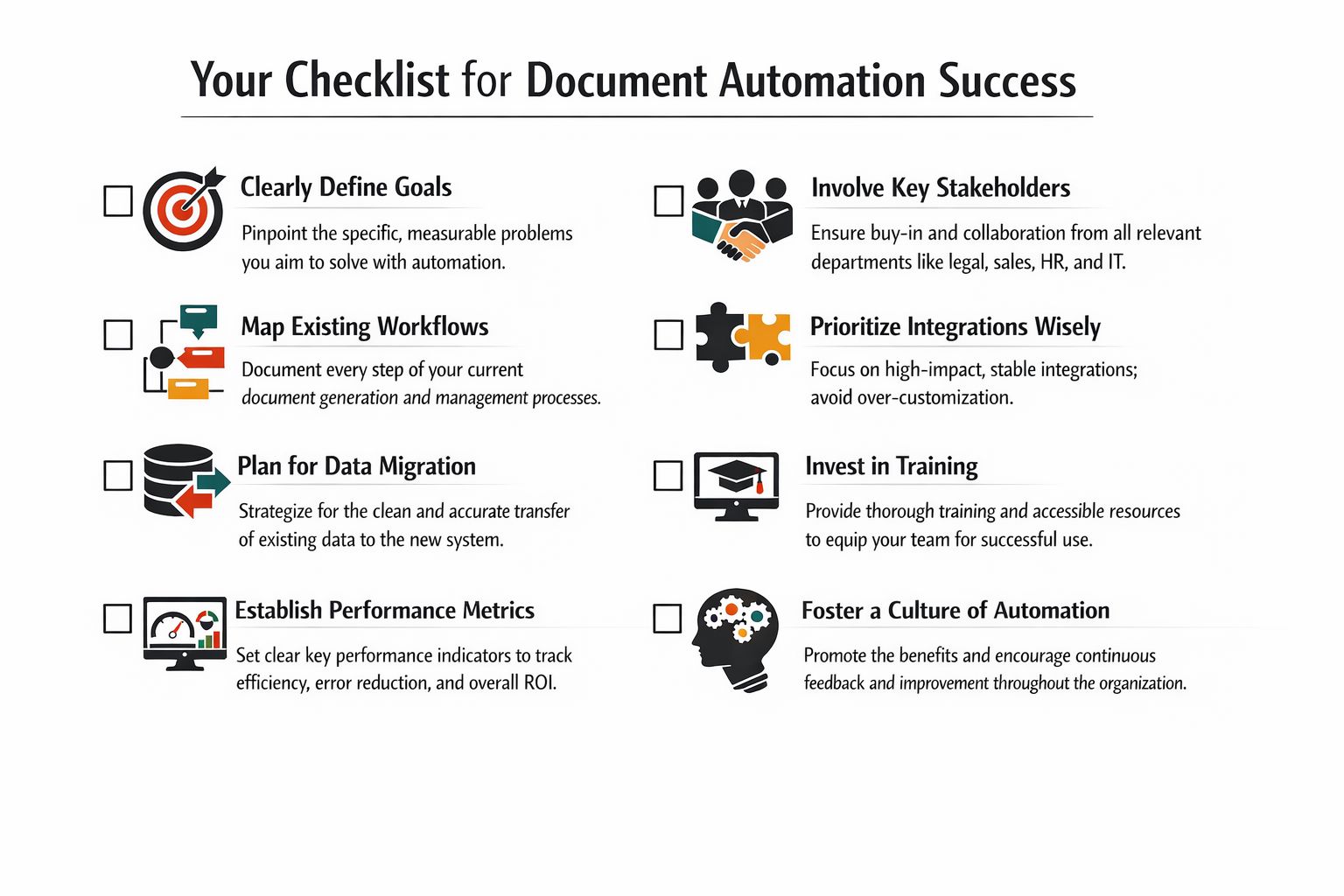
The best document automation software implementation is usually the one that feels boring after launch. Documents go out on time. Data stays aligned. Teams stop asking which version to use.
That only happens when evaluation, rollout, and optimization are handled with discipline.
During evaluation
- Define the process first. Choose the document workflows causing the most friction.
- Inspect integrations early. Ask how the software connects to your CRM, billing stack, eSignature tool, and internal approval process.
- Test with a real scenario. Use an actual quote, contract, or onboarding path from your business, not a vendor's polished sample.
- Check governance controls. Make sure versioning, permissions, and audit history are built in.
During implementation
- Run a limited pilot. Start with one workflow and one accountable owner.
- Document exception paths. Decide what happens when data is missing, terms are unusual, or approvals stall.
- Train by role. Sales, ops, legal, and finance need different instructions and success criteria.
During optimization
- Watch for off-system behavior. If people still duplicate work in docs, spreadsheets, or email, the process isn't finished.
- Review template drift. Update clauses, fields, and routing logic before workarounds spread.
- Expand only after stability. Add new document families once the first workflow is trusted.
The practical goal isn't to automate every document at once. It's to build one reliable document system, then extend it without creating fresh complexity.
If your team is still piecing together proposals, contracts, onboarding packs, and approvals across disconnected tools, MakeAutomation can help you design and implement an automation stack that fits your workflows. From process mapping to end-to-end integration, the focus is on reducing manual work without adding integration debt.