
Mastering AI Lead Generation Real Estate in 2026
You're probably dealing with the same pattern most brokerages and teams face right now. Leads come in from Zillow, Realtor.com, your IDX site, paid ads, Facebook forms, Instagram DMs, and random text replies to old campaigns. A few are serious. Many are early-stage. Some are duplicate contacts under slightly different names. By the time someone on the team figures out who should answer first, the best prospect has already heard back from someone else.
That's why most discussions about AI in real estate miss the core problem. The issue isn't access to more tools. It's the absence of an operating system that turns messy inbound activity into a structured, prioritized, fast-moving workflow.
The New Reality of Real Estate Prospecting
Consumers have already changed their behavior. According to Realtor.com's 2025 AI and housing survey, 82% of Americans use AI to gather housing market information, with ChatGPT at 67% and Gemini at 54%. The same survey also found that real estate agents remain the most trusted and accurate source, with 62% of respondents ranking agents above AI at 61%.
That combination matters. Buyers and sellers now start with AI, but they still want a human when the decision gets expensive, emotional, and time-sensitive.
So the practical question isn't whether AI belongs in real estate lead generation. It already does. The question is whether your team has built a system that can absorb AI-influenced inquiries, score them correctly, and route them to the right human fast enough to matter.
A lot of agents still treat AI as a content toy. They use it to write listing descriptions, social posts, or market updates. That's fine, but it doesn't fix the operational bottleneck. Real opportunity sits in response handling, qualification logic, contact enrichment, and workflow orchestration.
Practical rule: AI should fill the funnel and structure the first response. Agents should own the trust transfer and the close.
If you're revisiting your broader real estate agent lead strategy, this is the missing layer. Lead sources matter. Messaging matters. But the firms pulling ahead usually aren't just generating attention better. They're processing attention better.
Building Your AI Data and Scoring Foundation
Most failed AI lead generation real estate projects break at the data layer. The team buys a chatbot, wires up an email tool, maybe adds an auto-responder, and assumes the stack will somehow become intelligent on its own. It won't. AI only works when the inputs are clean, unified, and tied to actual buying behavior.
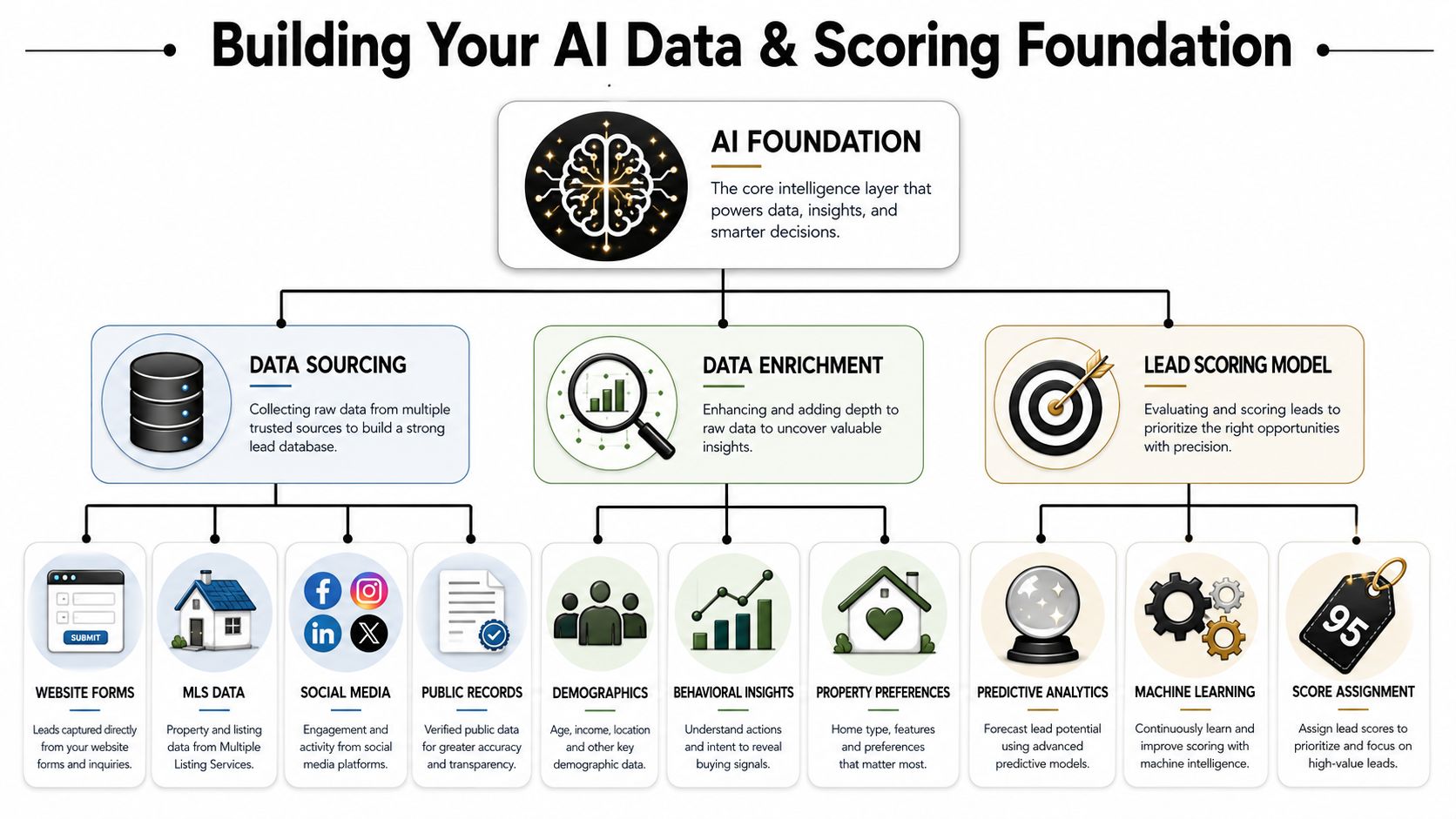
Start with behavior, not just contact details
A contact form gives you name, email, phone, and maybe a short message. That's not enough to prioritize effectively. A useful real estate lead record should pull in behavior from every touchpoint your team controls.
Typical inputs include:
- IDX activity: Search frequency, saved listings, favorited properties, repeat visits to the same home, and listing view duration.
- Email engagement: Opens, clicks, replies, and which property alerts got attention.
- Site behavior: Mortgage calculator visits, neighborhood page views, open house page visits, or valuation tool usage.
- Conversation signals: Chatbot transcripts, SMS replies, appointment requests, and reschedule behavior.
- External context: Public records, property ownership history, or social engagement when you're using compliant enrichment methods.
According to iHomefinder's write-up on AI lead scoring in real estate, a proprietary methodology uses at least 15 real-time behavioral signals to calculate a dynamic score, with predictive accuracy exceeding 85%. It also notes that leads scoring above 70 convert 3.5x faster.
That tells you where to focus. Don't overbuild demographic profiles while ignoring behavior. The strongest scoring models reflect what someone is doing now, not just who they are on paper.
Build a single lead profile
In practice, I recommend creating one lead object inside the CRM or data warehouse with fixed fields and event history attached. If you're using Salesforce, Pipedrive, Follow Up Boss, HubSpot, or a similar CRM, the record should include both static attributes and rolling engagement signals.
A simple framework looks like this:
| Layer | What belongs here | Why it matters |
|---|---|---|
| Identity | Name, email, phone, source, property interest area | Gives agents a usable contact record |
| Intent | Saved homes, repeat listing views, chat questions, showing requests | Separates casual browsers from active prospects |
| Timing | Last activity, inquiry time, revisit pattern | Helps trigger immediate or delayed follow-up |
| Qualification | Budget notes, financing status, property type, timeline | Supports better handoff to the agent |
| Score | Dynamic numeric score plus reason codes | Makes prioritization explainable |
Reason codes matter more than is commonly understood. “Score: 78” is less useful than “Score: 78 because lead revisited the same listing, clicked financing content, and replied to SMS.”
Teams trust scoring faster when the system explains the score in plain language.
Enrich carefully and legally
Some firms also add public web signals or market-level data to sharpen targeting. That can be useful, especially for investor pipelines or seller outreach, but scraping is where teams create unnecessary technical and compliance headaches. If your workflow includes pulling public data at scale, the implementation matters as much as the source list. A practical technical reference on how teams evade anti-bot detection is useful for understanding the engineering trade-offs, even if your own project ends up relying more on licensed data providers and first-party events.
For the scoring model itself, keep the logic transparent at first. You don't need a black-box machine learning system on day one. Start with weighted rules, then graduate into predictive models after you've collected enough historical outcome data. If you're planning the reporting layer, this guide on predictive analytics for sales is a useful reference point for structuring that progression.
A strong first version usually scores actions such as repeated listing views, return visits, saved homes, mortgage content engagement, chatbot qualification answers, and fast reply behavior. Then it decays scores when a lead goes inactive.
What doesn't work is relying on age, ZIP code, or broad persona labels without behavioral validation. In real estate, intent changes fast. Your system has to change with it.
Designing High-Conversion Automation Workflows
A lead score without workflow logic is just decoration. Once the system knows who matters most, it needs to decide what happens next, on which channel, with what message, and whether a human should step in now or later.
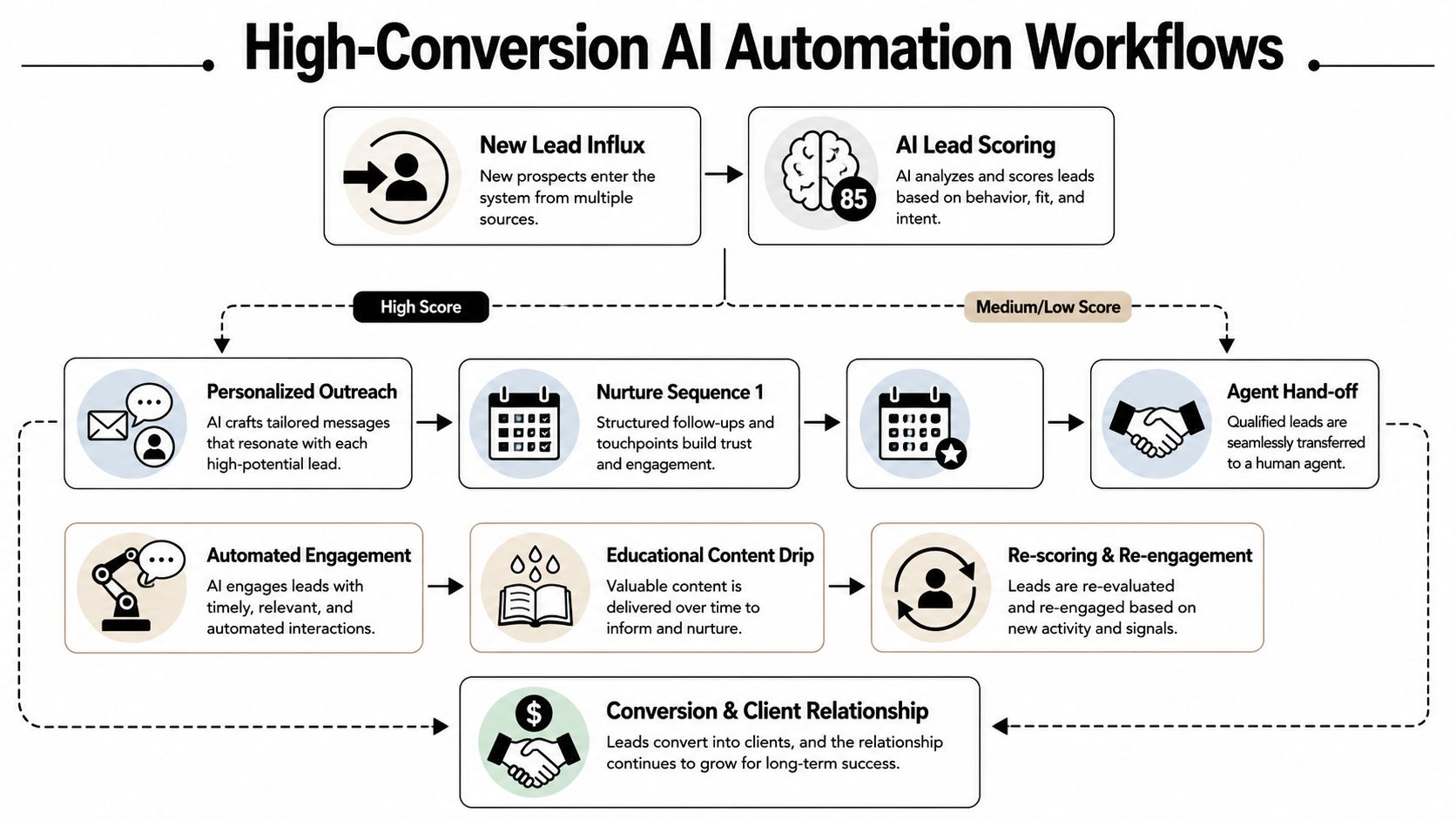
The best-performing systems don't send the same drip campaign to everyone. They branch based on score, source, behavior, and buying stage. That's how AI lead generation real estate stops feeling robotic and starts feeling timely.
Use branching logic instead of linear drips
According to B2B Rocket's overview of AI-powered lead generation techniques, AI-powered real estate platforms achieve a 45% higher conversion rate when they combine hyper-personalized content generation, automated lead qualification via chatbots, and predictive analytics to target high-intent prospects.
That framework maps directly to workflow design.
Here's a simple example for a downtown condo buyer inquiry:
- High-score lead: They viewed the same condo building several times, saved two listings, and clicked financing content. The system sends an immediate SMS referencing the building and offers floor plans or available showing times. If they reply, the agent gets alerted with the transcript and property context.
- Mid-score lead: They browsed several listings and opened one market email. They receive a neighborhood-specific email with recent listings and a short prompt asking what matters most: commute, amenities, or budget.
- Low-score lead: They filled out a form from a broad ad and haven't engaged since. They enter a slower nurture sequence built around useful local content and periodic re-scoring.
The point is relevance. Automation should react to what the lead did, not just to the fact that they exist.
Here's a good walkthrough on tooling options for lead generation automation tools if you're comparing orchestration stacks.
Match channel to urgency
SMS works best when the intent signal is strong and the ask is specific. Email works better when the person still needs context, inventory, or education. AI voice can work for routing, intake, or after-hours coverage, but it needs careful scripting. If it sounds generic, response quality drops quickly.
Use this sequence logic as a starting point:
| Trigger | Best channel | Goal |
|---|---|---|
| Saved multiple properties in one session | SMS | Start a live conversation |
| Requested a home valuation | Phone or SMS | Confirm timing and motivation |
| Opened market emails but no inquiry | Educate and invite reply | |
| Returned to a listing after several days | SMS or email | Re-engage around that property |
| Asked chatbot about availability | Agent handoff | Move to appointment |
This section is worth seeing in action:
Write prompts that sound local and specific
A weak automation says, “Thanks for your interest in real estate. Let us know how we can help.”
A better one says, “You've been looking at condos in the downtown core. Do you want current availability, HOA details, or a shortlist based on your budget?”
That second message works because it reflects observed behavior. It reduces friction. It gives the lead an easy next step.
If your AI messages could apply to any lead in any city, they're too generic to convert well.
The same rule applies to chatbot scripts. Don't just ask, “How can I help?” Ask the questions that move qualification forward. Are they buying, selling, or both? Which neighborhoods are in play? Are they already pre-approved? Do they want a showing or just alerts for now?
Good workflows don't just send messages. They collect better decision data for the next step.
Integrating AI into Your Real Estate CRM
CRM integration is where most ambitious projects stall. The AI layer might work. The chatbot may capture decent conversations. The scoring model may even be accurate. But if the output lands in disconnected tools, the team still operates blind.
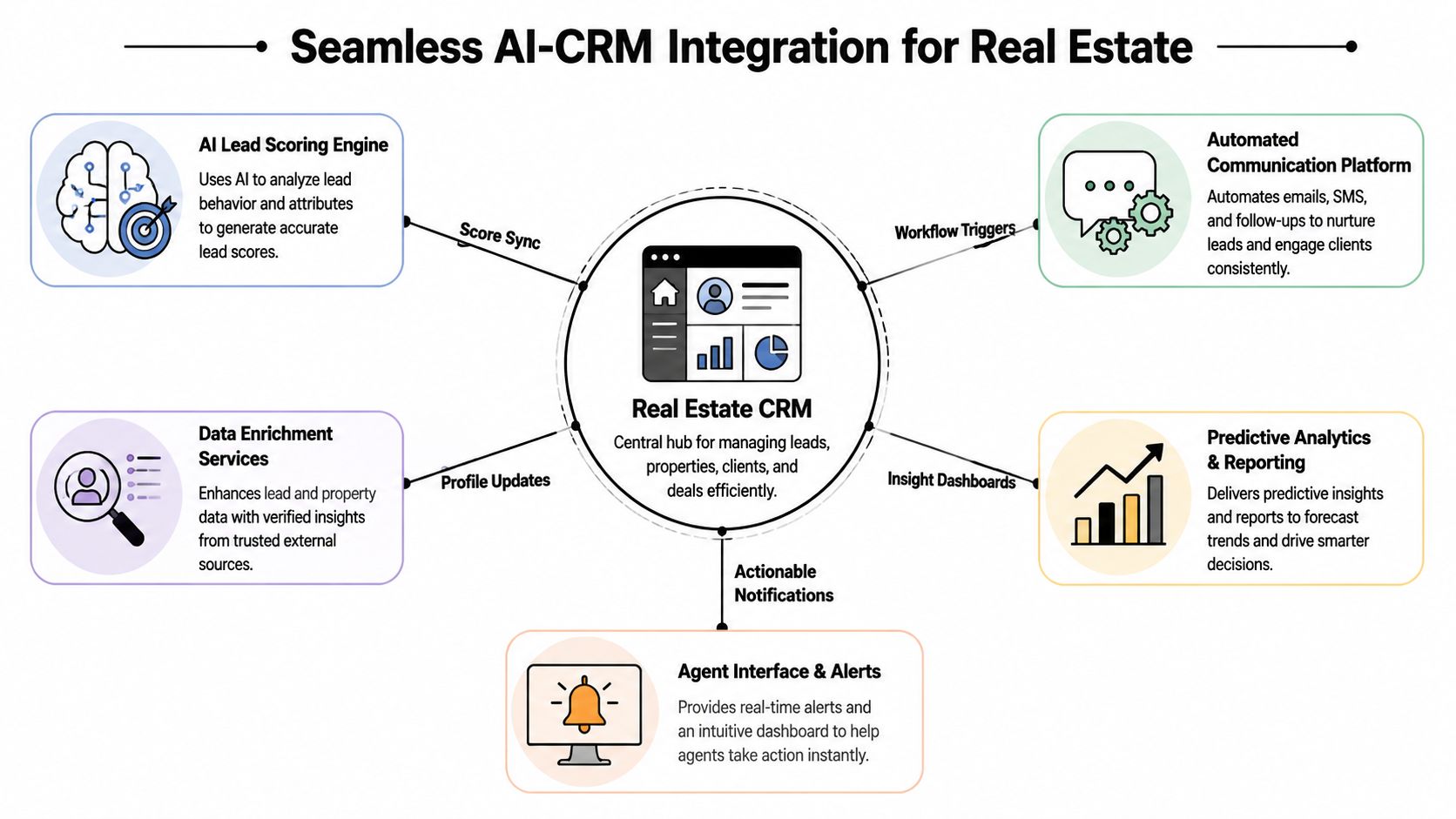
This is the step that separates a demo from a production system.
The CRM has to be the system of record
According to Marquiz's discussion of AI adoption and workflow orchestration, 68% of B2B firms fail to scale AI because they lack documented integration protocols with existing CRM and SOP frameworks. That finding translates directly to real estate teams. The issue usually isn't that the tool is bad. It's that nobody defined where the data should live, who owns the next action, or how AI outputs become sales tasks.
Your CRM needs to hold the authoritative version of:
- Lead identity: one canonical record per person or household
- Score state: current score, score history, and score reasons
- Conversation history: chatbot, email, SMS, calls, and notes
- Routing logic: assigned agent, round-robin state, and team rules
- Lifecycle stage: new inquiry, qualified, appointment set, active client, dead, nurture
If this information is split across a chatbot dashboard, an SMS app, a spreadsheet, and an agent's inbox, agents won't trust it. Once they stop trusting it, they stop using it.
A helpful technical primer on what CRM integration is can frame the architecture if your ops team is still mapping systems.
Map data fields before you automate anything
Teams often jump into workflow building before they've done field mapping. That's backward. First decide exactly which AI outputs need to land where.
A clean integration spec usually covers:
| AI output | CRM destination | Action triggered |
|---|---|---|
| Lead score | Custom score field | Reprioritize queue |
| Score reasons | Notes or custom text field | Help agent personalize follow-up |
| Chatbot qualification answers | Buyer or seller profile fields | Assign next task |
| Appointment intent | Task or opportunity stage | Alert assigned agent |
| Re-engagement event | Timeline activity | Launch follow-up sequence |
This doesn't have to be complicated, but it does have to be documented. Every field should have an owner, an allowed format, and a clear downstream use.
Define human decision points
The firms that get AI right are very explicit about when automation ends and human involvement begins.
For example:
- A new lead comes in through the website.
- AI enriches the record and assigns a score.
- If the score passes your threshold, the system sends an immediate first-touch message.
- If the lead replies positively, the CRM creates a task for the assigned agent.
- If no response comes back, the lead stays in a nurture branch and gets re-scored as behavior changes.
That handoff point matters. If AI keeps talking too long, it can frustrate a ready buyer or seller. If the handoff happens too early, agents waste time on unqualified inquiries. The right threshold depends on your market, team size, and response coverage.
The most effective AI setups don't replace agent judgment. They package the right context so the agent enters the conversation already informed.
Document the SOP, then train the team
This part gets skipped constantly. A brokerage will build the system, launch it, and assume adoption will happen automatically. It won't.
Agents need to know:
- What the score means
- How fast they're expected to act
- Which messages are AI-generated
- When they can override the workflow
- Where to leave notes so the model has useful feedback
Without that SOP layer, even a solid stack becomes shelfware. AI lead generation real estate works when the CRM, the automation logic, and the human process all point in the same direction.
Measuring ROI and Optimizing Your AI Engine
You don't need a giant reporting stack to know whether the system is working. You need a small set of metrics that show whether leads are being contacted faster, qualified more accurately, and moved through the pipeline with less manual effort.
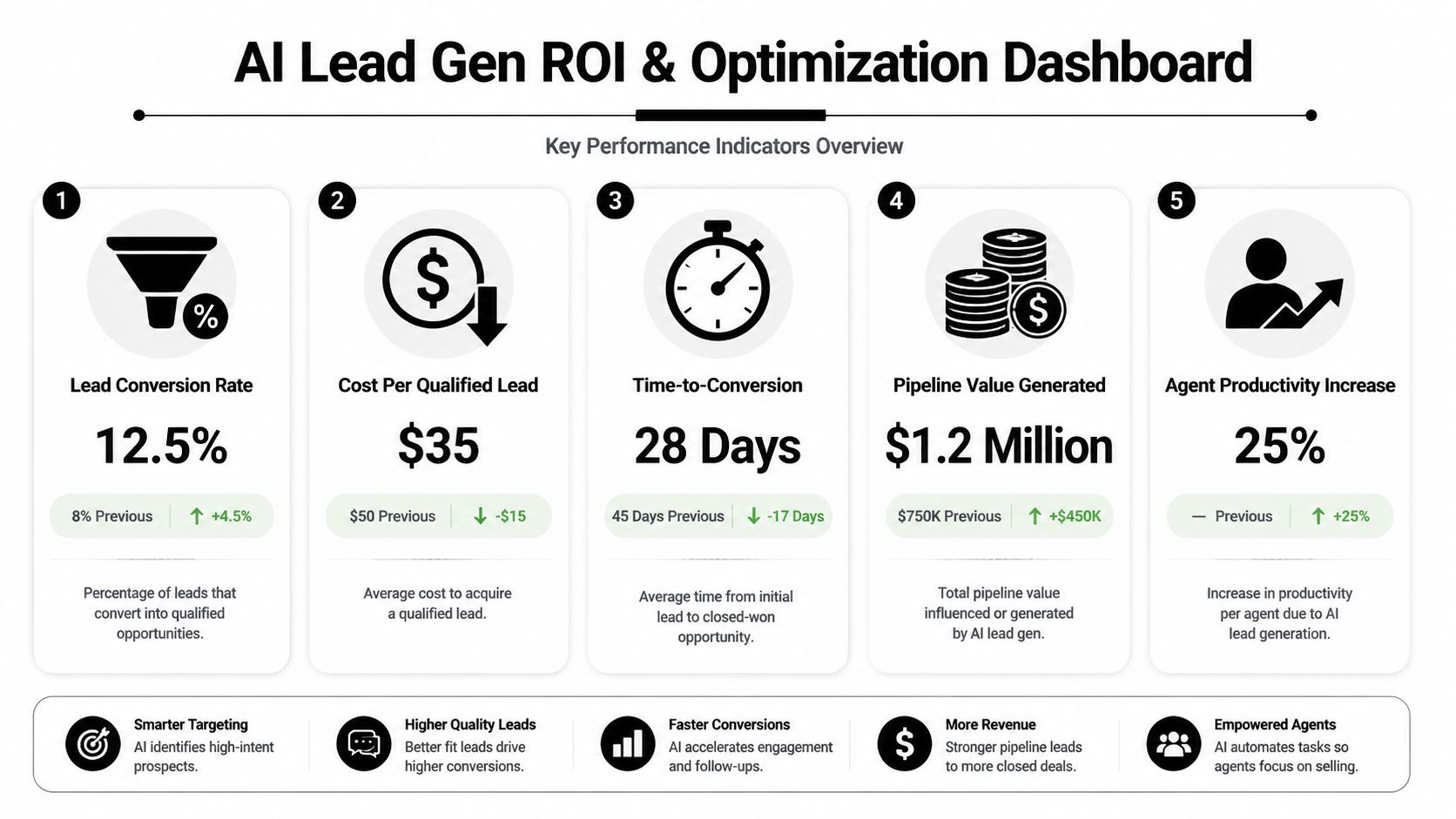
Track speed first
The single most important operational metric is response time. According to AgentZap's roundup of real estate lead response statistics, agents who respond to web leads within 5 minutes are 21 times more likely to qualify the lead than those waiting 30 minutes. The same summary says the average agent takes 917 minutes to respond, and that AI-assisted response systems improve lead capture by 40% or more.
That's the clearest business case for automation in this category. Faster response doesn't just improve service. It changes whether a conversation happens at all.
Build a practical dashboard
You don't need dozens of widgets. Start with a compact dashboard your ops lead and sales manager can review every week.
Focus on metrics like these:
- Response time by source: Compare website, portal, paid ads, and social leads.
- Qualification rate by score band: Check whether your scoring logic matches real outcomes.
- Appointment rate by workflow branch: See which sequences create conversations.
- Agent follow-up compliance: Confirm whether handoffs get actioned on time.
- Reactivation rate: Measure whether lower-intent leads warm up later through nurture.
A good optimization review asks simple questions. Are high-score leads receiving the fastest outreach? Which message templates produce replies instead of silence? Are certain lead sources flooding the system with poor-fit contacts that waste time?
Optimize the engine, not just the copy
A lot of teams fixate on subject lines and SMS wording while ignoring deeper issues. Sometimes performance drops because scoring thresholds are too loose. Sometimes the CRM assignment rule is wrong. Sometimes the chatbot asks too many questions before routing to a human.
Review these components regularly:
| Area | What to inspect | Common problem |
|---|---|---|
| Scoring | Score thresholds and decay rules | Too many leads marked urgent |
| Routing | Team assignment logic | Best leads sent to unavailable agents |
| Messaging | First-touch and nurture scripts | Generic copy with no local context |
| Timing | Delay windows and after-hours handling | Strong leads waiting too long |
| Data quality | Duplicates and missing fields | Broken personalization |
If your business also operates on the investment side, especially lighter rehab and disposition models, it's worth studying adjacent process frameworks like how to learn wholetailing with AI. The point isn't to copy a house-flipping workflow into retail brokerage. It's to see how operators use automation to protect margin, speed, and decision quality.
Better ROI usually comes from cleaner routing and faster action, not from adding one more AI tool.
One final point matters just as much as performance. Compliance has to be built into the workflow from the start. Automated texts, AI voice follow-up, data enrichment, and web collection all require careful privacy and consent handling. The strongest systems are disciplined, not aggressive.
Your AI Implementation Playbook
Many organizations don't need a massive rebuild. They need a controlled rollout with clear ownership. AI lead generation real estate becomes manageable once you treat it like an operations project instead of a marketing experiment.
What to do in the first 90 days
Start small enough that the team can absorb the change, but structured enough that the project creates real advantage.
- Audit your lead paths: List every source, every inbox, every chatbot, and every manual handoff. Hidden lead leakage often becomes apparent here.
- Choose one CRM as the source of truth: If data lives in multiple places, pick one system to own record quality and workflow status.
- Define your scoring signals: Use the strongest behavioral indicators first. Saved listings, repeat property views, valuation requests, chat responses, and reply behavior are better than vague profile tags.
- Launch one high-speed workflow: Pick your highest-value lead source and build the immediate-response sequence for that source before expanding.
- Set the handoff rule: Decide exactly when the lead moves from automation to agent.
- Train agents on score interpretation: If the team doesn't understand why a lead is marked hot, they'll ignore the queue.
- Review results weekly: Check response times, qualification quality, and broken automations before adding complexity.
Mistakes that slow adoption
The common failures are predictable.
Some teams automate too much, too early. They let AI handle long conversations before they've nailed the handoff point. Others do the opposite. They build a score and a dashboard, but agents still respond manually whenever they feel like it.
The biggest operational mistakes usually look like this:
- No field discipline: Data gets dumped into notes instead of mapped into usable CRM fields.
- No duplicate handling: The same lead appears under multiple records, so behavior history gets split.
- No documented SOP: Agents improvise, managers can't enforce standards, and nobody knows which alerts matter.
- No feedback loop: The team never marks which leads converted, so the model can't improve.
- No compliance review: Automation gets launched before consent language, messaging cadence, or privacy practices are checked.
The right goal isn't “more AI.” The goal is fewer dropped leads, faster follow-up, and cleaner agent attention.
What good looks like
A working system feels boring in the best way. Leads arrive. The system enriches them. Behavior updates the score. The right first-touch goes out. Qualified replies create agent tasks. Low-intent contacts keep warming in the background. Managers can see what happened without digging through five tools.
That's the shift. AI isn't replacing the human side of real estate. It's removing the operational friction that keeps good agents from showing up at the right moment with the right context.
If your team wants help building the workflow behind the tools, MakeAutomation helps companies design and implement AI-driven lead routing, CRM orchestration, SOPs, and automation systems that see active use. The focus is practical execution: clean data flow, fast handoffs, documented processes, and scalable operations your team can trust.