
Mastering React Hooks useState: The 2026 Guide
You're probably in one of two places right now. Either you're new to React and trying to understand why a simple input field needs a Hook at all, or you're already shipping product and your component tree has started to feel expensive, noisy, and harder to reason about than it should.
That's where React Hooks useState stops being a beginner topic and becomes an architecture topic. In a small demo, useState looks trivial. In a B2B product with admin dashboards, filters, table interactions, form validation, and async workflows, the way you model local state directly affects performance, maintainability, and debugging time.
The good news is that useState is still the right starting point. The trick is knowing what it's good at, how React uses it under the hood, and when to stop forcing it into jobs it wasn't meant to do.
Why useState Is Your First React Hook
A React component often needs memory. A search box needs to remember what the user typed. A modal needs to remember whether it's open. A table row might need to remember whether its details are expanded.
That memory is local UI state, and useState is React's default tool for it in function components.
Before Hooks, React developers handled component state with class components using this.state and this.setState(). Hooks, including useState, arrived in React 16.8 in February 2019, and that changed day-to-day React development in a big way. By 2023, over 90% of new React projects were using functional components with Hooks instead of class-based patterns, according to Syncfusion's overview of React Hooks.
Why that shift mattered
Class components worked, but they came with baggage.
- More boilerplate: You had constructors, method binding, and
thishandling. - More cognitive overhead: State, lifecycle methods, and event logic were spread across different parts of the component.
- Less ergonomic reuse: Sharing stateful logic cleanly was harder.
With useState, state became something you can declare inline, next to the UI that depends on it. That made components easier to read and easier to refactor.
A simple example says a lot:
const [isOpen, setIsOpen] = useState(false);
That line tells you almost everything you need to know. There's a current value, and there's a way to update it. No constructor. No this. No class syntax.
Practical rule: If a value belongs to one component and directly affects its rendering,
useStateis usually the first place to start.
If you're comparing frameworks and trying to understand why state patterns feel different across ecosystems, Cleffex has a useful breakdown on understanding React and Angular differences. It helps explain why React leans so heavily on composable primitives like Hooks instead of framework-level structure.
The Core Mechanics of useState
At a glance, useState looks simple:
const [count, setCount] = useState(0);
That one line hides several important rules.
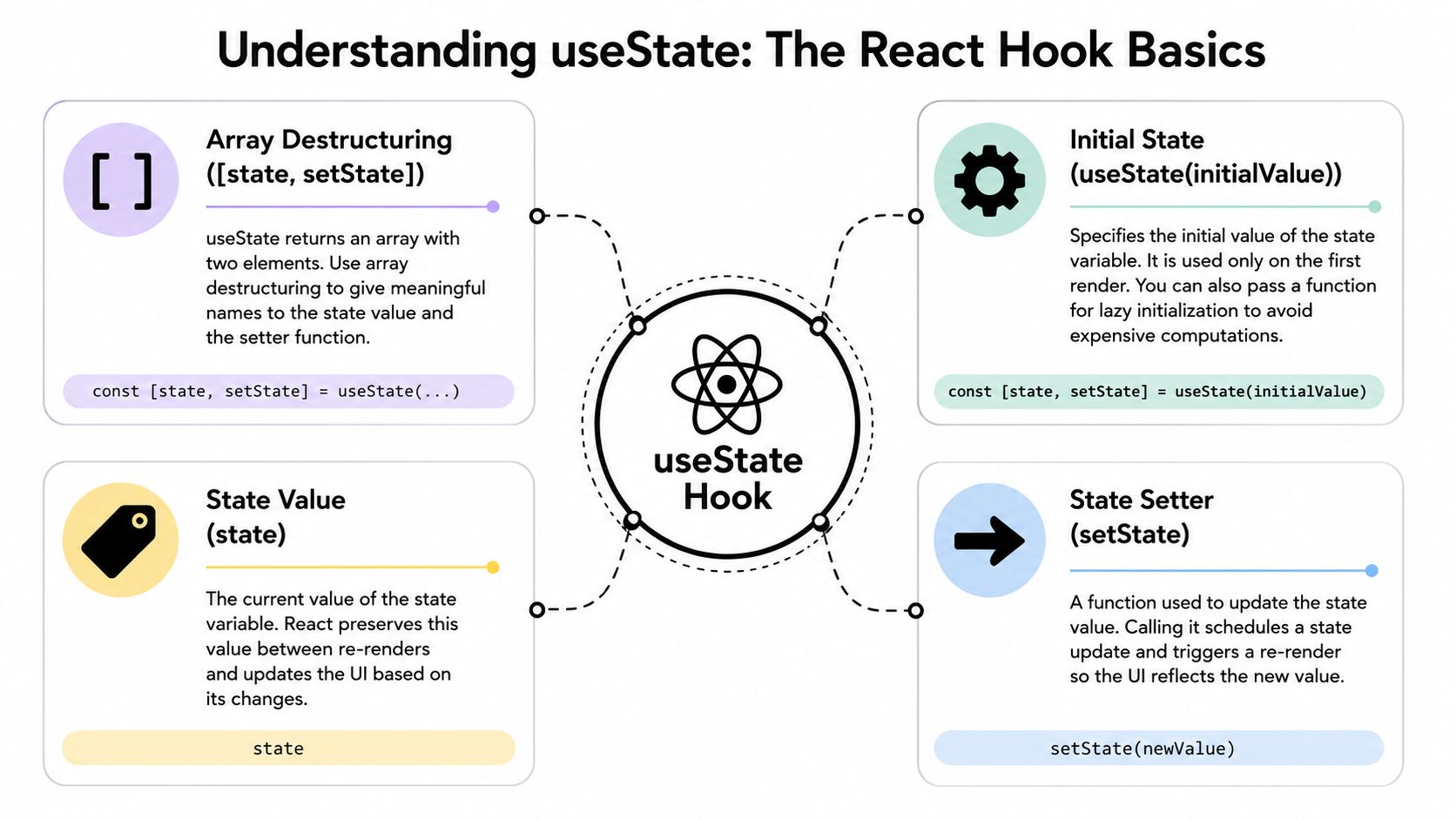
React's official docs define useState as returning an array with exactly two values: the current state and a setter function. They also enforce a strict top-level calling rule, because React relies on the consistent order of Hook calls to preserve state across renders, as explained in the React useState reference.
Read the syntax from right to left
Start with the right side:
useState(0)
That tells React, “this component needs a piece of state, and its initial value is 0.”
Then the left side uses array destructuring:
const [count, setCount]
You're naming the two values React returns.
| Part | Meaning |
|---|---|
count |
The current value for this render |
setCount |
The function React gives you to request an update |
0 |
The initial value used on the first render |
Think in memory slots
A useful mental model is to think of Hooks as ordered memory slots attached to a component instance.
On the first render, React sees:
const [name, setName] = useState('');
const [isOpen, setIsOpen] = useState(false);
React stores two state slots in that exact order. On the next render, it expects those same Hook calls in the same order again. That's why this is invalid:
if (showDetails) {
  const [detailsOpen, setDetailsOpen] = useState(false);
}
If that condition changes, the Hook order changes. React can no longer match the correct state slot to the correct Hook call.
Call Hooks at the top level of the component. Not inside loops, conditions, or nested helper functions.
The setter doesn't mutate the variable directly
This trips up a lot of juniors. setCount doesn't instantly rewrite count in place. It tells React to queue an update and schedule a render with the next state.
That's why this pattern is normal:
setCount(count + 1);
And this one is often safer when the next value depends on the previous one:
setCount(prevCount => prevCount + 1);
The setter can accept either a direct value or an updater function. That updater function receives the previous state and returns the next state.
useState works with any data type
You're not limited to objects.
You can store:
- Strings for input values
- Booleans for toggles and UI flags
- Numbers for counters or pagination indexes
- Arrays for selected items
- Objects for grouped local state
You can also call useState multiple times in one component. In real apps, that's often cleaner than forcing everything into one object.
Essential Usage and Update Patterns
The best way to learn useState is to move from small examples to realistic ones. In production work, the biggest jump isn't from number to object. It's from “this updates” to “this updates predictably.”
Start with the easy cases
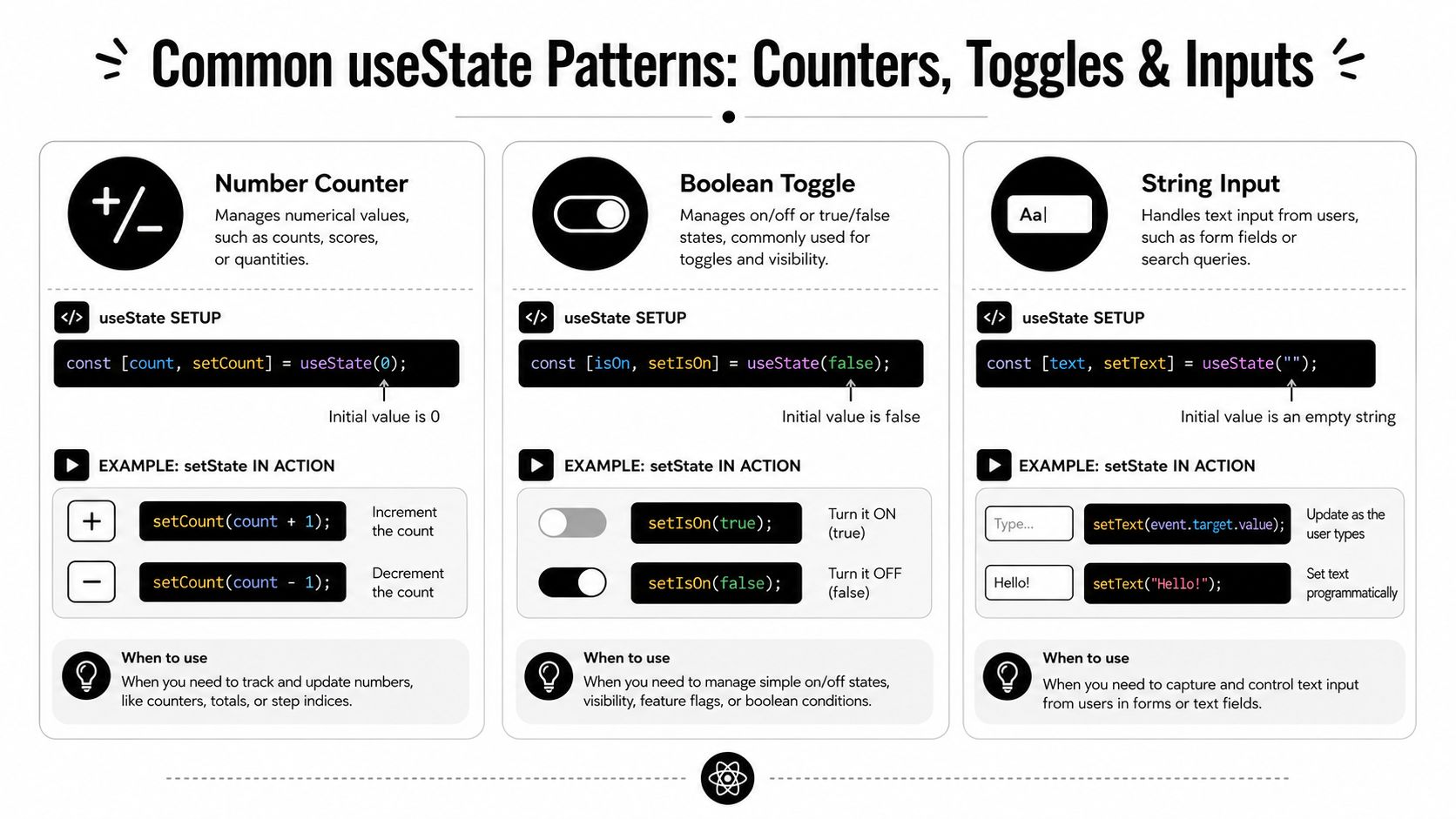
A counter is basic, but it teaches the setter pattern:
const [count, setCount] = useState(0);

function increment() {
  setCount(prev => prev + 1);
}
A toggle is even more common in product UI:
const [isOpen, setIsOpen] = useState(false);

function toggle() {
  setIsOpen(prev => !prev);
}
Controlled inputs are where useState starts to feel useful:
const [email, setEmail] = useState('');

<input
  value={email}
  onChange={e => setEmail(e.target.value)}
/>
If you build mobile forms as well as web forms, the same state principles apply. The UI APIs differ, but validation and controlled input logic still rely on predictable state updates. This guide on mastering React Native validation is a practical companion if your team works across both React and React Native.
Later in the component lifecycle, simple state often turns into grouped data.
Here's a section lead-in worth watching before you go deeper into patterns:
Objects and arrays need immutable updates
At this stage, many real bugs start.
When useState holds objects or arrays, React's change detection relies on reference equality. If you mutate an existing object without replacing its reference, React may not trigger the re-render you expect. That's why immutable updates matter, as discussed in this deep dive on practical React Hooks.
Wrong approach
const [filters, setFilters] = useState({
  status: 'open',
  owner: 'team-a'
});

function changeStatus() {
  filters.status = 'closed';
  setFilters(filters);
}
This mutates the existing object.
Correct approach
function changeStatus() {
  setFilters(prev => ({
    ...prev,
    status: 'closed'
  }));
}
You create a new object and preserve the unchanged fields.
The same rule applies to arrays.
Wrong approach
const [selectedIds, setSelectedIds] = useState([1, 2]);

function addId() {
  selectedIds.push(3);
  setSelectedIds(selectedIds);
}
Correct approach
function addId() {
  setSelectedIds(prev => [...prev, 3]);
}
When functional updates are non-negotiable
If the next state depends on the previous state, use the function form.
That matters in cases like:
- rapid button clicks
- queued updates
- async callbacks
- interval-based changes
- optimistic UI patterns
Compare these two:
setCount(count + 1);
setCount(count + 1);
Versus:
setCount(prev => prev + 1);
setCount(prev => prev + 1);
The second version is more reliable because each update is calculated from the latest queued value, not from the stale value captured in the current render.
Don't treat state like a mutable variable. Treat it like a snapshot for the current render.
A production-ready pattern for local form state
For compact forms, an object is fine if you update it immutably:
const [form, setForm] = useState({
  companyName: '',
  contactEmail: '',
  plan: 'starter'
});

function updateField(field, value) {
  setForm(prev => ({
    ...prev,
    [field]: value
  }));
}
That gives you a reusable update path without direct mutation. It works well for modest forms.
For larger workflows, especially multi-step B2B onboarding flows, this pattern starts to strain. That's where architecture decisions matter more than syntax.
Understanding Re-Renders and Performance
You see this first in a real product, not in a counter demo. A filter input feels instant in development, then starts lagging once the page also owns table selection, export modal state, role-based column config, and a few derived defaults from the API. useState is usually not the problem by itself. The problem is how much work each update causes.
Every call to a state setter schedules a re-render for the component that owns that state. React then re-runs that component and checks the subtree below it. In a dense B2B screen, that can become expensive fast if one component owns too many unrelated concerns.

Lazy initialization saves work up front
Some default state values are cheap. Others require real processing, especially in SaaS apps where defaults come from permissions, account settings, or transformed server data.
Use this:
const [reportConfig] = useState(() => buildInitialReportConfig(rawData));
Not this:
const [reportConfig] = useState(buildInitialReportConfig(rawData));
Passing a function to useState runs that initialization only on the first mount, as noted in this profiling guide for optimizing React Hooks.
That matters for cases like:
- filter presets derived from permission models
- table column configs built from role-specific metadata
- large default form objects generated from server payloads
State granularity changes how easy performance tuning becomes
A single object for all UI state looks tidy at first:
const [uiState, setUiState] = useState({
  search: '',
  isExportOpen: false,
  activeTab: 'overview',
  selectedRows: []
});
The trade-off shows up later. Updating search creates a new object, which makes it easier for unrelated children to re-render unless props and memoization boundaries are carefully designed. In small components, that cost is often fine. In dashboard shells, reporting pages, and admin workflows, it adds friction to every optimization decision.
A more maintainable version is often the boring one:
const [search, setSearch] = useState('');
const [isExportOpen, setIsExportOpen] = useState(false);
const [activeTab, setActiveTab] = useState('overview');
const [selectedRows, setSelectedRows] = useState([]);
This does not automatically make the component fast. It does make render behavior easier to reason about, test, and optimize.
Granular state works better with memoized component boundaries
If a child only needs selectedRows, isolated state gives you cleaner prop flow and fewer accidental updates. That becomes more important once the child renders expensive rows, charts, permission-gated actions, or virtualized lists.
In practice, useState performance work often overlaps with component memoization. If you're tuning render boundaries in a larger UI, this guide on memoizing React components effectively is a useful reference.
A practical comparison
| Pattern | What usually happens |
|---|---|
| One large object state | Faster to start, harder to isolate updates later |
| Multiple focused state values | More explicit, easier to optimize and refactor |
| Lazy initializer | Avoids repeated setup work during renders |
| Functional updater | Keeps updates correct when timing gets messy |
Know when useState is the wrong tool
useState works best for local, isolated, component-level concerns. It starts to strain when state has many fields, cross-field transitions, or update rules that need to stay consistent across several user actions.
Examples:
- a multi-step onboarding flow with validation rules across steps
- a pricing editor where one field update affects several dependent values
- a complex data table where sorting, filtering, pagination, and selection all interact
At that point, useReducer, derived state with useMemo, or a dedicated external store can be a better fit. I usually keep useState for ephemeral UI state and move to a different pattern once the state shape starts describing business workflow instead of a simple view concern.
What holds up in SaaS interfaces
For admin panels, CRMs, analytics views, and settings screens, these patterns age well:
- Keep ephemeral UI state local, such as open panels, hovered rows, and active tabs
- Split independent concerns so search text does not share a container with modal visibility
- Use lazy initialization for expensive defaults derived from API payloads
- Profile before refactoring, because React DevTools will show the actual hotspot faster than intuition will
useStatescales well when state boundaries match UI boundaries. It becomes expensive when one component turns into the owner of everything.
Common Pitfalls and Anti-Patterns to Avoid
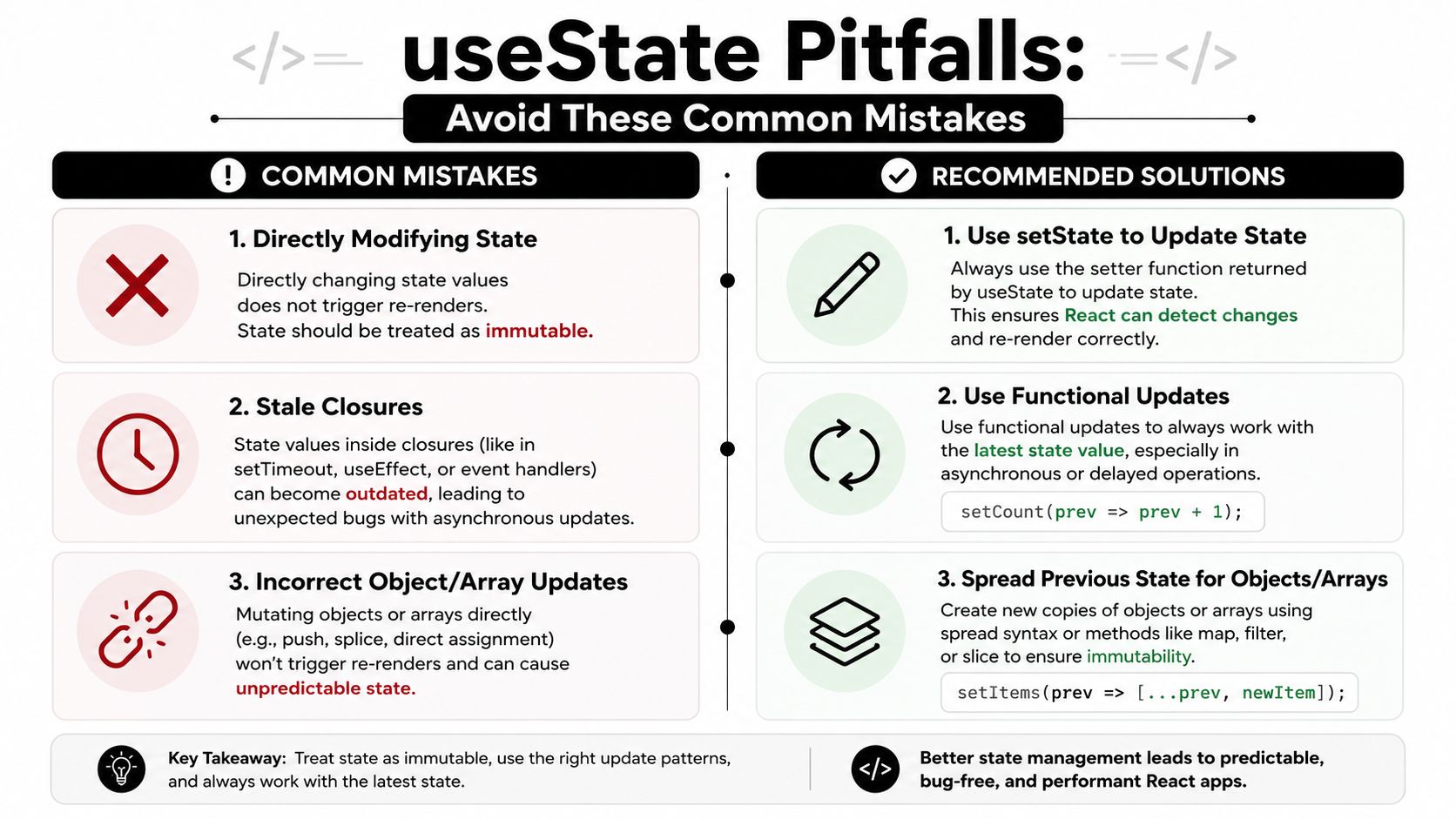
Most useState bugs aren't syntax bugs. They're mental model bugs. The code compiles, but the component behaves strangely because the state model doesn't match how React thinks.
Direct mutation
This one is still the classic.
Before
const [user, setUser] = useState({ name: 'Ada', role: 'admin' });

function promote() {
  user.role = 'owner';
  setUser(user);
}
After
function promote() {
  setUser(prev => ({
    ...prev,
    role: 'owner'
  }));
}
If your test doesn't catch this cleanly, it can slip into production. For teams writing component tests around state transitions and render behavior, a practical reference on mocking React components in Jest can help tighten up those checks.
Calling Hooks conditionally
React needs Hook order to stay stable.
Before
function Panel({ canEdit }) {
  if (canEdit) {
    const [draft, setDraft] = useState('');
  }

  return <div>...</div>;
}
After
function Panel({ canEdit }) {
  const [draft, setDraft] = useState('');

  if (!canEdit) {
    return <div>Read only</div>;
  }

  return <input value={draft} onChange={e => setDraft(e.target.value)} />;
}
The Hook stays at the top level. The conditional logic moves into rendering.
Stale state in closures
This is subtler and shows up in async behavior.
Before
function Counter() {
  const [count, setCount] = useState(0);

  function delayedIncrement() {
    setTimeout(() => {
      setCount(count + 1);
    }, 1000);
  }
}
The callback captures the old count value from the render where the timeout was created.
After
function delayedIncrement() {
  setTimeout(() => {
    setCount(prev => prev + 1);
  }, 1000);
}
That update is based on the latest previous state, not on a stale closure.
A stale closure bug feels random in QA. It usually isn't random. It's old state being reused later than you expected.
Storing derived data as state
If a value can be calculated from props or existing state during render, you often don't need another useState.
Before
const [firstName, setFirstName] = useState('');
const [lastName, setLastName] = useState('');
const [fullName, setFullName] = useState('');
Better
const [firstName, setFirstName] = useState('');
const [lastName, setLastName] = useState('');

const fullName = `${firstName} ${lastName}`.trim();
Storing derived values creates synchronization problems. Someone updates one field and forgets the derived one. Then your UI lies.
Advanced Scenarios for B2B and SaaS Applications
Beginner tutorials stop at counters and todo lists. Real products don't. They deal with approval flows, nested filters, live dashboards, permissions, and form state that spans multiple screens.
That's where useState needs judgment.
In high-frequency update scenarios such as real-time SaaS dashboards, useState can degrade performance when it manages large state blobs. One source also notes that 60% of performance-related React questions in developer forums stem from improper state management, which is a strong signal that many teams wait too long to revisit their state model. That finding is discussed in this article on mastering useState interview patterns and performance concerns.
When useState still fits
useState remains a good tool for:
- field-level input state
- open and closed UI controls
- active tabs
- row selection in isolated tables
- local loading flags
- small, self-contained preference panels
If the state is local, simple, and updated by one component, useState is usually enough.
When useState starts fighting back
You're hitting the limit when several of these happen at once:
| Signal | What it usually means |
|---|---|
| Many fields update together | State transitions are coupled |
| Multiple handlers repeat merge logic | Update rules need centralization |
| Bugs come from partial updates | The state model is too implicit |
| Different components need the same state | Local state has become shared state |
| Live updates hit large nested objects | Re-render cost is becoming structural |
A common SaaS example is a multi-step onboarding flow. You start with useState for each field. Then you add validation flags, async save states, step navigation, derived completion logic, and role-based field visibility. At that point, your component isn't just holding values. It's running a state machine informally.
That's usually the point where useReducer becomes easier to maintain.
Choosing the next step
Here's the practical progression I recommend:
- Start with useState when the component is small and local.
- Split state by concern before reaching for heavier tools.
- Move to useReducer when transitions are connected and need explicit actions.
- Use external state when many distant components need the same live data.
For applications that coordinate state across streams, subscriptions, or event-driven flows, teams often combine React with observable patterns. If your UI consumes async event pipelines or shared reactive data, this guide on using RxJS with React is a strong next step.
TypeScript makes local state safer
In B2B products, bad state often becomes bad data entry, broken workflows, or confusing permissions. TypeScript helps by making state shape explicit.
A lightweight example:
type FilterState = {
  status: 'open' | 'closed';
  ownerId: string | null;
};

const [filters, setFilters] = useState<FilterState>({
  status: 'open',
  ownerId: null
});
That doesn't solve architecture problems, but it does reduce accidental invalid values.
A practical rule for scaling
Use useState for stateful UI details. Don't force it to become your workflow engine, shared data bus, or event orchestration layer.
If the update logic starts reading like policy instead of interaction, you've likely outgrown it.
Conclusion Your Path to State Mastery
Mastering React Hooks useState isn't about memorizing const [value, setValue] = useState(...). It's about building the right mental model.
useState gives a component local memory. That memory is simple, powerful, and easy to misuse. Use it for local UI concerns, keep updates immutable, and prefer functional updates when the next value depends on the previous one. Those habits prevent a surprising number of production bugs.
The deeper lesson is architectural. A component doesn't become scalable because it uses Hooks. It becomes scalable because its state is shaped around real responsibilities. Small, focused state stays easier to test, easier to optimize, and easier to explain to the next developer who inherits the file.
That's why experienced React developers don't ask only, “Can I use useState here?” They also ask, “What re-renders when this changes?”, “Will this state still make sense in three months?”, and “Am I storing a value, or am I trying to model a process?”
Answer those questions well, and useState stays one of the cleanest tools in React. Ignore them, and even a simple Hook turns into friction.
If your team is building a B2B or SaaS product and needs help connecting frontend decisions with scalable automation, workflow design, and AI-enabled operations, MakeAutomation is a strong partner to bring structure to the messy parts. They help companies streamline processes across product, operations, outreach, and delivery so the tech stack supports growth instead of slowing it down.