
Workflow Exception Handling: A Practical SaaS Guide
Most SaaS teams don't notice their exception handling problem when the first few failures happen. They notice it when billing syncs stall, a CRM import drops records, support starts chasing "weird one-off issues," and nobody can answer a simple question: who owns this failure right now?
That's why workflow exception handling isn't just an engineering concern. It's an operating model. If your workflows touch revenue, customer onboarding, finance, compliance, or partner integrations, every exception is a business event. You either route it through a defined system, or it leaks into Slack threads, inboxes, and spreadsheets where accountability disappears.
Founders usually invest in happy-path automation first. That's normal. But scale doesn't break on the happy path. It breaks on retries that duplicate actions, queue backlogs that nobody triages, and manual fixes that leave no audit trail.
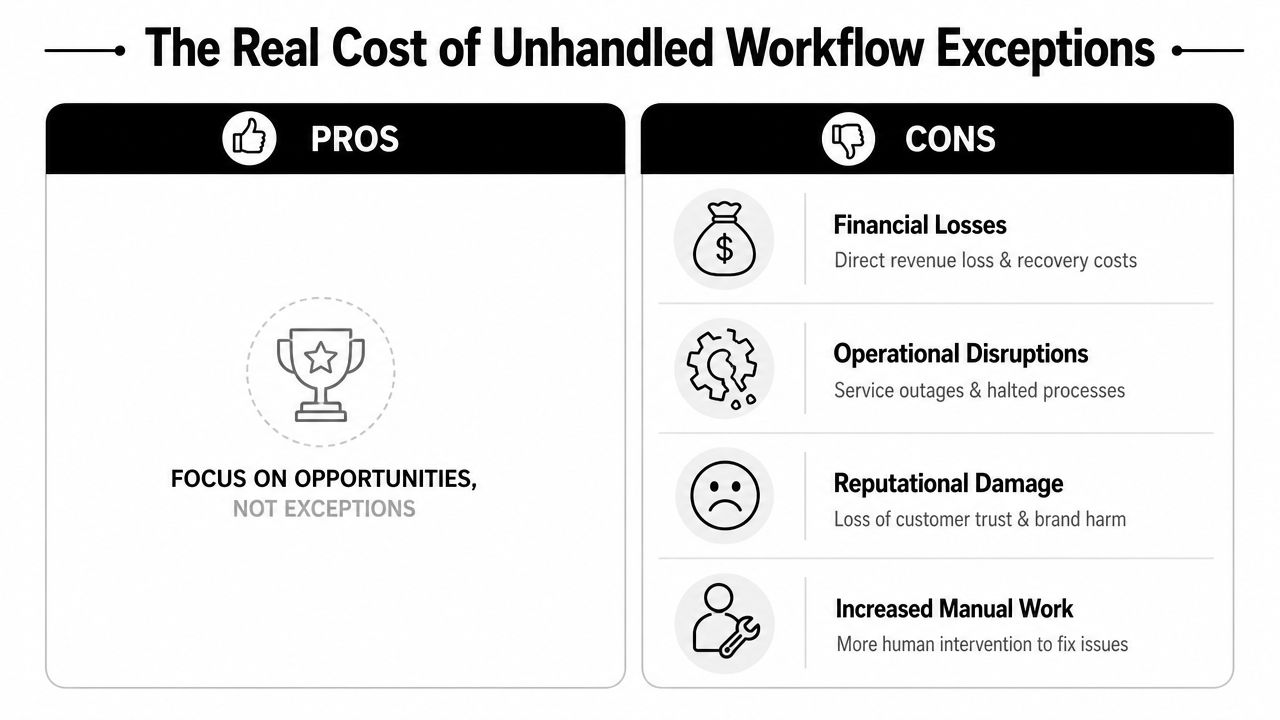
The Real Cost of Unhandled Workflow Exceptions
Monday starts with a failed renewal sync. By Tuesday, sales is looking at the wrong account status, finance is fixing invoice mismatches by hand, support is answering avoidable tickets, and nobody can say whether the customer record is now safe to update. One exception turned into four teams doing reactive work.
That is the cost problem founders should care about. Unhandled workflow exceptions increase labor, slow revenue operations, weaken reporting, and create audit gaps that get more expensive as volume grows. The technical fault matters. The operating response usually costs more.
What failure looks like in day-to-day operations
In B2B SaaS, exceptions rarely stay contained inside one system. A lead routing failure leaves SDRs working stale ownership rules. A billing exception delays collection and creates month-end cleanup. A provisioning error leaves customer-facing status out of sync with what success and support can see.
The business impact usually lands in four places:
- Revenue leakage: Quote, renewal, or billing workflows fail without detection and delay follow-up or invoicing.
- Manual rework: Operations staff patch records by hand, often without an approved procedure or documented reason.
- Reporting distortion: Leadership makes decisions on dashboards built from incomplete workflow output.
- Customer trust: Buyers experience inconsistent data, duplicate outreach, or delayed fulfillment.
Many ops teams initially react by creating more Slack alerts or email notifications. That increases visibility, but it does not create control. If no one owns triage, retry rules, approvals, and closure, the exception just moves from the workflow tool into human inboxes.
Practical rule: If an exception can wait in a shared channel without a named owner, priority, and resolution path, the business is carrying hidden operational debt.
The expensive part is governance, not just recovery
A thrown error is easy to spot. The larger cost comes after it. Someone has to decide whether the workflow should retry, whether a duplicate action could create financial or compliance risk, whether customer-facing data changed, and whether the fix needs approval from finance, support, or account management.
This is why exception handling belongs in operating reviews. Each unresolved exception is a business event with three governance questions attached: who owns it, what action is allowed, and what evidence is recorded. If those answers are unclear, teams improvise. Improvisation creates inconsistent fixes, weak audit trails, and repeat incidents.
Teams that map workflows visually tend to catch this earlier because failure paths become visible to both technical and non-technical operators. A disciplined workflow visualization process for operational handoffs helps teams see where an exception becomes a queue, an approval, or a customer issue.
Reactive exception handling blocks scale
Reactive teams pay twice. They pay once in immediate cleanup time, then again when undocumented fixes create more exceptions later.
I see the same pattern often in growing SaaS companies. Engineers bypass a safeguard to clear backlog. RevOps updates a record manually without logging the reason. A founder approves a one-off correction for an important customer, but the team never turns that decision into a standard operating procedure. The issue gets resolved for the moment, yet the system becomes less predictable.
Strong operators treat exceptions as part of service delivery. They define ownership, severity levels, approval rules, escalation targets, and closure requirements before failure volume rises. That is how automation reduces operating cost instead of hiding it inside manual work.
Fundamental Patterns for Resilient Workflow Design
A resilient workflow does two jobs at once. It keeps operations running, and it leaves enough evidence behind for someone to resolve the exception without guesswork.
The practical model is a five-part exception layer: Detection, Classification, Routing, Retry/Fallback Logic, and Resolution/Closure. That structure matters because it forces a business decision at each step. What failed? How serious is it? Who owns it? Can the system act on its own, or does the issue require approval and documentation before anything changes?
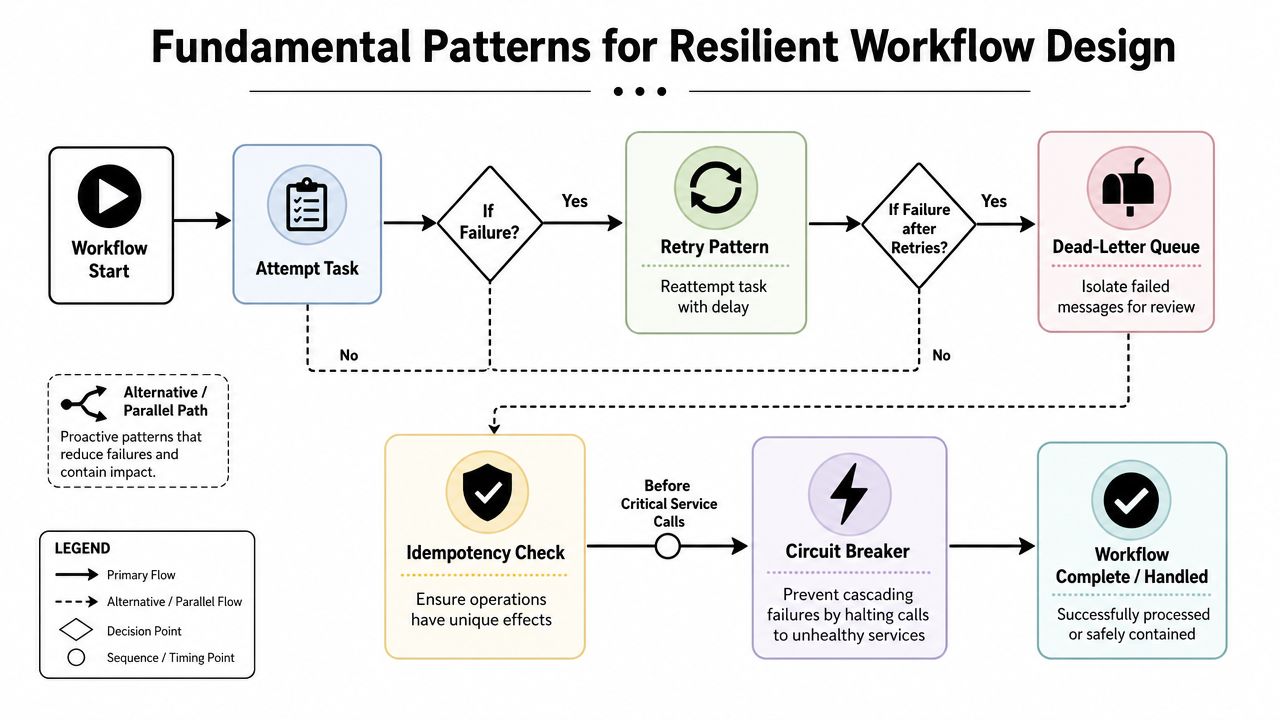
A common mistake is applying one pattern, such as retries, to all types of failures. That increases cost fast. Workers stay busy reprocessing bad inputs, queues back up, and teams lose time sorting avoidable noise from the exceptions that require attention.
Retry logic for transient failures
Retries belong on failures that are likely to clear on their own. API rate limits, brief network drops, and short service interruptions fit that category.
Common SaaS examples:
- CRM syncs: A Salesforce or HubSpot update fails because the target API is temporarily unavailable.
- Webhook delivery: Your platform posts an event to a partner and gets a timeout.
- Document processing: An extraction service returns a temporary processing error.
Retries need guardrails. Set a max attempt count, increasing delay between attempts, and a clear stop condition. Log each attempt with the request ID, payload reference, and final outcome so support and compliance teams can see whether the system recovered on its own or handed the issue off.
Retries are the wrong tool for validation errors, missing fields, and broken payloads. Repeating those jobs only adds load and delays correction.
Here's a short explainer worth watching if your team needs a visual mental model before implementation:
Compensation logic for multi-step workflows
Compensation handles failures that happen after earlier steps already changed state. In a SaaS operation, that usually means more than one system of record is involved.
Consider a user onboarding flow:
- Create account
- Assign subscription plan
- Provision workspace
- Notify CRM
- Trigger welcome sequence
If step 4 fails after steps 1 through 3 succeed, the platform now holds a partial truth. The account exists. The workspace exists. Sales and lifecycle systems may show nothing. The question is not only how to recover technically. The question is what the business wants preserved, reversed, or escalated.
Define that before launch. If your workflow touches billing, provisioning, and customer records, write compensation rules into the SOP, not just the code. Some failures should roll back automatically. Others should freeze the workflow, open a review ticket, and require approval because reversing the action could create a customer-facing issue or a revenue recognition problem.
A retry tries the same action again. A compensation action restores an acceptable business state.
Teams evaluating long-running workflow engines often choose systems with native state tracking and replay because compensation becomes easier to reason about over time. If you need that model, this guide to Temporal open source workflow orchestration is a useful reference point.
Dead-letter queues for toxic messages
A dead-letter queue is a controlled exception backlog. It holds items that should stop automatic processing until someone inspects the cause.
Use a DLQ when:
- Payload shape is wrong: A partner sends malformed data.
- Business rules reject the item: The workflow cannot continue safely.
- Repeated attempts add risk: More retries could create duplicates or corrupt state.
The queue needs operating rules. Define who reviews it, how often it is checked, what fields must be captured for triage, and what qualifies an item for replay versus permanent closure. Without those rules, the DLQ becomes hidden operational debt.
Idempotency for safe retries
Retries only stay safe if repeated actions do not create repeated business outcomes.
In practice, idempotency prevents duplicate invoices, duplicate contact records, duplicate email sends, and duplicate provisioning. It usually relies on an idempotency key, a request fingerprint, or a state check that confirms whether the action already completed.
Use it anywhere a timeout or partial failure could trigger another attempt.
| Pattern | Best use case | Common mistake |
|---|---|---|
| Retry | Temporary service or network instability | Retrying invalid data |
| Compensation | Multi-step process across systems | Reversing actions without checking downstream business impact |
| DLQ | Toxic or ambiguous failures needing analysis | Treating the queue as permanent storage |
| Idempotency | Any operation that may repeat | Assuming the receiving system will prevent duplicates |
Circuit breakers before critical calls
Circuit breakers protect the workflow when a dependency is unhealthy. They stop repeated calls after a failure threshold, give the downstream service time to recover, and keep one failing integration from consuming all worker capacity.
That matters most around billing systems, ERP connectors, and partner APIs with strict rate limits or weak uptime. A failed payment service should not block unrelated onboarding jobs. A noisy ERP outage should not flood the incident queue with retries that were never going to succeed.
Set breaker thresholds with operations in mind, not just engineering preference. Decide how long the breaker stays open, what fallback action is allowed, what alert gets created, and who can override the block if a customer account is affected. That turns a defensive code pattern into a controllable business process.
Architecting Your Systems for Exception Handling
A critical step in workflow exception handling is designing the system so failures stay contained, traceable, and governable under load. If one timeout in a partner API can stall billing, flood support, and force manual cleanup across teams, the problem is architectural, not just technical.
Resilient exception handling starts with clear boundaries between workflow stages, system responsibilities, and operational owners. Each exception should have a place to stop, enough context to be triaged, and a defined path for recovery or escalation. That is how engineering decisions turn into lower support cost, cleaner audits, and fewer revenue-impacting incidents.

Break monoliths into modules
Large workflows fail expensively because they hide the business step that broke. A single "order processing" job might validate data, write to the CRM, issue an invoice, update provisioning, and notify the customer. If that runs as one block, every exception looks bigger than it is, and recovery turns into investigation.
Modular design fixes that. Split the workflow into business-level units with explicit inputs, outputs, and ownership. Put local exception handling around each unit, then use a global handler only for failures that cross boundaries or indicate a wider system issue.
That structure changes operations in practical ways:
- It limits blast radius: A provisioning error should not roll finance into the same incident unless there is a real dependency.
- It improves triage: The team sees "invoice generation failed after account creation" instead of a generic workflow crash.
- It supports ownership: RevOps can own CRM sync exceptions. Finance can own payment posting. Support can see customer impact without reading stack traces.
If you're comparing orchestration options, this guide to Temporal open-source workflow orchestration is useful for evaluating how different engines handle long-running jobs, retries, and recovery boundaries.
Local handlers should match the business failure
A global exception handler is useful for final capture, alerting, and safe termination. It should not be the first place business logic goes to die.
Handle predictable failures where they occur, with a response that matches the business risk:
- A document extraction step routes low-confidence output to review instead of pretending the data is valid.
- A CRM update step catches schema mismatches and stores the rejected payload for correction.
- A partner API call applies timeout handling, retry limits, and queue deferral based on SLA and rate limits.
- A payment sync step blocks duplicate submission and records whether money movement may already have happened.
This is not just cleaner engineering. It determines whether the business can recover without customer-visible damage. Teams that push everything into one global catch block usually lose the detail needed for safe reprocessing, customer communication, and audit review.
Preserve context that operations can use
"Sync failed" is not an operational record. Neither is a raw stack trace with no account reference, no retry history, and no indication of whether a customer action is blocked.
Capture the fields an operator, manager, or auditor will ask for:
- Affected entity: customer ID, account ID, invoice ID, workspace ID
- Workflow context: workflow name, step name, environment, version
- Failure timing: event timestamp, retry count, queue age, last successful step
- Data references: payload ID, correlation ID, source system, downstream target
- Disposition: retried, held for review, escalated, manually corrected, closed
This data belongs in structured logs and exception records, not scattered across app logs, chat threads, and support notes. In B2B SaaS, exception handling is part of your operating model. If a customer asks what happened to an onboarding, renewal, or billing event, the answer should come from the system record.
Design exception paths like operating procedures
Architecture decisions need to line up with SOPs. If an exception lands in a queue, someone should already know who owns first response, what qualifies for auto-retry, when human approval is required, and what evidence must be retained.
A practical design standard is simple:
- Every exception type maps to an owner.
- Every queue or dead-letter destination has a review cadence.
- Every manual intervention leaves an audit trail.
- Every reprocessing action records who approved it and why.
That governance layer is where many SaaS teams fall short. The code catches the error, but the business has no controlled process for handling it. The result is predictable: inconsistent decisions, repeated incidents, and compliance risk during customer or security reviews.
Stress-test integrations before peak volume
Stress-test integrations against projected peak periods before they hit production. Seasonal renewals, month-end billing, product launches, and enterprise imports all raise exception volume at the same time they reduce tolerance for delay.
Normal-volume success proves very little. The true test is whether queues stay within SLA, whether fallback paths hold, whether human review teams can keep up, and whether one degraded dependency causes spillover into unrelated workflows.
Good architecture assumes exceptions increase under pressure. Strong architecture prevents that increase from turning into a headcount problem or a customer trust problem.
Building Your Exception Handling Runbook
If your team has to "figure it out" every time an exception lands, you don't have a process. You have tribal knowledge.
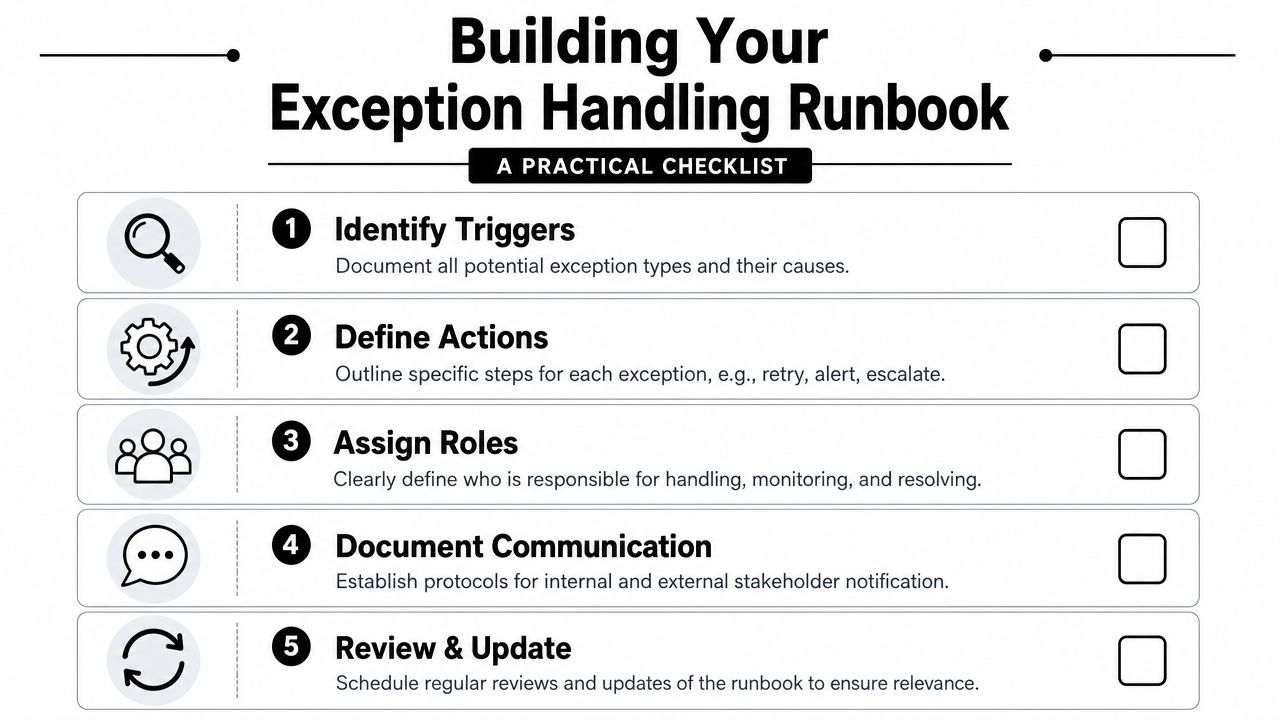
A runbook turns workflow exception handling into an operational discipline. It tells people what the exception means, who owns it, how fast it must be addressed, when to escalate, and how to document the outcome.
What every runbook must define
Workflow exception handling fails or succeeds based on whether a defined process exists for ownership of the exception queue, response timeframes, and escalation paths. That's the operational foundation. Without it, exceptions drift into email threads or spreadsheets and teams revert to reactive cleanup.
A practical runbook should answer these questions clearly:
- Which workflow is covered: Name the workflow, business purpose, and upstream/downstream systems.
- What exceptions exist: List known exception types such as timeout, validation failure, low-confidence extraction, duplicate detection, integration mismatch, and approval-required state.
- Who owns triage: Name the team or role that monitors the queue first.
- What the response window is: Define expected action windows by severity.
- When escalation starts: Spell out escalation path for after-hours, volume spikes, customer-facing impact, or compliance-sensitive exceptions.
If your ops documentation is weak, use a structured approach to creating SOPs for repeatable operations and adapt it to exception handling rather than writing from scratch.
A one-page structure that works
You don't need a giant operations binder. Start with a single page per critical workflow.
| Runbook field | What to document |
|---|---|
| Workflow name | Business process and systems involved |
| Trigger | What creates the exception |
| Detection method | Alert, queue monitor, dashboard, or manual review |
| Initial action | Retry, hold, route, request approval, or reject |
| Owner | Named role or team |
| Escalation path | Manager, on-call engineer, finance lead, partner contact |
| Closure requirement | What counts as resolved and how it is logged |
Resolution steps should be explicit
The best runbooks don't just identify owners. They define actions.
- For transient integration faults: Retry within policy, then route to the queue if the fault persists.
- For validation failures: Stop the workflow, request corrected input, and prevent downstream writes.
- For compliance-sensitive corrections: Require approval before reprocessing or editing.
- For repeat exceptions: Tag the issue for root-cause review so it feeds backlog prioritization.
Hidden process is expensive process. If the correction step isn't written down, teams will improvise it differently every time.
Build for handoffs, not just incidents
Exceptions often cross functions. A failed invoice workflow may begin in automation, require finance review, and end with a vendor correction. A denied lead sync may need RevOps, sales management, and a data steward.
Write the runbook so handoffs are visible:
- triage owner acknowledges
- reviewer classifies severity
- approver signs off if policy requires it
- resolver updates the exception state
- closer verifies the workflow returned to a defined state
Many SaaS teams mature quickly when they stop treating exceptions like engineering debris and start treating them like governed work.
Monitoring and Closing the Loop on Exceptions
At 8:45 a.m., the billing sync is throwing validation errors, three customer records are stuck in review, and no one can tell whether finance, support, or engineering owns the next step. That is not a monitoring problem. It is an operating model problem.
Exception monitoring has to answer one business question first: are exceptions being contained before they become customer impact, revenue leakage, or audit exposure? A pile of logs in Datadog, CloudWatch, or a workflow console does not answer that. Operators need a view that shows which workflows are creating manual work, how long items stay unresolved, where handoffs stall, and which exception types keep returning.
Monitor the queue like an operating system
A useful exception dashboard lets an operator assess status in minutes, not after a Slack thread and two status meetings.
The core questions are simple:
- what is failing right now
- what is close to an SLA breach or customer impact
- which exception patterns are repeating
Track operational measures that support decisions: exception age, resolution time, queue depth, ownership status, reopen rate, and state transitions. If a queue has items with no owner, or a workflow keeps producing the same validation failure, that is a governance gap as much as a technical one.
A practical dashboard usually breaks exceptions into views like these:
| Dashboard view | Why it matters |
|---|---|
| By workflow | Shows which automations create the most operational load |
| By exception type | Separates transient faults from business-rule failures |
| By owner | Reveals stalled queues and weak handoffs |
| By age | Exposes backlog before it becomes a service issue |
Alerting should follow the same logic. Alert on thresholds that require action, such as queue age, unresolved high-severity items, or sudden spikes in one exception class. Do not alert on every failure event. That trains teams to ignore the system.
Closing the loop means changing the system
Monitoring is only useful if resolved exceptions change future behavior.
For document-heavy and data-heavy workflows, teams usually get the fastest gains from reviewing resolved exceptions in a weekly cadence and feeding the findings into rules, field validation, retry policy, form design, model thresholds, or partner-facing data requirements. That is how exception handling lowers operating cost over time. Without that review loop, teams keep paying for the same failure in labor, delays, and avoidable escalations.
I usually look for three outputs from exception review:
- a fix to the workflow or integration
- a runbook update if operators had to improvise
- an audit trail that explains what changed, who approved it, and why
That last point matters more than many SaaS founders expect. Teams often start with automating repetitive tasks. Once automation touches billing, onboarding, reporting, or regulated data, exception handling becomes part of business governance.
Treat the exception queue as design input, not leftover operations work.
Regulated environments raise the bar
In compliance-heavy operations, the correction is often as important as the original failure.
As noted in SG Systems's discussion of governance in regulated plants, "hidden corrections are not normal" and systems should "handle corrections as governed events with audit trails and approvals, not as quiet edits" in exception handling workflow governance in regulated plants.
The same standard applies in SaaS environments with audit obligations. If someone fixes a failed workflow by editing a record directly, bypassing approval, or reprocessing without a trace, the immediate issue may disappear while the control failure remains. That is how small exception handling gaps become audit findings, disputed invoices, or broken customer trust.
What closure should really mean
An exception is closed when the business process is back in a defined state and the record can stand up to later review.
Closure should confirm:
- the workflow returned to a defined state
- the final action is logged
- the responsible actor is recorded
- any denied or blocked action is also recorded when policy requires it
- recurring pattern data is captured for future rule, model, or process changes
That standard keeps exception handling from turning into private tribal knowledge. It gives operators a clean handoff model, gives leaders a way to spot recurring cost drivers, and gives auditors a traceable record of how the business handled risk.
Your Path to Unbreakable SaaS Automation
The teams that scale automation cleanly don't assume workflows will run perfectly. They assume exceptions will happen and design the business around that reality.
That means four things working together: resilient patterns in the workflow itself, modular architecture that preserves context, runbooks that assign ownership, and monitoring that feeds continuous improvement. If one of those pieces is missing, you'll feel it during volume spikes, partner failures, or audit requests.
If you're still early, start small. Pick one workflow that matters to revenue, customer onboarding, billing, or reporting. Then spend a week making it safer.
A practical first-week plan looks like this:
- Identify one business-critical workflow. Choose the one that would hurt most if it failed without detection.
- Add a basic retry and dead-letter queue pattern. Separate transient failure from items that need human review.
- Write a one-page runbook. Name the owner, response window, escalation path, and closure rule.
- Set one alert. Make sure a real person knows when the queue needs action.
A lot of founders begin with the broader goal of automating repetitive tasks. That's the right instinct. But once automation touches core operations, exception handling becomes the definitive maturity marker. It tells you whether the system can be trusted when conditions aren't ideal.
Done well, workflow exception handling isn't overhead. It's a competitive advantage. It lets you scale without multiplying cleanup work, protect data quality, and answer customers and auditors with confidence.
MakeAutomation helps B2B and SaaS teams design, document, and implement automation systems that hold up under real operational pressure. If you need support with workflow architecture, SOPs, AI automation, or exception handling processes that your team can run, MakeAutomation is a practical place to start.