End-to-End Process Automation: The Complete Guide
A growth-stage SaaS company rarely notices operational debt in one dramatic failure. It appears as a founder checking whether Sales updated the CRM, a marketer forwarding a lead to an account executive, a customer success manager copying renewal notes into Finance, and an operations lead reconciling the same record across several tools. Each handoff feels manageable until the business needs more volume, faster response times, and consistent customer treatment.
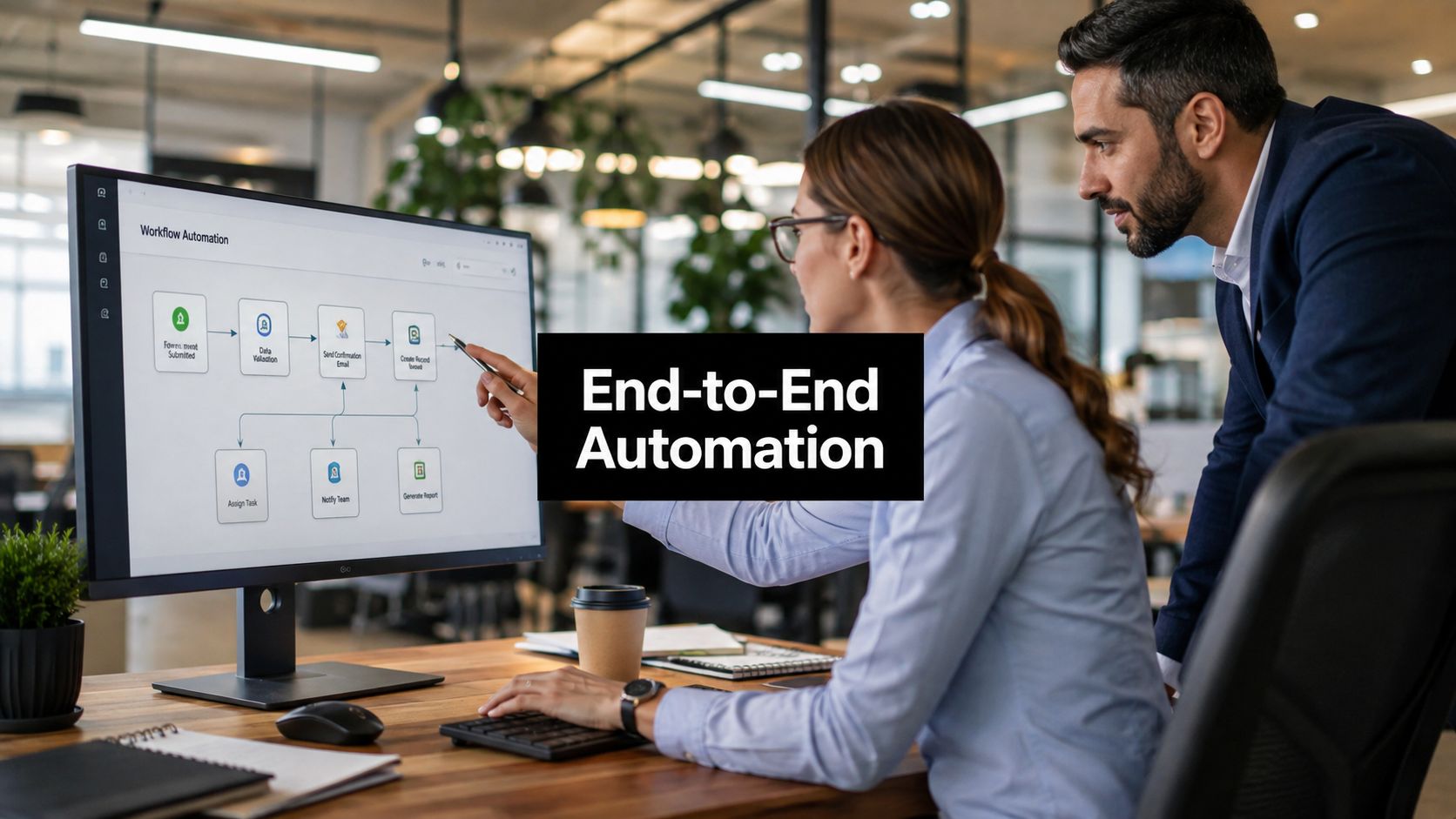
End-to-end process automation addresses that coordination problem. It connects the trigger, decisions, systems, people, exceptions, and final business outcome instead of automating isolated clicks. The important question isn't how many tasks a team has automated. It's whether revenue moves faster, cycle time falls, errors decline, and customers receive a more reliable experience.
When Manual Handoffs Start Costing You Real Revenue
A SaaS founder I'd expect to meet at this stage isn't usually short on software. The company has a CRM, marketing sequences, a billing platform, a customer success workspace, project tools, and spreadsheets filling the gaps between them. The founder's calendar still contains reminders to check whether a trial was routed, whether an implementation is ready, and whether Finance knows a renewal is approaching.
The failure often starts with one ordinary omission. A customer success manager records a renewal risk in a notes field, but nobody turns that note into a Finance task. The account executive doesn't see the risk before discussing an upsell. Billing sends an invoice with outdated terms, and the customer receives a confusing message from a team that appears not to know what another team promised.
Practical rule: If a critical handoff depends on someone remembering to copy information from one system to another, the process isn't controlled. It's being held together by personal vigilance.
The founder then reacts by adding more reminders, more Slack notifications, and another dashboard. That may reduce one visible symptom while making the operating model harder to understand. Employees learn which alerts to ignore, and every new integration creates another place where ownership can become unclear.
The coordinated alternative feels less dramatic because the work moves. A qualified lead enters the CRM, enrichment adds context, the right owner receives an actionable task, and the next action is recorded. A renewal signal creates the appropriate review, billing receives approved terms, and customer-facing teams work from the same process state.
Leaders usually look for help before they've bought another disconnected stack. The business needs a way to identify which handoffs consume time and delay outcomes. A practical cycle time reduction framework can help expose those delays before a team starts building automations around assumptions.
What End-to-End Process Automation Actually Means
End-to-end process automation is the coordination of every part of a work process, including people, workflows, technology, data, AI, exceptions, and governance, within one operating model. It starts with a business trigger and ends with a defined outcome. The systems involved may still be separate, but the process has a shared state, clear ownership, controlled handoffs, and observable results.
That distinction matters. A CRM-to-email integration can send a message when a field changes. An RPA bot can copy information from one screen to another. A point integration can update a record in a second application. These tools can be useful building blocks, but they don't automatically decide what happens when data is incomplete, an approval is rejected, a customer replies unexpectedly, or a human needs to intervene.
The history of workflow automation reflects this progression. Workflow-based software emerged in the 1990s to replace paper routing with electronic forms and digital task handoffs, while business process management adoption broadened from the early 2000s onward, as described in this workflow automation history. Modern stacks extend that same principle across CRM, billing, support, delivery, and reporting.
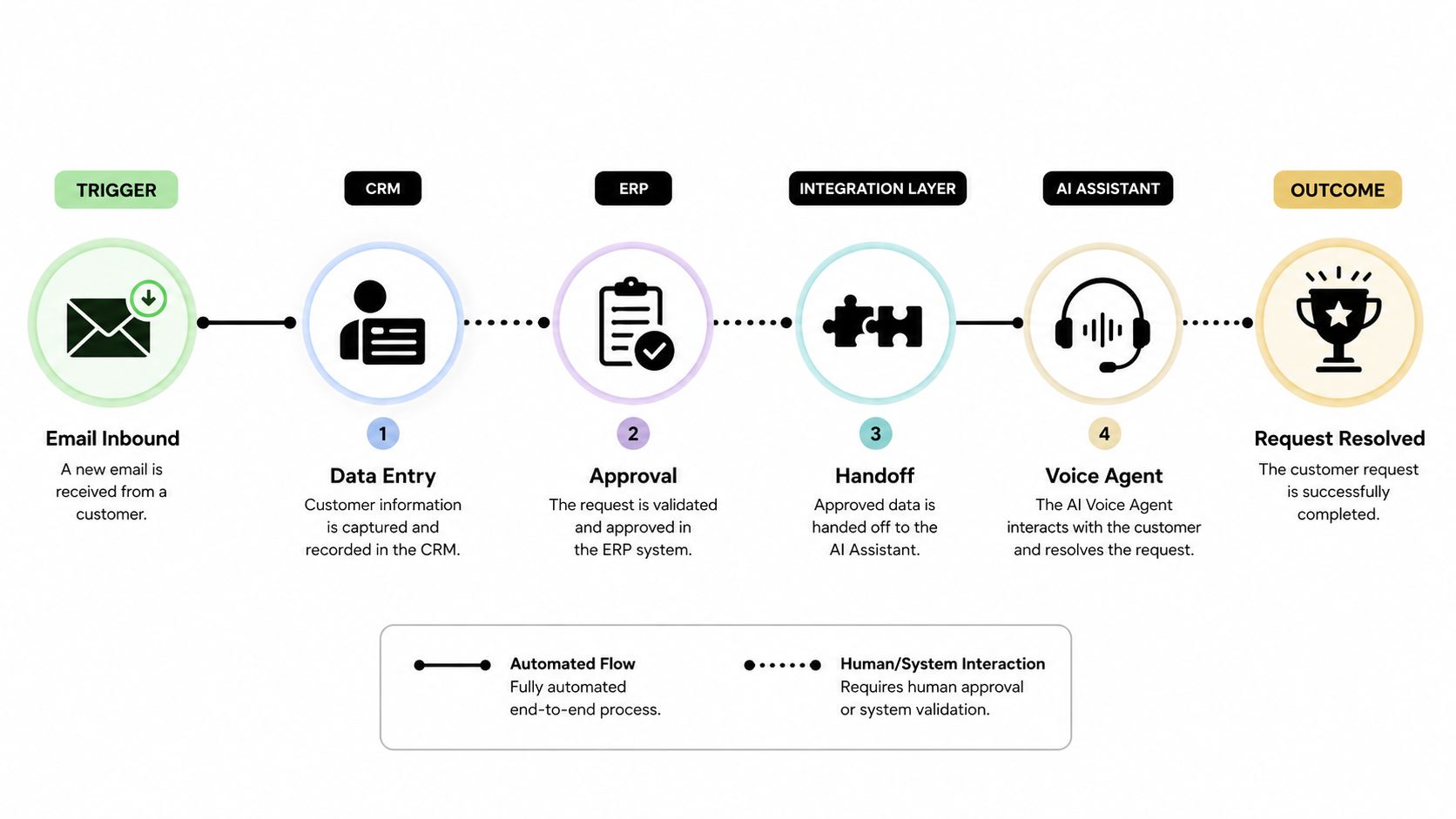
Orchestration is the control layer
Think of task automation as one aircraft landing and orchestration as air traffic control. The aircraft are data, employees, applications, bots, AI assistants, and voice agents. The tower sequences movement, checks conditions, manages conflicts, and sends an aircraft to a human controller when the normal route isn't safe.
That control layer is why end-to-end process automation differs from a collection of scripts. It defines:
- The trigger: What starts the process, and what evidence makes the trigger valid?
- The state: Where does the process stand, and which system is authoritative?
- The handoff: Who or what acts next, with what information?
- The exception: What happens when a rule fails or a customer needs judgment?
- The outcome: Which revenue, speed, quality, or experience measure determines success?
The same logic applies to scheduling-heavy operations. Teams comparing orchestration requirements with workforce coordination can use resources such as Headset Army enterprise scheduling to understand how people, availability, and operational rules fit into a broader workflow.
The Five Core Components That Hold It Together
A durable automation program has five connected components: process discovery, integration, orchestration, monitoring, and governance. They aren't a checklist that a team completes once. Weak discovery leads to poor integration decisions, poor integration limits orchestration, weak monitoring hides failures, and weak governance allows those failures to spread.
The operating model behind the components
Process discovery starts with observed work, not an executive diagram. Review tickets, CRM activity, approval records, screen recordings, and employee interviews. Mature teams identify the actual path, including rework and informal workarounds. A weak program maps the intended path and misses the steps employees perform in spreadsheets or private messages.
Integration connects the systems that hold process data. Good architecture uses a clear system of record, stable identifiers, permission controls, and deliberate fallbacks when an API cannot provide the required access. Bad architecture connects everything to everything, creating duplicate records and unclear ownership.
Orchestration manages sequence, conditions, approvals, and human intervention. It should know whether a lead is awaiting enrichment, qualification, assignment, or outreach. AI and voice agents belong here as controlled participants, not as an independent automation layer. An agent can classify, summarize, qualify, or place a call, but the orchestrator must define its authority and escalation path.
Monitoring turns workflow activity into operational evidence. Teams should monitor stuck states, failed integrations, exception queues, duplicate records, and outcome metrics. A dashboard nobody reviews is decoration, not control.
Governance assigns owners, documents decisions, controls access, reviews changes, and retires obsolete flows. It also determines which AI actions require approval and how voice interactions are recorded and escalated.
| Component | What It Does | Signal of Maturity | Common Failure Mode |
|---|---|---|---|
| Process discovery | Maps actual work and friction | Employees, logs, and records confirm the same process view | Automating an assumed workflow |
| Integration | Connects systems and data | Clear ownership, identifiers, and fallback paths | Duplicate or stale records |
| Orchestration | Controls sequence and handoffs | Shared state, approvals, and exception routes | A chain of brittle triggers |
| Monitoring | Surfaces failures and outcomes | Named owners review operational signals | Alerts exist but nobody acts |
| Governance | Controls change, access, and retirement | Regular review and documented accountability | Stale automations remain active |
A visual workflow builder can make process logic easier to inspect, but visual design doesn't replace ownership or measurement. Teams using a visual workflow builder still need to decide which system owns each fact and what happens outside the happy path.
Why End-to-End Process Automation Pays You Back
The strongest ROI case isn't “we saved employees some clicks.” It's that the company can move work through the business with fewer delays, corrections, and abandoned opportunities. Labor savings matter, but they're only one input into a broader financial model.
A practical calculation combines labor savings, error-cost reduction, and cycle-time improvements against implementation and ongoing operating costs. One industry benchmark reports 240% average ROI with payback in six to nine months, while top-performing implementations reach 390%, according to this process automation ROI benchmark. Those figures are benchmarks, not guarantees. They become useful only when a team establishes a baseline before deployment.
Measure four lenses, not one
Revenue measurement asks whether qualified leads receive timely follow-up, whether quote-to-cash stalls less often, and whether renewal risks reach the right owner. Cycle-time measurement tracks the elapsed time between meaningful process states, not merely the time an automated task takes.
Error reduction includes duplicate entry, incorrect billing data, missed approvals, and incomplete handoffs. Customer experience measurement looks at consistency, response continuity, resolution quality, and whether customers must repeat information.
| Metric Lens | Typical Pre-Automation | Post-Automation Range | Primary Driver |
|---|---|---|---|
| Revenue | Opportunities and renewals depend on manual follow-up | Qualitative improvement when routing and timing become consistent | Connected signals and ownership |
| Cycle time | Work waits in queues, inboxes, and approval gaps | Qualitative reduction when states and handoffs are visible | Orchestration and escalation |
| Error reduction | Re-keying and inconsistent records create corrections | Qualitative reduction when data enters once and is validated | Integration and rules |
| Customer experience | Customers encounter uneven updates and repeated requests | Qualitative improvement when teams share process context | Unified state and reliable handoffs |
Don't automate low-value work just because it occurs frequently. A busy process can still have little effect on revenue or customer outcomes. Use a cost-benefit analysis framework to compare the value of removing friction with the cost of building, monitoring, and maintaining the automation.
A Realistic Roadmap From Discovery to Scale
Leadership teams should begin with evidence. Pull support tickets, CRM logs, approval records, call notes, project histories, and screen recordings. Ask employees to show how work moves when the standard path breaks. The objective is to map the process people run, including manual re-entry, waiting, rework, and informal escalation.
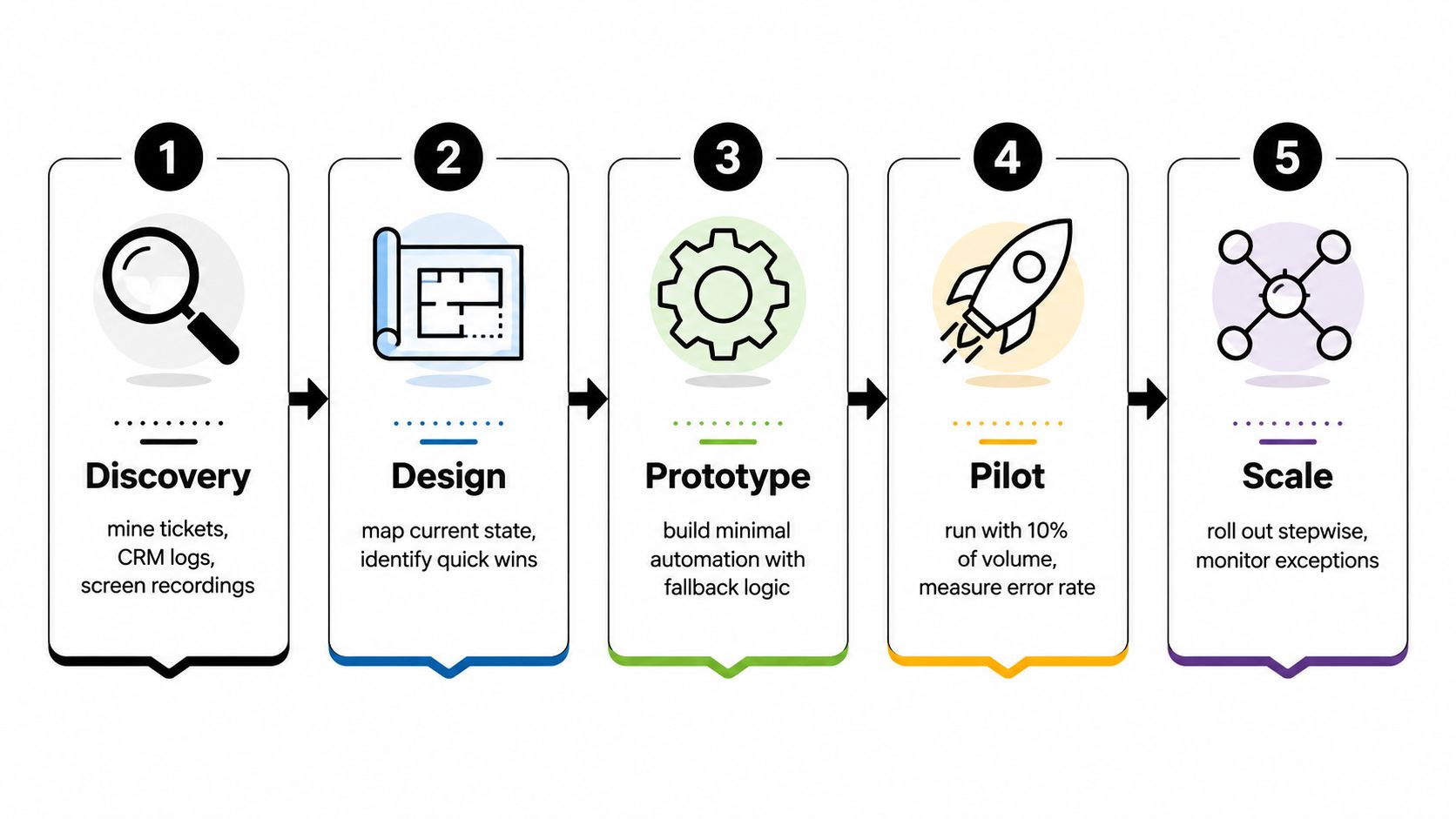
Choose a process that can prove its value
Don't begin with the most politically visible process. Choose two or three workflows with high volume, repeated friction, a clear owner, and an outcome the business already cares about. Lead routing, onboarding coordination, renewal preparation, support escalation, and invoice reconciliation often provide enough structure to test orchestration without redesigning the entire company.
Write the current state in plain language. For a renewal process, that might be: customer signal enters the CRM, account health is checked, a risk or expansion path is selected, Finance receives approved terms, and the customer receives a coordinated update. Every state should have an owner, a timestamp, and a fallback.
Design the orchestration before choosing every connector. Decide which application owns customer identity, which tool stores the process state, how approvals work, and what happens when a downstream system is unavailable. Use APIs where possible, controlled browser automation where necessary, and avoid forcing one tool to become a master database just because it has a convenient integration.
Introduce AI only where judgment is bounded
AI can enrich a lead, classify a support request, summarize a project thread, draft a contract clause, or prepare a renewal brief. A voice agent can qualify an inbound inquiry, schedule a meeting, conduct follow-up, or triage a routine request. Neither should receive unlimited authority.
Define the permitted input, expected output, confidence requirement, and escalation route. A human should review ambiguous pricing, contractual commitments, sensitive customer issues, and decisions that could materially change an account relationship. Monitoring should capture not just whether the agent completed an action, but whether the action produced the intended business result.
Start the pilot with a narrow audience, controlled volume, and explicit success criteria. Track revenue movement, cycle time, error reduction, customer experience, and exception behavior. A flow that completes quickly but creates billing corrections isn't a successful pilot.
Use the following video as a supplementary visual introduction to the process:
Scaling comes after the team understands failure patterns. Reuse proven templates, document integration conventions, establish a small automation center of excellence, and review whether overlapping SaaS contracts still make sense. Governance reviews should catch drift before an old rule routes customers, invoices, or leads incorrectly.
Where Most Automation Programs Quietly Fail
“Just connect the tools” is attractive advice because it hides the difficult decisions. In connected enterprise environments, one industry source describes organizations managing 130 to 175 SaaS tools, while also identifying legacy integration, employee resistance, weak strategy, and data security as continuing barriers in its workflow automation statistics overview. The problem isn't only the number of applications. It's the absence of a process owner who can decide what each application should do.
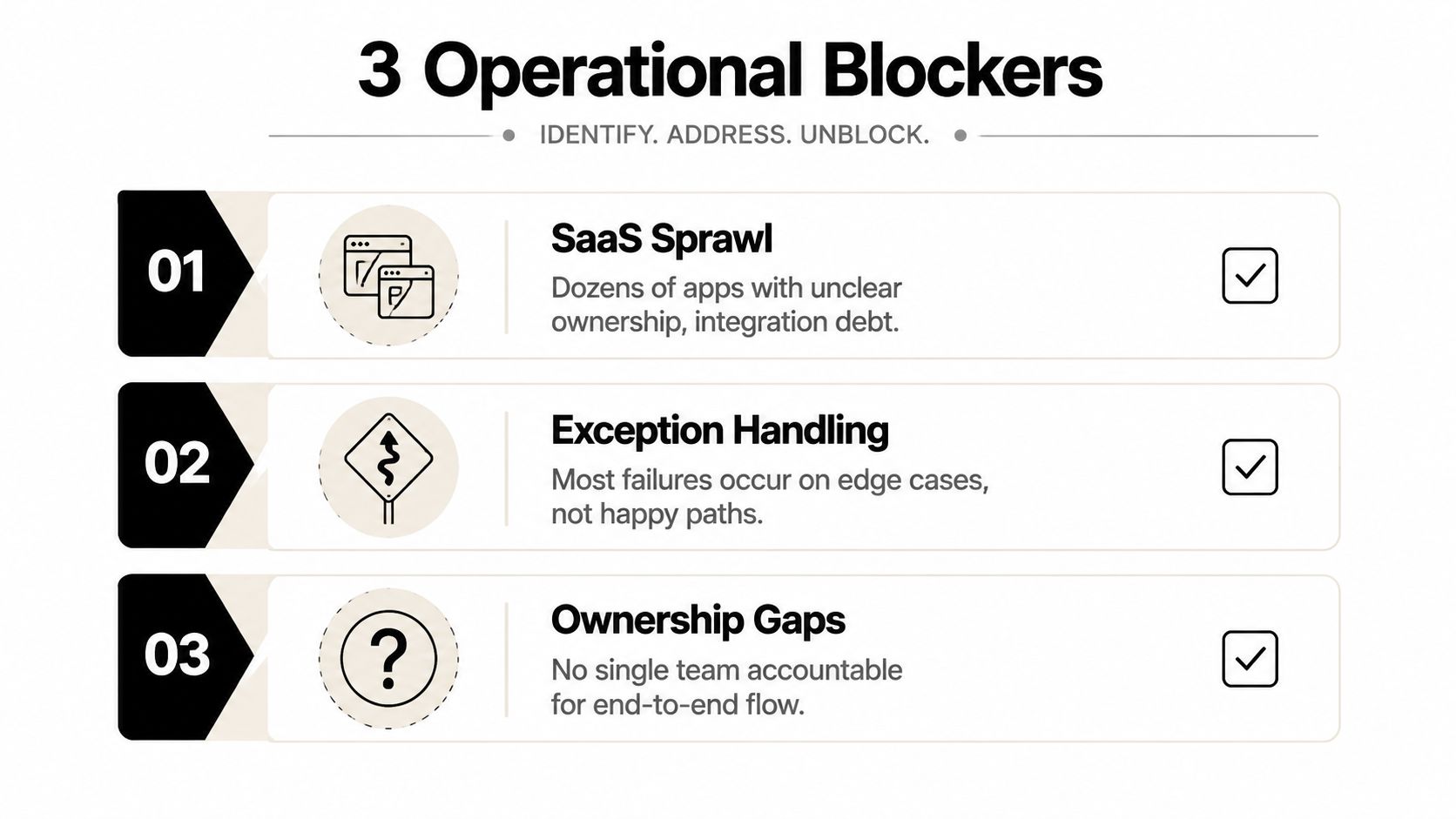
Sprawl creates integration debt
Teams often add a new tool for enrichment, another for outreach, and another for reporting without retiring the old path. The result is conflicting fields, duplicated notifications, and credentials nobody remembers to review. A platform can connect those tools, but it can't resolve an ownership dispute by itself.
Exceptions destroy trust
Happy-path demos look clean. Real customers change plans, send incomplete information, miss deadlines, request special terms, or combine issues that belong to different teams. If the workflow has no exception state, employees create a shadow process. Once that happens, leaders lose visibility into both the automated and manual paths.
Ownership gaps keep broken flows alive
Every production automation needs a business owner, a technical owner, a review cadence, and a retirement decision. Monitoring should surface stuck records and unexpected outcomes, but someone must be accountable for responding. Without that structure, teams keep repairing symptoms while stale rules continue to run.
Change management is part of architecture, not a launch email. Ask users where the current process fails, involve them in exception design, and make the fallback path easier than bypassing the system. Trust grows when automation handles routine work while giving people a clear route for judgment.
B2B and SaaS Examples With AI and Voice Agents in the Mix
The useful question isn't whether a company can add an AI agent. It's whether an agent belongs at a particular decision point in a governed process. The following patterns show how inputs, orchestration, AI, and human ownership can fit together without turning automation into a product demonstration.
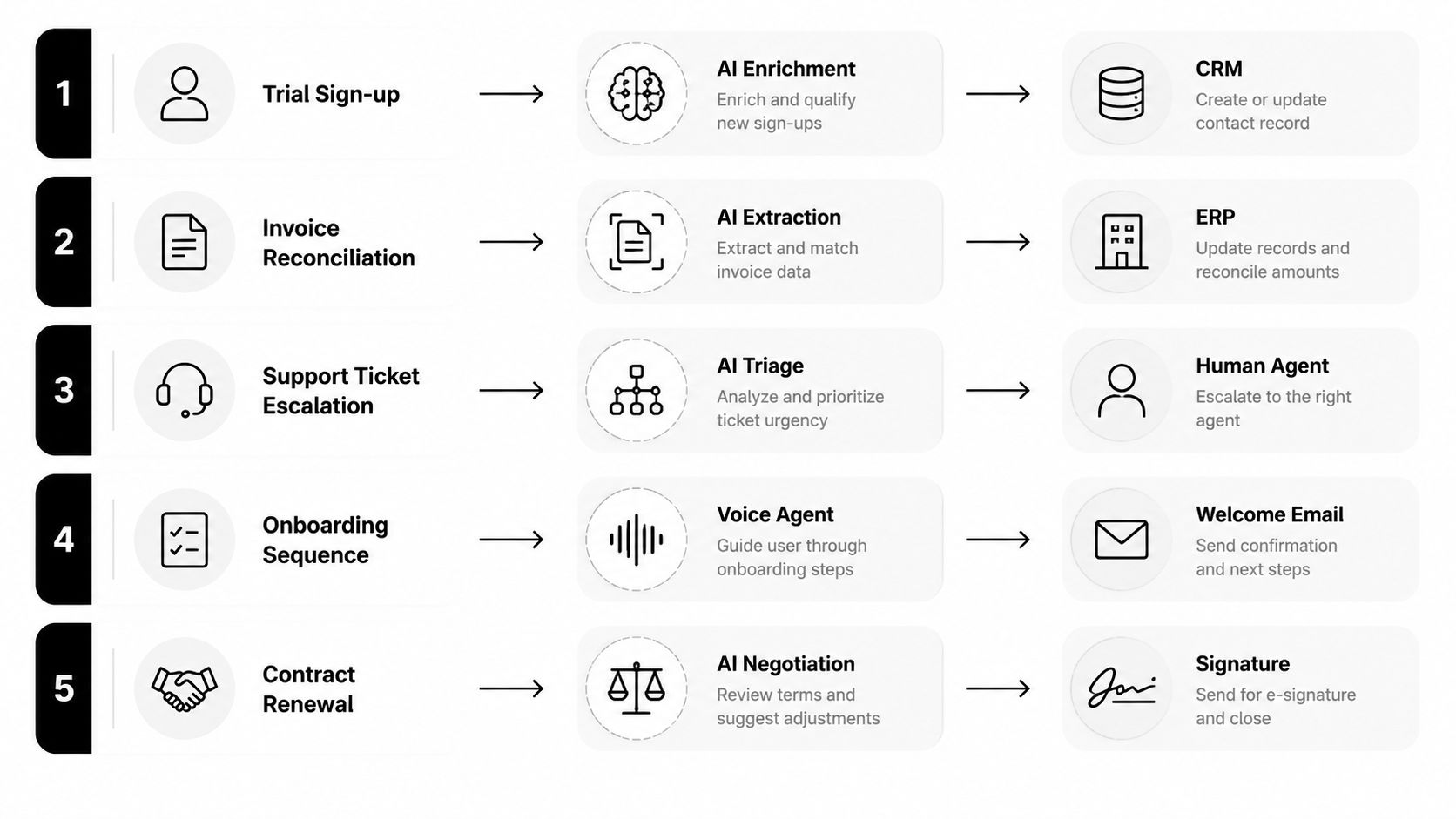
Trial qualification and scheduling
A trial signup enters the product database and CRM. An AI enrichment layer adds firmographic and behavioral context, while the orchestrator checks qualification rules and assigns ownership. A voice agent can make the first scheduling attempt when the account meets defined criteria, then record the disposition and return control to Sales when the conversation requires judgment.
The outcome to measure is not the number of calls placed. Track qualified meetings, routing accuracy, response continuity, and whether the customer received a relevant next step.
Quote-to-cash coordination
A RevOps workflow can connect CRM opportunity data, approval rules, contract generation, billing, and provisioning. AI can extract commercial terms or draft standard language for review, but Finance and Legal retain control over exceptions. The orchestrator prevents provisioning from moving ahead when required approvals or payment conditions are incomplete.
This design reduces the risk of a signed contract becoming an unfulfilled internal request.
Customer success outreach
Customer health signals, product usage, open tickets, and renewal dates can create a structured outreach queue. A voice agent may handle routine QBR scheduling or initial triage, then route expansion opportunities and sensitive concerns to a customer success manager. The system should preserve the conversation context so the customer doesn't have to repeat it.
Agency delivery updates
An agency can pull project status, task completion, blockers, and client messages into an AI-generated summary. The orchestrator checks whether the source data is current and sends the update for approval when a project is at risk. Humans remain responsible for commitments, scope changes, and relationship-sensitive communication.
Support escalation
Incoming tickets can pass through AI classification, priority rules, customer context, and live telemetry before reaching the appropriate specialist. The system should show why it assigned the ticket, which evidence it used, and when a human must override the route. The meaningful outcome is improved resolution flow and customer continuity, not just faster categorization.
What to Do Next If You Want This for Your Own Business
End-to-end process automation is a prioritization discipline, not a license purchase. Start by listing the three cross-tool workflows that create the most revenue risk, customer friction, or operational delay. Score them qualitatively against four lenses: revenue, cycle time, error reduction, and customer experience.
Pick one workflow with a clear owner and an observable outcome. Map the actual process, identify the systems involved, document exceptions, and establish a baseline before anyone builds. Then design a narrow pilot with fallback logic, human review where needed, and monitoring that can show whether the process improved.
The right sequence is discovery, design, instrumented rollout, and measured scale. A strategy session with MakeAutomation can help validate candidate workflows, connect CRM and operational systems, define AI or voice agent touchpoints, and turn the pilot into a practical roadmap. Waiting for the perfect stack usually costs more than starting with one well-chosen process and learning from controlled evidence.
MakeAutomation helps B2B and SaaS teams design and implement connected workflows across lead handling, CRM, outreach, project delivery, documents, APIs, AI automation, and voice AI agents. Visit MakeAutomation to book a strategy conversation and identify the first end-to-end process worth automating.